Tip #8: Using RAND and RANDBETWEEN functions to generate random data sets
Have you ever spent hours working on a sample data record for a demonstration? We're here to show you how to do it in less time. If you want to generate a sample data set for a demonstration, or just to learn how a pivot table works, using the RAND and RANDBETWEEN functions can be a savior. With these functions, you can generate random data that includes text, numbers, dates, and even cell references.
How to use them
The RAND function generates random values with no defined limits, while RANDBETWEEN, as its name signifies, returns random values within a specified range of values. Let's see how they can be used to generate various data sets.
Random numbers
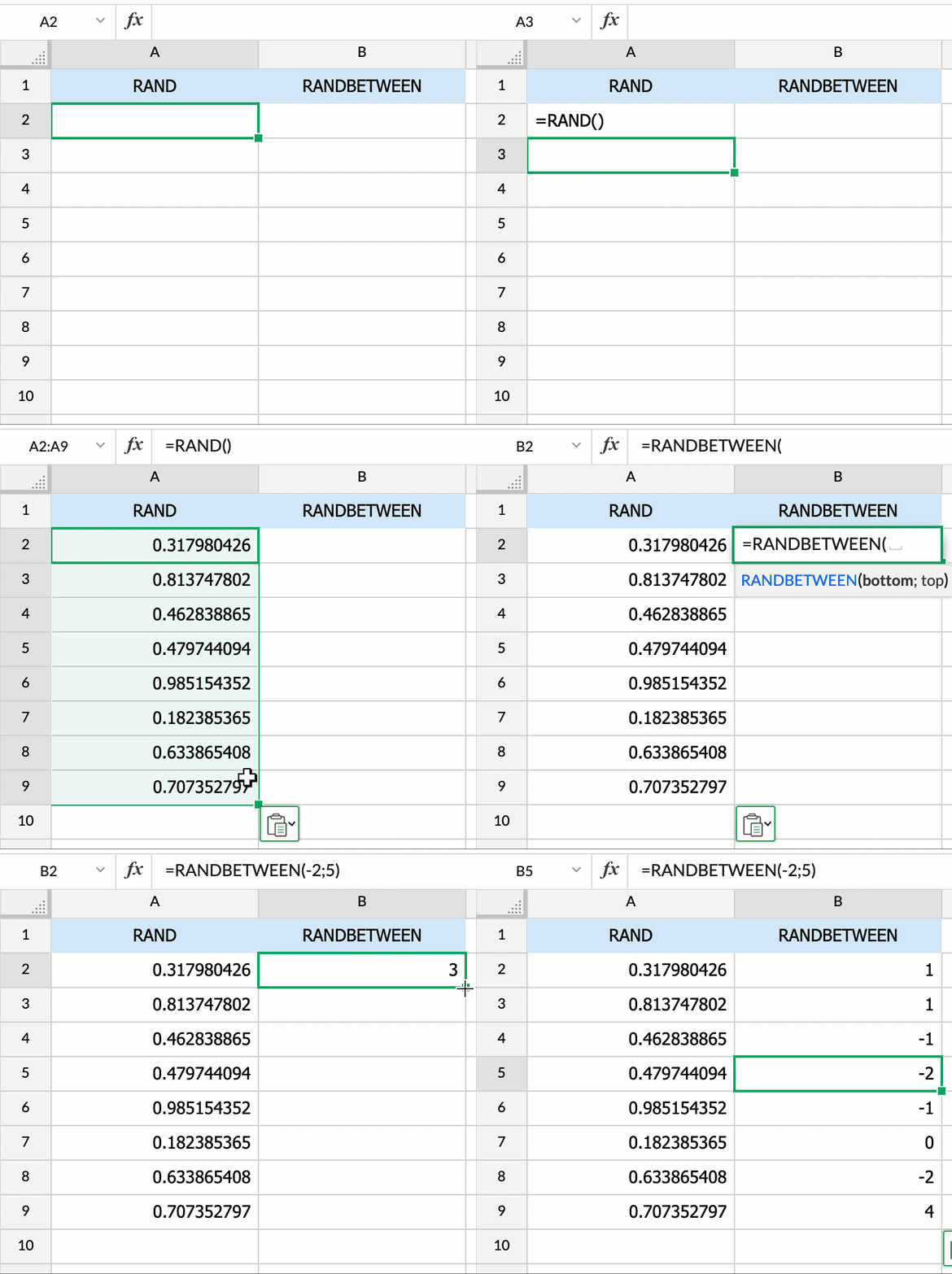
To get random numbers, you can use these functions the default way (i.e. without any special changes).
Example
=RAND() returns float values between 0 and 1
=RANDBETWEEN(10;100) returns values between 10 and 100, inclusive
Random text values
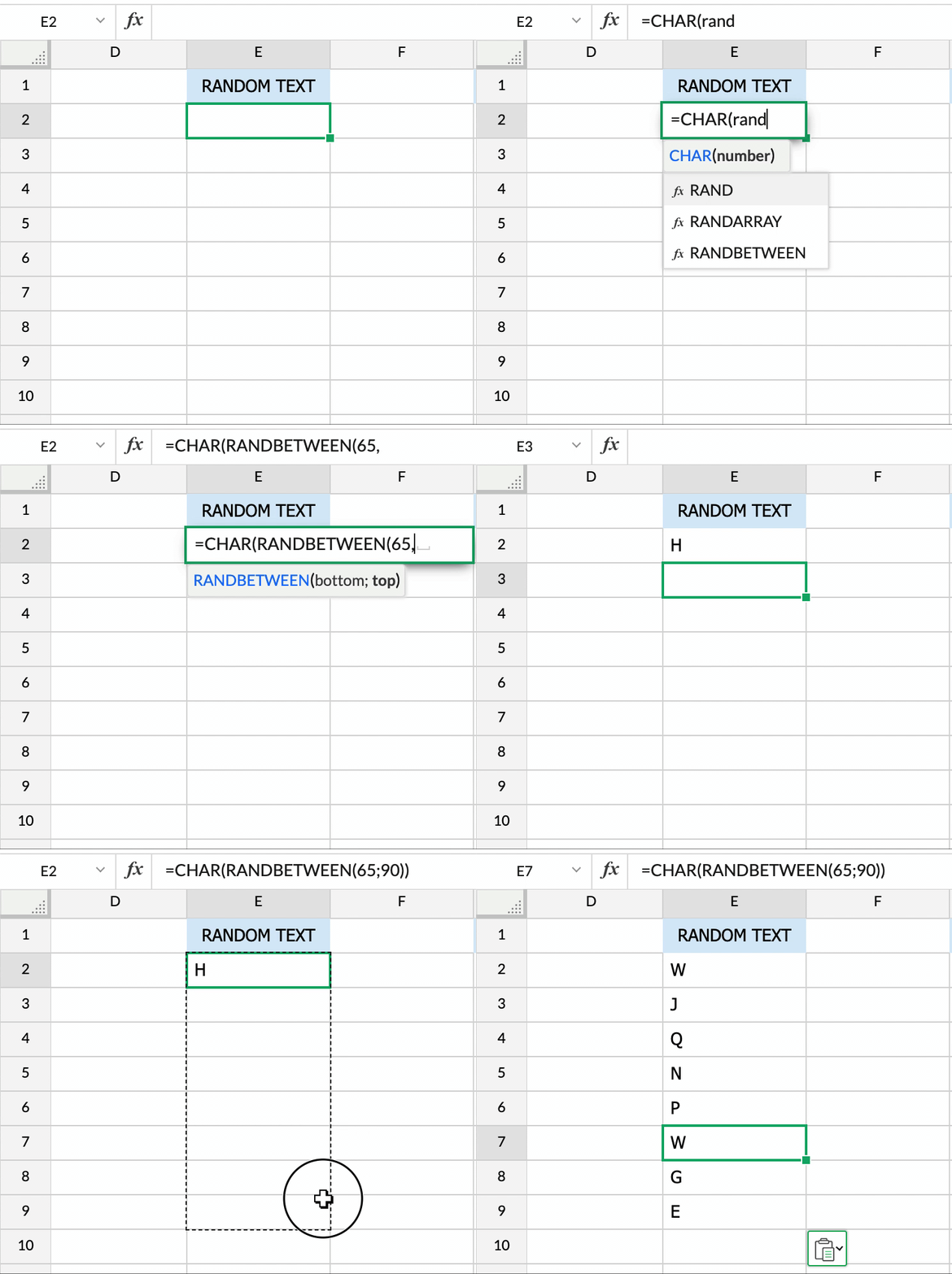
To get random text values (letters of the alphabet), you can use the RANDBETWEEN function in combination with the CHAR function. The numbers given as the input must be between 65 to 90 for capital letters and 97 to 122 for small letters.
Example
=CHAR(RANDBETWEEN(65;90)) returns capital letters
Random date values
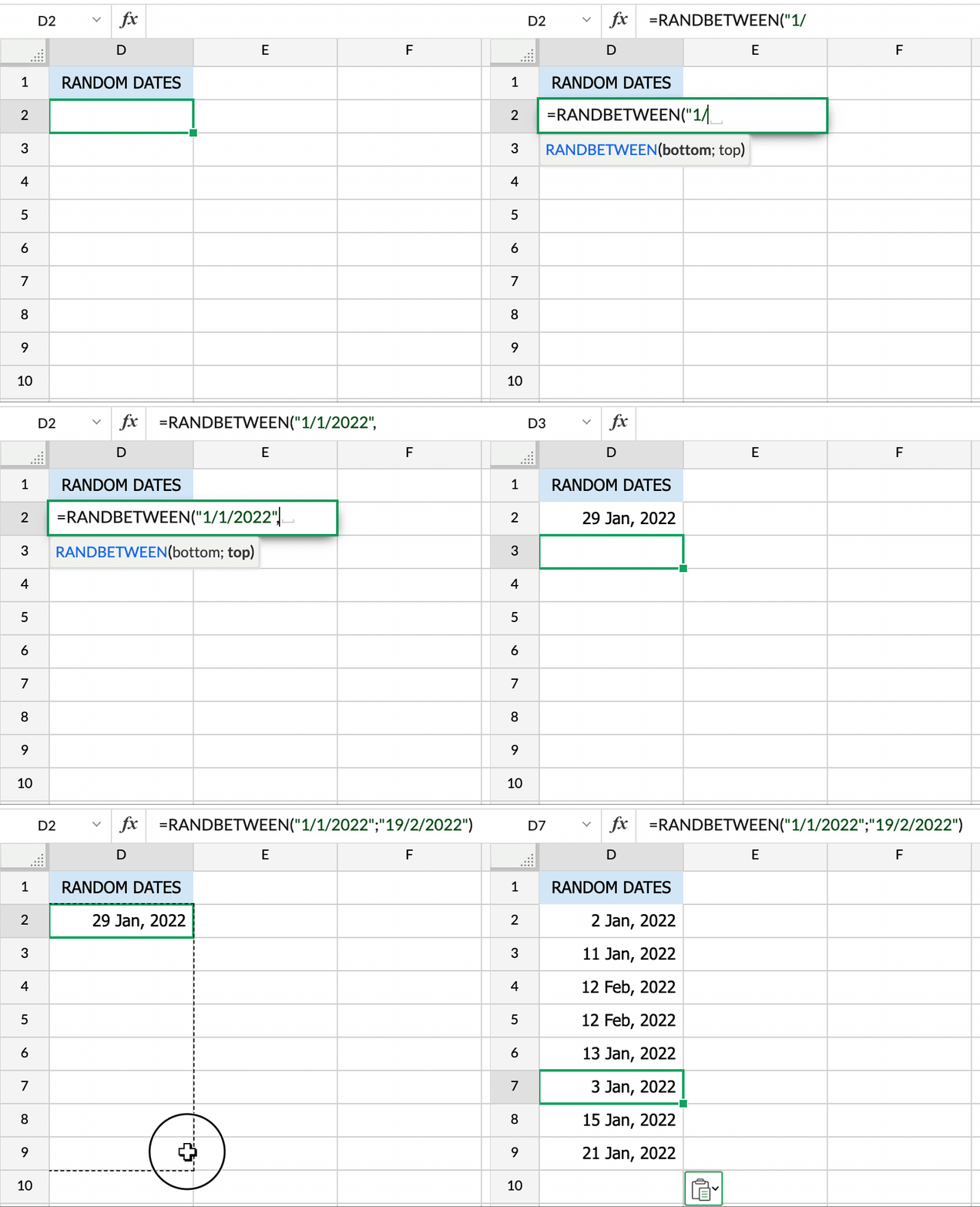
To get random date values, you can use the RANDBETWEEN function and specify the start and end dates. If the result is returned in the form of a date-time serial number, apply the Date format to the cells to get the desired result.
Example
=RANDBETWEEN("1/2/2022";"19/2/2022") returns dates from the given date range
Random cell references
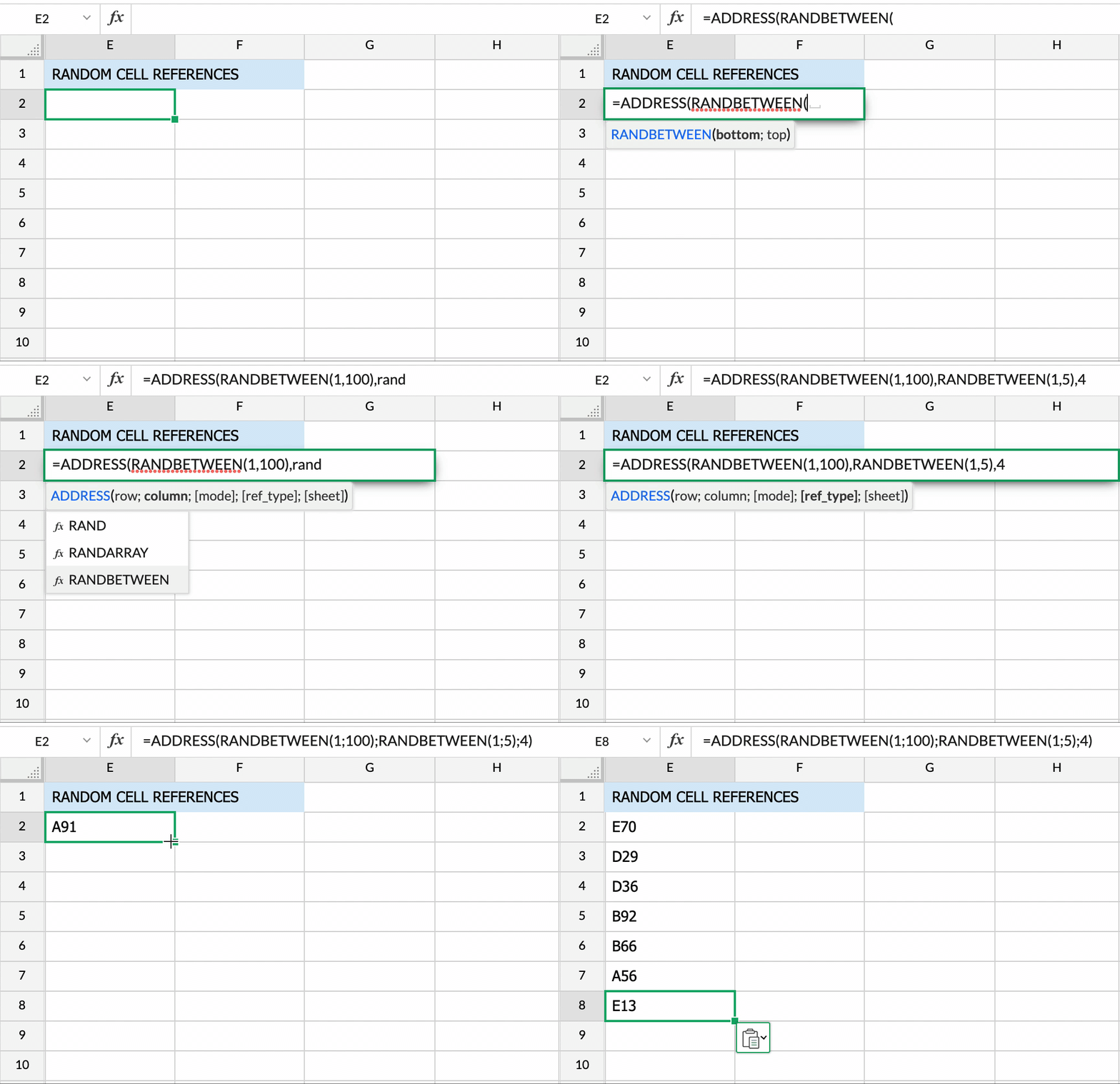
To get random cell references as the result, use RANDBETWEEN function in combination with ADDRESS function. You can also choose the reference type to be absolute or relative.
Example
=ADDRESS(RANDBETWEEN(1;100);RANDBETWEEN(1;5);4) returns random cell references between columns A to E and rows 1 to 100.
Random values from a list
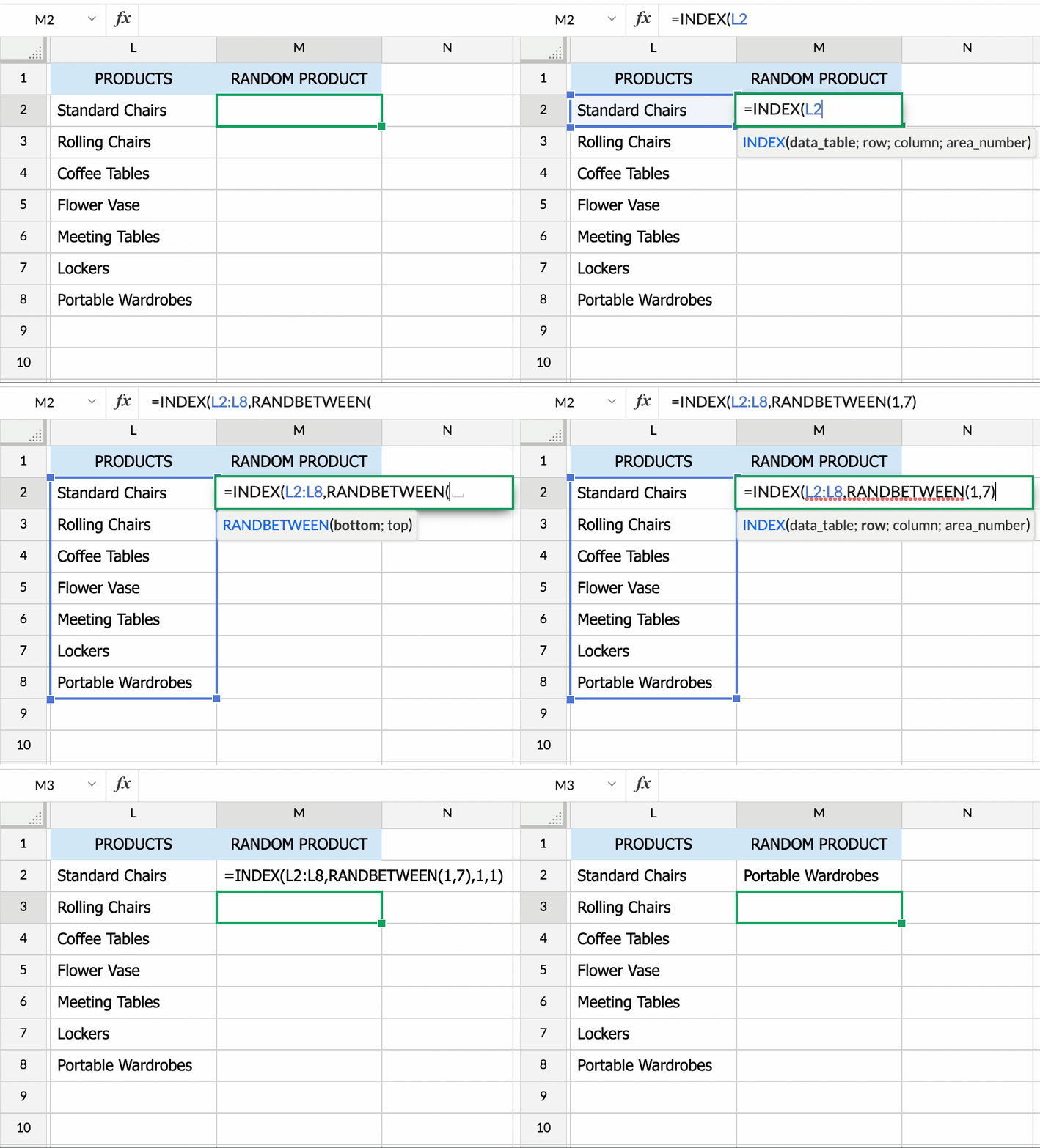
If you wish to get random values from a specified data set or range of values, you can use RANDBETWEEN in combination with INDEX function.
Example
=INDEX(L2:L8;RANDBETWEEN(1;5);1;1) returns random values from the cell range L2:L8.
Apart from the above mentioned functions, you can also use RANDARRAY and SEQUENCE to get an array of random and ordered data respectively! Are there any specific features you'd like to learn more about in future tips? Tell us in the comments below!
Join the Zoho Sheet community and stay up to date on the latest features, interact with fellow users, and learn from the team behind Zoho Sheet. For more such exciting tips follow our Tips and Tricks forum.
Topic Participants
Jaya Shankari S
Sticky Posts
Tip #20 - Three things you probably didn't know you can do with picklists
Hello Zoho Sheet users! We’re back with another quick tip to help you make your spreadsheets smarter. Picklists are a great tool to maintain consistency in your spreadsheet. Manually entering data is time-consuming and often leaves typos and irregularTip #18: 6 Trendlines and when to use them in your spreadsheet data?
Charts are a great tool for visualizing and interpreting large chunks of data in spreadsheets. Zoho Sheet offers you 35+ chart options, along with AI-powered chart recommendations based on the data set you select. There are various chart elements thatTip #17: Easily share spreadsheets with non-Zoho account users
With efficient, collaboration-friendly options, Zoho Sheet is a popular choice among users. Sheet's external share links help you collaborate more effectively by sharing your spreadsheets with anyone outside your organization, including users who do notTip #16: Ask Zia your data-related questions and get powerful insights
Zoho Sheet provides a variety of tools and functionalities to help you analyze your data from end to end. But what if you could analyze all your data sets with a single AI-powered tool? Meet Zia, our smart virtual assistant who will answer all your data-relatedTip #7: Four things you didn't know you can do with Conditional Formatting
Conditional formatting helps you highlight and visualize data in your spreadsheet based on provided rules. Zoho Sheet offers three types of conditional formatting: Classic, Color Scales, and Icon Sets. If you're already familiar with how Conditional Formatting works, here are some bonus tips for Classic formats: Customize rules with formulas Zoho Sheet allows you to create personalized rules based on formulas. For example, in a task list you can use customized formulas to highlight tasks which are
Recent Topics
Automation Series: Auto-assign Resources as Task Owners
In Zoho Projects, task ownership can be set automatically during task creation, allowing resources to be assigned based on the task name. Resources are work equipment or tools added to the portal to monitor their usage across projects. They can be assignedZoho CRM Email Templates 100% Width No Background How?
Hi, On the Zoho CRM Email Templates in setup > customization > templates > new templates > I choose blank template, but still it puts in a gray background and a max width for the email. I just want to make an email that looks like an email I would send from gmail that has no background or max width. How do you do this?Subform edits don't appear in parent record timeline?
Is it possible to have subform edits (like add row/delete row) appear in the Timeline for parent records? A user can edit a record, only edit the subform, and it doesn't appear in the timeline. Is there a workaround or way that we can show when a userAI secretary
In our company, Claude is the secretary and creates inquiries and schedules from Gmail. You no longer have to enter them yourself. The secret is that we created an MCP server that connects to CRM. https://x.com/Mac_nishio/status/19179545625663286945 small changes to Recruit that make a big difference
Sometimes, the biggest improvements aren’t new features, they’re small changes that make everyday actions feel smoother. Over the past few weeks, we’ve made a few such updates across Zoho Recruit. They’re subtle, but together, they remove friction fromProject Management Bulletin: March, 2026
We are passionate about equipping our users with efficient solutions that help them run their businesses successfully. Our collective efforts over the past 2 years have culminated in the launch of Sprints 3.0— built with reliable features, impactful integrations,New security enhancements for portal users: MFA and password management
Hello everyone, We are excited to announce three major security enhancements that are now available to portal users in Zoho CRM: Organization-wide multi-authentication for portal users - Admins can enforce multi-factor authentication across the entire[Free Webinar] Learning Table Series 2026 – Customer agreement & contract management using Zoho Creator
Hello everyone, We’re excited to announce the next session in Learning Table Series 2026, where we will continue with our purpose-driven approach—focusing on how Zoho Creator’s features help solve real-world business challenges. Each session in this seriesZoho Payroll's USA and KSA editions are available in Zoho One!
Greetings! We’re excited to share that Zoho Payroll, currently available only in India and the UAE, is now introducing the KSA (Kingdom of Saudi Arabia) edition and the USA (United States of America) edition, and these editions are now available in ZohoLooking for Guidance on Building a Zoho Website
I'm exploring the possibility of building a custom website with specific features using Zoho as an alternative platform. My goal is to create something similar to https://gtasandresapk.com , with the same kind of functionality and user experience. I'dMultilingual website feature
Would be a great feature to have. I saw that this feature was available for backstage. I think it could be done for zoho sites too.[Webinar] Modernize your sales engine with agentic analytics
Traditional sales decision-making methods aren't cut out for modern businesses. Leveraging AI in sales helps businesses actively respond to the changing dynamics of the market. Agentic AI is letting sales teams across industries make better decisionsBuilt-in Date Functions in Zoho Analytics Query Tables
I have a doubt about whether Zoho Analytics Query Tables provide built-in functions for start date, end date, and the current monthZoho Commerce in multiple languages
When will you be able to offer Zoho Commerce in more languages? We sell in multiple markets and want to be able to offer a local version of our webshop. What does the roadmap look like?Nimble enhancements to WhatsApp for Business integration in Zoho CRM: Enjoy context and clarity in business messaging
Dear Customers, We hope you're well! WhatsApp for business is a renowned business messaging platform that takes your business closer to your customers; it gives your business the power of personalized outreach. Using the WhatsApp for Business integrationConnectivity issues with Google Calendar and third-party integrations
Description: We are currently experiencing a critical failure with Zoho CRM third-party connections. This issue is heavily affecting our primary workflow. Symptoms: Sync Failure: Existing Zoho CRM to Google Calendar connections have been failing for approximatelyDynamic image in form works in the app but not on the customer portal.
img = frm_Fichas[ID == input.Nombre].Foto; imgno = Nophoto[ID2 = 1].Image; if(len(img) > 1) { img = img.replaceAll("/sharedBy/appLinkName/",zoho.appuri); img = img.replaceAll("viewLinkName","Fichas_de_personal_public"); img = img.replaceAll("fieldName","Foto");Incorrect Functioning of Time Logs API (Version 3)
We need to fetch the list of time logs for each task for our company internal usage. We are trying to achieve it by using the next endpoint: https://projects.zoho.com/api-docs#bulk-time-logs#get-all-project-time-logs Firstly, in the documentation theHow can I export all Deluge code across the application?
I’m working on a application with multiple forms, reports, and HTML views, where Deluge scripts are used across workflows, field actions, and custom functions. Is there a way to export all Deluge scripts into a single file for easier search?First Name in Mail
While sending a mail/message to the user, I want only the first name to be displayed—for example: “Hi John” instead of the full name using "Hi ${Name_Field}"Can you import projects into Zoho Projects yet?
I see some very old posts asking about importing project records into Zoho Projects. But I can't find anything up to date about the topic. Has this functionality been added? Importing tasks is helpful. But we do have a project where importing projectsUpdating Sales orders on hold
Surely updating irrelevant fields such as shipping date should be allowed when sales orders are awaiting back orders? Maybe the PO is going to be late arriving so we have to change the shipment date of the Sales order ! Not even allowed through the api - {"code":36014,"message":"Sales orders that have been shipped or on hold cannot be updated."}Zoho Social API for generating draft posts from a third-party app ?
Hello everyone, I hope you are all well. I have a question regarding Zoho Social. I am developing an application that generates social media posts, and I would like to be able to incorporate a feature that allows saving these posts as drafts in Zoho Social.Deleting unwanted ticket replies
Hello, In a Zoho Desk Ticket thread, sometimes one of the recipients has auto-reply activated. This creates a new message in the Ticket thread that not only pollutes the thread, but most importantly cannot be replied properly because usually auto-reply e-mails don't do "reply all", so the other recipients are not included. I want to delete such a message in the Ticket thread. I searched the help of Zoho Desk, but only found a way to mark as Spam (https://help.zoho.com/portal/kb/articles/marking-support-tickets-as-spam)Issue updating Multi-Select Picklist via API (saves as string instead of checking boxes)
Hi everyone, I'm hoping someone can point out what I'm doing wrong here. I'm stuck trying to update a custom multi-select field via the Desk API and it's driving me a bit crazy. I have a multi-select picklist called "Buy years" with options like 2023,Page variable not receiving URL parameter in Creator 6 HTML snippet Deluge — Canada DC
I have a Creator 6 app on Canada DC. I'm trying to pass a URL parameter to an HTML snippet page via Deluge but the variable always returns empty. Setup: Page: MYC_Meeting_Tool Page variable declared: submission_id, type Text Page Script tab contains:Zoho Campaigns API endpoint for contact details
there is some REST API support for Zoho Campaigns, however, I am not able to find an endpoint for "get contact details". in particular, I'd like to access contact's subscription status and also their topic. ideally there is all profile available includingMigrating Documentation from Notion to Zoho Help Centre
Hi there, We have a large chunk of documentation that currently sits on Notion. However, we are eager to move this into our Zoho Help Centre/Knowledge Base. What is the most efficient way of achieving this?Can't add attachment on email template
The attachment does show up. This is my template. Hi ${Cases.Assigned Programmers}, Please be reminded about the following task that has been assigned to you. Subject : ${Cases.Subject} Description : ${Cases.Description} Ticket # : ${Cases.Request Id}Edit a previous reconciliation
I realized that during my March bank reconciliation, I chose the wrong check to reconcile (they were for the same amount on the same date, I just chose the wrong check to reconcile). So now, the incorrect check is showing as un-reconciled. Is there any way I can edit a previous reconciliation (this is 7 months ago) so I can adjust the check that was reconciled? The amounts are exactly the same and it won't change my ending balance.Custom CSS for Zoho CRM Team Bookings embeded widget
Hello, we are adding Zoho CRM Team Bookings (crm.zoho.com) in our public website. We know that we can change Theme Color, Font Color and Background Color: Zoho CRM Booking Styling But is it possible to change other CSS attributes e.g. Font Family, likeStandard practice rerun updated deluge function over existing recordes
Hi folks, we have a function which is triggered via webhook from a third-party solution which then calls another api with a contact-id and gets a json payload back and then parses that data to custom fields in our CRM to the record id. As requirementsSpecifying time increments on a Date/Time field
Hi all, Im using a Date/Time field in my CRM module. At the moment the increments are 30 minutes. How can I change these to be 15 minutes? ThanksSort by Project Name?
How the heck do you sort by project name in the task list views??? Seems like this should be a no-brainer?Maximum limit of bank accounts
I'm currently setting up Zoho Books in order to migrate at the start of our next financial year (April) and while adding bank accounts I've tried to add a second account from the same bank and receive an error about the maximum limit of bank accounts.Account and Email and Password
I'm signing up as a Partner so I can move my website clients across to a separate email server from their current cPanel one.. So I have a Zoho account and then I moved one of my emails across to that account to test the import process... So the questionZoho Sprints iOS and Android app update: Global view. Screen capture control, file encryption, tags enhancement(iOS)
Hello everyone! We are excited to introduce new features in the latest version(v2.1) of the Zoho Sprints iOS app update. Let’s take a quick look at what’s new. 1. Global view Global view brings all your project items into one centralised space. You canCreating Restaurant Inventory Management on Zoho
Hi, We run a small cloud kitchen and are interested to use Zoho for Inventory and Composite Item tracking for our food served and supplied procured to make food items. Our model is basically like subway where the customer can choose breads, veggies,Price Managment
I have been in discussions with Zoho for some time and not getting what I need. Maybe someone can help explain the logic behind this for me as I fail to understand. When creating an item, you input a sales rate and purchase rate. These rates are justHow do I create an update to the Cost Price from landed costs?
Hi fellow Zoho Inventory battlers, I am new to Zoho inventory and was completely baffled to find that the cost price of products does not update when a new purchase order is received. The cost price is just made up numbers I start with when the productNext Page