How to use Twilio to send appointment notification and reminder SMS in Zoho Bookings
Hit no-shows out of the ballpark by combining Zoho Bookings and SMS providers.
SMS notifications help you remind customers of their appointments and reduce no-shows by reaching out where they are.
In this guide, we'll configure an SMS provider called Twilio.
Prerequisites
- A Premium Plan of Zoho Bookings - Pricing Page.
- A Twilio Subscription
- You need at least one number to send messages from. It can be a short code, your personal number, a local number, or anything else. Twilio charges monthly for phone numbers. Check out Twilio's pricing page for more details.
- Since Twilio uses a pay-as-you-go model, there are no monthly commitments (except the sender number). The minimum recharge value is $20, and you can use it until the credits expire - Learn more about Twilio's pricing model here.
Things to Know Before Using Twilio
- You can share your Twilio subscription amongst multiple admins (if required).
- Twilio is responsible for everything except configuring SMS text (You can configure this inside Zoho Bookings).
- Both single and dual way communication is possible with Twilio
- Using Twilio, you can send messages across borders.
- Case 1: When you send messages from a US number to an Indian number, sender IDs might change. It ensures the deliverability of messages.
- However, reply messages from those recipients will not be routed back to your Twilio Number. You can read more about it here.
- Case 2: SenderIDs don't change when the sender and the recipient numbers belong to the same country.
- Twilio charges for text messages on a segment basis. (1 segment = 160 Characters). For instance, if you send an SMS with 200 characters, you'll be charged for two SMS credits - Learn more about it here.
- To find the number of SMS you'll be able to send with your top-up, use this formula:
- Number of SMS that can be sent = (Top Up Value - Phone Number Price)/ Message Per SMS
- Let's assume you belong to the US and recharge for $20. You've also opted for a long code that costs $1.16 (with carrier fees), the equation would look like
- Number of SMS that can be sent* = ($20 - $1.16)/ ($0.0079) = 2200.
- You'll be able to send approximately 2200+ SMS with this. (If you don't buy additional phone numbers in the US)
- Note - The calculation is only an approximate estimation of the number of messages that you can send. This is because factors like carrier fees, and per-message rate change often and vary widely across different service providers.
- Twilio credits are one-off amounts that don't expire until you use them.
- Your Twilio account will get suspended once your account balance reaches zero. To avoid this, Twilio sends a notification to your email requesting you to refill your funds when the balance hits $5.
- Another way to prevent your account from hitting zero you can set up an auto-recharge trigger for a minimum of $10. When your balance hits $10, you can automatically set it up to top up your account. Check out this page for setting up automatic payment triggers.
A2P 10 DLC Registration (only if you wish to send messages to the US)
Note - This is only necessary if you send messages to the United States. (Regardless of where you send your messages from - inside or outside the US)
- If you send messages to the US, you should register for A2P 10 DLC. (Application to Person 10 Digit Long Code messaging protocol)
- A2P 10DLC is a secure way to communicate with businesses and ensures that the messages are relevant to the recipients. We highly advise you to register for A2P 10 DLC Protocol as numbers without it will incur higher fees and even service disruptions from June 1, 2023. This is to comply with US messaging regulations. You can learn more about it here.
- This registration will cost a one-time fee - Read more about it here.
- A2P 10 DLC registration is only possible with a Twilio premium subscription and not for trial accounts.
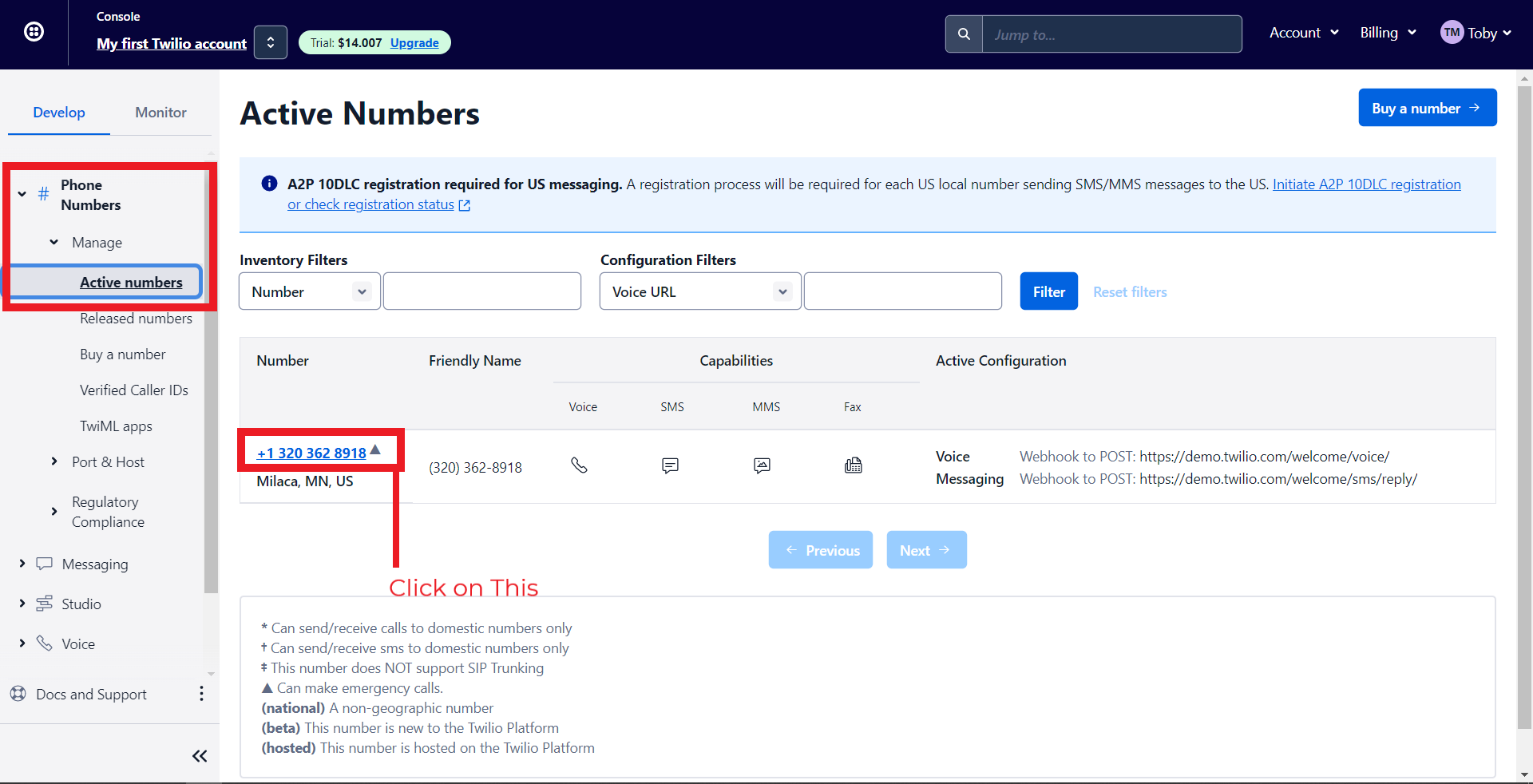
- To do this, navigate to Phone Numbers > Manage > Active Numbers > Click on a Number.
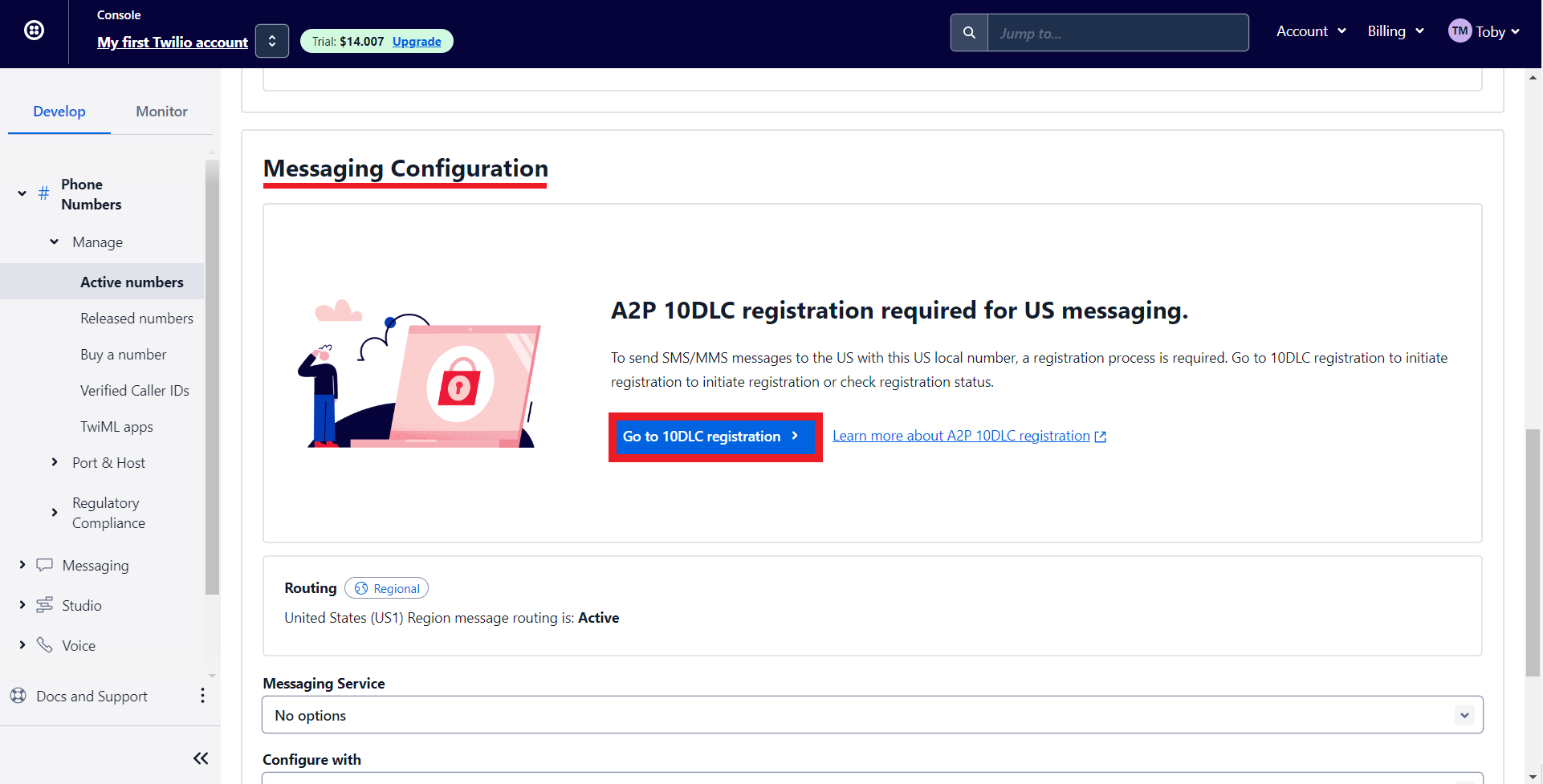
- Under Messaging Configuration, click on 'Go to 10DLC registration.'
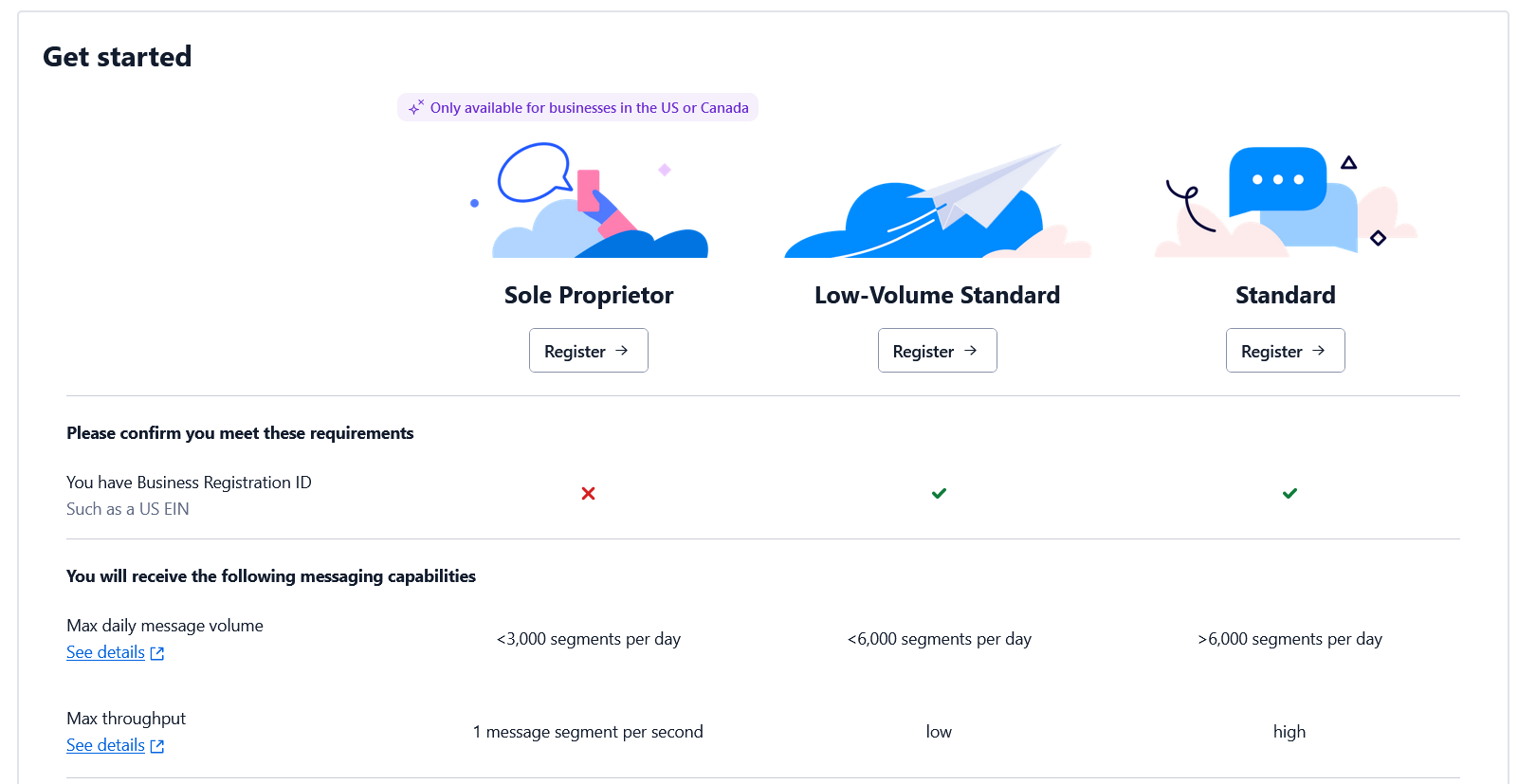
- Depending on whether you have an EIN (Tax ID) or not, you can register for the corresponding option. Check out this page for more details.
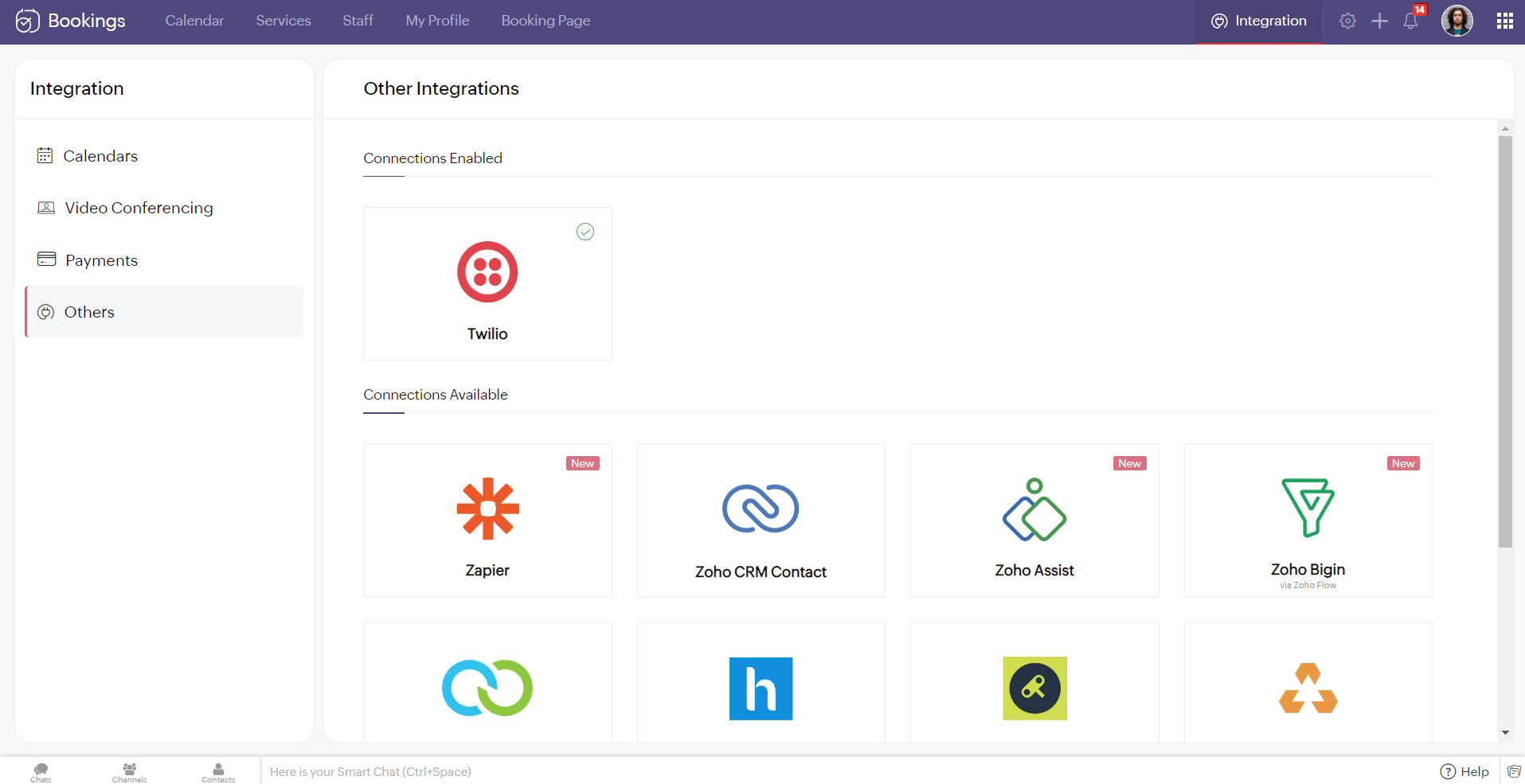
Note - You cannot integrate multiple SMS providers to Zoho Bookings simultaneously.
Configuring Twilio with Zoho Bookings
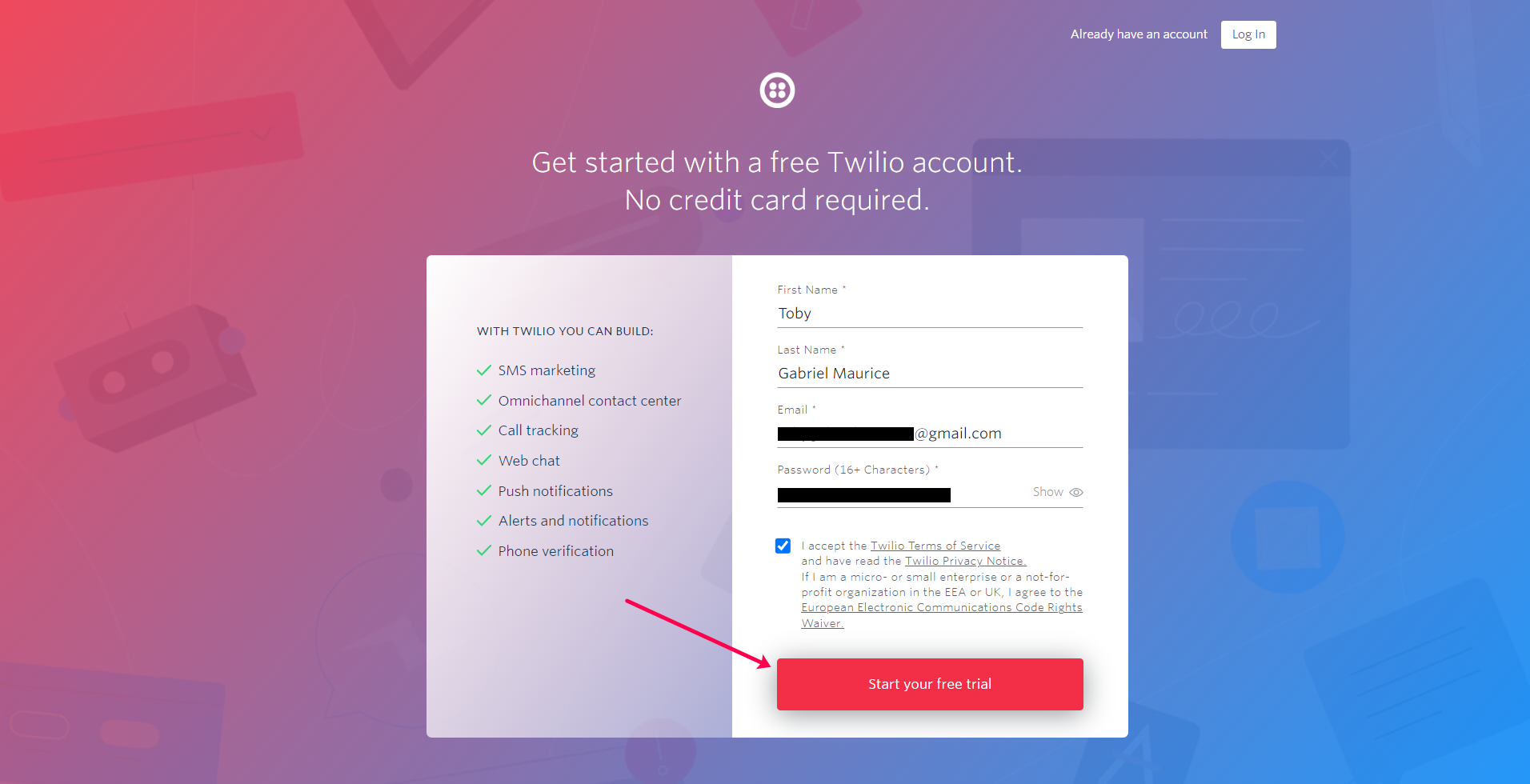
2. You'll be redirected to the following screen once you've signed up. Check your mail inbox.
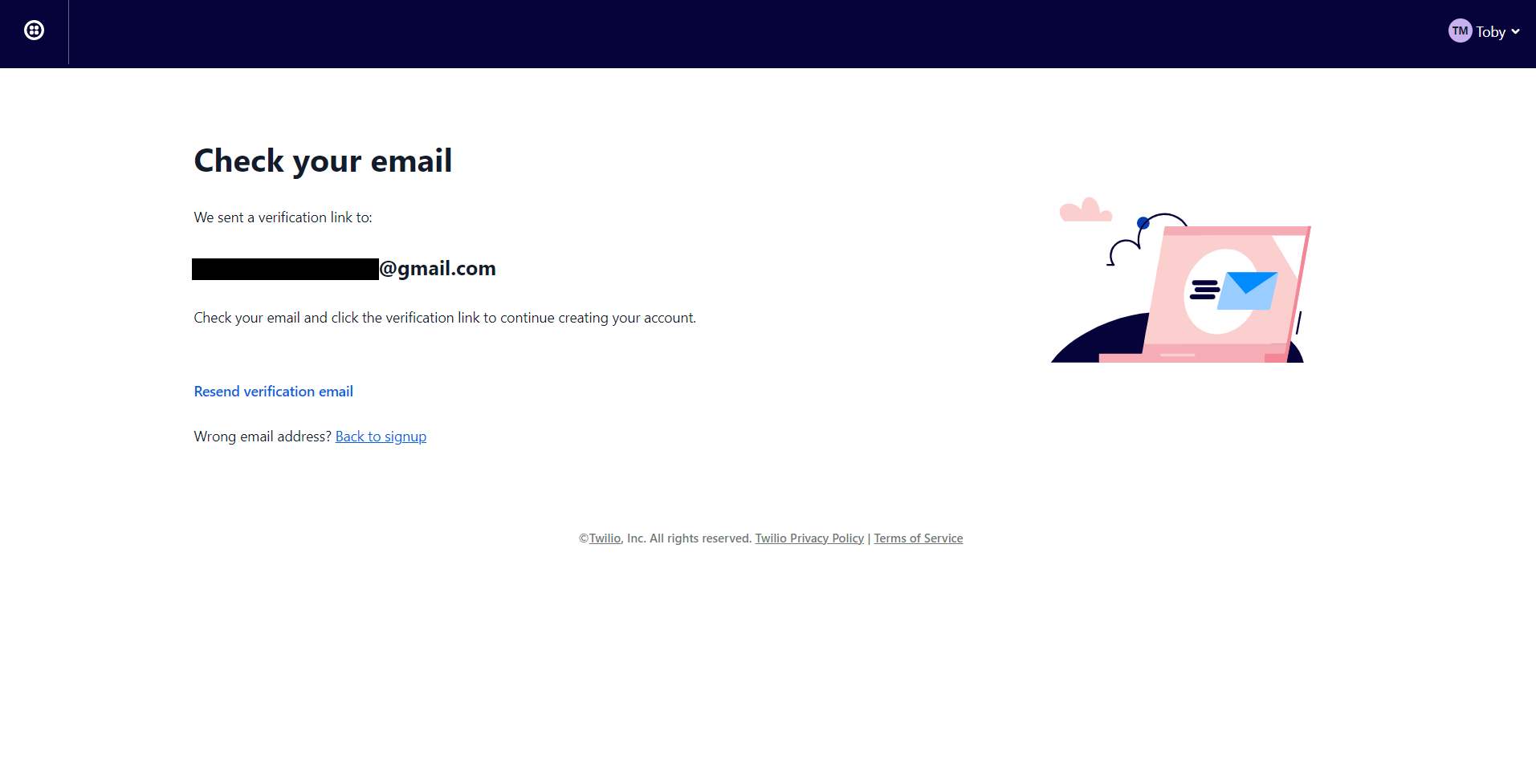
3. Your email would look like this. Confirm your account.
4. Twilio asks you to secure your account with a phone number. Enter your number and click on Send verification code/Get code via phone call depending on your choice.

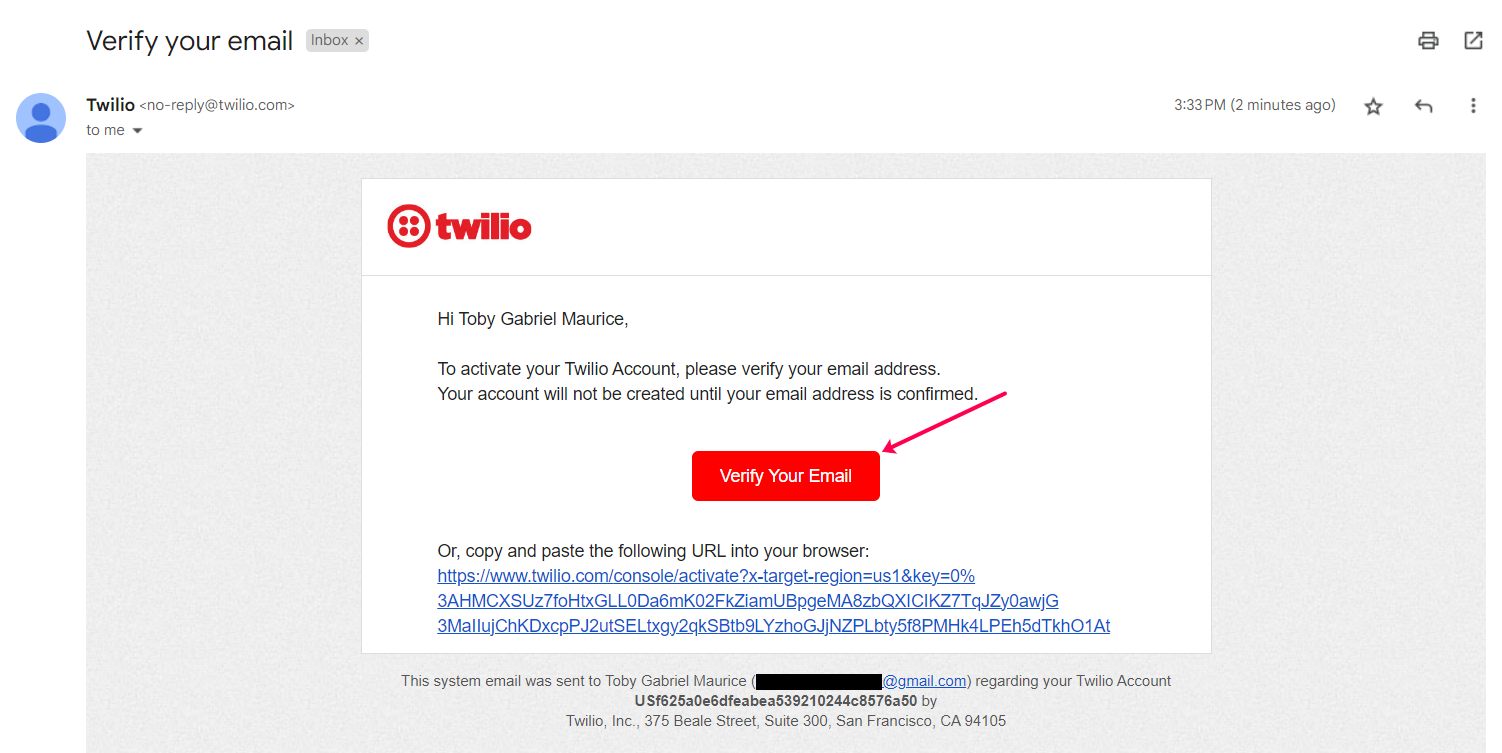
5. Once you've confirmed your phone number you can fill in the onboarding form and click on get started with Twilio.
6. You'll be redirected to the Twilio dashboard.
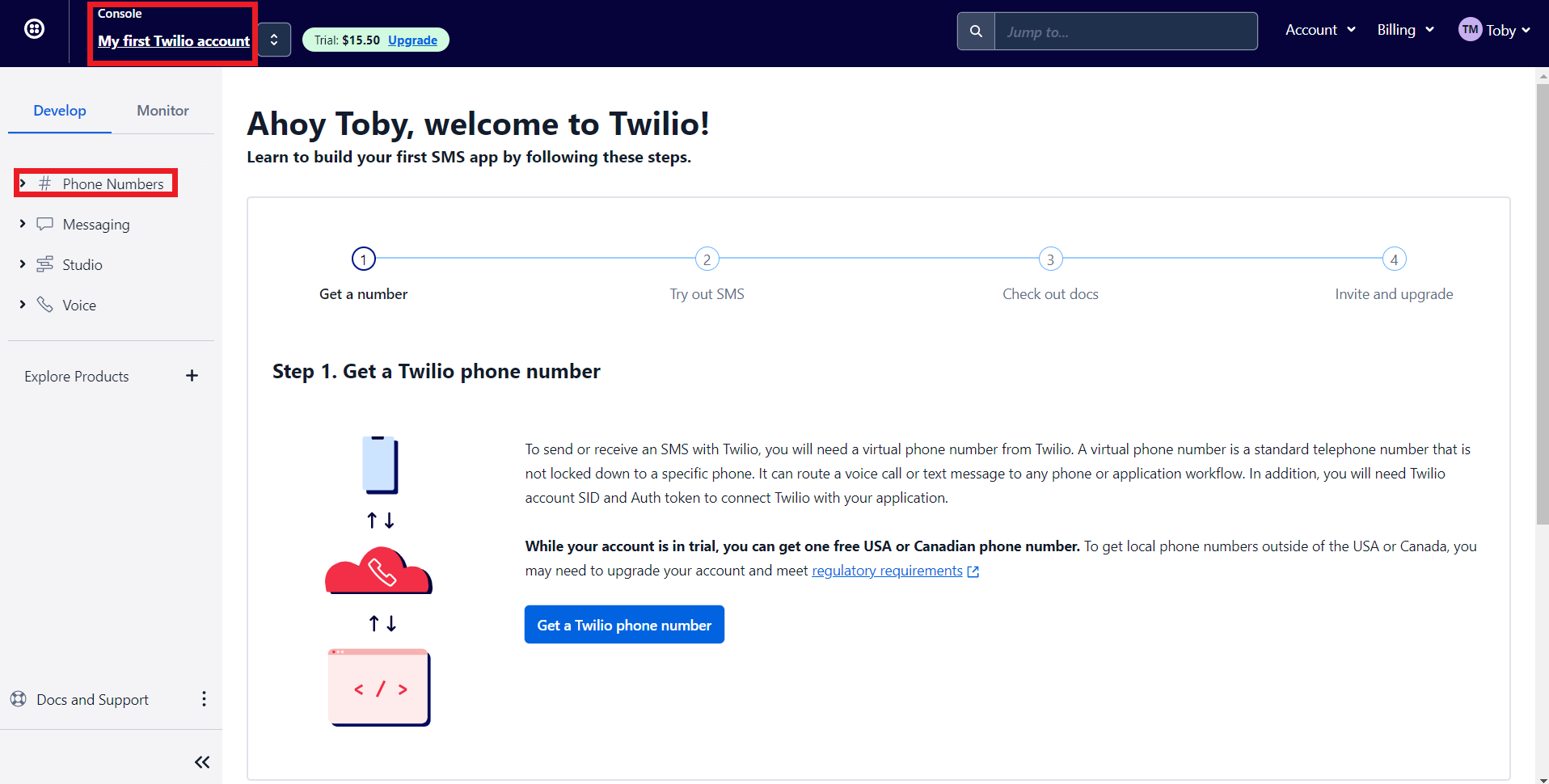
- 'My first Twilio account' is the account name of your Twilio SMS account. If you have multiple Twilio SMS accounts you can navigate it from here
- The Phone numbers tab helps you to
- Manage all your Phone numbers
- Buy new Numbers
- Release a Phone number
- When you sign up for a Twilio account, you'll get $15.50. You can get a trial number using this to test their configurations before opting for a premium plan.
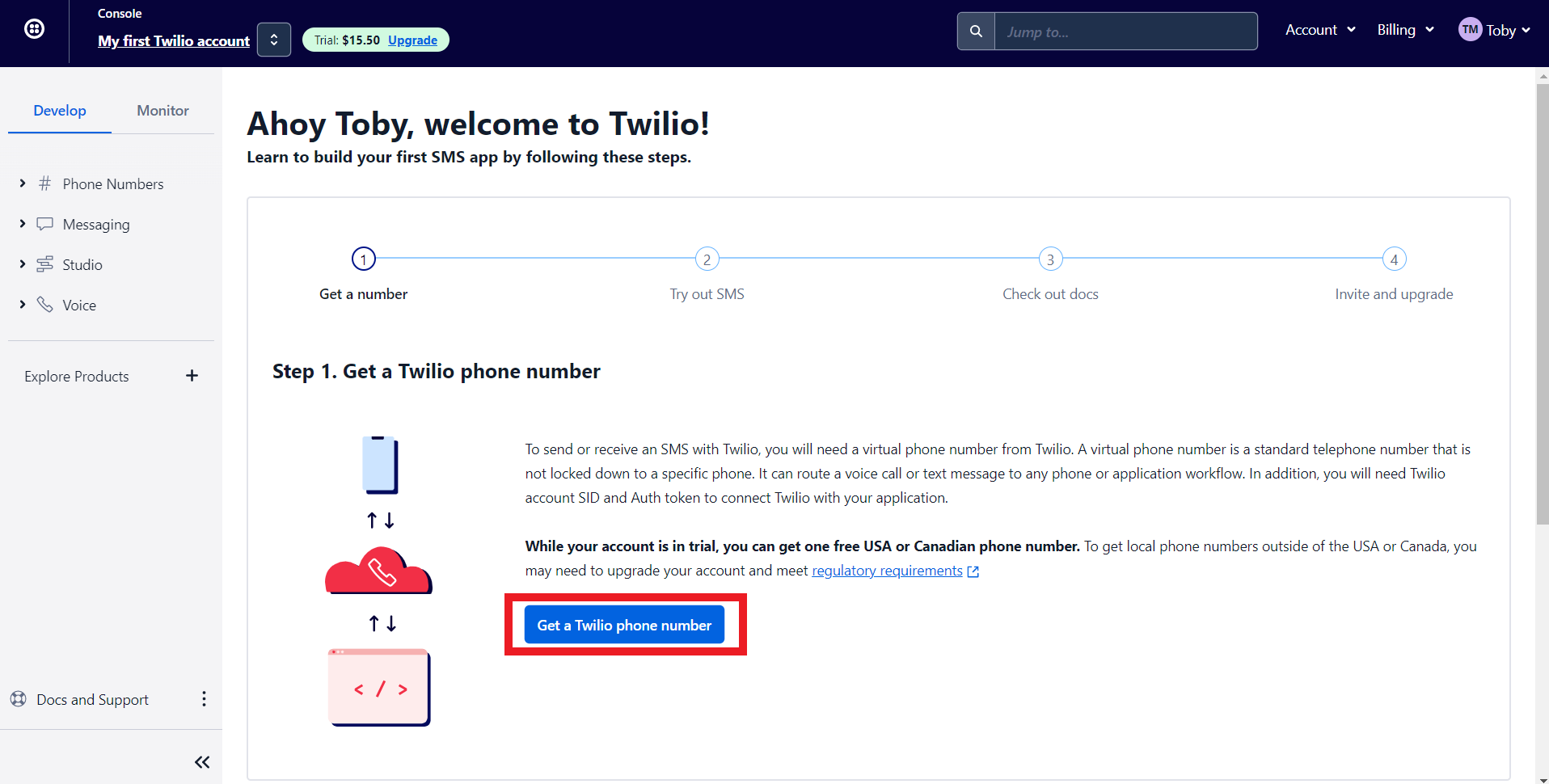
7. Let's get a phone number from Twilio. Click on 'Get a Twilio Phone Number.'
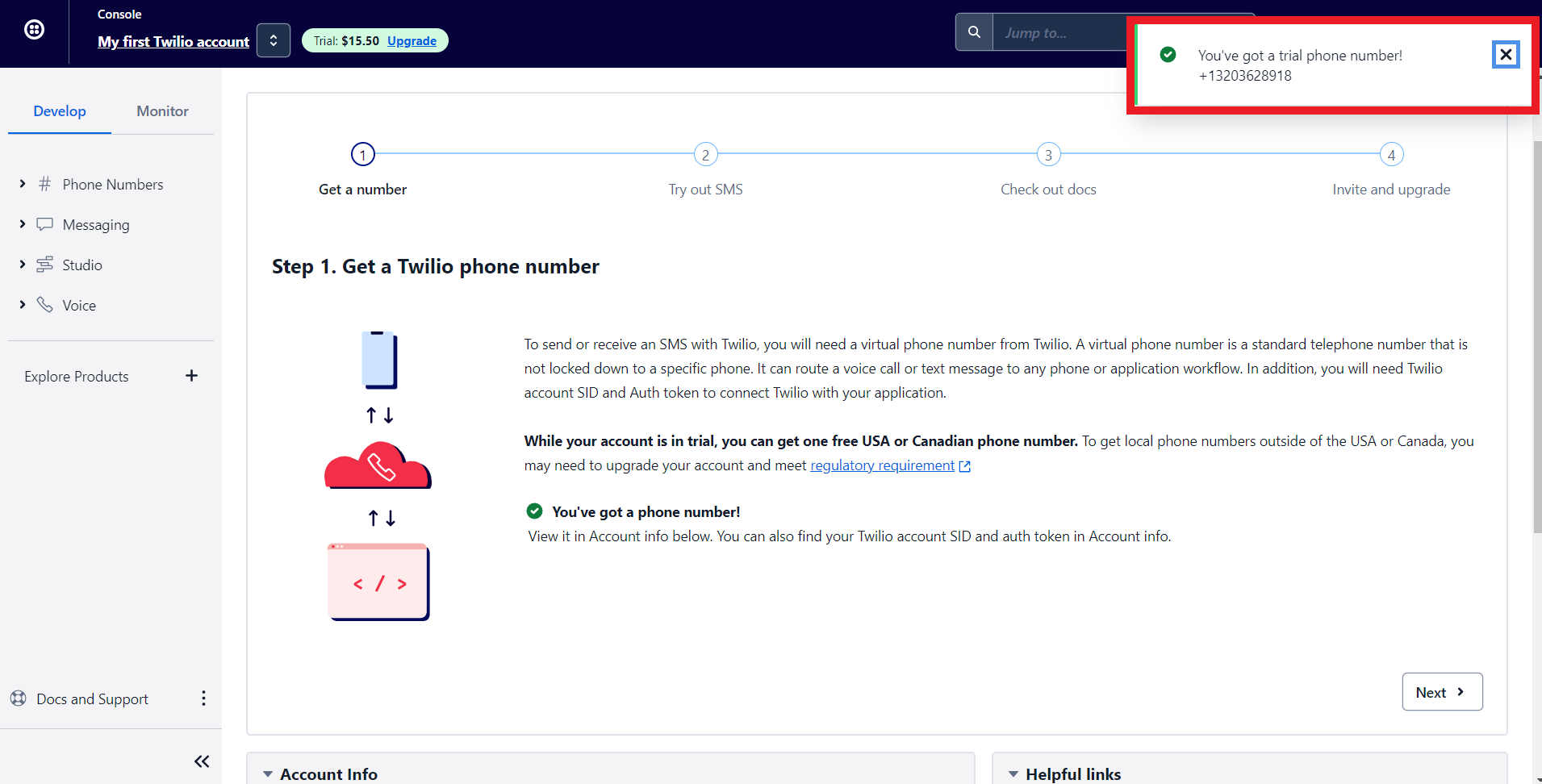
8. Twilio will assign you a phone number. Now let's configure Twilio with Zoho Bookings.
Note - To get a premium number, navigate to Phone numbers > Manage > Buy a Number
Choose which country's number you wish to get, SMS (as capability), and click search. You can click on buy to obtain the number.
Choose which country's number you wish to get, SMS (as capability), and click search. You can click on buy to obtain the number.

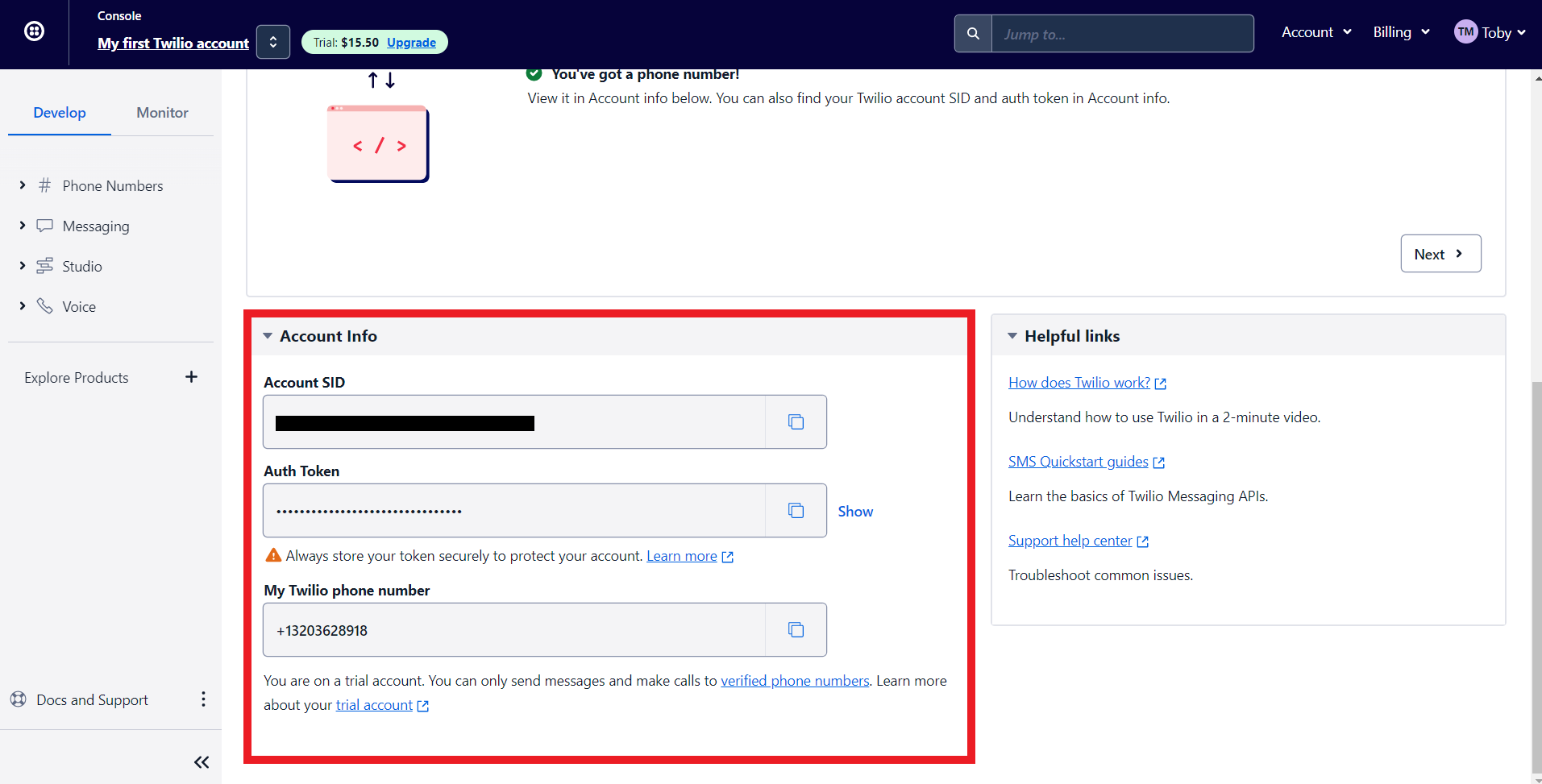
9. Scroll to the bottom of Twilio's main dashboard. You'll find three fields here, Auth Token, Account SID, and your Phone number. We'll paste all this data to integrate Zoho Bookings and Twilio.'
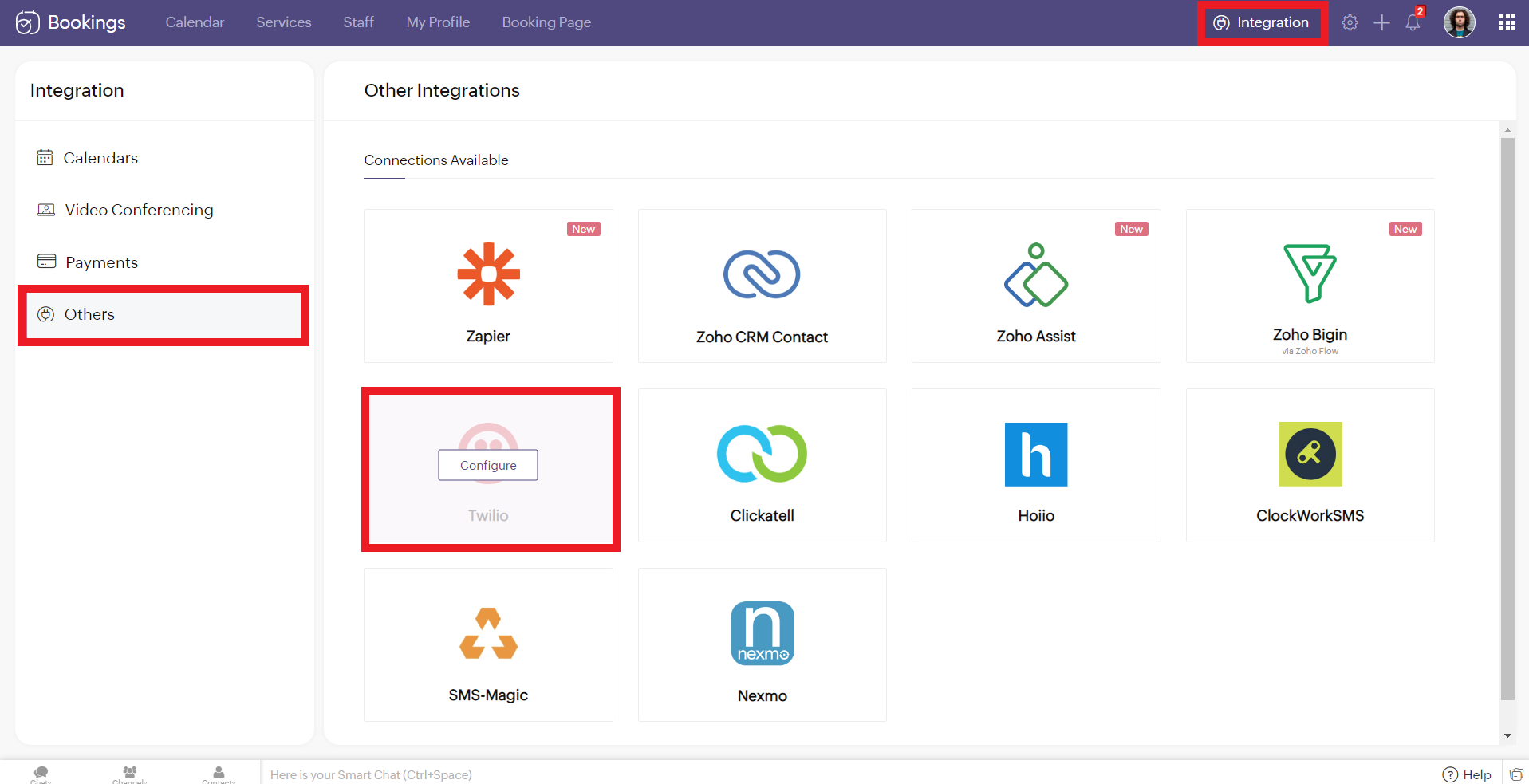
10. Now log in to your Zoho Bookings Dashboard. Navigate to Integrations > Others > Twilio. Hover over Twilio and click on Configure.
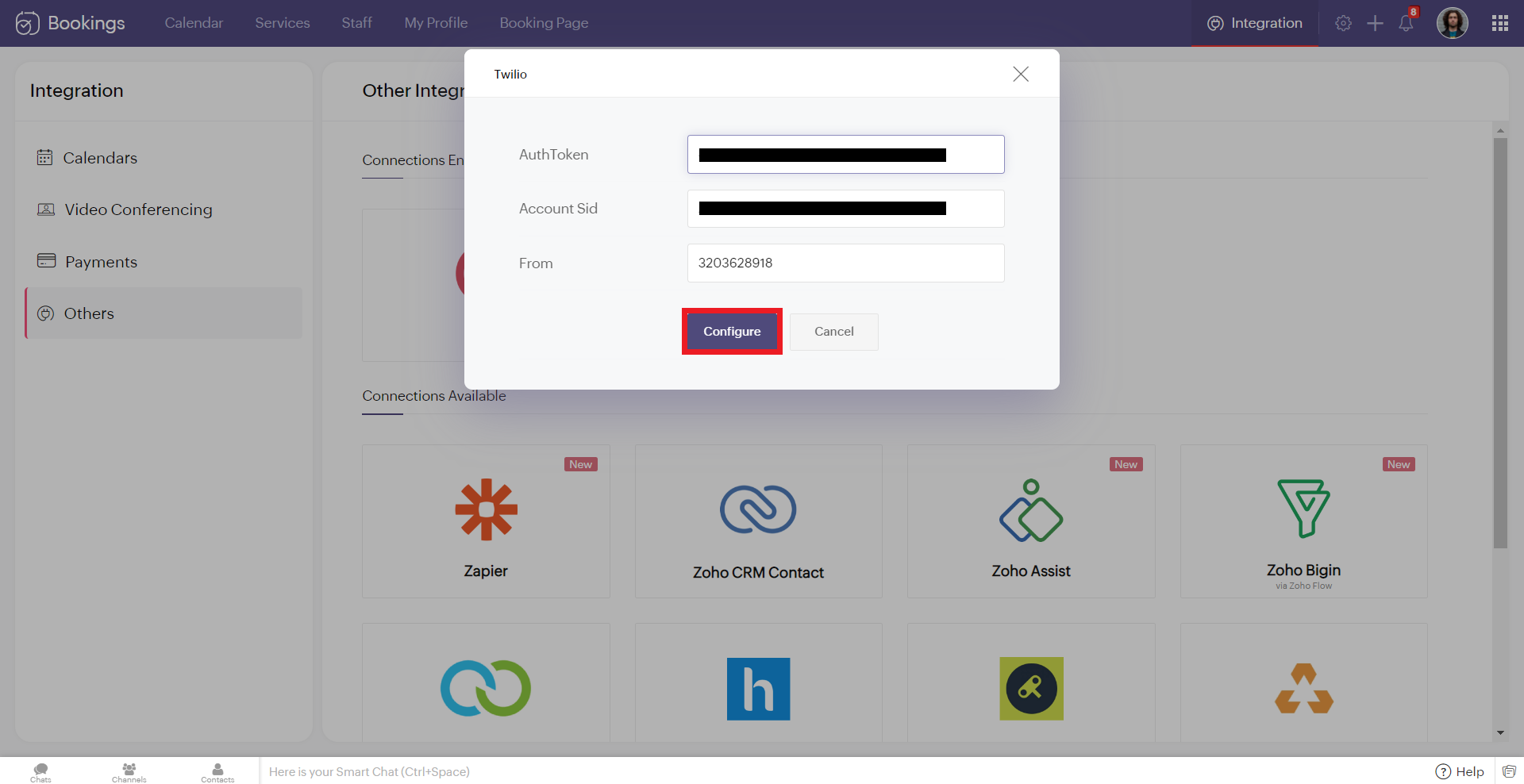
11. Copy and paste the details from Twilio to the corresponding fields in Zoho Bookings. Once you have pasted the details, click 'Configure.'
Note: While pasting the phone number, remove the country calling code. In this case, my phone number was +13203628918. '+1' is the country calling code. Remove it and paste the rest (i.e., 3203628918 without any spaces/symbols in between)
Note: While pasting the phone number, remove the country calling code. In this case, my phone number was +13203628918. '+1' is the country calling code. Remove it and paste the rest (i.e., 3203628918 without any spaces/symbols in between)
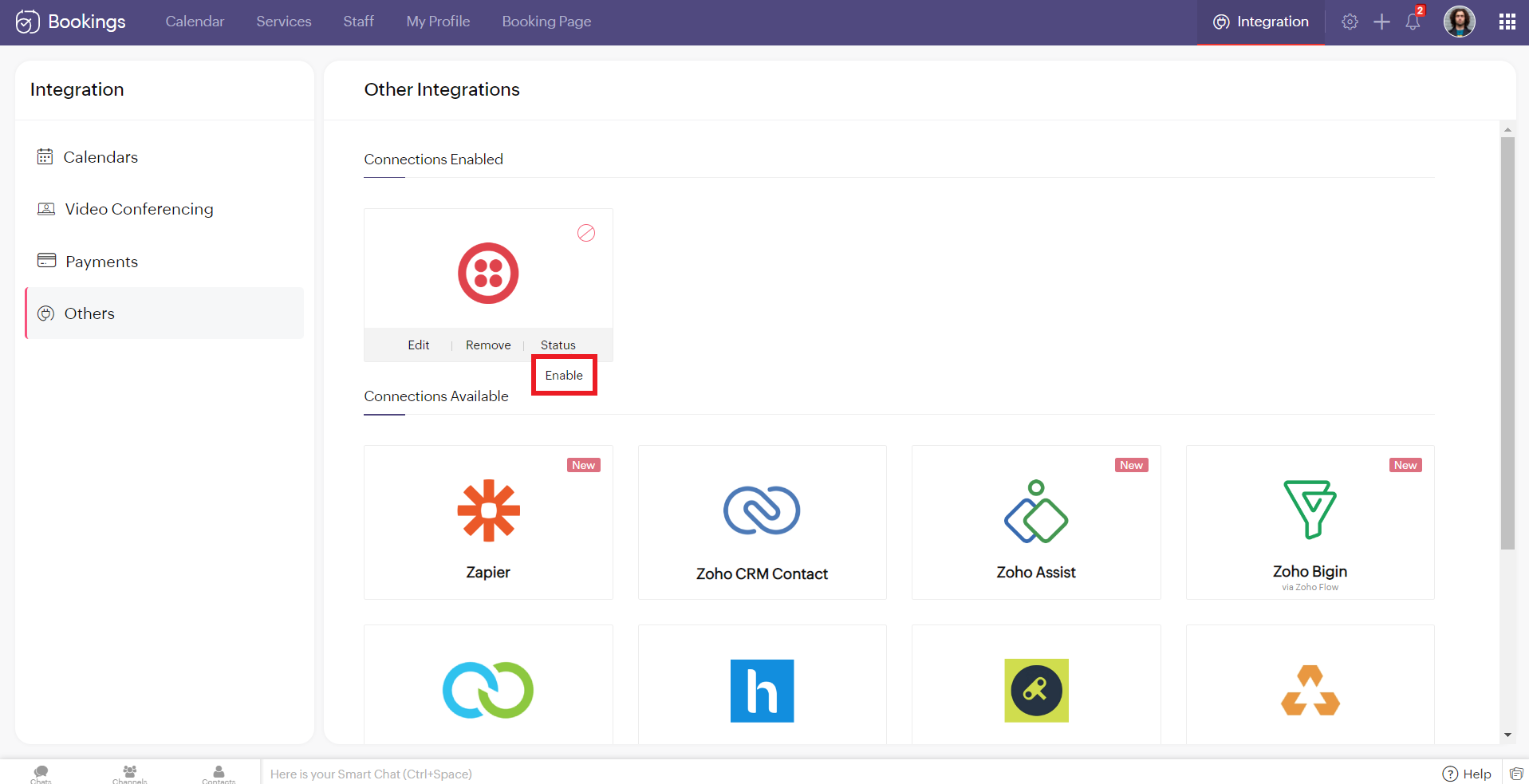
12. Hover over the created Twilio connection and click enable. Reload the page if the connection is still not active. You've successfully integrated Twilio with Zoho Bookings.
Editing Your Twilio Connection
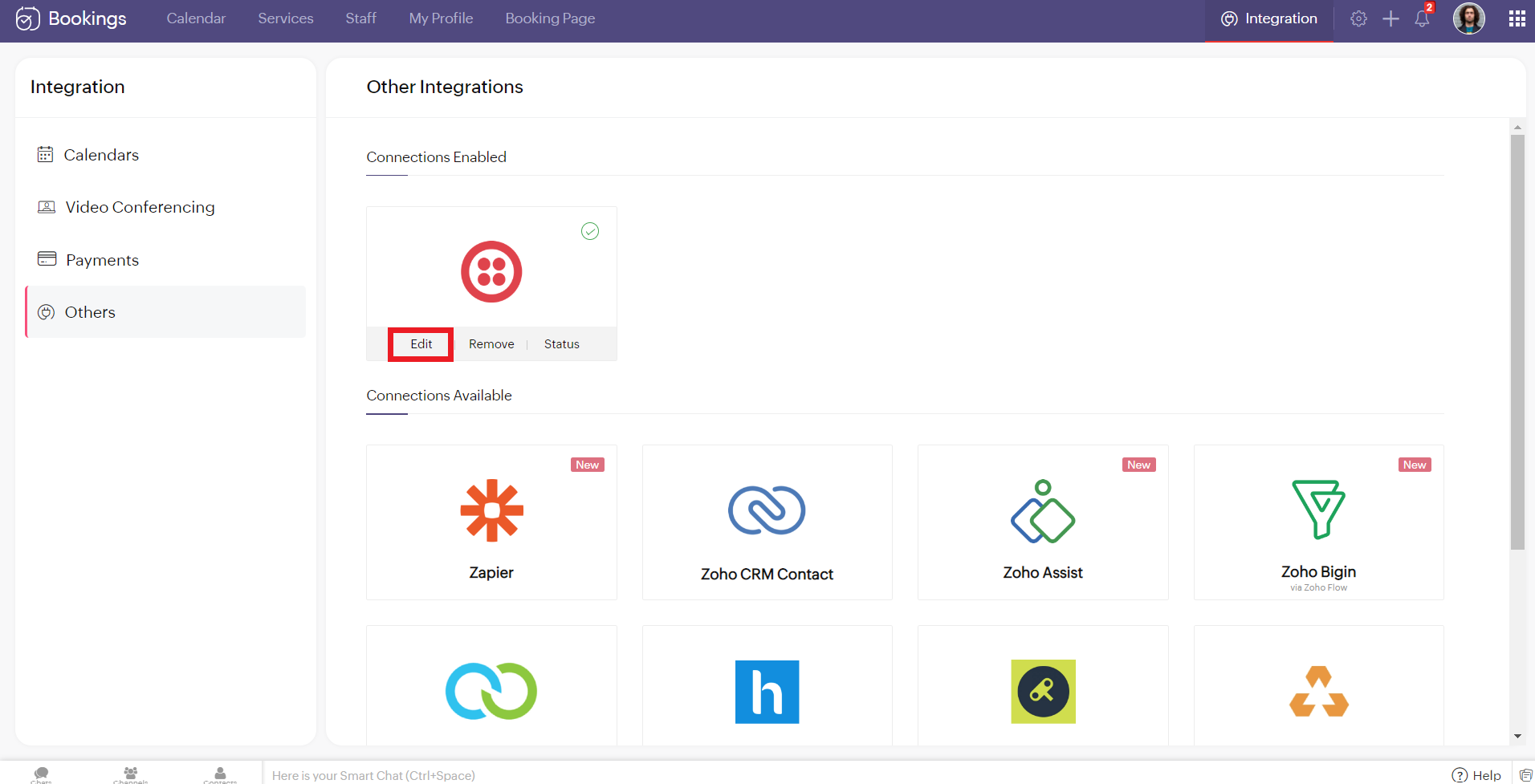
To edit your Twilio connection, hover over the Twilio integration and click on edit. Once you've made the changes, click Configure.
If you wish to remove your Twilio connection, hover over the Twilio integration and click remove.

A pop-up appears asking you to confirm. Click 'Proceed' to delete your Twilio connection.
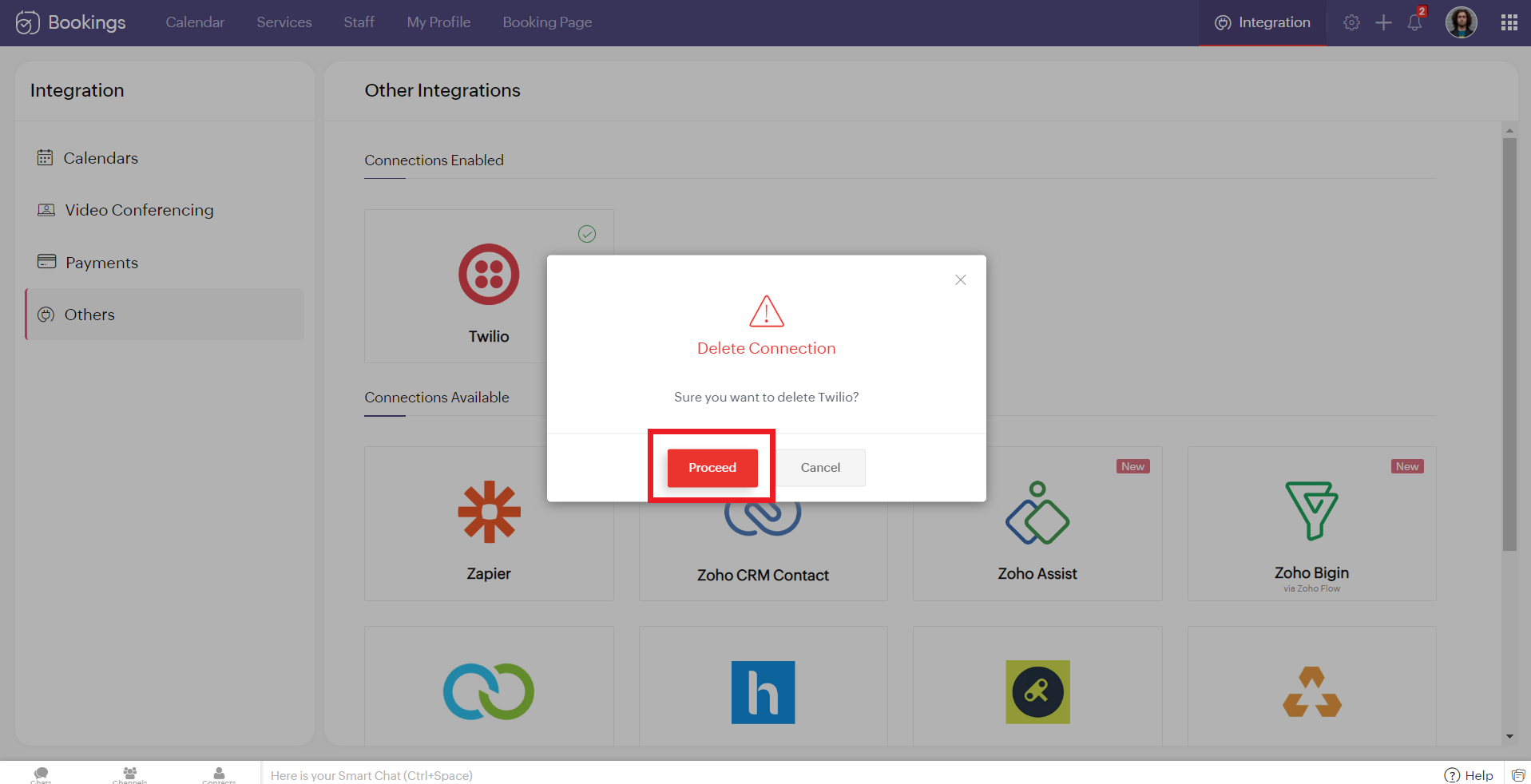
Note - While Editing or Removing your Twilio connections, if the changes don't reflect immediately, reload the page for the changes to reflect.
Configuring SMS Notifications
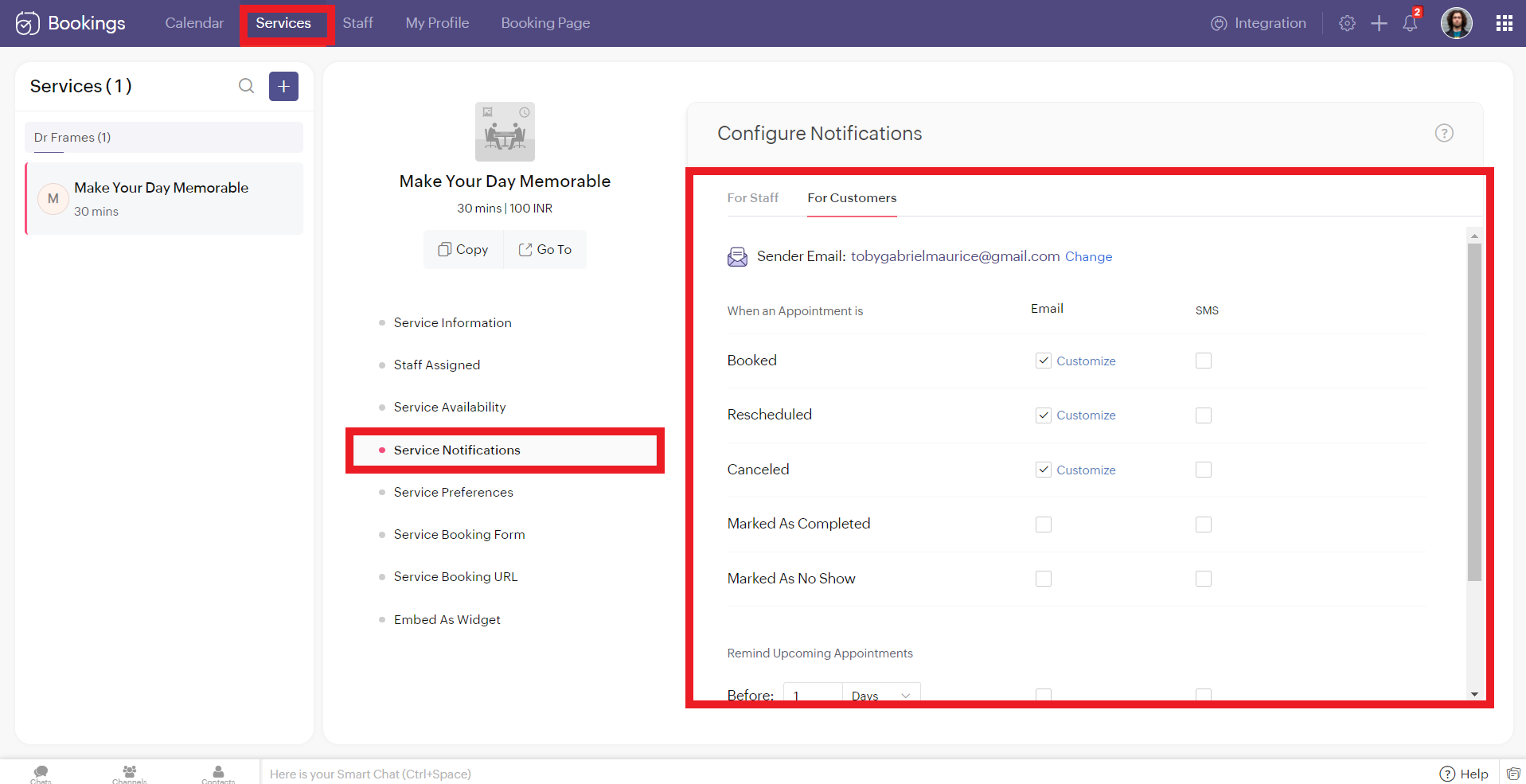
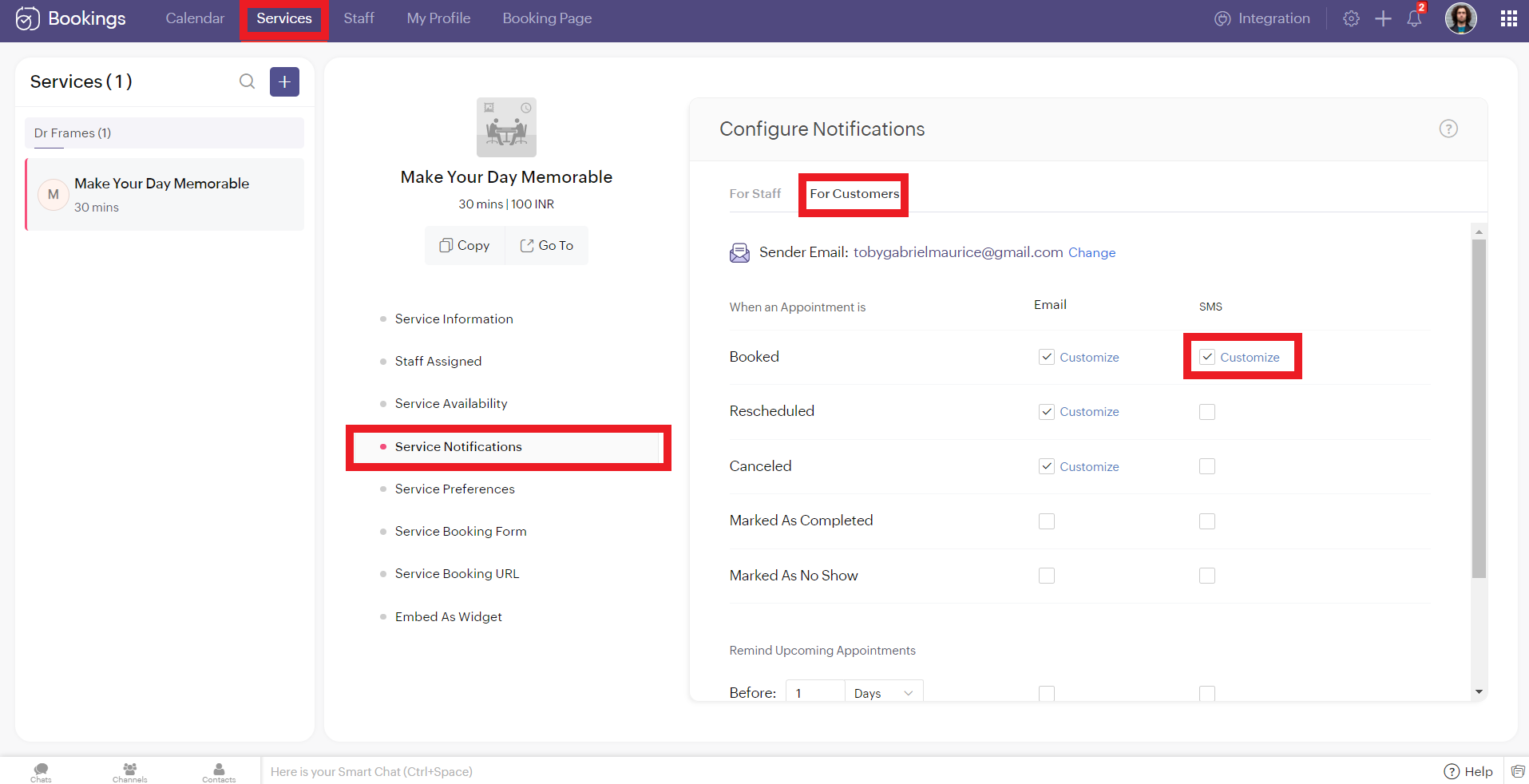
To configure SMS notifications for one on one bookings, navigate to services > service notification.
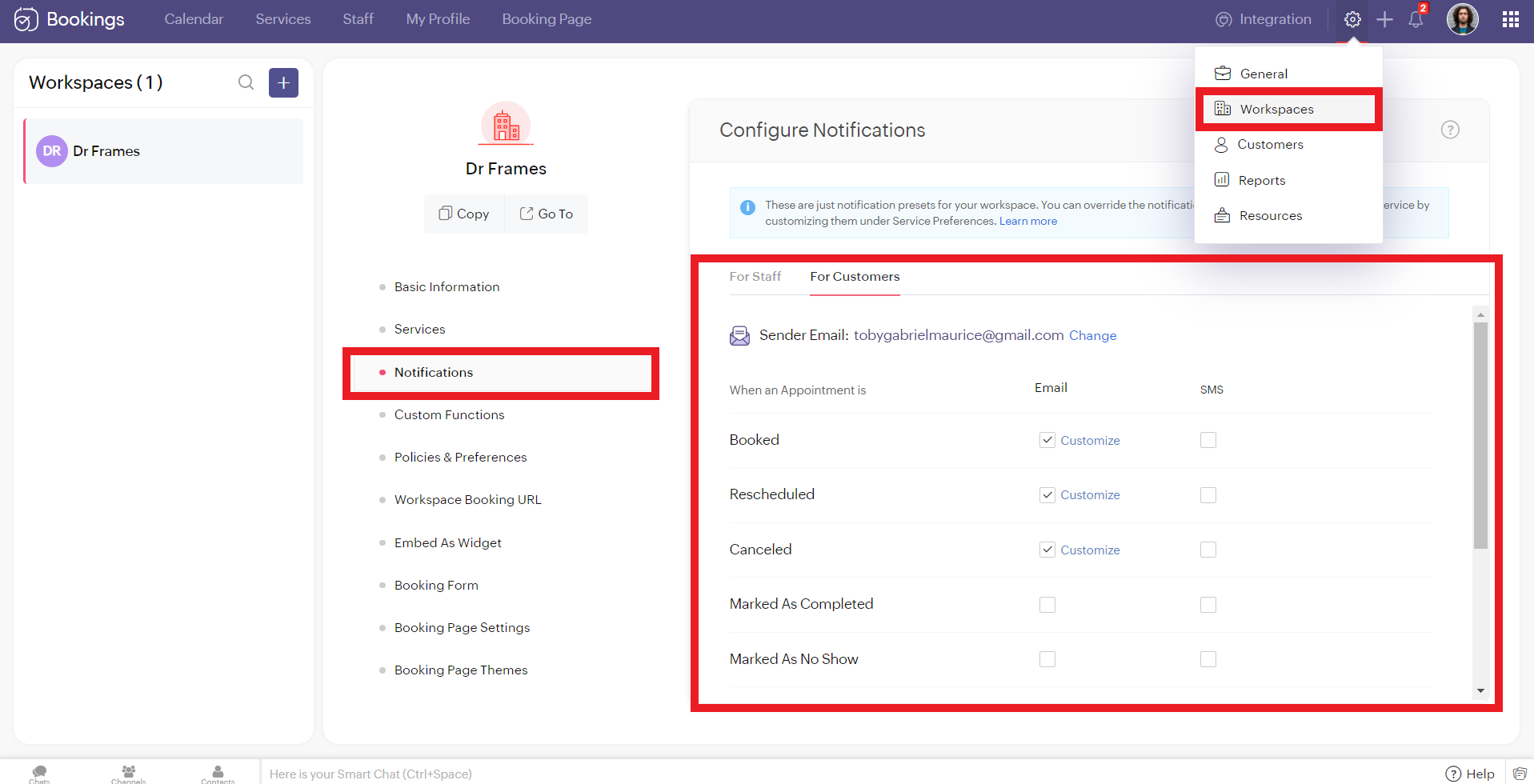
To configure SMS notifications for group/ resource bookings, navigate to settings > workspaces > notifications.
You'll see two tabs here. 'For Staff' and 'For Customers.' Zoho Bookings allows you to send eight different types of SMS under each tab.
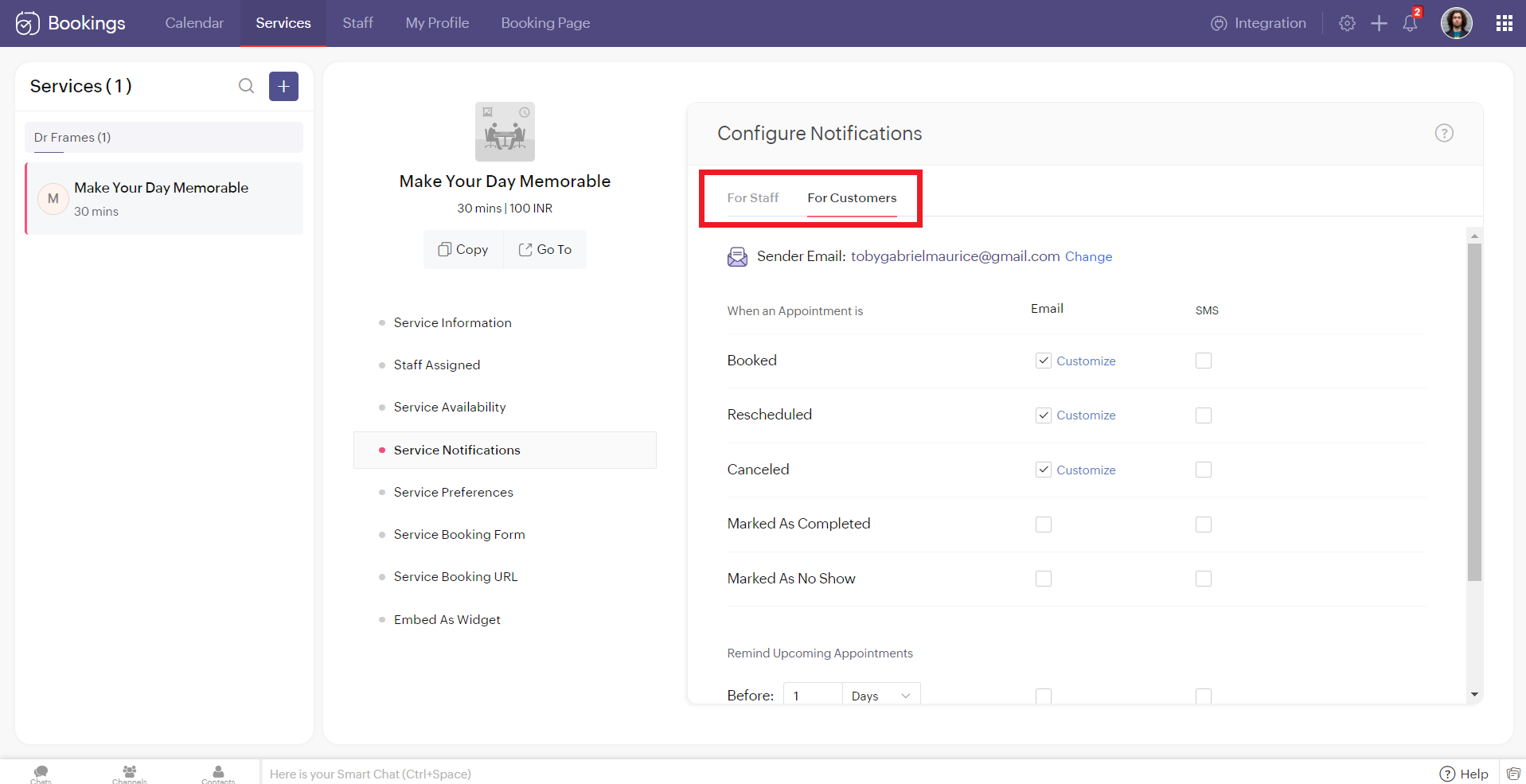
You can configure Zoho Bookings to send SMS using Twilio when you change the appointment status to
- Booked
- Rescheduled
- Canceled
- Marked As Completed
- Marked As No Show
Alternatively, you can set up to three reminders before your appointment time.

Illustration: Let's send SMS notifications to a customer when an appointment(one-on-one) is booked.
- Make sure that the checkbox is enabled corresponding to the booked notification in the customer tab. It ensures that the customer receives an SMS notification when an appointment is booked.
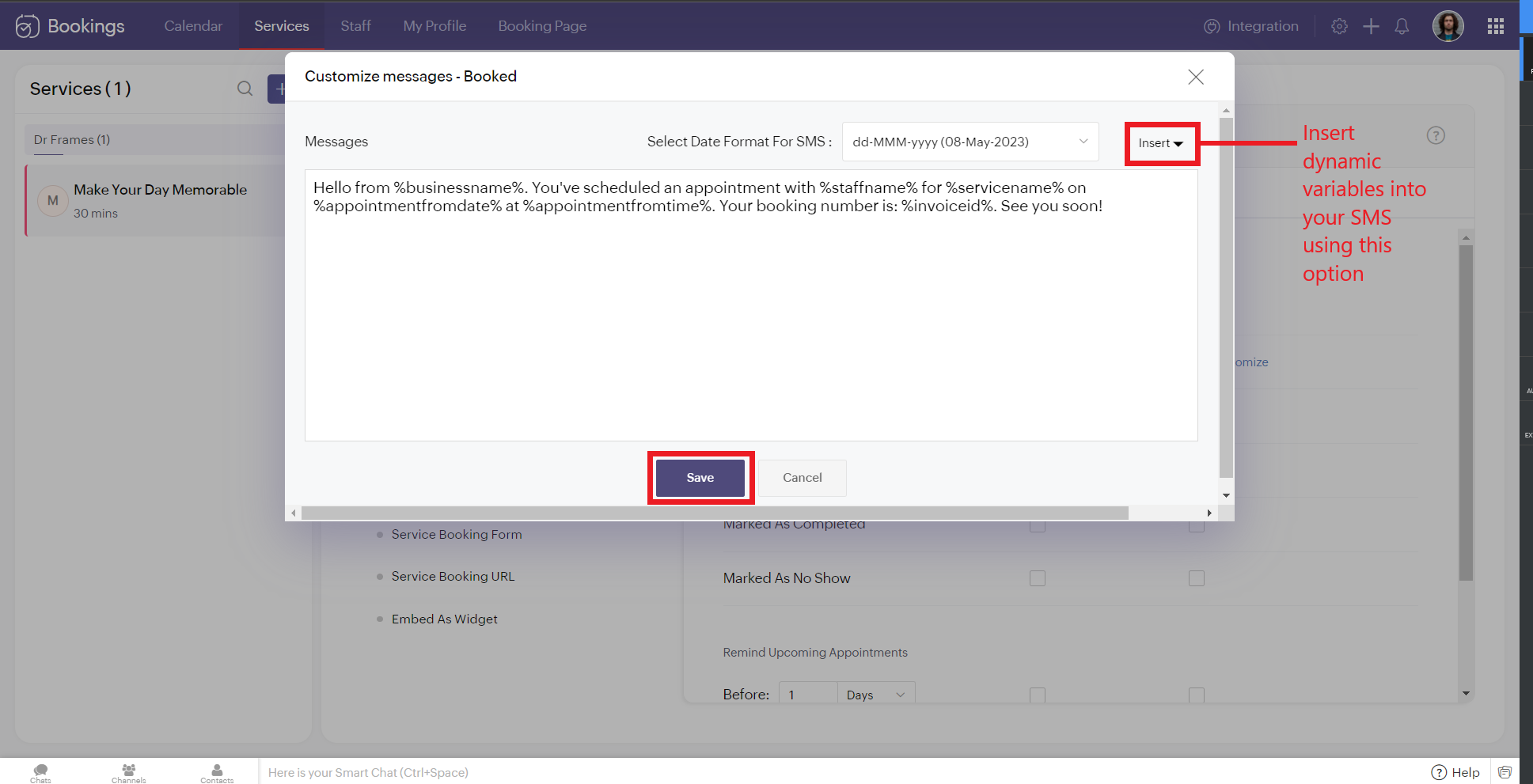
2. To customize the messages that will be sent, click on customize. You can change the message and insert dynamic variables like meeting info, customer name, meeting date, and more into your outgoing messages. Click 'Save' once you are done with the changes.
The customer receives the following message when an appointment is made.
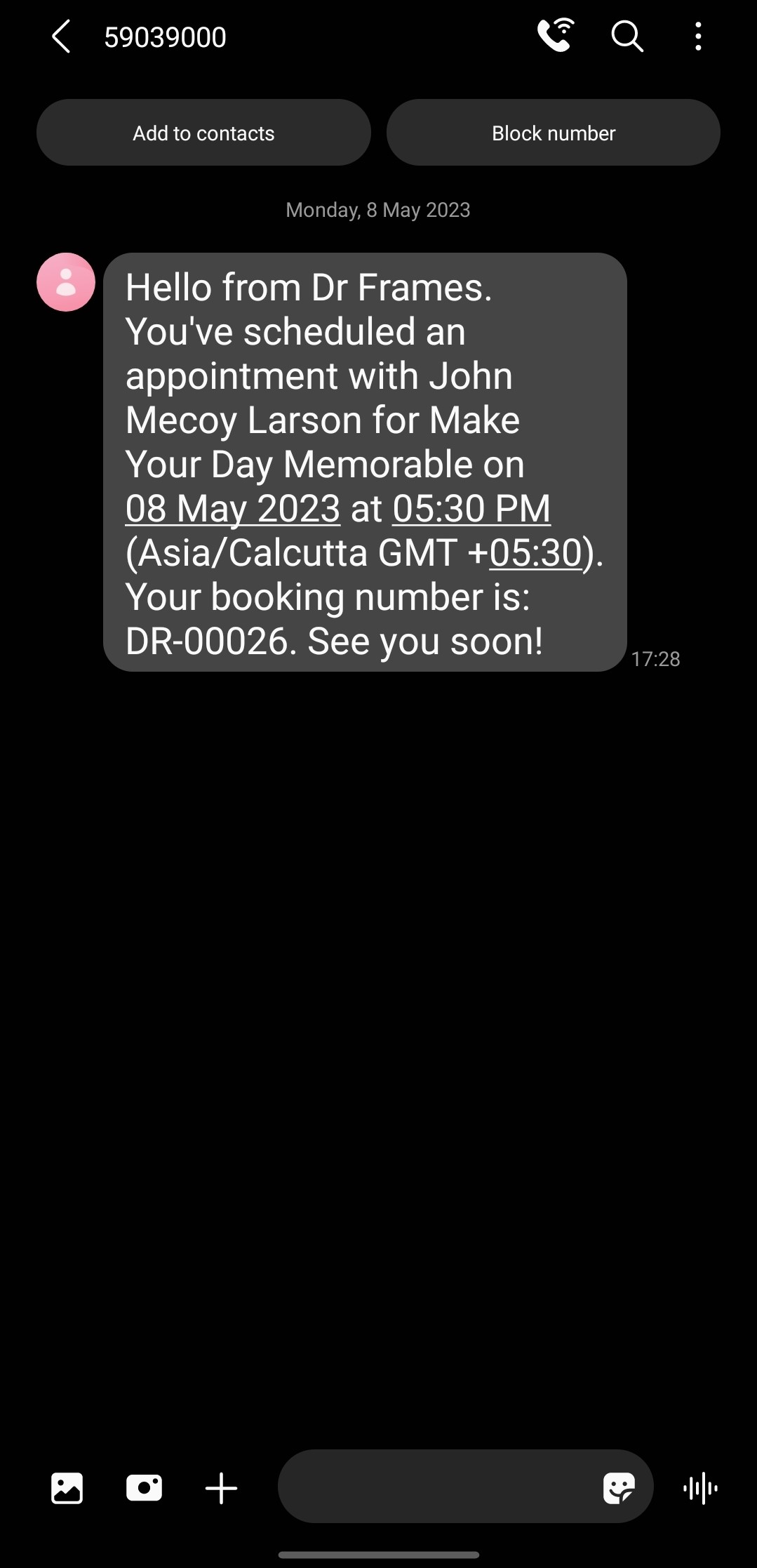
Note that the message is from the number '59039000' and not my original phone number. This is because the message is sent from a US number to an Indian Number. So the original long code is replaced with this number to ensure seamless deliverability.
If the sender and recipient belong to the same country, then the SenderID (i.e., your phone number) doesn't change.
There are cases where you might want to block incoming messages. For example, customers might reply to your SMS notifications requesting a reschedule or cancellation. This breaks the flow of Zoho Bookings and introduces unnecessary manual work. If that's the case, check out this document to block all incoming messaging.
If the sender and recipient belong to the same country, then the SenderID (i.e., your phone number) doesn't change.
There are cases where you might want to block incoming messages. For example, customers might reply to your SMS notifications requesting a reschedule or cancellation. This breaks the flow of Zoho Bookings and introduces unnecessary manual work. If that's the case, check out this document to block all incoming messaging.
SMS Customization Recommendations
- Since each message can accommodate only 160 characters, we recommend keeping your message crisp. Include vital info like appointment date, time, and business name.
- Avoid using emojis in your sms. As a single emoji consumes a lot of characters.
- We recommend you have your entire message length from 160 to 320 characters (i.e., 1 to 2 messages per message) to avoid consuming too many message credits for a single SMS.
Zoho Bookings Plans supporting this feature
Applicable in |
Premium |
If you want to start a trial of the Zoho Bookings Premium plan, please send an email to support@zohobookings.com including the word 'Twilio' in the subject line.
Topic Participants
Siva
Spencer Schmerling
Warren Krige
Recent Topics
Workqueue
I really like the idea of the Workqueue generally - it will be really useful. What it seems to lack however, is the ability to customise it properly. I want to be able to show a custom view rather than just "My Leads" and "Leads Assigned in Last 3 hours".Webform & spam
Hi, We set up 2 webform on our website, fowarding the content to Zoho CRM. Since it has been opened up, we are getting lot of spam message (for now about 20 a day). To lower the amount of false new leads we added the captcha field and new enquieries areZoho CRM Web form page URL
Hi there, I am getting quite a bit of spam through my Zoho CRM Web form and want to restrict the URLs it is submittable from. I can see that I can add Location URLs but I need to be able to just add a domain so can I enter mydomain.com/* to cover allReceiving too many Spam Leads. Why?
I am receiving so many junk leads from web forms created by zoho's platform. The junk queries are increasing day by day and are affecting our business. I am continuously following up with zoho team from the past one year but not getting any satisfactoryMail Merge is not working properly as far as the AUTOMATE section is concerned
Hi there, I created a Mail Merge template for the Deal module. I would like Deal owners to mail merge their Deal records, download the Mail Merge document as a Word doc and make a few changes before sending it to the customer. Thing is, neither the "MergeCanvas Detail View Related List Sorting
Hello, I am having an issue finding a way to sort a related list within a canvas detail view. I have sorted the related list on the page layout associated with the canvas view, but that does not transfer to the canvas view. What am I missing?project name field issue- n8n
Hey guys, I have a question. I want to create a new product using the workflow. The problem is with the product name field; I don't know how to fill it in. The workflow starts with retrieving information from the leads table, retrieving links to scrapeFunction #20: Custom calculation in item table of invoices
When you create an invoice in Zoho Books, the 'Amount' of a line item is typically calculated as the product of the "Quantity" and the "Rate" of the item. For instance, if an item has a sales rate of $50 and a quantity of 5 is sold, then the amount wouldFlexible Partial-Use Coupons (Stored Value Credits)
Subject: Feature Request: Ability for users to apply partial coupon balances per transaction Problem Statement Currently, our coupons are "one-and-done." If a user has a $50 coupon but only spends $30, they either lose the remaining $20 or are forcedHow to track repeat customers?
I own a food business and every order is entered into Zoho with: a unique Customer ID total order amount date of order With this information, I want to be able to see a list of my "best" customers. In other words, descending lists arranged according to:How to hide or archive a blog post temporarily in Zoho commerce website builder?
I would like to temporarily hide or archive a blog post in zoho commerce website builder so that it doesnt appear on my website till I enable it again. I tried to look for this option but could not find it. It only allows me to permanently delete a blogButton to Reapply Filters on Sheet(s)
I wrote a macro that I attached to a button to reapply the filters on all my sheets and it says it works, but it doesn't actually do anything. What is wrong with it? Is there another way? Or even make it work for one sheet? Sub UniversalFilterRefresh()Zoho Books - Breaking A Working App
We've been using Zoho for many years now. Across all apps, entering phone numbers in standard formats was enabled in all apps. These formats are: xxx.yyy.zzzz xxx-yyy-zzzz (xxx) yyy-zzzz and we were able also to add extension numbers in these formats:Automate pushing Zoho CRM backups into Zoho WorkDrive
Through our Zoho One subscription we have both Zoho CRM and Zoho WorkDrive. We have regular backups setup in Zoho CRM. Once the backup is created, we are notified. Since we want to keep these backups for more than 7 days, we manually download them. TheyCan you default reports/charts to report the current week?
Our data table maintains two years of data. Management wants certain report to automatically filter the report to the latest calendar week. I know I can do this manually with filters but I want the report to automatically default to the latest calendarBuild data protection into your support
At Zoho, privacy is our principle. Every Zoho product is built with privacy as the foundation and the finishing touch, guiding every decision we make. Security, privacy, and compliance are woven into the software development lifecycle, starting from howConditional formatting: before/after "today" not available
When setting conditional formatting, it only allows me to set a specific calendar date when choosing "Before" or "After" conditions. Typing "today" returns the error "Value must be of type date". Is there a workaround? Thanks for any help!Zoho mail account ownership transfer
We recently took over another company and have assumed responsibility for its Zoho account, including Zoho Mail and all related services. We would like to formally transfer ownership of this account to our organization. Could you please outline the completeDisplay Client Name in Zoho Creator Client Portal Dashboard
Hello Zoho Creator Team, We hope you are doing well. Zoho Creator recently introduced the option to set a client’s display name in the Client Portal settings, which is very helpful for providing a personalized portal experience. However, there is currentlyCustomizable UI components in pages | Theme builder
Anyone know when these roadmap items are scheduled for release? They were originally scheduled for Q4 2025. https://www.zoho.com/creator/product-roadmap.htmlStop the Workarounds: We Need Native Multi-Step Forms
After over 17 years of community requests, I'm hoping the Zoho team can finally address the lack of native multi-page form support in Zoho Creator. This has been one of the longest-standing feature requests in the community, with threads spanning nearlyAmazon.in FBA multiple warehouse integration with Zoho Inventory
My organisation subscribed to Zoho One looking at the opportunity to integrate Amazon.in with Inventory. But during the configuration, we understood the integration has severe limitations when it involves multiple warehouses in the same Organisation.Feature Request - Set Default Values for Meetings
Hi Zoho CRM Team, It would be very useful if we could set default values for meeting parameters. For example, if you always wanted Reminder 1 Day before. Currently you need to remember to choose it for every meeting. Also being able to use merge tagsIssues with Actions By Zoho Flow
Hi, I have a workflow that fires when a deal reaches a stage. This then sends out a contract for the client to sign. I have connected this up through Actions by Zoho Flow. Unfortunately this fails to send out. I have tracked it down to the date fields.CRM x WorkDrive: We're rolling out the WorkDrive-powered file storage experience for existing users
Release plan: Gradual rollout to customers without file storage add-ons, in this order: 1. Standalone CRM 2. CRM Plus and Zoho One DCs: All | Editions: All Available now for: - Standalone CRM accounts in Free and Standard editions without file storageWindows Desktop App - request to add minimization/startup options
Support Team, Can you submit the following request to your development team? Here is what would be optimal in my opinion from UX perspective: 1) In the "Application Menu", add a menu item to Exit the app, as well as an alt-key shortcut for these menusAbility for admin to access or make changes in zoho form without asking for ownership
Currently in zoho form only form owner can make the changes in the form and if someone else has to make changes then we have to transfer the ownership to them and even admin also cant access it . So i think admin must have the ability or option to accessIssue with WhatsApp Template Approval and Marketing Message Limit in Zoho Bigin
We are facing issues while creating and using WhatsApp message templates through Zoho Bigin, and we request your clarification and support regarding the same. 1. Utility Template Approval Issue Until December, we were able to create WhatsApp templatesZoho CRM Calendar View
Hello Zoho team, We need desperately a calendar view next to list, kandan and other views. I think it should be easy to implement as you already have the logic from Projects and also from Kanban View in CRM. In calendar view when we set it up - we chooseCamera
I can sign on to a meeting and see the other participants, but my screen is dark. The instructions for Zoho "Camera Settings" say "click on lock icon in address bar," but I don't see that icon! Suggestions?What is Workqueue and how to hide it?
Hi, My CRM suddenly have this "Workqueue", may I ask how to set the permission of this tab?Batch/lot # and Storage bin location
Hi I want to ask for a feature on Zoho inventory I own a warehouse and I've gone through different management software solutions with no luck until I found Zoho, it has been a game changer for my business with up to the minute information, I'm extremely happy with it. It's almost perfect. And I say Almost because the only thing missing for me (and I'm sure I'm not alone) is the need of being able to identify the lot number of my inventory and where it is located in the warehouse. Due to the natureAdding Sender Address with Basic Plan
According to the knowledge base, I should be able to add Sender addresses with the Basic Plan. But whenever I try to add an email, it takes me to a search window and I cannot find any emails in the list. Even mine, which is the admin. email.Conditional Field Visibility in Bigin CRM
I would like to request support for conditional field visibility within Bigin CRM. This feature should allow administrators to configure show/hide rules for fields based on predefined criteria (e.g., field values, picklist selections, stage changes,Bill automation in Zoho Books
Hi I am looking for 3rd-party options for bill automation in zoho which are economical and preferably have accurate scanning. What options do I have? Zoho's native scanning is a bit priceyReporting Tags
We've been using reporting tags for years (before itemizing was available) and now we are finding reporting these tags are impossible to track. Reports have changed in the customization and our columns of reporting tags no longer show up. We do not useFunction #53: Transaction Level Profitability for Invoices
Hello everyone, and welcome back to our series! We have previously provided custom functions for calculating the profitability of a quote and a sales order. There may be instances where the invoice may differ from its corresponding quote or sales order.Consumption based inventory
I am currently using Zoho Books for my hospitality business, which includes lodging and restaurant services. We purchase many items in bulk for storage and consumption as needed. I'd like these items to be recorded as inventory when purchased and categorizedSmarter Access Control: Role-Based Access vs. Responsibility-Based Profiles
Every business has roles, responsibilities, and workflows. While roles help define structure, responsibilities within those roles are rarely the same. As your team grows, some members need access to only a specific set of features. Others require visibilityPartner with HDFC And Sbi Bank.
Hdfc and sbi both are very popular bank if zoho books become partner with this banks then many of the zoho books users will benefit premium features of partnered banks.Next Page