Upcoming Features for Zoho Subscriptions
Hello everyone,
Zoho Subscriptions is set to receive a massive update, with a bunch of new features and usability improvements. This update will also provide a shared user experience with other apps from the Zoho Finance suite, such as Zoho Books or Zoho Inventory.
Zoho Subscriptions is set to receive a massive update, with a bunch of new features and usability improvements. This update will also provide a shared user experience with other apps from the Zoho Finance suite, such as Zoho Books or Zoho Inventory.
Here's a quick peek at some of the features that will be available to you soon:
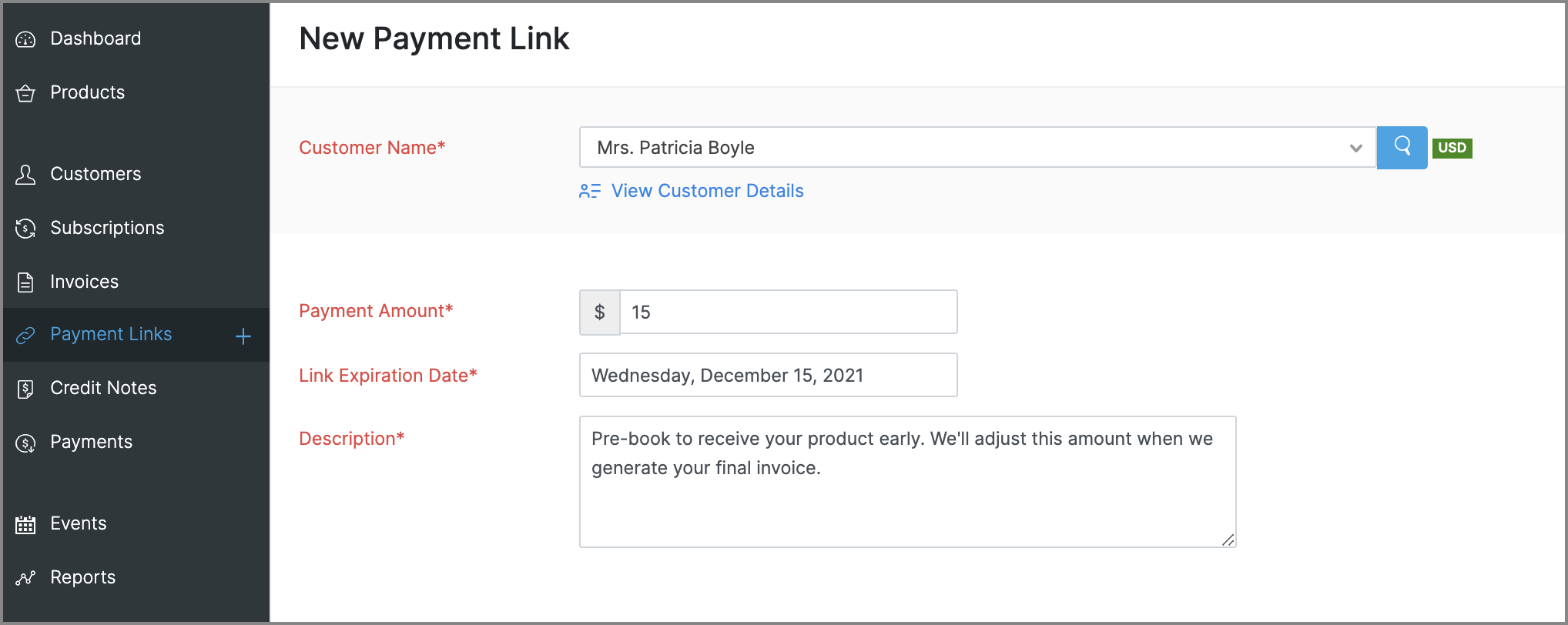
Payment Links for ad hoc payments
This is a new feature that will let you request and accept one-time payments from customers by sending them payment links, which they can use to make online payments to you. These payments can be for miscellaneous reasons that need not be related to any subscriptions, such as an advance payment or a convenience fee.
Enhancements to reports
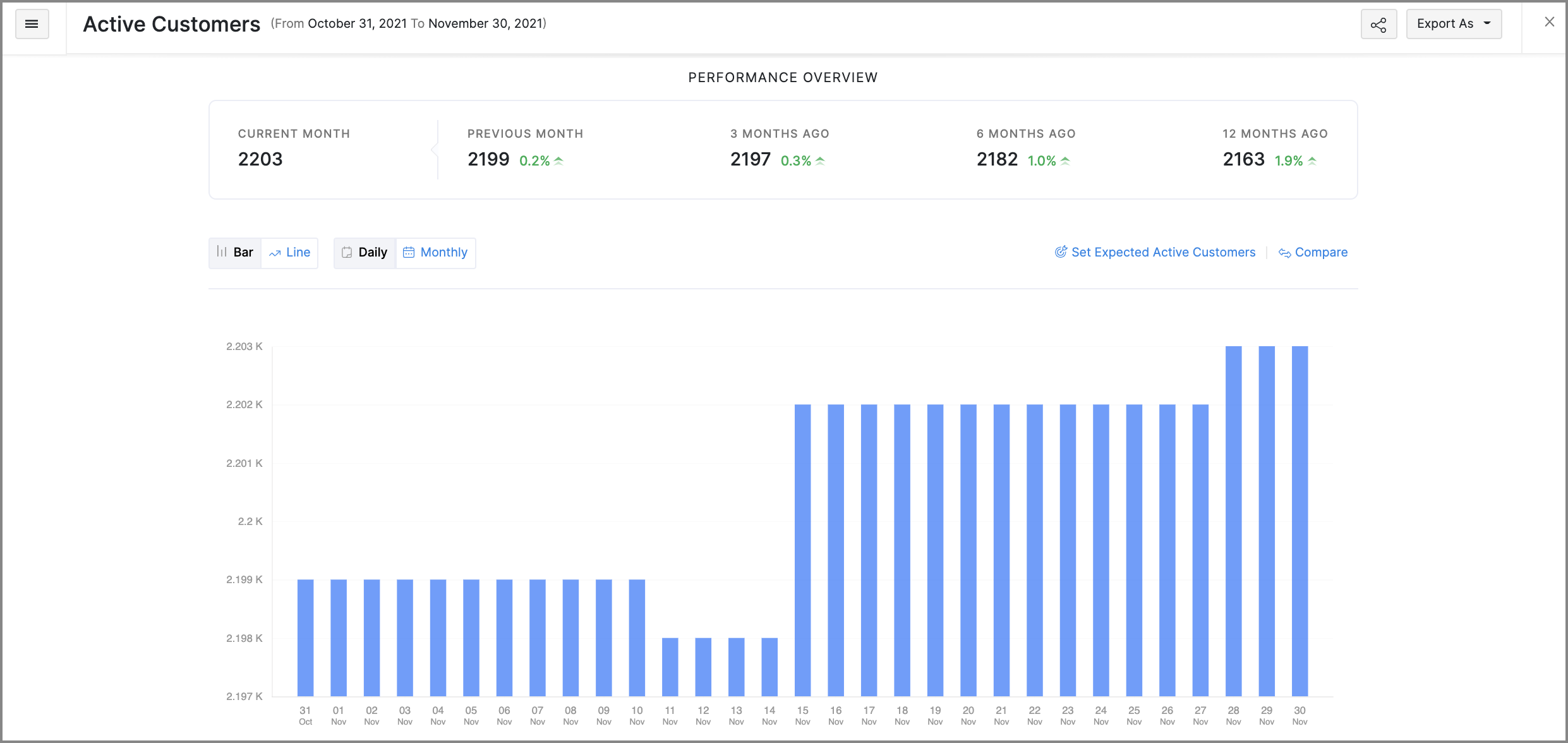
- Revamped UI: Most reports will get a slicker UI, that's more intuitive and puts commonly used customization features in places that are easier to access. Some reports will also get comparative percentage changes across different periods, along with the option to set expected figures as a benchmark. Here's a glimpse of what the new UI will look like:
- Favorites: Mark frequently visited reports as favorites to pin them at the top of the Reports module.
- Share reports: You can quickly share the reports that you've generated with other users and set the level of access they have for that report as well.
- Schedule reports: You can schedule some reports to be generated routinely and emailed to the recipients that you choose.
More control for emails
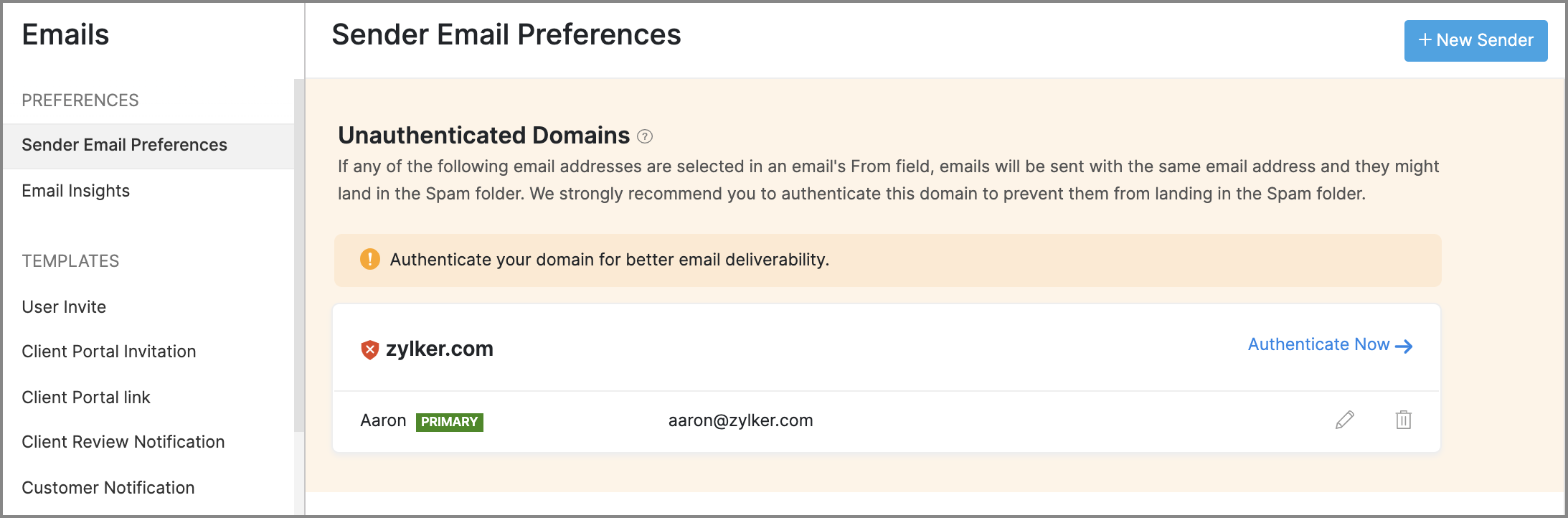
- Sender Email Preferences will allow you to manage the From address of emails that are sent from Zoho Subscriptions. It will also assist you in adding SPF and DKIM records for your domain, to prevent your emails from landing in a recipient's spam or trash folder.
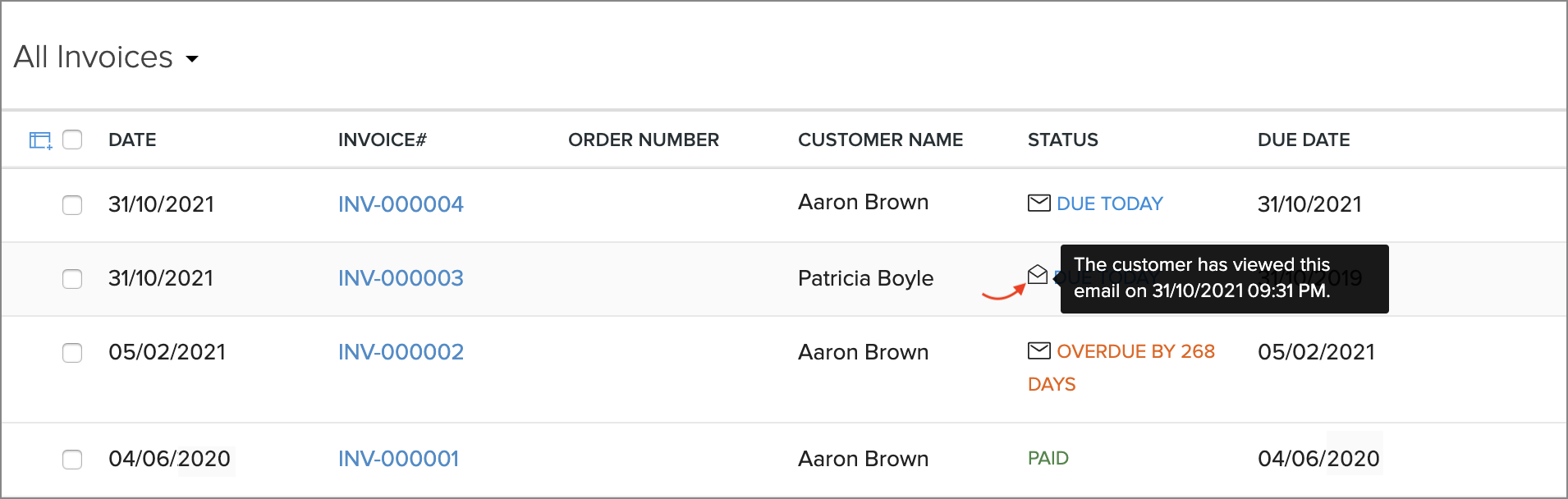
- Email Insights lets you keep track of the notification emails that have been sent to customers. You will be able to know if an email was opened, and exactly when it was opened, which can help in deciding when to initiate follow-up conversations with customers.
Revamped modules
The following modules will receive new features and improvements all-around:
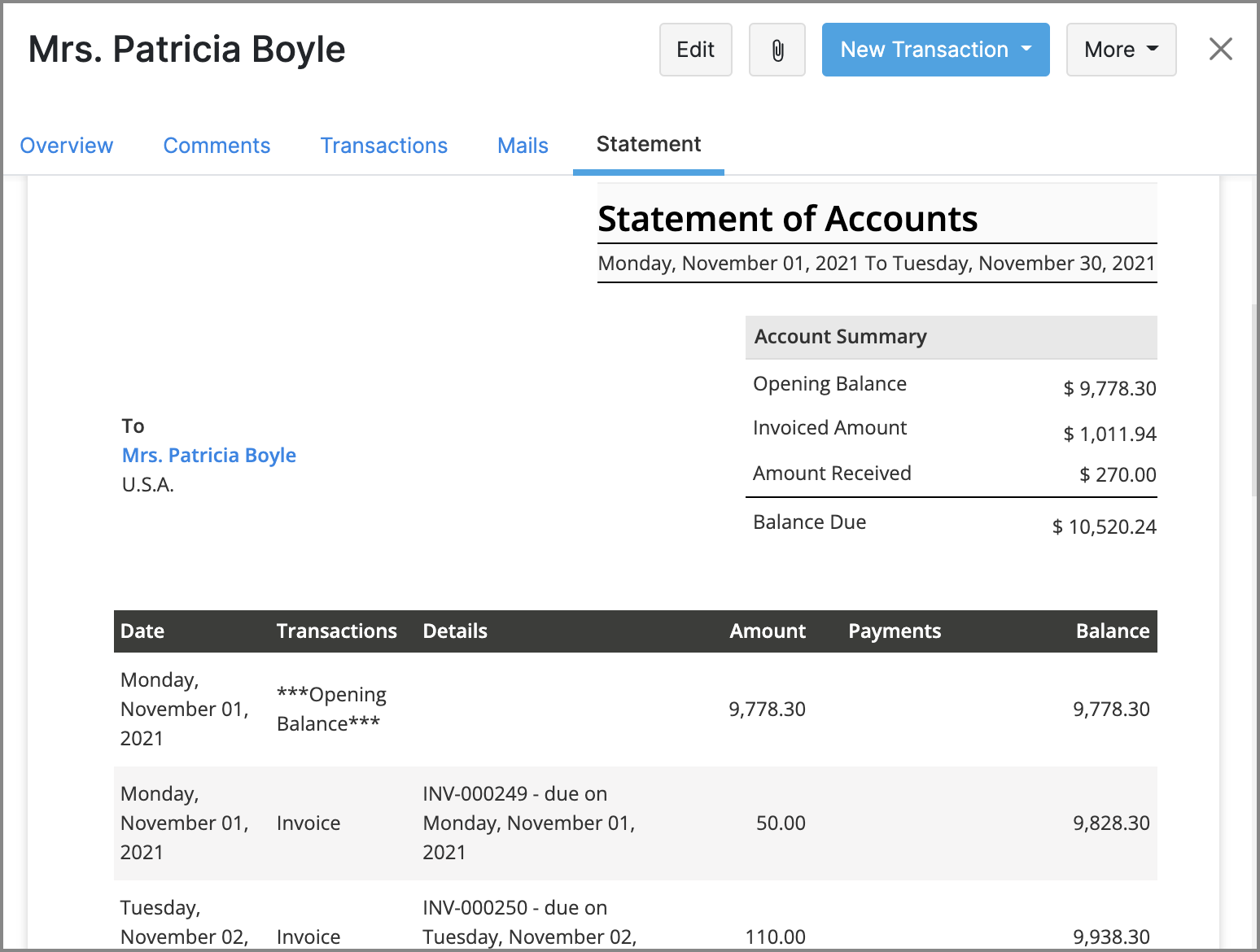
- Customers: You will be able to generate customer statements, send emails directly from Zoho Subscriptions, and find related transactions more easily with an improved Transactions tab.
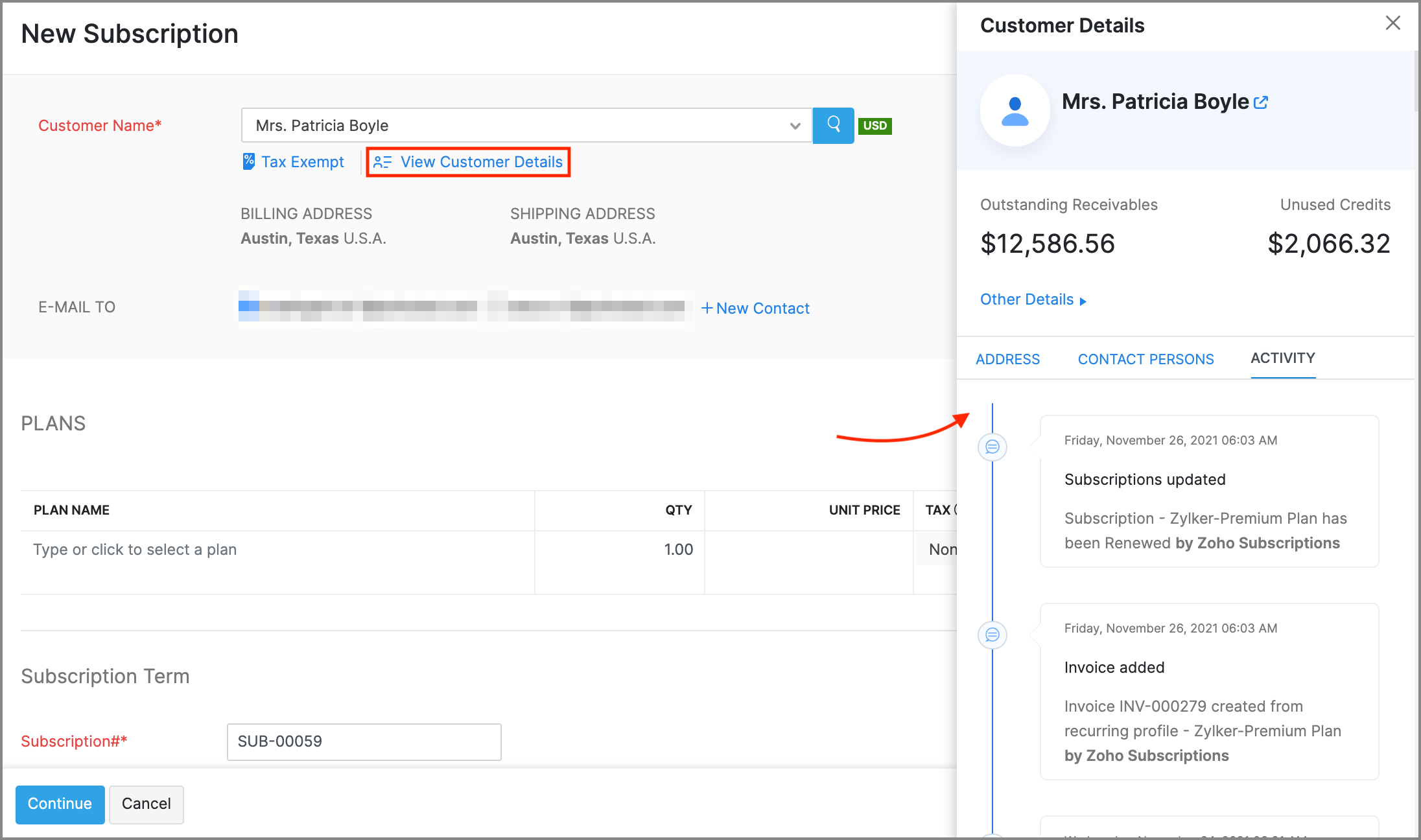
- Subscriptions: New features like creating customers on the fly, contextual customer details, and Advanced Search for customers will make it much faster to create new subscriptions.
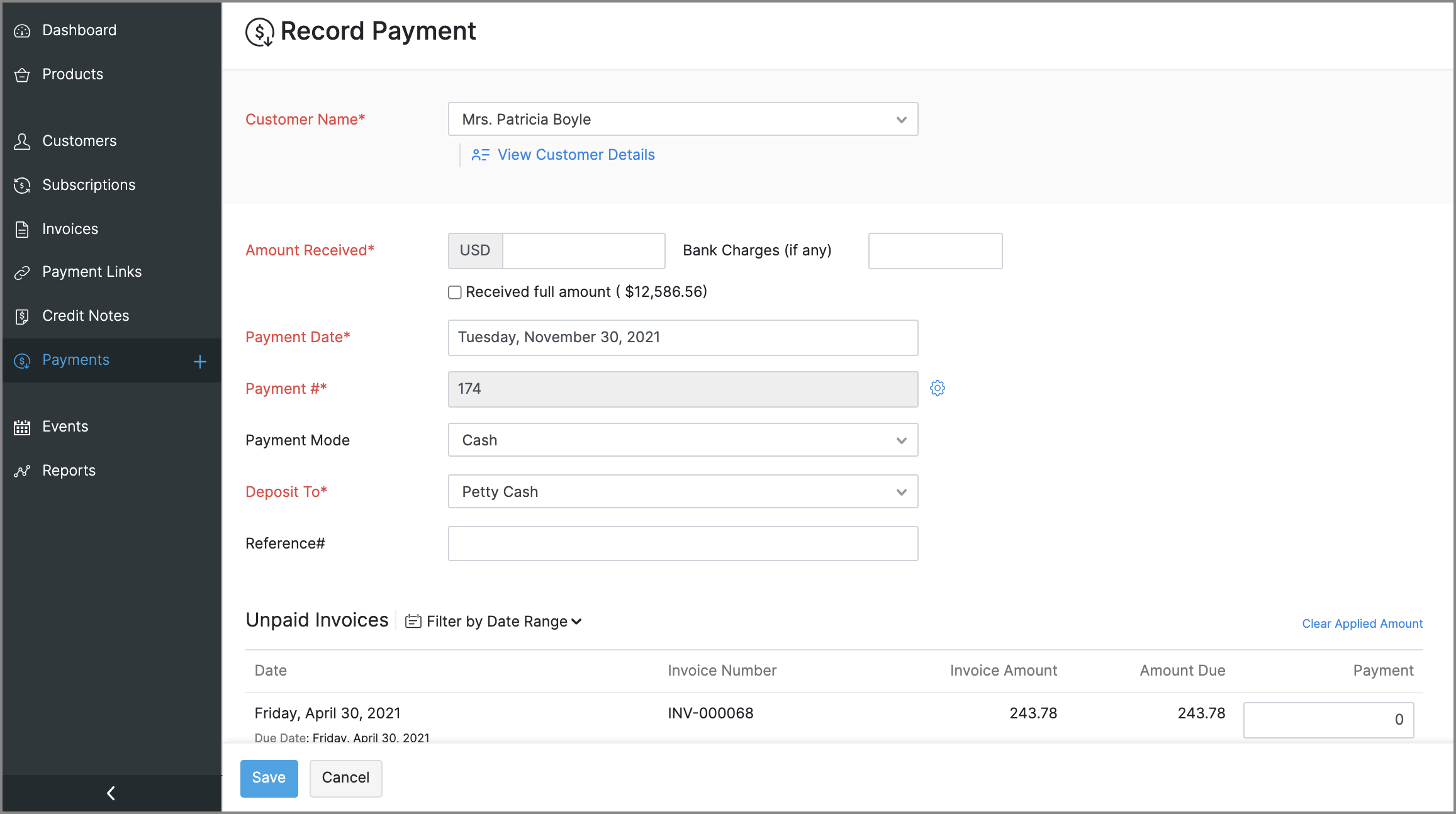
- Payments: The existing Transactions module will be renamed to Payments. You can use it to record or edit payments, view payment receipt PDFs, and perform an Advanced Search to find payments easily.
General usability improvements
Throughout the app, you will find changes that aid with usability and accessibility. Here are some that will be evidently visible:
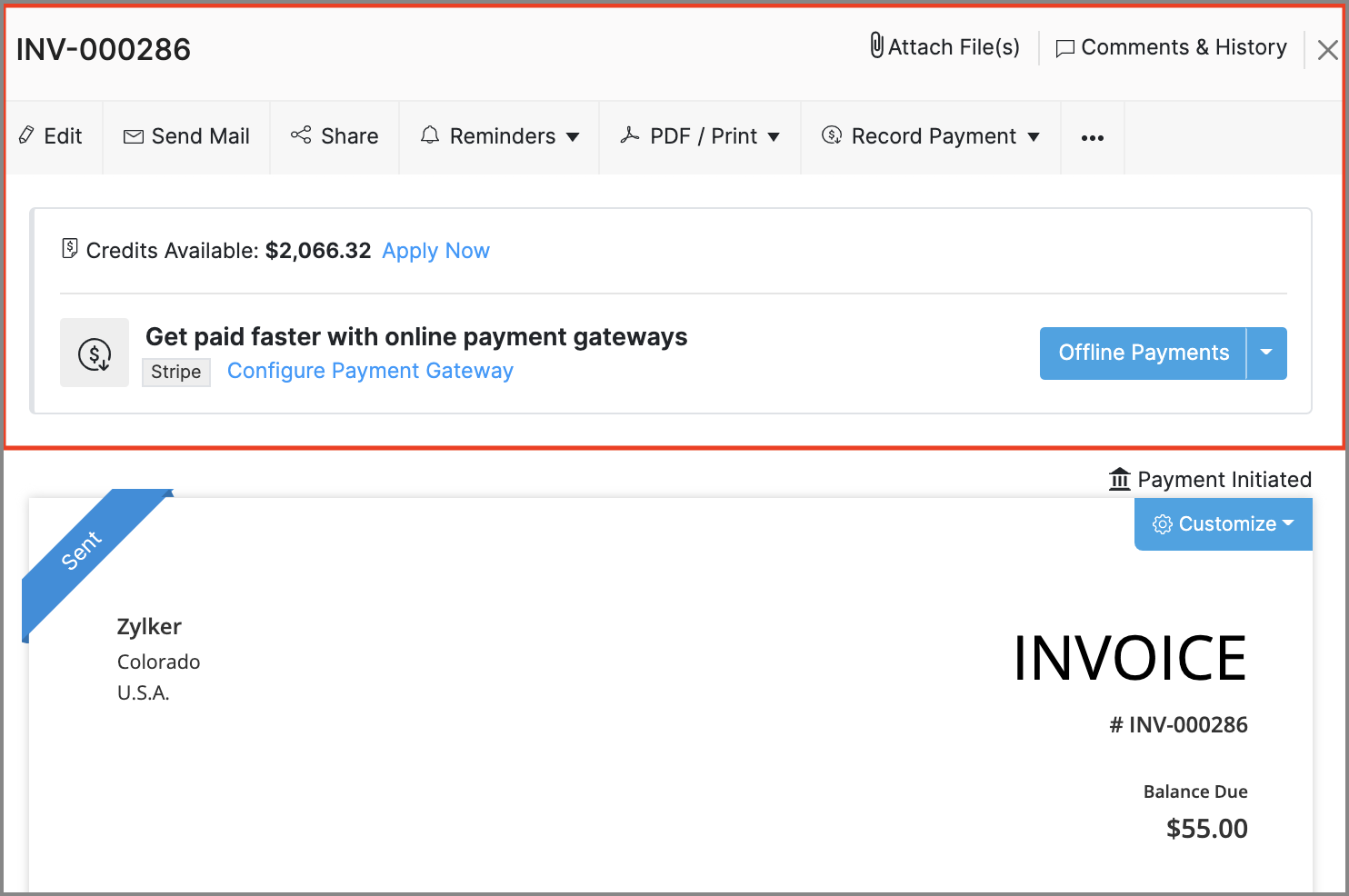
- Invoice Details: The action bar in the invoice details screen has been revamped. The new design adds text to previously standalone icons and also groups certain options to make them easier to find.
- Recent Activities: The recent activities dropdown, that's always present near the search bar will assist in navigation by listing any transactions or customers that have recently been updated, created or visited.
- Online Payments: The Online Payments section in Settings > Integrations, will be moved out to its own spot in Settings, and all the payment gateway integrations that are available will be grouped based on the type of payment methods that they support.
- Right-to-left interface: If your organization's language is set to Arabic, Zoho Subscriptions' entire interface, including navigation bars and other visual elements will be switched to a right-to-left style, so Arabic speakers will feel right at home.
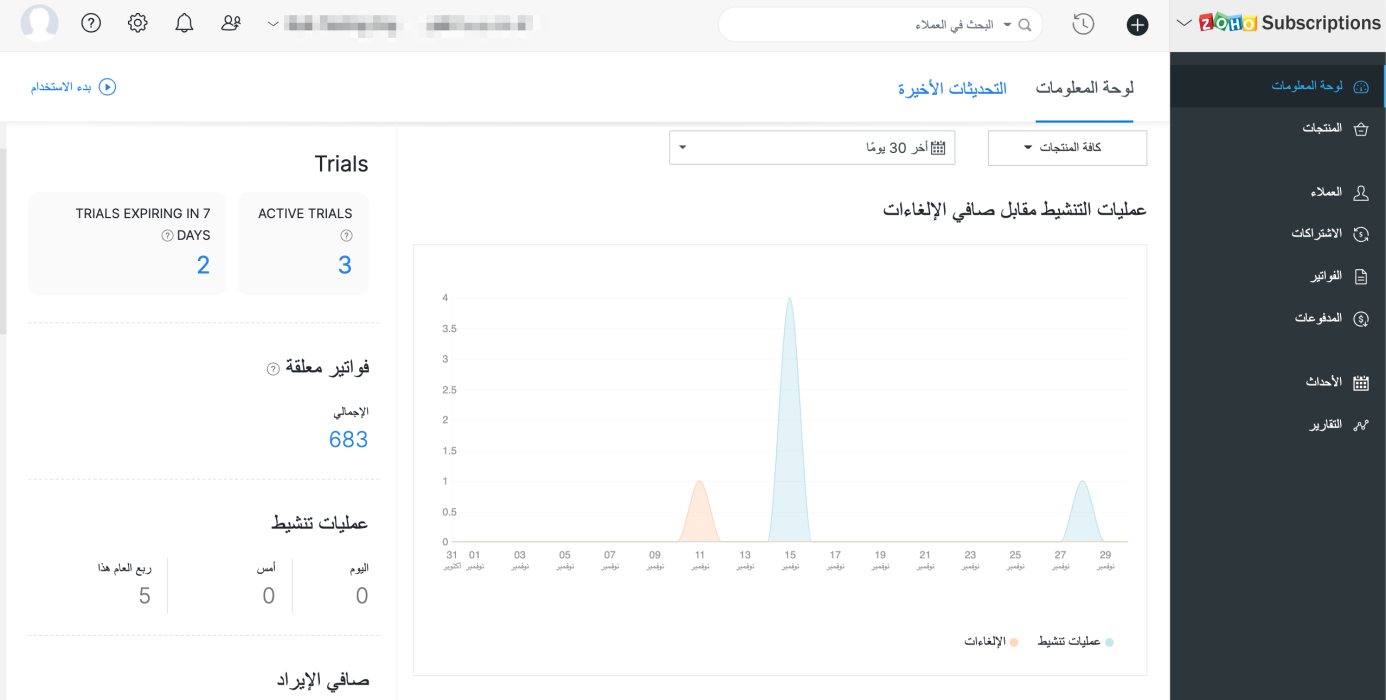
New and improved settings
Apart from bolstering some existing modules with more preferences, there will also be new sections in Settings, to accommodate preferences for the newly added features.
Here's what will change in Settings:
- Users and Roles: You will be provided with an extensive range of configurations for how users can access reports.
- Templates: The existing Templates section will house templates for two new documents: Customer Statements & Payment Receipts. The template editor will also see improvements, such as the ability to add annexure content and adjust the width of individual rows in item tables.
- Reporting Tags: A new section to manage reporting tags will be added.
- Emails: The existing Email Notifications section will be renamed to Emails, and will direct towards Sender Email Preferences, Email Insights, and templates for email notifications.
The following changes will be made in Settings > Preferences.
- General: This is a new section that will contain common preferences, such as options for your organization's address format or PDF attachments in emails.
- Payments: The existing Payments section will be renamed to Payments Received, along with preferences fo custom fields and custom buttons.
- Delivery Notes & Packing Slips: These are two new sections, which will let you configure the layout and label names for delivery notes and packing slips.
- Users: This is a new section which will allow you to configure custom fields for the users of your organization.
These are some of the major features and improvements that will be available in Zoho Subscriptions. We'll reveal a full list of the new features and shed more light on the ones mentioned above soon.
We'll release these features in the weeks that follow. We can't wait for you to try them out! You can also write to us at support@zohosubscriptions.com if you'd like early access to these features. Your feedback is valuable to us, so make sure to let us know what you think about these updates in the comments below!
Best regards,
The Zoho Subscriptions Team
Topic Participants
Varun Steven
OfficeServ Accounts
Jim Kubicek
Trey Shadwick
pmc
Sticky Posts
What's New in Zoho Billing - February 2024
Hello everyone, We are excited to share the first set of updates for Zoho Billing in 2024. Read along to know more about a wide range of updates, from the Aging Summary in customer statements to Apple Pay support in Stripe. One-Time Invoice with PlansZoho Finance Workshop 2023 is coming to the USA. Get exclusive training on Zoho Finance apps, one-on-ones, and more.
Hello all, We'd like to invite you to our biggest Zoho Finance workshop in the United States. After a brief break, we are excited to be back. This year, we're bringing together our customers and community members for two days of curated hands-on sessions,Zoho Subscriptions wins IDC's 2020 SaaS CSAT Award for Subscription Billing
Dear customers, We're excited to share that Zoho Subscriptions has won IDC's 2020 SaaS Customer Satisfaction Award! As a team, we cherish each and every milestone with our customer community. And this particular award, focusing on customer satisfaction,Introducing: SMS notifications via Zoho Subscriptions
Dear customers, We hope you are doing well! We are happy to announce that you can now send SMS notifications to your customers right from Zoho Subscriptions. To facilitate this, we've integrated with Twilio, a leader in the business communication space.What's new this December in Zoho Subscriptions
The year is almost over and we here at Zoho Subscriptions have released new features and updates on the month of November. Let's take a look at the features we have worked on in the past month. Zendesk Integration The Zoho Subscriptions app for Zendesk allows your customer support executive to access customer details in an instant. You will be able to view the customer information from Zoho Subscriptions right from your ticket view. On enabling the integration, you will be able to: Get your customer
Recent Topics
Any insights about API/v2? Having problem for a while.
I don't know why it is throwing a 404 error, my report name is correct. Has someone had this issue and how you fix it?Edit QR code with redirect to form
Guten morgen, wir haben ein Formular Reklamation_erstellen. Dort soll ein QR Code erstellt werden, der im Lieferschein angezeigt wird. Beim Scannen auf dem soll das jeweilige Formular zum BEARBEITEN geöffnet werden. Leider bekomme ich es nur so hin, dassGetting all the ingredients together for baking an app
Good day everyone. After reading a lot of the help docs and watching videos, I now started on my app. To prevent hours and hours wasted on going down the wrong track, I would like some clarification on the following. But first some background: I haveHelp Needed with Configuring ZC Microservice
I'm attempting to create a simple microservice, but am running into problems with scope and auth. Using Custom API Builder, here's my setup: 1. Method: GET 2. Auth: OAuth2 3. User Scope: All users 4. Response: Standard 5. Function: A function that returnsCreator Simplified #10: Predefine Form Field Values and Make Them Read-Only for Users
Hey Creators, Ready for this week's tip in the Creator Simplified series? Today, we will explore how to have read only fields in a form. Use Case: Assume a scenario where the default value for a Department field needs to be English Literature, but youZoho Mail : Email Outgoing Blocked
I suddenly received the following message yesterday. I cannot send any mail. Please resolve as soon as possible, I cannot work without sending email. Dear User, We regret to inform you that your email outgoing has been blocked and you will not be ableCreator and Tables
Good day. I am trying to create my first application. I have imported my data into Tables and am creating my app in Creator. I do not see my tables and cannot see how to write forms data to a table. Even the Workflow just uses the form. In one of thecustomer Name and address details
i created one application there is no customer details in that . how to add customer details andRecalculate every row in the subform
Hello, Can anyone help me with a script, please? I have an issue. Sometimes it happens, that in a multi row subform one of the rows show an incorrect row total value. Not really understand how it can happen, if I have a 20 row subform, 19 rows show correctCreating Repeat Forms that remove redundancies
I wanted to understand if you can make multi-layer forms that reduce the need for users to input information in again and again. We want a form that our suppliers fill out per ingredient they sell, and the end result should have the Ingredient (SectionWhat is the difference between the free plan and the mail lite plan?
What is the difference between the free plan and the mail lite plan? How many emails can I send per day?Unblock email
Hi The outgoing mail from a client of me is blocked. I already made tickets and tickets are send to the EU desk but nobody is responding. The problem is already 4 days! There is absolutely no help from the support. I am really not satisfied at all! CanDomain verification failure
Hello Zoho Support, I purchased my domain directly through Zoho Mail, but the domain verification keeps failing with the message “TXT verification failed.” I’ve already waited and retried several times, but it still won’t verify. Could you please manuallyUnable to send message;Reason:554 5.1.8 Email Outgoing Blocked.
My email account is unable to send emails, and I urgently need to use it. How can I resolve this?If there is anything we have done wrong, please let us know in advance so we can actively cooperate to improve. User ID: 850482493URGENT: Email stopped workin - can't access admin panel
For some reason email sending stopped working. When I try to send an email it fails with "Unable to send message;Reason:451 4.7.1 Temporary system error" I can receive email just fine I see in my notifications some errors about the MX records, howeverCan I associate an invoice to a Project after the fact?
We have generated an invoice but would like to assoicate it to a Zoho Project after the fact. Is there any way to accomplish that? Thanks, ScottEmails I send as a cc or bcc NEVER GO THROUGH TO THA RECEIVER !!
every time i send a cc or bcc copy of an email to anyone when I’m using my zohomail.com email - no one ever gets the cc of bcc copy if the email: why???? And i triple check that the email addresses are correct; then i get back an email message (EVERYTIME)Cannot see correct DNS config for mail after moving domain to another provider
I have moved my domain from one provider to another and after that zoho mail stopped working (expected). Problem is, zoho mail admin panel still shows (10 hours after move) that all records are correct while I haven't changed anything in my domain DNSAdd Support for Authenticator App MFA in Zoho Desk Help Center
Hello Zoho Desk Team, We hope you are doing well. We would like to request an enhancement related to security for the Zoho Desk Help Center (customer portal). Currently, the Help Center supports MFA for portal users via SAML, JWT, SMS authentication,Auto-fill Contacts in Zoho Mail not working for me
We just switched to Zoho Mail for our company, and I am noticing that the "auto fill" feature when composing an email -- where the "to" field is autofilled (like in the attachment) from Contatcts works for everyone except me. Any way I might have madeHow to unlink a SAML user from the existing Zoho Desk user (domain change case)
Hi everyone, I’m trying to understand how to handle a situation where a customer changes their company domain. In our setup, users authenticate via SAML, so when the domain changes, the SAML system treats them as a new user. However, in Zoho Desk, I’dPrice Managment
I have been in discussions with Zoho for some time and not getting what I need. Maybe someone can help explain the logic behind this for me as I fail to understand. When creating an item, you input a sales rate and purchase rate. These rates are justRelated to zoho survey
Hi team. I want to know something regarding zoho survey question builder. I have two questions each of dropdown (One answer) - question type. In the first question, there are 16 answer choices and in the second question, there are 3 answer choices. ForText Message
When trying to sent a text message, it says its an error i should contact a zoho agentZoho POS is now available for Canadian retailers
Hey everyone, We're excited to introduce the all-new Canadian edition of Zoho POS, which helps retail businesses simplify and manage their end-to-end business operations. Start by signing up and exploring the 15-day free trial. Sign up now How does ZohoPayroll In Canada
Hi, When can we expect to have payroll in Canada with booksMass update to change or shift all project dates and keep project structure + shift all sub-tasks dates with main tasks
Most users would expect that if they change the start date of their project then that will be reflected inside the actual project and any project structure would be retained. Additionally if a task list with associated sub-tasks is moved, most users would expect that those sub-tasks would also be moved along with their parent task. This is not the case. For a total Project shift of dates: * the start and end date from > "Edit Project" page can have a radio button added to "shift all project tasksClosing Accounting Periods - Invoice/Posting dates
Hi, I have seen in another thread but I'm unsure on how the 'transaction locking' works with regards to new and old transactions. When producing monthly accounts if I close December 24 accounts on 8th Jan 25 will transaction locking prevent me from postingIn-person ZUG Meetups for Real Estate Professionals - US Q1 2026
The Real Estate Zoho User Group is going on a multi-city, in-person meetup tour across the US, and we’d love to see you there! These meetups are a great opportunity to: Connect with fellow real estate professionals using Zoho Share challenges and discoverZoho CRM custom fields not showing in zoho creator
Hi Team, I have created a Products form with Zoho CRM integration and connected it to Products module of CRM. But when I see the reports of Products in Zoho creator then I am not able to see custom fields of Products module. Only standard fields of ProductsSending email notifications based on language
Hello. I would like to know how we can bypass the default notifications (which are just in English) for when a ticket is created/replied to/closed, to be in other languages, based on the language field in the ticket? I can create other email templates,Zoho Error: This Operation has been restricted. Please contact support-as@zohocorp.com for further details
Hello There, l tried to verify my domain (florindagoreti.com.br) and its shows this error: This Operation has been restricted. Please contact support-as@zohocorp.com for further details. Screenshot Given Below - please check what went wrong. ThanksDownload a file from within a zoho creator widget
I have a widget running in Zoho Creator , it displays uploaded documents in a table file, and I have added a download link in the view. ( The widget is created with html, css and javascript). I do not succeed in getting the download working. Do I haveZoho / Outlook Calendar sync
The current Marketplace -> Microsoft -> Meetings integration needs 2 changes. 1. The current language for the Two-Way sync option should be changed. It currently states, "Sync both your Zoho CRM Calendar and Office 365 Calendar meetings with each other."Email content just contain 'OK' ,not what we expect
create campaign API URL: https://campaigns.zoho.com/api/v1.1/createCampaign req params: {'campaignname': 'General_Outreach_d0cfc415-43aa-4b96-bb09-558e76a3dda3_50_20251117_214806_660', 'from_email': 'admin@allinmedia.ai', 'subject': 'ALL IN MEDIA', 'list_details':Possible to connect Zoho CRM's Sandbox with Zoho Creator's Sandbox?
We are making some big changes on our CRM so we are testing it out in CRM's Sandbox. We also have a Zoho Creator app that we need to test. Is it possible to connect Zoho CRM's Sandbox to Zoho Creator's Sandbox so that I can perform those tests?Reopen ticket
Hello! Can I reopen a ticket just using the API ticket/sendReply ? What's the rules to do it? I'm trying but it doesn't reopen the ticket, it just send the replyAllow Admins to Transfer Ownership of Their Own Files & Folders
Hi Zoho WorkDrive Team, Hope you are doing well. We would like to request an important enhancement to the ownership-transfer functionality in Zoho WorkDrive, specifically regarding administrator capabilities. As administrators, we have the ability toTip#46: Capture accurate log hours
Hello everyone, Use the newly introduced timer settings that will streamline the usage of timers and help admins or workspace owners to manage the time entries of the workspace users better. Check out the below mentioned timer settings added to the TimesheetMoving to app-specific authentication for Google integrations
Hello everyone, We’re making an important change to how Google integrations work in our platform. Until now, we used a common Google project across Zoho to enable integrations like Google Drive, Calendar, and more. Going forward, we’ll be moving to anNext Page