Visualize your data with a new set of charts: Treemap, Butterfly, Sankey, and Cluster charts in Zoho CRM
Dear customers,
When it comes to analytics, it's not just about the numbers; it's about understanding the story behind them.
With that philosophy in mind, we’re excited to introduce a line of representations to the existing array of chart types in Zoho CRM: Treemap, butterfly, sankey and cluster charts. Let's go!
Treemaps
Treemap charts are used to visually represent hierarchical datasets in a rectangular layout. It aligns its parent categories as larger tiles with their sub-categories nested within them. The size of each tile is proportional to its corresponding value, making it easy to compare different segments within the hierarchy.
This is how a treemap chart looks:

These structured data representations help you understand overall performance and contributions, as well as compare participating entities at a glance.
Unlike traditional bar charts or pie charts, treemaps can be used if your datasets are large and exhibit parent-child relationships.
Here are some examples to better understand their usage:
Comparing revenue distribution between functions
A company's revenue is distributed among its functions before it gets further disbursed to its employees. Treemap charts can be used to depict this distribution and compare it between functions. As you can see below, the hierarchy can be represented as a treemap to compare it directly with other functions:

The hierarchy at the top shows just the numbers and levels, but the treemap chart represents the numbers proportionally, allowing leaders to visualize the difference in distribution.
Interpretation: As you can easily see in the treemap, sales and marketing receive the same amount of revenue, while engineering is given significantly more than the other two.
Likewise, with treemap charts, you can:
- Compare popular lead sources with lead counts is the measure and lead source being the participating entity—a classic single-grouping configuration.
- View cost savings achieved across departments. With the departments as the grouping parameters and the cost saved as the measured amount, the chart lays out all the departments as tiles in proportion, based on money saved.
- Compare ad spends across channels, where channels are the parent grouping and ad spend is the measured unit.
Butterfly
Butterfly charts are used to compare two related datasets side-by-side, resulting in a representation that looks like a butterfly or tornado.
Now, how does it differ from bar charts?
The standard bar chart can compare two entities for a given measure. Say, you are comparing the performance of Mary and Charles. The two users' data is represented using bars, and the length will denote their performances. But, when it comes to comparing their performances over a period or their contribution across different stages, a bar chart is not sufficient.


With butterfly charts, you can:
- Compare revenue between two of your branches each month. With branches being compared for sum of sales revenue, grouped by closing date.
- Compare the performance of two reps in a given quarter. Compared between two users for average of amount of deals, grouped by closing date until today.
In addition to the user-based comparison above, butterfly charts are well-suited to visualizing other types of data comparisons, like:
- Picklist-based comparisons
- Duration-based comparisons
- Aggregate-based comparisons
Business scenario
Comparing the number of deals closed for each lead sources: Duration-based comparison
You can identify the productive lead source by comparing the number of deal closures for every lead source in your organization based on their closing week.

Analyzing effective sales methodology, inbound vs. outbound: Picklist-based comparison
Businesses use both inbound and outbound lead generation strategies, and each of these methods can reap different results based on the season and occasion. By comparing inbound versus outbound each month, you can identify which works best at what time.

Analyze the amount versus the expected revenue between accounts: Aggregate-based comparison
Expected revenue is a result of a deal's progression in the sales pipeline. Comparing the amount versus their expected revenue will not only help visualize the expected revenue of participating accounts but also indicate the accounts' stage in the sales pipeline.

Sankey
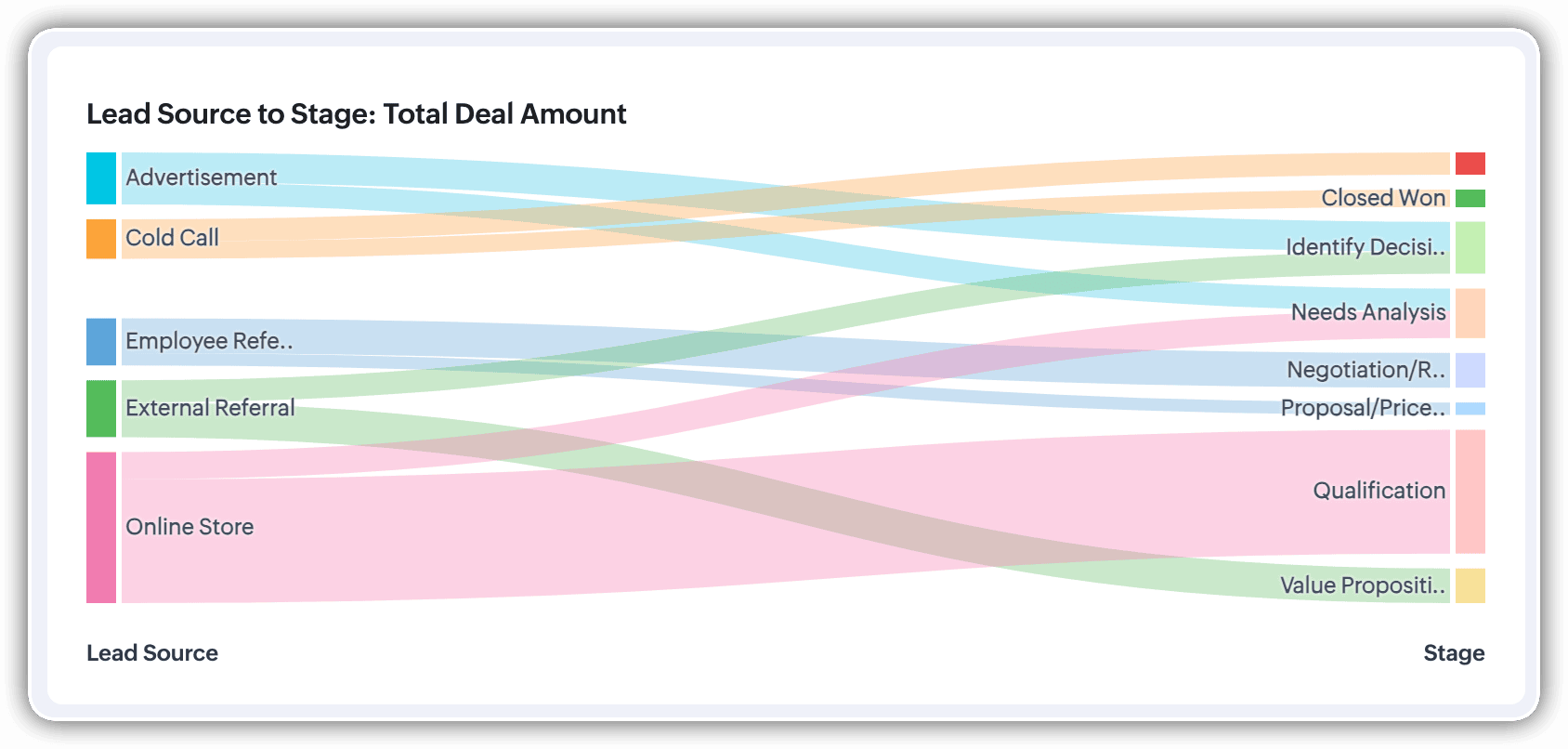
A Sankey Chart is designed to visualize the movement of data across different data groups. Unlike traditional charts—such as bar, column, pie, or donut—that mainly provide a static distribution of values, the Sankey Chart focuses on illustrating the flow between multiple segments or grouping fields. This makes it an ideal choice when you want to track how values (like lead counts, revenue, or deal statuses) move from one category to the next.

Key features
- Flow visualization: With the Sankey Chart, you can observe the movement of data between different groups.
- Multiple grouping fields: This chart works best when you have at least two grouping fields. You can go even further and add a third grouping to see an even more detailed mapping of your data flow.
- Simple configuration: The configuration for the Sankey Chart is as simple as any other chart type in Analytics.
Business scenarios:
Imagine you’re a sales manager trying to get a better handle on your team’s performance and your company’s pipeline. You want to understand not just how many deals are coming in, but also which sources are contributing the most value—and how those deals are progressing through different sales stages.
Let’s say you want to understand which lead sources are driving the most deal activity and how those deals progress through the pipeline. You can create a Sankey chart that maps the count of deals from Lead Source to Stage.

After analyzing the chart, you might notice that Online Store brings in a high volume of early-stage deals, while sources like External Referral contribute fewer deals that are more likely to reach advanced stages like Proposal or Negotiation.
This insight helps you prioritize nurturing the most profitable channels.
Sankey charts can also be helpful in other operational scenarios where understanding transitions across stages or teams is essential:
- Regional revenue distribution: Visualize how revenue flows across different regions, product categories, and their corresponding annual revenue. This helps you compare which regions contribute the most to each product line and where your high-value segments lie.
- Ticket handling flow: Visualize the flow of support tickets from their origin channel to internal departments and finally to resolution statuses. This can reveal workload imbalances or common points of delay in your support process.
Cluster
A cluster chart is similar to stacked column charts, but instead of stacking horizontally, the data is represented as vertical bars. As you create a column chart with multiple groupings, you can change the type of column chart to a cluster chart to achieve this representation.

In the above image, you can see the stacked column chart compares the number of lead conversions based on popular sources between countries. The stacks appearing on top of existing stacks ask you to calibrate the record count (y-axis) based on the previous stacks, which can lead to inaccurate interpretations. In this case, a cluster representation will paint a clearer picture of the analyses.
Other minor enhancements:
In addition to the three charts we mentioned above, we've also made the following minor changes:
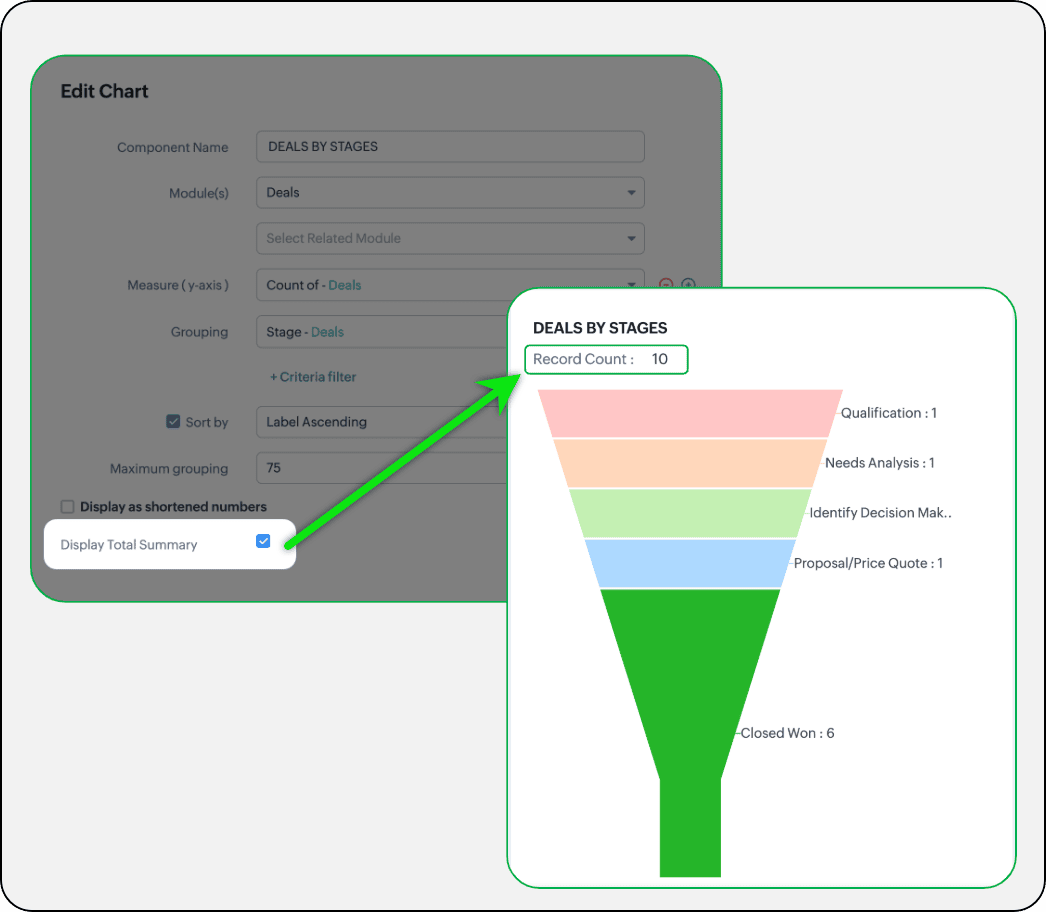
- Display total summary: Thus far, for all charts, each participating measure included labels. Now, to better understand overall contributions, a check box to display the total summary is provided under More options on the Chart Configuration page. Based on the configuration, the total revenue or the rolled-up quantities will be prominently displayed.
- Merge Y-axis: For charts that use two y-axis measurements, the intention is to view the progression of one entity against these two measures. Despite the scale, if the y-axis on the left is disproportionate to the values of the y-axis on the right, the plotted graph will result in a graphically and logically incorrect representation.
As you can see in the image below, the plot area of the sum of amount bar and the sum of expected revenue aligns close together, while, the difference between $700,000 and $40,500 is drastic, creating inaccurate interpretations.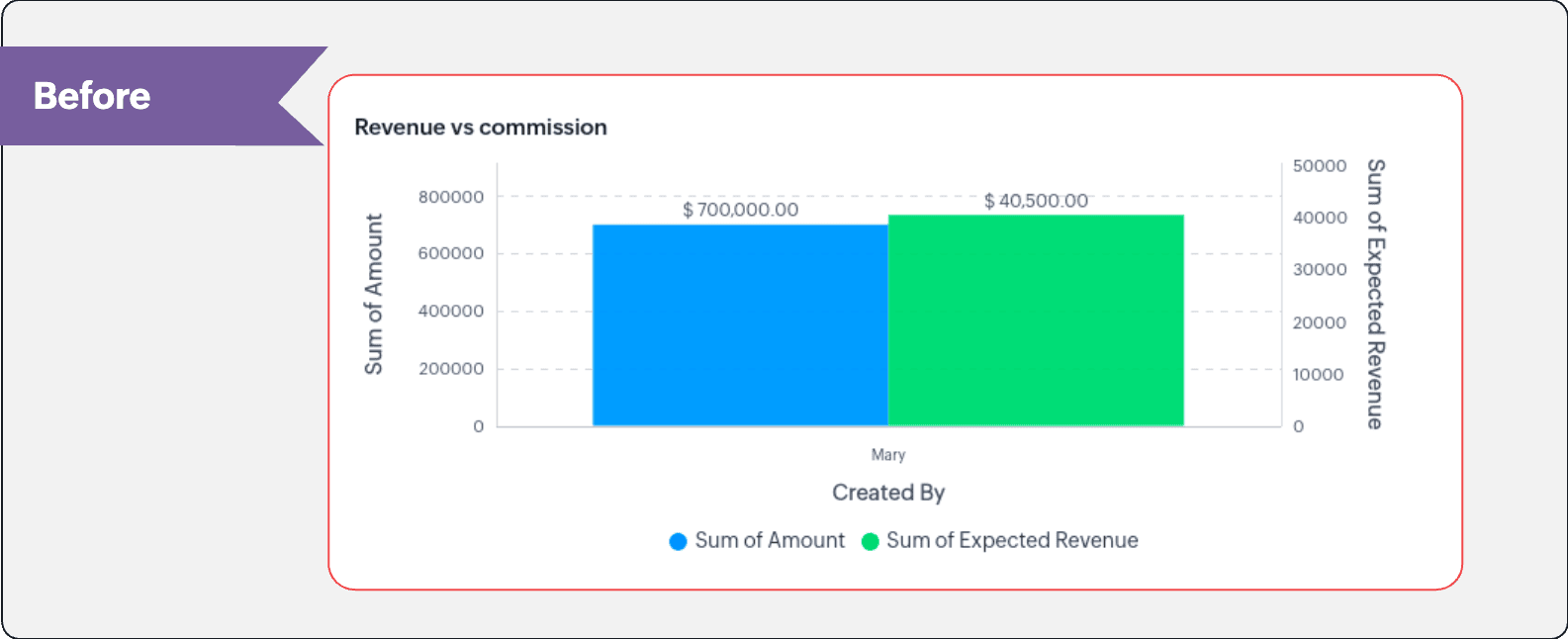
In this enhancement, we're allowing neighboring values of measures to merge so that the interpretation can be more visually accurate.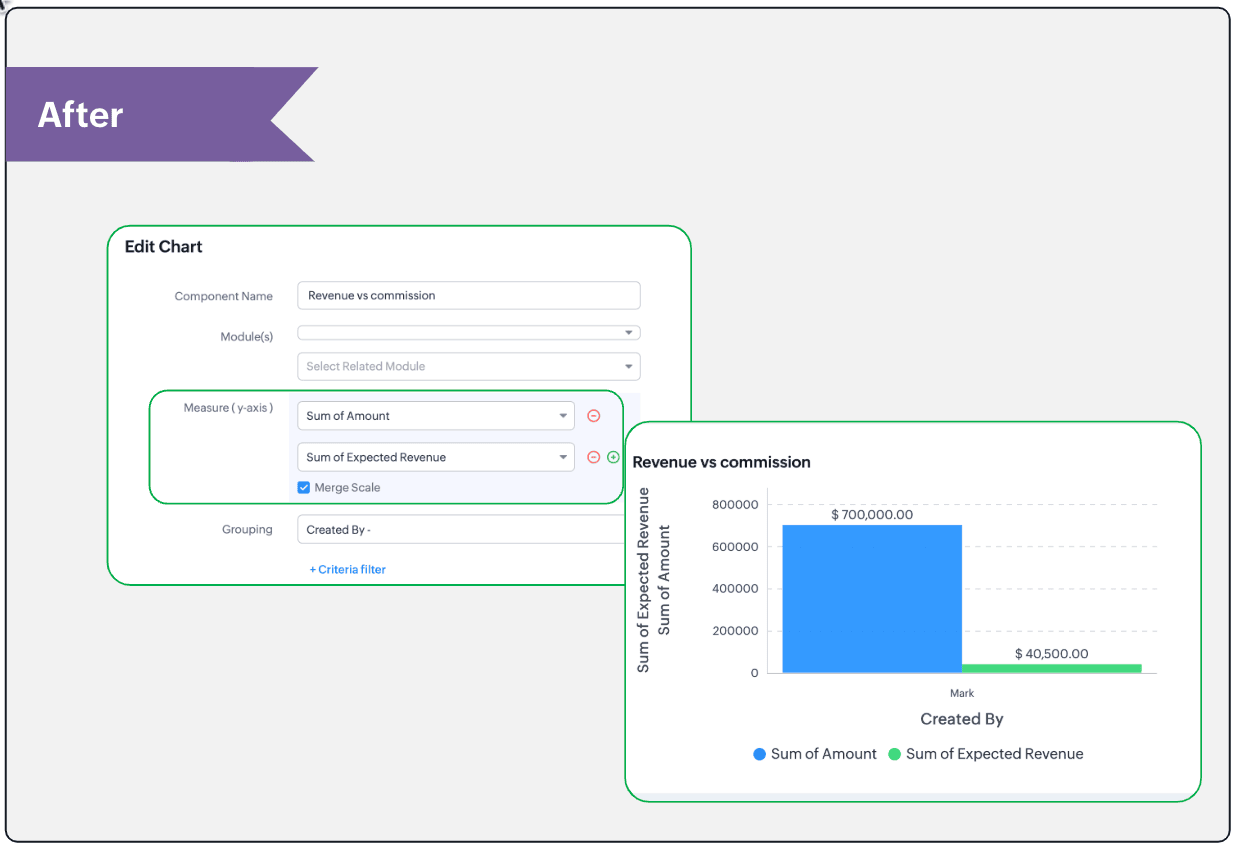
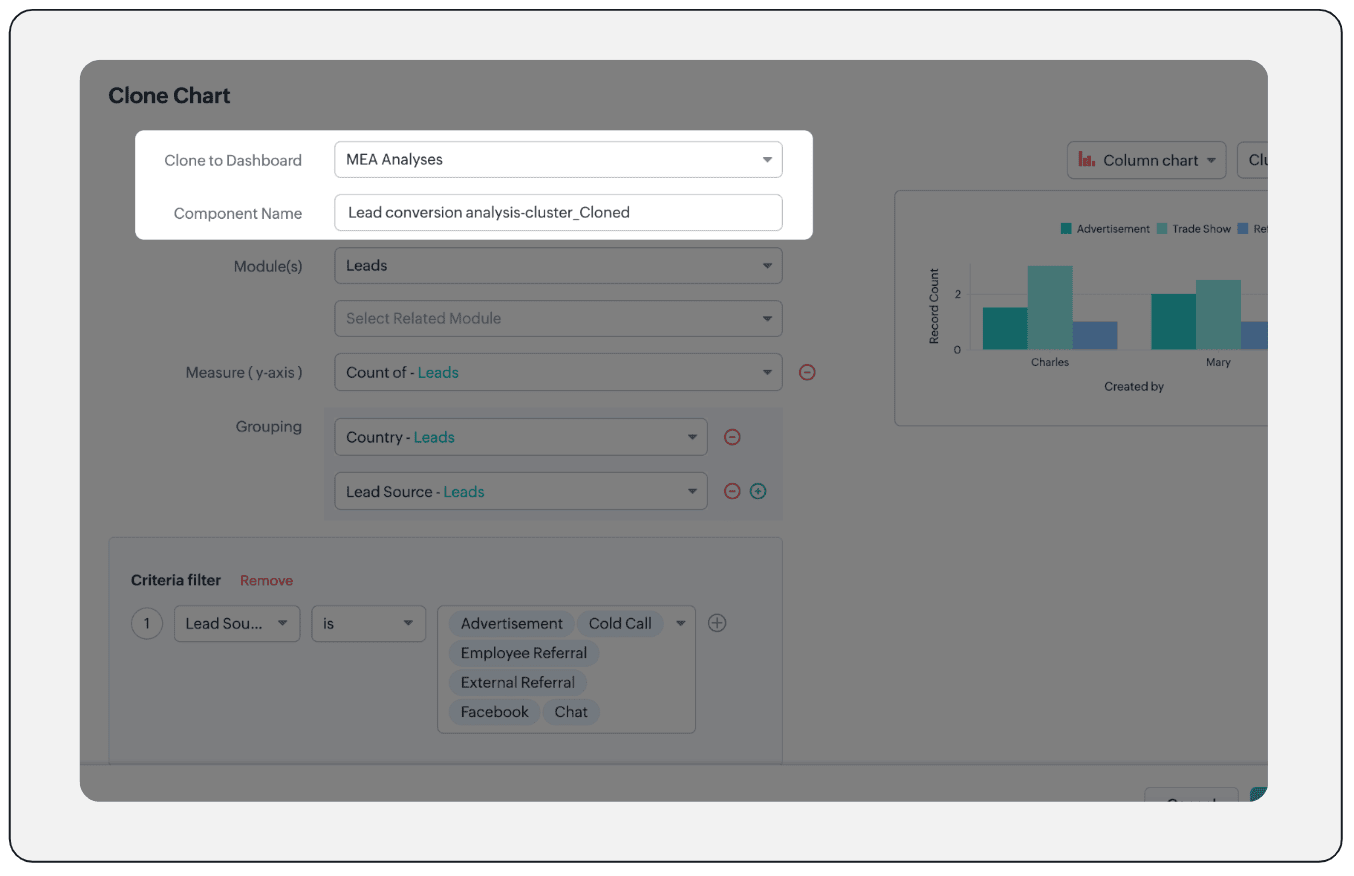
- Clone components to a different dashboard: Dashboards in Analytics serve in unique ways for various audiences—there can be separate dashboards for the sales team, marketing team, engineering team, and so on, and the chances of using the same measure for reference is common. Thus, when you clone a chart, you can now determine the target dashboard in which the cloned chart can be placed.
Resource: Help document
Thanks and have a good one!
Kind regards,
Saranya Balasubramanian
Saranya Balasubramanian
Topic Participants
Saranya Balasubramanian
Sticky Posts
Presenting ABM for Zoho CRM: Expand and retain your customers with precision
Picture this scenario: You're a growing SaaS company ready to launch a powerful business suite, and are looking to gain traction and momentum. But as a business with a tight budget, you know acquiring new customers is slow, expensive, and often deliversGood news! Calendar in Zoho CRM gets a face lift
Dear Customers, We are delighted to unveil the revamped calendar UI in Zoho CRM. With a complete visual overhaul aligned with CRM for Everyone, the calendar now offers a more intuitive and flexible scheduling experience. What’s new? Distinguish activitiesCreate and populate a record in an instant: Introducing zero-shot field prompting to Zia's ICR
A couple of months ago, we upgraded our in-house AI image detection and validation tool, Zia Vision, with intelligent character recognition (ICR). By training Zia with sample images, you could create and enrich CRM records with data extracted from standardIn-person ZUG Meetups for Real Estate Professionals - US Q1 2026
The Real Estate Zoho User Group is going on a multi-city, in-person meetup tour across the US, and we’d love to see you there! These meetups are a great opportunity to: Connect with fellow real estate professionals using Zoho Share challenges and discoverNimble enhancements to WhatsApp for Business integration in Zoho CRM: Enjoy context and clarity in business messaging
Dear Customers, We hope you're well! WhatsApp for business is a renowned business messaging platform that takes your business closer to your customers; it gives your business the power of personalized outreach. Using the WhatsApp for Business integration
Recent Topics
Zoho CRM custom fields not showing in zoho creator
Hi Team, I have created a Products form with Zoho CRM integration and connected it to Products module of CRM. But when I see the reports of Products in Zoho creator then I am not able to see custom fields of Products module. Only standard fields of ProductsSending email notifications based on language
Hello. I would like to know how we can bypass the default notifications (which are just in English) for when a ticket is created/replied to/closed, to be in other languages, based on the language field in the ticket? I can create other email templates,Zoho Error: This Operation has been restricted. Please contact support-as@zohocorp.com for further details
Hello There, l tried to verify my domain (florindagoreti.com.br) and its shows this error: This Operation has been restricted. Please contact support-as@zohocorp.com for further details. Screenshot Given Below - please check what went wrong. ThanksDownload a file from within a zoho creator widget
I have a widget running in Zoho Creator , it displays uploaded documents in a table file, and I have added a download link in the view. ( The widget is created with html, css and javascript). I do not succeed in getting the download working. Do I haveCorrelated subqueries not supported in Zoho Analytics. This creates huge limitations
Running into a major limitation in Zoho Analytics: correlated subqueries simply don’t work, even in completely standard SQL patterns inside a JOIN. Example: LEFT JOIN "Bills" b ON d."Id" = b."Deal ID" AND EXISTS ( SELECT 1 FROM "BillZoho / Outlook Calendar sync
The current Marketplace -> Microsoft -> Meetings integration needs 2 changes. 1. The current language for the Two-Way sync option should be changed. It currently states, "Sync both your Zoho CRM Calendar and Office 365 Calendar meetings with each other."Email content just contain 'OK' ,not what we expect
create campaign API URL: https://campaigns.zoho.com/api/v1.1/createCampaign req params: {'campaignname': 'General_Outreach_d0cfc415-43aa-4b96-bb09-558e76a3dda3_50_20251117_214806_660', 'from_email': 'admin@allinmedia.ai', 'subject': 'ALL IN MEDIA', 'list_details':Possible to connect Zoho CRM's Sandbox with Zoho Creator's Sandbox?
We are making some big changes on our CRM so we are testing it out in CRM's Sandbox. We also have a Zoho Creator app that we need to test. Is it possible to connect Zoho CRM's Sandbox to Zoho Creator's Sandbox so that I can perform those tests?Reopen ticket
Hello! Can I reopen a ticket just using the API ticket/sendReply ? What's the rules to do it? I'm trying but it doesn't reopen the ticket, it just send the replyAllow Admins to Transfer Ownership of Their Own Files & Folders
Hi Zoho WorkDrive Team, Hope you are doing well. We would like to request an important enhancement to the ownership-transfer functionality in Zoho WorkDrive, specifically regarding administrator capabilities. As administrators, we have the ability toTip#46: Capture accurate log hours
Hello everyone, Use the newly introduced timer settings that will streamline the usage of timers and help admins or workspace owners to manage the time entries of the workspace users better. Check out the below mentioned timer settings added to the TimesheetMoving to app-specific authentication for Google integrations
Hello everyone, We’re making an important change to how Google integrations work in our platform. Until now, we used a common Google project across Zoho to enable integrations like Google Drive, Calendar, and more. Going forward, we’ll be moving to anLost the ability to sort by ticket owner
Hi all, in the last week or so, we have lost the ability to sort tickets by Ticket Owner. Unlike the other columns which we can hover over and click on to sort, Ticket Owner is no longer clickable. Is it just us, or are other customers seeing this too?How Can i put a form in Zobot
Hi,how can i integrate a form which has a multiple options to choose from.the form should be opened or displayed by zobot after it meets a requirement in the conversation. Thanks in advance !Playback and Management Enhancements for Zoho Quartz Recordings
Hello Zoho Team, We hope you're all doing well. We would like to submit a feature request related to Zoho Quartz, the tool used to record and share browser sessions with Zoho Support. 🎯 Current Functionality As of now, Zoho Quartz allows users to recordZoho Analytics - Feature Request For Time Based Data Source Fetch
Hi Analytics Team, I have a client using Zoho CRM and they want a weekly report at 4:30pm every Friday, emailed to the sales team showing a pie chart of Closed Won Deals for that week. This is easy to achieve in Analytics but not so easy to ensure theWhich user's capacity is used for Shared Mailbox storage?
We use shared mailboxes at our company, and their size is increasing daily. Which user(s)'s total mailbox limit is being used up by this space?Inserting the current date / time
I'd like to use Zoho Notebook as a log - so it would be great to be able to insert the current date and time at the beginning (or end) of each my log/journal entries - or wherever I want. Something simple, like pressing a button/icon to insert it wherever my text cursor is. It could be formatted like "Mon Dec 11, 2017 - 11:43p".Campaign editor overrides href value
I've been trying to insert a deep link in an email campaign so recipients can directly open a native app on their device. My deep link looks something like "myapp://". The options to insert links in the campaign editor are limited to strict urls, emails,how to add subform over sigma in the CRM
my new module don't have any subform available any way to add this from sigma or from the crmBug Report and Suggestions for Improvement in Zoho Applications
Hi Zoho Team, I’d like to report a few bugs and improvement suggestions I’ve noticed while using Zoho products: Zoho Cliq Video Call: The camera sometimes turns off automatically during video calls. This seems to be a bug — please check and fix it. ZohoCanvas Flex Box containers should not require a width/height.
Flexbox containers are often used as organizational concepts, to ease re-flow on mobile etc. - I cannot use % for flexbox W or H - I cannot omit W or H This means that the content cannot dictate, and a Flexbox container cannot be used merely as an organizationalZoho Desk Android app update: Filter enhancement, Save Filters
Hello everyone! We have now enhanced the filter section on the ticket listing screen of Zoho Desk Android app as it is on the web(desk.zoho.com). Also, we have introduced an option to save filters for tickets on the mobile app. You can easily apply, rename,Very long loading times | bad performance [ZOHO DC: EU]
Hello there, we have recently noticed that the loading times have become extremely long when retrieving tickets and ticket details. For example, I open any ticket and get the following view. The subject and standard information (ticket owner, status etc.)Zia Profile Summary now supports six languages and responds faster
After numerous customer requests, we’ve expanded Zia Profile Summary to do more than just summarize resumes quickly. It can now summarize them in six different languages and deliver results even faster. What’s New 1. Extended language support Zia canIntroducing Zoho Show Android 3.0
Good ideas need the right space to grow. They deserve tools that move as fast as your thoughts and make creating feel effortless. And that is why we are bringing you Zoho Show Android 3.0! From a brand-new look and smoother navigation to improved collaborationProperly Capture Dropdowns & Hover Elements When Recording a Window/Tab
Hi Zoho WorkDrive Team, Hope you are doing great. We encountered a limitation when recording a selected window or browser tab: Certain UI elements, such as dropdown lists, hover menus, and overlays, are not captured unless we record the entire screen.Peppol integration zoho invoicefu
Hi, Belgium will require Peppol invoicing as of 2026. I found that this is being prepared for Zoho books, to be released in Sep 2025. Will Zoho Invoice get this functionality too? I like the Invoice app for my part-time side business as bike mechanicAllow Recording Only a Selected Portion of the Screen
Hi Zoho WorkDrive Team, Hope you are doing well. We would like to request a more flexible recording option in Zoho WorkDrive. At the moment, we can record either the entire screen or a specific window/tab — but not a custom selected portion of the screenRestricting Calendar View to Working Hours
Hi: I'm trying to implement a calendar which displays all of my customer appointments. Currently, the calendar shows all 24 hours of the day. Is there a way to restrict the hours to simply the times my business is open? Thanks!Add Camera Background Blur During Recording
Hi Zoho WorkDrive Team, Hope everything is well. We would like to request an enhancement to the video recording feature in Zoho WorkDrive. Currently, the camera preview displayed during a recording does not support background blur. This is an essentialAmazon FBA integration - Handle invoice reconciliation under different GSTINs,
Dear Zoho Community, Thank you for the clarification regarding the Amazon FBA integration, default warehouse, and GSTIN mapping in Zoho Inventory. I understand that Zoho currently supports only one warehouse for Amazon FBA, and that all FBA orders areWhatsapp Integration questions
Hi Questions: 1. Whatsapp messages are not reaching our CRM, is there a delay? 2. Is there any way to create a whatsapp catalog on a number that is integrated with ZOHO? 3. How do I configure my profile picture on a number that is integrated with ZOAllow Font Size 11 in Editors...
That is basic functionality...link mail.zoho.com/UnblockMe to unblock
Could you please unblock my account heloisa.bomfim@expansaodenegocios.comUnblocked me
Please can you help unblocked my account thanks materiauxjcbrunet2000@zohomail.comIntegrating External Portal Tickets Into Zoho Desk
A B2B travel company has a customer portal where clients can raise and submit tickets related to their bookings. These tickets need to be handled and managed in the backend through Zoho Desk. Ticket updates and replies from Zoho Desk should also be visibleShow unsubscribed contacts ?
Hello, I would like to display the unsubscribed contacts. Unfortunately, I do not have this subscription type as described in the documentation (https://help.zoho.com/portal/en/kb/marketing-automation-2-0/user-guide/contacts/contact-management/articles/subscription-type-24-1-2024#Subscription_Type_field.)Make Camera Overlay & Recording Controls Visible in All Screen-Sharing Options
Hi Zoho WorkDrive Team, Hope you are doing well. We would like to request an improvement to the screen-recording experience in Zoho WorkDrive. Current Limitation: At the moment the recording controls are visible only inside the Zoho WorkDrive tab. WhenSend WhatsApp voice messages from Bigin
Greetings, I hope all of you are doing well. We're happy to announce this enhancement we've made to Bigin. Bigin's WhatsApp integration now supports audio messages, so you can record and send voice messages. This makes it easier to handle customer questionsNext Page