What's New in Zoho Invoice | January - March 2025
Hello everyone!
We're excited to meet you with the latest set of feature updates and enhancements made to Zoho Invoice from January to March 2025.
In this, you will learn more about the following features:
Leave Organization
We've introduced the option to leave an organization from the Manage Organizations page. If you're an admin and have enabled any integrations in the organization, you'll need to disable them before leaving. However, if you're the admin who created the organization or the only admin, you will need to delete the organization.

Pin Columns in List Pages
You can now pin up to 2 columns to the left of a module's list page if you have more than 8 columns in the list page. The pinned columns stay fixed while scrolling horizontally through the table, making it easier to compare values with other columns while keeping the important columns in sight.
Here's how to pin columns in a list page:
- Go to any module from the left sidebar.
- Click the Toggle icon below the Filters dropdown.
- Select Customize Columns and pin the columns you want.
- Click Save.

Multi-Factor Authentication (MFA) in the Customer Portal
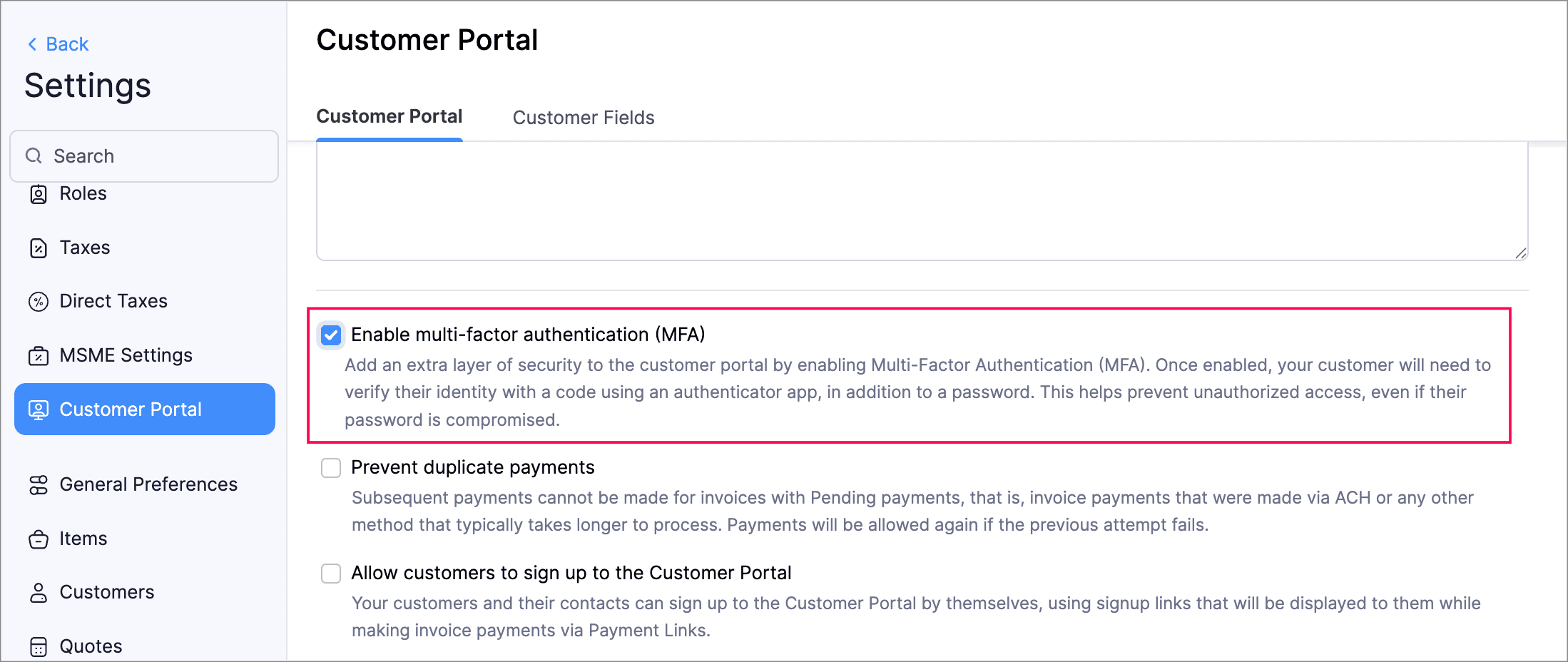
We’ve enhanced security of your customers' accounts with Multi-Factor Authentication (MFA) in the Customer Portal. MFA adds an extra layer of protection by requiring a Time-Based One-Time Password (TOTP) in addition to the login credentials Admins can enable MFA in the Customer Portal settings, making it mandatory for customers to configure it via an authenticator app. After setup, your customers must enter a TOTP code to log in. Admins can reset MFA if needed.

Your customers who have set up MFA must still enter the TOTP for logging into the Customer Portal, even if the MFA is disabled by the admins of your organization. If your customers lose access to their authenticator app, they should contact admins of your organization for resetting MFA.
Here's how to enable multi-factor authentication for your customer:
- Go to Settings > Customer Portal.
- Mark Enable multi-factor authentication (MFA).
- Click Save.
Income TCS Settings under Direct Taxes
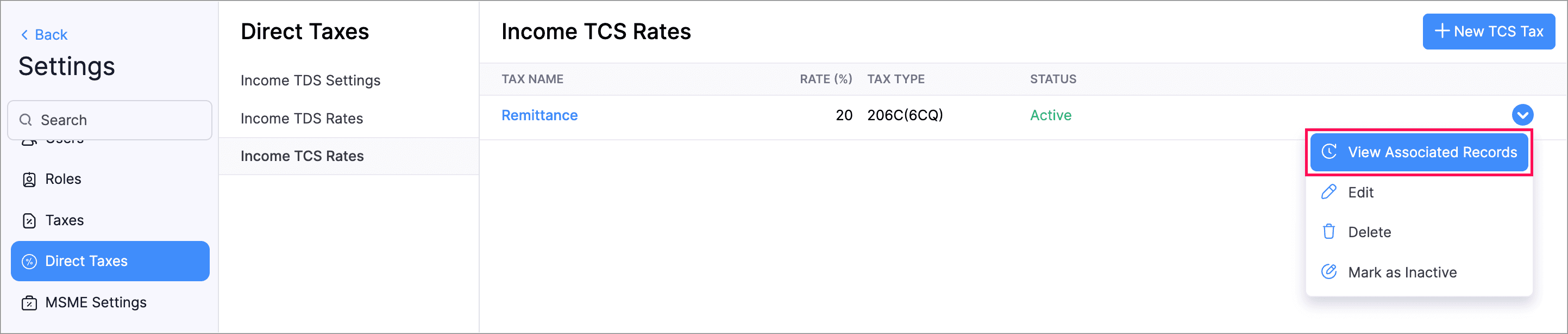
Zoho Invoice now allows you to create, edit, and view TCS rates in Direct taxes under Settings. Additionally, you can also view the number of associated transactions in View Associated Entities by clicking the dropdown next to the Income TCS rate.
Here's how to manage your income TCS rates:
- Go to Settings > Direct Taxes > Income TCS Settings.
- Make the required changes.
Page Number Customization
We've introduced new options to customize page numbers in your PDFs. Previously, you could only enable or disable them, but now you can choose from three formats: Numeric, Fraction (Page X / Y), or Page X of Y.
Additionally if you need a custom format, you can select Custom and use placeholders like ${CurrentPageNumber} and ${TotalPages}. You can also adjust the position of the page numbers to the Right, Left, or Center.
Here's how to customize the page numbers:
- Go to Settings > PDF Templates.
- Create a new template or edit an existing one.
- Select Footer under the Header & Footer section.
- Select the required option in the dropdown next to Page Number Format and Page Number Position.
- Click Save.

Organization Logo in Reports
We've added support for including your organization's logo in PDF exports and prints. You can add the logo in two ways: display it in the header section of the PDF or use the Watermark option to apply it to every page. Additionally, you can customize the watermark by adjusting its position, intensity, and size to match your preferences.
Here's how you can add your organization's logo to reports:
- Go to Reports and select the report which you want to export.
- Click Export > PDF.
- Click the dropdown Customize the details in the export file.
- Mark Logo Watermark or Organization Logo.
- Make the necessary changes and click Export.

Other Feature Enhancements
- You can now mark the default filters of modules as your favourites. This allows you to quickly access the relevant filters without having to search them every time. These changes will only be visible to you and will not affect other users in the organization.
- You can now add a name for your exported file when exporting a report. Additionally, you can also choose to display column headers in each page of the PDF and display report data in separate pages based on the Group By field.
We regularly update our mobile and windows apps, so visit the App Store, Google Play, or Microsoft Store to ensure you're using the latest version.
That's all for our latest product updates! We hope the latest enhancements are beneficial for your business. You can also visit the What's New timeline for byte-sized information about all our feature updates and enhancements.
We'd love to know what you think of the latest features! Let us know in the comments below. If you require any assistance or need clarifications, feel free to write to us at support@zohoinvoice.com, we'd be happy to help!
Best regards,
The Zoho Invoice Team
Topic Participants
SELVAPRIYA V
Sticky Posts
Charting the 2025 Voyage: Zoho Invoice's Year in Review
2025 has been a year of progress, productivity, and purposeful growth for Zoho Invoice. From expanding into new regions to refining everyday workflows, each update was designed to help businesses stay compliant, get paid faster, and work with confidence.
Recent Topics
New in CRM: Dynamic filters for lookup fields
Last modified on Oct 28, 2024: This feature was initially available only through Early Access upon request. It is now available to all users across all data centers, except for the IN DC. Users in the IN DC can temporarily request access using this formWhy hybrid project management might be the best fit for you?
Project management techniques are designed to equip teams with proven methods for easy and efficient project execution. While management teams may have apprehensions about adopting the hybrid method of project management, we’ve compiled the top reasonsAllow all Company Users to view all projects, but only owner/admins can change projects
I was wondering if there was a permission setting I could adjust to allow all our company users to see all projects created. Then, only the project owners and admins with the change permission. ThanksSeeking help to be able to search on all custom functions that are defined
Hello I have a lot of custom functions defined (around 200) and i would like to search some specific strings in the content of those. Is there a way to accomplish that? If not, is there a way to download all existing custom functions in some files locallyAdd Bulk Section / Grid Layout Duplicate Feature in Zoho Forms Builder
Currently in Zoho Forms, users can only duplicate individual fields. There is no option to duplicate an entire section or two-column/grid layout with all internal fields. This becomes inefficient when building structured forms such as Family Details,Leistungsdatum in Rechnungen (Zoho Books)
Hallo, ist es irgendwie möglich den Leistungszeitraum in der Rechnung aufzuführen? Beste Grüße AleksZoho Trident Windows - Streams Not Visible
Namaste We’re having an issue with Streams not being visible in Trident (Windows), which is important for us as we share many emails internally. It appears that the feature to show Streams above the Inbox folder, as seen in the default mailbox view, isSales IQ Chat Widget is Only Displaying Last Name
Can anyone suggest why the widget is only displaying "last name"?! We have the latest version of the wordpress plugin installed. Thanks Thanks!Shopify - Item sync from Zoho Inventory
Hi team, We’ve connected Shopify with Zoho Inventory. We want that when an item is created in Zoho Inventory, it must create a product in Shopify. But currently, new items created in Zoho Inventory are not getting created in Shopify even after clickingKill zoho meeting
Saying the quiet part out loud. Can zoho please just give up on the idea that they can make a meeting platform and just make our workplace licenses cheaper when you remove it so people can switch to zoom or teams. Tired of the excuses, you guys cant makeUtilisation de Zoho en conformité avec l’article 286 du Code général des impôts (CGI)
Cher(e) client(e), Conformément à l’article 286 du Code général des impôts (CGI) impose aux entreprises assujetties à la TVA d’utiliser des systèmes de caisse ou de gestion commerciale certifiés lorsqu’elles enregistrent des ventes à des particuliers.Unable to Create Task as a Support Administrator
Hello! I want to ask for help regarding creating tasks within the tickets. I am by default the Support Admin. I should be able to create tasks or activities right? But there's a prompt that I need to contact the Administrator. See photos for reference.Introducing Forms in Zoho Sheet
We hereby bring you the power of forms in Zoho Sheet. Now, build and create your own customized forms using Zoho Sheet. Be it compiling a questionnaire or rolling out a survey, Zoho Sheet can do it all for you. Forms is an excellent feature that helps you collect information in the simplest of ways and having it in Zoho Sheet takes it a notch higher. Build Simple yet Powerful forms Building forms using Zoho Sheet is fairly simple. The exclusive 'Form' tab lets you create one quickly. Whether youLayout one survey question in a time & redirect next Page based on previous response
I have doubt while, I am scripting survey on the Zoho where I redirecting to next page based on my previous response but didn’t get success on this. Please help me on this and tell me how I layout one survey questions in a time when I submit responseZoho Bookings form pre-filled with Zoho Forms in
Hi, I've got a contact page on my website and I'd like to have the option to book an appointment (redirected to zoho bookings page) after an option is submitted on the contact form. how would I go about doing this? thanksSupport “Other” Option with Free Text in Dropdown Fields
Hello Zoho Bookings Team, Greetings, We would like to request an enhancement to the registration form fields in Zoho Bookings, specifically for dropdown fields. Current Limitation: At the moment, dropdown fields do not support an “Other” option that allowsDetailed Balance Sheet for tax preparer
I'm using the free edition of Zoho Books. My tax preparer is asking for "detailed" Profit & Loss and Balance Sheet reports which include all the activity and transactions within the various categories. The default reports do not include these details.Sending automated messages that appear in the ticket's conversation thread
Good morning, esteemed Zoho Desk community, warm greetings Today I am here to raise the following problem, seeking a solution that I can implement: I need to implement an automation that allows me to send reminder messages to customers when I am waitingPayment Card or Identity form-fill from Vault?
Hello! I'm working on replacing Bitwarden with Vault and one issue I've run into is that I can't find any option to fill address and payment forms from Payment Card or Identity info that has been saved in Vault. Is there a way to do this? Is it a plannedAbility to add VAT to Retainer Invoices
Hello, I've had a telephone conversation a month ago with Dinesh on this topic and my request to allow for the addition of VAT on Retainer Invoices. It's currently not possible to add VAT to Retainer Invoices and it was mutually agreed that there is absolutely no reason why there shouldn't be, especially as TAX LAW makes VAT mandatory on each invoice in Europe! So basically, what i'm saying is that if you don't allow us to add VAT to Retainer Invoices, than the whole Retainer Invoices becomesTime Log Reminder
Tracking the time spent on tasks and issues is one of the most important functions of a timesheet. However, users may forget to update the time logs because they have their own goals to achieve. But, time logs must be updated at regular intervals to keep[Early-access] Introducing Zoho's CommandCenter - Cross-Zoho business process automation
Resources to help Webinar recording | Documentation Feature Restrictions Currently available on early-access only for US data center accounts Features Role CommandCenter as a Service uses signals across Zoho services to propel the movement of recordsTip #58- Accessibility Controls in Zoho Assist: Learning- 'Insider Insights'
Learning should be clear and interruption-free for everyone. Timely feedback plays an important role in helping users understand actions as they happen, without breaking their focus. In this post, we’ll explore the final section of Accessibility: Learning.ZIA "Generate Content" action doesn't have contexual data from the ticket
"Generate Content" action doesn't have contexual data from the ticket. I try to get AI to help me with this ticket but it doesn't seem to have any ticket information as context. Although the ticket has a lot of information in it.Zoho Desk - Zoho FSM Integration issue on Mobile and iPad
Hello Team, I am trying to create a Work Order (WO) using the Zoho FSM integration (Add-on Service) that is integrated with Zoho Desk. The issue is that the integration is not working on mobile devices and iPads. While I am able to create the WO, Request,E-File Form 1099 Directly With the IRS From Zoho Books
The Form 1099 filing season has begun, and businesses are required to e-file certain forms with the IRS to report payments made to vendors and contractors. If your business made qualifying payments during the year, you must e-file the appropriate FormSuggestions for showing subscribed Topics in CRM (contact record)
We have several Topics set up in ZMA. We also have a sync set up between ZMA and CRM. I'd like to display the subscribed topics on the CRM Contact record. This will allow the Sales team (who uses CRM) to see at a glance what topics a Contact is subscribedReplies sometimes creating separate ticket
Sometimes when a customer responds to an email coming from Zoho Desk, instead of adding a reply to the original ticket, a separate ticket is created. This happens even though the response subject line contained the ticket number, and the person respondingRe-hide fields when option is unselected
Hi all Can anyone help me with this - when I create a 'show' field rule for when a dropdown option is selected, how to I make it so the 'show' option re-hides if that option is no longer selected?Custom Fields
There is no way to add a custom field in the "Timesheet" module. Honestly, the ability to add a custom field should be available in every module.Consultant-Only Booking Page
Zoho Bookings does not allow for Meeting Type OR Workspace-Wide booking pages to be turned off. This is detrimental to organizations that have territory-based or assigned accounts, because if prospects can go to these booking pages and either select theCustom Sorting based on other columns in table
I need the ability to apply custom sorting to a text-based dimension in the X axis where the sorting is based on another column in the table. For example, I have a chart report where the X axis is a text label. I would like to be able to sort those textFeature Request: Enable Custom PDF Layout Editor for All Modules (Including Package Slips)
Hello Zoho Community and Product Team, I am writing to share a suggestion that would significantly enhance the customization capabilities within Zoho Books. We all appreciate the power of the Custom PDF Layouts (the "New" template engine) that allowsIs there a way to invoke deluge function from within a widget?
Hi! I have custom functions in deluge and I was wondering whether there is any way to call this function through a widget? Something like on click of a button inside a widget, run the deluge custom function. Would this be possible?Can a default task Priority be set?
The "Priority" field in the Task layout does not allow a default to be set. Is there another way of doing it? Because the current default is "None" and the Zoho Kanban board design has selected this field as critical information to surface by includingAdding a threshold to a line chart based on date range
I have a line chart that is tracking a percentage over time. It also has a filter for 50 different clients. I would like to create a threshold that is based on a portion of the date range. As I understand it, this would be done by adding a column to theResize Signature field dynamically
On the tablet, it is perfect. But on smaller mobile devices and PCs, both web and application, it is too small for people to sign. Is there any plan to make the signature field size dynamically in the future update?Zoho Creator Application - New User Not able to access the application
In Zoho Creator, The newly added user not able to access the " Added Application" - User has received the Invitation Email, but while clicking "confirm Account" in the invitation Email, the following error message has appeared. "Sorry! you cannot acceptDeleting Salutation Field
We have updated our lead input screen and 'Salutation' has appeared. This is not visible in the 'Edit Pgae Layout' screen so cannot be moved to 'List of Removed Fields' Salutation is visible in the list in 'Customization - Fields' however I can only 'Edit' or 'Replace' I cannot delete and I do not need this field on my lead input screen. Please can you advise how to get rid of this. Screen shots can be provided if needed. Thank you TashaAuto-Generate & Update Asset Serial Numbers using a custom function (Assets Module)
Hello Team, I’ve been working on a script to automate one of our processes in Zoho FSM, and the core functionality has been successfully implemented. However, I’m encountering an issue related to serial number allocation, which is not working as expected.Next Page