What's New - January 2026
Hello Users!
We are starting the year with a strong lineup of updates, marking the beginning of many improvements planned to enhance your analytics experience. Explore the latest improvements built to boost performance, simplify analysis, and help you extract more value from your data.

Archive Data
No more querying all records while generating reports! Analyze data faster and optimize workspace performance with Archive Data. Move older or less-frequently used records out of active tables, and store them securely.
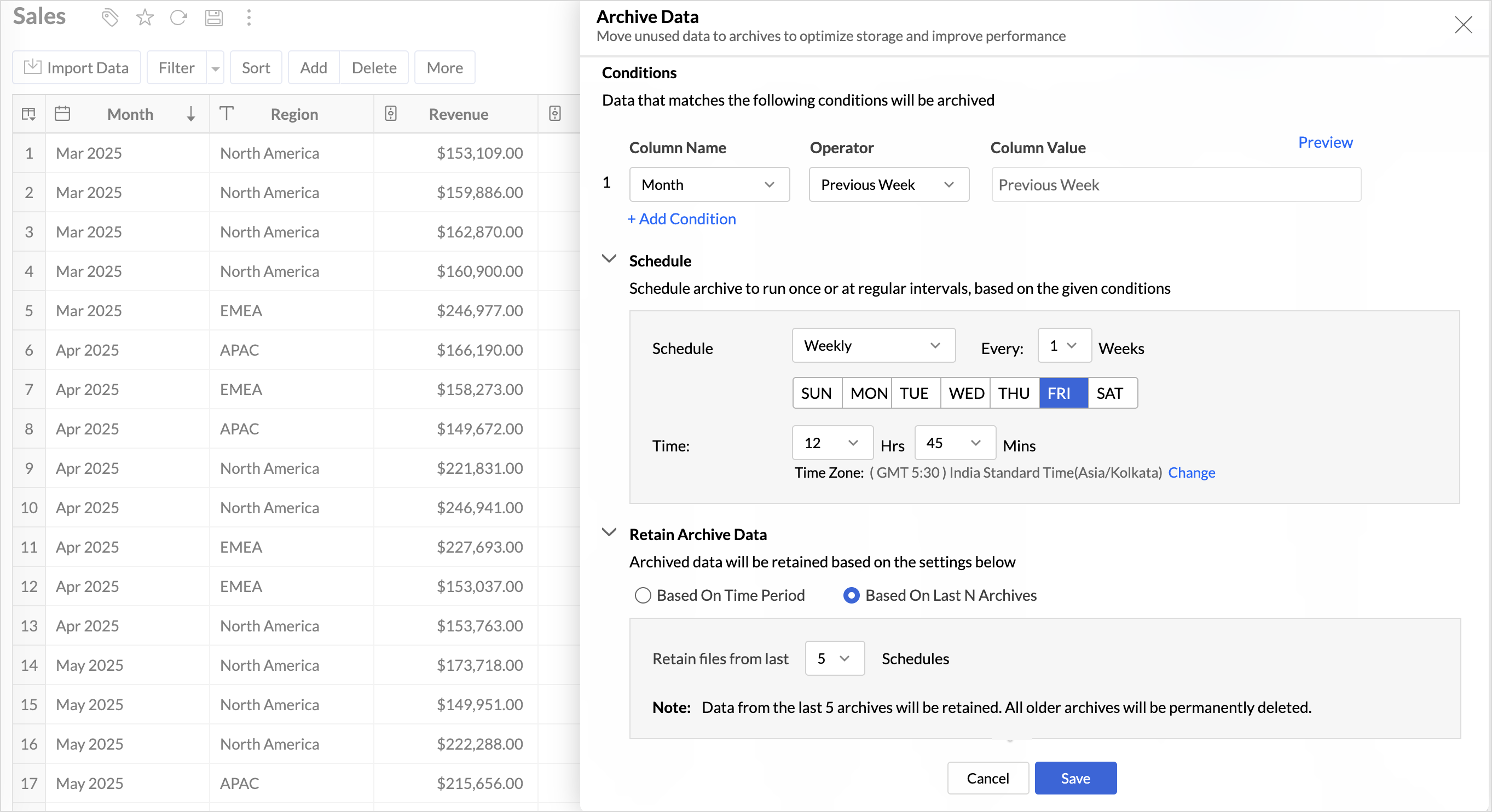
Key Benefits
- Pay only for what you analyze: Active data is reserved for analysis, while historical data is retained without impacting usage limits.
- Improved Querying and Faster Analysis: By limiting queries to relevant data, report generation and dashboard loading times are significantly reduced, resulting in faster insights and a more responsive analytics experience.
- Optimized Storage Usage: Archiving older data helps control table size, preventing unnecessary growth, and better management of row limits.
Organize Views with Tags
Group related views, and manage reports and dashboards effortlessly. Use tags to organize views by teams, departments, projects, or specific use cases, making it easy for users to navigate large workspaces.
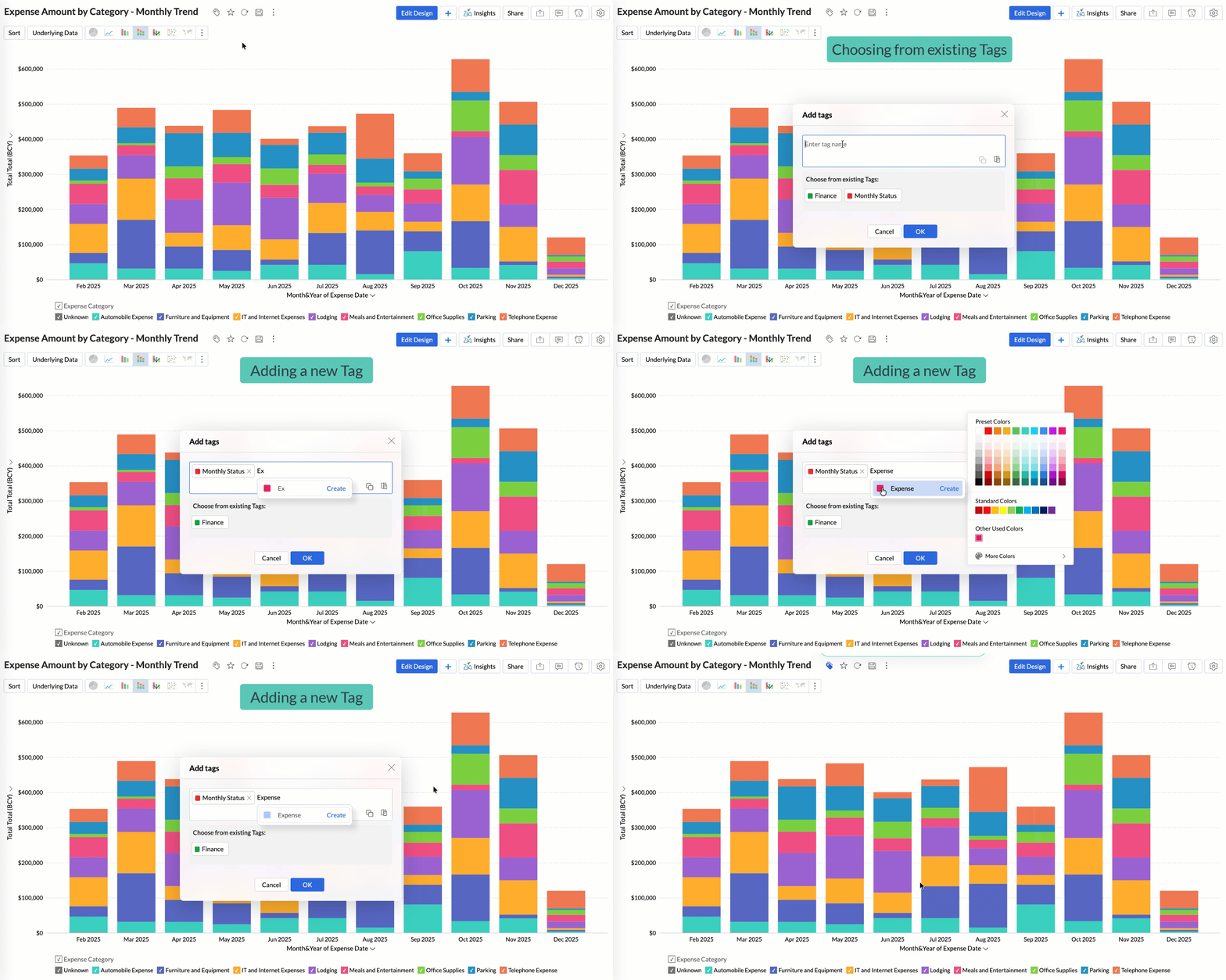
Quickly filter and find the right reports and dashboards, reduce clutter, and ensure teams always have access to the views that matter most to them.
Global Custom Sort
Custom sort was limited to individual reports previously. With recent enhancements, you can now define the sort order for text data types at the workspace level.
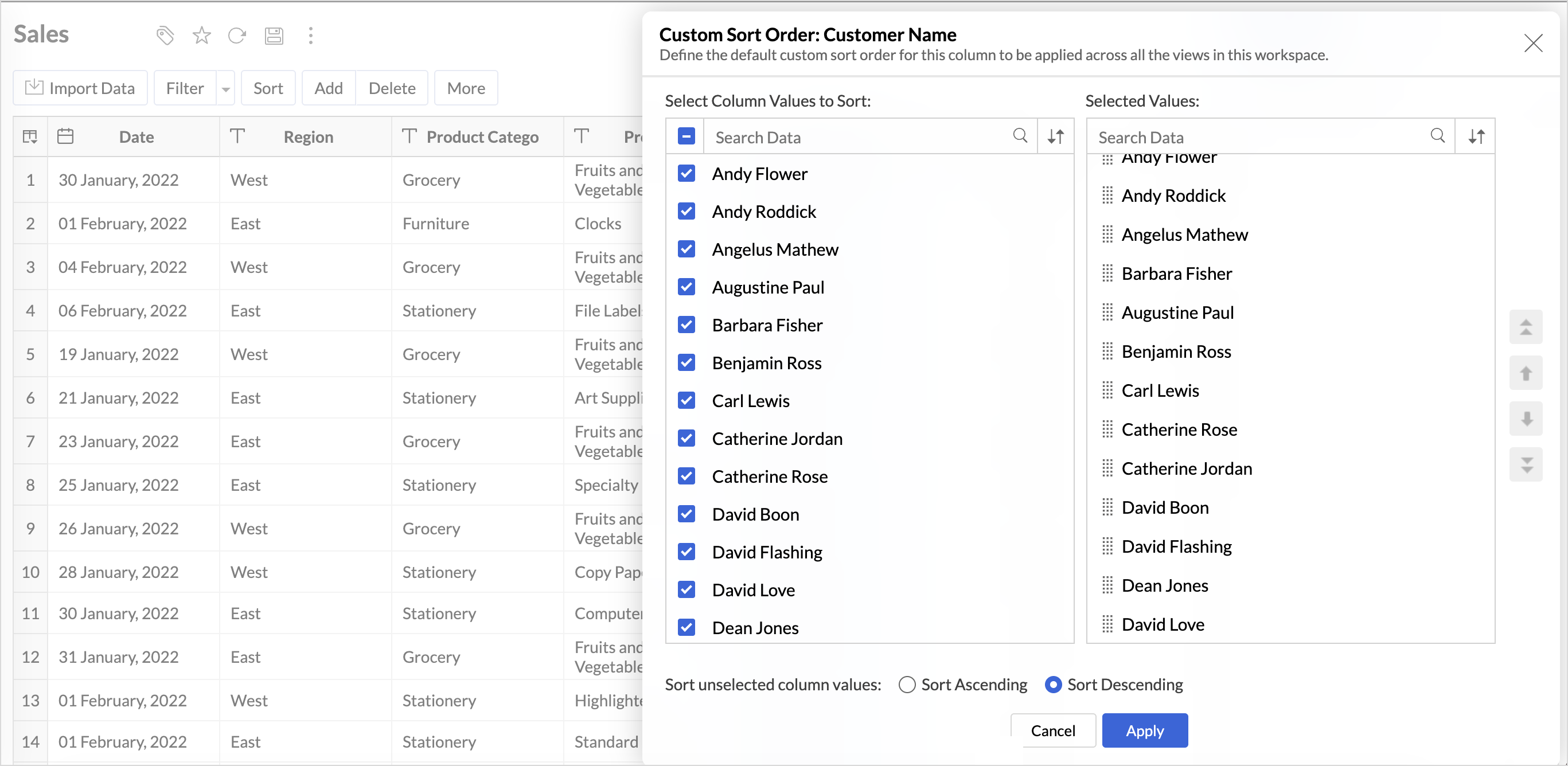
This improvement helps you maintain a consistent sorting across all reports, reduces repetitive setup, and saves time. It also ensures a standardized view of your data throughout the workspace.
Timeframe Selection for Overview Charts
Overview charts now offer flexible timeframe selection, allowing you to focus on relevant periods for deeper trend analysis.
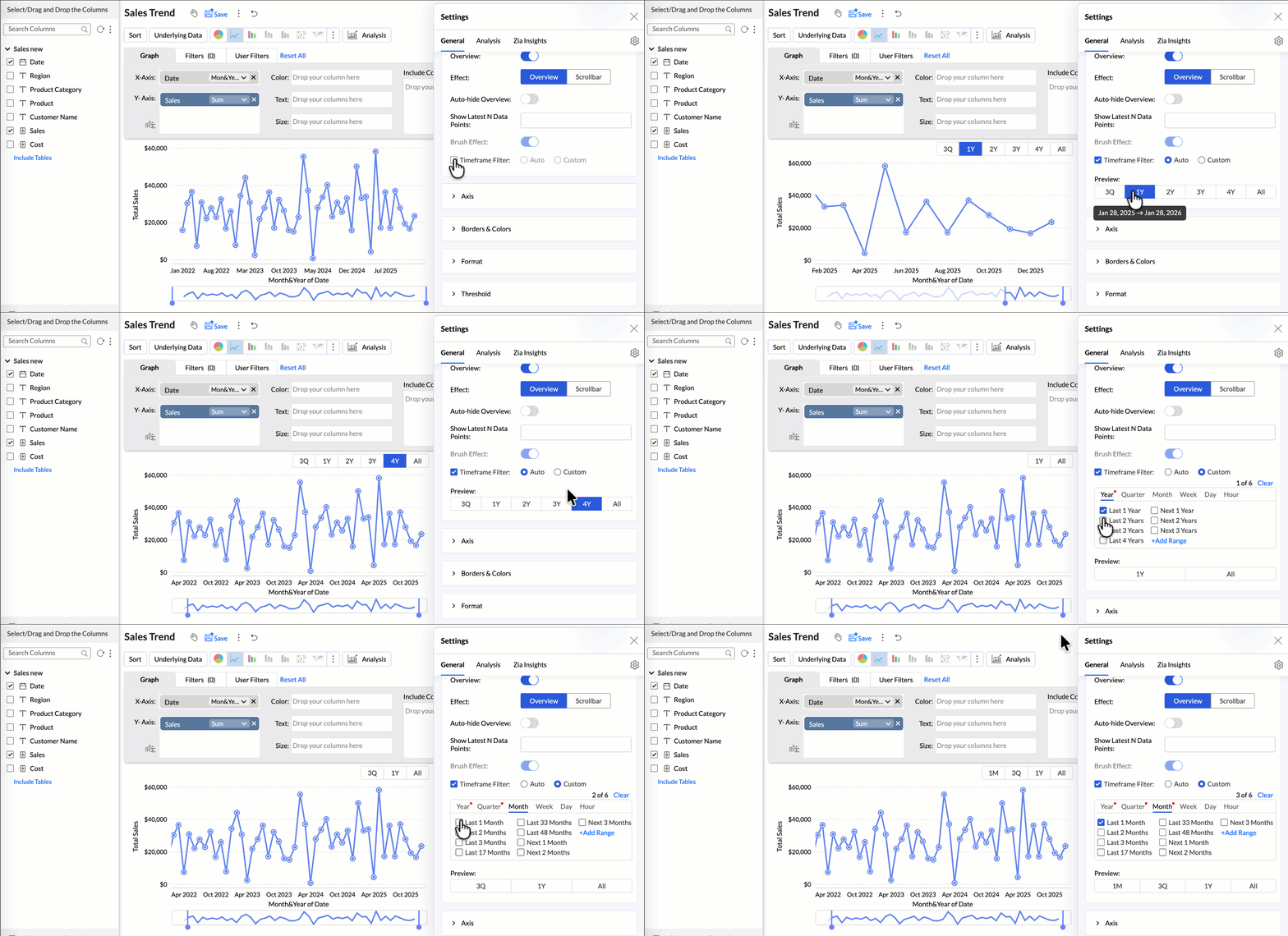
By narrowing the time range, you can better compare performance, identify patterns, and gain clearer insights without distraction from older data.
Customize Zia Insights placement in Dashboards
Choose where and how the insights are displayed, so that they complement your analysis without disrupting your dashboard layout. This gives you greater flexibility to present insights in the way that best suits your audience and reporting style.
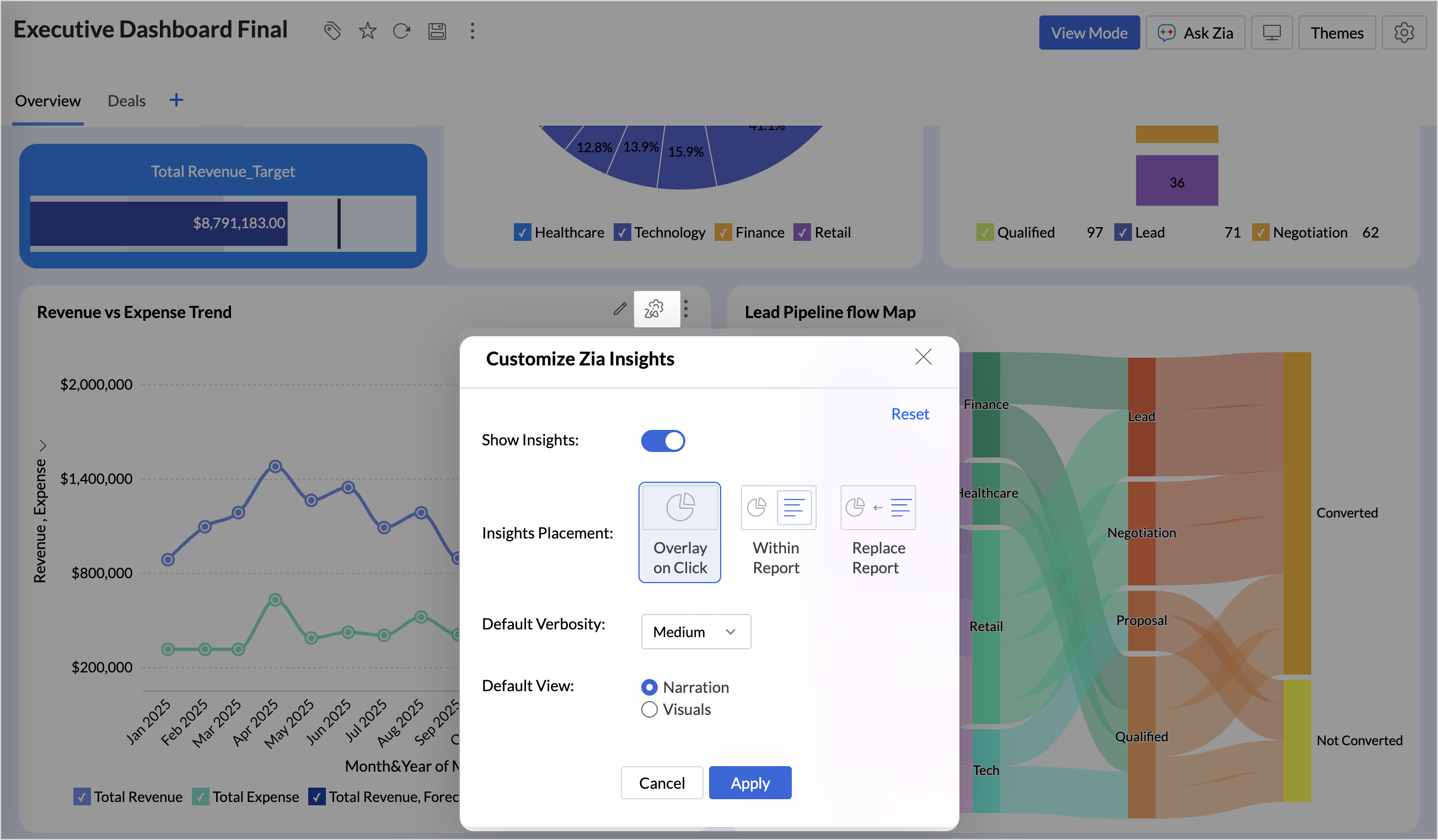
- Overlay: Displays insights in a floating panel that opens on demand, allowing users to review insights without leaving or altering the report view.
- Within Report: Embeds insights directly within the report, enabling users to view data and insights together in a single, continuous view.
- Replace Report: Displays insights as the primary view by replacing the report entirely, offering an insight-first experience focused on conclusions, rather than raw data.
Customize Image Size in Dashboards
Dashboards now support image size settings that let you control how images are displayed.
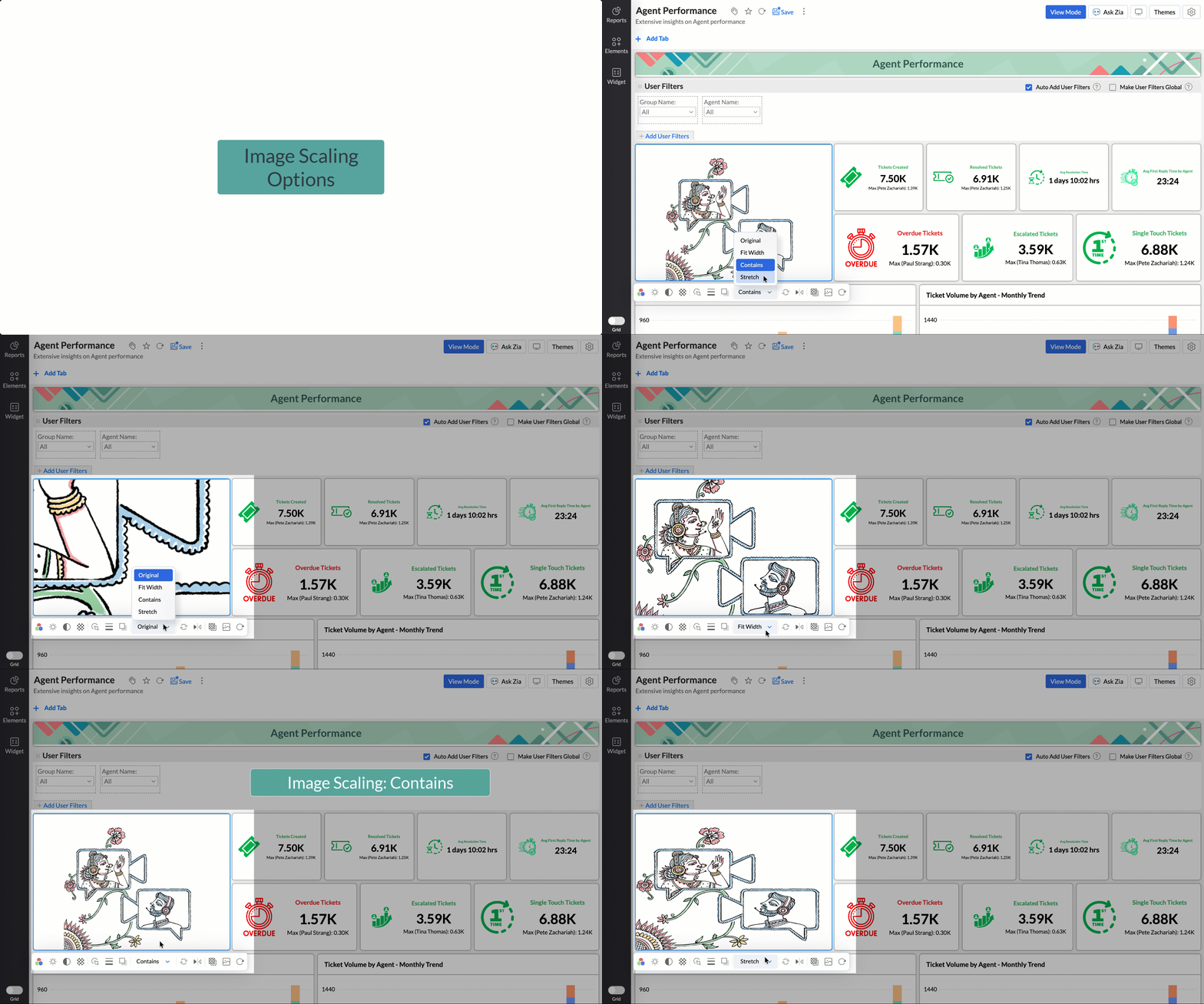
Choose from options like Original, Fit to width, Contain, or Stretch to ensure images align well with your dashboard layout, and thus improve visual clarity.
Tabular View Enhancements
- With this enhancement, all tables linked via lookup columns are now available in the Filter Criteria tab. This makes it easier to share views with users using associated filters, ensuring the specified criteria are automatically applied to the shared report.
- You can now customize lookup columns and the join paths used within Tabular View. This enhancement gives you control over how related tables are connected, helps avoid incorrect or ambiguous joins, and ensures more accurate and reliable data representation in your tabular reports.
New Business App Connectors
We have now introduced integration with two new business connectors Zoho FSM and Magento.
Zoho FSM
Connect your Zoho FSM Data with Zoho Analytics to analyze your field service operations in depth. Identify bottlenecks, optimize resource allocation with interactive reports and dashboards. Analyze revenue, service costs, and customer trends to improve profitability and service quality.
Adobe Commerce (Magento)
Analyze sales, orders, customers, and product performance with ready-made reports and dashboards. Track key metrics like revenue trends, average order value, and top-selling products. Gain insights into customer behavior and regional sales patterns. Make faster, data-driven decisions to optimize store performance and growth.
Topic Participants
Nisha Angel J
Sticky Posts
What's New in Zoho Analytics - January 2026
Hello Users! We are starting the year with a strong lineup of updates, marking the beginning of many improvements planned to enhance your analytics experience. Explore the latest improvements built to boost performance, simplify analysis, and help youWhat's New in Zoho Analytics - November 2025
We're thrilled to announce a significant update focused on expanding your data connectivity, enhancing visualization capabilities, and delivering a more powerful, intuitive, and performant analytics experience. Here’s a look at what’s new. Explore What'sWhat's New in Zoho Analytics - October 2025
Hello Users! We're are back with a fresh set of updates and enhancements to make data analysis faster and more insightful. Take a quick look at what’s new and see how these updates can power up your reports and dashboards. Explore What's New! ExtremeWhat’s New in Zoho Analytics – September 2025
Hello Users!! In this month’s update, we’re raising the bar across multiple touchpoints, from how you bring in data, plan and track projects to how you design and brand your dashboards. We’ve added the all-new Gantt chart for project visualization, expandedAnnouncing Agentic AI - Ask Zia!
We are delighted to roll out the new agentic AI capabilities in Ask Zia, where every stage of the BI workflow is assisted by AI. With a human-in-the-loop approach, Ask Zia ensures that you’re in command of the decision, while AI handles the complexity.
Recent Topics
CRM: related table using module queries, are links possible?
Hello. I was exploring the possibility of using a module query to get a filtered related list. For example, I'm using a Canvas custom details page and if an account has an open deal I'd like it to appear at the very beginning of the account page, withBetter reorder point functionality?
1. How about having item reorder point warehouse level instead branch? 2. Considering committed stock and to be received quantity also as reorder point calculation? 3. Considering associated items as committed when sales order created on composite iBatch tracking updates
I applaud the Zoho team for their recent updates to batch tracking information and even though I have 'chatted' to the Zoho team, I'm still batteling to understand the reasoning on the below. We buy stock in bulk and it is received into the Bulk Warehouse.Custom Button in Shipments
Custom buttons feature is very much needed in shipments. Please work on this feature request!Zoho Support is Dysfunctional & Don't Know Their Own Support Hours
Seeking clarification on Zoho support hours and contact numbers please. We have been trying to phone Zoho support on +61 2 8066 2898 at 9:20am AEDT for the second day in a row, and gotten a message on Zoho's support line: "support is open monday throughWhat are the knowledge database limit for AnswerBot and which app its integrate?
1) Can AnswerBot be integrated in Trainer Central? 2) Can AnswerBot learn from external websites and excel spreadsheets? 3) Is there a limit size or number of documents for the knowledge based content to train AnswerBot? ThanksReports showing 24hr days instead of business hours
I am not sure what I am missing, I created a report to look at resolution times in business hours but it is displaying hours based on 24hr days. I have business hours set (7am-5pm) and all that functionality is working, the reports are displaying 2 daysSkip Pages - Zoho form
Hi Team, I need help with skipping pages based on the below logic in Zoho form: If field number of borrowers is 1 and field number of dependants is 0 then do not show page borrower 2 and 3 If field number of borrowers is 2 and field number of dependantsHow to print blank form and also how to use form offline
I have created a form in PC and want to use the form in the field to gather information. Can I use the form offline in PC - in case I have no internet access? As a fail safe, I'd like to print the blank form ut just in case the PC form doesnt work forUsing Marketing Automation Journey to associate lead record with a campaign?
Hello, I am trying to push people from a Marketing Automation Journey to a CRM campaign so I can track lead journeys and lead conversions however I am hitting a roadblock. When a lead hits particular scores or does specific actions in marketing automationExpose FIFO COGS in Invoice API
Currently, in the Invoice API, the line_items array contains the purchase_rate field. Unfortunately, this purchase_rate field is the Cost Price of the Item, not the FIFO cost journaled into COGS for that sale. There seems to be no current way to get theDrag-and-Drop Customization Interface for Help Center in Zoho Desk
Hi Zoho Desk Team, We hope you're doing well. We’d like to submit a feature request regarding the customization of the Help Center in Zoho Desk. 🔧 Current Limitation: At present, Help Center customization options are quite limited through the Zoho DeskStop selling out of stock Items.
Hi I have been using Zohobooks for a around 8 month now. I am not involved in selling process but my staff cant stop selling product which they do not hold in stock, this is a big headache for me as physical count never matches what is shown on the books.Importing New Items to be Added to Existing Item Group
How to use the import sheet to import new items to be added to an existing item group. The import gives me an error that the item group name already exists and won't proceed. If it's possible, how should my import spreadsheet should look like?Condolences and Prayers Following the Ahmedabad Plane Crash
Dear Zoho Team, We were heartbroken to learn about the tragic plane crash that occurred today in Ahmedabad, as reported in the news. On behalf of our entire team, we want to extend our deepest condolences to everyone at Zoho and across India who may haveZoho Developer Community Monthly Digest – May 2025
Hello everyone, Welcome to this month’s Zoho Developer Community Digest! From fresh product insights to hands-on tech sessions and standout community threads, there's plenty here to keep your ideas flowing and your skills sharp. Be sure to explore ourTimesheet in project not visible to invited users.
We are using Zoho Projects and have enabled the client portal so our clients can access both Projects and Timesheets. However, while the client can see the project, no timesheet entries are visible. How can we resolve this issue?Scheduled outbound calls
How do you mark a scheduled outbound call as complete? I see no way to change the status.How to see exact clicked links in CRM from Zoho Campaigns ?
Hi, I'm wondering how I can see the clicked links from an email sent from Campaigns when I'm in a campaign in the CRM module. I can see the number of clicks but I need the sales team to be able to see which link has been clicked by a prospect or contact.Email parser rule will only parse emails with an exact match? What madness is this?
I finally got myhead around deluge and scripting, but wondered why my parser wasn't working. (https://help.zoho.com/portal/en/community/topic/extract-11-digit-number-in-any-position-from-enail-subject) Problem: There are *zero* characters or phrases thatHow to add a fee based on payment method
I currently accept both ACH payments and credit card. I want to add a 3% fee to a number of my subscription plans if the customer chooses to use a credit card (and not ACH/checking). How do I do this? Is there an in-built feature, or would i have to createCondolences and Prayers Following the Ahmedabad Plane Crash
Dear Zoho Team, We were heartbroken to learn about the tragic plane crash that occurred today in Ahmedabad, as reported in the news. On behalf of our entire team, we want to extend our deepest condolences to everyone at Zoho and across India who may haveCRM Analytics - Elegant Comparator
Anyone noticed a wierd thing on the Elegant Comparator on CRM... Compare Among - Time Period - Last 6 Weeks... only 5 weeks show Compare Among - Time Period - Last 5 Weeks... only 4 weeks show Compare Among - Time Period - Last 4 Weeks... only 3 weeksCopy Templetes from one module to another in Zoho Books.
Hello, I have created a Custom Module in Books for GST Invoice. I can see only 1 Invoice Templete over there. Can we clone or copy Invoices Templetes from Sales Module of Books into Customer Module.Enhancements in Bookings browser extension
Greetings from Zoho Bookings! We're here with another update to make your scheduling even quicker. We have enhanced our browser extension with three significant features: Copy slots to email Gmail integration LinkedIn integration Copy slots to email ThisSome notes are shown as Not Synced
I'm not sure why this happens but it's a weird little bug I noticed. I have two notes I believe that has that weird icon shown in the screenshot that shows that it's not synced even though the notes do sync properly. Manual syncing doesn't remove thePower of Automation :: Auto-Color Tasks in Gantt chart based on values in Picklist field.
Hello Everyone, A Custom function is a user-written set of code to achieve a specific requirement. Set the required conditions needed as when to trigger using the Workflow rules (be it Tasks / Project) and associate the custom function to it. Requirement:-Zoho CRM record in blueprint unable to initiate any form of approval process
My business case As a penetration testing company, we have engagements that need to follow a set path, from “to be scheduled” to “assigned to tester” to “regulatory documents sent” to “testing in progress” to “report delivered”. On this path, a particularEdit Project Number?
Hi all: We just signed up for a trial of zoho one, which includes ZoHo Projects. We've noticed there was a 'dummy project' preloaded in projects to help familiarize yourself with the software. We've created a couple of our own projects now but noticed since the dummy project was preloaded, our projects start with number 2 then 3, sequentially. Since it seems we will be keeping zoho past the trial, If we delete the dummy project, how do we get our own projects renumbered, beginning with 1? We'd likeTip of the Week #57– Reply faster with saved response templates!
Ever find yourself typing out the same email reply over and over again? It's time consuming and eats productive work hours. With shared response templates, you and your team can create pre-composed messages to quickly respond to common queries — savingConnect MySQL database to Zoho sites
Hi! Is there a way to connect a MySql database with Zoho sites. So the user input are stored in and dinamic data is fetched from the database? Regards, MihályWhat’s new in Zoho RPA: Cross-platform automation, OCR, and more!
Zoho RPA is now included in Zoho One Zoho RPA is now part of the Zoho One suite, bringing unified automation to your entire business ecosystem. You can now automate UI-based tasks across Zoho apps and third-party systems too. From processing sales ordersNew in CPQ: Create dynamic actions in Product Configurator (PC), clone PCs and Price Rules (PRs)
Configuring product combinations just got enhanced. Zoho CRM's CPQ system now supports dynamic actions based on multiple base products. Additionally, you can now clone configurations for both Product Configurator (PC) and price rules (PRs). Dynamic actionsBeyond Email: #2 Connect better with Contacts
After successfully creating a 'Welcome & Setup' event using the Calendar, Sarah is eager to invite her team members to participate. For a smoother communication experience and easy access, Sarah wants to store their information, ensuring quick referenceIntegrate MS Teams with Zoho CRM for faster collaboration
Availability Editions: Standard and above DCs: All Release status: This feature has been released for all users in all DCs. Help resource: Microsoft Teams integration Hello everyone, We're adding MS Teams to our lineup of CRM chat integrations—Cliq, Slack,Subforms and Reports
I am trying to do a report that shows various data from subforms. eg I want a report that shows what Bill Status are Approved Required. Or show the status of all bills. It doesn't look like Zoho Reports picks up information within reports. Is there another【Zoho CRM】アナリティクス機能のアップデート:ウォーターフォールの導入
ユーザーの皆さま、こんにちは。コミュニティチームの藤澤です。 今回は「Zoho CRM アップデート情報」の中からアナリティクス機能のアップデートをご紹介します。 本記事は、以前紹介された機能に新たに追加された機能です。 以前の記事:https://support.zoho.co.jp/portal/ja/kb/articles/zoho-crm-visualize-your-data-with-a-new-set-of-charts-treemap-butterfly-sankey-and-cluster-charts[Free Webinar] Learning Table Series - Creator for the Finance Industry
Hello Everyone! The Learning Table Series is a free monthly webinar that runs for around 45 minutes. It's offered to our Community users and aims to provide a dynamic learning experience by demonstrating how Creator can be used as a solution for variousWebhook - Configuration failed: 200 response not received for POST request
Hello, I am trying to set up a webhook to connect with an automation software but I receive the following error from Zoho: Configuration failed: 200 response not received for POST request I have tried testing it on webhook.site as well and receive theAutomated Shopify adjustment problem. "An inventory adjustment has been created by the system to set the initial stock from Shopify"
Has anyone noticed issues since the Shopify Sync has been updated recently? If you sync with Shopify, check to see if there are automated adjustments for old products that keep recurring. We have this problem for 6 SKU's that Zoho is doubling the stockNext Page