What's New - March 2025 | Zoho Backstage
Hello there,
We’re thrilled to introduce a much-awaited lineup of powerful features and enhancements designed to fulfill your event management needs. Here's a round-up of the latest updates that will enhance your experience with Zoho Backstage this month.
Offer Tickets
Early bird and limited-time offers are powerful tools to boost ticket sales and generate early revenue. With the new Offer Tickets feature, you can create multiple offers as tiers within a single ticket class, making the process more streamlined and automated.
Previously, you had to create separate ticket classes for each offer and manually manage their availability. Now, you can:
- Add multiple offers under a single ticket class
- Automate the offer start and stop conditions
- Reduce manual intervention
Key benefits
- Increased marketing impact: Time-sensitive discounts create a sense of urgency, encouraging faster ticket purchases.
- Early revenue and cash flow: Early sales provide immediate cash flow to cover event expenses like venue deposits, marketing, and logistics.
- Leverage Psychological Triggers:
- FOMO (Fear of Missing Out): Limited-time availability compels attendees to act quickly.
- Perceived Savings: Attendees feel they are getting a deal, making them more likely to buy.
How to use
Setting up offers

You can add offers as tiers within a ticket class and configure their availability based on:
- Time: Set specific start and end dates for the offer.
- Quantity: Define the number of tickets available at the offer price.
Flexible offer progression
From the second offer onward, you can choose to automatically start the next offer when the previous one ends. Or, set a custom start date for the new offer.
Customizing offer display
You can customize how offers are displayed on your event website using the Website Designer. The offer card can show:

- Current Offer
- Previous Offer
- Next Offer
- Both Previous and Next Offers
This flexibility helps you highlight the most relevant deals and enhance visibility.
Good to know
- During the ticket purchase process, the offer name appears alongside the ticket class name. The order summary clearly displays the applied offer.
- After attendees purchase their tickets, the "Your Orders" section displays the offer name along with the ticket class name. The invoice also reflects the offer name for transparency.
- When manually adding an order, any valid offers associated with the ticket class are applied automatically. There's no need for manual price adjustments.
- During check-in, only the original ticket class amount is displayed.
- Offer-tiered tickets cannot be selected during manual check-in.
Click here to learn more.
Tax Rules - Canada (Early access)
Accurate tax calculation is essential for ensuring compliance and transparency in event management. With the new Tax Rules feature for Canada, you can automatically apply the correct tax rates based on your event location, making tax management simpler and more efficient. Zoho Backstage now allows you to create tax rules for all 10 provinces and 3 territories, which can be selected and applied to an event automatically, ensuring the correct tax rates are applied without manual adjustments. This feature supports in-person, hybrid, and online events, offering flexibility and accuracy.
The Canadian tax rule engine covers 10 provinces, 3 territories, multiple tax agencies, and 12 sales tax rates, providing a comprehensive solution for handling event-related taxes.

How do taxes work on Canadian events?
For in-person and hybrid events, the tax rate is determined by the event’s physical location, based on the Place of Supply, in compliance with Canada Revenue Agency (CRA) regulations. This ensures attendees are charged the appropriate tax rate according to the province or territory where the event takes place.
For online events, where no physical venue exists, the tax is calculated based on the attendee’s location. This ensures the correct sales tax is applied, even when attendees purchase tickets from different provinces or countries.
How to use
To enable Canada Tax Rules, configure your organization’s location:
- Go to Portal Settings > Payments and Tax.
- Select Canada as the organization location.
Once configured, the system automatically populates:
- 12 default tax rates covering all provinces and territories.
- 13 tax rules (one for each region).
- A default rule for online events, applying the correct tax based on the attendee’s location.
- 5 tax agencies for accurate tax handling.
You can create new tax rates, groups, and authorities to meet your event’s specific needs. Additionally, you can add custom tax rules for both in-person/hybrid and online events, giving you full control over how taxes are applied.
Applying Tax Rules to In-Person and Hybrid events
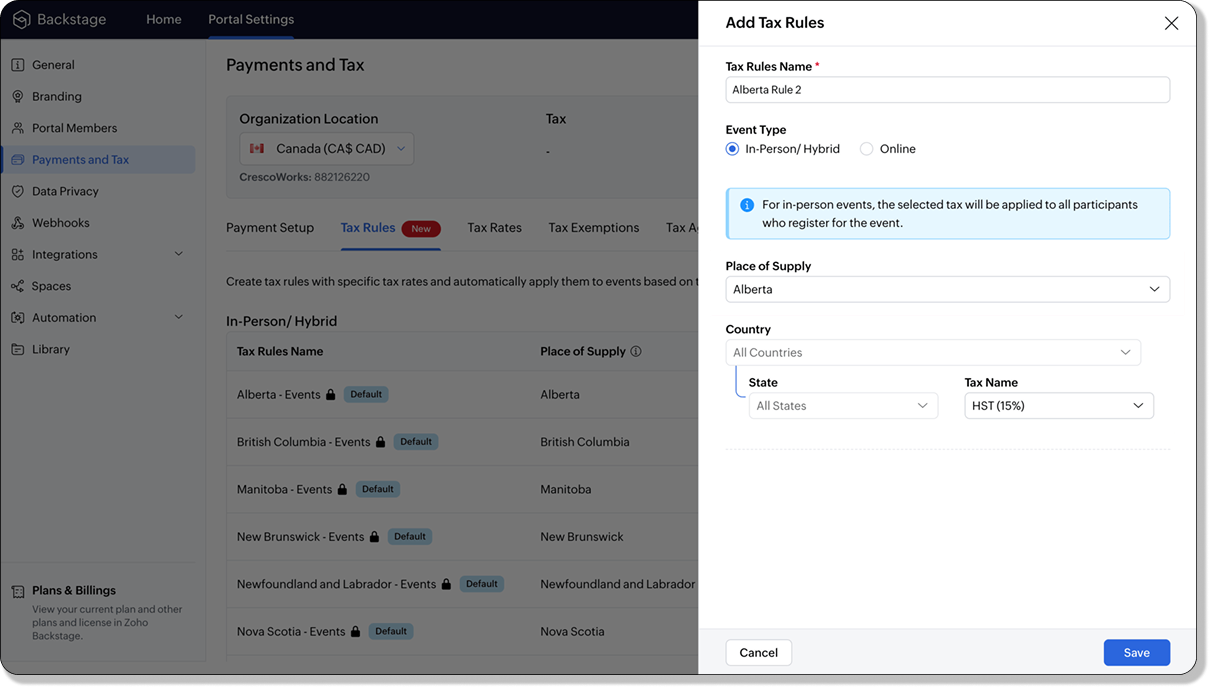
For in-person and hybrid events, Zoho Backstage automatically suggests tax rules based on the event location. The 13 default tax rules cover all Canadian provinces and territories. If the event location changes, the system automatically updates the relevant tax rules to reflect the new region’s rates.
You can also create custom tax rules by selecting a specific province or territory and applying a custom tax rate, offering greater flexibility for managing event taxes.
Applying Tax Rules to Virtual events
For online events, the system uses a default tax rule that covers all Canadian provinces and territories. Taxes are applied based on the attendee's location.
Canadian attendees are charged the applicable provincial tax rate.
International attendees are assigned a zero tax rate by default.
If you need to apply taxes to international attendees, you can create new tax rules tailored for online events, ensuring compliance with international tax regulations.

- Tax rules in Zoho Backstage are flexible and dynamic. You can modify them at any time during your event setup. However, changes will only apply to new transactions. Existing transactions will retain the original tax rule, ensuring previous purchases remain unaffected.
- If you select a non-Canadian location for your event, the Canada Tax Rule will not be applied. This ensures taxes are only charged where applicable, preventing errors in cross-border events.
Event Category

Categorize and filter events based on custom classifications for organizers and attendees to find and manage events easily. This new addition is aimed at improving event management by giving organizers the flexibility to create, manage, and filter events using custom categories. Organizers can now create up to 100 custom categories when setting up an event, giving them the freedom to define categories that suit their specific needs.
Previously, categories selected in Event Info were not utilized elsewhere, and there was no option to add new/manage categories.
Now, organizers can tailor categories to their specific needs and filter them on the Event Directory.
To access:
- While Creating an Event: On the Event Info page.
- For Category Management: Under Portal Settings > Branding > Event Category.
Permissions:
Portal Owners & Admins:
- Add, edit, and delete custom categories.
- Cannot edit or delete default categories.
Event Organizers:
- Can only add new categories.
- Cannot edit or delete existing custom or default categories.
Other Enhancements
Floor plan Focus Area

The Focus Area in the floor plan refers to designated spaces within the event venue that are visually highlighted to draw attention to specific sections, such as booths, stages, or key locations. These areas allow organizers to emphasize important spots, making navigation easier for attendees and improving the overall flow of the event. Focus areas help guide visitors to essential parts of the venue, enhancing their event experience.
Custom Dates for ticket classes (Early access)
In cases where smaller sessions or events (like welcome events, after-event parties, etc.) occur before or after the main event, this feature allows organizers to assign specific dates to separate ticket classes, ensuring tickets are only valid for the selected dates.
Custom dates can be set within 30 days before or after the main event.
New WhatsApp triggers and templates
The WhatsApp Integration, designed to enhance communication and engagement with all event stakeholders, now includes new triggers and templates to facilitate messaging and ensure timely updates for everyone.
For Purchasers:
- Send Registration Confirmation: Instantly confirm registration to enhance the attendee experience.
- Order Canceled: Notify purchasers promptly in case of any order cancellations.
For Speakers:
- Welcome Speaker: Extend a warm welcome to our speakers and set a positive tone for their participation.
- Speaker Added to a Session: Inform speakers when they’re added to a session, ensuring they are well-prepared.
- Speaker Removed from a Session: Provide timely updates should there be any changes to their session involvement.
For Sponsors:
- Thank a Sponsor Before Website is Live: Show appreciation early on, fostering positive relationships with sponsors.
- Welcome and Thank Sponsor After Website is Live: Acknowledge sponsors publicly once the event website goes live.
- Deny Sponsor Proposal: Deliver sensitive information with professionalism and clarity.
- Acknowledge Sponsor Proposal: Confirm receipt of sponsor proposals, keeping communication open and transparent.
For Participants:
- Event Canceled: Quickly inform participants in the event of cancellations, ensuring they’re kept in the loop.
We are continuously refining Zoho Backstage to make your event management experience even more powerful and intuitive. Stay tuned for more updates in the coming months!
If you have any questions, please contact support@zohobackstage.com.
Topic Participants
Jithan Raghuraj
Recent Topics
Can I filter a Lookup field to only show related records from another Lookup in Zoho CRM?
In our Leads module, we have two Lookup fields: Recruitment Agency – the agency that the lead came from Recruiter – the individual contact from that agency who sent us the lead Both fields link correctly to their respective records in CRM. However, ourZoho Books API invoice email bouncing with 'relaying-issues' error
I have waited over 30 days for zoho books uk to assist with the following and i have had no replies or tickets erronously closed. The service has been terrible - very unlike zoho! So i am raising this here hoping that a community member can assist: Hello,How do I filter contacts by account parameters?
Need to filter a contact view according to account parameter, eg account type. Without this filter users are overwhelmed with irrelevant contacts. Workaround is to create a custom 'Contact Type' field but this unbearable duplicity as the information alreadyZoho Writer to Zoho Sign Template Misalignment – Request for Community
We are currently facing a critical issue impacting our live business operations due to a misalignment problem between Zoho Writer templates and Zoho Sign output. Issue Summary: We have an automated workflow in Zoho CRM using Deluge scripts that generatesAccount blocked
Yesterday I got my Zeptomail account blocked due to too many hard bounces. My account is used exclusively for sending transactional emails (eg. your order has been shipped, a form has been filled, etc) and the sudden blocking impacted hundreds of websitesMigration Tool Download
Since apparently you have to ask for the migration tool to download (why?), I need the download for the migration tool for exchange servers. Please forward link, thanks.IF Formula
Hi, I'm having trouble setting up a custom formula in a field. Can you help me with it? The formula should do the following: If the created date is less or equal to 30 days the field should display a string New in pieline or Exisitng pipeline if aboveAutorespond to one specific sender
Is there any way to create a rule or filter that sends an automatic reply to messages from one specific email address? I really need to set up something like a "vacation response" but only for one "received from" address.View comprehensive logs of all actions in Custom Module History
Hello everyone, We are happy to announce our new feature, Detail View in Custom Module History, which enhances visibility, control and accountability over your records. Users can now access a detailed timeline of every action that has been performed onTrack ZohoForm Conversion using Postmessage event
Hi, I’ve been using a third-party lead tracking tool to capture leads from my website along with their source. Earlier, with the HubSpot form, the third-party script was able to detect the postMessage event that iframe forms typically send back to theEmail task creator when task is updated/marked complete
I am looking for a way to notify the creator of a task in zoho todo when - Task is updated Task is closed Comments entered 1 and 2 are critical, and I cannot find a zoho flow to do this. There is no way that as a manager I will know when someone has completedEmail Recall Feature In Zoho Mail Which Should Also Work For Outside Organisation Members
Add a feature to recall or undo sending an email within a configurable short time window (e.g., 30 seconds to 2 minutes) after hitting send, similar to Gmail’s undo send. Currently the sent email can not be recall If the recipient is not from within yourHow to implement calculating average value of averaged values?
Hi, I'm trying to implement a formula in my layout for a module that calculates the average of 2 averaged values, but I can't do so using the formula custom field. To calculate the 2 averaged values, I could use the formula custom field, but in the customZoho Recruit update published job boards
If we have a job thats already posted on several different job boards and we edit this job in zoho recruit (e.g. the description of the job), does this then automatically update this new information to all the published job boards? If not, how does theNarrative 14: The magic bazaar of Desk
Behind the scenes of a successful ticketing system: BTS Series Narrative 14: The magic bazaar of Desk Marketplace is a centralized platform where users can discover Zoho and third-party applications that can be integrated with their Desk account to facilitateCollections Management: #2 Late Payment Automation
"Sir, I'll process the payment by evening, please don't apply any late payment charges", the customer said while arranging papers on his desk. Sanjay stood there with a tired smile. He had already visited twice that week. Payment collection was one thing.Create a table in the layout section of modules
Dear Sirs, I would like to know whether is possible to create a table under new fields in layouts section of modules. In fact in this section there are single line, multi line, pick list, multi-select, date, formula etc. but I am unable to add a tableNimble enhancements to WhatsApp for Business integration in Zoho CRM: Enjoy context and clarity in business messaging
Dear Customers, We hope you're well! WhatsApp for business is a renowned business messaging platform that takes your business closer to your customers; it gives your business the power of personalized outreach. Using the WhatsApp for Business integrationPower of Automation :: Automatic Task Status Handling for Users
Hello Everyone, A custom function is a software code that can be used to automate a process and this allows you to automate a notification, call a webhook, or perform logic immediately after a workflow rule is triggered. This feature helps to automateQuestion - why no way to input a 'tool description' and 'tree of 'tools'
Every business is different, with different business processes. To be truly useful Zoho MCP needs to have user editable tool descriptions (or ruleset) and a 'tool tree' so that the LLM is context aware when being used. For example, the tool descriptionDevelop Zoho Meeting as a Full Native Application (Not a Browser Wrapper)
Hello Zoho Meeting Team, Hope you are doing well. We would like to suggest an important improvement regarding the Zoho Meeting desktop application. At the moment, the Zoho Meeting app feels more like a mini browser window or an iframe that loads the webCan I create a custom function for chart of accounts?
I'm trying to add a custom function that should run whenever a record in the Chart of Accounts module is edited, but on the form for creating a new function, the module dropdown does not include the chart of accounts as an option.billing
hi, I am being billed $12/year, and I can't remember why. My User ID is 691273115 Thanks for your help, --Kitty PearlAutomatic Matching from Bank Statements / Feeds
Is it possible to have transactions from a feed or bank statement automatically match when certain criteria are met? My use case, which is pretty broadly applicable, is e-commerce transactions for merchant services accounts (clearing accounts). In theseUnable to confirm Super Admin assignment — confirmation button not working
I’m trying to change the roles within my organization. I am currently a super admin and would like to add another user as a super admin. When I attempt to confirm the action, a screen appears asking for my password to verify my identity. However, whenAutomation#36: Auto-create time-entry after performing the Blueprint transition
Hello Everyone, This week’s edition focuses on configuring a custom function within Zoho Desk to streamline time tracking within the Blueprint. In this case, we create a custom field, and request the agent to enter the spending time within the singleFeature Request: Reviews
Any chance we could get a "Reviews" element to put on sites? It should be extremely simple to do. Basically just take the comments box and add an option for a star rating. At the very least, it would be nice to have more customization options for the comment box so the text could be changed from "Comments" to "Reviews". I've looked at a bunch of embeddable review widgets but nothing meets my needs so this would be a great feature to have added to the site builder.Can we handle a support like (incident management) project in Zoho Projects?
Hi, I have a new profile of a project whereby we provide "ticket" base support to a client. They have a request and ideally we would handle comms via a email exchange logged in Zoho. Today we use Zoho Projects for all out projects, which means that weTrying to show the actual Terms & Conditions on PDF
Hi, On Zoho forms I am trying to have the actual terms and conditions that the user needs to accept also show on the pdf that they receive after. Right now it only says "Agreed". Please help.Installing EMAIL Setup in New Domain
Respected Support team, I'm facing an issue with cloudflare in Pakistan, I want to setup Zoho Mail Setup but I Don't know how to enable Zoho mail setup without cloudflare. My Website https://stumbleguyzzapk.com/, https://fakservices.com/ is using CF,Enhancements to Zoho Meeting Annotator
Hello Zoho Meeting Team, Hope you are doing well. We would like to share a few improvement suggestions regarding the Zoho Meeting Annotator used during screen sharing. While the current version provides helpful annotation tools, there are several limitationsZoho Social/Marketing Plus - Addition to "Monitor" function
It would be very helpful if the Monitor function would allow us to add a column to monitor hashtags in addition to pages and mentions. This is a common and very valuable function in other social listening tools.Zoho forms - > Zoho desk multiple agents
Hi! I would like to use a standard form to be used when we hiring people, so we looked at zoho forms for that. Now we would like to get that info in to Zoho desk and their different users shall take care of this ticket simultaneous . So, what would beAlmacenamiento
Hola, Quisiera saber como podría hacer para bajar el almacenamiento de 5gb a mis usuarios, en otras palabras los quiero ir limitando de la cuota real, y luego ir agregando poco a poco la cantidad hasta llegar a los 5gb que me dan en el plan free.Will I Get a Refund If I Downgrade Zoho Mail?
Hello, We upgraded an email account for our new employee. However, the employee left after one month, and now I've reduced the number of Zoho Mail users from 7 to 6. Can we get a refund for the remaining portion of our annual payment?Infinite loop of account verification
Hi I can't do anything on my zoho account. I always get this message Hi Sheriffo Ceesay As a security measure, you need to link your phone number with this account and verify it to proceed further. When ever I supply the details, it displays that the number is associated with another account. I don't have any other account on zoho so this is really annoying.Introducing the revamped What's New page
Hello everyone! We're happy to announce that Zoho Campaigns' What's New page has undergone a complete revamp. We've bid the old page adieu after a long time and have introduced a new, sleeker-looking page. Without further ado, let's dive into the mainZoho Books - France
L’équipe de Zoho France reçoit régulièrement des questions sur la conformité de ses applications de finances (Zoho Books/ Zoho Invoice) pour le marché français. Voici quelques points pour clarifier la question : Zoho Books est un logiciel de comptabilitéName autocomplete
Hi, During searching emails the web tool does not always propose the auto-completion of the saved emails. As a result I either have to go to contacts and look up the exact email, or the exact full name including the middle name and any dots, which is very annoying. For example I have a contact that I emailed in the past that has "First M. Last" <email@email.com> type of contact. When I start typing 'First' the email may or may not pop up in the autocomplete menu. Then if I start typing "first last"How do i follow up my email campaign in-thread
Is there a way to follow up the email campaign so that it is in-thread using zoho campaigns? eg customer gets original email with subject line "hello" then 5 days later follow up would be with subject line "RE: hello".Next Page