What's New - March 2025 | Zoho Backstage
Hello there,
We’re thrilled to introduce a much-awaited lineup of powerful features and enhancements designed to fulfill your event management needs. Here's a round-up of the latest updates that will enhance your experience with Zoho Backstage this month.
Offer Tickets
Early bird and limited-time offers are powerful tools to boost ticket sales and generate early revenue. With the new Offer Tickets feature, you can create multiple offers as tiers within a single ticket class, making the process more streamlined and automated.
Previously, you had to create separate ticket classes for each offer and manually manage their availability. Now, you can:
- Add multiple offers under a single ticket class
- Automate the offer start and stop conditions
- Reduce manual intervention
Key benefits
- Increased marketing impact: Time-sensitive discounts create a sense of urgency, encouraging faster ticket purchases.
- Early revenue and cash flow: Early sales provide immediate cash flow to cover event expenses like venue deposits, marketing, and logistics.
- Leverage Psychological Triggers:
- FOMO (Fear of Missing Out): Limited-time availability compels attendees to act quickly.
- Perceived Savings: Attendees feel they are getting a deal, making them more likely to buy.
How to use
Setting up offers

You can add offers as tiers within a ticket class and configure their availability based on:
- Time: Set specific start and end dates for the offer.
- Quantity: Define the number of tickets available at the offer price.
Flexible offer progression
From the second offer onward, you can choose to automatically start the next offer when the previous one ends. Or, set a custom start date for the new offer.
Customizing offer display
You can customize how offers are displayed on your event website using the Website Designer. The offer card can show:

- Current Offer
- Previous Offer
- Next Offer
- Both Previous and Next Offers
This flexibility helps you highlight the most relevant deals and enhance visibility.
Good to know
- During the ticket purchase process, the offer name appears alongside the ticket class name. The order summary clearly displays the applied offer.
- After attendees purchase their tickets, the "Your Orders" section displays the offer name along with the ticket class name. The invoice also reflects the offer name for transparency.
- When manually adding an order, any valid offers associated with the ticket class are applied automatically. There's no need for manual price adjustments.
- During check-in, only the original ticket class amount is displayed.
- Offer-tiered tickets cannot be selected during manual check-in.
Click here to learn more.
Tax Rules - Canada (Early access)
Accurate tax calculation is essential for ensuring compliance and transparency in event management. With the new Tax Rules feature for Canada, you can automatically apply the correct tax rates based on your event location, making tax management simpler and more efficient. Zoho Backstage now allows you to create tax rules for all 10 provinces and 3 territories, which can be selected and applied to an event automatically, ensuring the correct tax rates are applied without manual adjustments. This feature supports in-person, hybrid, and online events, offering flexibility and accuracy.
The Canadian tax rule engine covers 10 provinces, 3 territories, multiple tax agencies, and 12 sales tax rates, providing a comprehensive solution for handling event-related taxes.

How do taxes work on Canadian events?
For in-person and hybrid events, the tax rate is determined by the event’s physical location, based on the Place of Supply, in compliance with Canada Revenue Agency (CRA) regulations. This ensures attendees are charged the appropriate tax rate according to the province or territory where the event takes place.
For online events, where no physical venue exists, the tax is calculated based on the attendee’s location. This ensures the correct sales tax is applied, even when attendees purchase tickets from different provinces or countries.
How to use
To enable Canada Tax Rules, configure your organization’s location:
- Go to Portal Settings > Payments and Tax.
- Select Canada as the organization location.
Once configured, the system automatically populates:
- 12 default tax rates covering all provinces and territories.
- 13 tax rules (one for each region).
- A default rule for online events, applying the correct tax based on the attendee’s location.
- 5 tax agencies for accurate tax handling.
You can create new tax rates, groups, and authorities to meet your event’s specific needs. Additionally, you can add custom tax rules for both in-person/hybrid and online events, giving you full control over how taxes are applied.
Applying Tax Rules to In-Person and Hybrid events
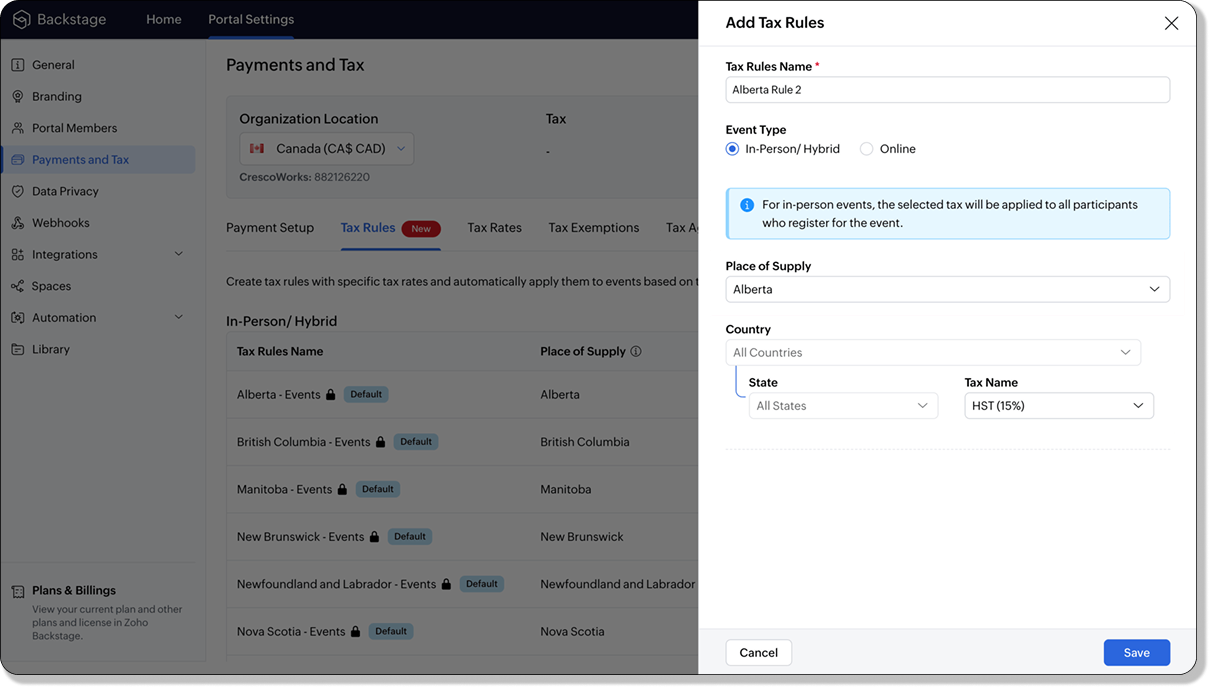
For in-person and hybrid events, Zoho Backstage automatically suggests tax rules based on the event location. The 13 default tax rules cover all Canadian provinces and territories. If the event location changes, the system automatically updates the relevant tax rules to reflect the new region’s rates.
You can also create custom tax rules by selecting a specific province or territory and applying a custom tax rate, offering greater flexibility for managing event taxes.
Applying Tax Rules to Virtual events
For online events, the system uses a default tax rule that covers all Canadian provinces and territories. Taxes are applied based on the attendee's location.
Canadian attendees are charged the applicable provincial tax rate.
International attendees are assigned a zero tax rate by default.
If you need to apply taxes to international attendees, you can create new tax rules tailored for online events, ensuring compliance with international tax regulations.

- Tax rules in Zoho Backstage are flexible and dynamic. You can modify them at any time during your event setup. However, changes will only apply to new transactions. Existing transactions will retain the original tax rule, ensuring previous purchases remain unaffected.
- If you select a non-Canadian location for your event, the Canada Tax Rule will not be applied. This ensures taxes are only charged where applicable, preventing errors in cross-border events.
Event Category

Categorize and filter events based on custom classifications for organizers and attendees to find and manage events easily. This new addition is aimed at improving event management by giving organizers the flexibility to create, manage, and filter events using custom categories. Organizers can now create up to 100 custom categories when setting up an event, giving them the freedom to define categories that suit their specific needs.
Previously, categories selected in Event Info were not utilized elsewhere, and there was no option to add new/manage categories.
Now, organizers can tailor categories to their specific needs and filter them on the Event Directory.
To access:
- While Creating an Event: On the Event Info page.
- For Category Management: Under Portal Settings > Branding > Event Category.
Permissions:
Portal Owners & Admins:
- Add, edit, and delete custom categories.
- Cannot edit or delete default categories.
Event Organizers:
- Can only add new categories.
- Cannot edit or delete existing custom or default categories.
Other Enhancements
Floor plan Focus Area

The Focus Area in the floor plan refers to designated spaces within the event venue that are visually highlighted to draw attention to specific sections, such as booths, stages, or key locations. These areas allow organizers to emphasize important spots, making navigation easier for attendees and improving the overall flow of the event. Focus areas help guide visitors to essential parts of the venue, enhancing their event experience.
Custom Dates for ticket classes (Early access)
In cases where smaller sessions or events (like welcome events, after-event parties, etc.) occur before or after the main event, this feature allows organizers to assign specific dates to separate ticket classes, ensuring tickets are only valid for the selected dates.
Custom dates can be set within 30 days before or after the main event.
New WhatsApp triggers and templates
The WhatsApp Integration, designed to enhance communication and engagement with all event stakeholders, now includes new triggers and templates to facilitate messaging and ensure timely updates for everyone.
For Purchasers:
- Send Registration Confirmation: Instantly confirm registration to enhance the attendee experience.
- Order Canceled: Notify purchasers promptly in case of any order cancellations.
For Speakers:
- Welcome Speaker: Extend a warm welcome to our speakers and set a positive tone for their participation.
- Speaker Added to a Session: Inform speakers when they’re added to a session, ensuring they are well-prepared.
- Speaker Removed from a Session: Provide timely updates should there be any changes to their session involvement.
For Sponsors:
- Thank a Sponsor Before Website is Live: Show appreciation early on, fostering positive relationships with sponsors.
- Welcome and Thank Sponsor After Website is Live: Acknowledge sponsors publicly once the event website goes live.
- Deny Sponsor Proposal: Deliver sensitive information with professionalism and clarity.
- Acknowledge Sponsor Proposal: Confirm receipt of sponsor proposals, keeping communication open and transparent.
For Participants:
- Event Canceled: Quickly inform participants in the event of cancellations, ensuring they’re kept in the loop.
We are continuously refining Zoho Backstage to make your event management experience even more powerful and intuitive. Stay tuned for more updates in the coming months!
If you have any questions, please contact support@zohobackstage.com.
Topic Participants
Jithan Raghuraj
Recent Topics
Zia Actions: AI-powered Workflow Automation for Faster and Smarter Execution
Hello everyone, Workflows got a notch better with AI-based actions. Actions such as field extraction, prediction, auto reply, and content generation facilitate quick execution with improved speed and accuracy. Zia can intercept useful details in newlyConstant color of a legend value
It would be nice if we can set a constant color/pattern to a value when creating a chart. We would often use the same value in different graph options and I always have to copy the color that we've set to a certain value from a previous graph to makeWhat's New in Zoho POS - October 2025
Hello everyone, Welcome to Zoho POS's monthly updates, where we share our latest feature updates, releases, changes, and more. Let’s take a look at how October went. Process returns for refunds, exchanges, or offer store credit Returns and exchanges canLoan and purchase
My husband is lending me mobey to buy a vehicle intersst free ... I need to know how to record the cash receipt and how I pay it back... the money is for a vehicle do I just post the invoice for that as I normally would usung the loan money to pay forZoho Connect Module in Zoho Trident
Hi I really like where Zoho Trident is going. Having Mail and Cliq in one place is especially powerful. However, Zoho Connect really needs to be included to make this a true communication and collaboration hub. I would like to request that Zoho ConnectZoho FSM API Delete Record
Hi FSM Team, It would be great if you could delete a record via API. Thank you,File Field Validation
Hello all, We are tracking our customer NDA agreements in our CRM and have created 2 fields to do so, an execution date field and a file upload field. I want to create a validation rule to ensure that when the execution date field is populated that the100 record view limitation
I have just migrated from another CRM and am starting in ZOHOcrm with over 5000 contacts. It seems that my searches and sorts are limited to 100 live records....or am I missing something. This seems to be very limiting...in a lot of scenarios (mass email,ZUG Meet-ups are back - Across India (December 2025)
The Zoho User Group (ZUG) meet-ups are back, and this time, we’re travelling across India to reconnect with our amazing community! From Chennai to Delhi, Bengaluru to Mumbai, we can’t wait to meet you all in person and talk everything Zoho SalesIQ, automation,Categorise Attachments
We take ID, proof of address, right to work documentation and more. I can upload a single file in to field, but we often receive multiple files for each category e.g. someone may send a separate file for the front and back of their national ID card. My team don't have time to manipulate the files in order to upload them as a single file. The options, as far as I can tell, would be to create additional fields on attachments in order to categorise what the file is, or to be able to upload singleScheduling a meeting for just a 1:1 phone call
My business is B2C and many of my customer's don't want to engage in an online meeting for what can be handled in a regular phone call. I am trying to create a new meeting invitation, but there is no venue optoin for "phone call". How are other's handlingNeed more details on API Usage Dashboard
Hi Team, We have implemented Zoho Expense for a client and has done some integrations with well known third party ERP via api. Recently we have noticed a huge spike in the API consumption. But we couldn't get the root cause for the same. I accept therePower of Automation:: Automating SLA Timelines for First Response & Resolution for Issues module.
Hello Everyone, Ever wished SLAs could update automatically based on issue severity i.e no manual tracking, no missed timelines? That is exactly what one of our customers, Alex, wanted to achieve in the Issues module. So, we have setup a simple automationPower of Automation :: Quick way to associate your Projects with Zoho CRM
A custom function is a software code that can be used to automate a process and this allows you to automate a notification, call a webhook, or perform logic immediately after a workflow rule is triggered. This feature helps to automate complex tasks andFree webinar! Build smarter apps with Zoho Sign and Zoho Creator
Hello, Bring the power of digital signatures to the apps you build in Zoho Creator! Connect Zoho Sign as a microservice and enable seamless e-signature workflows in your applications. This integration allows you to automate signing tasks using Deluge.Move orders scan ISBN
Hi We have ISBN setup to be searched in items zoho but move orders dissent recognize the ISBN is there q missing configuration? regards, JSWhat's New - October 2025 | Zoho Backstage
Hey everyone! We’ve been busy rolling out a host of upgrades for Zoho Backstage. While some major features are still going through final rounds of testing to make your event experience smooth as butter, here’s what was new and improved in October 2025.Zoho People Attendance Regularization – Wrong Total Hours Displayed
While using Zoho People, I observed that the attendance regularization is showing wrong total hours when applied to past dates. For example, if a check-in is added at 10:00 AM and check-out at 6:00 PM for a previous date, the system sometimes calculatesAdd Flexible Recurrence Options for Meeting Scheduling in Zoho Cliq (e.g., Every 2 Weeks)
Hello Zoho Cliq Team, We hope you are doing well. Currently, when scheduling a meeting inside Zoho Cliq, the recurrence options are limited to Daily, Weekly, Monthly, and Yearly. There is no ability to set a meeting to occur every X weeks — for example,Subform Disabled Fields Should Remain Disabled on Edit/View
Currently, when we disable a subform field using on user input or on add new row, it works perfectly during the initial data entry. However, when the record is saved and reopened for viewing or editing, these disabled fields become editable again. ThisHow do you print a refund check to customer?
Maybe this is a dumb question, but how does anyone print a refund check to a customer? We cant find anywhere to either just print a check and pick a customer, or where to do so from a credit note.What is Resolution Time in Business Hours
HI, What is the formula used to find the total time spent by an agent on a particular ticket? How is Resolution Time in Business Hours calculated in Zohodesk? As we need to find out the time spent on the ticket's solution by an agent we seek your assistanceHide "Section" headers when using a form as a subform in "List view"
When using a form as a subform and setting the "View Type" to "List View" it is not possible to hide the section headers. This can become an issue if I have a section which is not applicable to this subform and I hide the fields within that section andAdd additional field to quick search results
IN the advanced search, we can add any field to the columns. In the regular search results (before you press enter, there is no option to modify the results. It would be super useful to include a custom field where it currently displays the pipleineNeed Help: Updating Related Records via Subform Entries in Zoho Creator
Hi everyone, I’m trying to set up a workflow in Zoho Creator where each row in a subform updates related records in another form automatically. Here’s the situation: My main form (e.g., “Receipts”) contains a subform where each row selects a related recordDisable signing in using email aliases?
Hi, I currently have user accounts that have multiple aliases, for example: Main: name@domain.com Alias: alias1@domain.com, alias2@domain.com Currently, I am able to use any of those 3 emails in the 'username' box during login, and it will log me into the email. Is there a way to setup so that email aliases cannot be used to sign on? I'd still be able to receive and send emails using those aliases in the main email account like it works now, except only the main email can be used to login. Cheers!Zoho Desk - Community - Customer Portal - Description Field UX Improvement
Hi Zoho Desk Team, As a prolific user of Zoho Cares Community, I find it very frustrating that I cannot increase the size of the Description box (this one which I am typing this message). Many apps with multi line text fields have a small handle in theAdd the same FROM email to multiple department
Hi, We have several agents who work with multiple departments and we'd like to be able to select their names on the FROM field (sender), but apparently it's not possible to add a FROM address to multiple departments. Is there any way around this? Thanks.Can I change the format of the buttons in the email templates?
Hi all! We have been working hard trying to brand our email templates, and have some way to go yet. One of the things we can't seem to edit is the green ${Cases.CUSTOMER_PORTAL_BUTTON} button and the font of the View Ticket text. Is there any way of doingLead to Contact Conversion with multiple email address fields
We are a B2C business with a strong repeat cycle, and as such it's not uncommon for customers to use multiple email addresses with us. We have both our Contacts & Leads modules set up with 3 email fields. (Primary Email / Secondary Email / Historic Email)Exporting Charts from ZohoCRM
Hi...I'm relatively new to ZohoCRM, but very happy with it so far. I have all my leads and potentials accurately entered, and like the reports that I can view, with charts at the top of the data. But when I export the data, I'm receiving only the data, whether I export as excel, csv or pdf. How can I export both the chart and the data? In case it makes a difference, I'm using the free version right now. I tried researching the other editions to see if a paid version of the software offered the abilityAutomatically Update Ticket Status in Zoho Desk Based on Actions in Zoho Projects
Hi Zoho Desk Team, Hope you’re doing well. We’re using the Zoho Desk–Zoho Projects integration to manage tasks related to customer tickets, and it works well for linking and tracking progress. However, there are a few important automation capabilitiessms long credits
I’m trying to purchase Long Code credits so I can send SMS campaigns to my contacts. However, when I click the “Buy Now” button, the page appears blank and doesn’t load any purchase options. Could you please assist me in purchasing the Long Code creditsTip #48- Power Your AI Workflows with Zoho Assist on Zapier’s MCP- 'Insider Insights'
We’re thrilled to announce that Zoho Assist is now part of Zapier’s Model Context Protocol (MCP), bringing remote support automation right into your AI ecosystem. What is MCP? The Model Context Protocol (MCP) is Zapier’s new framework designed to connect"Total Hours" on Employee Attendance Report
I'm learning that in Zoho jargon, "total hours" does not include paid breaks. Or at least not the way that my setup is working. That seems a little weird to me, since most jurisdictions in the US don't differentiate between time spent on paid break andInsert Cookie Policy in Zoho Sites
Hello, i need to insert a banner on my site because i'm in Italy so i have to respect EU laws for Cookie Policy and Privacy Policy. I see that i need to insert a code in <head> section of my site to show a banner/popup with cookie info. How i can do this? Thank you LucaMarketing Tip #1: Optimize item titles for SEO
Your item title is the first thing both Google and shoppers notice. Instead of a generic “Leather Bag,” go for something detailed like “Handcrafted Leather Laptop Bag – Durable & Stylish.” This helps your items rank better in search results and instantlyCustomer Parent Account or Sub-Customer Account
Some of clients as they have 50 to 300 branches, they required separate account statement with outlet name and number; which means we have to open new account for each branch individually. However, the main issue is that, when they make a payment, theyForced Logouts - Daily and More Frequent
In the last month or so, I've been getting "power logged out" of all of my Zoho apps at least daily, sometimes more frequently. This happens in the same browser session on the same computer, and I need to re-login to each app separately after this happens.ENTER key triggering Submit
Is it possible to stopped the ENTER key from the mandatory triggering of the Submit button on Creator form? I want forms submitted "ONLY" when the Submit button is pressed.Next Page