Zoho Books | Product Updates | February 2025
Hello users,
Now that January is over, here are some exciting updates to make this new year even better. We’re back with new features and enhancements in Zoho Books, including comparing fields as criteria in workflow rules and a custom SMTP integration. Explore these updates that are designed to elevate your accounting experience.
Import/Export E-Invoices in the ZUGFeRD and XRechnung Format [Germany Edition]
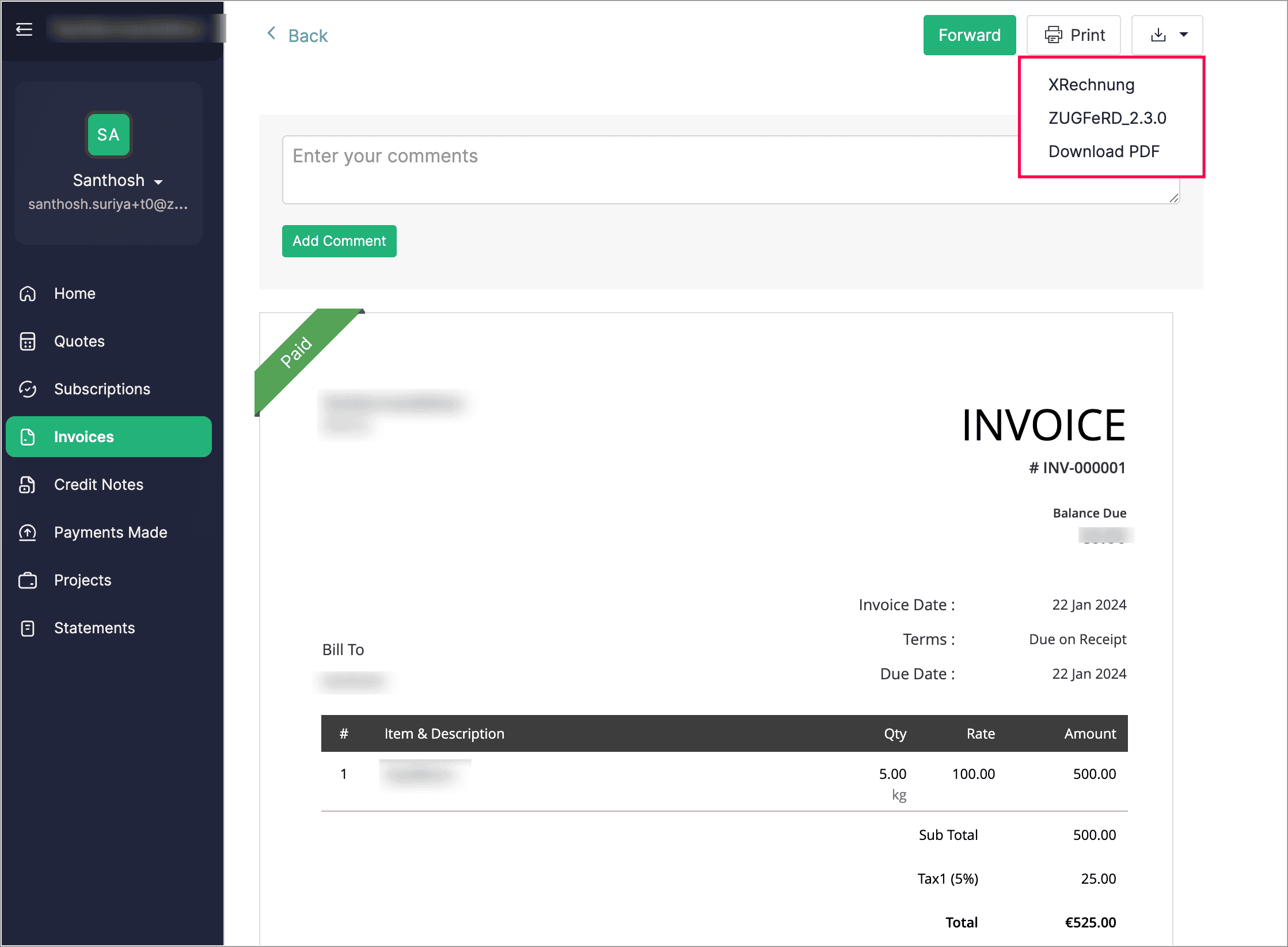
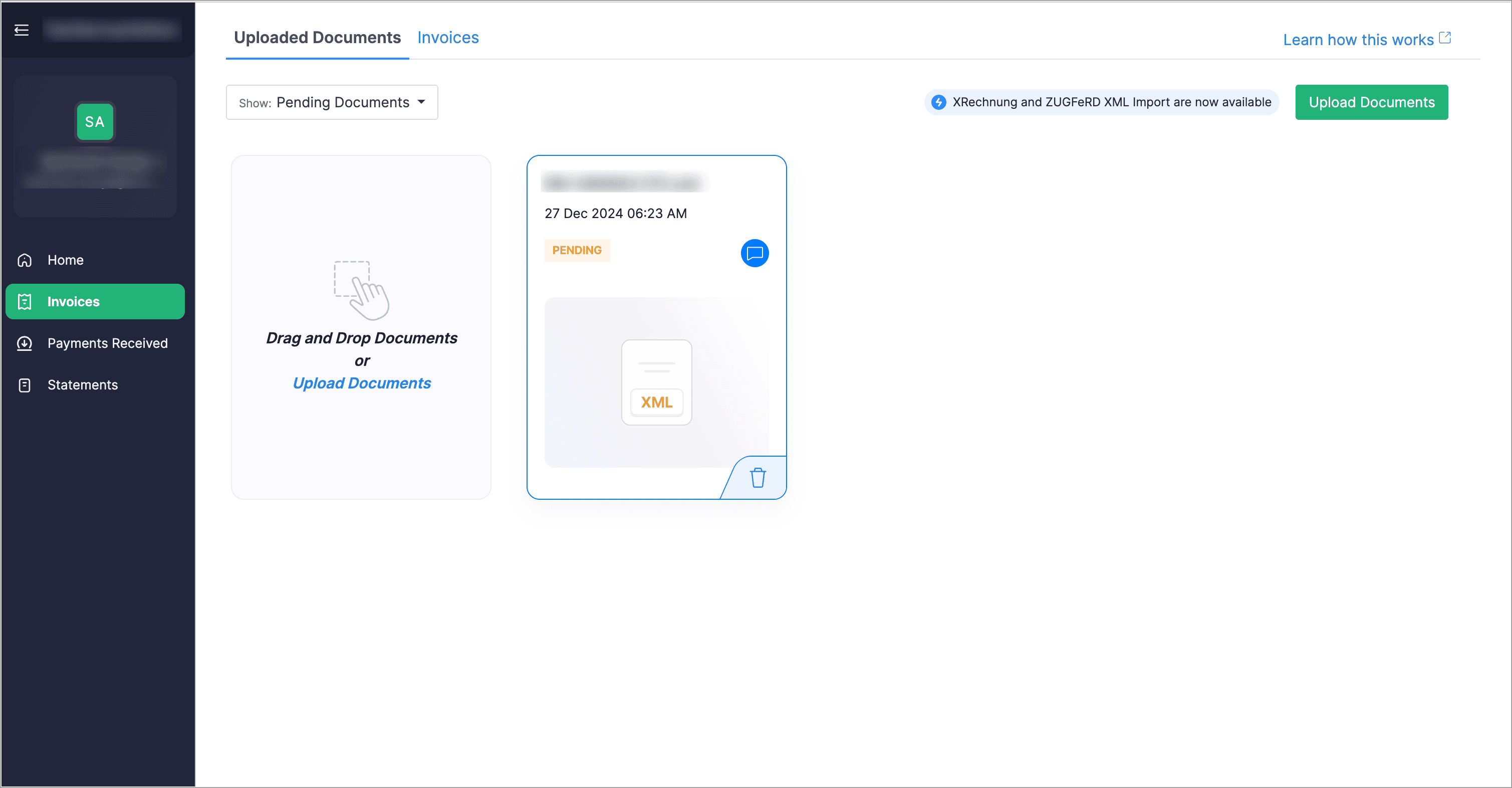
Customers can now download their e-Invoices in both XRechnung and ZUGFeRD formats directly from their customer portal. Additionally, vendors can upload invoices through their vendor portal and later convert them into bills from the Bills module.
Create Compound and Group Taxes [Germany Edition]
We’ve introduced the option to create compound and group taxes to manage local taxes and surcharges. In some cases, additional taxes, such as tourism or municipal taxes, may be charged alongside VAT. If the local tax is included in the total amount, VAT will be calculated on the entire amount (including the surcharge). However, if the local tax is applied separately, it will not be subject to VAT and will not appear in VAT-based reports. Additionally, when creating a tax rate, you can set tracking preferences for both sales and purchases.

Use Field Comparison as Criteria in Workflow Rules
When creating workflow rules, you can now use the comparison of two fields as criteria. For example, you can set a rule that triggers a workflow when the Discount Amount exceeds the Tax Amount.
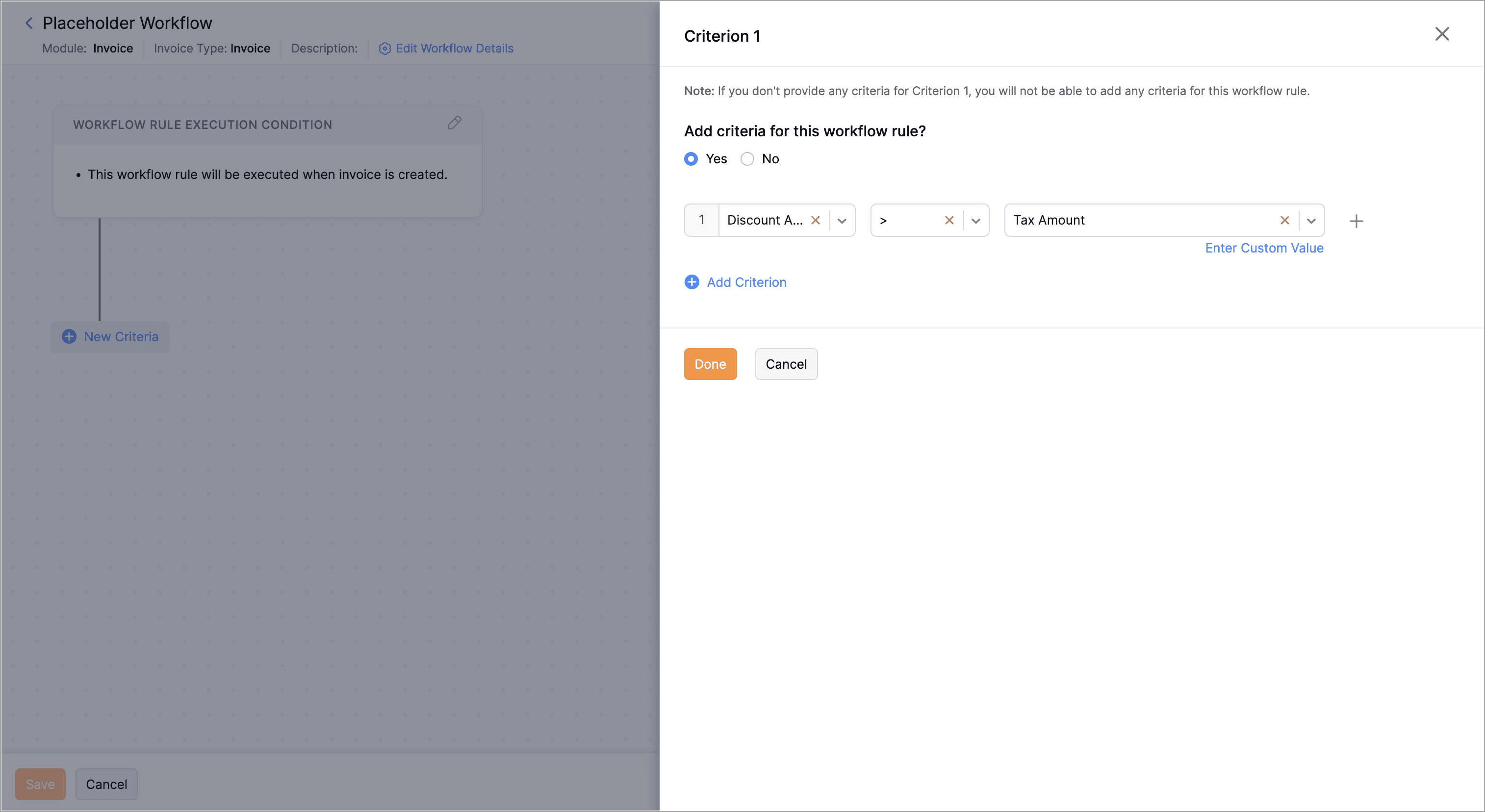
To compare fields as criteria, navigate to Settings > Automation > Workflow Rules > + New Workflow Rule. Enter the Workflow Rule Name and select the Module. Choose an Action Type and click Next. Then, click + New Criteria, select a field from the first dropdown, choose a comparator from the second dropdown, click Select Placeholder below the third dropdown, and select the field to compare. Click Done.
Background Execution Custom Button
When creating a custom button, if the execution takes longer than 10 seconds, you can choose to either wait for it to finish or move it to the background. For tasks that run over five minutes, the system will automatically shift them to the background unless you opt to do so manually. After the process is completed, you'll receive an in-app notification.
Send Emails with Custom SMTP Servers
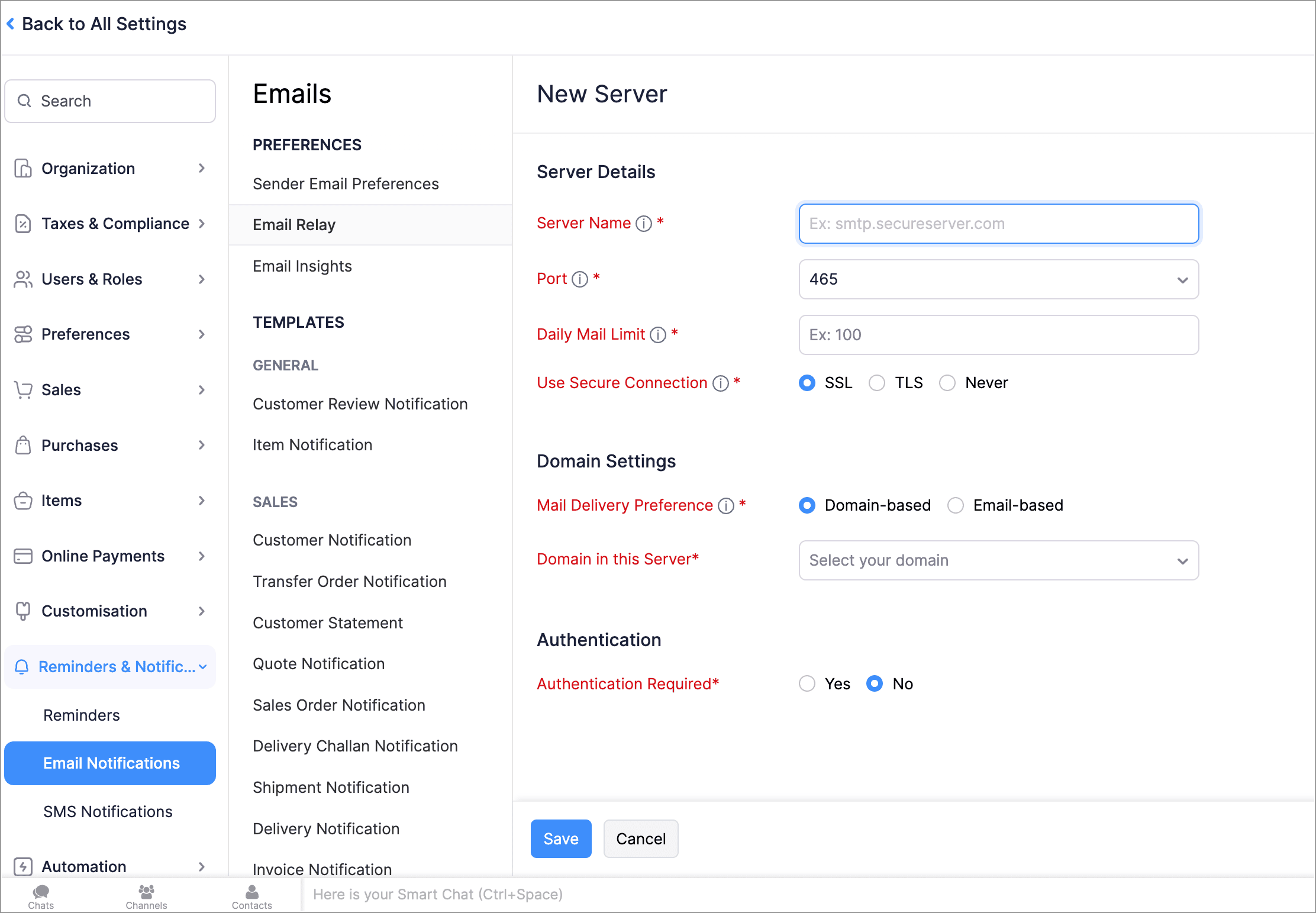
With Email Relay, you can use your own SMTP (Simple Mail Transfer Protocol) servers to send emails and avoid spam filters. You can add multiple SMTP servers, assign them to specific emails or domains, and set a daily sending limit. Once the limit is reached, emails will be sent through our Transmail server.
To setup an email relay, go to Settings > Reminders and Notifications > Email Notifications > Email Relay > + New Server.


Leave Organization
We've introduced the option to leave an organization from the Manage Organizations page. However, if you're the admin who created the organization or the only admin, you'll need to delete the organization instead. Additionally, if you've enabled any integrations in the organization, you'll need to disable them before leaving.
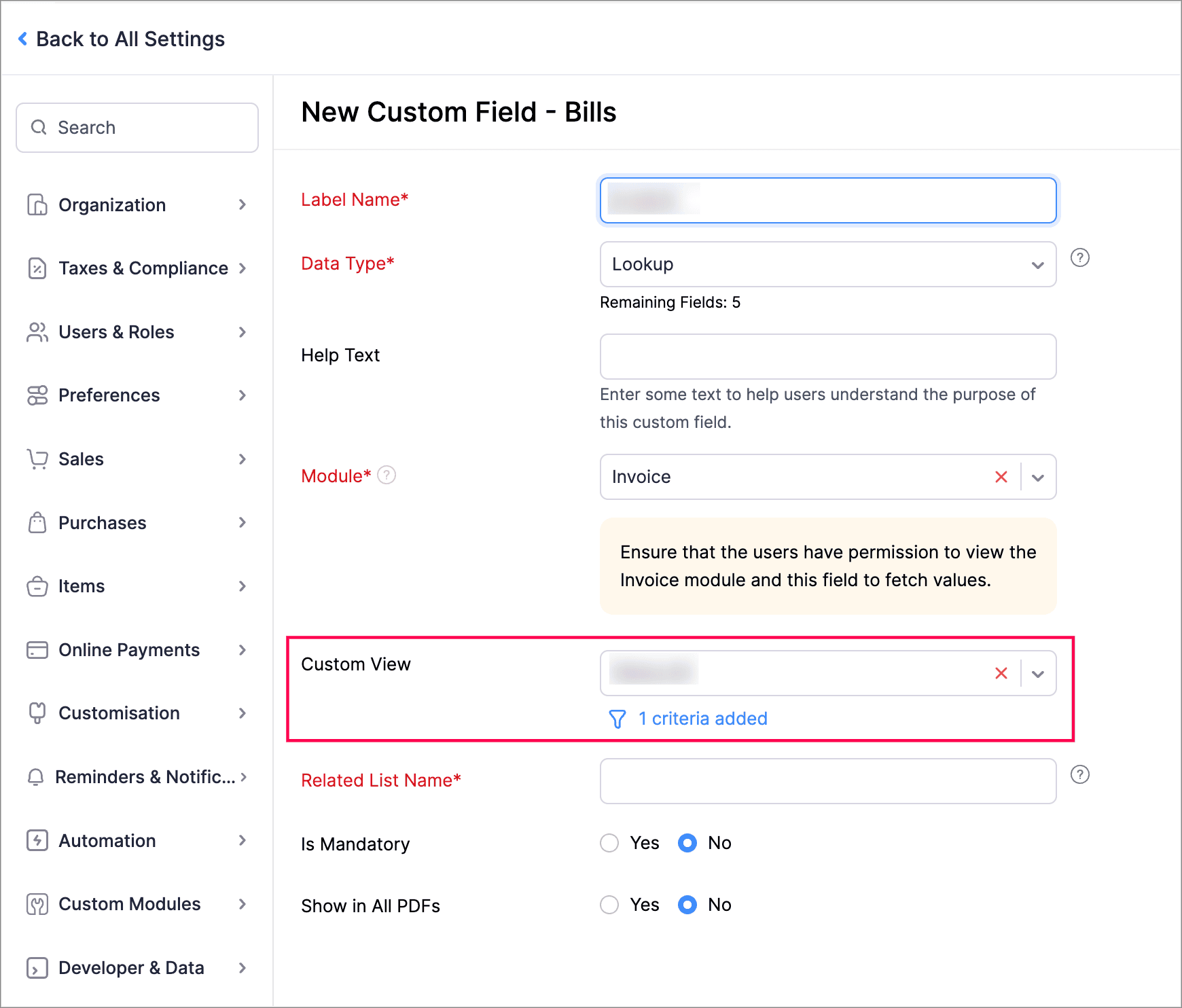
Filter Lookup Custom Fields by Setting Criteria and Using Custom Views
You can now filter your lookup custom fields by using custom views and setting criteria. Records will be filtered based on both the Custom View and Criteria, ensuring all conditions are met.
Create Workflow Rules with Sub-Modules
You can now create workflow rules for sub-entities within the Invoice module. For example, within the Invoice module, you can execute workflows with Bill of Supply, Debit Note, and Late Fee as sub-modules.
To create workflow rules for sub-entities within the Invoice module, navigate to Settings > Automation > Workflow Rules > + New Workflow Rule. Enter the Workflow Rule Name, select the module as Invoice, choose an option under Execute Workflow For, and select the sub-entity from the Invoice Type dropdown.
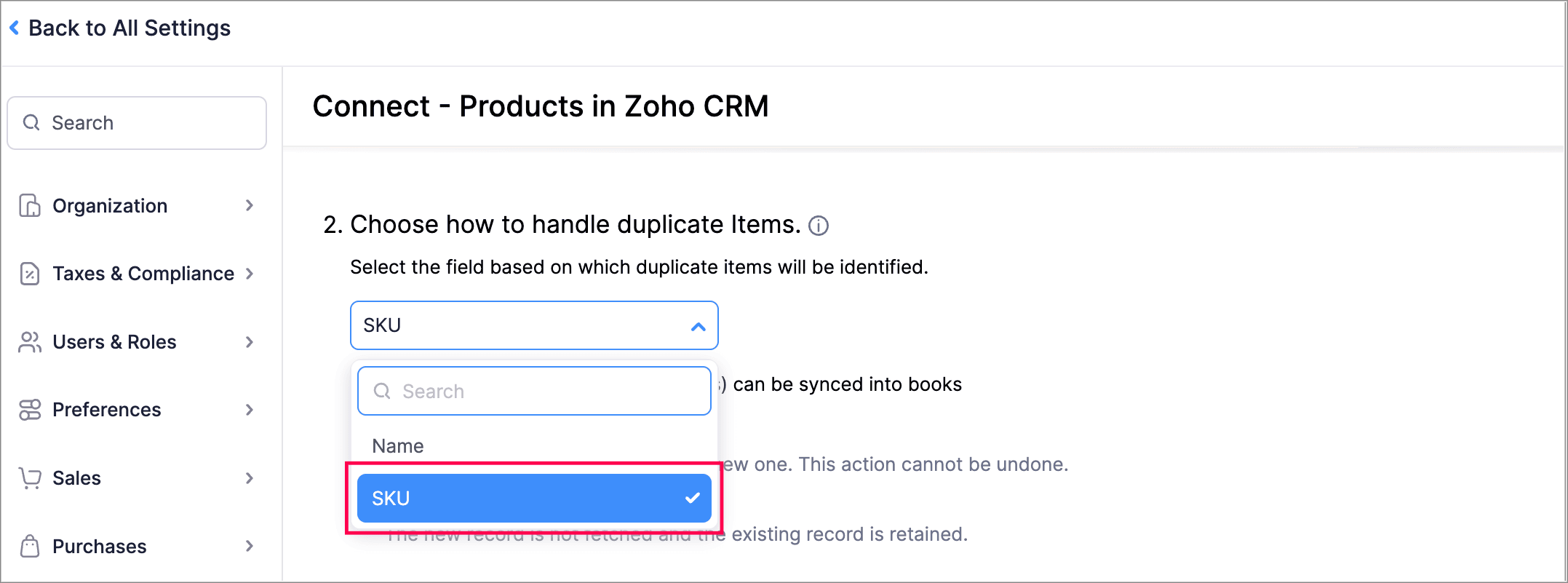
Handle Duplicate Items Using SKU in Zoho Books - Zoho CRM Integration
You can now use product SKU as the field based on which duplicate items will be identified while integrating Zoho Books organization with Zoho CRM.
Zoho Inventory Add-On Updates
Print/Download Purchase Receives
Now, you can print or download your purchase receives. We have also supported a standard template with which you can view the PDF of your purchase receives.
To print or download a purchase receive, go to Purchases > Purchase Receives. Select the purchase receive and click PDF/Print.
To view the PDF of a purchase receive, go to Purchases > Purchase Receives. Select the purchase receive and enable the Show PDF View option on its details page.
Other Feature Enhancements
Other Feature Enhancements
- Access your Customer/Vendor Balance Summary reports with the same configuration and filters as before, and create custom reports.
- We now support exporting the current view of your filtered Tasks that you and your users have to complete.
- You can now mark the default filters of all modules as your favorites. This change will only be visible to you and will not affect other users in the organization.
We hope you like the new features and enhancements in Zoho Books! Take some time to explore the latest updates. We’ll be back next month with even more updates, as we continually strive to elevate your accounting experience.
You can also visit the What's New timeline for bite-sized information about our previous feature updates and enhancements. If you need any assistance, feel free to reach out at support@zohobooks.com.
Best regards,
The Zoho Books Team
Topic Participants
Madhumitha M
Zohoboy
Miqdad Remtula
andra.bellu
Deanna
Recent Topics
Assign Income to Project Without Invoice
Hello, Fairly new user here so apologies if there is a really obvious solution here that I am just missing... I have hundreds of small deposits into a bank account that I want to assign to a project but do not want to have to create an invoice every timeTracking Non-Inventory Items
We have several business locations and currently use zoho inventory to track retail items (sales and purchase orders). We were hoping to use zoho inventory to track our non-inventory items as well (toilet paper, paper towels, etc). I understand that weProfile Page View Customization
I need to change the fields, sections from the profile view of an emplyoyee.Zoho Desk Android app update: Filter, Sort and Saved filters Enhancements
Hello everyone! We are excited to introduce the below features on the Android version Zoho Desk mobile app: 1. Filter & Sort support has been introduced for the Contacts and Accounts modules. 2. Sort options is now available in Custom Modules as well.Accessing shared mailboxes through Trident (Windows)
Hi, I have a created a couple of shared mailboxes. The mailboxes are showing up on the browser based Zoho workplace, but I cannot seem to figure out how to access my shared inboxes through Trident (Windows). Am I missing something or is this feature notFeature Request: Ability to set Default Custom Filters and apply them via URL/Deluge
I've discovered a significant gap in how Zoho Creator handles Custom Filters for reports, and I'm hoping the Zoho team can address this in a future update. This limitation has been raised before and continues to be requested, but remains unresolved. TheClosing the Loop: Why Lookup Asymmetry is Harming Data Integrity in Creator
TL;DR: Lookup fields allow users to add new related records inline via the "+" icon, but there's no equivalent ability to edit an existing related record without navigating away and losing form context. Adding a native "Edit" icon—with automatic Userfiltering lookup field options based on information in another module.
In our CRM system. We have the standard Accounts and Deals modules. We would like to introduce the ability to classify Accounts by Sector. Our desired functionality is to have a global list of all sectors that an Account can select, with the ability toService op locatie organiseren met Zoho FSM: waar lopen organisaties tegenaan?
Bij organisaties met service teams op locatie merken we vaak dat de complexiteit niet zozeer in de planning zelf zit, maar in wat er rond die planning gebeurt. Denk aan opvolging na interventies, consistente servicerapporten, en het bijhouden van installatiesIntroducing Assemblies and Kits in Zoho Inventory
Hello customers, We’re excited to share a major revamp to Zoho Inventory that brings both clarity and flexibility to your inventory management experience! Presenting Assemblies and Kits We’re thrilled to introduce Assemblies and Kits, which replaces theDoes the ability exist to make tax on the customer profile mandatory?
I am reaching out to inquire about the possibility of making the "Customer Tax" field mandatory when creating a new customer in Zoho. We want to ensure that all customers have their tax information recorded to maintain compliance with our internal processes.email association with CRM
Why is it 2024 (almost 2025) and Zoho has not figured out how to integrate email with CRM? It is so inconsistent at associating emails within CRM. I am an attorney. I have clients and work with other attorneys. Attorney John Doe is associated with multipleFix the speed
It takes ages to load on every step even though my dataset is quite small.Credit Note for Shipped and Fatoora pushed invoices
We have shipped a Sales Order and created an Invoice. The Invoice is also pushed to Fatoora Now we need to create a credit note for the invoice When we try it, it says we need to create a Sales Return in the Zoho Books, we have already created a SalesFSM - Timesheet entires for Internal Work
Hi FSM Team, Several of my clients have asked how they can manage internal timesheets within Zoho FSM. Since their technicians already spend most of their day working in FSM, it would be ideal if they could log all working hours directly in the FSM app.Add a way of clearing fields values in Flow actions
It would be great if there was an option to set a field as Null when creating flows. I had an instance today where I just wanted to clear a long integer field in the CRM based on an action in Projects but I had to write a custom function. It would beRole Management
I am creating an analytics dashboard for a company that will be utilized by its various departments such as Finance, Marketing, and HR. My goal is to design the dashboard with separate tabs for each department. Additionally, I plan to implement role-basedHighlight a candidate who is "off limits"
Hello: Is there a way to highlight a candidate who is "off limits"? I would like to have the ability to make certain candidate and / or Client records highlighted in RED or something like that. This would be used for example when we may have placed a candidate somewhere and we want everyone in our company to quickly and easily see that they are off limits. The same would apply when we want to put a client or former client off limits so no one recruits out of there. How can this be done? Cheers,Announcing new features in Trident for Windows (v.1.37.5.0)
Hello Community! Trident for Windows just received a major update, with a range of capabilities that strengthen email security and enhance communication. This update focuses on making your mailbox safer and your overall email experience more reliable.Early Payment Discount customize Text
Hi, I’m currently using Zoho Books and am trying to customize the standard “Early Payment Discount” message that appears in the PDF invoice template. I’ve reviewed the documentation here: https://www.zoho.com/books/help/invoice/early-payment-discount.htmlDeprecation of SMS-based multi-factor authentication (MFA) mode
Overview of SMS-based OTP MFA mode The SMS-based OTP MFA method involves the delivery of a one-time password to a user's mobile phone via SMS. The user receives the OTP on their mobile phone and enters it to sign into their account. SMS-based OTPs offerZoho Sheet - Desktop App or Offline
Since Zoho Docs is now available as a desktop app and offline, when is a realistic ETA for Sheet to have the same functionality?I am surprised this was not laucned at the same time as Docs.DKIM Now Mandatory - Changes to Zoho Forms Email Policies
Hello Zoho Forms Users, This post is to inform you about an important update regarding the authentication of all email domains in your Zoho Forms account. This year, we are doubling down on our commitment to deliver a secure, seamless, and empoweringCall description in notes
When completing a call, we type in the result of the call in the description. However, that does not show up under the notes history on the contact. We want to be able to see all the calls that have taken place for a contact wihtout having to go intoEmail Address for Contact not Populating
When I click "Send Mail" from a Contact's page, their email address does not auto populate the "To" field. How do I make this happen?New in CRM: Dynamic filters for lookup fields
Last modified on Oct 28, 2024: This feature was initially available only through Early Access upon request. It is now available to all users across all data centers, except for the IN DC. Users in the IN DC can temporarily request access using this formWhy hybrid project management might be the best fit for you?
Project management techniques are designed to equip teams with proven methods for easy and efficient project execution. While management teams may have apprehensions about adopting the hybrid method of project management, we’ve compiled the top reasonsAllow all Company Users to view all projects, but only owner/admins can change projects
I was wondering if there was a permission setting I could adjust to allow all our company users to see all projects created. Then, only the project owners and admins with the change permission. ThanksFail to send Email by deluge
Hi, today I gonna update some email include details in deluge, while this msg pops up and restrict me to save but my rules has run for one year. can you tell me how to use one of our admin account or super admin account to send the email? I tried to updateSeeking help to be able to search on all custom functions that are defined
Hello I have a lot of custom functions defined (around 200) and i would like to search some specific strings in the content of those. Is there a way to accomplish that? If not, is there a way to download all existing custom functions in some files locallyTotals for Sales Tax Report
On the sales tax report, the column totals aren't shown for any column other than Total Tax. I can't think of a good reason that they shouldn't be included for the other columns, as well. It would help me with my returns, for sure. It seems ludicrousAdd Bulk Section / Grid Layout Duplicate Feature in Zoho Forms Builder
Currently in Zoho Forms, users can only duplicate individual fields. There is no option to duplicate an entire section or two-column/grid layout with all internal fields. This becomes inefficient when building structured forms such as Family Details,Leistungsdatum in Rechnungen (Zoho Books)
Hallo, ist es irgendwie möglich den Leistungszeitraum in der Rechnung aufzuführen? Beste Grüße AleksZoho Trident Windows - Streams Not Visible
Namaste We’re having an issue with Streams not being visible in Trident (Windows), which is important for us as we share many emails internally. It appears that the feature to show Streams above the Inbox folder, as seen in the default mailbox view, isSales IQ Chat Widget is Only Displaying Last Name
Can anyone suggest why the widget is only displaying "last name"?! We have the latest version of the wordpress plugin installed. Thanks Thanks!Shopify - Item sync from Zoho Inventory
Hi team, We’ve connected Shopify with Zoho Inventory. We want that when an item is created in Zoho Inventory, it must create a product in Shopify. But currently, new items created in Zoho Inventory are not getting created in Shopify even after clickingBulk upload image option in Zoho Commerce
I dont know if I am not looking into it properly but is there no option to bulk upload images along with the products? Like after you upload the products, I will have to upload images one by one again? Can someone help me out here? And what should I enterIs it possible to setup bin locations WITHOUT mandating batch tracking?
Hi fellow zoho users, I'm wondering if anyone else has a similar issue to me? I only have some products batch tracked (items with shelf life expiry dates) but I am trying to setup bin locations for my entire inventory so we can do stock counting easier.Kill zoho meeting
Saying the quiet part out loud. Can zoho please just give up on the idea that they can make a meeting platform and just make our workplace licenses cheaper when you remove it so people can switch to zoom or teams. Tired of the excuses, you guys cant makeUtilisation de Zoho en conformité avec l’article 286 du Code général des impôts (CGI)
Cher(e) client(e), Conformément à l’article 286 du Code général des impôts (CGI) impose aux entreprises assujetties à la TVA d’utiliser des systèmes de caisse ou de gestion commerciale certifiés lorsqu’elles enregistrent des ventes à des particuliers.Next Page