Zoho Creator Upcoming Updates — October 2022
Hi all,
Greetings from the Zoho Creator team! We've got some interesting updates for you today—and rest assured, there’s more to come!
In this post, we'll be going over the following features and improvements for this month.
In-app notifications
Backend enhancements to improve field usability
Increasing usability of drop down and multi select fields
Custom connectors
Removing page parameters
These features will be released and accessible in the upcoming weeks. Keep watching this space for more updates on this month's releases!
Introducing in-app notifications
One of the most requested features in our communities was to notify users mentioned in record comments—and we've gotten the message loud and clear! Notifications are the modern solution for informing and engaging your users, by keeping them in the loop and providing instant alerts for specific activities.
Creator notifications are undergoing a major makeover to support real-time notifications for approval workflows, blueprint workflows, record comments, and push notifications for Deluge tasks, as well as important announcements across web, mobile, and tablet devices.
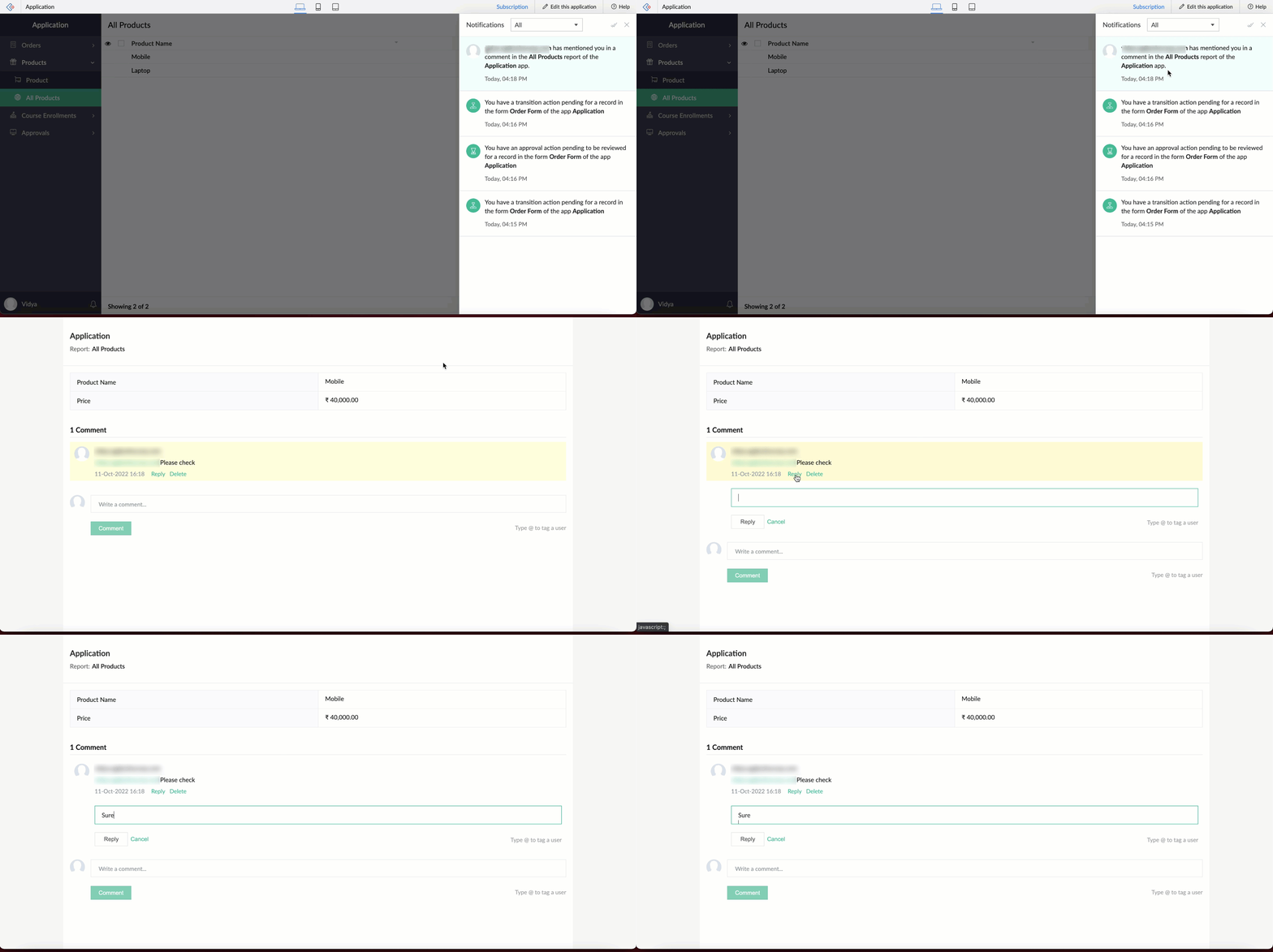
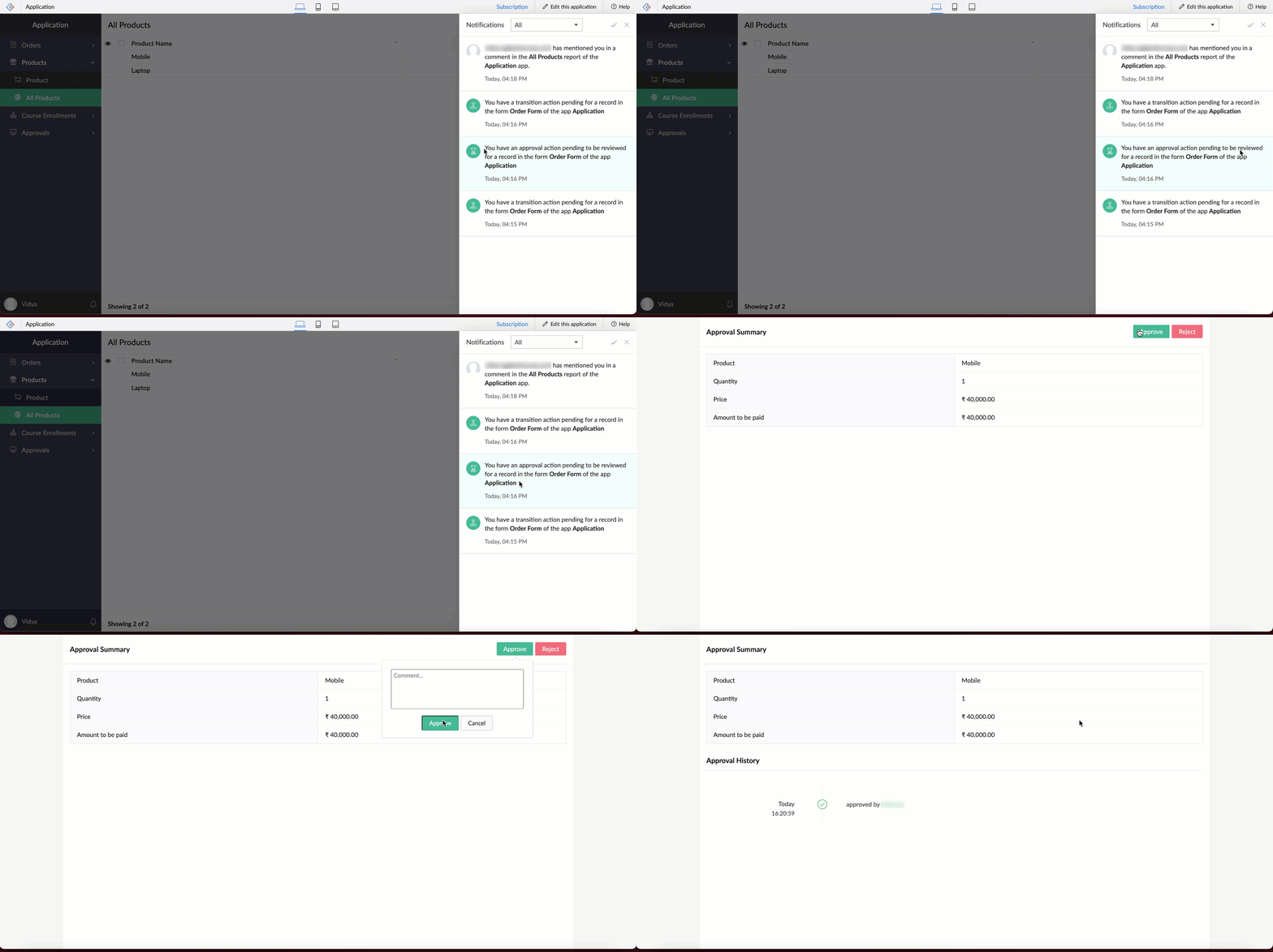
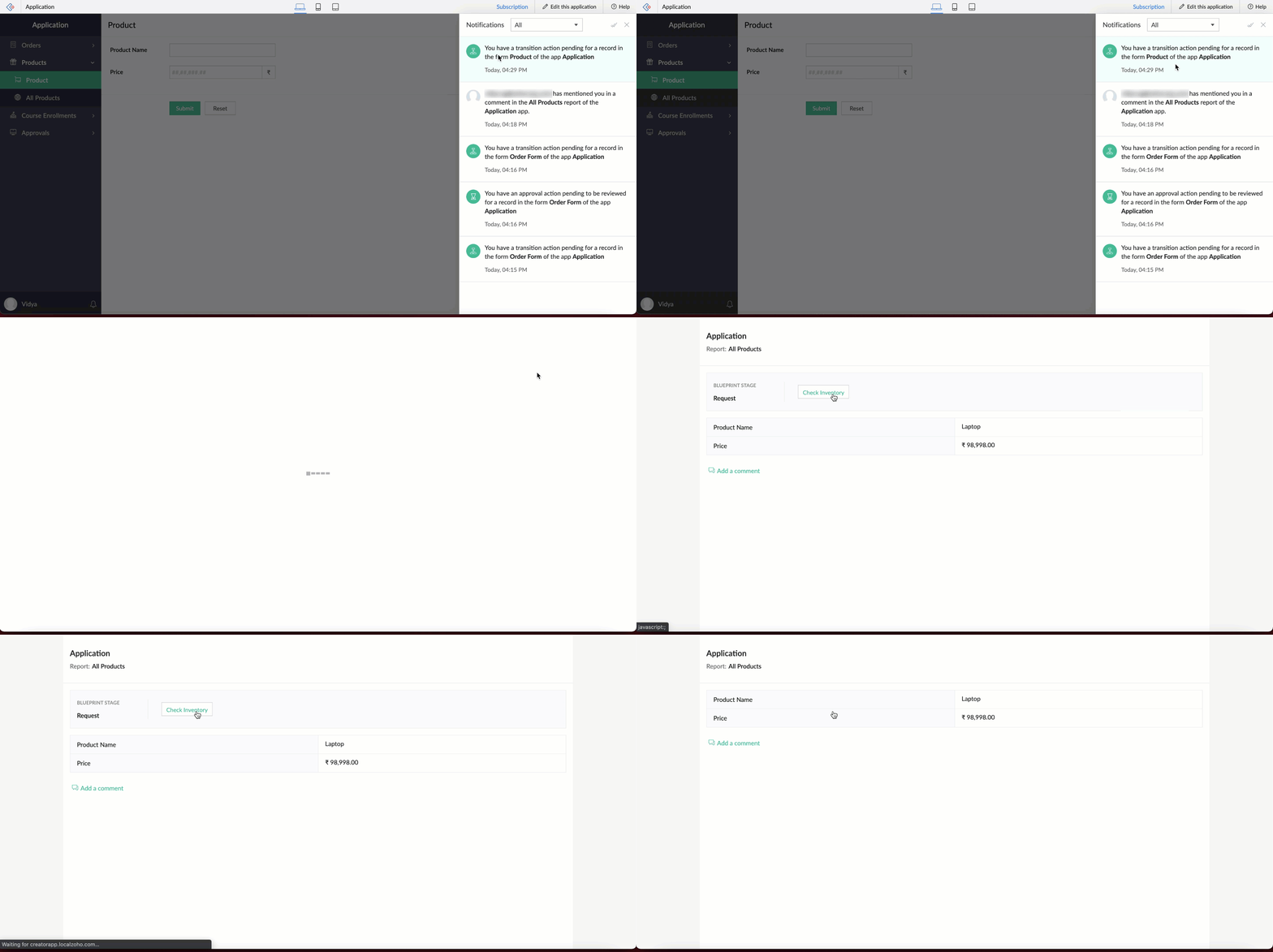
The below images show how notifications will be shown for the above actions.
(i) Notification shown when someone @mentions you in the record comments in your forms
(ii) Notification shown when you have yet to review an approval process for a record in any of the forms
(iii) Notification shown when you have a record for which the stage transition is pending
The Notifications Pane is accessible by clicking the Notifications icon in the top-right of your screen, which will be visible in both the development and live-mode of your apps.
Each of these notifications will be listed as cards in the notification pane. When you click a notification, you'll be taken to the respective record view in a new tab, where you can perform the required action (refer to the above GIFs).
Currently, notifications are not supported for the SDK apps in iOS and Android. Also, notifications are enabled only for a handful of activities, although we hope to add more in the future!
Backend enhancements to improve the usability of form fields
As announced earlier, we'll be introducing a few technical backend enhancements that'll enable you to redefine the character limits of certain fields. Following this upgrade, you'll have the capability to reset field character limits to efficiently accommodate more fields in a form.
For example, setting the field character limit as 255 following the update will allow only 60 fields per form, whereas resetting the character length to 100 will allow 160 fields per form, and resetting to 80 will allow 200 fields. In short, decreasing the character limit will enable you to add more fields to your form.
Note: These enhancements are applicable only for users with applications that have forms with approximately 60 fields, with the sole intention of adjusting space to accommodate more fields in the future. As a result of these backend changes, a few fields in your forms might have their maximum character length values updated. To enable you to view and track these changes, we'll be sending an email with details of the fields whose values have been changed and their new values. We also assure you that we've taken all necessary measures to ensure that the transition is seamless, with minimal impact on your end.
Increasing usability of drop down and multi select field choices
We've planned to make a few changes to the choice fields—drop down and multi select—to reduce scrolling and drill down to records or field values, especially when you have a large volume of data.
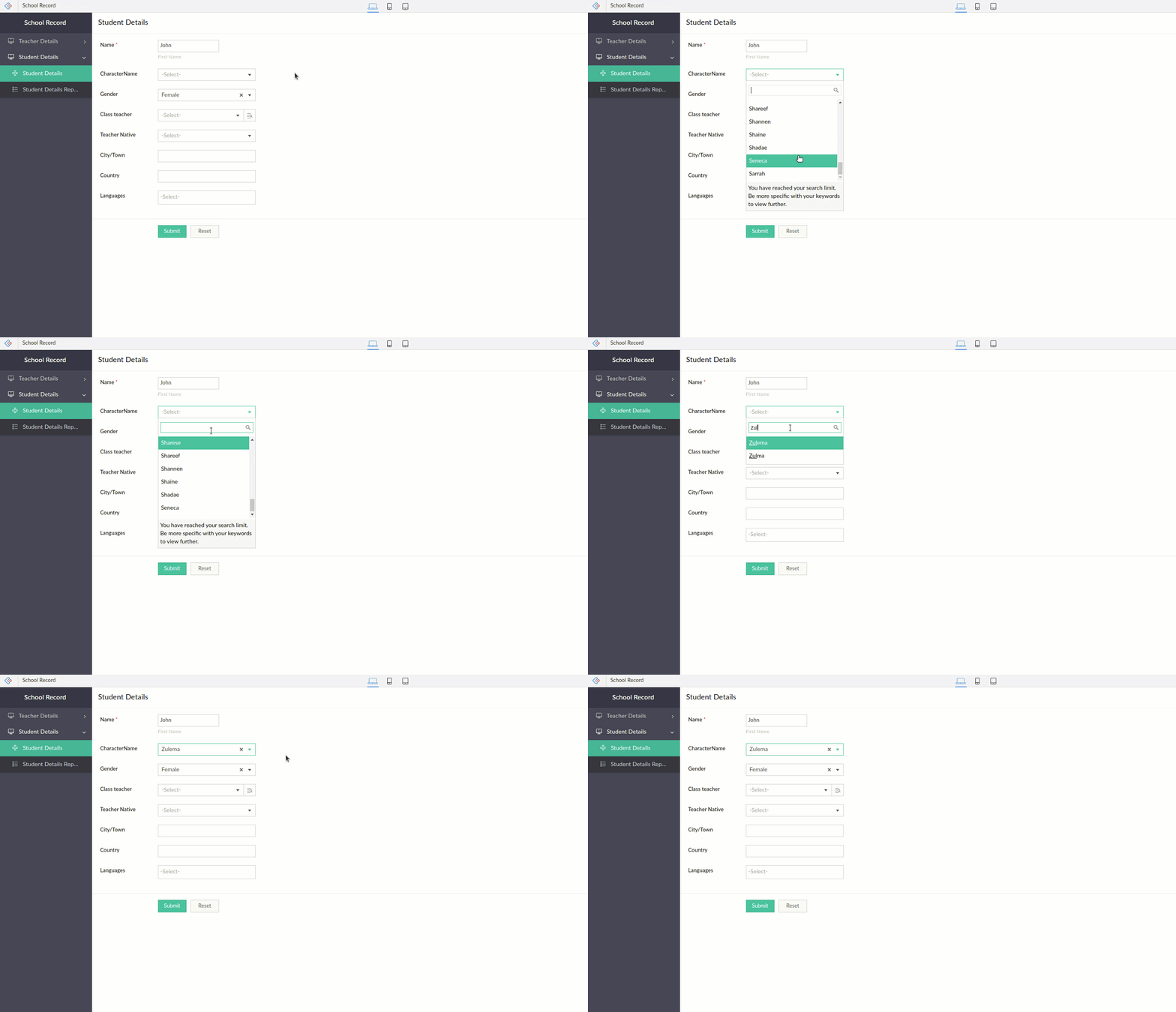
After this update, we'll be limiting the listing of choices to 5,000. Anything beyond 5,000 is not likely to be the result that a user is looking for. If you need to search for records beyond the 5,000 limit, users can use the search provided in the choice fields as efficiently as possible. This allows users to skip scrolling, while narrowing down the search results at the same time. All that needs to be done is to enter the appropriate keywords to fetch the relevant records more easily. We assure you that these changes will have minimal or no impact on your end.
Introducing custom connectors
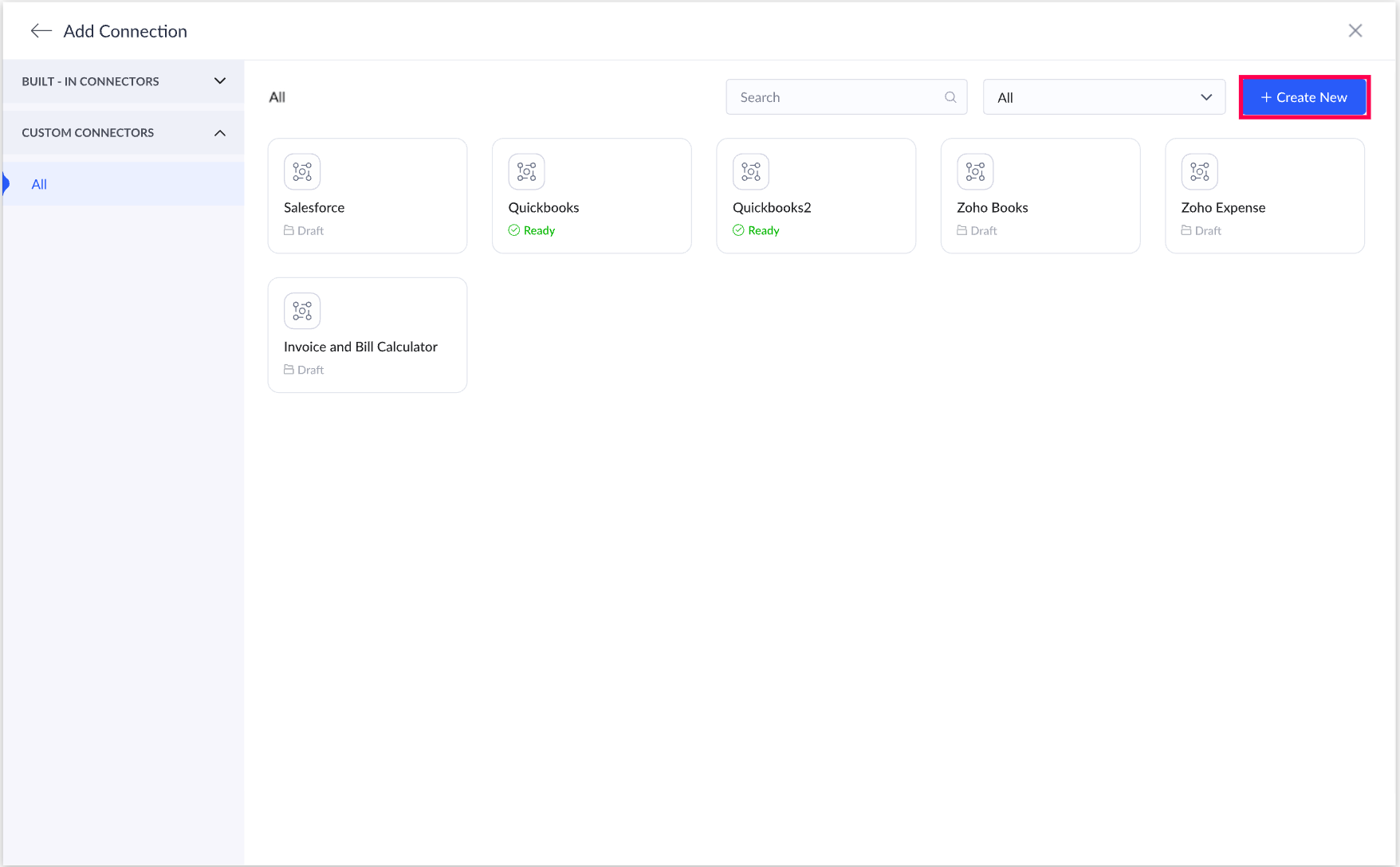
As promised, we'll soon be introducing custom connectors to help you integrate with any third-party service outside Creator. You (the admin) can create these connectors under Connections in the Microservices section.
Using custom connectors, you can integrate your Zoho Creator applications with additional third-party cloud services that are not available as built-in connectors inside Zoho Creator. You can now define and configure your own connectors for services that support Basic, API Key, and OAuth2 authentication mechanisms.
The following major configurations are necessary to create a custom connector:
General: Defines the basic information of your custom connector, such as Connector Name, Description, and Logo.
Security: Defines the authentication settings of the custom connector, such as Authentication Type, Authentication Parameters, Scopes, and Additional Parameters.
Once a connector is created and a connection is established, you can use it to perform REST operations on the target service from Zoho Creator. For example, to access your Google Drive account using Google's REST APIs, you can create a custom Google connector, establish a connection, and connect to it. You can then use this connection to perform the specified integrations to your connected Google account.
Removing page parameters
Previously, you were able to delete page parameters only if there were no existing HTML/ZML snippets used in the page. This limitation made the deletion of page parameters a complex process. To resolve this, we'll henceforth allow page parameters to be deleted by showing a confirmation before deletion.
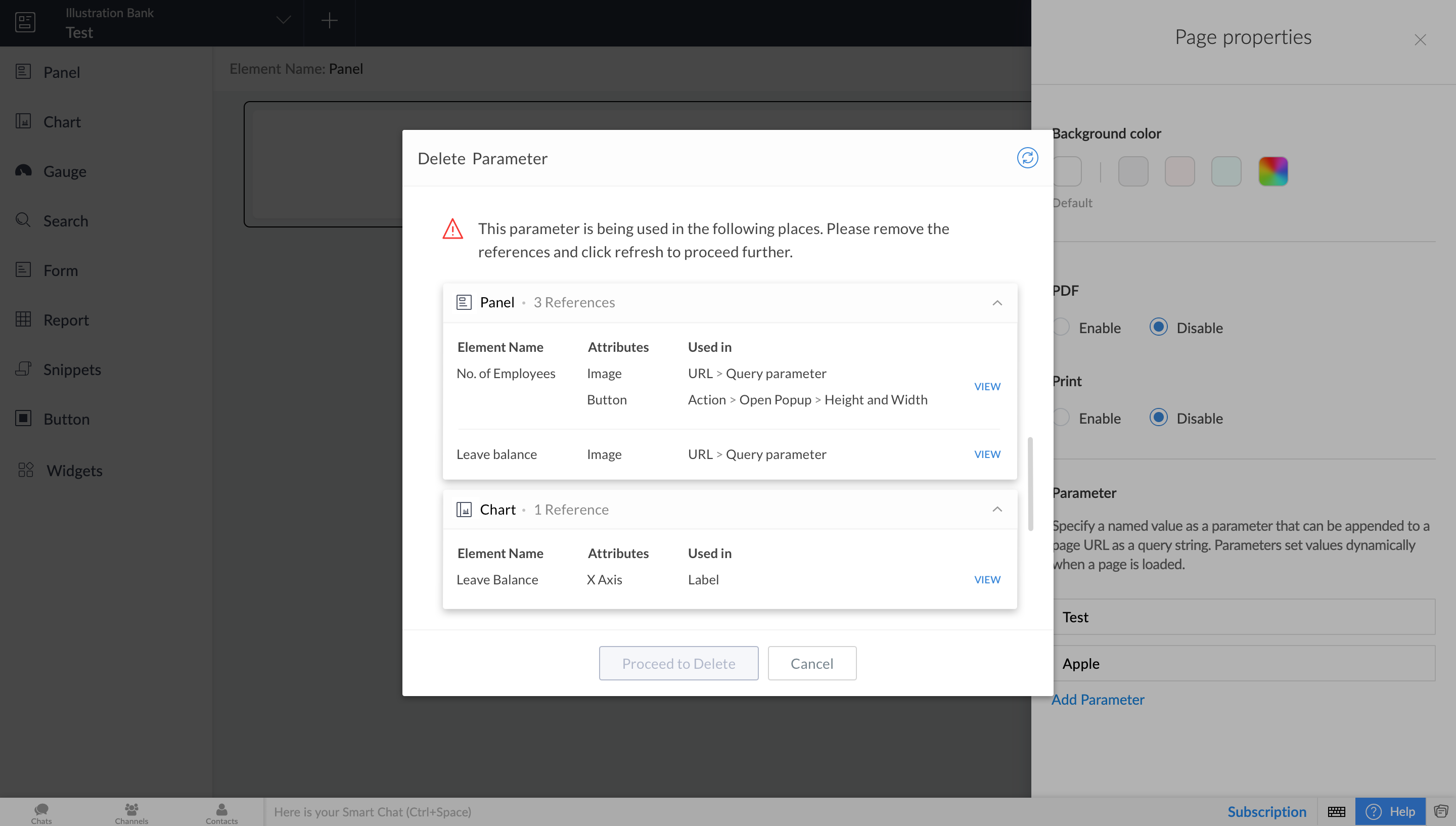
Upon invoking the deletion of a page parameter, if that parameter has been used in any other element on the same page, users will be prompted with a list of references where the parameter has been used. They can proceed with the deletion only after all those references have been reviewed and removed.
We know you're eager to try out these exciting updates, and we hope that this announcement is helpful in planning your upcoming projects and apps.
We'd also like to thank you once again for your loyalty and continued support! Please don't hesitate to reach out to us at support@zohocreator.com if you have any questions or concerns, or need assistance.
Regards,
The Zoho Creator Team
Topic Participants
Meghaa Pradyumnan
Catherine
Damien Cregan
Anders Ager | Transformio
threepmnz
Sticky Posts
Introducing Zoho Creator's 2025 Release Projection 2
Hello Creators! I'm Prakash, from the Creator product management team, and today I'm delighted to unveil our next set of features as part of Release Projection 2 for 2025. With thoughtful analysis and planning, we've curated powerful new capabilitiesZoho Creator - 2023 Release Projection 1
Hello everyone! A very Happy New Year to you and your family. Hope you're all good and having a great time using Zoho Creator to make your lives easier and your businesses prosper. 2022 was an action-packed year for us at Creator, and we hope to continueZoho Creator User Group meetups in a city near you! - Oct - Nov, 2023
Greetings from the Zoho Creator team! We're hosting a series of Zoho Creator meetups in various cities across the globe, and we'd love to meet you there! Our meetups are a great opportunity to network with industry peers, exchange ideas and best practices,Zoho Creator - 2023 Release Projection 2
Hello everyone! Time truly flies when you're having an incredible journey, and today we mark the completion of an eventful and action-packed six months. It feels like just yesterday when we embarked on this adventure together with the launch of our newUpcoming Updates - August 2022
Hi all, Greetings from the Zoho Creator team! Today we've got news for you on some exciting updates. And rest assured— there’s more to come! In this post, we'll be going over the upcoming features and improvements for this month as mentioned below. A
Recent Topics
How do I create an update to the Cost Price from landed costs?
Hi fellow Zoho Inventory battlers, I am new to Zoho inventory and was completely baffled to find that the cost price of products does not update when a new purchase order is received. The cost price is just made up numbers I start with when the productManage control over Microsoft Office 365 integrations with profile-based sync permissions
Greetings all, Previously, all users in Zoho CRM had access to enable Microsoft integrations (Calendar, Contacts, and Tasks) in their accounts, regardless of their profile type. Users with administrator profiles can now manage profile-based permissionsZoho OAuth Connector Deprecation and Its Impact on Zoho Desk
Hello everyone, Zoho believes in continuously refining its integrations to uphold the highest standards of security, reliability, and compliance. As part of this ongoing improvement, the Zoho OAuth default connector will be deprecated for all Zoho servicesVoC in Zoho CRM is now data savvy: Explore response drilldown, summary components and participation in CRM criteria
VoC has all the goods when it comes to customer intelligence—which is why we're constantly enhancing it. We recently added the following: A customer drilldown component that shows you the list of prospects and customers behind a chart's attribute ExpandedHow do I bulk archive my projects in ZOHO projects
Hi, I want to archive 50 Projects in one go. Can you please help me out , How can I do this? Thanks kapilError 0x800CCC0F Outlook
Hello, i cannot send or receive email in outlook. can you please help. 'Sending' reported error (0x800CCC0F) : 'The connection to the server was interrupted. If this problem continues, contact your server administrator or Internet service provider (ISP).'Passing the CRM
Hi, I am hoping someone can help. I have a zoho form that has a CRM lookup field. I was hoping to send this to my publicly to clients via a text message and the form then attaches the signed form back to the custom module. This work absolutely fine whenCan I add Conditional merge tags on my Templates?
Hi I was wondering if I can use Conditional Mail Merge tags inside my Email templates/Quotes etc within the CRM? In spanish and in our business we use gender and academic degree salutations , ie: Dr., Dra., Sr., Srta., so the beginning of an email / letterZoho vault instal on windows
I am trying to use Zoho Vault Desktop for Windows, but I am unable to complete the sign-in process. Problem description After logging in to my Zoho account and clicking Accept on the authorization page, nothing happens. The application does not proceedZoho Browser??
hai guys, this sounds awkward but can v get a ZOHO BROWSER same as zoho writer, etc. where i can browse websites @ home and continue browsing the same websites @ my office, as v have the option in Firefox, once i save and close the browser and again when i open it i will be getting the same sites. If u people r not clear with my explanation, plz let me know. Thanks, SandeepLet’s Talk Recruit: LinkedIn Cheatsheet
Welcome to the first edition of Let’s Talk Recruit for 2026. We are kicking off the year by revisiting one of the most asked about topics in Zoho Recruit. How our LinkedIn integrations actually work and how recruiters can get the most value from them.Zoho Forms API
Is there any way to get all form entry list using API? Looking forward to hear from youCreating a Chart from a Report
In Zoho Analytics, is it possible to create a chart from a Pivot View report? We are looking to use Zoho Analytics to replace Excel for Sales reports and would like to be able to show both the table and the chart together.Ability to Set Client Name During Portal Invitation
Hi Zoho Team, We would like to suggest an important enhancement to the Zoho Creator Client Portal functionality. Zoho Creator recently introduced the option to set a client’s display name in the Client Portal settings, which is very helpful for creatingMove email between inboxes?
Is it possible to move emails from one team inbox to another? We would like to be able to have a single "catch-all" inbox for incoming requests, and then move the email to the appropriate department inbox. I was hoping we would be able to accomplish thisPDF Attachment Option for Service Reports
Hello Team, I would like to check with you all if there is an option to attach PDF documents to the service reports. When I try to attach a file, the system only allows the following formats: JPEG, JPG, and PNG. Could you please confirm whether PDF attachments【Zoho CRM】データ一覧画面でのメモのバッジ機能リリースのお知らせ
ユーザーの皆さま、こんにちは。コミュニティチームの藤澤です。2026年度もゾーホーユーザーコミュニティをどうぞよろしくお願いいたします! 今回は「Zoho CRM アップデート情報」の中から、新機能のデータ一覧画面でのメモのバッジ機能をご紹介します。 目次 概要 メモのバッジ機能について メモの作成について メモに関する様々な処理について 最近追加したメモについて メモのバッジの非表示について クライアントスクリプトの対応 概要 メモのバッジ機能について 既存の活動バッジに加えて、すべてのタブのデータ一覧表示画面に、各データごとに利用できる「メモのバッジ」(キャプチャ内の赤枠部分)が新たに導入されました。is it possible to add more than one Whatsapp Phone Number to be integrated to Zoho CRM?
so I have successfully added one Whatsapp number like this from this User Interface it seems I can't add a new Whatsapp Number. I need to add a new Whatsapp Number so I can control the lead assignment if a chat sent to Whatsapp Phone Number 1 then assignCan’t find fsm in zoho one
Every other app is available to me in Zoho one except fsmPosibility to add Emoticons on the Email Subject of Templates
Hi I´ve tried to add Emoticons on the Subject line of Email templates, the emoticon image does show up before saving the template or if I add the Emoticon while sending an Individual email and placing it manually on the subject line. Emoticons also showTask Deletion Restriction & Strict Stage Control
Hello Zoho Community, We have the following two issues currently pending and under testing, for which we require a workable and reliable solution: 1. Task Deletion Restriction We are testing ways to ensure that staff users are not able to delete tasksUnable to mass update a picklist field
Hello, I have the records within our Accounts module divided between two account types: Parent Accounts & Member Accounts. I am attempting to mass update accounts from one picklist value to the other (within other specific criteria in our custom fields)Process checklist in CRM
Hi We've created a new sales process that I'm mapping into the CRM - issue I have is that some of the tasks / milestones I would like to capture require very simple tick box responses but there are quite a few under a variety of sub categories so I don'tCRM project association via deluge
I have created a workflow in my Zoho CRM for closing a deal. Part of this workflow leverages a deluge script to create a project for our delivery team. Creating the project works great however, after or during the project creation, I would like to associateHolidays - Cannot Enter Two Holidays on Same Day
I have a fairly common setup, where part-time employees receive 1/2 day's pay on a holiday and full-time employees receive a full day's pay. Historically, I've been able to accommodate this by entering two separate holidays, one that covers full-timeWhere is the settings option in zoho writer?
hi, my zoho writer on windows has menu fonts too large. where do i find the settings to change this option? my screen resolution is correct and other apps/softwares in windows have no issues. regardsFile emails in Shared email folder
Hi, I am unable to allow users to collaborate in Shared email folders: User 1 shares a folder let's say "SharedTopic" with full permissions Users 2 and 3 can see this folder but are unable to add emails to this folder or search in this folder. For example,How create a draft via workflow?
I wish to create a workflow rule for specific emails that creates a draft response - not an automatic email reply, but just a draft with a set response ready to be verified by an agent who can then manually select recipients. Alternatively, the workflowThis user is not allowed to add in Zoho. Please contact support-as@zohocorp.com for further details
Hi Team, when I,m trying to create a email account (imagixmidia.com.br) it's showing this error >> This user is not allowed to add in Zoho. Please contact support-as@zohocorp.com for further details plz help me thanksHow to manage task lists in Zoho Desk?
Hello, I use Zoho Desk for IT customer support. I have a list of standard operating procedures (SOPs), including SOPs for onboarding new users, offboarding users, losing a device, etc. These are lists of tasks to be performed depending on the situation.Zoho → ShipStation Integration – Sales Order–Driven Fulfilment Workflow
Hello All, I’m reaching out to explore the best way to integrate a shipping tool into our inventory which will speed our process up. We are looking to integrate ShipStation into our existing order-to-fulfilment workflow, as we’re keen to standardise onBusiness Day Logic Update: More Accurate Scheduling for Your Workflows
Hello everyone, We’re improving how business-day calculations work in workflows, especially when triggers happen on weekends. This update ensures that offsets like +0, +1, and +2 business days behave exactly as intended, giving you clearer and more predictableConvert Lead Automation Trigger
Currently, there is only a convert lead action available in workflow rules and blueprints. Also, there is a Convert Lead button available but it doesn't trigger any automations. Once the lead is converted to a Contact/Account the dataset that can be fetchedDefault Tagging on API-generated Transactions
If one assigns tags to an Item or Customer, those tags get auto-populated in each line item of an Invoice or Sales Order when one creates those documents. However, if one creates the Sales Order or Invoice via the API (either directly coding or usingUser
If user is already part of manage engine endpoint central , what hapens when i try to add them to another Zoho org / directory? Are these users added as external users?Adding a new section to the related details sidebar when creating a new ticket.
Hello, I was wondering if you can add a new section to the related details sidebar when creating a new ticket. I was wanting to have it to where it also shows the account information related to the contact chosen as well. This is the section I am referringDisplaying only unread tickets in ticket view
Hello, I was wondering if someone might be able to help me with this one. We use filters to display our ticket list, typically using a saved filter which displays the tickets which are overdue or due today. What I'd really like is another filter thatHow to compare a subform lookup field that allows multiple entries when edited
I have a form with a subform with multiple fields. One of the fields is a lookup field that allows a multi select. On edit validation, I want a workflow to execute only when the entries in that subform field has changed. The old. function is not workingIs Zoho Shifts included in the Zoho One plan?
In case the answer is no: there's any plan to make it available via One? Thank youZoho Tracking Image location
So we've been having an issue with tracking email opens. Specifically in Gmail. Our emails are not that long either, maybe 4 sections of image/250 characters of text/button per section. But all my test accounts I used via Gmail we're showing opens. But then come to find out the tracking image is at the very bottom of the email. So If the message is clipped (It always just clips our social icons on the bottom) and the user doesn't click the show more button it never tracks the open. Looking at otherNext Page