Ensure Consistent Service Delivery with Comprehensive Job Sheets

We are elated to announce that one of the most requested features is now live: Job Sheets. They are customizable, reusable forms that serve as a checklist for the services that technicians need to carry out and as a tool for data collection. While on location, the checklists and instructions within the job sheet guarantee that the services are performed accurately and efficiently. Technicians can update job sheets in real-time using the mobile app. Once all the activities are carried out, they can attach photos of the work done and also include their observations. This documentation serves as a reliable record that can be referenced later.
Here's why job sheets are an essential feature that you need to make use of right away:
- Consistent Service Delivery: Job sheets help standardize processes and workflows, ensuring that all technicians follow the same procedures and protocols, resulting in consistent service delivery. Predefined checklists in job sheets allow for built-in quality control measures for all kinds of service, be it inspection, installation, or repair.
- Superior Data Collection: By providing a structured format for documenting job details, job sheets help minimize errors and omissions, leading to standardized data collection, ensuring that all technicians capture all the required information uniformly. It supports a variety of fields enabling users to capture different types of data.
- Accountability, Compliance, and Safety: Job sheets can include safety instructions and compliance requirements, ensuring that technicians are aware of necessary precautions and regulations while performing their job. Thus, organizations can ensure compliance with industry regulations and internal policies, thereby reducing liabilities. The uniformity of data collected also makes it easier to conduct audits and reviews.
- Mobile Accessibility: Using the mobile app, technicians can update job sheets in real-time while on-site, capturing vital information such as photos and diagnostic results. This immediacy enhances the accuracy of the information collected and reduces the risk of errors associated with post-job data entry, also ensuring that all relevant data is immediately available in the system for the office staff.
- Training and Development: By outlining standardized procedures, job sheets help new technicians learn the correct methods for completing their job. While on-site, they can quickly access important information, such as troubleshooting steps, safety protocols, and equipment specifications. This clarity helps reduce confusion and increases confidence.
Some Job Sheet Illustrations
You can create job sheets to suit any industry. Below are some sample job sheets.
HVAC Preventive Maintenance Checklist

Pool Cleaning Checklist

Low Water Pressure Repair Job Sheet

Create Job Sheets With Our Intuitive UI
With our intuitive and user-friendly Job Sheet Builder, you just need to drag and drop the necessary fields to create professional job sheets. You can customize the field properties, arrange fields, and add sections or headers.

A variety of field types are supported, enabling you to create highly customized job sheets tailored to your specific business needs. The table below lists the field supported.
Single Line | Multi Line |
Number | Long Integer |
Decimal | Phone |
Email | Date |
Date Time | Checkbox |
Pick list | Radio Choice |
URL | Currency |
Multi-Select | Check List |
Image Upload | Rating |
Associate Job Sheets To Services
In order to use a job sheet, you need to link it to a relevant entity. It could be Companies, Work Orders, Service Appointments, Services, etc. In Zoho FSM, you link job sheets to Services. All the job sheets associated with the services that are added to a service appointment will be available for use under the Job sheets tab of that service appointment. You can also associate services with a job sheet while creating it.

Using Job Sheets in Service Appointments
All the job sheets associated with the services added to a service appointment will be listed as job sheet line items under the Job sheets tab. The field technician while on the job can perform the following activities on the job sheet line items of a service appointment:
- Fill out the details
- Save it as draft
- Save it as completed
The More Options [  ] for a job sheet entry will have the Start Filling option.
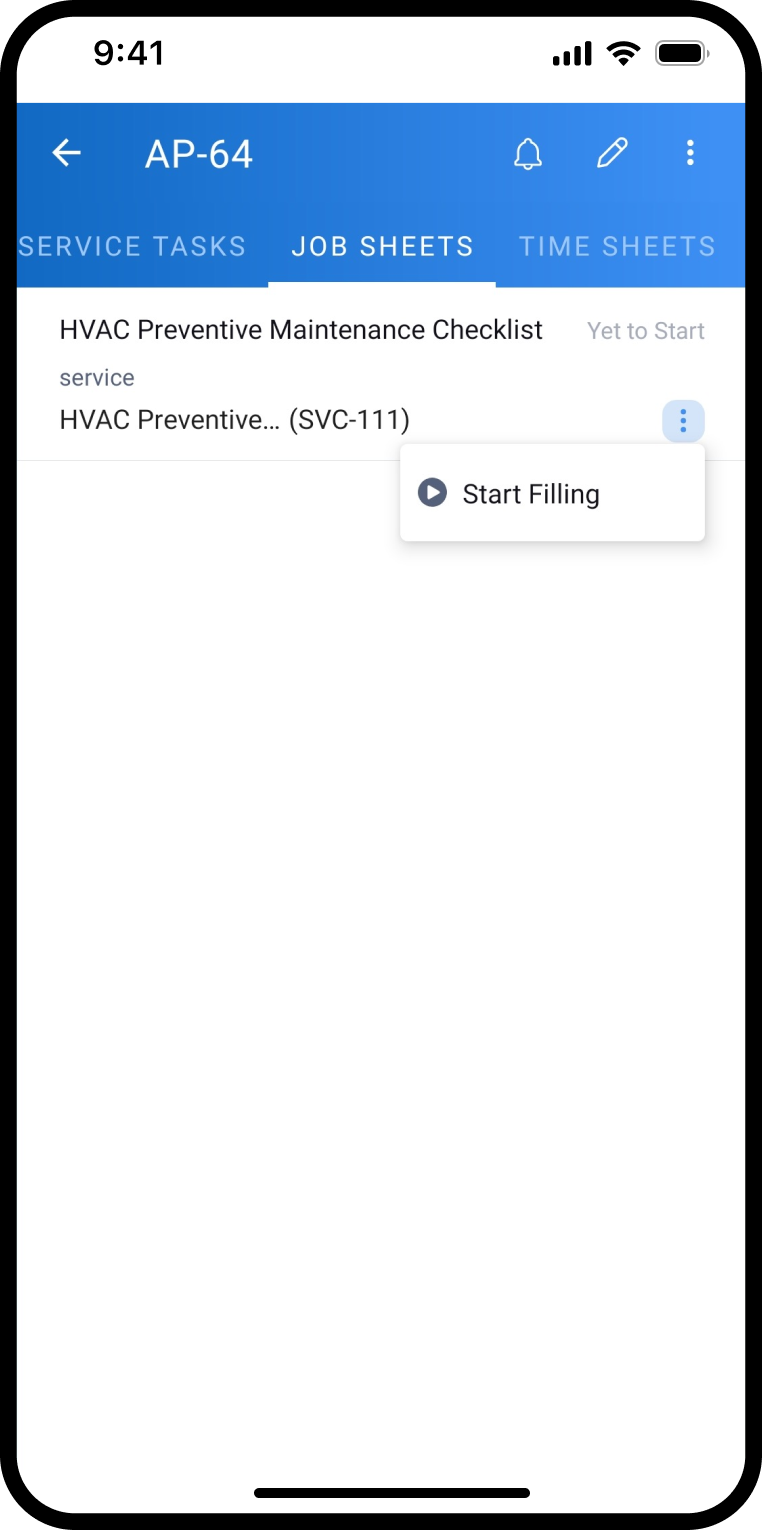
] for a job sheet entry will have the Start Filling option.The technician can either Save as Draft or Save as Completed.

They can later change its status to Completed by clicking on Save as Completed.

All these actions can be performed from the web app too.
Topic Participants
Latha Velu
Arnaud Henrard
Dorset Water Softeners
Kevin Smit
Max
Recent Topics
Service One. Bill Another. Zero Hassle.
In field service operations, one challenge often comes up: the person who needs the service isn’t always the one who pays for it. Think about tenants vs. property managers, corporate offices vs. their finance departments, or school buildings vs. centralTime Tracking on Iphone doesn't stop
When I start a time tracking session the timer starts as expected. However when I hit stop, the timer remains on that project. The only buttons available are discard and start. Start runs the timer more and discard says it will throw away the data fromPresenting ABM for Zoho CRM: Expand and retain your customers with precision
Picture this scenario: You're a growing SaaS company ready to launch a powerful business suite, and are looking to gain traction and momentum. But as a business with a tight budget, you know acquiring new customers is slow, expensive, and often deliversCan we do Image swatches for color variants?
We want to do something like the attached screenshot on our new zoho store. We need image swatches instead of normal text selection. We want to user to select an image as color option. Is this doable? I don't see any option on zoho backend. Please hCan Zoho Flows repeat Actions more than once?
I'm attempting to make an intentional Zoho Flow loop using the below layout. However, when "WithinLimit" condition is met, the program fails to execute the action "Get & Add Request Co..." again. Is this by design? Is Zoho Flows unable to repeat actionsVideo interviews not compatible on mobile
Hi Zoho, The 2-way video interview feature you have added to Recruit would be great if the candidate was able to use the link to the video on a mobile phone, it doesn't work on Samsung browser, it doesn't work on chrome/firefox mobile version of browser,What is the difference between Zoho Campaigns and marketing hub?
Zoho Campaigns is a permission-based email marketing tool for sending marketing emails and mass emails. Marketing Automation is a multichannel marketing automation tool that caters to organizations looking for tools to engage their users across multipleZoho Desk View Open Tickets and Open Shared Tickets
Hi, I would like to create a custom view so that an agent can view all the open tickets he has access to, including the shared tickets created by a different department. Currently my team has to swich between two views (Open Tickets and Shared Open Tickets).Enviro Recycling EHF Fee's
I'm in Canada and each province has it's own recycling program with it's own fee's. There are numerous categories that electronics fall into and each category has a taxable rate applied to it. I need a way to be able to apply the correct rate dependingChange of Blog Author
Hi, I am creating the blog post on behalf of my colleague. When I publish the post, it is showing my name as author of the post which is not intended and needs to be changed to my colleague's name. How can I change the name of the author in the blogs?? Thanks, RamananZoho Desk API - Influence which layout is used
Hello, how can the ticket layout be changed using the API? I would like to choose the layout directly when creating the ticket. If this is not possible, my question would be how can I change it afterwards? Best regards, SvenHas CSS Changed for Common Elements?
I noticed today that the standard title headings on my Forms and Reports display smaller in size than before. Google Dev Tools (attached), seems to confirm my suspicion. Something appears to be overriding the 1.375rem to 1.125rem. The font size on theText field alignment
Is it possible to align text in the text field? Or even better, is there a possibility to have a field which accepts only numbers?email moderation issue when email is sent in the name of a mail group
Symptom: an email that is sent by a mail group moderator in the name of a moderated mail group is held back for approval. Reproduction: Create a moderated mail group with members and moderators. Allow that mails can be sent in the name of the group (extendedPipeline in Custom Modules
I love the way the Sales Pipeline looks and functions with reports. I would like to add the save pipeline features and visualization to a custom module, however, I only see that these pipelines are only available for the Deals module. Is there a way to add pipelines to custom modules?Duplicate customers being created in Desk
Hi I've trying to work out why I've getting duplicated customers being created in my desk. I have an external booking system that generates an email when I get a customer booking a job. A booking email gets sent to Desk where I manage the booking andTip #53- Remote Billing: Your End-to-End Billing Solution in Zoho Assist- 'Insider Insights'
Manual invoicing, after every remote support session, can be time-consuming and often error-prone. As an MSP, IT admin, or even a freelance support technician, it may become overwhelming to keep track of session time, service rates, and client invoices.Record history and ticket interaction tab in contacts and accounts
Hello everyone! We have improved the History tab to help users trace updates in the interaction activity logs of the Contacts and Accounts detail pages in the Customer Module. This enhancement make it easier to get clear details about who made each update,sync views to sheet
Im looking to sync my views aka reports in analytics to zoho sheets, when data is updated in analytics it also should be updated in sheets, till now zoho sheets only offer raw data connection and it is not enough as these reports are difficult to re-doIs there an API to "File a Ticket" in Desk
Hi, Is there an API to "File a Ticket" in Desk to zoho projects?Keyboard UX for Assemblies
The new Assembly module has a counter-intuitive behavior that ought to be corrected. When an Assembly is ready to be entered, there are two options given, the blue-highlighted "Assemble" and the gray "Save as Draft". This correctly implies that the normalMapping a new Ticket in Zoho Desk to an Account or Deal in Zoho CRM manually
Is there any way for me to map an existing ticket in Zoho desk to an account or Deal within Zoho CRM? Sometimes people use different email to put in a ticket than the one that we have in the CRM, but it's still the same person. We would like to be ableCliq iOS can't see shared screen
Hello, I had this morning a video call with a colleague. She is using Cliq Desktop MacOS and wanted to share her screen with me. I'm on iPad. I noticed, while she shared her screen, I could only see her video, but not the shared screen... Does Cliq iOS is able to display shared screen, or is it somewhere else to be found ? RegardsHow to Move Behavior, Acquisition, Polls & Forms Data from Zoho PageSense to Zoho Analytics?
Hi Zoho Community, I'm looking for a way to transfer data from Zoho PageSense to Zoho Analytics, specifically: Behavioral data (clicks, scrolls, heatmaps, etc.) Acquisition data (traffic sources, campaigns, etc.) Polls and forms data As far as I can tell:Why can't I see images uploaded by other users in the Library for Campaigns
We are several users of zoho Campaign. I have uploaded visuals of our company, but my team members can't see them.zoho sheet stuck
I Need help. ZOHO sheets stuck on the loading screen. I've already deleted the system cache and cookies of my browser (google chrome) but it's still not opening.Tip of the Week #78 – Cut response time with multichannel shared inboxes
If you’ve ever felt your team juggling between multiple email accounts, social pages, and chat apps just to reply to customers, you’re not alone. Managing conversations in multiple channels can quickly turn messy. Important messages across inboxes, repliesNeed a way to run a client script longet than 10 seconds
By The Grace of G-D. Hi, Currently, Client Scripts are Timing out at 10 seconds. We have complex logics that needs more time. Can you add a feature request to increase the timeout?FSM Improvement Idea - Show an Import button when there is no data
I am setting up FSM for a client and I noticed that there is no option to import data, see screenshot below. Even when you click Create Contact there is only an option to Import from Zoho Invoice. It is only after you add at lease 1 record that the ImportUnable to Send Different Email Templates for Different Documents in Zoho Sign
Hello Zoho Community, I am facing a limitation with Zoho Sign regarding email notifications sent to customers when a document is sent for signing. Currently, whenever I send any template/document for signing, the email notification that goes to the customerTimeline Tracking Support for records updates via module import and bulk write api
Note: This update is currently available in Early Access and will soon be rolled out across all data centers (DCs) and for all editions of Zoho CRM. The update will be available to all users within your organization, regardless of their profiles or roles.UI Improvement - Ability to Collapse Flow
The UI for Flow is generally pretty good. However, when multiple decision trees are used, the layout can get pretty convoluted and hard-to-follow (see one of my Flows below): In these cases, even the auto-arrange fails to make this something that a normalTasks Statuses
Hi, The task status "Completed" is a final status which closes the task. We need to have a status "Cancelled". However, when the status is set to "Cancelled", the task prompt still has a blue button to Close Task. When the customer clicks that and closesAdd Lookup Field in Tasks Module
Hello, I have a need to add a Lookup field in addition to the ones that are already there in the Tasks module. I've seen this thread and so understand that the reason lookup fields may not be part of it is that there are already links to the tables (Create New Tasks Layout in CRM
I am able to do this in Leads, Contacts, Meetings, Calls - every other module, but cannot create a new layout in tasks. I have the appropriate access but it's simply not appearing as an option. Only "Standard" option shows. Please help!Whatsapp Connection Status still "Pending" after migration
Hello, I migrated my WhatsApp API to Zoho from another provider a day ago. So far the connection status is still “Pending”. There is a problem? How long does it usually take?Using IMAP configuration for shared email inboxes
Our customer service team utilizes shared email boxes to allow multiple people to view and handle incoming customer requests. For example, the customer sends an email to info@xxxx.com and multiple people can view it and handle the request. How can I configureAuto-sync field of lookup value
This feature has been requested many times in the discussion Field of Lookup Announcement and this post aims to track it separately. At the moment the value of a 'field of lookup' is a snapshot but once the parent lookup field is updated the values diverge.Zoho Recruit Subscription
Hello Zoho Recruit Team, Good day! I would like to inquire about your recruitment subscription plans and would also like to verify the current subscription our company is enrolled in under Zoho Recruit. Thank you, and I look forward to your response.Keyboard shortcut M key
I'm trying to customize my keyboard shortcuts and assign the "m" key. But it says the key is already assigned. I've looked through all my shortcuts and can't see any assigned "m". When I select an email and press the M key, nothing happens. What is theNext Page