Kaizen #193: Creating different fields in Zoho CRM through API

Kaizen #193: Creating different fields in Zoho CRM through API

🎊 Nearing 200th Kaizen Post – We want to hear from you!
Do you have any questions, suggestions, or topics you would like us to cover in future posts? Your insights and suggestions help us shape future content and make this series better for everyone. 

Hello all, welcome back to another exciting Kaizen post!

In Zoho CRM, you have the option to tailor modules according to your organization's unique needs using custom fields. These can be created manually in the module builder or via API.
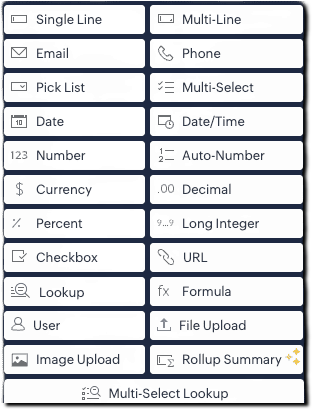
From Zoho CRM API version 6, you can add custom fields via API using the below endpoint:
POST 
{api-domain}/crm/{version}/settings/fields?module={module_API_name}

From Zoho CRM API version 8, additional field types like multi-select lookups, multi-user lookup additions are also supported.
This article is intended to be a guide on how to create fields through the API.

Field Type (UI)
Field Data Type 
Single Line
text
Multi-Line
textarea
Email
email
Phone
phone
Pick List
picklist
Multi Select
multiselectpicklist
Date
date
Date/Time
datetime
Number
integer
Auto-Number
autonumber
Currency
currency
Decimal
double
Percent
percent (only in POST)
Long Integer
bigint
Checkbox
Boolean
URL
website
Lookup
lookup
Formula
formula
User (Type- Single User)
userlookup
User (Type- Multiple Users)
multiuserlookup
File Upload
fileupload
Image Upload
imageupload
Rollup Summary
rollup_summary
Multi-Select Lookup
multiselectlookup

The fields in below JSON are common for all fields. Field types such as single line text, phone, email, date, datetime, integer, and url fields consists of the below common fields alone and there are no dependent fields for them. 
{
  "fields": [
    {
      "field_label": "Your Field Label",
      "data_type": "<field_type>",
      "length": "<length>",
      "tooltip": {
        "name": "static_text",
        "value": "Tooltip message"
      },
      "profiles": [
        {
          "id": "<profile_id_1>",
          "permission_type": "read_write"
        },
        {
          "id": "<profile_id_2>",
          "permission_type": "read_only"
        }
      ],
      "external": {
        "type": "user",
        "show": false
      },
      "crypt": {
        "mode": "decryption"
      }
    }
  ]
}


Key
Mandatory
Description
field_label


Yes
Display name of the field
date_type
Yes
Field type
length
No
Max number of characters allowed for a field
filterable
No
Whether field can be used in filters. When set to true, the field will be available for use in Criteria Pattern Editors. Note that it is not applicable for imageupload, fileupload, textarea, and formula fields 
tooltip
No
Field help text; name can be static_text or info_icon 
profiles
No
Access control per profile (read_write, read_only, hidden)
crypt
No
Whether to encrypt the field (encryption or decryption)
unique
No
Enforce uniqueness across records
hipaa_compliance_enabled
No
Enable HIPAA protection
private
No
Enable GDPR-level handling (Low or High)

Single line Field

The single line field is a string field that can store 255 characters, and alphanumeric and special characters. It can be used to store fields like name, company, account name, etc. To create a single line field, give data_type as text
A single line field can be marked as an external field. An external field is used to hold a record's unique ID available in an external system.
{
    "fields": [
        {
            "data_type": "text",
            "field_label": "External ID",
            "external": {
                "type": "org",
                "show": true
            }
        }
    ]
}

Multiline Fields

The multi line field is a string field that can be used when you need a larger string field. It accepts alphanumeric and special characters. Multiline fields are of three types: plain text small, plain text large, and rich text field.
Multi-line field type
Character limit
Can be marked Mandatory?
Can be Encrypted?
Plain text small
Up to 2000
Yes
Yes
Plain text large
Up to 32000
Yes
No
Rich text (RTF)
Up to 50000
No
No

1) Plain Text Small Field

This type of multi-line field is ideal for concise entries up to 2000 character size. To create a plain text small multi line field, give data_type as textarea and type key in text area JSON object as "small".
{
    "fields": [
        {
            "field_label": "Apartment_details",
            "data_type": "textarea",
            "length" : 2000,
            "textarea": {
                "type": "small"
            }
        }
    ]
}

2) Plain Text Large Field

This type of multi line field is ideal for more extensive entries of up to 32000 character size. To create a plain text large multi line field, give data_type as textarea and type key in text area JSON object as "large".

{
    "fields": [
        {
            "field_label": "Apartment_details",
            "data_type": "textarea",
            "length" : 32000,
            "textarea": {
                "type": "large"
            }
        }
    ]
}

3) Rich text Field

Rich text field is ideal when formatted text needs to be entered. The length of the entry can be up to 50000 characters. To create a plain text large multi line field, give data_type as textarea and type key in text area JSON object as "rich_text"
{
    "fields": [
        {
            "field_label": "Apartment_details",
            "data_type": "textarea",
            "length" : 50000,
            "textarea": {
                "type": "rich_text"
            }
        }
    ]
}

Picklist Field

Picklist is a field that lets you choose a value from a set of predefined values. The pick list value accepts all alphanumeric and special characters.
To create a picklist field, give data_type as picklist .Picklist fields have dependent JSON array - pick_list_values.  
  • pick_list_values: This JSON array comprises the options for the picklist field. Inside the array, display_value and actual_values stores the label shown for the picklist value in the CRM UI and the actual internal value of the picklist option respectively.  The colour_code field consists of the color code of the picklist option in hex format, if color code is enabled.
  • enable_colour_code - Boolean value that represents whether color code is enabled for the script
  • history_tracking_enabled -   This key when set as true audit/history tracking for the picklist field is enabled. Users with Module Customization permission can enable picklist history tracking. You can enable tracking for one picklist field per module, and this will be applicable across all layouts.
{
  "fields": [
    {
      "field_label": "Your picklist's field label",
      "data_type": "picklist",
      "enable_colour_code": true,
      "history_tracking_enabled": true,
      "pick_list_values": [
        {
          "display_value": "Option 1",
          "colour_code": "#af38fa",
          "actual_value": "Option 1"
        },
        {
          "display_value": "Option 2",
          "colour_code": "#ffd6bc",
          "actual_value": "Option 2"
        },
        {
          "display_value": "Option 3",
          "colour_code": "#cfddbc",
          "actual_value": "Option 3"
        }
      ]
    }
  ]
}

Global picklist Field

Global sets in Zoho CRM is a type of picklist that helps you easily manage picklist values that recur across modules. To create a global picklist, use the Create Global Picklist API. The global picklist can then be associated to a module in the below format using the Create Custom Field API.
{
  "fields": [
    {
      "field_label": "Source",
      "data_type": "picklist",
      "global_picklist": {
        "id": "72223455366"//Id of the global picklist
      }
    }
  ]
}

Multi-Select Picklist Field

Multi-select picklist allows you to select multiple values while creating or editing record. The pick list value accepts all alphanumeric and special characters. To create a multi select picklist, give data type as multiselectpicklist.
Note that Picklist tracking is not supported for multi-select picklists
{
    "fields": [
        {
            "field_label": "Preferred working days",
            "data_type": "multiselectpicklist", // Specify the data type as multiselectpicklist* 
            "pick_list_values": [
                {
                    "display_value": "Monday",
                    "actual_value": "1"
                },
                {
                    "display_value": "Tuesday",
                    "actual_value": "2"
                },
                {
                    "display_value": "Wednesday",
                    "actual_value": "3"
                },
                {
                    "display_value": "Thursday",
                    "actual_value": "4"
                },
                {
                    "display_value": "Friday",
                    "actual_value": "5"
                }
            ],
            "pick_list_values_sorted_lexically": true,
            "enable_colour_code": true
        }
    ]
}

Auto Number Field

Auto Number fields are used for assigning a unique incremental number automatically to each record, making identification easy. To create an auto number field, set "data_type" as "autonumber" and include an auto_number object with the following keys:

  • start_number (mandatory) – Starting value for the auto-number sequence.
  • prefix (optional) – (String) to prepend to the number.
  • suffix (optional) – (String) to append to the number.
  • _update_existing_records (optional) – (Boolean). If set to true, updates existing records with new auto-numbers based on the current format. Default value is false.
{
  "fields": [
    {
      "field_label": "Order ID",
      "data_type": "autonumber",
      "auto_number": {
        "start_number": 1000,
        "prefix": "ORD-",
        "suffix": "-2025",
        "_update_existing_records": true
      }
    }
  ]
}

Currency Field

Currency field is used to store amount values. To create a currency field, set "data_type" as "currency" and define the currency JSON object with the following keys:
  • rounding_option(mandatory) – Specifies how values should be rounded:
    • "normal" – No rounding.
    • "round_off" – Rounds to nearest based on precision.
    • "round_up" – Always rounds up based on precision.
    • "round_down" – Always rounds down based on precision.
  • precision(optional) – Number of decimal places displayed in the UI (e.g., 123.466 with precision 2 becomes 123.47).
  • decimal_place(optional) – Maximum number of decimal places stored. Values beyond this are truncated. Max allowed decimal places: 9.
{
  "fields": [
    {
      "field_label": "Deal Amount",
      "data_type": "currency",
      "currency": {
        "rounding_option": "round_up",
        "precision": 2,
        "decimal_place": 3
      }
    }
  ]
}

Decimal Field

Decimal field is used to store decimal numbers. To add a decimal (floating point) number field, use "data_type": "double".
  • length(optional) – Total number of digits allowed, including both sides of the decimal point.
  • decimal_place(optional) – Number of digits to allow after the decimal point (e.g., 2 means values like 123.45).
{
  "fields": [
    {
      "field_label": "Discount Rate",
      "data_type": "double",
      "length": 16,
      "decimal_place": 2
    }
  ]
}

Percent Field

This field type is used to capture percentage values, such as scores or growth rates. To create a percentage field, use "data_type": "percent". 
{
  "fields": [
    {
      "field_label": "Enrollment number",
      "data_type": "bigint",
      "length": 18,
      "separator": true
    }
  ]
}

Long Integer Field

Long Integer Fields are number fields that accept up to 18 digits. To create a long integer field, use "data_type": "bigint".  
{
  "fields": [
    {
      "field_label": "Enrollment number",
      "data_type": "bigint",
      "length": 18,
      "separator": true
    }
  ]
}

Separator: a Boolean key that indicates whether the number is formatted for better readability. It is applicable for data types integer, double, bigint. Refer to this article on changing locale information for information on how to change it.

Checkbox Field

Checkbox value allows you to select or unselect a value indicating true or false. To create a checkbox field, use "data_type": "boolean".
{
  "fields": [
    {
      "field_label": "Previously Employed?",
      "data_type": "boolean"
    }
  ]
}

Lookup Field

Use "data_type": "lookup" to associate records from another module. The lookup JSON object defines the target module, display label, and optional filter criteria.
  • module.api_name(mandatory) – API name of the target module (get via Modules API).
  • display_label(mandatory) – Label shown in the related list.
  • query_details(optional) – Used to define lookup filters. Inside query_details JSON Object following keys are present:
    • criteria(mandatory if query_details is used) – Filter logic.
    • group_operator – "AND"/"OR" (required for multiple conditions).
    • group – Array of filter conditions. Each condition includes:
      • field.api_name: Field in the target module
      • comparator: Operator like contains, equal
      • value: Value to match
  • revalidate_filter_during_edit(optional) – If true, validates filter conditions on record edit.
{
  "fields": [
    {
      "field_label": "Your lookup",
      "data_type": "lookup",
      "lookup": {
        "module": {
          "api_name": "Contacts"
        },
        "display_label": "Contact Lookup",
        "revalidate_filter_during_edit": true,
        "query_details": {
          "criteria": {
            "group_operator": "AND",
            "group": [
              {
                "field": {
                  "api_name": "Phone"
                },
                "comparator": "contains",
                "value": "91"
              },
              {
                "field": {
                  "api_name": "Lead_Source"
                },
                "comparator": "equal",
                "value": [
                  "Cold Call"
                ]
              }
            ]
          }
        }
      }
    }
  ]
}

Formula Field

Formula fields are used to calculate different types of values, including numeric values, text values, date values, etc. Use "data_type": "formula" to calculate dynamic values based on other fields.
For more details on all the available usages in the formula field, refer to this help doc on formula field. The formula object defines the logic and output type.
  • formula.return_type (mandatory for formula field) – Output type of the formula. Possible values: double, currency, text, date, datetime, boolean
  • formula.expression(mandatory) – The actual formula logic (e.g., "Sqrt(Len(${Email}))").
  • decimal_place(optional) – Number of decimal places (only for double or currency).
  • number_separator(optional) – If true, formats the number using separators (default is true).
{
  "fields": [
    {
      "field_label": "Total amount",
      "data_type": "formula",
      "formula": {
        "return_type": "double",
        "expression": "${Amount} + 150"
      },
      "decimal_place": 0,
      "number_separator": false
    }
  ]
}

Auto refresh formula field

These type of formula fields are used when you need an accurate time measurement whenever you view the record. The key "dynamic" set as true indicates that the field is an auto refresh formula field.
 For example, the age of a deal can be calculated by comparing the created time of the deal with the current time. A condition can be given to stop computing the value of the auto refresh field. 
  • dynamic: When set as true, indicates that the formula field is an auto refresh field.
  • stop_compute_conditionally:  When set as true, indicates that the computation of field stops when the condition given in stop_compute_expression key
  • stop_compute_expression:  Mandatory when stop_compute_conditionally is true. Consists of the condition for stopping computation of the auto refresh formula field.
{
    "fields": [
        {
            "field_label": "Deal Age",
            "data_type": "formula",
            "formula": {
                "expression": "Datecomp(${Created_Time},Now())",
                "return_type": "double",
                "dynamic": true,
                "stop_compute_conditionally": true,
                "stop_compute_expression": "${Probability}==100"//When the deal probability is 100, the calculation gets stopped.
            }
        }
    ]
}

User lookup Field

User lookup field is used to associate a specific user to a record of the module. Use "data_type": "userlookup" to add a user lookup field.
The lookup JSON object defines the key properties of the user lookup
  • query_details (JSON object): Defines filters to restrict which users are selectable.
  • criteria: Uses a group of field conditions (field, comparator, value) with a group_operator (AND, OR) to filter users.
  • revalidate_filter_during_edit (Boolean): If true, the criteria is reevaluated on record edit for the value selected on the record creation. This option is useful when associated values or fields have changed due to updates. It allows users to re-check and confirm that the correct records are still linked when editing the record.
  • sharing_properties (JSON object):  Contains details of access given to users
    •  share_preference_enabled (Boolean): If true, enables access to the records for the users.
    • share_permission (String): Defines what level of access the associated user has (e.g., "read-only", "full-access", "read-write").

{
  "fields": [
    {
      "field_label": "Assigned Sales Rep",
      "data_type": "userlookup",
      "tooltip": {
        "name": "info_icon",
        "value": "Sales user responsible for this lead"
      },
      "lookup": {
        "revalidate_filter_during_edit": true,
         //associate only users from countries India, and email containing "zylker.com".
        "query_details": {
          "criteria": {
            "group_operator": "AND",
            "group": [
              {
                "field": {
                  "api_name": "country"
                },
                "comparator": "equal",
                "value": "India"
              },
              {
                "field": {
                  "api_name": "email"
                },
                "comparator": "contains",
                "value": "@zylker.com"
              }
            ]
          }
        }
      },
      "sharing_properties": {
        "share_preference_enabled": true,
        "share_permission": "read-only"
      }
    }
  ]
}

Multiuser lookup Field

Multi-user look up is a lookup field that lets you add multiple users to a module record. It allows you to establish many-to-many relationships between modules and users in CRM.
Multi user lookup can be added by using the data_type "multiuserlookup". 
  • record_access: This Boolean key when marked as true indicates that the added user has access to the record. The users selected in the multi-user lookup field will be able to 'Edit', 'Delete', 'Change the owner' of that respective record
{
  "fields": [
    {
      "field_label": "Associated_Agents",
      "data_type": "multiuserlookup",
      "multiuserlookup": {
        "record_access": true
      }
    }
  ]
}


File Upload Field

User data type "fileupload" to add a file upload field 
{
  "fields": [
    {
      "field_label": "Resume Upload",
      "data_type": "fileupload",
      "length": 1,// Allow only 1 file, Maximum length : 5
      "tooltip": {
        "name": "info_icon",
        "value": "Upload the applicant's resume in PDF or DOC format"
      }
    }
  ]
}


Image Upload Field

User data type "imageupload" to add an image upload field
{
  "fields": [
    {
      "field_label": "Profile Photo",
      "data_type": "imageupload",
      "length": 1, // Only 1 profile photo allowed, Maximum length 10
      "tooltip": {
        "name": "info_icon",
        "value": "Upload a professional head shot for the employee record"
      }
    }
  ]
}

Rollup Summary Field

Rollup Summary is a field that aggregates or summarizes a desired related list field. Rollup Summary Fields are of two types - Custom Rollups and Predefined Rollups. You can create only custom rollups using APIs. Supported related modules for APIs are Calls, Meetings, and Tasks
  • function - Indicates the mathematical function applied to calculate the rollup summary.
  • field_label - Represents the label of the field as it appears in the UI. 
  • data_type - This must be set to "rollup_summary" for rollup summary field.
  • rollup_summary -  This object contains all the configuration details for the rollup field.
  • return_type - Specifies the type of value returned.
  • expression - Defines the calculation logic for the rollup. 
    • function_parameters  An array containing parameters needed by the function, typically including:
      • api_name: The field being summarized.
    • criteria Defines the filters to apply to the related records. Each condition includes:
      • group_operator:  If there are multiple conditions, you should also include AND or OR as the group operator for the conditions. It consists of an array of conditions.
      • group: Array element of a condition
        • field
          • api_name: The API name of the field.
        • comparator: The comparison operator (e.g., equal, greater_than, contains).
        • value: The value used in the comparison.
  • function - The function to be applied to the filtered records.  Allowed functions : COUNT, MAXIMUM, MINIMUM, AVERAGE, RECENT, UPCOMING, EARLIEST.
  • based_on_module - Specifies the module from which to summarize related records.
  • related_list - Indicates the related list within the module (e.g., "Deals", "Contacts") to summarize from.
{
    "fields": [
        {
            "field_label": "Total Invoice Amount",
            "data_type": "rollup_summary",
            "rollup_summary": {
                "return_type": "currency",
                "expression": {
                    "function_parameters": [
                        {
                            "api_name": "Grand_Total"
                        }
                    ],
                    "criteria": {
                        "group_operator": "AND",
                        "group": [
                            {
                                "comparator": "equal",
                                "field": {
                                    "api_name": "Billing_Country"
                                },
                                "value": "United States"
                            },
                            {
                                "comparator": "greater_than",
                                "field": {
                                    "api_name": "Invoice_Date"
                                },
                                "value": "2024-01-01"
                            }
                        ]
                    },
                    "function": "SUM"
                },
                "based_on_module": {
                    "api_name": "Invoices"
                },
                "related_list": {
                    "api_name": "Invoices"
                }
            }
        }
    ]
}


Multi-Select Lookup Field

 Multi-Select Lookup Field enables you to establish a many-to-many relationship between two modules in CRM.
  • multiselectlookup : The mulitselectlookup JSON object specify the linking details between the module in which the field is present and another module 
    • connected_details: This JSON object contains details about the module you want to connect the current module with.
      • module.api_name:  Specify the module API name you want to link the current module with.
      • field.field_label: When connecting a module, the system creates a new lookup field in the connected module for the current module. Use this key to specify a field label in the connected module.
  • linking_details: When creating a multi-select lookup field, the system creates a separate module connecting these two modules, which contains their common details. This module is called the linking module
    • module: Consists of the details of the linking module.
      • plural_label: Specify a plural label for the linking module.

{
    "fields": [
        {
            "field_label": "Skills",
            "data_type": "multiselectlookup",
            "multiselectlookup": {
                "connected_details": {
                    "module": {
                        "api_name": "Skills"
                    },
                    "field": {
                        "field_label": "SkillName"
                    }
                },
                "linking_details": {
                    "module": {
                        "plural_label": "EmpXSkill"
                    }
                }
            }
        }
    ]
}


    Access your files securely from anywhere

        All-in-one knowledge management and training platform for your employees and customers.


                              Zoho Developer Community


                                                    • Desk Community Learning Series


                                                    • Digest


                                                    • Functions


                                                    • Meetups


                                                    • Kbase


                                                    • Resources


                                                    • Glossary


                                                    • Desk Marketplace


                                                    • MVP Corner


                                                    • Word of the Day


                                                    • Ask the Experts


                                                              • Sticky Posts

                                                              • Kaizen #198: Using Client Script for Custom Validation in Blueprint

                                                                Nearing 200th Kaizen Post – 1 More to the Big Two-Oh-Oh! Do you have any questions, suggestions, or topics you would like us to cover in future posts? Your insights and suggestions help us shape future content and make this series better for everyone.
                                                              • Kaizen #226: Using ZRC in Client Script

                                                                Hello everyone! Welcome to another week of Kaizen. In today's post, lets see what is ZRC (Zoho Request Client) and how we can use ZRC methods in Client Script to get inputs from a Salesperson and update the Lead status with a single button click. In this
                                                              • Kaizen #222 - Client Script Support for Notes Related List

                                                                Hello everyone! Welcome to another week of Kaizen. The final Kaizen post of the year 2025 is here! With the new Client Script support for the Notes Related List, you can validate, enrich, and manage notes across modules. In this post, we’ll explore how
                                                              • Kaizen #217 - Actions APIs : Tasks

                                                                Welcome to another week of Kaizen! In last week's post we discussed Email Notifications APIs which act as the link between your Workflow automations and you. We have discussed how Zylker Cloud Services uses Email Notifications API in their custom dashboard.
                                                              • Kaizen #216 - Actions APIs : Email Notifications

                                                                Welcome to another week of Kaizen! For the last three weeks, we have been discussing Zylker's workflows. We successfully updated a dormant workflow, built a new one from the ground up and more. But our work is not finished—these automated processes are


                                                              Manage your brands on social media


                                                                    Zoho TeamInbox Resources


                                                                        Zoho CRM Plus Resources

                                                                          Zoho Books Resources


                                                                            Zoho Subscriptions Resources

                                                                              Zoho Projects Resources


                                                                                Zoho Sprints Resources


                                                                                  Qntrl Resources


                                                                                    Zoho Creator Resources


                                                                                        Zoho CRM Resources

                                                                                        • CRM Community Learning Series

                                                                                          CRM Community Learning Series


                                                                                        • Kaizen

                                                                                          Kaizen

                                                                                        • Functions

                                                                                          Functions

                                                                                        • Meetups

                                                                                          Meetups

                                                                                        • Kbase

                                                                                          Kbase

                                                                                        • Resources

                                                                                          Resources

                                                                                        • Digest

                                                                                          Digest

                                                                                        • CRM Marketplace

                                                                                          CRM Marketplace

                                                                                        • MVP Corner

                                                                                          MVP Corner


                                                                                            Design. Discuss. Deliver.

                                                                                            Create visually engaging stories with Zoho Show.

                                                                                            Get Started Now


                                                                                              Zoho Show Resources

                                                                                                Zoho Writer

                                                                                                Get Started. Write Away!

                                                                                                Writer is a powerful online word processor, designed for collaborative work.

                                                                                                  Zoho CRM コンテンツ


                                                                                                    Nederlandse Hulpbronnen


                                                                                                        ご検討中の方


                                                                                                                • Recent Topics

                                                                                                                • Nome do Agente não aparece nas conversas do whatsapp para o nosso cliente

                                                                                                                  Nome do Agente não aparece nas conversas do whatsapp para o nosso cliente! Isso é ruim pois so,os em 5 agentes e o cliente fica sem saber com quem ele está falando, pois tentei procurar configurações que pudessem ter esta opção, mas até então não encontrei.
                                                                                                                • Marketing Plus : quatre ans à réinventer la simplicité des opérations marketing

                                                                                                                  Pourquoi et comment ? Il y a exactement quatre ans, nous avons démarré simplement, avec une seule vision: unifier et simplifier les opérations marketing pour les équipes marketing de tous les secteurs. Chez Zoho, nous proposons des outils dédiés à chaque
                                                                                                                • hide resolution from help centre

                                                                                                                  to my surprise, i just found out that the resolution text is public in the helpcenter, even if 'notify customer' is off. is there a workaround to that? how do others deal with this? How zoho support does this and I don't think its used by Zoho in the first place. the resolution is meant to be private, not public
                                                                                                                • Zoho Desk - Event Calendar View

                                                                                                                  Hi Desk team, Are there any plans to introduce a calendar or timeline view for Events in Zoho Desk? It would be very helpful if we could see Events visually in a calendar and/or timeline. This is very helpful when desk side support activities need to
                                                                                                                • Pasting Images in Zoho Desk ignores cursor location

                                                                                                                  My team has reported an issue which started recently where when we paste an image into a new or existing reply or comment, the pasted image seems to ignore the current cursor location instead paste itself at the last character present in the reply/comment,
                                                                                                                • Enrich your contact and company details automatically using the Data Enrichment topping

                                                                                                                  Greetings, I hope you're all doing well. We're happy to announce the latest topping we've added to Bigin: The Data Enrichment topping, powered by WebAmigo. This topping helps you automatically enhance your contact and company records in Bigin. By leveraging
                                                                                                                • Financial manger

                                                                                                                  why is transaction locking for zoho I Can't closing period
                                                                                                                • API usage

                                                                                                                  My application has bad implementation and code that is resulting in very high API usage. This is my first time experiencing something like this. Does anyone know how I can troubleshoot and fix this?
                                                                                                                • Disabled page

                                                                                                                  Hello, When I try to to run Inventory Valuation Summary and FIFO Cost Lot Tracking reports, I get This page is disabled error. I tried everything in settings, cant find the settings to enable. Help me.
                                                                                                                • Setting defaults for "Find and Merge Duplicate for..."

                                                                                                                  To remove some of the extreme tedium from Zoho's poorly implemented merge function, I would like to set defaults.  Currently I am defaulted to match "ANY" when I would never do that, so I always have to click "ALL". Then it makes me click on several totally irrelevant drop boxes to turn off phone, mobile and other useless match criteria. Is there a way I can set: Match to default as "ALL" Firstname to default to "IS" Lastname to default to "IS" every other match field default to "-NONE-" This will
                                                                                                                • Linux agent 2026_M05 release notes

                                                                                                                  Agent Version: 3.6.5.3 Release date: 28 April, 2026 Major Enhancement: Quick Support feature release. Security improvements and enhancement to in session features.
                                                                                                                • Automated Sales Order Fulfillment Based on Inventory Availability (Allocation / Commitment Modes)

                                                                                                                  Hi everyone, I recently reached out to Zoho Inventory support regarding a workflow challenge and wanted to share both the issue and their response here for visibility. Zoho confirmed: “Zoho Inventory does not currently support automatic notifications
                                                                                                                • Linux agent 2026_M04 release notes

                                                                                                                  Agent Version: 3.6.5.2 Release date: 30 April, 2026 Code refactoring and improvements to function efficiently in minimal hardware environments.
                                                                                                                • Simple Totals on all pages?

                                                                                                                  Hi there. I'm surprised this isn't implemented yet (since most other software has this by default). Can you display a simple total at the bottom of all invoice lists? ie: I click in SALES tab, select INVOICES and on that page please show us a simple total? Yes, I realize I can go the long way around and generate reports and select my date options and select the type of invoices etc...but honestly that shouldn't be necessary when just viewing a list of unpaid invoices and how much total is outstanding.
                                                                                                                • Linux agent 2026_M03 release notes

                                                                                                                  Agent Version: 3.6.5.1 Release date: 27 February, 2026 Bug fixes and performance improvements for optimised session experience.
                                                                                                                • Linux agent 2026_M02 release notes

                                                                                                                  Agent Version: 3.6.5.0 Release date: 26 February, 2026 Major enhancement: File Manager feature release Issue fixing of idle session timing interfering with backend activities.
                                                                                                                • Linux agent 2026_M01 release notes

                                                                                                                  Agent Version: 3.6.4.8 Release date: 13 February, 2026 Optimised the unattended agent uninstallation process to properly cleanup residual files and complete uninstallation process. Fixed issues with CTRL+ALT+DEL command not functioning properly in some
                                                                                                                • Using API for multiple organizations

                                                                                                                  I am busy building an app to load data from a retailer into Zoho Books. We are planning on selling the app to multiple organizations that use this retailer. Is there a way to get a single oauth app to access multiple organizations? From what I can find
                                                                                                                • MacOS agent 2026_M04 release notes

                                                                                                                  Agent Version: 3.120.0 Release date: 23 April, 2026 Retry mechanism for end users to enable Accessibility and Screen Share permissions to successfully join remote sessions. Agent stickiness on multiple desktops to avoid confusion. Improvements to audio
                                                                                                                • MacOS agent 2026_M03 release notes

                                                                                                                  Agent Version: 3.117.0 Release date: 02 March, 2026 Bug fixes and performance improvements for optimised session experience.
                                                                                                                • MacOS agent 2026_M02 release notes

                                                                                                                  Agent Version: 3.116.0 Release date: 23 February, 2026 Major enhancement: File Manager feature release Minor enhancement: Improved peer to peer connectivity across various network conditions. Minor enhancement: Improvements to Elevate to Admin mode
                                                                                                                • MacOS agent 2026_M01 release notes

                                                                                                                  Agent Version: 3.111.0 Release date: 11 February, 2026 Major Enhancement: Quick Support feature release. Upgrades to monitoring protocols for analysing performance. Issue fixing of idle session timing interfering with backend activities.
                                                                                                                • Account Unblock Request

                                                                                                                  Dear Sir/Madam, I hope you are doing well. I noticed that my account has been blocked for violation of the usage policy which I believe comes from it being associated with sending spam. I have since then removed the old keys which were compromised in
                                                                                                                • Kaizen #242 Enabling In-Context Order Creation from Deals Using SlyteUI

                                                                                                                  Hello everyone! Welcome to another interesting Kaizen post. Today’s spotlight is on SlyteUI, the new UI builder designed to create powerful, intuitive user interfaces in minutes. Built for speed and simplicity, SlyteUI empowers teams to deliver high-impact
                                                                                                                • Auto-sync field of lookup value

                                                                                                                  This feature has been requested many times in the discussion Field of Lookup Announcement and this post aims to track it separately. At the moment the value of a 'field of lookup' is a snapshot but once the parent lookup field is updated the values diverge.
                                                                                                                • CRM gets location smart with the all new Map View: visualize records, locate records within any radius, and more

                                                                                                                  Hello all, We've introduced a new way to work with location data in Zoho CRM: the Map View. Instead of scrolling through endless lists, your records now appear as pins on a map. Built on top of the all-new address field and powered by Mappls (MapMyIndia),
                                                                                                                • Can't access google from toppings menu

                                                                                                                  So... When I click the manage button in toppings, nothing happens. it won't let me access the settings.
                                                                                                                • Best sales insights for target accounts?

                                                                                                                  Question for all the sales power-users out there: I would like to gain insights from Zoho CRM for a rotating list of target accounts. Each Outside Salesperson has 5 target accounts, and they can change these targets quarterly with management approval.
                                                                                                                • Emails Disappearing From Inbox

                                                                                                                  I am experiencing the unnerving problem of having some of the messages in my inbox just disappear.  It seems to happen to messages that have been in there for longer than a certain amount of time (not sure how long exactly). They are usually messages that I have flagged and know I need to act on, but have not gotten around to doing so yet.  I leave them in my inbox so I will see them and be reminded that I still need to do something about them, but at least twice now I have opened my inbox and found
                                                                                                                • Cadence not stopping on reply (in some cases) – anyone else?

                                                                                                                  Hi everyone, we’ve noticed that in a few cases, Cadences don’t stop even though the contact replied (setting “stop on reply” is active). It works fine most of the time, but occasionally the reply is visible in CRM without stopping the Cadence. Our assumption
                                                                                                                • Issue with Resume Parsing and Storage Limit in Zoho Recruit

                                                                                                                  Hello Team, We are currently facing an issue with resume parsing in Zoho Recruit. While parsing resumes, we are receiving a message indicating that the storage is full. We would like to delete multiple old resumes from the system to free up storage space.
                                                                                                                • BUG: Related List Buttons with Client Script action now erroring

                                                                                                                  There appears to have been a bug introduced over the last few days with Related List buttons that invoke a Client Script action. Button configuration: Configured Client Script: Results: The default loader is presented at the top of the page, and an error
                                                                                                                • SalesIQ Email Delivery Issues to Microsoft

                                                                                                                  Is anyone else having delivery issues to Hotmail, Outlook, and Live inboxes when sending transcripts and replies via email from SalesIQ? We’ve detected that emails sent from SalesIQ to these accounts aren't arriving—they don’t even bounce back; they simply
                                                                                                                • Introducing the revamped What's New page

                                                                                                                  Hello everyone! We're happy to announce that Zoho Campaigns' What's New page has undergone a complete revamp. We've bid the old page adieu after a long time and have introduced a new, sleeker-looking page. Without further ado, let's dive into the main
                                                                                                                • Multiple Pipelines

                                                                                                                  Is it possible to create multiple candidate pipelines?
                                                                                                                • Insert Template not inserting

                                                                                                                  I have been using the "Insert Template" feature for years and I use it every single working day. Yesterday it was working fine. Today, on two different browsers (Chrome and Edge), I can select "Insert Template", select the template I want to insert, but
                                                                                                                • Default ticket template in helpcenter

                                                                                                                  Hello, I have a web form and a ticket template created. How can I make that my default ticket template? If an user clicks New ticket or create a ticket, I want that template to be the default one. Thank you for the time and info.
                                                                                                                • Zoho Books bill pay option not available with zoho one

                                                                                                                  Why isn't Zoho Books bill pay add-on not available for Zoho one customers not even as a purchasable option. I think this is very inconvenient for companies wanting to use this feature all in one system
                                                                                                                • Access images from form submission in power automate

                                                                                                                  Images from form submission show up as links in power automate. How do I access the image data?
                                                                                                                • Add personal Facebook to Zoho Social

                                                                                                                  Hi. is there any way i can post to my business and personal Facebook and Instagram at the same time when I make or schedule a post?
                                                                                                                • Next Page