Voice-based forecast analysis in Zoho CRM | Public Early Access 2023

Voice-based forecast analysis in Zoho CRM | Public Early Access 2023

Hello Everyone!

We are happy to introduce you to yet another exciting update from Zoho CRM. This time, it's about the addition of a valuable dashboard component in Voice of the Customer called "Voice based forecast analysis"

This feature is a sequel to the previously announced VoC feature. If you already registered for the Voice of the Customer (VoC) Early Access, you do not need to register again as the enhancement will automatically apply to your account. You can learn more about the VoC function by reading this post if you haven't already.

This is available in a public early access mode, which means this feature will be enabled for you upon request. To start with, To submit your request for this feature, kindly fill out this form.

As the feature is currently in EA, we eagerly look forward to your feedback. Do try it out and post your feedback in the comments section.

Let's have a quick look

As you may already be aware, Forecasts in Zoho CRM help you set and achieve sales targets for your teams by a specific period (by month, by quarter, etc). By creating and working with forecasts, you are effectively able to use the knowledge of current sales progress to set and meet future sales goals for your teams.

The challenge with the current forecast setup is that, while the system will actively help you monitor sales progress, it does not capture specific feedback from customers on your sales efforts, that lead up to a winning or losing deal.

For instance, in the cases of failure to meet the set target, you may not exactly know what your customers have to say about the deal. Or for that matter, you may not know what it is that you are doing well, that is giving you winning deals. So, knowledge of this winning/losing pattern along with contextual feedback from customers will help you set better goals and also meet them better.

This is where VoC enters the picture. With our new Voice based analysis dashboard, you are provided with real-time insights about your customers' feedback across the sales process, offered to you in the context of your sales forecasts.
 
 
This way you are effectively able to understand what went right/wrong with deals in a specific forecast category, which will
 
a) Potentially help you take corrective actions for deals on a losing path, before their target period is over, with the help of contextual feedback from customers.
b)  Set and meet better data-driven sales targets with VoC insights at your disposal for future sales goals.


Voice-based forecast analysis— An overview

Zoho CRM will now include a dedicated dashboard in its Voice of the Customer solution, called "Voice-based forecast analysis" in order to present intelligent insights about customer feedback presented in the context of forecast categories configured in the CRM.


Let's say Zylker Tech uses Zoho CRM to keep a track of their sales efforts. Currently in their CRM, the Forecasts module projects a target of $10000 for sales team for the upcoming quarter.
 

In this context, with insights in the Voice based forecast analysis, they can observe real-time, key takeaways from customer feedback plotted in the context of forecast details.

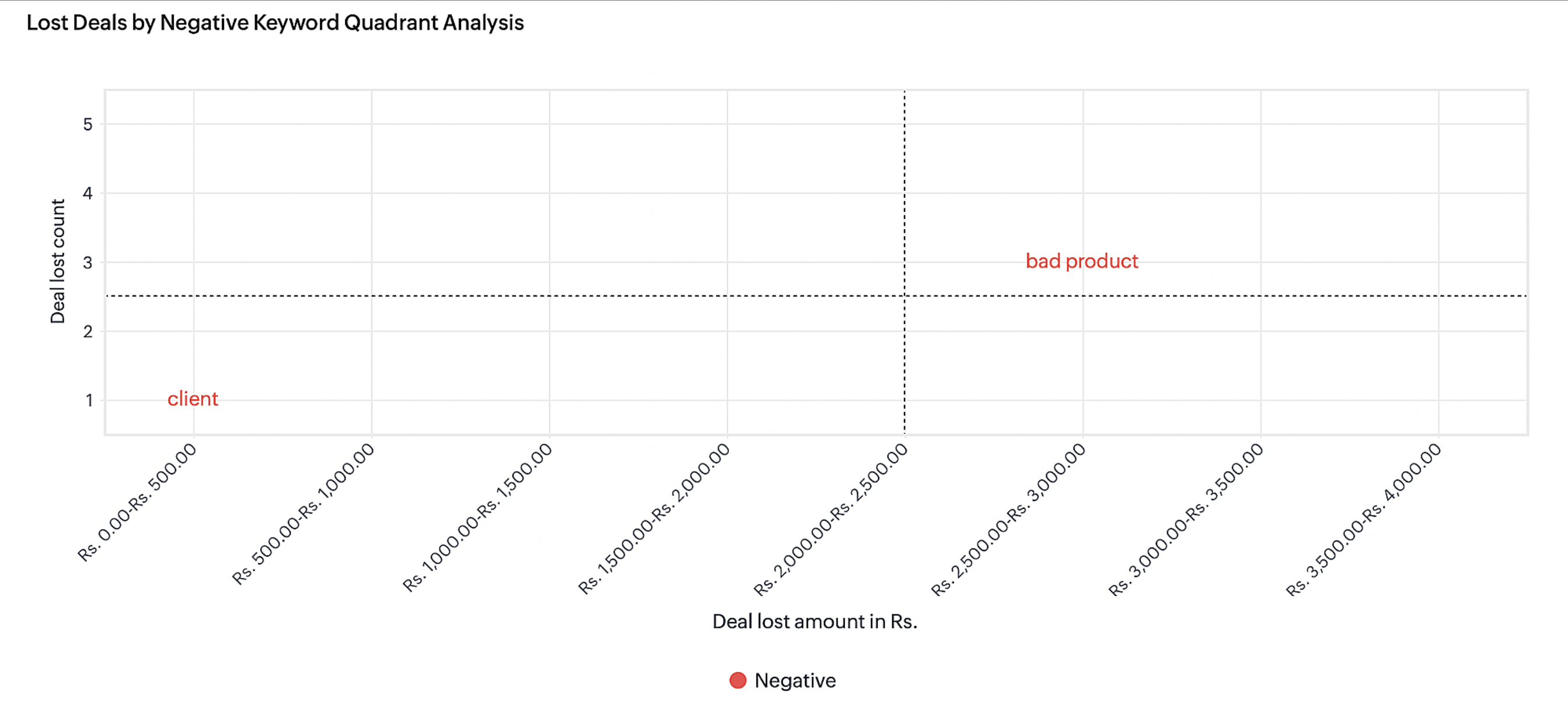
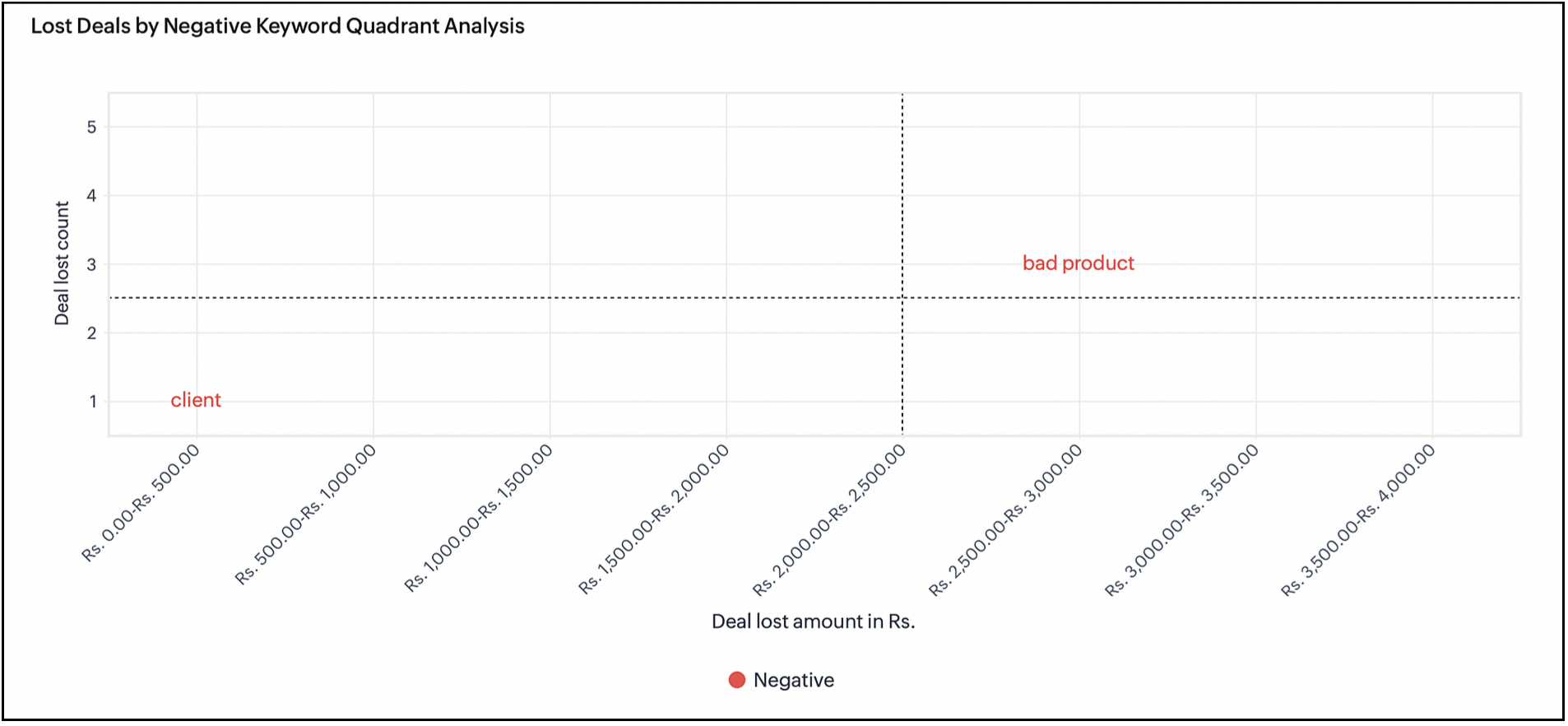
For example, here you can see that there are three customers in the 2500-3000 deal lost category, who've mentioned the term "bad product" in some of their conversations with the organization. If a handful of customers have been lost because of their feedback that a "product is bad", this could immediately call for corrective actions from the organization as a whole, in terms of revisiting the quality of their offerings, and also reaching out to these lost customers to make remedies.
 

This will also help sales teams to plan future conversations with such customers to meet their targets better.


There are several more chart components in this dashboard, and they are outlined in the following sections in this post. This is just an example to indicate the value from just one particular chart. To summarize, the insights in this dashboard will help you in the following ways.

  • To observe real-time feedback from customers in the context of sales forecasts, which will help you meet your sales targets better. 
  • To recognize a winning/losing path for deals across a projected target period and use the insights to increase the chances of successful deals within the target period.

To learn from what went wrong and apply the learning to future sales targets.

How does Voice based forecast analysis work

Zia captures all types of voice-related attributes such as keywords spoken by customers and the intent and sentiment with which the keywords were spoken. This information in conjugation with many other CRM features will give insightful dashboards for customers.
 
For every role in an organization, you can set a deal amount or deal revenue that needs to be delivered/achieved in a particular period (quarterly or monthly). You can see the performance trends and comparisons across periods.


Key components in forecast analysis are:

Forecast type: In Zoho CRM, forecast analysis is based on the deal count (Deal Quantity) or the deal amount (Deal Revenue).

Forecast period - You can set the forecast based on Quarterly (Quarter 1, Quarter 2,.... Quarter n) or Monthly (Month 1, Month 2, Month n) period.

It is incomplete when we stop with just viewing the numbers. It turns out to be useful and important only when we question the reasoning for the gaps. It is at this juncture that VOC will help us analyze these forecast for our customers based on their constantly uttered keywords and the intent of these keywords before and after a deal win or deal loss.

It is reasoning out everything based on the Voice of the Customer. What was spoken by the customer before a deal was won or lost? How many deals were open when they were spoken?...We already have umpteen number of charts inside VOC to cater to these needs. What is new is that, CRM has now curated a certain set of charts based on forecast attributes and deliver these insights as dashboards within VOC.

How to configure voice based Forecast Analysis dashboard


To set the dashboard configuration:

  1. Go to Voice Of The Customer module.
  2. Select Voice-based Forecast Analysis dashboard from the left pane.
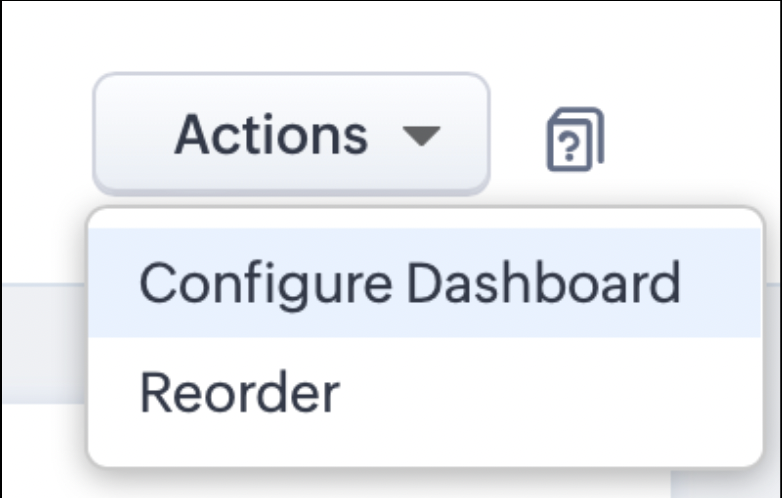
  3. Select Configure Dashboard from Actions option on the upper-right corner of the page
  4.           


  5. In the displayed dialog box, set the following options:

      1. Select Forecast - Select a forecast that you configured on the Forecast module. It is to be noted that the computations are based on forecasts for the current quarter or month only.
      2. Select Modules - Select the module where you want to execute forecast analysis.
      3. Keyword Preferences - You can choose to include all keywords or exclude certain keywords.
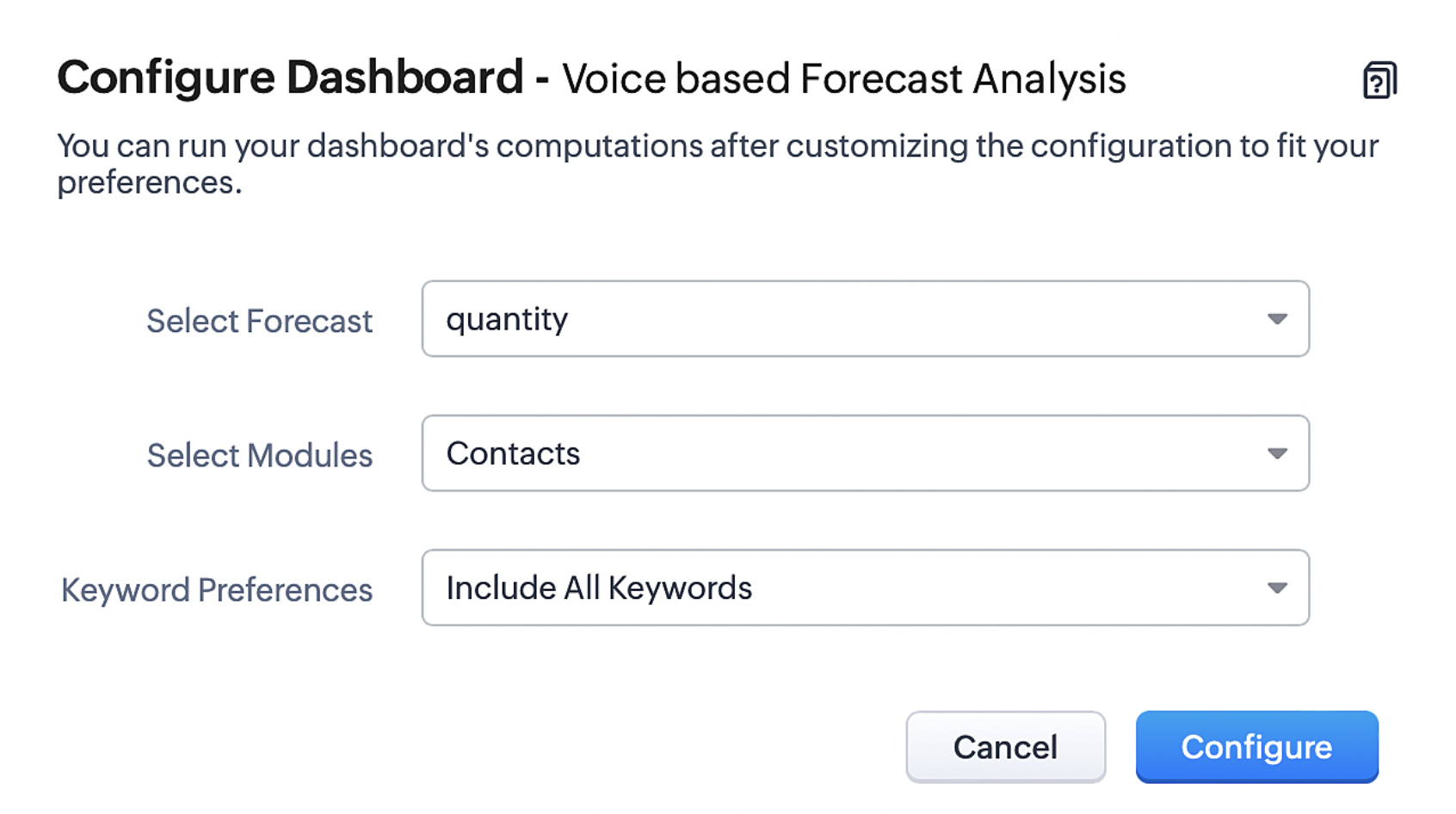


7. Click Configure to complete the configuration.

Type of Charts for Voice-based Forecast Analysis  


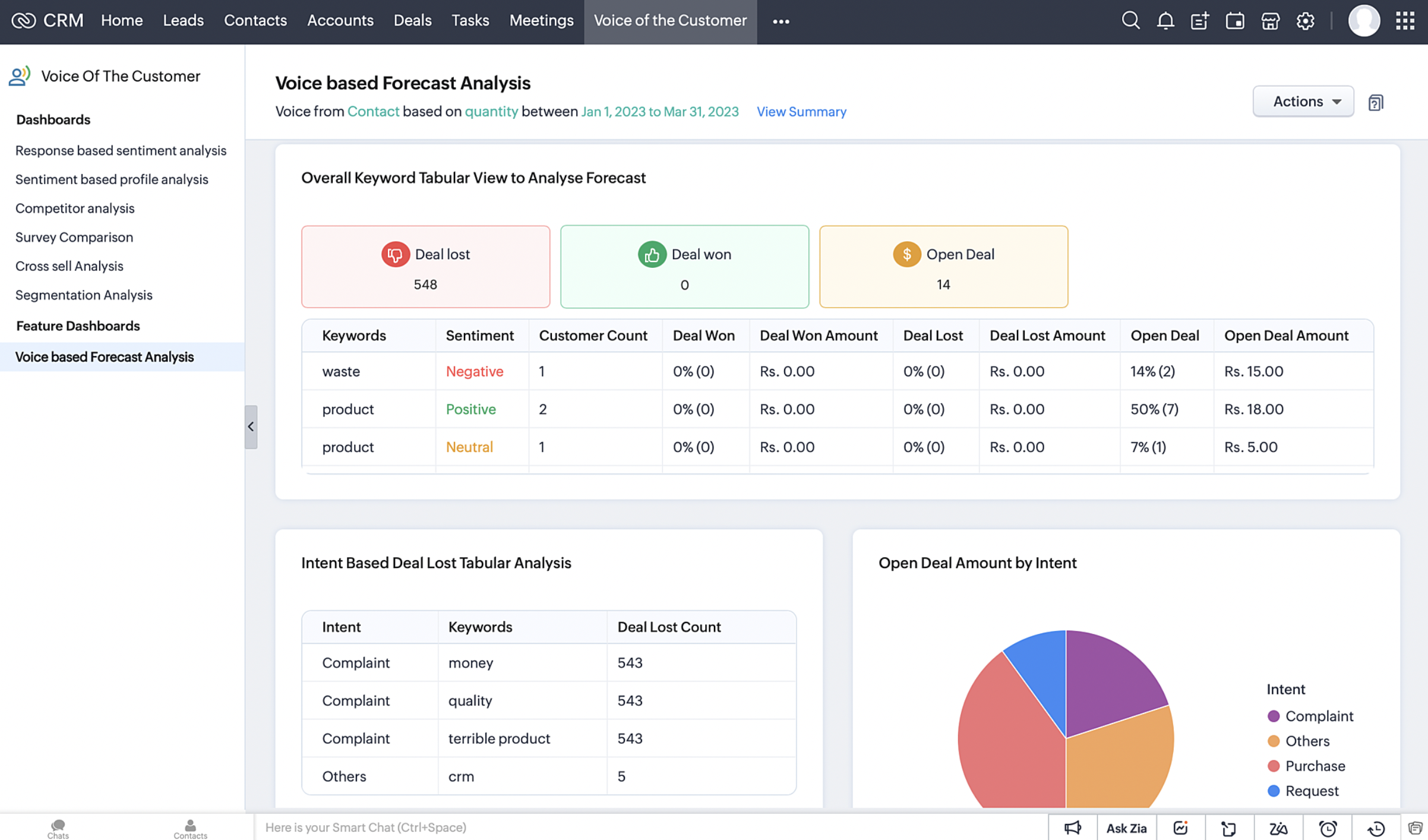
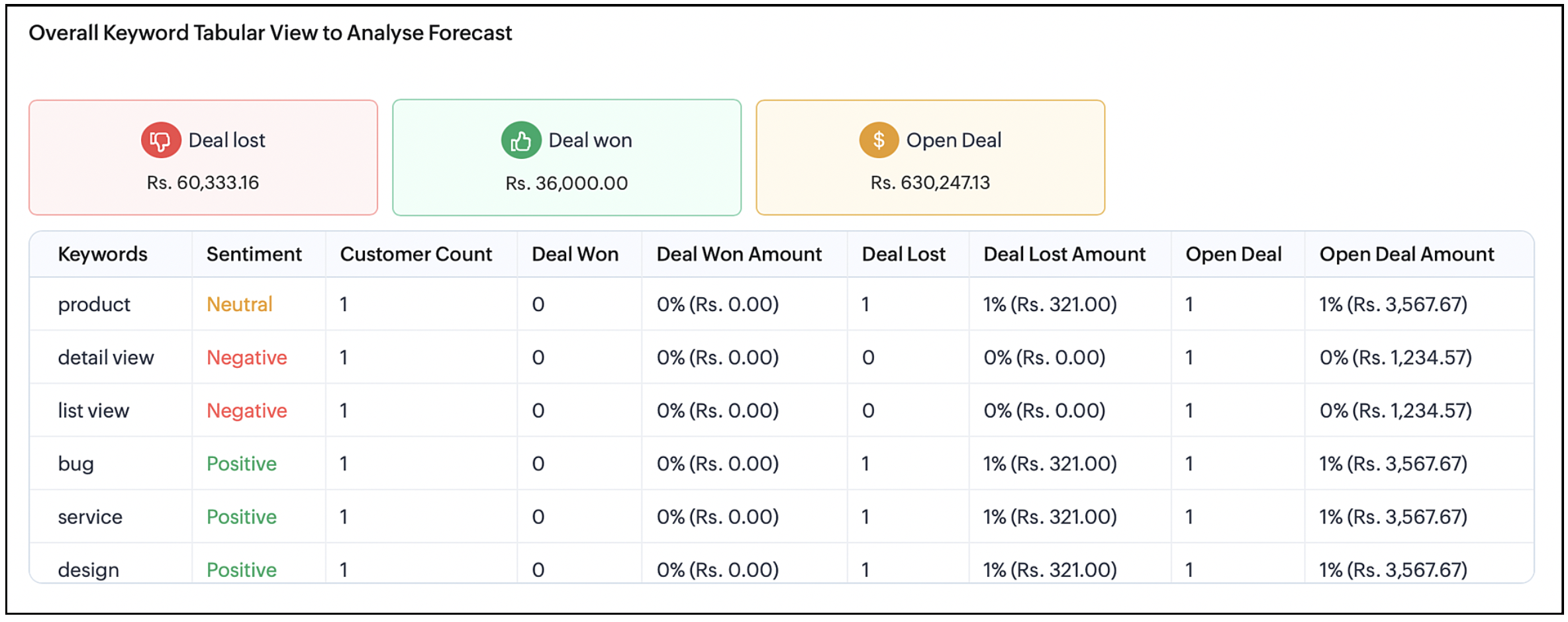
Overall Keyword tabular view 

This analysis covers details on how many deals were lost, won or open for the targeted period. The type of keyword mentioned by the customers for that month or quarter before a deal loss or deal won or any open deals. You can view the most commonly spoken keywords before every stage of a sales cycle.


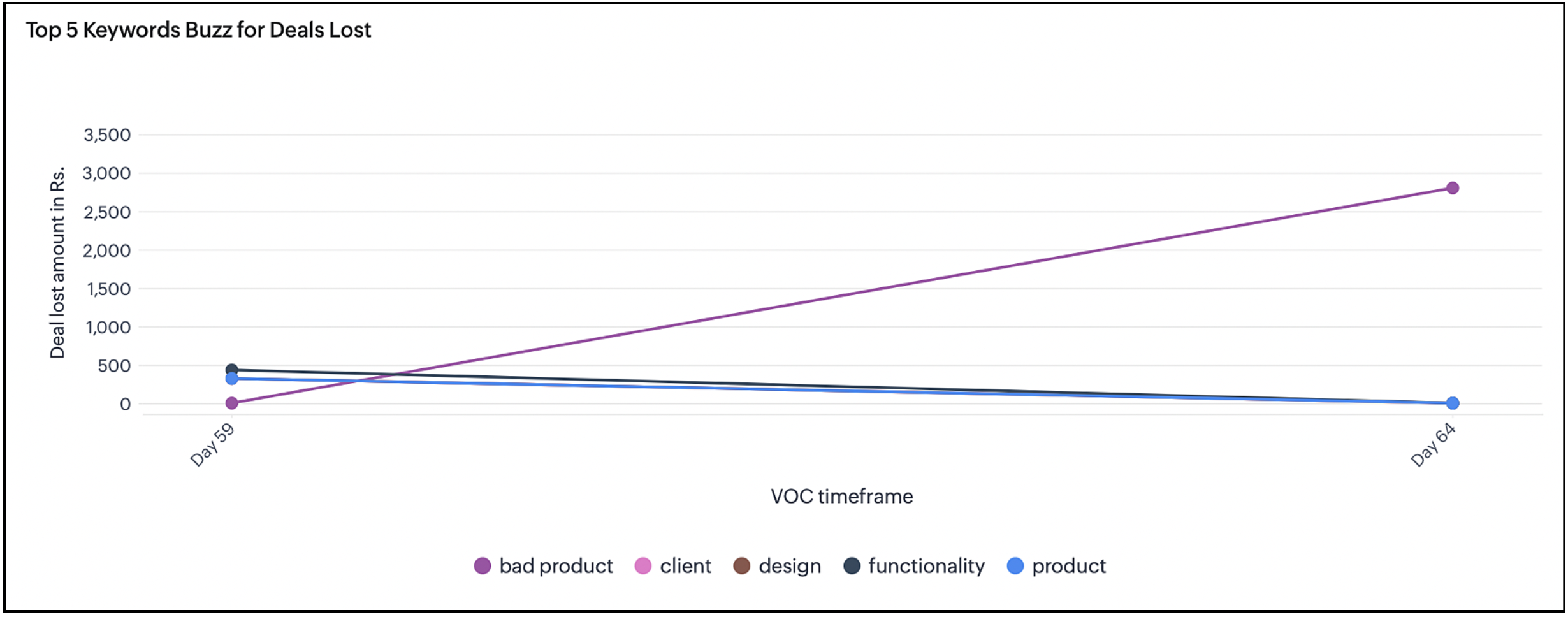
Top 5 Keyword Buzz for lost deals

Displays the deal loss percentage for every month or quarter. The number of lost deals where the top keywords were spoken over the chosen period. This will help understand the keywords that led to losing the deal and not being able to achieve the target.


Keyword quadrant analysis for lost deals

Latest keywords with negative intent mentioned before lost deals is plotted against quadrants. This helps the user to avoid using those keywords for upcoming deals and prioritize the issues to avoid more deal loss. This helps achieve the set target for a period by analyzing the gap and avoiding such keywords that lead to deal loss.


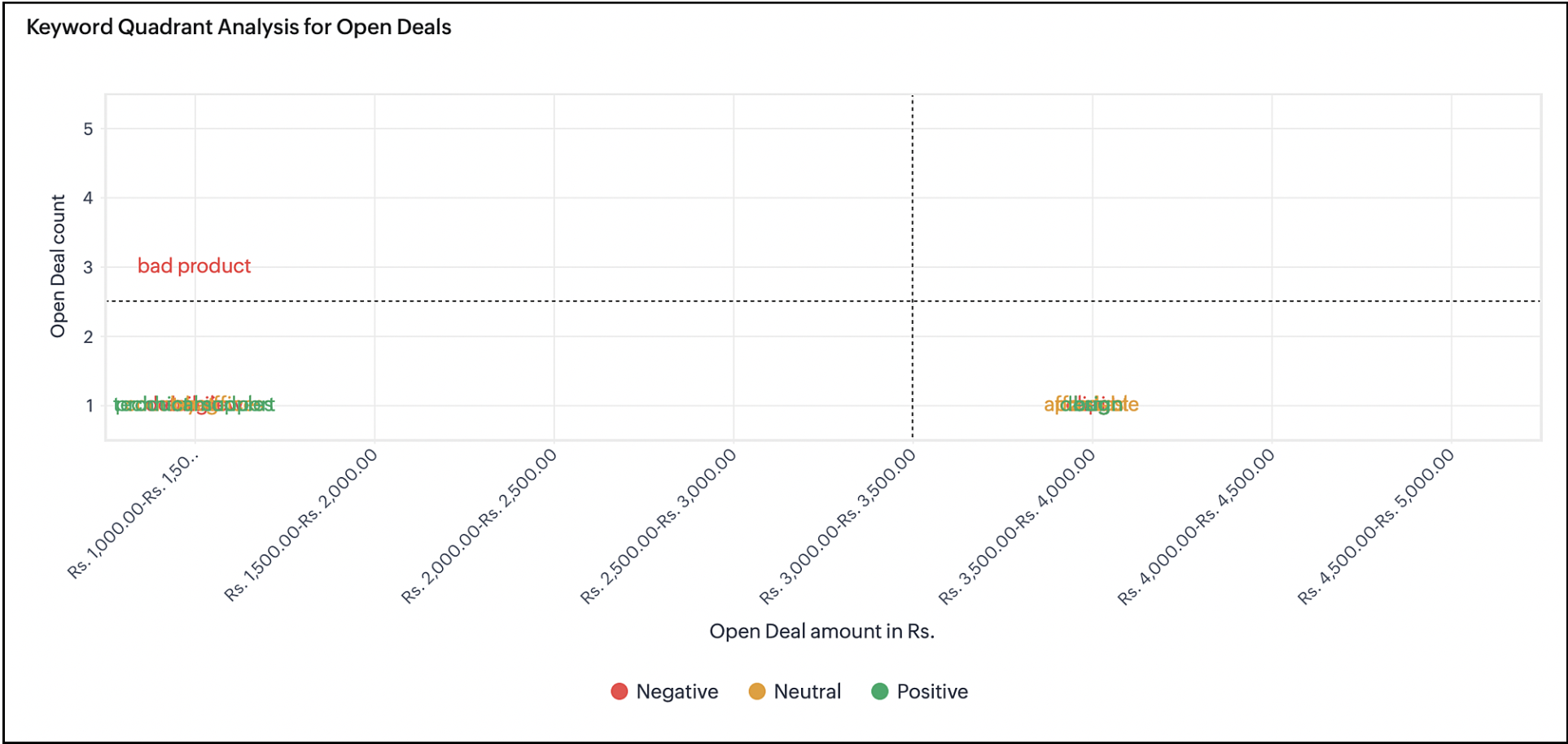
Keyword quadrant analysis for open deals

Latest keywords that were uttered during an open deal are plotted in this chart. You can compare this chart with the previous chart to find out similarities and the trajectory to lose a deal. This will help you to plan your conversations with a customer who uses keywords mentioned in the previous chart that lead to deal loss.


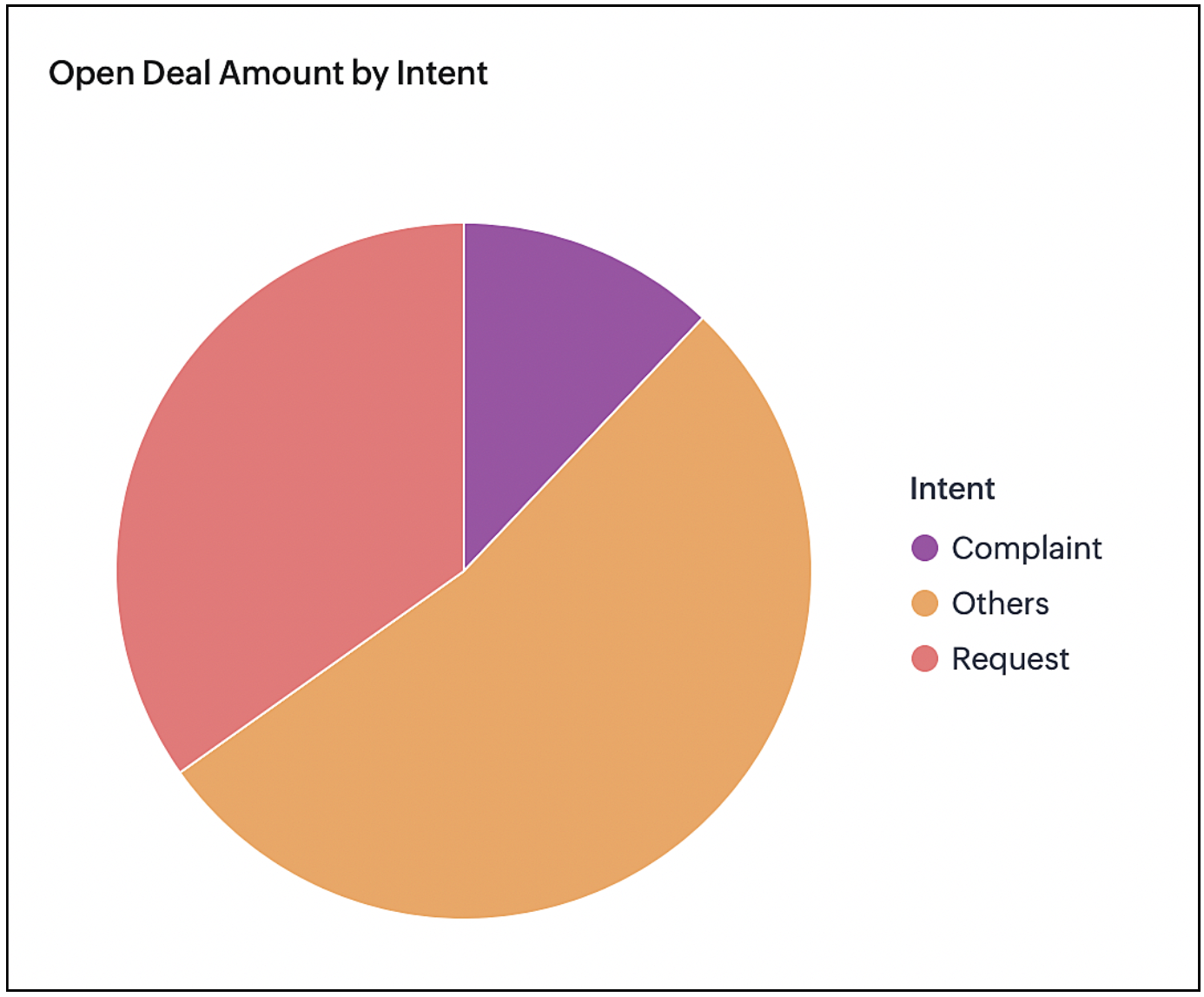
Open deal amount by intent

Deals that are open are analyzed by the intent and the keywords associated with the intent. The chart gives the user a perspective on what the state of the deal would be at the end and how it will affect the target.


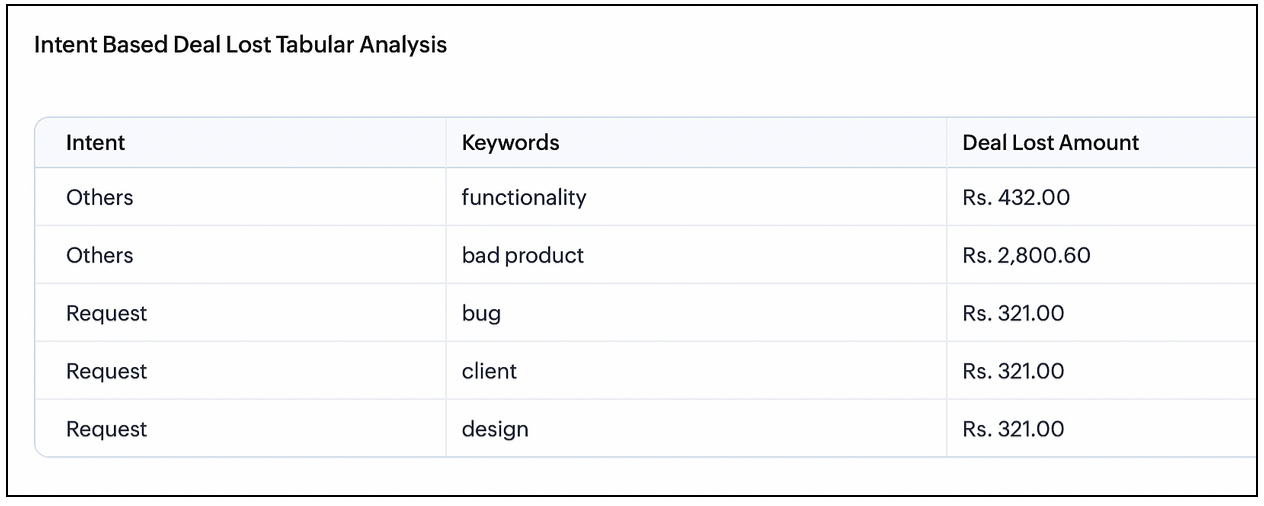
Intent-based deal lost tabular analysis

Keywords mentioned by customers are grouped based on the intent of the keywords. For example, the groups can be a complaint, request, dissatisfaction and so on. You can see the deal revenue that is lost for an intent and what keywords are associated with that intent. This is similar to the previous chart but this chart gives detailed understanding in the tabular view.


To learn more about VoC and what it offers, please refer to this guide.

That's all about this enhancement. Let us know you're feedback in the comment section.


Thank You :)

    Access your files securely from anywhere


                            Zoho Developer Community


                                                  • Desk Community Learning Series


                                                  • Digest


                                                  • Functions


                                                  • Meetups


                                                  • Kbase


                                                  • Resources


                                                  • Glossary


                                                  • Desk Marketplace


                                                  • MVP Corner


                                                  • Word of the Day


                                                  • Ask the Experts


                                                            Manage your brands on social media


                                                                  Zoho TeamInbox Resources


                                                                      Zoho CRM Plus Resources

                                                                        Zoho Books Resources


                                                                          Zoho Subscriptions Resources

                                                                            Zoho Projects Resources


                                                                              Zoho Sprints Resources


                                                                                Qntrl Resources


                                                                                  Zoho Creator Resources


                                                                                      Zoho CRM Resources

                                                                                      • CRM Community Learning Series

                                                                                        CRM Community Learning Series


                                                                                      • Kaizen

                                                                                        Kaizen

                                                                                      • Functions

                                                                                        Functions

                                                                                      • Meetups

                                                                                        Meetups

                                                                                      • Kbase

                                                                                        Kbase

                                                                                      • Resources

                                                                                        Resources

                                                                                      • Digest

                                                                                        Digest

                                                                                      • CRM Marketplace

                                                                                        CRM Marketplace

                                                                                      • MVP Corner

                                                                                        MVP Corner


                                                                                          Design. Discuss. Deliver.

                                                                                          Create visually engaging stories with Zoho Show.

                                                                                          Get Started Now


                                                                                            Zoho Show Resources

                                                                                              Zoho Writer

                                                                                              Get Started. Write Away!

                                                                                              Writer is a powerful online word processor, designed for collaborative work.

                                                                                                Zoho CRM コンテンツ


                                                                                                  Nederlandse Hulpbronnen


                                                                                                      ご検討中の方


                                                                                                              • Recent Topics

                                                                                                              • Cliq iOS can't see shared screen

                                                                                                                Hello, I had this morning a video call with a colleague. She is using Cliq Desktop MacOS and wanted to share her screen with me. I'm on iPad. I noticed, while she shared her screen, I could only see her video, but not the shared screen... Does Cliq iOS is able to display shared screen, or is it somewhere else to be found ? Regards
                                                                                                              • project name field issue- n8n

                                                                                                                Hey guys, I have a question. I want to create a new product using the workflow. The problem is with the product name field; I don't know how to fill it in. The workflow starts with retrieving information from the leads table, retrieving links to scrape
                                                                                                              • How to filter Packages in zoho inventory api

                                                                                                                Hi Team, I want to perform some tasks in a schedular on the packages which are in "Shipped" state. I tried to use filter_by in my api call but in return I get response as {"code":-1,"message":"Given filter is not configured"} My Api request is as follows
                                                                                                              • CRM

                                                                                                                Is anyone else experiencing this issue? Our company is not moving out of using Gmail's web app. It just has more features and is a better email program than Zoho Mail. Gmail has an extension (Zoho CRM for Gmail) that we're using but we've found some serious
                                                                                                              • ZOHO add-in issue

                                                                                                                I cannot connect ZOHO from my Outlook. I am getting this error.
                                                                                                              • Syncing with Google calendar, Tasks and Events

                                                                                                                Is it possible to sync Zoho CRM calendar, task and events with Google Calendar's tasks and events. With the increasing adoption by many major tool suppliers to sync seamlessly with Google's offerings (for instance I use the excellent Any.do task planning
                                                                                                              • How can i view "Child" Accounts?

                                                                                                                It can be very useful in our field of business to know the parent-child account relationship. However, there seems to be a shortcoming in the parent account view: no child account list. How can we view the child accounts per each account?
                                                                                                              • Ability to assign Invoice Ownership through Deluge in FSM

                                                                                                                Hi, As part of our process, when a service appointment is completed, we automated the creation of the invoice based on a specific business logic using Deluge. When we do that, the "Owner" of the invoice in Zoho FSM is defaulted to the SuperAdmin. This
                                                                                                              • Easily perform calculations using dates with the new DATEDIF function

                                                                                                                Hey Zoho Writer users! We've enhanced Zoho Writer's formula capabilities with the new DATEDIF function. This allows you to calculate the difference between dates in days, months, and years. Function syntax: =DATEDIF(start_date, end_date, unit) Inputs:
                                                                                                              • Adding Comments Using Workflows - How to Change User Attributed

                                                                                                                We have worklflows in Desk where a comment is added to a ticket based on certain criteria. It seems that the comment added is always attributed to the user who last edited the workflow. This does not make sense for us because: - It's misleading to other
                                                                                                              • Add Attachment Support to Zoho Flow Mailhook / Email Trigger Module

                                                                                                                Dear Zoho Support Team, We hope you are well. We would like to kindly request a feature enhancement for the Mailhook module in Zoho Flow. Currently, the email trigger in Zoho Flow provides access to the message body, subject, from address, and to address,
                                                                                                              • Conect chat of salesiq with zoho cliq

                                                                                                                Is there any way to answer from zoho cliq  the chat of salesiq initiated by customers?
                                                                                                              • Les dernières avancées en saisie de données et collaboration

                                                                                                                Après une année dédiée à la recherche et au développement, notre équipe est prête à dévoiler des améliorations majeures pour Zoho Sheet. Ces nouveautés seront lancées par étapes afin d’en assurer une prise en main optimale. Nous commençons avec des fonctionnalités
                                                                                                              • Deluge Learning Series – Client functions in Deluge | January 2026

                                                                                                                We’re excited to kick-start the first session of the 2026 Deluge Learning Series (DLS) with Client functions in Deluge. For those who are new to DLS, here’s a quick overview of what the series is all about: The Deluge Learning Series takes place on the
                                                                                                              • Rich Text For Notes in Zoho CRM

                                                                                                                Hello everyone, As you know, notes are essential for recording information and ensuring smooth communication across your records. With our latest update, you can now use Rich Text formatting to organize and structure your notes more efficiently. By using
                                                                                                              • Implement Meeting Polls in Zoho Bookings

                                                                                                                Dear Zoho Bookings Support Team, We'd like to propose a feature enhancement related to appointment scheduling within Zoho Bookings. Current Functionality: Zoho Bookings excels at streamlining individual appointment scheduling. Users can set availability
                                                                                                              • Zoho Bookings and Survey Integration through Flow

                                                                                                                I am trying to set up flows where once an appointment is marked as completed in Zoho Bookings, the applicable survey form would be sent to the customer. Problem is, I cannot customise flows wherein if Consultation A is completed, Survey Form A would be
                                                                                                              • Service Account Admin for API Calls and System Actions

                                                                                                                Hello, I would like to request the addition of a Service Account Admin option in Zoho product. This feature would allow API calls and system actions to be performed on behalf of the system, rather than an active user. Current Issue: At present, API calls
                                                                                                              • How to apply customized Zoho Crm Home Page to all users?

                                                                                                                I have tried to study manuals and play with Zoho CRM but haven't found a way how to apply customized Zoho CRM Home Page as a (default) home page for other CRM users.. How that can be done, if possible? - kipi Moderation Update: Currently, each user has
                                                                                                              • Please can the open tasks be shown in each customer account at the top.

                                                                                                                Hi there This has happened before, where the open tasks are no longer visible at the top of the page for each customer in the CRM. They have gone missing previously and were reinstated when I asked so I think it's just after an update that this feature
                                                                                                              • How to Customize Task Creation to Send a Custom Alert Using JavaScript in Zoho CRM?

                                                                                                                Hello Zoho CRM Community, I’m looking to customize Zoho CRM to send a custom alert whenever a task is created. I understand that Zoho CRM supports client scripts using JavaScript, and I would like to leverage this feature to implement the alert functionality.
                                                                                                              • Send Whatsapp with API including custom placeholders

                                                                                                                Is is possible to initiate a session on whatsapp IM channel with a template that includes params (placeholders) that are passed on the API call? This is very usefull to send a Utility message for a transactional notification including an order number
                                                                                                              • Configurable Zoho Cliq Notifications for Zoho People Alerts

                                                                                                                Hello Zoho People Product Team, Greetings and hope you are doing well. We would like to request an enhancement to Zoho People notifications, enabling a native delivery via Zoho Cliq with admin-level control, similar to the notification settings available
                                                                                                              • Add Israel & Jewish Holidays to Zoho People Holidays Gallery

                                                                                                                Greetings, We hope you are doing well. We are writing to request an enhancement to the Holidays Gallery in Zoho People. Currently, there are several holidays available, but none for Israel and none for Jewish holidays (which are not necessarily the same
                                                                                                              • Keep Zoho People Feature Requests in the Zoho People Forum

                                                                                                                Hello Zoho People Product Team, Greetings. We would like to submit a feature request regarding the handling of feature requests themselves, specifically for Zoho People. Issue: Feature Requests Being Moved to Zoho One Zoho People feature requests are
                                                                                                              • ZO25: The refreshed, more unified, and intelligent OS for business

                                                                                                                Hello all, Greetings from Zoho One! 2025 has been a remarkable year, packed with new features that will take your Zoho One experience to the next level! From sleek, customizable dashboards to an all-new action panel for instant task management, we’ve
                                                                                                              • Introducing Multi-Asset Support in Work Orders, Estimates, and Service Appointments

                                                                                                                We’re excited to announce a highly requested enhancement in Zoho FSM — you can now associate multiple assets with Work Orders, Estimates, and Service Appointments. This update brings more clarity, flexibility, and control to your field service operations,
                                                                                                              • [Product Update] Locations module migration in Zoho Books integration with Zoho Analytics

                                                                                                                Dear Customers, As Zoho Books are starting to support an advance version of the Branches/Warehouses module called the Locations module, users who choose to migrate to the Locations module in Zoho Books will also be migrated in Zoho Analytics-Zoho Books
                                                                                                              • Introducing Schedules for smarter availability management

                                                                                                                Greetings from the Zoho Bookings team! We’re excited to introduce Schedules, a powerful enhancement to manage availability across your workspace. Schedules are reusable working-hour templates that help you define and maintain consistent availability across
                                                                                                              • Why Zoho Contracts Prefers Structured Approvals Over Ad-hoc Approvals

                                                                                                                Approvals are one of the most important stages in a contract’s lifecycle. They determine whether a contract moves forward, gets revised, or needs further discussion. The approval process also defines accountability within the organization. Zoho Contracts
                                                                                                              • Whatsapp Connection Status still "Pending" after migration

                                                                                                                Hello, I migrated my WhatsApp API to Zoho from another provider a day ago. So far the connection status is still “Pending”. There is a problem? How long does it usually take?
                                                                                                              • Kaizen #226: Using ZRC in Client Script

                                                                                                                Hello everyone! Welcome to another week of Kaizen. In today's post, lets see what is ZRC (Zoho Request Client) and how we can use ZRC methods in Client Script to get inputs from a Salesperson and update the Lead status with a single button click. In this
                                                                                                              • How to Filter timewise question to check uploaded one month or two months before in these community question ?

                                                                                                                i want to find the question that is asked some month or before any particular year, so how can i filter it ?
                                                                                                              • Proposal for Creating a Unique "Address" Entity in Zoho FSM

                                                                                                                The "Address" entity is one of the most critical components for a service-oriented company. While homeowners may change and servicing companies may vary, the address itself remains constant. This constancy is essential for subsequent services, as it provides
                                                                                                              • Workflow Down/Bug

                                                                                                                We have a workflow that sends an email to one of our internal departments 10 minutes after a record is created in a custom module. The workflow actually works correctly. However, we have now noticed that on January 8, between 3:55 p.m. and 4:33 p.m.,
                                                                                                              • Service Locations: Designed for Shared Sites and Changing Customers

                                                                                                                Managing service addresses sounds simple—until it isn’t. Large facilities, shared sites, and frequently changing customers can quickly turn address management into an operational bottleneck. This is where Service Locations deliver clarity and control.
                                                                                                              • Can I re-send the Customer Satisfaction Survey after a ticket closure?

                                                                                                                Hello, Some customers does not answer the survey right after closure, is it possible to re-send after a few days or weeks? Best Regards!
                                                                                                              • Account blocked

                                                                                                                Yesterday I got my Zeptomail account blocked due to too many hard bounces. My account is used exclusively for sending transactional emails (eg. your order has been shipped, a form has been filled, etc) and the sudden blocking impacted hundreds of websites
                                                                                                              • Filter contacts based on selected category in Zoho Desk ticket

                                                                                                                Hello community, I’m setting up the Tickets module in Zoho Desk and I need help implementing the following: When a category is selected in a ticket, I want the Contact field to be filtered so that it only displays contacts that are related to that category.
                                                                                                              • Mapping a new Ticket in Zoho Desk to an Account or Deal in Zoho CRM manually

                                                                                                                Is there any way for me to map an existing ticket in Zoho desk to an account or Deal within Zoho CRM? Sometimes people use different email to put in a ticket than the one that we have in the CRM, but it's still the same person. We would like to be able
                                                                                                              • Next Page