How to Avoid Bounces
Emails that are not delivered and are returned to the sender are called bounces. The surest way to avoid them is to keep a clean, permission-based mailing list, authenticate your sending domain with SPF, DKIM, and DMARC so mailbox providers accept your mail, and remove bad addresses as soon as they bounce. Take a closer look at email bounces to learn why emails bounce.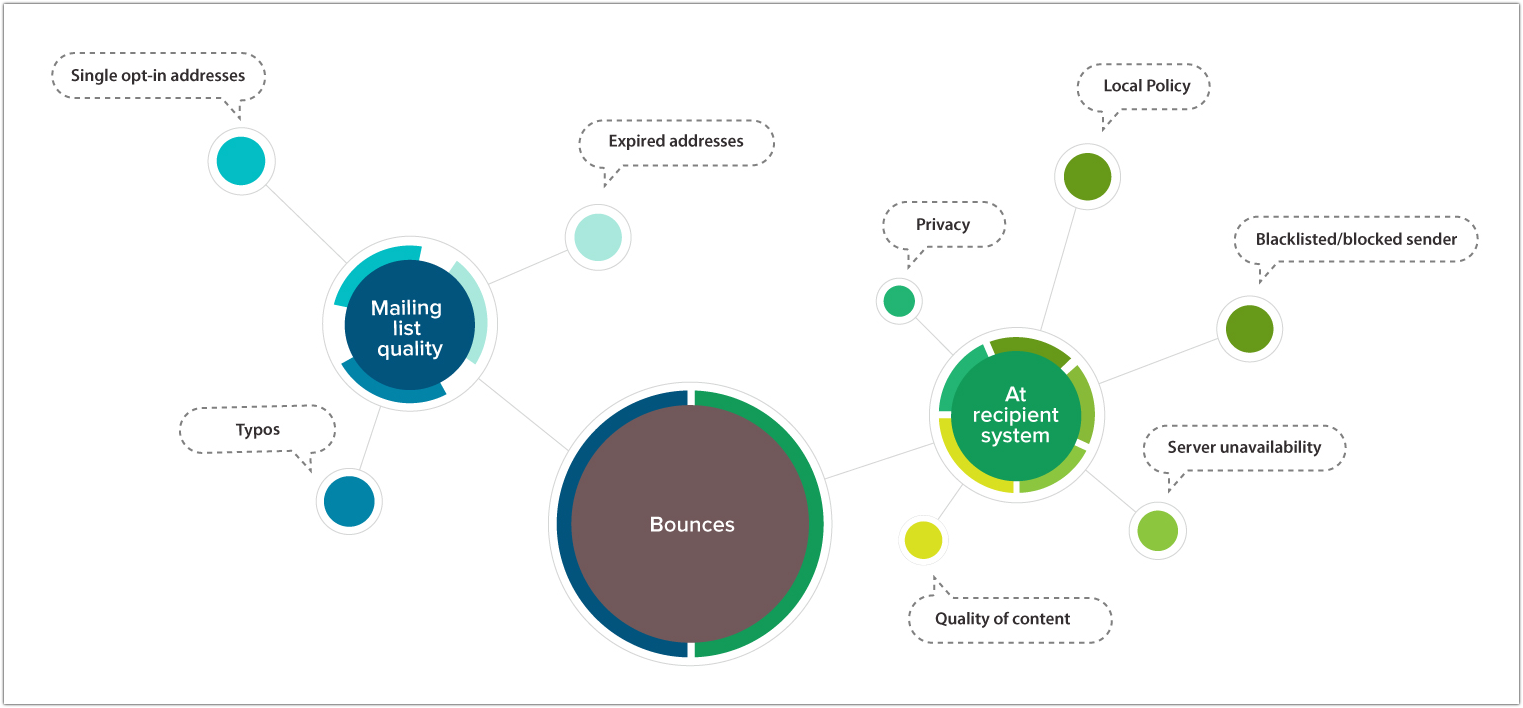
Check the reason for bounces
In your organization, you will find the reasons for any bounces in your mailing list. Click on the bounce error message to know in detail about the bounced address.
Hard bounces from soft bounces need different treatments. A hard bounce is a permanent failure — for example, the mailbox does not exist — so suppress that address immediately and never mail it again. A soft bounce is a temporary failure, such as a full mailbox or a busy server; keep the address on your list, but suppress it if it soft bounces on three to five consecutive sends.
Use the bounce details to analyze and reduce it with the suggestions below.
Clean your list
The best way to reduce bounces is to have a hygienic mailing list. You can find the reasons for bounces by checking your list for the following:
- Non-opt-in email addresses are the email recipients who haven’t given proper consent to receive your emails. Having non-opt-in email addresses in your list not only affects your email deliverability but is also a violation of various email marketing laws and carries severe penalties.
- Collected, harvested, and purchased email addresses should be avoided as they’re more prone to be bounces.
- Single opt-in contacts: If you use a single opt-in subscription method, it’s impossible for you to check whether your contacts have given a valid email address. People may enter email addresses with typos while signing up, which result in bounces. Typos can also happen when you copy email addresses manually. This can be prevented by requiring the recipient to confirm their email address through the double opt-in subscription method.
Best practices
- If your email bounces are from a single recipient domain (e.g., Gmail or Yahoo!), then the recipient system is blocking your emails, your emails violate their policies, or the anti-spam system at the recipient end is blacklisting your domain.
- Authenticate your sending domain. Since February 2024, Google and Yahoo’s bulk sender requirements require anyone sending to their users to set up SPF, DKIM, and DMARC; Microsoft applies the same rules to Outlook, Hotmail, and Live.com from May 2025. Mail that fails authentication is now rejected outright and counted as a bounce, so publishing valid SPF, DKIM, and a DMARC record (start with a policy of p=none) is one of the most effective ways to prevent them.
- Make it easy to unsubscribe. Bulk senders must include a one-click unsubscribe option and honor requests within two days. When people can’t unsubscribe, they mark your emails as spam instead, which drives up your complaint rate and gets future emails blocked. Keep your spam complaint rate below 0.3% — ideally under 0.1% — as measured in Yahoo and Google’s sender tools.
- A major cause for bounces is email addresses expiring. To avoid this, segment the idle contacts every six months. Send them re-engagement emails and keep only the contacts who respond positively.
- Provide a profile update link in all your campaigns, so that, if your contact changes email address, he/she can update it. This avoids inactive email addresses in your list. You can use merge tags for providing profile update link - $[LI:UPDATEPROFILE]$
- If an email has phrases that resemble spam words, the recipient system may block it. Avoid them when composing email subject lines and content to prevent unnecessary bounces.
- Avoid using URLs from blacklisted domains as emails may be blocked if they contain suspicious URLs.
- Bounces can occur if an anti-spam service blacklists the sender domain. So check your domain reputation with leading anti-spam services such as Spamhaus and Spamcop, and with the mailbox providers’ own tools such as Google Postmaster Tools and Microsoft SNDS. (SORBS, once commonly recommended, was decommissioned in June 2024 and no longer publishes reputation data.) If your sending address is blacklisted by an anti-spam system, resolve it by delisting your domain.
- You should also check the error code in bounceback messages and analyze what went wrong. As a rule, a 5xx code is a permanent (hard) failure that you should suppress right away, while a 4xx code is a temporary (soft) failure worth retrying.
- Keep your overall bounce rate below 2%. A higher rate signals list-quality problems to mailbox providers and can hurt the delivery of your future campaigns, so clean your list before it climbs.
Start following these suggestions, and you will soon start to see a decline in the number of bounces from your campaigns. It may take some time and multiple approaches to reduce bounces to a negligible rate, but once you start gaining momentum, you’ll see the benefit.