 IMPORTANT: This is the help page of the latest version of Zoho Campaigns. Click here to access the corresponding help page if you're still in the older version.
What are topics?
Topics are interest categories you set up in Zoho Campaigns to define the purpose of your email communication. They let your contacts choose the types of emails they want to receive, whether that's product updates, newsletters, promotional offers, event announcements, or anything else relevant to your brand.
Topics are maintained at the organization level and are directly tied to individual contacts, not mailing lists. Every contact in Zoho Campaigns, regardless of how they were added, can be mapped to one or more topics. When you send a campaign, it goes only to contacts who are subscribed to that specific topic.
 Note: A default topic called Marketing is available in all Zoho Campaigns organizations. If your organization only needs one generic topic, you can use this as-is. Contacts are automatically associated with this default topic, so you do not need to map them explicitly. The default topic can be renamed but not deleted if its the only topic present.
Why use topics in Zoho Campaigns
Before topics, campaigns were tied to mailing lists with no way to filter by interest. A contact on a list would receive every campaign sent to it, whether the content was relevant to them or not. Topics fix this by ensuring a campaign only reaches contacts who have opted into that specific subject.
Contacts can choose and update their topic preferences at any time through the Manage Preference link in your email footer. This shifts control to the subscriber, which builds trust and reduces the friction that leads to full unsubscribes.
If a contact unsubscribes and you have only one topic configured, they will be unsubscribed from your organization entirely. If you have multiple topics, contacts can unsubscribe from specific topics while staying subscribed to others. This is a meaningful difference for reducing overall list churn.
Campaigns sent to opted-in, interested contacts consistently see better open rates, click rates, and conversions. When your content matches what contacts signed up to receive, they are far more likely to engage with it.
Stay compliant with email marketing regulations
Topics work alongside Zoho Campaigns' compliance features to support adherence to CAN-SPAM, GDPR, and similar laws. Sending only to contacts who have opted into a topic, and recording a lawful basis for each subscription, creates a defensible record of consent. How topics and lists differ
Lists and topics serve different purposes in Zoho Campaigns. Confusing the two is a common source of errors when setting up contact management.
| Lists | Topics |
Adding contacts | You add contacts to lists based on your own requirements. | Contacts subscribe to topics based on their preferences. |
Visibility | Visible only to you and your organization members based on their privileges. | Visible to all your contacts through the Manage Preference page. |
Removing contacts | You remove contacts from lists as needed. | Contacts can unsubscribe from topics on their own. |
Purpose | Internal use — for organizing and targeting recipients when sending campaigns. | External use — for letting contacts declare what they want to receive. |
Note: Avoid giving a topic and a list the same name. Lists are internal; topics are shown to your contacts. A topic name should clearly describe the type of emails it represents, not reflect your internal list naming convention. Choosing your topic hierarchy
Before setting up topics, you need to decide which hierarchy structure suits your organization.
Brand - Topic
Use this if your organization operates under a single brand or focuses on one product or service area. Topics are placed directly under your brand.
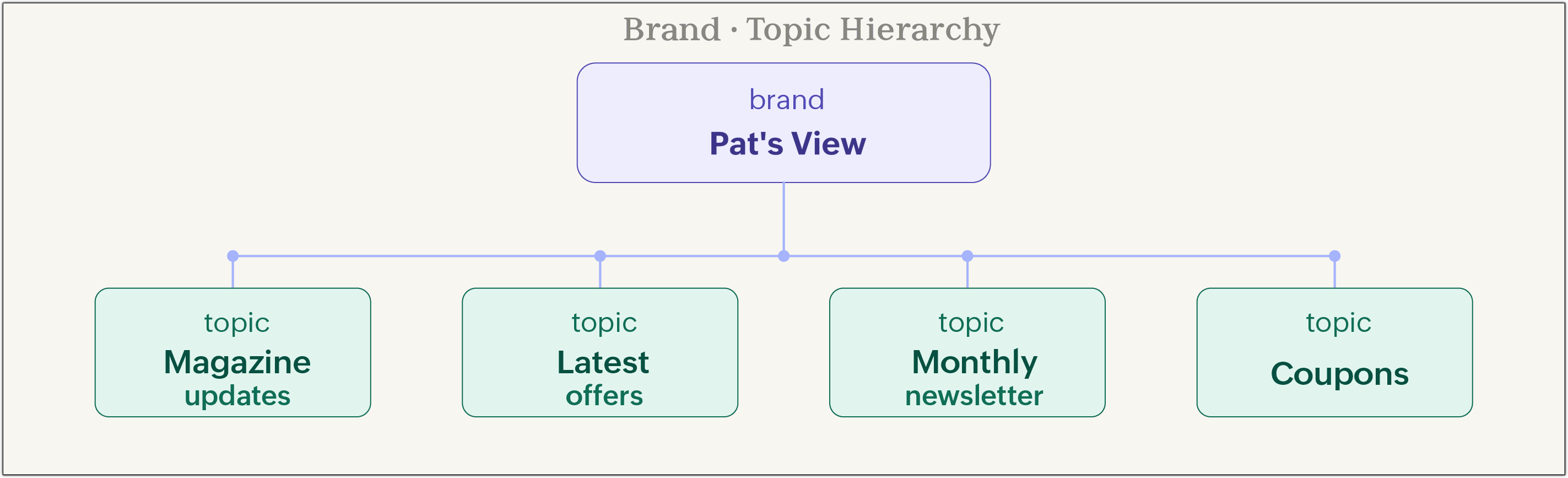
Use case: Patricia runs an online fashion magazine called Pat's View. She sends emails covering magazine updates, latest fashion offers, special occasion coupons, and a monthly newsletter. All topics sit directly under the Pat's view brand.
Brand - Category - Topic
Use this if your organization has multiple product lines or service categories and wants to send emails specific to each one. Categories sit between the brand and its topics, letting you organize related topics together.
You can also add brand-level topics that cut across all categories — for example, an annual conference announcement or a seasonal sale applicable to all products.
Use case: Jerold runs Jeroldstores, an electronics retailer selling televisions, mobile devices, and computers. Each product category has its own set of topics: Latest trends, Hot sellers, and Monthly offers. Contacts who buy televisions only see television-related campaigns.
Notes:
Brand - Topic is the default hierarchy.
A contact can be subscribed to any number of topics.
Each email campaign can only be associated with one topic at a time.
Use cases
Single-brand content publisher
Patricia's online magazine Pat's view uses the Brand - Topic hierarchy with four topics: Magazine updates, Latest offers, Coupons, and Monthly newsletter. A reader who only wants the monthly newsletter subscribes to that topic alone and never receives coupon emails. This keeps the list healthy and readers engaged with content they actually asked for.
Multi-category retail store
Jerold's electronics store uses the Brand - Category - Topic hierarchy. Customers who buy televisions are subscribed to topics under the Televisions category. They receive latest trends, hot sellers, and monthly offers for televisions — not for mobile devices or computers — unless they choose to subscribe to those categories too.
Subscription-based business with tiered users
Rogers runs an online consultation platform with free and paid subscribers. Free subscribers receive a generic business ideas newsletter. Paid subscribers receive specific business advice for their firm. In this case, the topic is shared but the mailing lists used to target recipients differ — lists handle the internal segmentation, while the topic defines the email's purpose.
Clothing retailer with demographic segments
Suave Fashions sends targeted offers based on categories: Men, Women, Kids, and Teen. A customer initially subscribed to the Women topic can subscribe to the Kids topic at any time using the Manage Preference option in any email footer, without needing to contact the brand.
Best practices for creating topics
Group topics under the right category or brand. This makes the preference center clearer for contacts when they are choosing what to subscribe to.
Keep topic names short and specific. Names should reflect what the contact will receive, not your internal terminology. "Monthly product updates" is better than "Comms List 3."
Add a description to every topic. A brief description helps contacts make an informed decision about subscribing. For example: "Weekly tips on getting the most out of your subscription."
Do not create topics for internal use. If you need to organize contacts for internal purposes, use lists. Topics are always visible to contacts.
Keep the number of topics manageable. Too many topics make it harder for contacts to choose. Start with a focused set and expand as your communication strategy grows.
Lawful basis for communication
When you assign a topic to a contact in Zoho Campaigns, you are also required to select a lawful basis for communication. This field appears when you have enabled GDPR compliance under Settings -> Consent and Privacy -> Compliances.
The lawful basis documents the legal justification for contacting that person under that topic. It is a GDPR requirement under Article 6: Lawfulness of processing. If a contact or regulatory authority questions whether you had the right to send a particular email, this record is your evidence.
Zoho Campaigns supports six lawful bases, plus a Not Applicable option.
Lawful basis | What it means | Example |
Consent | The contact has freely and specifically agreed to receive emails from you, without pre-ticked boxes or unclear agreements. They can withdraw consent at any time. | A contact ticks a checkbox on a newsletter sign-up form agreeing to receive marketing emails. |
Legitimate interest | Your organization has a genuine and proportionate reason to process the contact's data, as long as it does not override their rights and freedoms. | A company monitors network traffic to detect fraud or cyberattacks. |
Contract | Processing is necessary to fulfill a contract the contact is part of, or to take steps before entering one. | An online shop processes a delivery address and payment details to complete an order. |
Legal obligation | Your organization is required by law to process the data. | An employer shares payroll data with a tax authority to comply with national tax law. |
Vital interest | Processing is necessary to protect someone's life. This is typically a last resort used when consent cannot reasonably be obtained. | Emergency services access a patient's medical records when they arrive unconscious. |
Public task | Processing is necessary for a task carried out in the public interest or to exercise official authority. | A local council processes residents' data to manage planning applications. |
Not applicable | None of the above six bases apply to this contact and topic. | Use this only when the other options genuinely do not fit your situation. |
For most marketing use cases, Consent or Legitimate interest will apply.