Working with rebranded app metrics

Working with mobile metrics dashboard

What does this page cover
In this page, you'll learn how to initialize and setup the capture of metrics (powered by Zoho Apptics) for your rebranded mobile apps during the code-sign process. You can also set filters, create goals and manage them effectively.
To find out how to get usage statistics across web applications, check out our Metrics documentation.
Availability
Metrics for rebranded mobile apps:
  1. Is available on the Enterprise plan (which contains rebranded mobile apps by default)
  2. Is available only in the Creator 6 version of Zoho Creator.
  3. Can be enabled only by the super admins in the System Integrations page. Once enabled, both super admins and admins can enable app metrics during code signing and view the collected metrics data.

1. Summary of rebranded mobile metrics

Where to access rebranded app metrics?
Homepage -> Manage -> Mobile -> Code-signed app -> View Metrics
Who are the end users?
Super admin and admins
Whose activities are captured?
Users, portal users, and public users
Which solutions' usage is captured?
Only the live mode of applications
What parameters are considered?
Count of new devices and accessed devices of users across all applications

2. Initializing rebranded mobile metrics

You will be able to view the Mobile metrics dashboard once you agree to the consent and click the Configure/Enable button in the following places. ur usage metrics will be visualized in the dashboard from the day you enable Apptics.
  1. Zoho Apptics system integration.

  2. While code-signing or post code-signing process for your mobile applications.

3. Date filter behaviour

The date filter drop-down helps filter the mobile metrics data in a more precise manner based on the selected date range.
Date filter
Data available from
Today
12 AM with 3 hours intervals
Yesterday
12 AM with 3 hours intervals
Current week
Monday to Sunday
Last week
Monday to Sunday
Last 30 days
Past 30 days
Current month
First day of the month
Previous month
First day of previous month
Past 3 months
Past 3 months
Notes
Note: Let's imagine that August 1st is on a Thursday. If you choose the 'Current week' filter on August 1st, you'll be shown data collected from July 29th, which is on a Monday. This is because the data collection occurs only on weekly intervals for the current week and previous week.

4. Funnel goal creation

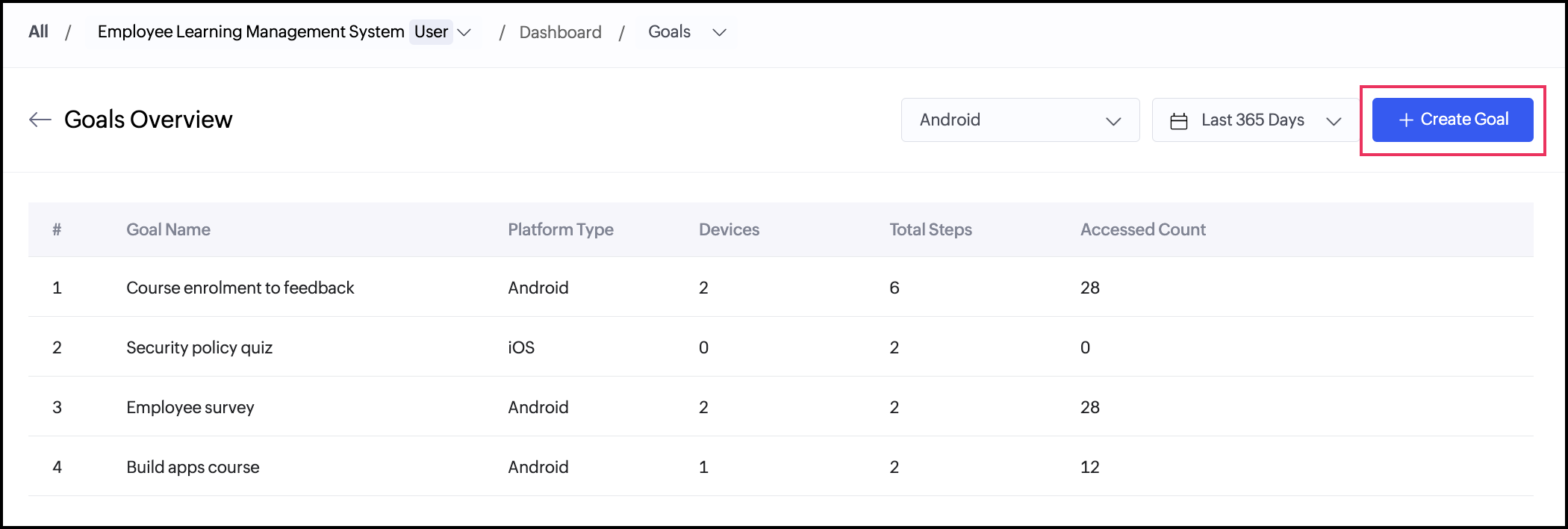
You can create new goals in the Goals Overview dashboard by following the below steps.

1. Click Create New Goal at the top-right of this page. The Create Goal slider will appear from the right.
2. Enter a Goal Name in the space provided.
Notes
Note: Currently, you can only create screen-based goals.
3. Select the required platform: iOS or Android.
4. Under Add Flow, name your step and select the relevant screen. Here, the screen names are the display names of your app components (form, report, or page).
Notes
Currently, you can create a flow based on the screen traversal in your mobile application. To do this, you can associate existing screens to each of the added steps for your goal.
5. Click + Add Step to create another step.
Info
Info: You can click the delete icon beside a step if you want to delete that step. You can also click on the "+" icon beside a step to add the next step.

6. Click Create once you've added the required steps for this goal.

Notes
Note: At least two steps are needed to create a goal.
All the goals that you've created will be listed and can be viewed in the All Goals dashboard. To view individual metrics for a goal, you can click on the View metrics button beside that goal and track the stats in the Goal Analytics dashboard.

4.1 Manage created goals

To rename the goal or delete a goal,
1. Navigate to the All Goals dashboard.
2. Hover over the required goal and click the ellipsis or the three-dot menu icon.
3. Select the required option:
  1. Rename: The Goal Created popup will appear, where you can only edit the name of the goal.
    1. Once you're done, click Rename.

  2. Delete: Click Delete again in the Delete Goal popup that appears.
    1. The goal will be removed from the listing.

Notes
Note: A deleted goal will no longer generate funnel analytics.

5. Disabling mobile metrics

  1. If you need to disable capturing metrics for your rebranded mobile apps, you'll need to get in touch with support@zohocreator.com.
  2. To enable mobile metrics again, please refer to the Initializing rebranded mobile metrics section.
  3. Please note that the usage metrics in-between the timeframe of you disabling and re-enabling the App Metrics will not be available in the dashboard.

6. Points to note

  1. To enable Apptics integration for rebranded apps in your Creator account, you must enable it for each rebranded mobile individually during its code sign process.
  2. For the same mobile app (let's say Order Management), you can opt to track metrics exclusively for Android while excluding iOS. To achieve this, you must enable app metrics during the Android code signing process but leave them disabled during the iOS code signing process for this app.
  3. Once enabled, you can't disable the Apptics integration currently. You can only deactivate (pause) the tracking
  4. When you create and restore a backup for an application, the mobile metrics data will not be included in the backup. The backed-up application will not contain any code-signed apps.
  5. When an account is migrated from one datacentre (DC) to the other, the existing App Metrics data of that account will not be migrated to the new DC. After migration, ensure to complete the prerequisites. Your Metrics dashboard will then be populated with the statistics specific to the new DC.
  6. When users open your mobile app from their device, a consent form will appear, allowing them to choose from the below two options:
    1. Give consent to being tracked anonymously
    2. Deny consent to being tracked. In this case, data will not be collected and any actions the user performs will not be tracked.
  7. Mobile metrics are majorly measured in terms of devices by Zoho Apptics. If a mobile app is downloaded and opened on a device, then that count is registered as a "new device" by Apptics.
  8. Both users' and portal users' code signed apps will be considered as separate apps in Apptics, and their metrics will be captured individually.
  1. Understanding rebranded mobile apps
  2. Understanding devices and sessions
  3. Understanding screen analysis
  4. Understanding goal analysis
  5. Understanding code-signing mobile apps


        Create. Review. Publish.

        Write, edit, collaborate on, and publish documents to different content management platforms.

        Get Started Now


          Access your files securely from anywhere

            Zoho CRM Training Programs

            Learn how to use the best tools for sales force automation and better customer engagement from Zoho's implementation specialists.

            Zoho CRM Training
              Redefine the way you work
              with Zoho Workplace

                Zoho DataPrep Personalized Demo

                If you'd like a personalized walk-through of our data preparation tool, please request a demo and we'll be happy to show you how to get the best out of Zoho DataPrep.

                Zoho CRM Training

                  Create, share, and deliver

                  beautiful slides from anywhere.

                  Get Started Now


                    Zoho Sign now offers specialized one-on-one training for both administrators and developers.

                    BOOK A SESSION


                                Quick LinksWorkflow AutomationData Collection
                                Web FormsEnterpriseOnline Data Collection Tool
                                Embeddable FormsBankingBegin Data Collection
                                Interactive FormsWorkplaceData Collection App
                                CRM FormsCustomer ServiceAccessible Forms
                                Digital FormsMarketingForms for Small Business
                                HTML FormsEducationForms for Enterprise
                                Contact FormsE-commerceForms for any business
                                Lead Generation FormsHealthcareForms for Startups
                                Wordpress FormsCustomer onboardingForms for Small Business
                                No Code FormsConstructionRSVP tool for holidays
                                Free FormsTravelFeatures for Order Forms
                                Prefill FormsNon-Profit

                                Intake FormsLegal
                                Mobile App
                                Form DesignerHR
                                Mobile Forms
                                Card FormsFoodOffline Forms
                                Assign FormsPhotographyMobile Forms Features
                                Translate FormsReal EstateKiosk in Mobile Forms
                                Electronic Forms
                                Drag & drop form builder

                                Notification Emails for FormsAlternativesSecurity & Compliance
                                Holiday FormsGoogle Forms alternative GDPR
                                Form to PDFJotform alternativeHIPAA Forms
                                Email FormsFormstack alternativeEncrypted Forms

                                Wufoo alternativeSecure Forms

                                TypeformWCAG


                                    All-in-one knowledge management and training platform for your employees and customers.

                                              Create. Review. Publish.

                                              Write, edit, collaborate on, and publish documents to different content management platforms.

                                              Get Started Now


                                                                You are currently viewing the help pages of Qntrl’s earlier version. Click here to view our latest version—Qntrl 3.0's help articles.


                                                                    Manage your brands on social media


                                                                      • Desk Community Learning Series


                                                                      • Digest


                                                                      • Functions


                                                                      • Meetups


                                                                      • Kbase


                                                                      • Resources


                                                                      • Glossary


                                                                      • Desk Marketplace


                                                                      • MVP Corner


                                                                      • Word of the Day


                                                                      • Ask the Experts


                                                                        Zoho Sheet Resources


                                                                            Zoho Forms Resources


                                                                              Secure your business
                                                                              communication with Zoho Mail


                                                                              Mail on the move with
                                                                              Zoho Mail mobile application

                                                                                Stay on top of your schedule
                                                                                at all times


                                                                                Carry your calendar with you
                                                                                Anytime, anywhere


                                                                                      Zoho Sign Resources

                                                                                        Sign, Paperless!

                                                                                        Sign and send business documents on the go!

                                                                                        Get Started Now


                                                                                                Zoho TeamInbox Resources


                                                                                                          Zoho DataPrep Demo

                                                                                                          Get a personalized demo or POC

                                                                                                          REGISTER NOW


                                                                                                            Design. Discuss. Deliver.

                                                                                                            Create visually engaging stories with Zoho Show.

                                                                                                            Get Started Now


                                                                                                                                • Related Articles

                                                                                                                                • Understanding rebranded mobile app metrics

                                                                                                                                  In a nutshell Zoho Creator enables you to download your web application as a fully rebranded mobile app for both iOS and Android devices. This feature helps morph the functionality of Zoho Creator into an app representing the admin's organization and ...
                                                                                                                                • FAQs: Metrics

                                                                                                                                  This page offers comprehensive details on metrics, application activity, and user engagement, including user and portal user activities. Metrics What is the Metrics feature in Zoho Creator, and what does it offer? The Metrics feature in Zoho Creator ...
                                                                                                                                • Working with Metrics

                                                                                                                                  What Does This Page Cover? Learn the important points to be remembered when working with the dashboard. Learn more about the Metrics dashboard. Availability Metrics is available in the United States (.com), Europe (.eu), Australia (.au) and India ...
                                                                                                                                • Creating applications using Zia App Builder from mobile devices

                                                                                                                                  1. What does this page cover Learn about Zia App Builder for mobile devices to assist you in instantly creating simple, functional apps from user prompts. This is done by leveraging AI to generate practical use cases and build working components to ...
                                                                                                                                • Understanding rebranded mobile app

                                                                                                                                  This help page is for users in Creator 6. If you are in the older version (Creator 5), click here. Know your Creator version. Zoho Creator enables you to download your creator application as a separate mobile app for iOS and Android devices. This ...
                                                                                                                                  Wherever you are is as good as
                                                                                                                                  your workplace

                                                                                                                                    Resources

                                                                                                                                    Videos

                                                                                                                                    Watch comprehensive videos on features and other important topics that will help you master Zoho CRM.


                                                                                                                                    eBooks

                                                                                                                                    Download free eBooks and access a range of topics to get deeper insight on successfully using Zoho CRM.


                                                                                                                                    Webinars

                                                                                                                                    Sign up for our webinars and learn the Zoho CRM basics, from customization to sales force automation and more.


                                                                                                                                    CRM Tips

                                                                                                                                    Make the most of Zoho CRM with these useful tips.


                                                                                                                                      Zoho Show Resources