Remote Work Policy - Zoho People
What is remote work policy in Zoho People?
The Remote Work Policy in Zoho People allows your organization to define rules for managing and controlling employees’ remote work days. It helps you specify the number of remote workdays allowed for all employees or specific groups, set approval requirements, and control when and how employees can mark their attendance from remote workplace.
Using this feature, you can create multiple remote work policies, and apply them to all employees or only to those from specific locations, departments, designations, roles, or specific users.
With this policy, you can:
- Limit remote workdays per week or month.
- Define approval rules for remote work requests.
- Enable automatically raise requests when employees attempt to punch in remotely.
- Make reasons, supporting document, description mandatory while applying for remote work.
- Allow same day remote check-in after office check-in.
- Restrict remote work on specific days of the week.
- Allow remote work on specific days, employee weekends, and holidays.
- Restrict requesting remote work request for past dates.
- Apply the policy to all users or selected users.
This ensures structured remote work management and seamless attendance tracking for employees working from home or any remote location.
Default Remote Work Rules
If the Office In and Remote In settings are enabled in Attendance methods, the default Remote Work rules will automatically apply to all employees in your organization, unless a specific remote work policy is created for them. The default remote work rules are:

- Employees can check in and check out from both office and remote locations without restrictions.
- There is no limit on the number of days an employee can do remote check-in.
- No approval is required.
Configure specific remote work policy
If an employee is eligible for multiple remote work policies, the policy with the highest permitted remote work days will apply, other than the default rules.
To configure specific remote work policy:
To configure the remote work policy in Zoho People, ensure that the Office In and Remote In settings are enabled under Attendance Methods. For more information, refer to Enable attendance Methods.- Navigate to Settings > Attendance > Configuration > Remote Work Policy.
- Click Add Remote Work Policy.
- Enter the Policy name.
- Select the Limit remote work days checkbox if you want to limit the remote work days per week or month for your employees.If not selected, employees can take any number of remote work days with approval (if configured).
- If Limit remote work days is selected, choose the period:Week: Limit the number of remote work days per week.Month: Limit the number of remote work days per month.
- Enter the total allowed days per week or month based on your period selection.
- Restrict remote work on specific days: Enable this option to allow remote work only on selected days of the week.
- Allow remote work requests only on specific days: Enable this option to restrict remote work requests to selected days.
You can allow employees to submit remote work requests on:
- Employee Weekends – Days marked as weekends in the employee's work schedule or shift.
- Specific Days – Selected weekdays (Sunday through Saturday).
- Holidays – Days configured as holidays in the organization. You can allow requests on all holidays or only on specific holidays. - Restrict remote work requests for past dates: Enable this option option to restrict employees from applying for remote work for past dates.
- Select any of the following approval settings as required
- Approval required: Employees must obtain approval before taking remote work days.
- No approval required: Employees can take remote work days without any approval.
- Requires approval if exceeding the total allowed days: Approval is needed only when an employee tries to take more remote work days than the configured allowed limit.To configure approval workflow for remote work policy, refer to Approvals - Overview & Use Cases.
- Automatically submit a remote work request when a user checks in remotely: Enable this option to automatically submit a remote work request whenever an employee checks in remotely.Employee must have a remote work day limit to automatically submit a request. If the limit is exceeded, check-out will be denied.
- Allow same-day remote check-in after office check-in (no approval required): Enable this option to allow employees to check-in remotely after checking in at the office. You can also set a restriction to allow remote check-in only if the employee has completed a specified number of hours at the office.
- Allow same day remote check-in if On Duty entry is present for the day: Enable this option to allow employees to check in remotely on a day when they have an On Duty entry.
- Allow remote check-in immediately after submitting a remote work request: Enable this option to allow employees to check in remotely before the request is approved. Attendance entries will be marked as approved or unapproved remote check-ins based on the remote work request approval status.
- Allow approvers to edit request dates during approval: Enable this option to allow approvers to update the requested remote work dates while reviewing the request.
- Add reasons to select while raising a remote-work request: Enable this option to require employees to choose a predefined reason while submitting remote-work requests.
- Requires employee to select remote-work type (mandatory): Enable this option to ensure employees select a remote-work type when submitting a remote-work request.
- Visibility and mandatory settings: Enable this option to require employees to provide a description and upload proof when submitting a remote-work request.
- Select the applicability. You can apply it to all users or to specific users based on Location, Department, Designation, Roles, or specific employees.
Add Adhoc Remote Work Policy
An Ad-hoc Remote Work Policy lets you grant remote work days to your employees for a specific period, such as situations like a natural calamity, a local disruption, or any temporary circumstance that prevents employees from coming to the office.
Unlike a regular or specific remote work policy, an ad-hoc policy is temporary and applies only to the date range you define. It is ideal for exceptions rather than ongoing arrangements.
When an ad-hoc remote work policy is active, applicable employees do not need to submit a remote work request for the covered dates. They can remote in directly, and their attendance will be recorded. They can also login from office premises.
Prerequisites
- At least one remote work policy must already be configured in your organization to add an ad-hoc policy.
An ad-hoc remote work policy takes the highest priority and overrides any applicable specific policy for the date range you specify.
Add ad-hoc remote work days:
- Go to Settings > Attendance > Configuration > Remote Work Policy.
- Click on Add-Ad hoc Remote Work Days.
- Select the date range for remote work.
- Enter the reason.
- Set applicability and click Save.
Employees can remote check-in and check-out for the selected date range.
Raise a remote work request
Employees can raise a remote work request in Attendance (left-side tab) > My Data > Remote Work Requests or automatically through check-in, based on setting.
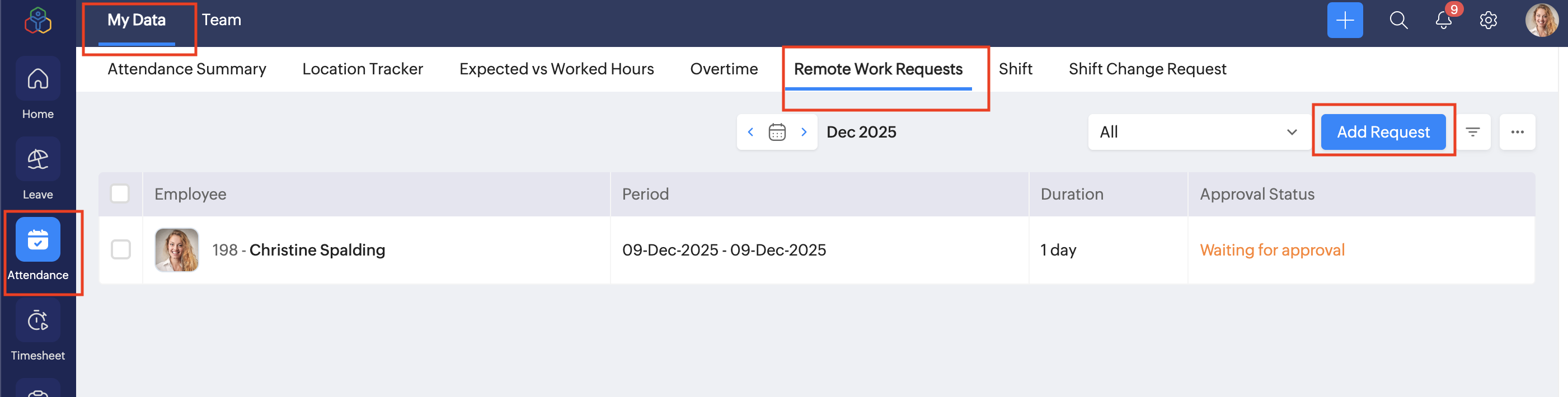
To manage remote work request for a reportee or team member, navigate to the Team tab. Only users with the appropriate permissions can submit and approve remote work requests.
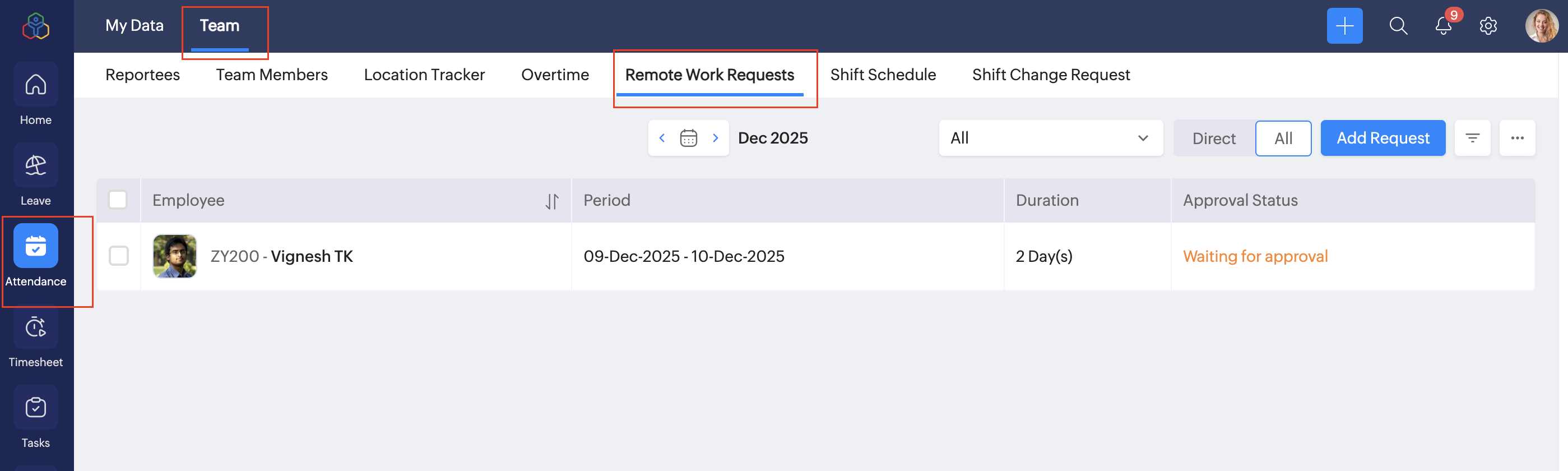
- Click Add Request.
- Select the Period.
You can view the applicable remote policy at the right side of the page. Remote work request cannot be raised beyond this limit and check-in will be restricted. - Enter the reason and description.
- Add supporting documents if mandatory.
- Click Submit.
Auto raise remote work request on Check-In
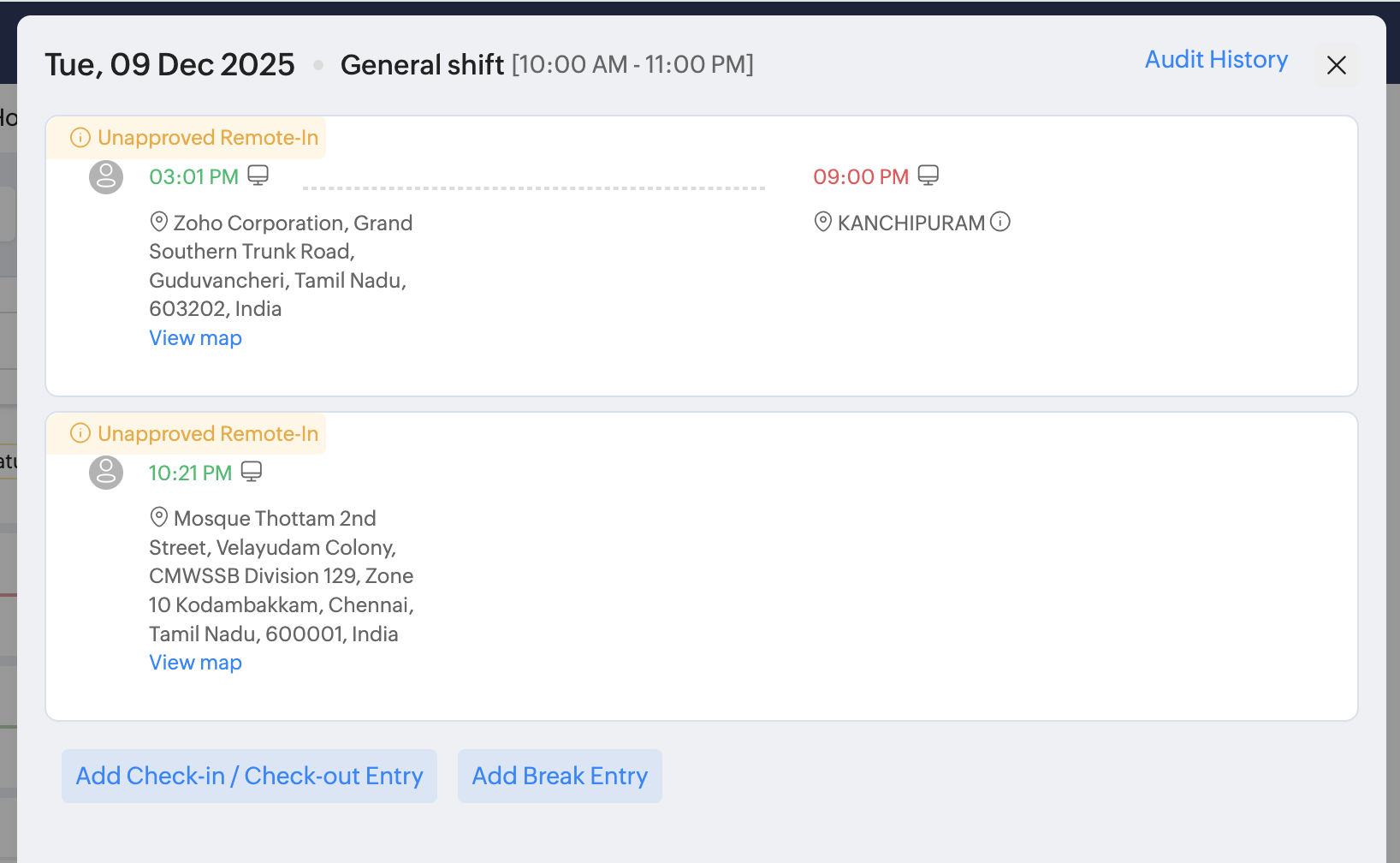
If Automatically raise request when a user tries to punch in remotely is enabled in settings, a remote work request will be submitted automatically when an employee checks in remotely, provided they have valid remote work days for the week or month. If they have exceeded their limit, the system will restrict the check-in.
Any automatically raised request will appear with the status “Unapproved Remote-In” until it is approved.
Approve remote work request
To approve remote work request:
- Navigate to Attendance > Team > Remote Work Requests tab, or if you are a administrator, navigate to Operations > Attendance > Remote Work Requests tab.
- Click the request you want to approve.
- Click Approve.
Alternatively, approvers can approve requests from the Approvals tab in My Space.
For the request that are automatically submitted upon employee check-in will be marked as Unapproved Remote-in until it is approved by the approver.
Manage remote work requests
Administrators can manage remote work requests for the entire organization from Operations > Attendance > Remote Work Requests.
Available actions in Remote Work Requests:
- Use the ellipsis menu in the top-right corner to:
- Import records
- Export records
- Download data as PDF
- Print records
- Apply advanced filters to refine request data.
- Use the status dropdown to navigate between approval statuses.
- Select a request record to delete the request.
- Click a request record to approve or reject the request.
- Navigate between months to view remote work requests for different periods.