Zoho People Integration with Zoho Recruit

Zoho People Integration with Zoho Recruit

Introduction

The Zoho Recruit integration brings your hiring and HR workflows together, eliminating the gap between selecting a candidate and getting them set up in Zoho People. Once a candidate clears the hiring process in Zoho Recruit, their profile,  along with offer details, compensation data, education history, and experience can be pushed directly into Zoho People without manual re-entry.
From there, you can convert them as an employee or move them into the onboarding workflow, with all mapped field data carrying over automatically. The integration also supports auto-pushing candidates based on a status trigger, so the handoff can happen without any manual action at all.

Click here to learn more about setting up the Zoho People integration from Zoho Recruit.

From the Zoho People perspective the main purpose of the Zoho Recruit integration is to seamlessly push candidates directly from Zoho Recruit directly into Zoho People.
Candidates from Zoho Recruit can be pushed to Zoho People as:
  1. Candidates
  2. Employees (referred to as 'Users' in Zoho People)
With the candidates pushed from Zoho Recruit, the following actions can be performed:
  1. Sync compensation data along with the offer details.
  2. Assign salary package to the candidate in Zoho People.
  3. Generate an offer letter for the candidate in Zoho People.
  4. Get the offer signed/accepted in Zoho Recruit, then assign a salary package in Zoho People.
  5. Convert candidate as employee (user).

Setting Up The Integration (With Compensation Data Sync)

Follow these steps to configure Zoho Recruit integration with Zoho People:
  1. As a prerequisite, Ensure that the Compensation service is enabled and configured within Zoho People, with the 'Getting Started' flow completed. Learn more about configuring Compensation service.
  2. Ensure the use of "Detailed employee pay tracking with benefits and breakup" option as the 'Salary tracking method'. You can find this option in the Settings > Compensation > Configuration page. 
  3. Next, head to recruit.zoho.com, Login to your account, and navigate to Settings > Zoho (within "Marketplace") and click on Setup Now / Configure button with the Zoho People integration. 
  4. Once the integration is enabled, Enable the "Push Offer Details to Zoho People" option.
Notes
Ensure that the same currency is used across both Zoho People and Zoho Recruit. For e.g., if USD is used in Zoho Recruit, the same must be used in Zoho People. You can add Currencies in both applications.
For Zoho People, navigate to Settings > Compensation > Currencies (or) Settings > Onboarding > Compensation > Currencies.
For Zoho Recruit, navigate to Setup > Company Details > Currencies.

If the 'Employee pay only' option is used then only the Salary (CTC) field will be synced between the two applications, without breakup.
Alert
Before proceeding to the next step, ensure that the necessary fields are added in Zoho Recruit. By default, only the Compensation Amount field will be present.  Add 'Currency Fields' for breakup components such as Basic Pay, HRA, Fixed Allowances. To do this navigate to Recruit > Setup > Modules (within 'Customization) and configure the 'Offers' module. Simply drag and drop currency fields to the form, rename them and Save your changes.  


Once the breakup components are created here, these fields will appear on the Compensation Module mapping page.
  1. Next, proceed with mapping the corresponding Zoho People fields to the Zoho Recruit fields. To map the compensation breakup, head to the Compensation Module tab in recruit.

Adding the Candidate in Zoho Recruit and Generating an Offer 

You can also directly generate the offer letter in Zoho People.
  1. From Zoho Recruit, go to the Candidates tab and click on the Create Candidates button (+ button)
  2. Fill out the candidate information
  3. Click on Save and Associate
  4. Select a Job Opening
  5. Click on Associate

  6. Now head to the Applications tab and select job application that you just processed, click on the More options button and select Generate Offer Letter option.
Info
If you wish to Generate the offer letter in Zoho People directly (instead of Zoho Recruit), then head to the candidate record in Zoho Recruit, click on More Options and select Push to Onboarding button directly.
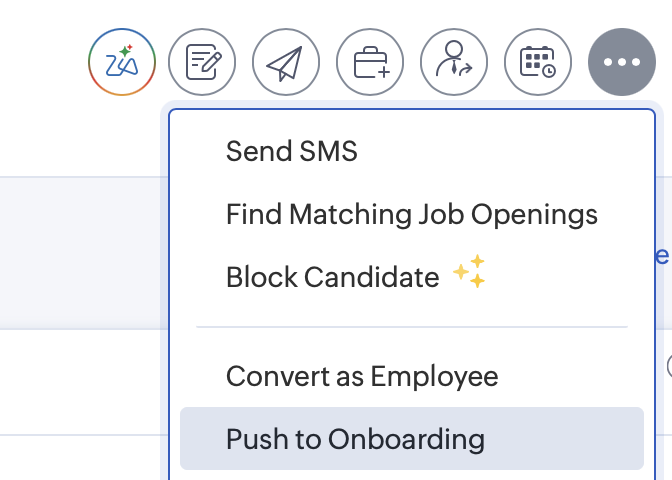


Once this is done, you can select the candidate record in Zoho People and generate and send the offer letter directly.
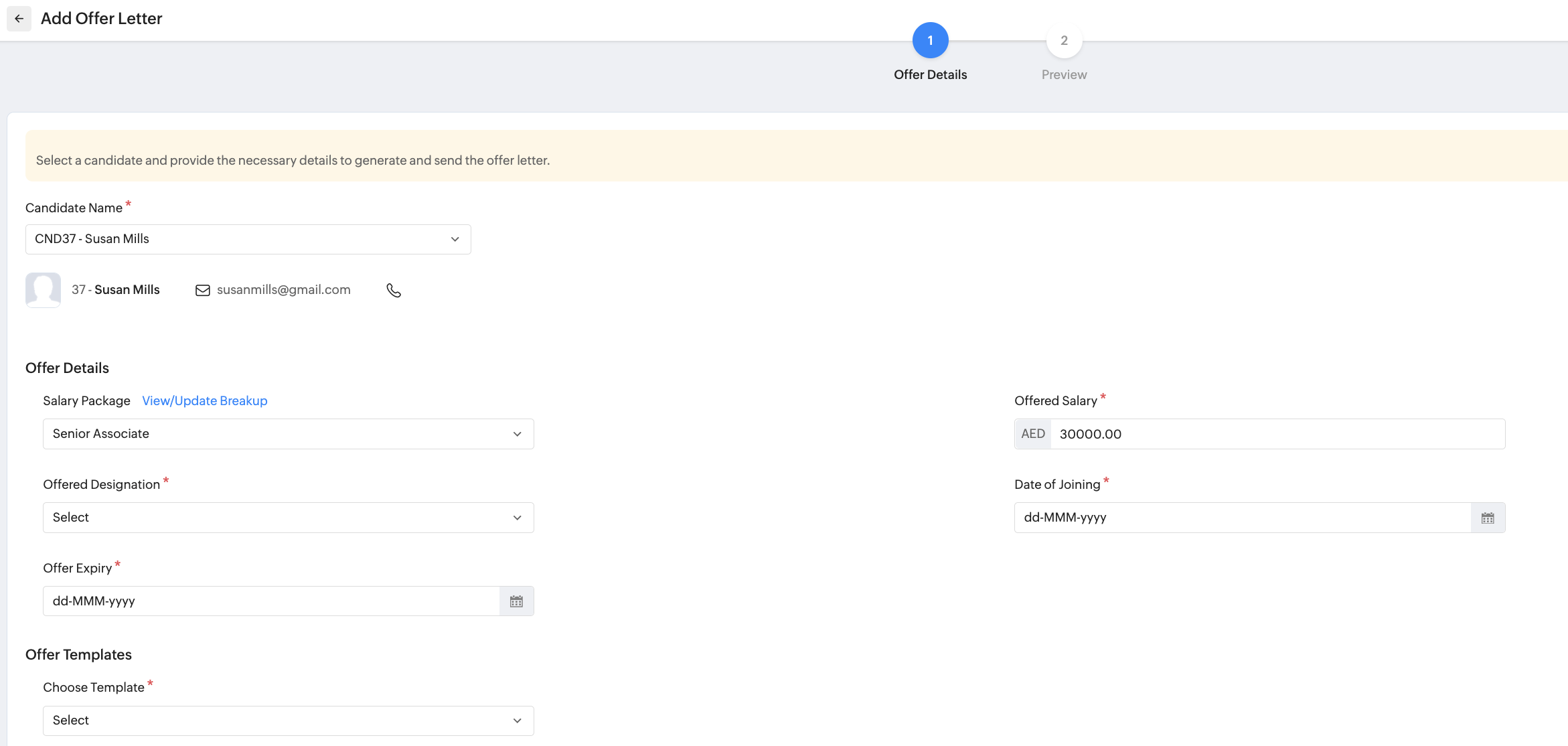


Learn more about offer and appointment letter in Zoho People
  1. Select currency, fill out the compensation details breakup, select the expected date of joining, offer expiry date and click Save and Next
  2. Once you preview the template, click Send

    The Offer email will now be sent to the candidate. (The Recruit Status will change from "Associated" to "Offer-Made")
The candidate must accept the offer for the process to proceed.
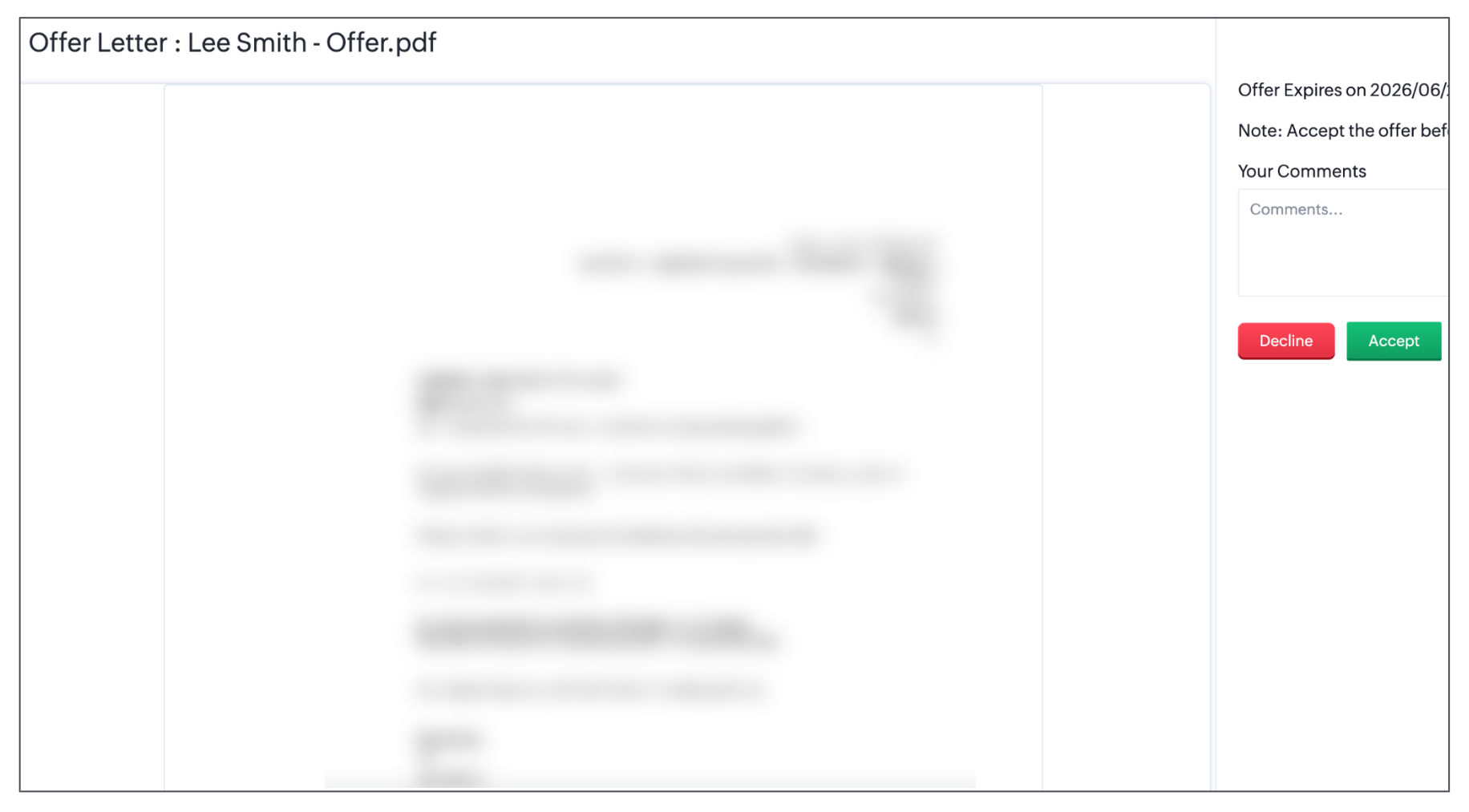
The Recruit status will indicate "Offer-Accepted" once the candidate accepts the offer.

Push Candidate to Zoho People

In the previous section, we saw how to add the candidate in Zoho Recruit, Generate an offer and send it to the candidate. Once the candidate has accepted the offer, we now have two main options:

1. Push to Onboarding - Push to the Onboarding service within Zoho People as an candidate.
2. Convert as Employee - Push directly as an user in Zoho People. 

To view these options, head to the Candidates tab in Zoho Recruit and select the offer accepted candidate's record and click on the More options icon. There is also a third option:

3. Automatically move Candidates to Zoho People - When enabled, you can choose between one of the above options to be automatically triggered based on the candidate status. 
Read below to understand the difference between these flows.

'Push to Onboarding' Flow

Follow these steps to understand the 'Push to Onboarding' flow:
  1. Form the candidate's profile, click on the Push to Onboarding button, followed by reviewing the details and clicking on the Convert button to finalize the action.
  2. Now the candidate with 'offer accepted' will be pushed automatically to Zoho People. 
  3. Go to Zoho People. Navigate to Operations > Onboarding > Offer Letters > Accepted Offers. Here you can see the candidate record that is added. Select the record.
  4. Click on the Assign Package button and proceed with assigning an offer package from Zoho People and click Submit.

  5. Once this is done, Head to the Candidate tab, select the candidate record and convert them to an user (making them a permanent employee of the organization.).
Now you have the candidate added as an employee in Zoho People, with compensation data updated based on the salary package assigned to them. (You can skip step 5, if you directly wish to proceed with the compensation data synced from Zoho Recruit with no changes to salary package).

'Convert as Employee' Flow

Here is the difference when using the 'Convert as Employee' flow:
Similar to the above flow, when the 'Convert as Employee' flow is used, the candidate will be pushed as an Employee (user in Zoho People), along with the compensation details entered in Zoho Recruit.
Idea
You can still assign a salary package to employees added as users from Zoho Recruit, do this by navigating to Operations > Compensation > Employee Salary (set Filter 'Employee Status' as 'All Requests') then click on the Assign Package button in the corresponding record. 
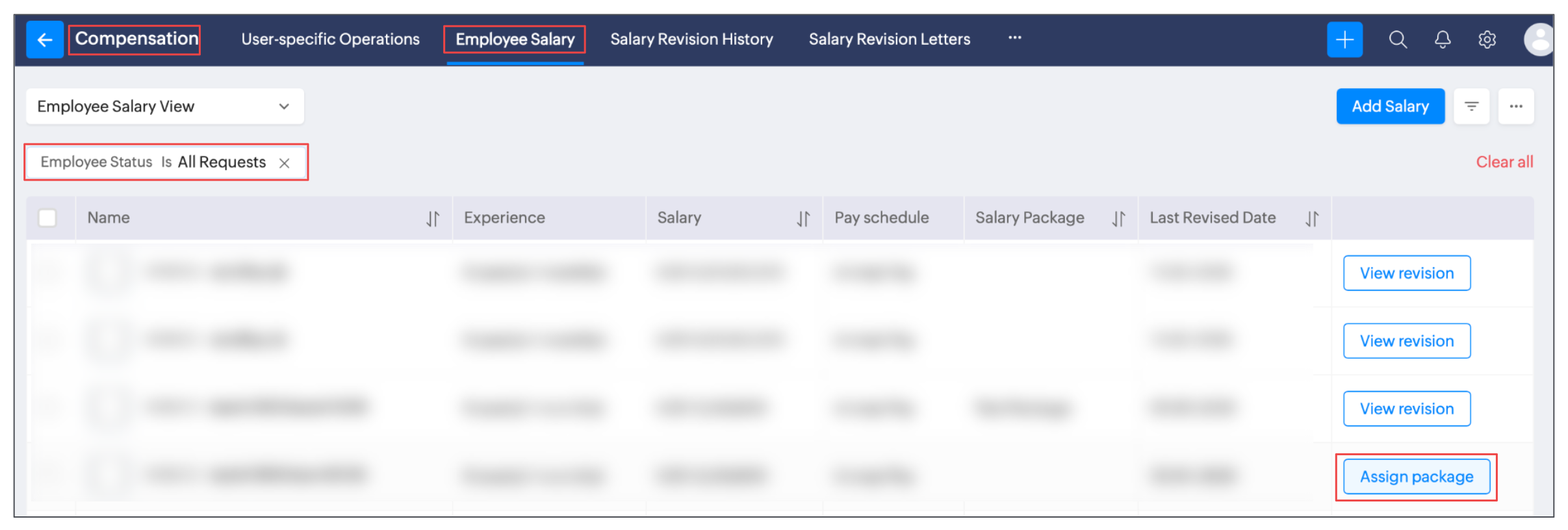
'Automatically Move Candidate to Zoho People' Flow

Zoho Recruit allows triggering either the 'Push to Onboarding' flow or 'Convert as Employee' flow automatically. To enable this option, follow these steps:
  1. Go to Zoho Recruit. Head to Setup > Zoho (within Marketplace) > in the Zoho People card, click on Manage.
  2. Enable the 'Automatically move Candidates to Zoho People' option
  3. Choose between:
     Push to Onboarding - Push to the Onboarding service within Zoho People as an candidate.
     Convert as Employee - Push directly as an user in Zoho People. 
  4. Set the move trigger status:
    Hired - Candidate will only be moved when the status has been updated to hired.
    Offer accepted - Candidate will only be moved when they have accepted an offer.
  5. Finally, click on Update.

Now the selected flow will be automatically triggered when the candidate is moved to the set status.


        Create. Review. Publish.

        Write, edit, collaborate on, and publish documents to different content management platforms.

        Get Started Now


          Access your files securely from anywhere

            Zoho CRM Training Programs

            Learn how to use the best tools for sales force automation and better customer engagement from Zoho's implementation specialists.

            Zoho CRM Training
              Redefine the way you work
              with Zoho Workplace

                Zoho DataPrep Personalized Demo

                If you'd like a personalized walk-through of our data preparation tool, please request a demo and we'll be happy to show you how to get the best out of Zoho DataPrep.

                Zoho CRM Training

                  Create, share, and deliver

                  beautiful slides from anywhere.

                  Get Started Now


                    Zoho Sign now offers specialized one-on-one training for both administrators and developers.

                    BOOK A SESSION


                                Quick LinksWorkflow AutomationData Collection
                                Web FormsEnterpriseOnline Data Collection Tool
                                Embeddable FormsBankingBegin Data Collection
                                Interactive FormsWorkplaceData Collection App
                                CRM FormsCustomer ServiceAccessible Forms
                                Digital FormsMarketingForms for Small Business
                                HTML FormsEducationForms for Enterprise
                                Contact FormsE-commerceForms for any business
                                Lead Generation FormsHealthcareForms for Startups
                                Wordpress FormsCustomer onboardingForms for Small Business
                                No Code FormsConstructionRSVP tool for holidays
                                Free FormsTravelFeatures for Order Forms
                                Prefill FormsNon-Profit

                                Intake FormsLegal
                                Mobile App
                                Form DesignerHR
                                Mobile Forms
                                Card FormsFoodOffline Forms
                                Assign FormsPhotographyMobile Forms Features
                                Translate FormsReal EstateKiosk in Mobile Forms
                                Electronic Forms
                                Drag & drop form builder

                                Notification Emails for FormsAlternativesSecurity & Compliance
                                Holiday FormsGoogle Forms alternative GDPR
                                Form to PDFJotform alternativeHIPAA Forms
                                Email FormsFormstack alternativeEncrypted Forms

                                Wufoo alternativeSecure Forms

                                TypeformWCAG

                                  Zoho FSM Video Tutorials


                                        All-in-one knowledge management and training platform for your employees and customers.

                                                  Create. Review. Publish.

                                                  Write, edit, collaborate on, and publish documents to different content management platforms.

                                                  Get Started Now


                                                                    You are currently viewing the help pages of Qntrl’s earlier version. Click here to view our latest version—Qntrl 3.0's help articles.


                                                                        Manage your brands on social media


                                                                          • Desk Community Learning Series


                                                                          • Digest


                                                                          • Functions


                                                                          • Meetups


                                                                          • Kbase


                                                                          • Resources


                                                                          • Glossary


                                                                          • Desk Marketplace


                                                                          • MVP Corner


                                                                          • Word of the Day


                                                                          • Ask the Experts


                                                                            Zoho Sheet Resources


                                                                                Zoho Forms Resources


                                                                                  Secure your business
                                                                                  communication with Zoho Mail


                                                                                  Mail on the move with
                                                                                  Zoho Mail mobile application

                                                                                    Stay on top of your schedule
                                                                                    at all times


                                                                                    Carry your calendar with you
                                                                                    Anytime, anywhere


                                                                                          Zoho Sign Resources

                                                                                            Sign, Paperless!

                                                                                            Sign and send business documents on the go!

                                                                                            Get Started Now


                                                                                                    Zoho TeamInbox Resources


                                                                                                              Zoho DataPrep Demo

                                                                                                              Get a personalized demo or POC

                                                                                                              REGISTER NOW


                                                                                                                Design. Discuss. Deliver.

                                                                                                                Create visually engaging stories with Zoho Show.

                                                                                                                Get Started Now


                                                                                                                                    • Related Articles

                                                                                                                                    • Settings in Zoho People 5.0

                                                                                                                                      What can you do in settings? Settings lets you set up and fine-tune Zoho People to handle all your organization's HR Processes. It Includes: Setting up your organization's information in Zoho People. This includes basic details such as name, type of ...
                                                                                                                                    • Zoho People - Slack Integration

                                                                                                                                      Integrate Zoho People with Slack to quickly perform your HR operations, and to get real time approval alerts in Slack. Purpose To simplify and speed up HR tasks by enabling employees and managers to perform key Zoho People actions and receive ...
                                                                                                                                    • Operations in Zoho People 5.0

                                                                                                                                      What can you do in Operations in Zoho People? Manage your employees and organization, and perform day-to-day HR processes in operations. For example, while setting up policies is performed in settings, viewing relevant data, modifying, or updating ...
                                                                                                                                    • My Space Tab in Zoho People

                                                                                                                                      What is My Space tab? My space is an exclusive space that revolves around the employee, the user who is currently accessing Zoho People. This space has access to reminders, approvals, and all of the important data that the employee would need to act ...
                                                                                                                                    • Zoho People 5.0 - What has changed?

                                                                                                                                      Changes in Home tab and Self Service Zoho People 4.0 Zoho People 5.0 Landing page is Home > Dashboard Self Service page: New Landing page is Home > My Space > Overview (Replacement for Self service in Zoho People 4.0 with additional features). ...
                                                                                                                                      Wherever you are is as good as
                                                                                                                                      your workplace

                                                                                                                                        Resources

                                                                                                                                        Videos

                                                                                                                                        Watch comprehensive videos on features and other important topics that will help you master Zoho CRM.


                                                                                                                                        eBooks

                                                                                                                                        Download free eBooks and access a range of topics to get deeper insight on successfully using Zoho CRM.


                                                                                                                                        Webinars

                                                                                                                                        Sign up for our webinars and learn the Zoho CRM basics, from customization to sales force automation and more.


                                                                                                                                        CRM Tips

                                                                                                                                        Make the most of Zoho CRM with these useful tips.


                                                                                                                                          Zoho Show Resources