Report bugs in test cases from Zoho QEngine with Zoho Sprints
1. What does this page cover
This document covers the step-by-step process for reporting bugs from test case executions in test plans. To learn more, refer to the document Integrating Zoho QEngine with Zoho Sprints
2. Steps to report a bug from test case executions in test plans
Using the Zoho Sprints integration, you can report bugs from test execution results in Zoho QEngine, allowing you to create and track issues in Zoho Sprints.

Note:
- To report a bug with Zoho Sprints, the user must have a Zoho Sprints account.
- A bug can be raised by a Super Admin, Admin, Manager, or Tester in a Zoho QEngine project.
- Click the Bug icon {
} for the required test case execution on the test plan results page.
- In the Create a Bug panel for Zoho Sprints, provide the following details, including the auto-filled fields:
- Item Type - Choose the correct type (e.g., Story, Task, and Bug).
- Item Name - Pre-filled with the test case name, but can be edited if needed.
- Description - Pre-filled with execution details such as the test case name, environment configuration, failure log (for failed runs), whether it was run on the local agent or using Zoho Cloud, the test case version, and the start time. You can edit the content if additional context is required.
- Add to - Select the relevant sprints, backlogs, or epics.
- Attachments - Includes all screenshots captured during test execution, along with the failed step screen (if applicable). Additional files can be uploaded if necessary.
- Assigned to - Select the team member responsible for fixing the issue. By default, the user who raised the bug is assigned to the issue.
- Click Create to submit a bug.
Alternatively, if the issue for this test case execution has already been reported, you can link the execution to the existing bug to avoid duplication.
- Select Link to a Bug from Item Type.
- Select Sprint, Backlog, or Epic from the Add to list.
- Choose the relevant issue from the Select Item list.
- Attach any required files and add comments, if needed.
- Click Link to associate your test case with the existing bug.
Additionally, you can report bugs from the test case listing page within the execution results.
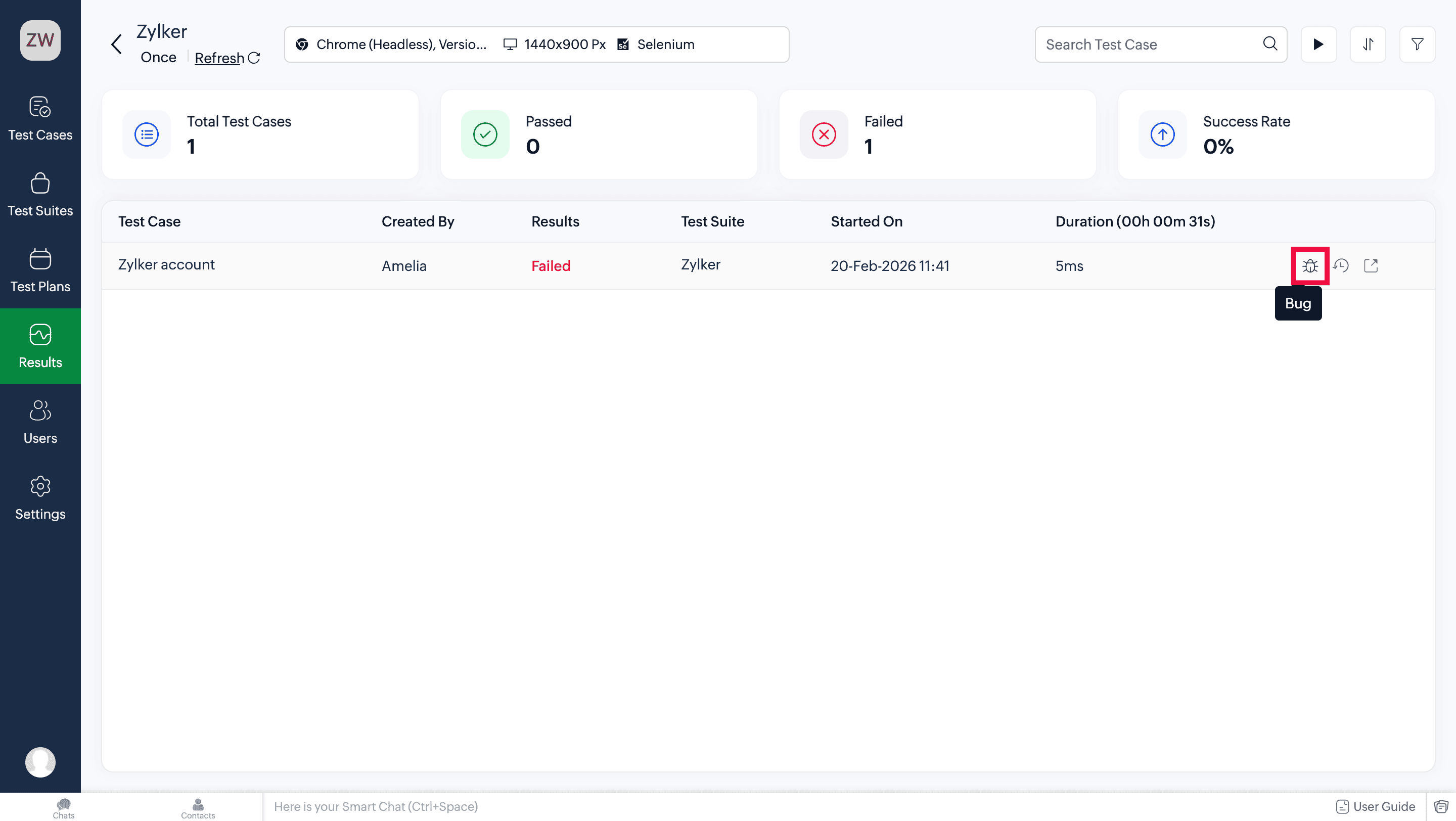
Notes:
- A bug can be reported for each test case execution in test plans, allowing multiple bugs to be logged for the same test case across different executions.
- If any test cases are re-run after failure, you can also report a bug from their re-run execution results page.
3. Preview test cases with bugs
Now, let's see how to view the bug statuses of reported test cases from the test plan listing page. Test cases with linked bugs are marked with a red bug icon { }.
}.
- Clicking on the red bug icon {
} will open the bug summary panel. This panel displays the associated sprint project details such as its name, item type, who it is assigned to, the progress status, and a link to open the bug in Zoho Sprints.
- Once the bug is closed in Zoho Sprints, its status is auto-synced with the respective test case execution result.
Note: Only users who have access to the Zoho Sprints project and the respective item type can access and view the issues filed in Sprints. - You can also remove the linked bug from this panel. Clicking the delete icon {
} removes the association between the bug and the test case.
Note: Once the association is removed, the bug status is no longer visible in Zoho QEngine, but remains accessible in Zoho Sprints.Alternatively, you can view a bug's status from a test case's preview run page as well.
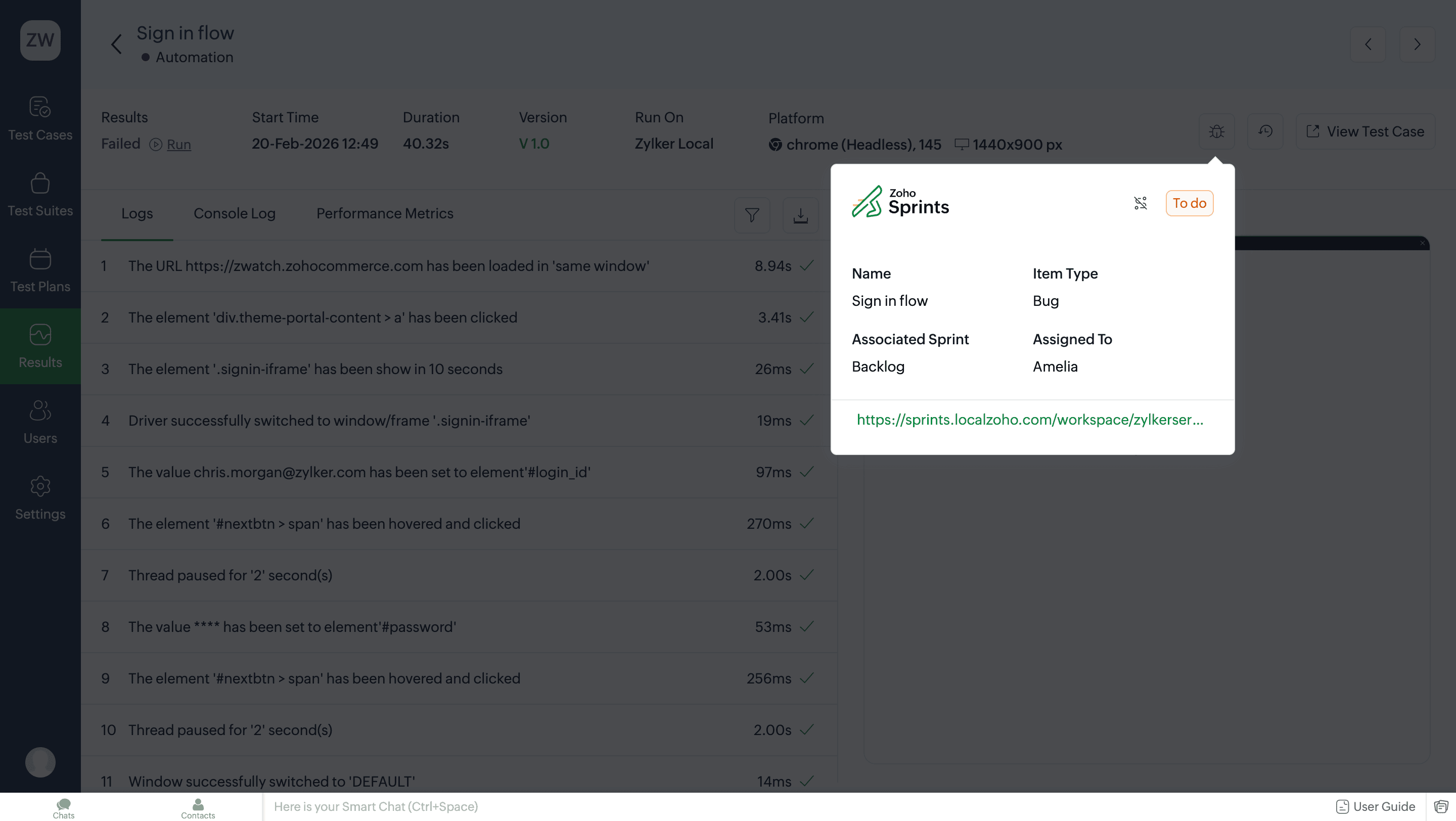
Note: You can filter all test cases with reported bugs using the filter on the test plan listing page. Learn more about filters in test case results4. Related links
5. What's next
Previous step
Previous step