Improve comments with Zia Suggestions
- Zia helps you draft clear and relevant comments by suggesting responses based on the content of your file. This makes it easier to collaborate, provide feedback, and communicate effectively without having to write everything from scratch.
Pre-requisites
To use Zia features, your Team Admin or Super Admin must have activated Zia by setting up the Zoho AI service at the team level. Learn how to activate Zia settings
To use comment suggestions
- Enter your comments in the comment box.
- Click
at the left bottom of the comment box.
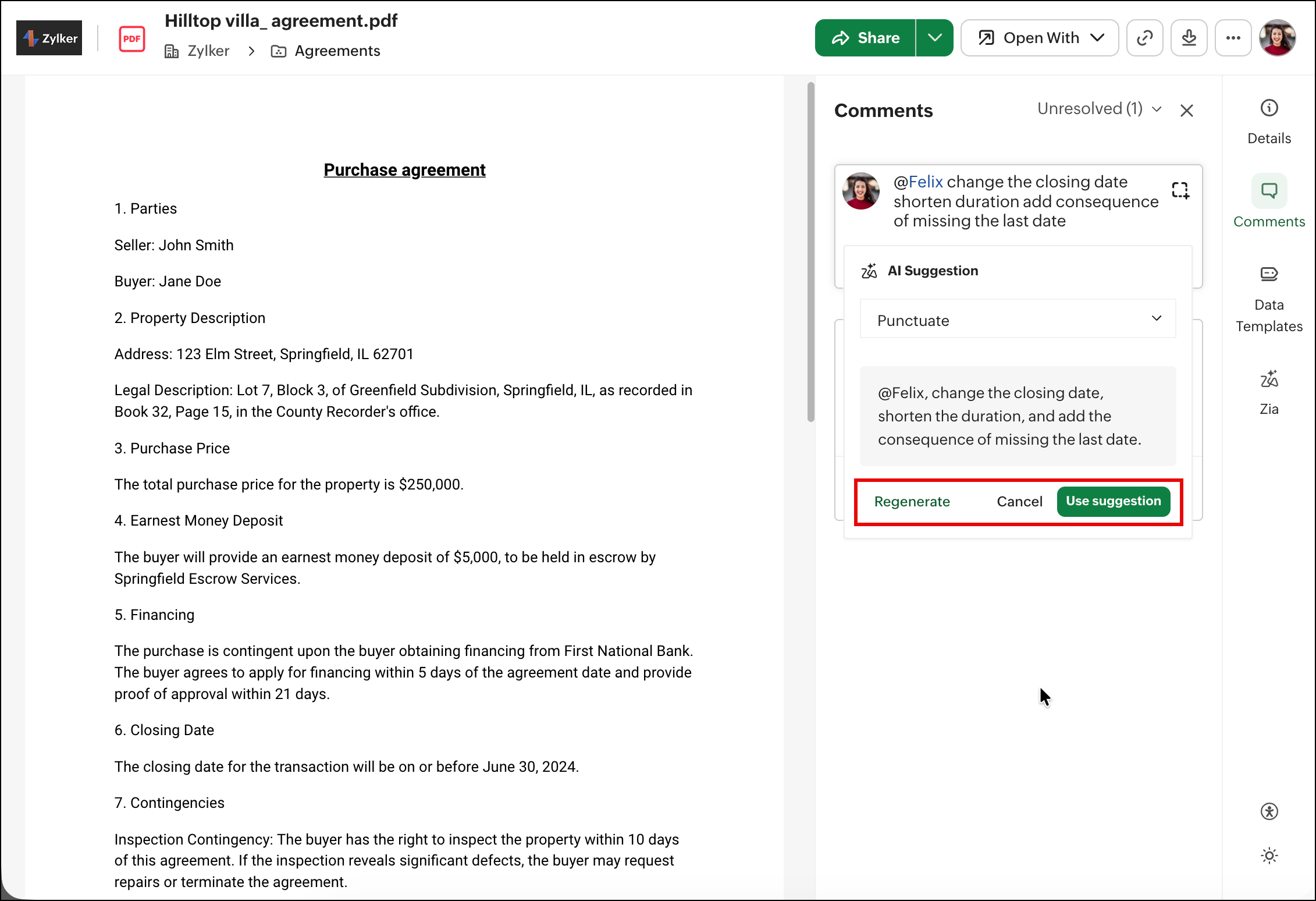
A dropdown will open with the following options.
- Rephrase: Request an alternative way to express your comment for enhanced clarity.
- Change into Active Voice: Make your comments more clear and direct by phrasing them in active voice.
- Expand Acronym/Abbreviation: Expand an acronym or abbreviation in your comment to ensure your message is easily understood by collaborators.
- Punctuate: Check for any punctuation errors in your comment, ensuring proper grammar and readability.
- Shorten: Make your current comment more concise without losing its essential meaning.
- Translate: Convert your comment into another language to aid collaboration.
Zia supports comment translations in 70+ languages.
If you're satisfied with the generated suggestion, click Use suggestion.
If you feel the initial suggestion could be improved, click the Regenerate button to receive an alternative suggestion.