A/B Testing Idea #2: Make your headlines sound super cool.
Hello everyone,
We're back with our second post in the CRO testing idea series. If you missed the first post, please check it out here: "Place irresistible and clear CTAs." In today's post, we'll look at how to effectively A/B test your headline content.
Some people say "you only get one chance to make a first impression" while others contend that it only takes seven seconds to make an impression about someone or something. Well, the same concept applies to your website.
A good first impression on your website is crucial for making visitors trust in your products/services and keeping them tied to your business forever. Creating this first impression depends on many factors like structure, colors, spacing, symmetry, amount of text, and fonts. But, of everything else, a good headline plays a major role in the success of your website.
Your headline is the first thing that readers see as soon as they land on your site; it holds the power to make or break a deal at first visit. Even if your content is truly unique and innovative, a weak headline can ruin its chances of being super successful in terms of conversions. So how do you create a strong headline that drives more traffic and clicks on your website?
Here are a few aspects to consider as you A/B test your site's headline content:
A good first impression on your website is crucial for making visitors trust in your products/services and keeping them tied to your business forever. Creating this first impression depends on many factors like structure, colors, spacing, symmetry, amount of text, and fonts. But, of everything else, a good headline plays a major role in the success of your website.
Your headline is the first thing that readers see as soon as they land on your site; it holds the power to make or break a deal at first visit. Even if your content is truly unique and innovative, a weak headline can ruin its chances of being super successful in terms of conversions. So how do you create a strong headline that drives more traffic and clicks on your website?
Here are a few aspects to consider as you A/B test your site's headline content:
Communicate your brand's purpose
Often we just assume that the visitors fully understand everything about our website and its product offerings. However, that’s not always the case, especially for new visitors. With hundreds of websites selling products/services online, it's important to make sure that the primary headline on your homepage tells visitors what your website has to offer and how it aligns with their expectations—all in a few short seconds. Tweaking and testing headline copy that clearly communicates your brand's purpose and differentiates yourself from the competitors can encourage your visitors to take the desired action without another thought.
Example:
Say you own a website testing and analytics software solution that offers a set of tools to grow an online business. Take a look below at the old and new versions of the same headline message. Notice that while the first tells people what the product is, the second tells people what the product will actually help them do.
Say you own a website testing and analytics software solution that offers a set of tools to grow an online business. Take a look below at the old and new versions of the same headline message. Notice that while the first tells people what the product is, the second tells people what the product will actually help them do.

Extra tip: The easiest way to determine if your brand message is clear to your visitors is by assuming your audience knows nothing about the business you're running.
Try different headlines for different set of target audiences
Each website caters to a specific type of audience. So understanding which audience group you cater to, where they come from, what their interests are, and what information they are hoping to find on your site is another major parameter to consider before starting to test your headline content. Testing and optimizing your headline copy based on a particular set of audience segments like demographics (such as location, gender, age, etc), personal interests, and past engagements with your site can help you deliver personalized content for each category of visitors, which is more likely to generate conversions.
Example:
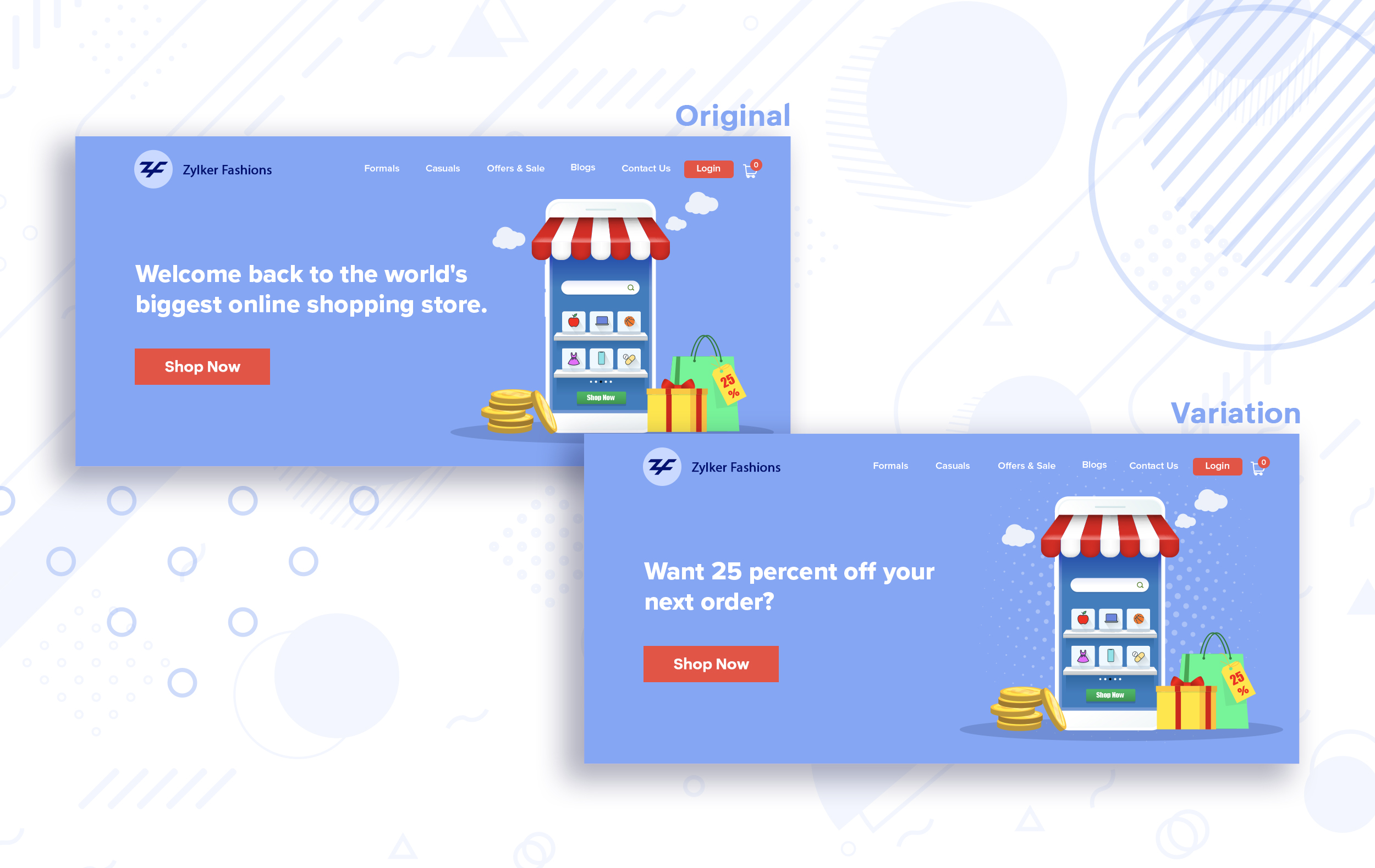
Say you run an ecommerce business and want to A/B test your headline copy with enticing offers for returning visitors to see which one convinces them to fulfill your conversion goals.
Say you run an ecommerce business and want to A/B test your headline copy with enticing offers for returning visitors to see which one convinces them to fulfill your conversion goals.
Extra tip:
- You can target your A/B test in PageSense using a variety of audience segments such as visitor type, device used, JS variable, day of the week, and more to learn which version grabs your audience's attention immediately and performs best for each segment.
- To know your target audience better, you can set up polls on your website using PageSense and learn your visitor’s business (or personal) needs and how your product can help achieve them. Later, you can use this feedback to test and optimize your website content.
Match your headline with your ad copy
When a visitor clicks on an ad, it's of the utmost importance to match the message on that ad to the headline content on your post-click landing page. If your headline doesn't match the offers and features that you promised in your ad copy, you're wasting all your marketing investment and conversion opportunities. A/B testing your headline by incorporating relevant keywords that resonate with your ad copy can help you reassure people that they've come to the right place. It can also later persuade them to take the desired action on your site more quickly. Further, this type of testing is more likely to generate increased clickthrough rates, conversions, and revenue for your website.
When a visitor clicks on an ad, it's of the utmost importance to match the message on that ad to the headline content on your post-click landing page. If your headline doesn't match the offers and features that you promised in your ad copy, you're wasting all your marketing investment and conversion opportunities. A/B testing your headline by incorporating relevant keywords that resonate with your ad copy can help you reassure people that they've come to the right place. It can also later persuade them to take the desired action on your site more quickly. Further, this type of testing is more likely to generate increased clickthrough rates, conversions, and revenue for your website.
Example:
Say you're running a Facebook Ad for older travelers, and the post-click landing page shows the most relevant tourist packages, flights, and hotel stays based on their interests. Now compare the old and new headline messages below to see which version of the message sounds better.
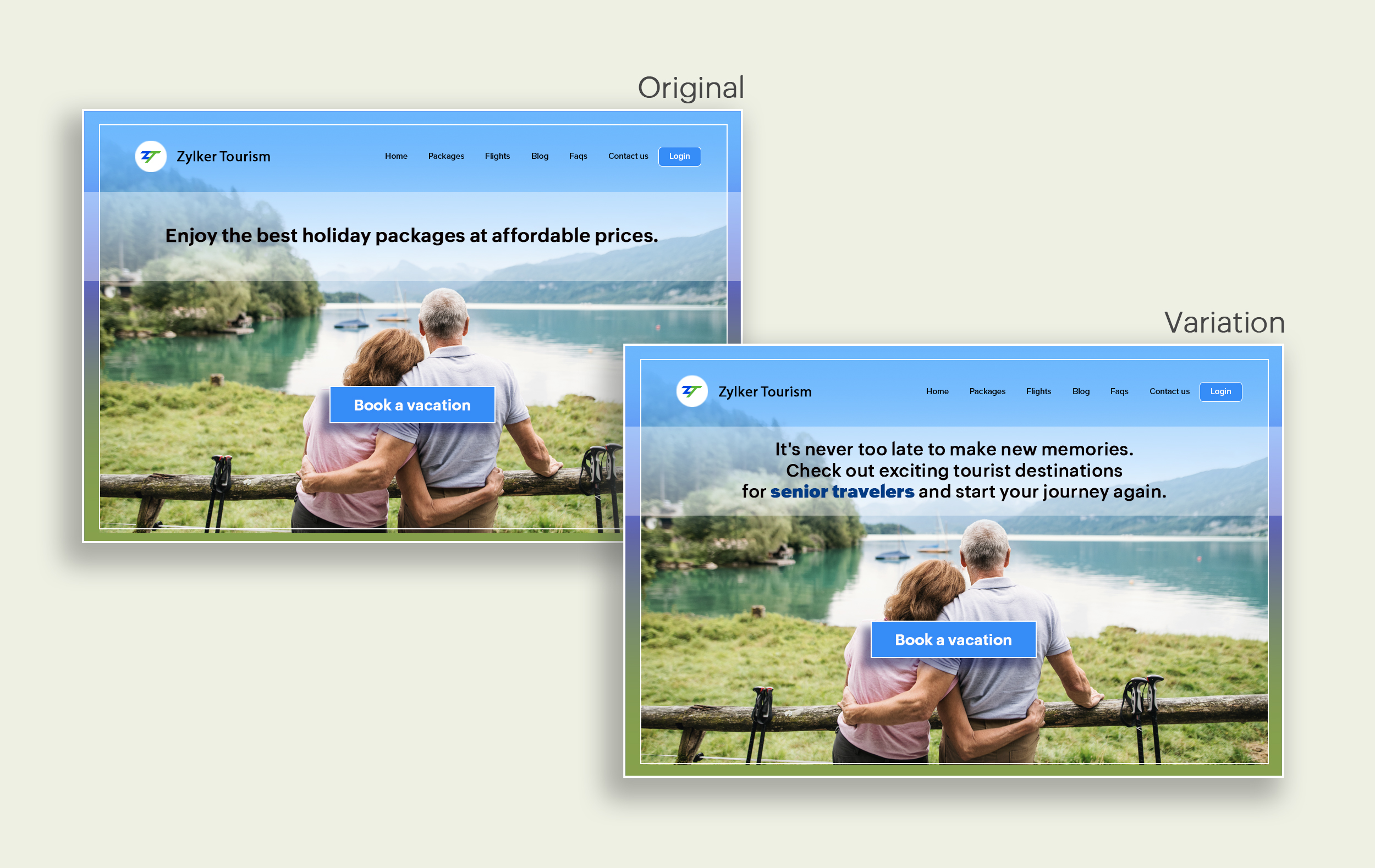
Say you're running a Facebook Ad for older travelers, and the post-click landing page shows the most relevant tourist packages, flights, and hotel stays based on their interests. Now compare the old and new headline messages below to see which version of the message sounds better.
Include stats and numbers
Numbers in your headlines are a great way to grab attention by spontaneously triggering curiosity in your targeted audience. When you use symbols like %, $, or digits instead of words to express percentages, dollars, or numbers in your headlines, it creates specificity around the duration, size, value, etc. of what you're offering customers, which is more attractive than a generic offering. This is a powerful psychological tactic that spotlights your headlines and immediately hooks the reader's interest, which results in more traffic.
Example:
Consider the pricing page of your website and see how adding a number to the headline can increase reader engagement.

Follow the problem-solving methodology
Solving your customers' problem is the easiest and fastest way to reach their heart. Crafting a headline that addresses an issue and provides a cutting-edge solution to solve the problem can make optimizing your website easier. Intriguing your readers like this can make them look for more information on the rest of your site. Further, when done well, it can build a solid emotional bond between you and your customer for a longer term.
Example:
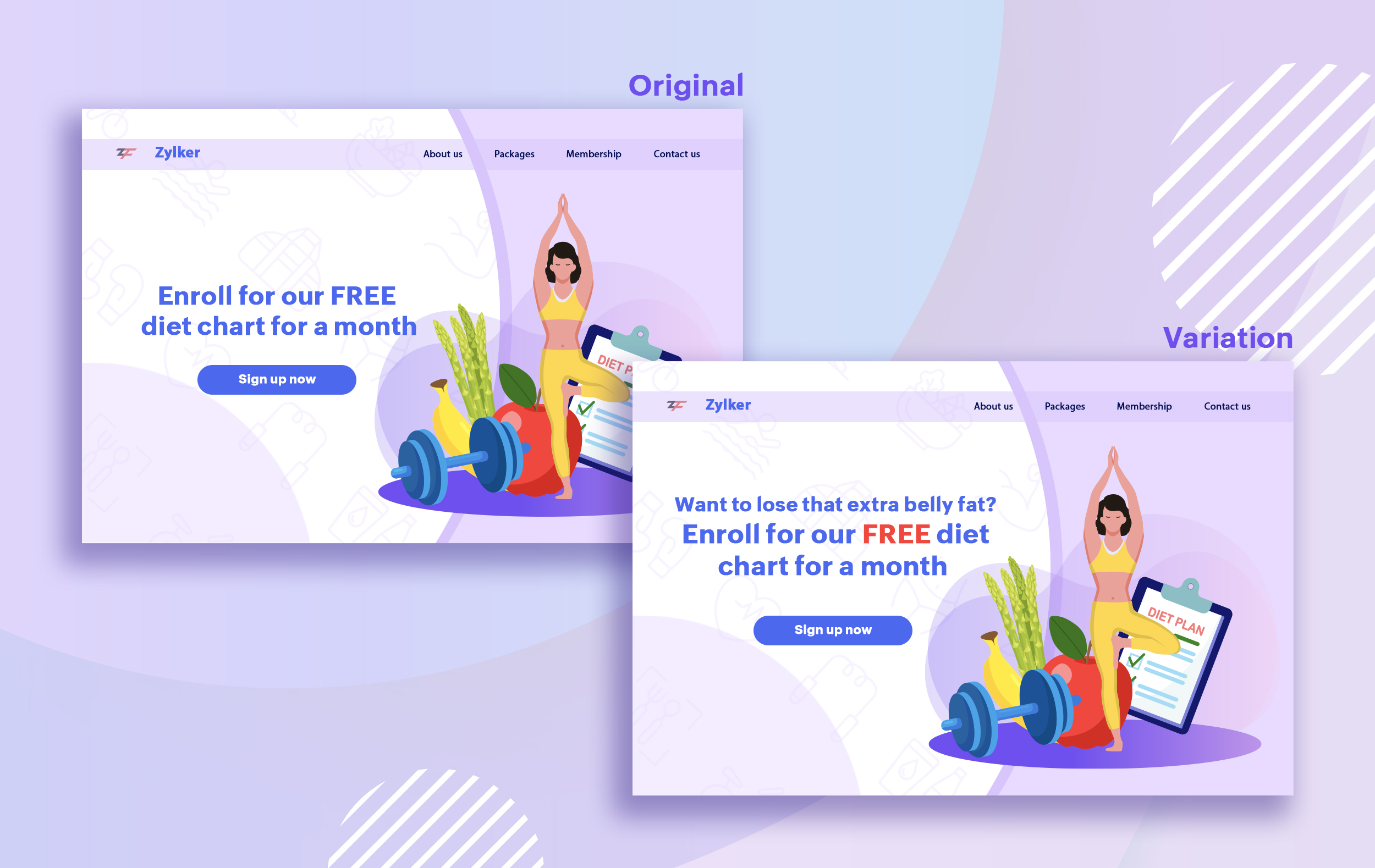
Take a look at the image below to see how implementing the problem and solution technique in your fitness website can make your headline sound more interesting.
Solving your customers' problem is the easiest and fastest way to reach their heart. Crafting a headline that addresses an issue and provides a cutting-edge solution to solve the problem can make optimizing your website easier. Intriguing your readers like this can make them look for more information on the rest of your site. Further, when done well, it can build a solid emotional bond between you and your customer for a longer term.
Example:
Take a look at the image below to see how implementing the problem and solution technique in your fitness website can make your headline sound more interesting.
Test with power words and sentiments
Sometimes the right audience is just one word away. Using forceful positive or negative power words in your headlines has the potential to kindle your customers' emotions and inspire action on your website in no time. Also, these words can guarantee more clicks and make your headlines stand out from the rest. You can test your headlines depending on two groups of power words:
Sometimes the right audience is just one word away. Using forceful positive or negative power words in your headlines has the potential to kindle your customers' emotions and inspire action on your website in no time. Also, these words can guarantee more clicks and make your headlines stand out from the rest. You can test your headlines depending on two groups of power words:
- Negative headlines: This type of headline tends to intrigue your customers by setting a stage to avoid a miserable situation. It includes words like never, stop, worst, avoid, or do not.
- Positive headlines: This type of headline tries to build a relationship with feel good emotions. It includes words like best, always, fastest, easiest, most, greatest, largest, funniest, hottest, strongest, biggest, and ever.
Example:
Take a look at the image below to see how the choice of words can invoke a positive feeling as you read the headline.
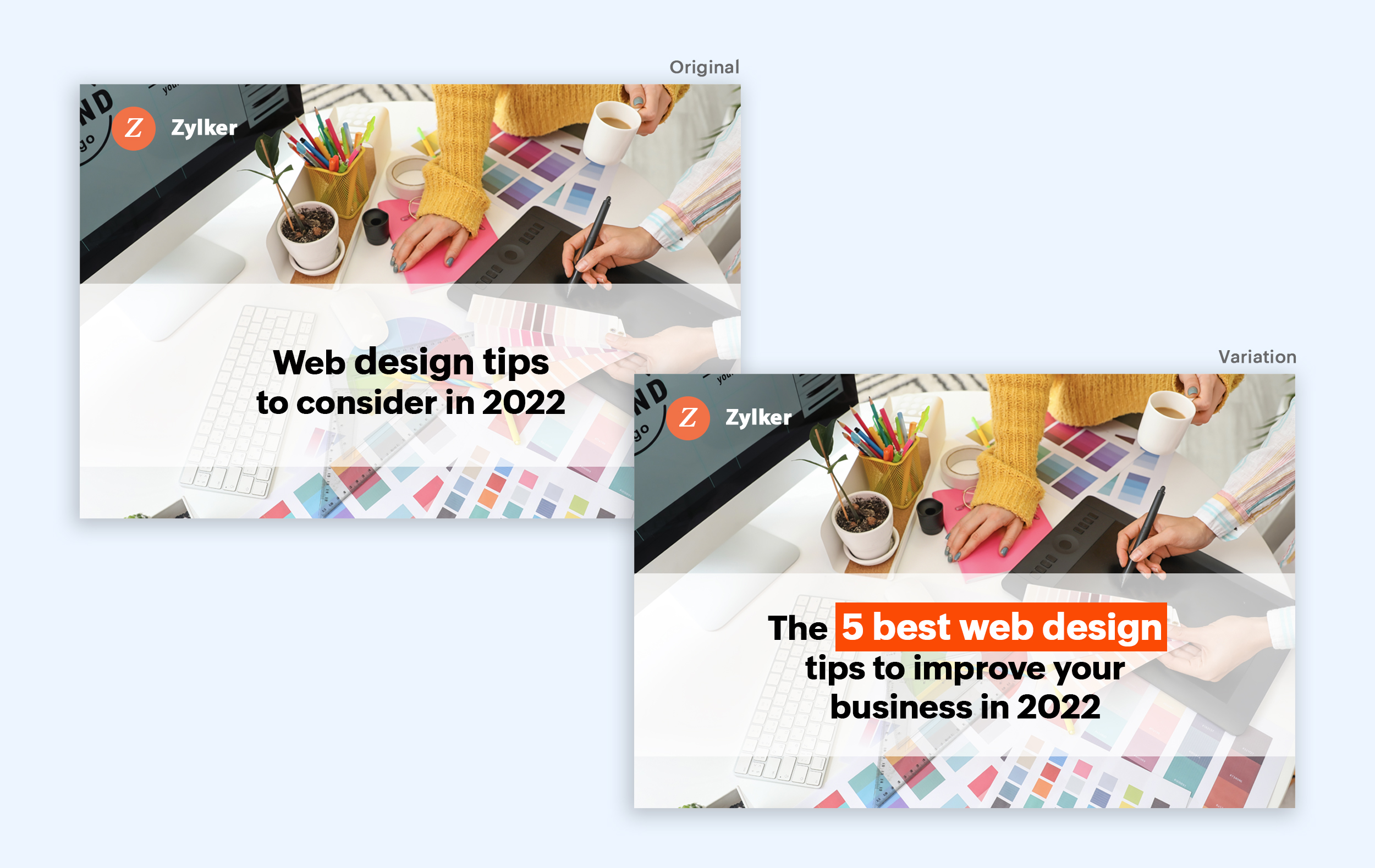
Test the font and appearance of your headline
The presentation (color, fonts, and layout) of your headline copy has a huge impact on the performance of your site. Below are a few points to consider while testing the appearance of your headline:
- Use title case. Avoid writing your headlines in all caps as it can reduce the readability of your text.
- Choose a font style and size that matches your website's personality. The most popular font style is sans-serif and font size is 20 - 36 pixels.
- Apply colors that contrast (while complimenting) your website's background well and focus on the legibility of your content.
- Align your headline perfectly with your body content for a bigger impact. Centered headlines are most powerful visually, while left-centered are more conservative and formal.
Example:
Say you own an online food delivery website, and you want to test the color and font of your homepage headline for better clickthrough rates. Take a look at the before and after images of the headline below. Which one you think will attract more eyeballs?
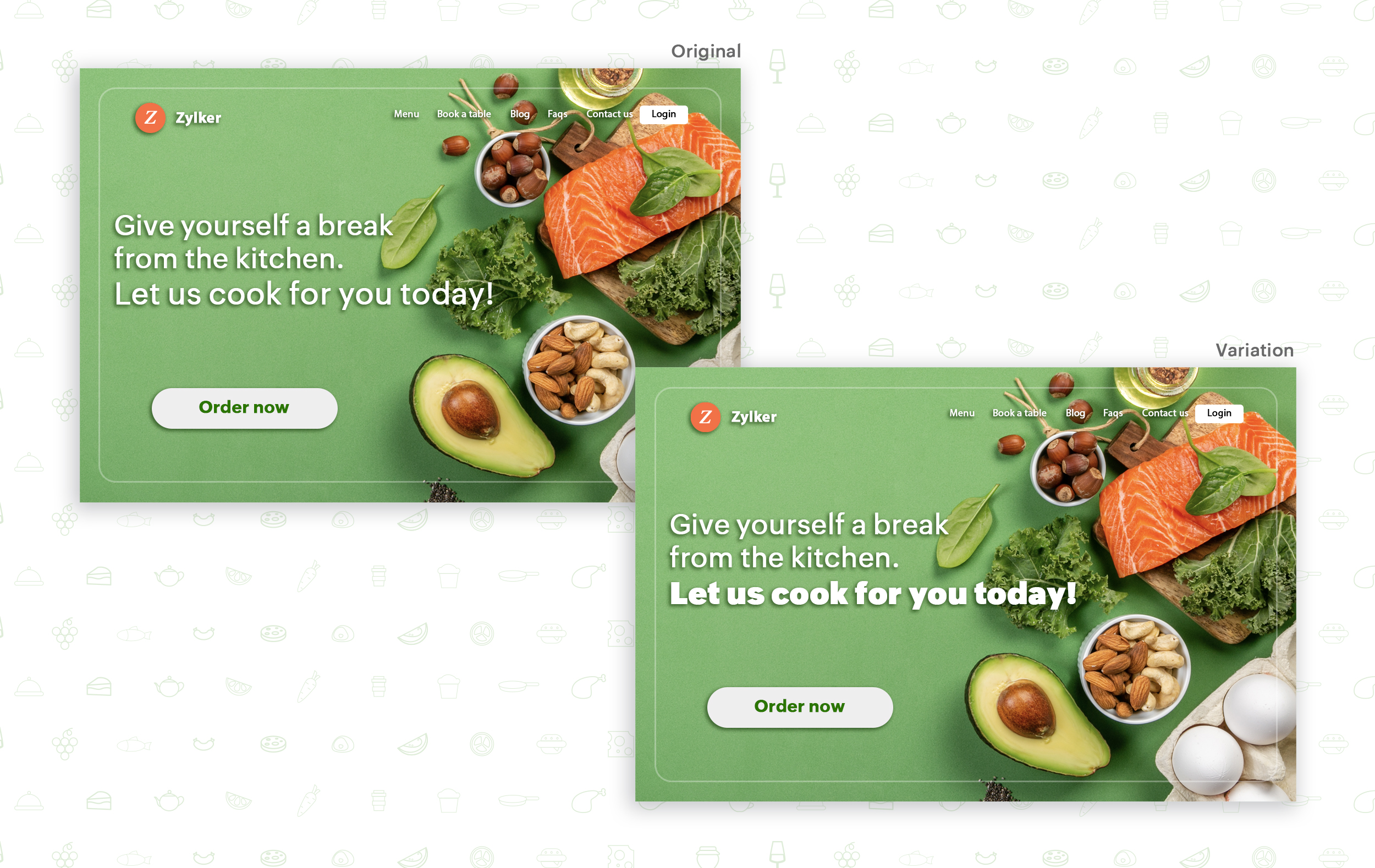
Try out the two-part strategy
Don't forget your supporting cast! Successful headlines act in two parts. Including a persuasive subheadline copy below your headline can be another winning strategy to pull your customers deeper into your website. You can test different versions of your subheadings to see which best suits your visitors, such as explaining a bit more about your product or services, emphasizing your product benefits, or encouraging visitors to click the CTA button placed on your site.
Example:
Take a look at the main headline and the subheading of a customer support software website as shown below. In this case, your subheadline re-affirms how your software helps your customers and adds emphasis about different product features.

Test the headline length and SEO compatibility
Test your headline for the right length, SEO keywords, and sentiments. Keeping a headline no longer than six words will help readers easily process your text and attain the goal of your website. Using free headline analyzer tools such as Coschedule or Sharethrough can help you effortlessly understand your website's performance. They analyze important factors (like searchable keywords, word balance, and sentiments) and assign a percentage score based on how good your headline is. They'll help you identify the factors you need to improve for more productive headlines.
Test your headline for the right length, SEO keywords, and sentiments. Keeping a headline no longer than six words will help readers easily process your text and attain the goal of your website. Using free headline analyzer tools such as Coschedule or Sharethrough can help you effortlessly understand your website's performance. They analyze important factors (like searchable keywords, word balance, and sentiments) and assign a percentage score based on how good your headline is. They'll help you identify the factors you need to improve for more productive headlines.
Example:
Let's say you own an online pet supply store and you want to test the headline of your homepage to attract more visitor traffic. The screenshots below show the performance of both the old and new versions of the headline in terms of length.
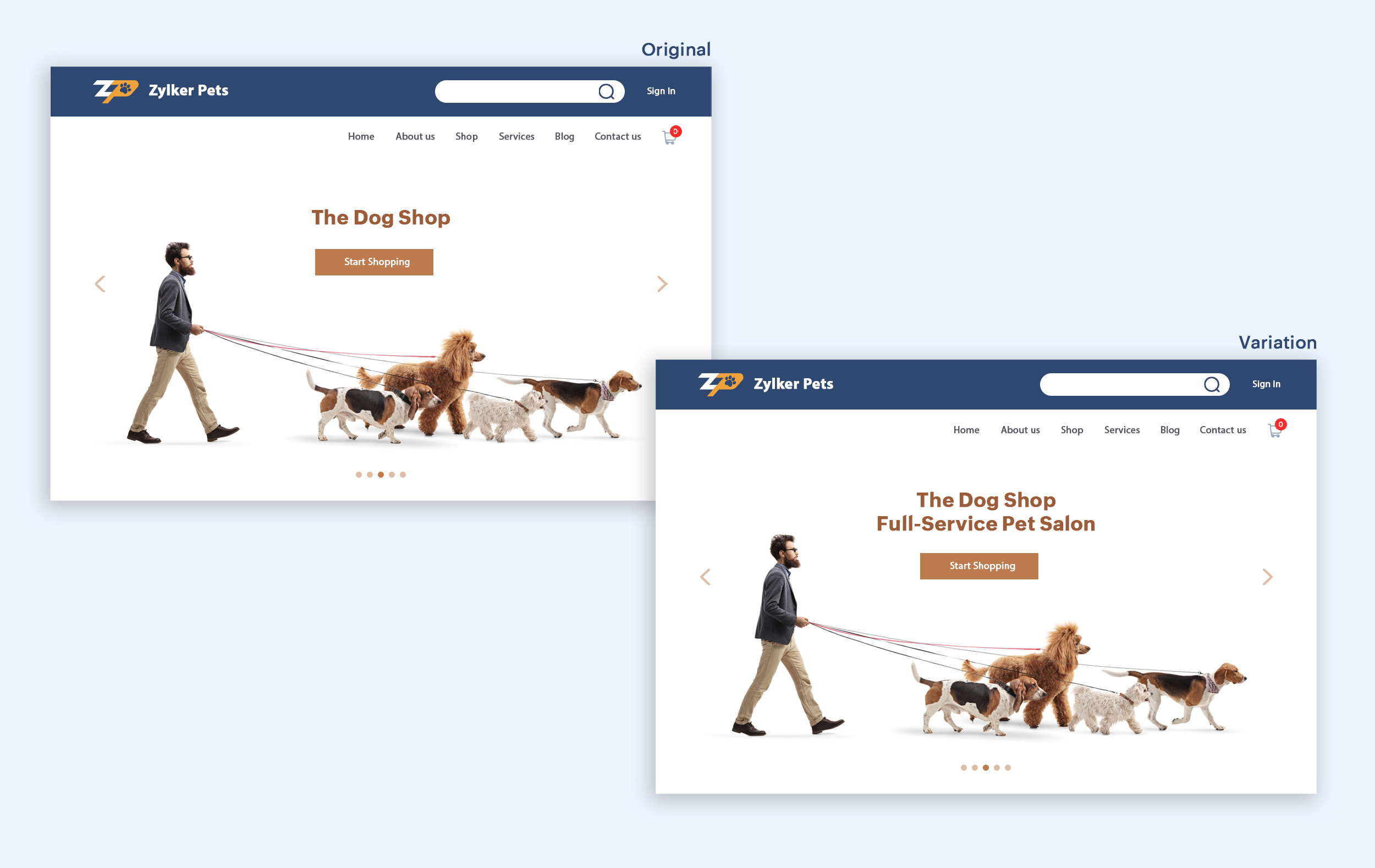
Bonus tips:
- Create a sense of urgency in your headline with words like "today," "now," and "last-minute offer."
- Use comparison phrases like "versus" to reinforce the benefits and features of your products/services.
- Research your competitor's headlines to add more value and optimize your headlines better.
We hope you found this article useful. What is your favorite headline tester? Have you had any success with headline A/B testing? Do share with us in the comments box below.
Happy testing. Happy converting!
Thank you.
Topic Participants
Balarohini Paulraj
info
Sticky Posts
[Live Webinar] How to maximize your conversions using existing website traffic
Hello all, Did you know that on an average only 0.1% of your traffic converts? The rest are either heading towards your competitors or dropping off without being able to find what they came for. When you want to increase your conversions, it's naturalA/B Testing Idea #2: Make your headlines sound super cool.
Hello everyone, We're back with our second post in the CRO testing idea series. If you missed the first post, please check it out here: "Place irresistible and clear CTAs." In today's post, we'll look at how to effectively A/B test your headline content.A/B Testing Idea #1: Place irresistible and clear CTA buttons
Are you wasting much of your time and effort A/B testing every single idea that pops into your head, yet you're not generating sufficient traffic to your website? Don't worry—we've got you. We'd like to introduce you to the A/B Testing Ideas learningDid you know?#3: How to target and run your experiment based on custom audience segments in PageSense
Whatever kind of online business you're running, defining your target audience is the key factor to delivering relevant messages and further positioning your brand in the industry. Most marketing efforts revolve around this basic strategy of segmentingDid you know?#2: How to filter your report by custom date range in PageSense
Do you want to quickly view your experiment analysis or responses over different time periods? Want to effortlessly compare the performance of your website by specific weeks, months, or years? Also, see whether your new marketing strategies or efforts
Recent Topics
Introducing Color Coding of Picklist Values
Dear Everyone, Greetings!! Zoho CRM is uplifting the user experience. Recently, we had some notable aesthetic improvements in CRM like Kanban View UI enhancement, New List view UI enhancement, color coding of tags, and color coding of picklists in meetings.Where can I find the best mail backup tool for Windows?
Later this evening I found Mail Backup Tool in google. Actually I was looking for a solution to download/save emails to my local drive. As I had plenty of important data stored in my email account. So i was not in a mood to take this thing lightly. This made me curious to found any software which can help me to backup my data to hard drive. Then I found the above application which was like a gem. A complete email backup solution for Zoho Mail, Gmail, Yahoo Mail, Office 365 and more than 40+ emailMailbox storage showing incorrect usage
My mailbox shows 4.99 GB used out of 5 GB. However, actual mailbox usage is only around 394 MB. Trash and Spam are already empty. IMAP/POP is not enabled. WorkDrive is not in use. This appears to be a storage calculation issue. Please help to recalculateSuper Admin Logging in as another User
How can a Super Admin login as another user. For example, I have a sales rep that is having issues with their Accounts and I want to view their Zoho Account with out having to do a GTM and sharing screens. Moderation Update (8th Aug 2025): We are workingEs posible cambiar el lenguaje de los modulos del ASAP?
Es posible cambiar el lenguaje de estos textos? Tengo Zoho configurado en español pero aun así me muestra estos textos en ingles:Option to Automatically Publish Job Openings to the Career Website via API or Workflow
Currently, when creating Job Openings using the Zoho Recruit API, the records are successfully inserted into the system. However, there is no way to automatically publish these Job Openings to the Career Website. In the Job Opening field data, there areEvaluate applicants faster: Profile Summary and Skill Sets now in Applications
Evaluating applicants often requires switching between modules to understand their skills and background. With this update, we’ve extended two capabilities directly to the Applications module: Skill Sets and Profile Summary. You can now review applicantsFree webinar: How to use passkeys with Zoho Vault
Hi everyone! Passkeys are transforming the way we sign in—making authentication safer, faster, and completely passwordless. No more memorizing complex passwords or worrying about credential theft. With Zoho Vault, you can securely manage both passwordsAdding Markdown text using Zoho Desk API into the Knowledge Base
Hi Zoho Community members, We currently maintain the documentation of out company in its website. This documentation is written in markdown text format and we would like to add it in Zoho Knowledge Base. Do you know if there is REST API functionalityIs it possible to embed Zoho Bookmarks in the Cliq sidebar?
Is there any way that each Zoho user can access their bookmarks (that live in https://bookmarks.zoho.eu/ which is technically a part of Zoho Mail) directly within Cliq? As a widget, or an item in the sidebar? My team does not use Mail, it uses Cliq allEnhancing Zia's service with better contextual responses and article generation
Hello everyone, We are enhancing Zia's Generative AI service to make your support experience smarter. Here's how: Increased accuracy with Qwen One of the key challenges in AI is delivering responses that are both contextually accurate and empathetic whileLet us add Lookup fields in the Blueprint Transitions
We are unable to add Lookup Fields in the blueprint transitions in Zoho Desk, we wanted to make it a requirement for our workflow but since it's not available in the transition we cannot. The lookup field exists in the Layout: But it cannot be added/selectedHow can we clear a signature field with deluge?
I would like to clear a signature field in the Edit -> On Load. I have tried input.signature = ""; input.signature = null; clear input.signature; None of the above is working. is there any other way I am missing?Online PDF Editor
Hello Team, There is a small glitch i found when i was using your online software called "PDF Editor", There is a menu bar on right side comes when we click on 3 dots for any pdf, but that entire menu has no options to choose, that is totally blank, pleaseHow do I disconnect my Salesforce integration?
I need to integrate a different Salesforce sandbox with my Zoho form.Zoho Recruit - Email Relay
Good day, Has anyone succeeded in setting up an email relay for Office 365? If I add the details from https://support.microsoft.com/en-us/office/pop-imap-and-smtp-settings-8361e398-8af4-4e97-b147-6c6c4ac95353, I get the connection error. Regards, EkaZoho Recruit -> Exchange Online Relay
HI! I have tried to connect Recruit to our MS 365 Exchange Online without any luck. I use this guide https://help.zoho.com/portal/en/kb/recruit/outreach/email-relay/articles/email-relay-zoho-recruit#Configuring_Email_Relay_Settings Do anyone have theError AS101 when adding new email alias
Hi, I am trying to add apple@(mydomain).com The error AS101 is shown while I try to add the alias.an issue in Zoho CRM where the workflow rule is not triggering
H I’m currently facing an issue in Zoho CRM where the workflow rule is not triggering when a new lead is created through a webform. I’ve double-checked the criteria and field updates, everything seems fine but it still doesn’t fire. Has anyone faced this401 Unauthenticated Error – Zoho CRM to Google Sheets Integration
Hi I'm building an Automation Function in Zoho CRM using Deluge that appends contact data from Zoho CRM into a Google Sheet whenever a new contact is created. WHAT I'VE DONE: I created a connection in Zoho CRM (Developer Hub → Connections) with the followingPower up your Kiosk Studio with Real-Time Data Capture, Client Scripts & More!
Hello Everyone, We’re thrilled to announce a powerful set of enhancements to Kiosk Studio in Zoho CRM. These new updates give you more flexibility, faster record handling, and real-time data capture, making your Kiosk flows smarter and more efficientIncome not showing in direct bank feed
Hi, I am trying to enter income without knowing or mentioning customer, as i am told, my client wants single or cash basis accounting but i seriously struggling......................I am not able to check in and checkout in zoho people even location access allowed
This issue i am facing in mackbook air m1, I allowed location in chrome browser and i also tried in safari but getting similar issue. Please have a look ASAP.Preview future shift rotation in Shift Schedule
Hi, What if, instead of the current behavior, the Shift Rotation feature in Zoho People allowed users to preview future shift schedules before the scheduler execution? Currently, when a shift rotation is configured (for example, monthly rotation), theWhat do you get in Zoho ONE Free Trial?
Zoho One is a collection of applications that work together to run a company's entire operations in the cloud. It includes more than 40 online applications and an equivalent number of mobile apps, all of which can be accessed with a single sign-on andAutomatically Update Ticket Status in Zoho Desk Based on Actions in Zoho Projects
Hi Zoho Desk Team, Hope you’re doing well. We’re using the Zoho Desk–Zoho Projects integration to manage tasks related to customer tickets, and it works well for linking and tracking progress. However, there are a few important automation capabilitiesSign Out
Hello, I have a doubt with Permalink. I have a view created with critera to show only the records belonging to the user who has sign in. The problem is that the different users use the same computer and some times the user login keep signed, and when I send the permalink (by email) of the view, the users enter with other login signed. Moreover the permalink view doesn�t allow to do a log out. May I add something in the permalink to request always sign in? Sorry for my English. Many thanks! RegardsAnnouncing new features in Trident for Windows (v.1.39.4.0)
Hello Community! Trident for Windows just received a major update, with a range of capabilities that focuses on strengthening communication and simplifying workflows. Let’s dive into what’s new! Upload email attachments to WorkDrive. Until now, you couldIntroducing Automatic Field Addition (Text Tags) in Zoho Sign
Hello, Today we are excited to announce the general availability of automatic field addition (text tags) feature in Zoho Sign. Now, you can now add text tags in the content of your documents and Zoho Sign will automatically add the corresponding fields when they are uploaded for the signing process. For example: when you add text tags to your sales orders, new employee contracts, and NDAs, Zoho Sign will add the corresponding fields when these documents are uploaded for the signing process. If youIntroducing Built-in Telephony in Zoho Recruit
We’re excited to introduce Built-in Telephony in Zoho Recruit, designed to make recruiter–candidate communication faster, simpler, and fully traceable. These capabilities help you reduce app switching, handle inbound calls efficiently, and keep everyDo not use isnull()
Does not always return booleans. Can also return null. Never use this function. Just use var==null instead.Write-Off multiple invoices and tax calculation
Good evening, I have many invoices which are long overdue and I do not expect them to be paid. I believe I should write them off. I did some tests and I have some questions: - I cannot find a way to write off several invoices together. How can I do that,Splitting Transactions in Zoho Books
I have read in past forum posts that the ability to split bank transactions would likely be implemented - it's definitely a typical accounting program feature. I'm new to Zoho and thought I'd found nirvana until I realized this feature doesn't seem toStatement Aging On Cutomer Statement
Hello, Is it possible to put aging on customer statements? Current 1-30days 31-60days 61-90days 91-120days Over 120 days. See attached image from another accounting package. Many customers pay off a statement and clear older invoices.Unveiling the next iteration of Ask Zia in Zoho CRM: An all-new chat interface, conversation history, actions, and much more
Your CRM assistant just leveled up. Zoho CRM's Ask Zia functionality now offers a more conversational and context-aware experience to help you not just understand your data, but act on it—all from one chat window. With its redesigned interface and expandedResponse rate and time on social media
Hello, I just want to know if it's possible to manage the response rate and response time from my social media on zoho social ? I don't see any statistical reports on the online scoreboard ? Thank you in advance for your response and sorry if the question has already been postedWhatsapp BOT with CRM
Hello, how do you use Whatsapp integrations in zoho CRM?Ability to translate Zoho CRM Kiosks
Hi team, Is support for translating kiosk text and screen names in the Zoho CRM translation tool planned on the roadmap? Thanks,Whatsapp Limitation Questions
Good day, I would like to find out about the functionality or possibility of all the below points within the Zoho/WhatsApp integration. Will WhatsApp buttons ever be possible in the future? Will WhatsApp Re-directs to different users be possible basedEditing the list of Categories in the Categorize Manually section of Banking in Zoho Books
Hi, I need to create two new Categories called Withdrawals and Deposits to categorize payments in a bank account. How do I edit the Categories list?Next Page