A LETTER TO THE UNSUNG HEROES OF THE INTERNET

A LETTER TO THE UNSUNG HEROES OF THE INTERNET


Dear social media marketers, this one’s for you…

From the outside, it may look like you're just scrolling through feeds or switching between tabs. But we know better.

Team Zoho Social sees the real story.

We understand the challenges you face—and we’ve been right there with you, every step of the way. For over a decade, Zoho Social has been more than just a tool. It’s been a part of your daily grind, your wins, your routines. So this Social Media Day, we want to walk you through a day in your life and show you how Zoho Social fits right into it.

We know your mornings start early with campaign plans scribbled on notepads, boards filled with content ideas, and market research done over a dose of caffeine. You're not just creating content; you're studying trends, tracking competitors, and trying to hit just the right tone with every piece you post.

But some mornings, the ideas don’t come. You’re staring at a blank screen, the cursor blinking back at you, and the pressure to be creative doesn’t wait.

That’s when Zia, your AI-powered writing assistant, steps in. Whether you're crafting a fresh caption or coming up with tag lines for your new campaign. Zia helps you break through the block. Just give a prompt and let Zia help you keep moving.

Because sometimes, even superheroes need a partner.


Now that you’ve written your post, the next question is: When do I publish it? Timing makes all the difference, and it’s not always easy to get it right.

You’ve worked hard on this post, and it definitely deserves the spotlight. So your SmartQ comes to help you in analyzing your audience’s behavior and recommends the best time to post, so your content gets the attention it deserves. 


For greater clarity, the Reports tab provides a comprehensive view of when your audience is most active.


It’s midday already. You’ve cleared your morning clutter, and after lunch, it’s time to get organized. You’ve got a campaign launch coming up, some posts waiting, and a few brand announcements. Planning all that across multiple platforms? It can feel like solving a big puzzle.

Zoho Social Calendar is built to help you map everything out visually. See your entire content plan at a glance. Check what’s going out when, adjust as needed, and stay ahead. 


And when you’ve got too many posts in the pipeline? Bulk scheduling has you covered. Line up your posts in advance and let them go live exactly when you want—no last-minute rush, no missed windows. 


By the time the afternoon slump hits, it’s probably time for your second coffee. But while you take that much-needed break, your audience doesn’t. The comments are coming in, mentions are building up, and DMs are waiting to be replied to.
We know how overwhelming that can get, and how important it is not to miss a message. Zoho Social Inbox brings all your conversations into one neat, organized space. From every platform. Just clear visibility, faster responses, and a better way to engage meaningfully. 
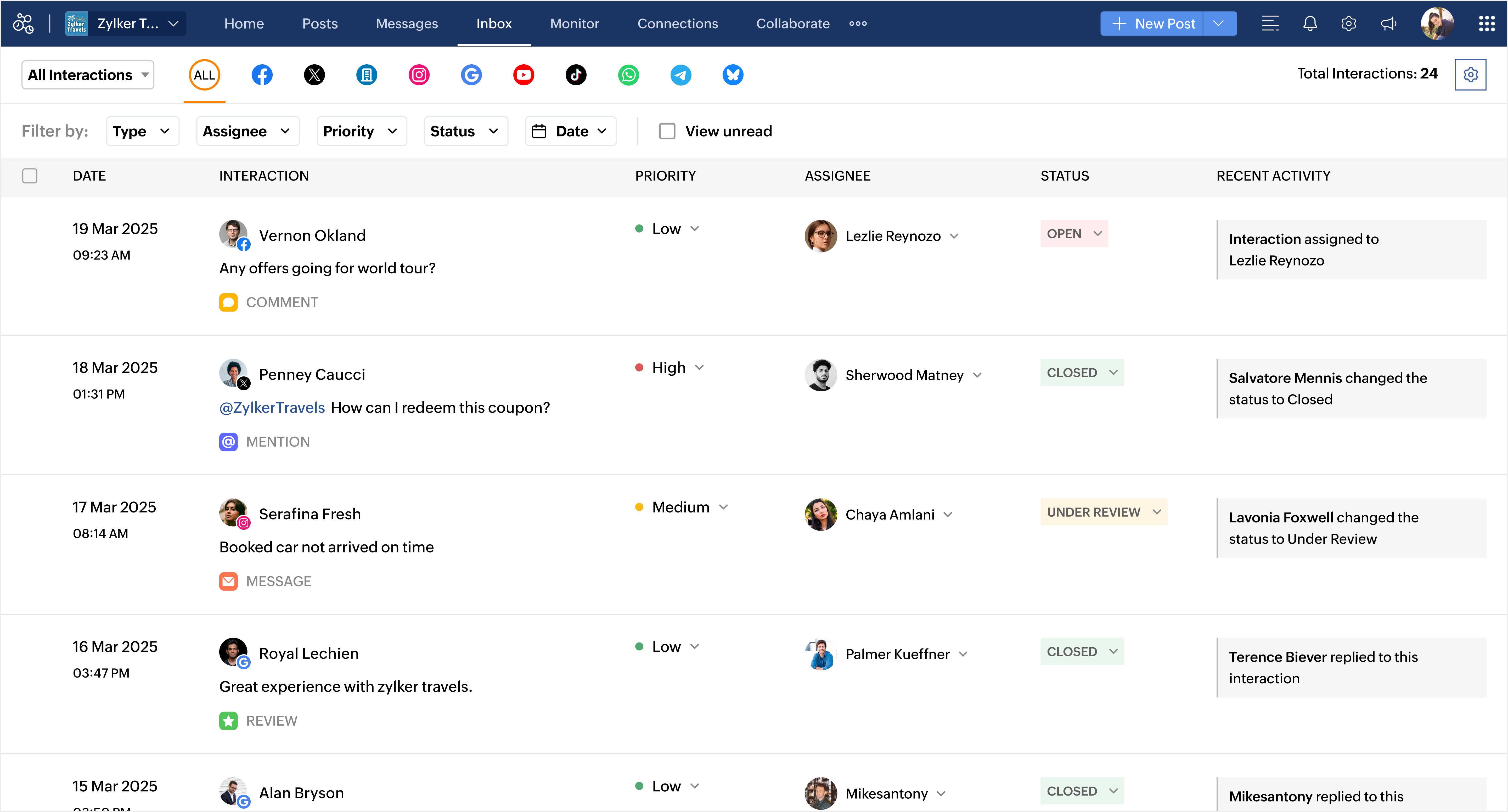


Not every message needs to find you. You can let it find the right person instead. With Inbox Automation, create smart assignment rules that automatically route interactions to the right teammate, so your team can spend less time organizing and more time connecting with customers.


Now it’s late evening. You’ve written, planned, scheduled, and replied. But somehow, your day still doesn’t feel over. Because for you, it’s not just about checking off tasks—it’s about getting it right.

Your day ends when that one post goes live. The one crafted with care, posted with hope, and shared with intention. The one that makes someone pause mid-scroll and connect.

Because that’s what you do every single day. 

This Social Media Day, we just want to say thank you.

Thank you for the creativity you spark, the consistency you bring, and the care you pour into every campaign, every comment, every conversation. We see the effort behind every post. We know the hustle. We hear you. And most importantly, we’re here for you.

Today, we raise our glasses to you. Thank you for everything you do.

With gratitude,
Team Zoho Social

Explore what’s new in Zoho Social and see how it can simplify your everyday marketing routine.
    • Sticky Posts

    • What's new in Zoho Social - Q3 recap

      Hello everyone, We've rolled out a bunch of exciting updates in Q3, and we're thrilled to walk you through them. Here's a quick look at everything we released in July, August, and September to help you experiment with content, automate engagement workflows,
    • Snapchat is here on Zoho Social

      Hey everyone, Snapchat is now on Zoho Social! You can now connect your Snapchat account to Zoho Social and manage your Snapchat content alongside your other social channels. Create and schedule Spotlights and Stories, save your best content as Saved Stories.
    • What's new in Zoho Social - Q2 recap

      Hello everyone, We’ve rolled out a bunch of updates in Q2, and we’re excited to walk you through them. Here’s a quick look at everything we released in April, May, and June to help you manage your social media presence more effectively. Threads updates
    • A LETTER TO THE UNSUNG HEROES OF THE INTERNET

      Dear social media marketers, this one’s for you… From the outside, it may look like you're just scrolling through feeds or switching between tabs. But we know better. Team Zoho Social sees the real story. We understand the challenges you face—and we’ve
    • Introducing Inbox in Zoho Social

      Hey everyone, We are excited to introduce the Inbox in Zoho Social to help manage all social media interactions from Facebook, Instagram, X (formerly Twitter), Google Business Profile and YouTube for your brand in one place. You can track and assign them
      • Recent Topics

      • Generate a link for Zoho Sign we can copy and use in a separate email

        Please consider adding functionality that would all a user to copy a reminder link so that we can include it in a personalized email instead of sending a Zoho reminder. Or, allow us to customize the reminder email. Use Case: We have clients we need to
      • Need help with importing expenses

        I'm using the template downloaded from the application. When I try to import my expenses, I get the message: Duplicate entry in the Expense Date column. Ensure it contains unique values. None of the rows will import. There are duplicate dates, but they
      • Notes - Reaction Buttons

        Using the native notes option within CRM is fine, it works and the RTF features are great, however, would it be possible - if there isnt already something in place, where we can add a reactions button, similar to teams/whatsapp to show that its been read
      • #12 Bringing In A Second Pair Of Hands

        Meera's studio became a two-person business in month five. Adding the second person took ten minutes. Working out why Meera herself was showing up as Staff took considerably longer. The Usual Way To Do This Covered in our published General FAQ, with the
      • How can I add a Custom Field (or Customer_name) to a picklist?

        Our workflow is Shopify-->SO -->Picklist-->Package-->Shipment. We would like to have the Picklist template to include a custom field "Customer_Notes" (we have created this field already). This way we get alerted when a customer has notes on their account.
      • Support Plan: Recuring Issue

        Hi Zoho Team, Could you please look into this recurring alert and provide clarification on why this restriction is still in place? This issue has become a bottleneck in our workflow, significantly limiting our automation capabilities. We are unable to
      • Header Line in Quote product rows

        I believe this is an essential feature that Zoho should provide us, when adding products we want the ability to add titles for our product, in quotes: The Solution/Category Title Product1 Product2..... and then it would show the sub-total of that title 
      • Widget Height were destroyed

        All widget heights in the Details Canvas view are broken. Moderation Update: This issue with widget heights in Client Script popups and flyouts has been resolved. Widgets should now display at their expected heights.
      • How to Fix the Corrupted Outlook 2019 .pst file on Windows safely?

        There are multiple reasons to get corrupted PST files (due to a power failure, system crash, or forced shutdown) and several other reasons. If You are using this ScanePST.EXE Microsoft inbuilt recovery tool, it only supports the minor corruption issue
      • GrassHopper VOIP Integration

        Does Zoho Plan to integrate with Grasshopper to allow the Telephony hookup in Zoho Desk?  If not, Can this be passed along for consideration 
      • 👍 Zoho CRM's Notes now gets Reactions and a new look

        Moderation update: Currently available in the following DC's CA, AU, CN, UAE, JP, SA - All Editions EU - Free, Standard and Professional Hello everyone, Notes help users capture important updates, collaborate with teammates, and maintain context for records.
      • Zoho Extensions 101: Building extensions for Zoho People

        Hello developers! Welcome to our new video series on building extensions for Zoho People! If you're new to extension development or looking for guidance on building extensions for Zoho People, you're in the right place. We've curated a series of videos
      • Add @Mention Notifications in Zoho Cliq for Zoho Project Mentions

        Hello Zoho Projects Team, We hope you are doing well. We would like to submit a feature request regarding "Projects Bot" Cliq bot notifications for @mentions inside Zoho Projects comments (Tasks and Issues). Current Behavior: At the moment, when someone
      • Can't connect to POP and SMTP over VPN

        I use Thunderbird to access Zoho Mail via POP and SMTP. I have configured an app-specific password for Thunderbird to use. Everything is properly configured and works correctly — until I enable my VPN. I'm using a paid commercial VPN service (Mullvad).
      • Outgoing Mail Blocked – Suspicious Login Activity (Need Clarification and Solution)

        Hello, I’m currently facing an issue where my Zoho Mail account has been blocked due to “suspicious login activity,” and outgoing emails are restricted. Here are the details shown: Block type: Outgoing mail blocked Reason: Suspicious login activity A
      • Online Payment Fees

        We don't take many online credit card payments so the merchant service provider (PayPal) charges us the 2.9% fee for processing the amount. I would like the ability for the fee to be automatically added to the total amount for "ease of payment". We'd
      • O SalesIQ aceita números do Whatsapp Business com coextistência?

        Tenho uma equipe com vários vendedores e cada um deles tem um celular corporativo usando o Whatsapp Business para se comunicar com os clientes. Estamos no plano Zoho One e esses mesmos vendedores também usam o SalesIQ para atender os leads que vem do
      • Merge Tickets Directly from Contact Page in Zoho Desk

        Dear Zoho Desk Support Team, We are writing to request a new feature that would allow users to easily merge tickets directly from the contact page in Zoho Desk. Currently, the only option to merge tickets is from the Tickets list view page, which can
      • Losing description after merging tickets

        Hello, We merge tickets when they are about the same topic from the same client. It happens sometimes. We recently noticed that after the merger only the description from the master ticket is left in a thread. And the slave-ticket description is erased.
      • Any update on much requested feature, to delete attachments without deleting the e-mail body?

        People have been requesting the ability to delete e-mail attachments without deleting the e-mail for more than ten years now. The latest I see is marked "Working On It" and a year ago it was supposedly being added, see here: https://help.zoho.com/portal/en/community/topic/is-there-a-way-to-delete-mail-attachments-without-deleting-the-text
      • Undo/redo when composing Mail

        Where is the undo/redo button when composing mail? I've new to Zoho, I've looked, I've searched and can't find it. What am I missing?
      • Mail menu bar items missing in Inbox and folders

        Last night some shortcuts such as Move to Folder, Archive, Delete, Mark as spam, and others, disappeared from my Mail menu bar, along with items in the vertical three dots extension such as Mark as read, Flag as, Mark as unread, etc. What I now have instead
      • ERROR CODE :554 - Your access to this mail system has been rejected due to poor reputation of a domain used in message transfer

        This message was created automatically by mail delivery software. A message that you sent could not be delivered to one or more of its recipients. This is a permanent error. *****, ERROR CODE :554 - Your access to this mail system has been rejected due
      • Sent items with shared folders

        Hello, this is in some way in between a problem and an idea.  When sharing folders (which is actually not any close to a shared mailbox...) the person which the folder has been shared with can access that folder and can send emails when delegation is
      • What's New in Zoho Inventory | July & August 2026

        Hello users, The July and August 2026 releases bring a range of new features and improvements across the product. From the Nigeria Edition and Super Admin enhancements to Sri Lanka IRD-compliant invoicing, Loyalty Program Management, and improvements
      • E-mail com problema

        Não estou recebendo e-mail desde Janeiro. Algo desconfigurou e eu não consigo resolver. Podem ajudar? Aguardo. Wagner Della Aversana Whats 55 11 985119899
      • Account Blocked due to Suspicious Activity.

        Hello, Trying to get access to my account, I have found this message above in the subject of this message. I am unable to log back to my account (see err. mess. below.) and thus cannot get rif of this following the Zoho procedure : I followed the step
      • SAML authentication in Zoho Mail: Simplify and secure your organization's login management

        Managing login credentials across multiple web applications can be challenging for organizations with a large number of users. Without a centralized authentication system, users are required to maintain separate passwords for each application, increasing
      • How to prepare a balance sheet for a company that has no operations yet?

        .
      • Can't create new account in zoho email

        Hello, i'm trying to create some free accounts to my customers... and since yesterday i can't create a new account, what is wrong? why i can't create free account? Thank You
      • Name autocomplete

        Hi, During searching emails the web tool does not always propose the auto-completion of the saved emails. As a result I either have to go to contacts and look up the exact email, or the exact full name including the middle name and any dots, which is
      • Introducing Incentives for Zoho CRM: Build, automate, and track sales commissions

        Dear Customers, We are here with an amazing news! We built a direct solution to help manage your commission provisioning activity in your business. From creating commission plans to issuing payouts, this application leverages your sales reps’ performance
      • Specific ListView Canvas on Canvas Home Page Always Loads Most Recent ListView, Not the One Specified

        I had mentioned this to ZOHO, but I mainly wanted to see if others in the Community are also facing this problem. I created a Canvas ListView for a Custom Module, and then created a Canvas Home page (technically on a tab item, but I'm not sure if that
      • Reminder Settings - Time Tracker

        On the time tracker in Reminder Settings I created a reminder according to the Zoho manual. But a manager asked me to change the message that goes in the email. Is it possible to change the message? I didn't find that in the Zoho manual. Another question: I configured to receive the reminder everyone who logged in less than 40 hours. Does Zoho consider less than 40 hours of the current week or the whole month? Another situation, I put it so that I and another specific user would receive the notification,
      • Create a single record from multiple images with ICR

        Hello all, Zia's Intelligent Character Recognition can now create a single record from multiple images based on the configured ICR rule. Users can upload up to three images at once, such as an ID, a passport, and a business card, and Zia will extract
      • SPF failure in android app

        I have no domain. I am not admin of anything. All I want to do is send an email from a zohomail.eu address, using the Zoho android app, with all settings as default. I do not use Office 365, or EOP, or Outlook, and I have no domain or domain registrar.
      • Zoho Books | Product updates | August 2026

        Hello users, July has been an exciting month for Zoho Books! This month, we're excited to introduce HTML PDF Templates, Placeholders as Pills, expanded approval workflows for Sales Returns and Journals, and significant compliance updates across the India,
      • Page Not Found error - 404 error

        Hello, I am a first time user of zoho sites.I just published my website dentistinminneapolis.com but its giving me a 404 error.Please look into it ASAP and help with the problem.
      • What's New in Zoho POS - September 2026

        Hello everyone, Welcome to Zoho POS’s monthly update, where we share our latest feature updates, enhancements, events, and more. Let’s take a look at how September went. Global Edition of Zoho POS for Retail is here On September 28, 2026, we launched
      • New in Cadences: WhatsApp follow-ups, upgraded limits, and options for add-ons

        Hello everyone, We're rolling out two key updates to help you engage better and scale smarter with Cadences in Zoho CRM. Reach customers on WhatsApp, directly from Cadences Previously, Cadences have enabled you to automate follow-ups through emails, calls,
      • Next Page