Add Claude in Zoho Cliq

Let’s add a real AI assistant powered by Claude to your workspace this week, that your team can chat with, ask questions, and act on conversations to run AI actions on.
This guide walks you through exactly how, step by step, with all the code you'll need.
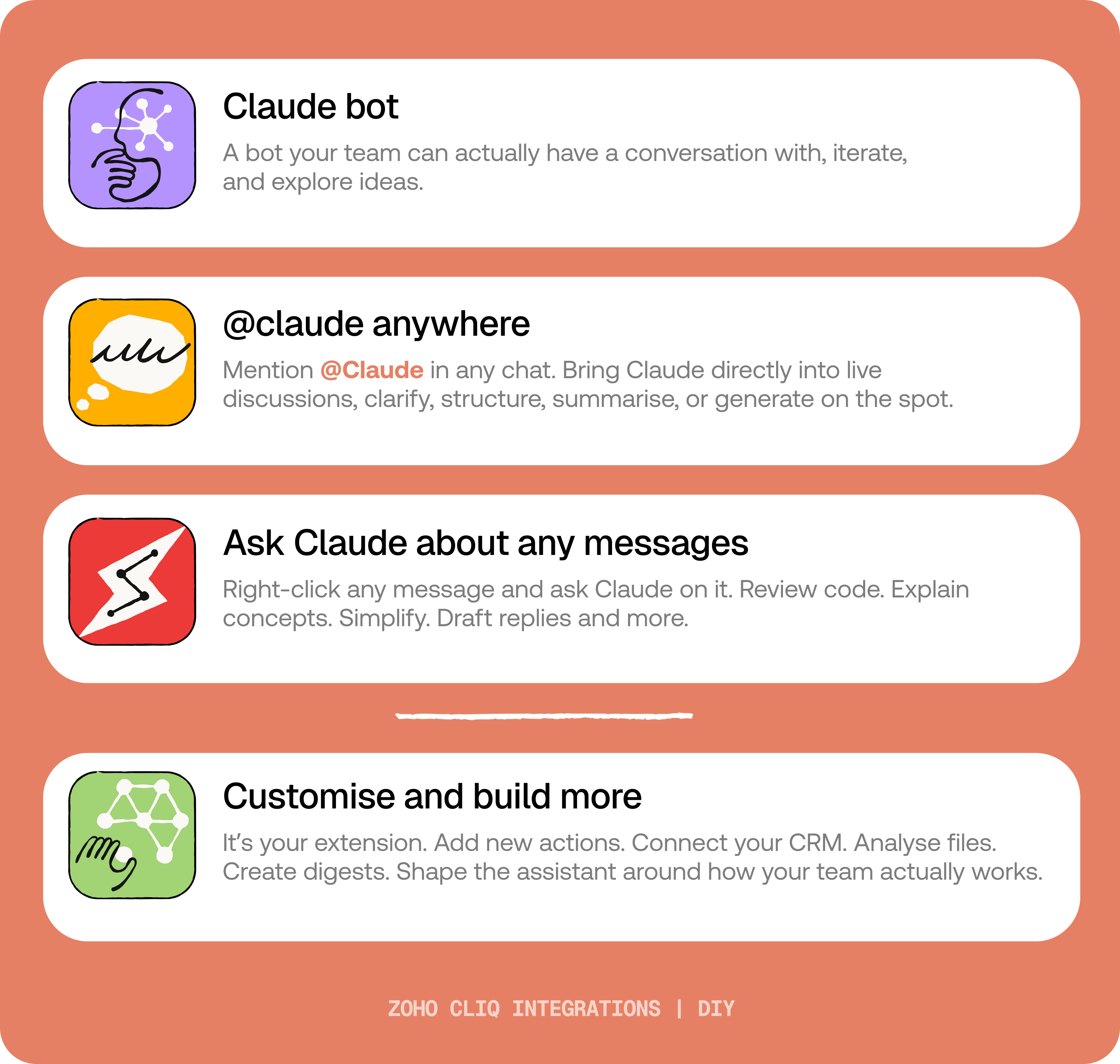
By the end of this guide, you’ll have:
- A Claude bot inside Zoho Cliq and hreal back-and-forth conversations.
- The ability to @mention Claude in any channel and reply to a message and ask Claude to act on it.
- A message action to act on messages in Cliq by Claude. Additionally, pre-built actions to review code, make mind maps, draft a reply for the selection message or explain like you're new.
 Before you start:
1. A Zoho Cliq account with Developer access.
2. An Anthropic API key
3. Basic comfort with Deluge (optional — all code is provided 😉)
A. How to get Anthropic API key?
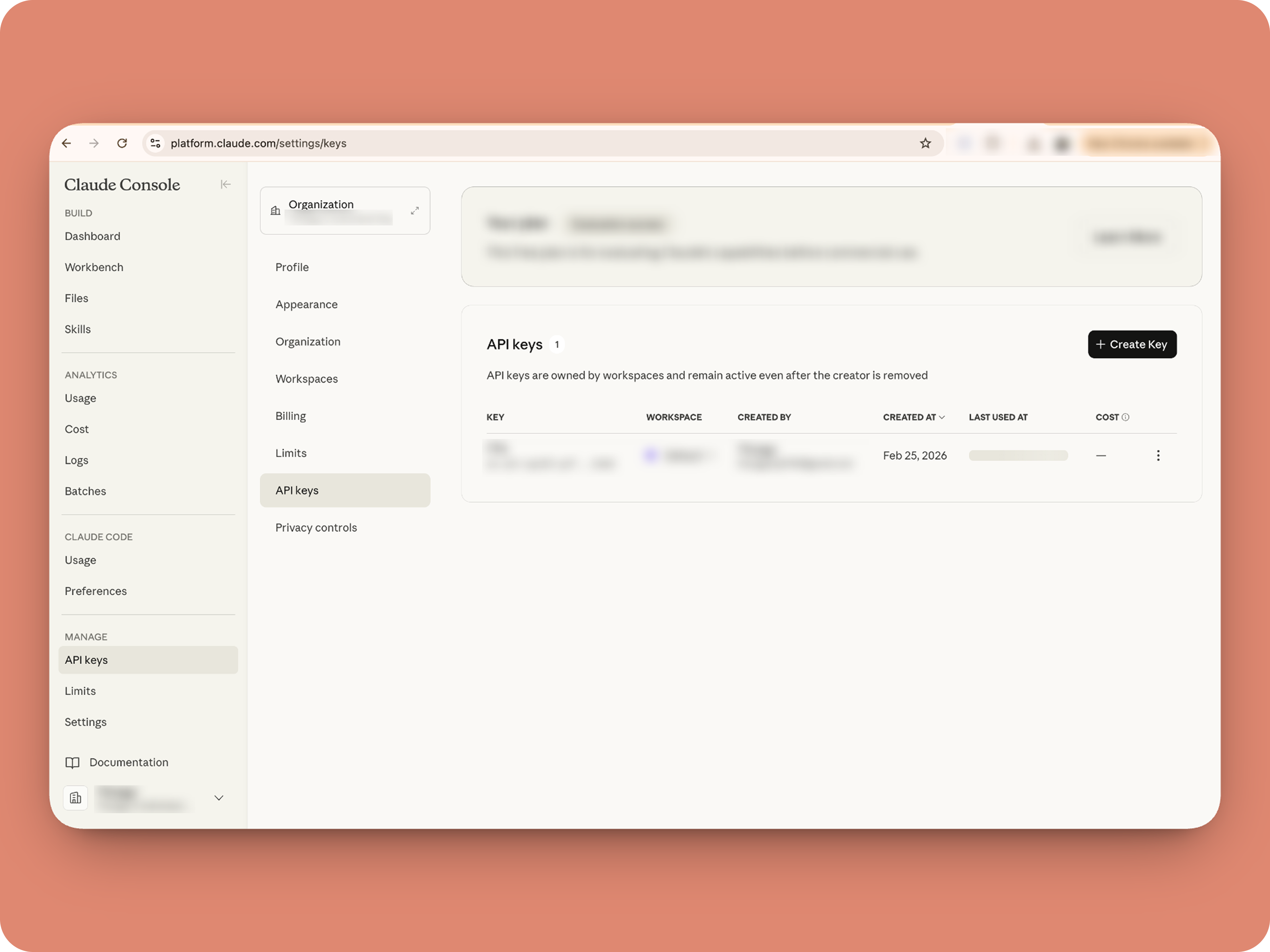

B. Create a Connection
1. Go to the Connections module (in Bots & Tools) → Create Connection
2. Add a Connection name, for eg. "readmessageandfile"
3. Select:
ZohoCliq.Attachments.READ
ZohoCliq.Messages.READ
4. Create
Click Create, then authorize the connection. Copy the connection name, you'll paste it into the handlers in the next steps.
How to start
Go to Zoho Cliq → Settings → Bots & Tools
Claude Bot:
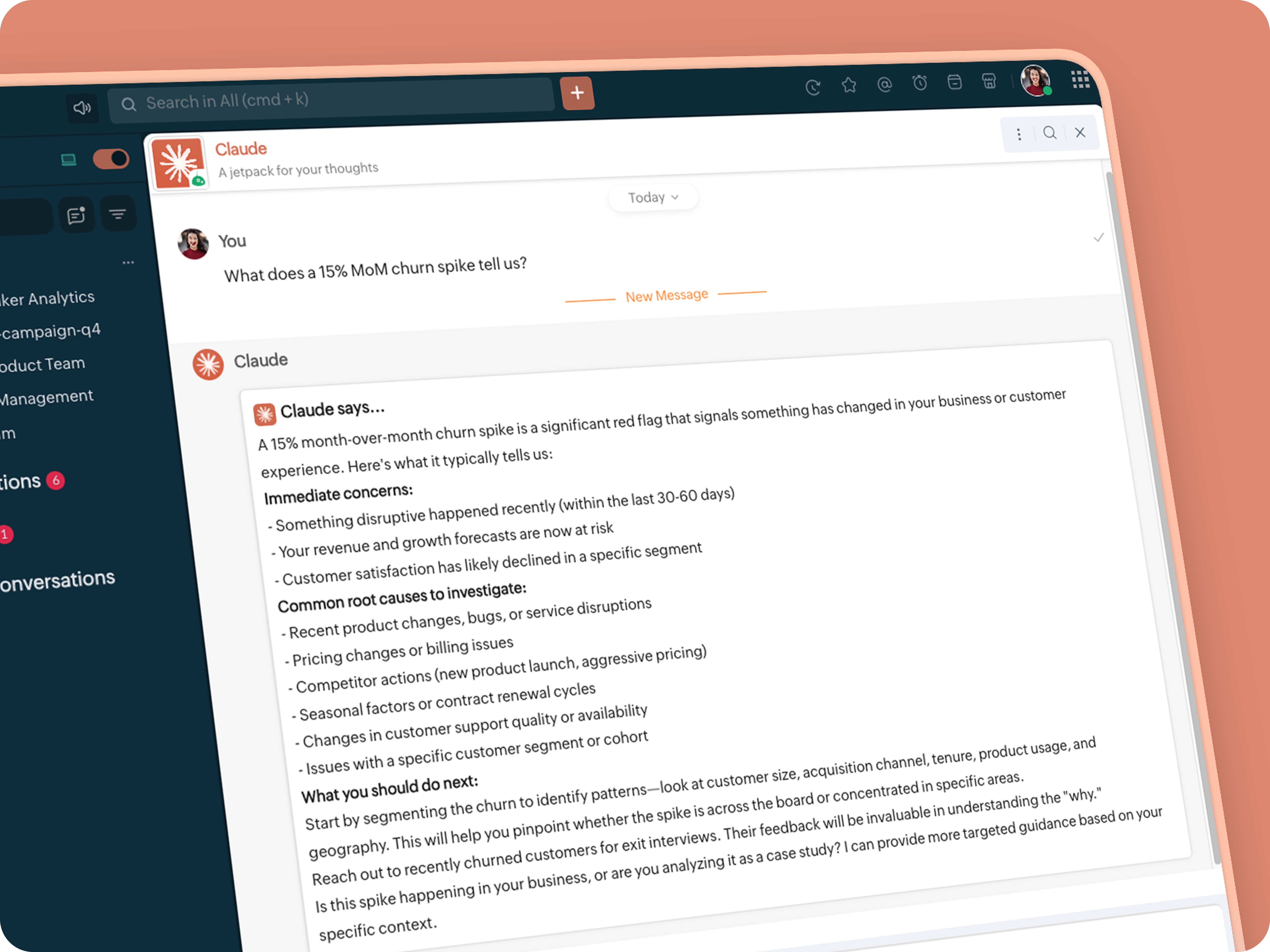
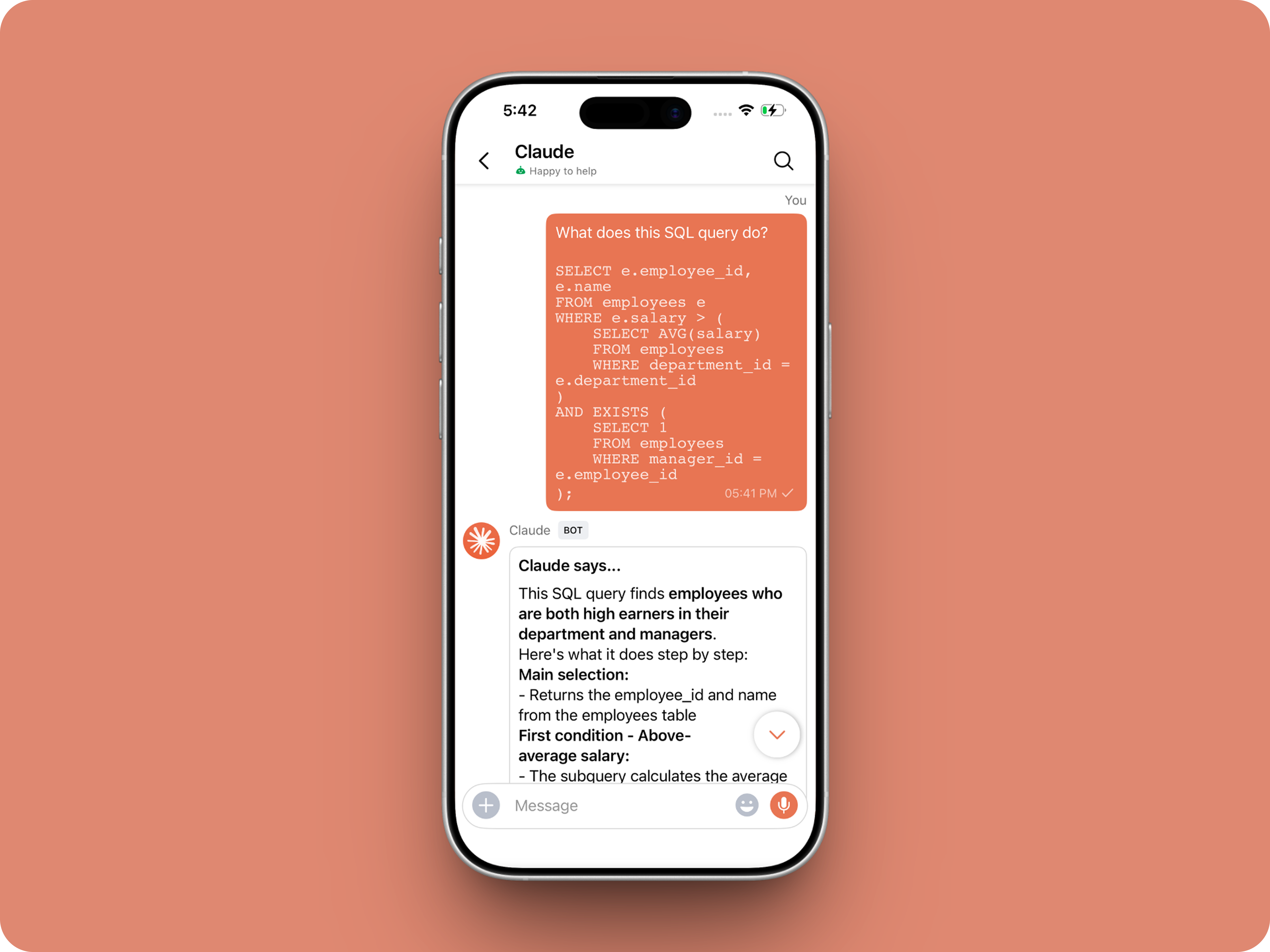
Go to Bots → Create Bot.
Name it Claude and give it any description of choice.
First, let's create a Message handler to handle the conversations first.
Click edit code and copy paste the below code in it (follow along the comments to understand what each part does)
One API endpoint. That's all.
Both the bot and the message action use the same single Anthropic endpoint: POST /v1/messages. The only thing that changes between them is the system prompt and what you put in the messages array. Once you understand that, the rest is just assembly.
Explore API docs →
Message Handler: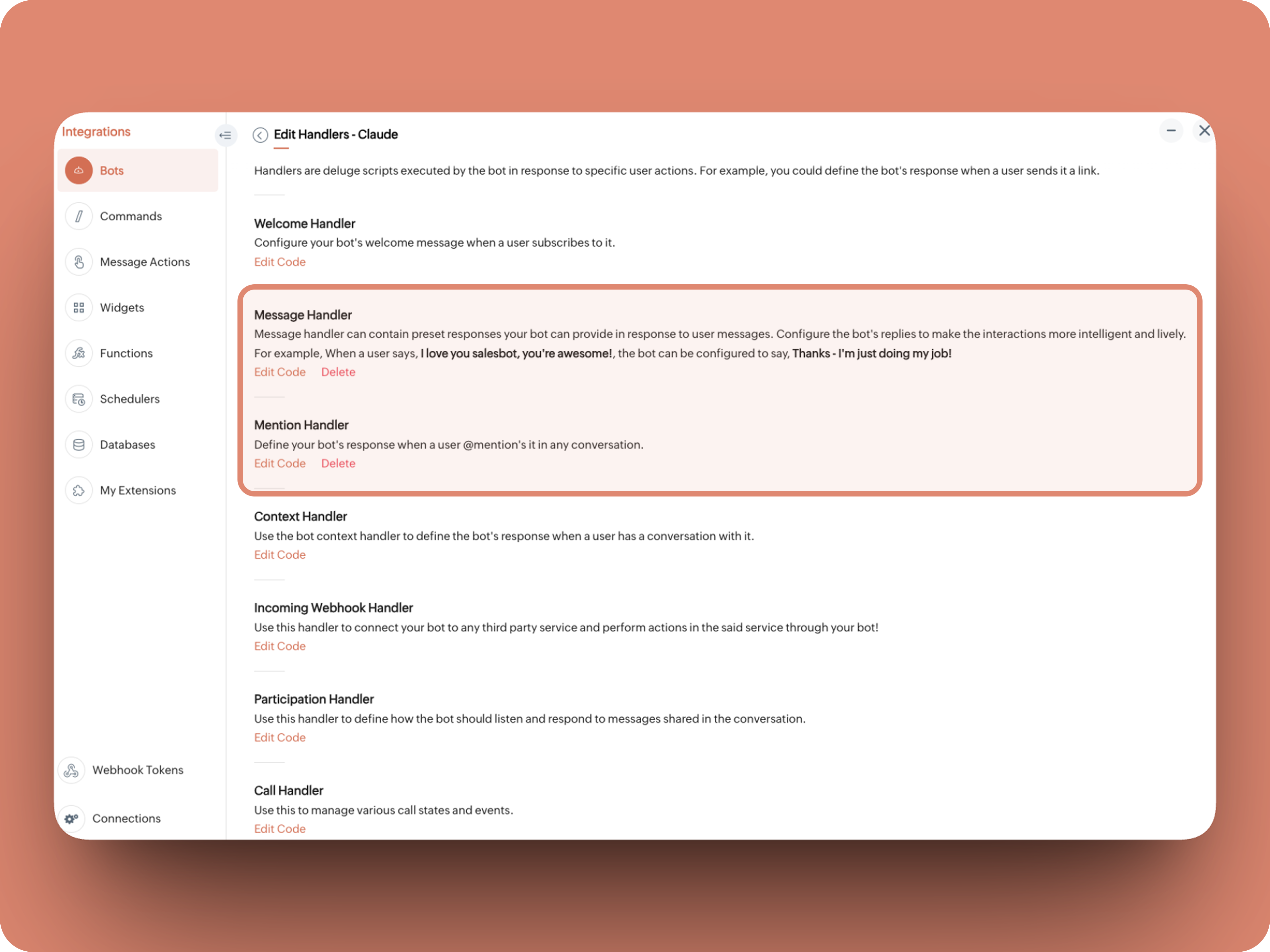
What does this do: Fetches last 10 (customizable - but keep message limit small ( around 10–15 to avoid token overuse)) chat messages for additional context and enables natural chat conversations
- info environment;
- botUniqueName = "BOT-UNIQUE-NAME";
- // Replace with your bot unique name
- cliqBaseUrl = environment.get("base_url");
- fetchRecentMessages = invokeurl
- [
- url :cliqBaseUrl + "/api/v2/chats/" + chat.get("id") + "/messages?limit=10"
- type :GET
- connection:"CONNECTION-NAME"
- //Read below how to create a connection, and paste here:
- ];
- info fetchRecentMessages;
- contentList = list();
- contentList.add({"role":"user","content":"Act as a conversational assistant. Reply to the message below in a friendly, informative, and well-organized way.\n\nGuidelines:\n- Respond only to the message provided.\n- Do not use memory or external context.\n- Be warm but professional.\n- Be clear and structured (use short paragraphs or bullet points if helpful).\n- Provide helpful details or clarification where useful.\n- If something is unclear, ask a polite follow-up question.\n- If action is needed, suggest a simple next step.\n- Do not include meta commentary.\n- Output only the reply.\n\n\nSTRICTLY USE * FOR BOLD, AND NEVER ** FOR BOLD MARKDOWN."});
- allMessages = fetchRecentMessages.get("data");
- for each data in allMessages
- {
- type = data.get("type");
- if(type == "card" || type == "text")
- {
- getMessage = data.get("content").get("text").replaceAll("\n"," ");
- senderID = data.get("sender").get("id");
- if(senderID.startsWith("b-"))
- {
- contentList.add({"role":"assistant","content":getMessage});
- }
- else
- {
- contentList.add({"role":"user","content":getMessage});
- }
- }
- }
- info contentList;
- // Set up API headers
- apiHeaders = Map();
- apiHeaders.put("anthropic-version","2023-06-01");
- apiHeaders.put("Content-type","application/json");
- apiHeaders.put("X-Api-Key","INSERT-API-KEY-HERE");
- // Don't forget your API key!
- model = "claude-sonnet-4-5-20250929";
- requestPayload = {"max_tokens":1024,"messages":contentList,"model":model};
- // Make API call to Claude
- claudeApiResponse = invokeurl
- [
- url :"https://api.anthropic.com/v1/messages"
- type :POST
- parameters:requestPayload + ""
- headers:apiHeaders
- detailed:true
- ];
- info claudeApiResponse;
- if(claudeApiResponse.get("responseCode") == 200)
- {
- responseBody = claudeApiResponse.get("responseText");
- parsedResponse = responseBody.toMap();
- claudeMessage = parsedResponse.get("content").get(0).get("text").replaceAll("\n\n","\n").remove("---").remove("#");
- if(claudeMessage.length() > 4000)
- {
- claudeMessage = claudeMessage.subString(0,4000) + "...";
- }
- info "Claude's Response: " + claudeMessage;
- }
- else
- {
- responseBody = claudeApiResponse.get("responseText");
- parsedResponse = responseBody.toMap();
- claudeMessage = "*" + parsedResponse.get("error").get("type") + "* \n" + parsedResponse.get("error").get("message");
- info "API Error: " + claudeApiResponse;
- }
- responseContent = {"text":claudeMessage,"card":{"title":"Claude says...","icon":"https://uxwing.com/wp-content/themes/uxwing/download/brands-and-social-media/claude-ai-icon.png"}};
- info responseContent;
- info zoho.cliq.postToBot(botUniqueName,responseContent);
- return Map();
⚙️ Replace These Placeholders
BOT-UNIQUE-NAME (ⓘ How to find it?)
CONNECTION-NAME
INSERT-API-KEY-HERE
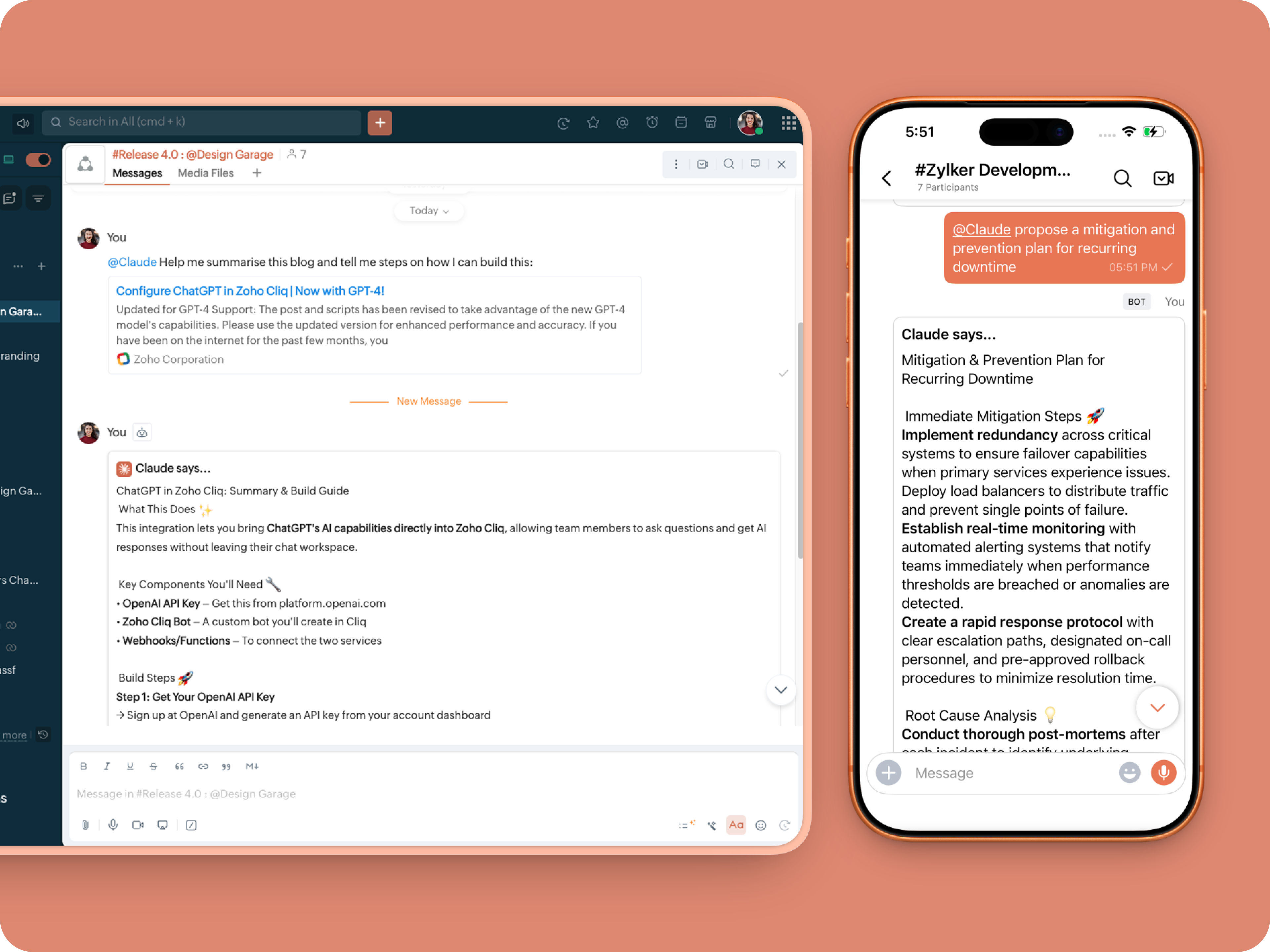
What does this do: This is to allow Claude to be @mentioned in any chat.
- userMessageText = "";
- fileAction = false;
- repliedMessage = false;
- if(message_details.get("message").containKey("replied_message"))
- {
- repliedMessage = true;
- replyMessageID = message_details.get("message").get("replied_message").get("id");
- messageType = message_details.get("message").get("replied_message").get("type");
- if(messageType == "text" || messageType == "card")
- {
- userMessageText = message_details.get("message").get("replied_message").get("text");
- }
- else
- {
- fileType = message_details.get("message").get("replied_message").get("file").get("type");
- if(fileType != "application/pdf")
- {
- return {"type":"banner","text":"Only PDF files are supported for this action","status":"failure"};
- }
- else
- {
- fileAction = true;
- }
- }
- }
- promptInstruction = "\"### Instructions ⓘ \nProvide a human-digestible, highly organized response (300-500 characters). Break down your output into bite-sized paragraphs and use bolding to guide the reader's eye. *Strictly avoid tables.* Use plenty of white space and only ### headings for a clean look. \n\n ### Formatting Protocol • \n - Bold: *text* \n - Italic: _text_ \n - Strike: ~text~ \n - Underline: __underline__ \n - Headers: ### Title \n - Quote: \"quote\" \n - Blockquote: > text \n - Bullets: Use • or → for lists \n - Emojis: Use ✨, 🚀, or 💡 to highlight key takeaways \n - Separator: --- \n\n ### and replace ** to *";
- userPrompt = "";
- if(message.trim().length() > 0)
- {
- userPrompt = "Action: " + message + "\n\n\n" + userMessageText + "\n\n\n" + promptInstruction;
- }
- else
- {
- userPrompt = "Action: " + userMessageText + "\n\n\n" + promptInstruction;
- }
- // Set up API headers
- apiHeaders = Map();
- apiHeaders.put("anthropic-version","2023-06-01");
- apiHeaders.put("Content-type","application/json");
- apiHeaders.put("ENTER-APIKEY-HERE");
- // Don't forget your API key!
- // Check if message is text-only or contains a file
- if(!fileAction)
- {
- // Handle text-only message
- requestPayload = {"max_tokens":1024,"messages":{{"content":userPrompt,"role":"user"}},"model":"claude-sonnet-4-5-20250929"};
- }
- else
- {
- // Handle message with file attachment
- uploadedFile = invokeurl
- [
- url :message_details.get("message").get("replied_message").get("file").get("url")
- type :GET
- connection:"ENTER-CONNECTION-NAME"
- ];
- info uploadedFile;
- // uploadedFile = message.get("content").get("file").get("name");
- base64EncodedFile = zoho.encryption.base64Encode(uploadedFile);
- if(message_details.get("message").get("replied_message").containKey("comment"))
- {
- comment = message_details.get("message").get("replied_message").get("comment");
- userPrompt = userPrompt + "\n" + comment;
- }
- else
- {
- userPrompt = userPrompt;
- }
- mediaType = "application/pdf";
- requestPayload = {"max_tokens":1024,"messages":{{"role":"user","content":{{"type":"document","source":{"type":"base64","media_type":mediaType,"data":base64EncodedFile}},{"type":"text","text":userPrompt}}}},"model":"claude-sonnet-4-5-20250929"};
- }
- info requestPayload;
- // Make API call to Claude
- claudeApiResponse = invokeurl
- [
- url :"https://api.anthropic.com/v1/messages"
- type :POST
- parameters:requestPayload + ""
- headers:apiHeaders
- detailed:true
- ];
- info claudeApiResponse;
- // Extract the actual text response
- if(claudeApiResponse.get("responseCode") == 200)
- {
- responseBody = claudeApiResponse.get("responseText");
- parsedResponse = responseBody.toMap();
- claudeMessage = parsedResponse.get("content").get(0).get("text").replaceAll("\n\n","\n").remove("---").remove("#");
- if(claudeMessage.length() > 4000)
- {
- claudeMessage = claudeMessage.subString(0,4000) + "...";
- }
- info "Claude's Response: " + claudeMessage;
- }
- else
- {
- responseBody = claudeApiResponse.get("responseText");
- parsedResponse = responseBody.toMap();
- claudeMessage = "*" + parsedResponse.get("error").get("type") + "* \n" + parsedResponse.get("error").get("message");
- info "API Error: " + claudeApiResponse;
- }
- responseContent = {"text":claudeMessage,"card":{"title":"Claude says...","icon":"https://uxwing.com/wp-content/themes/uxwing/download/brands-and-social-media/claude-ai-icon.png"}};
- info responseContent;
- if(repliedMessage)
- {
- responseContent.put("reply_to",replyMessageID);
- }
- info zoho.cliq.postToChat(chat.get("id"),responseContent);
- return Map();
Message Action
What does it do: Allow Claude to act on any message or file.
 ⓘ For files, we've extended this to only PDF file formats for now to keep implementation predictable and to avoid unsupported file formats
What we're adding:
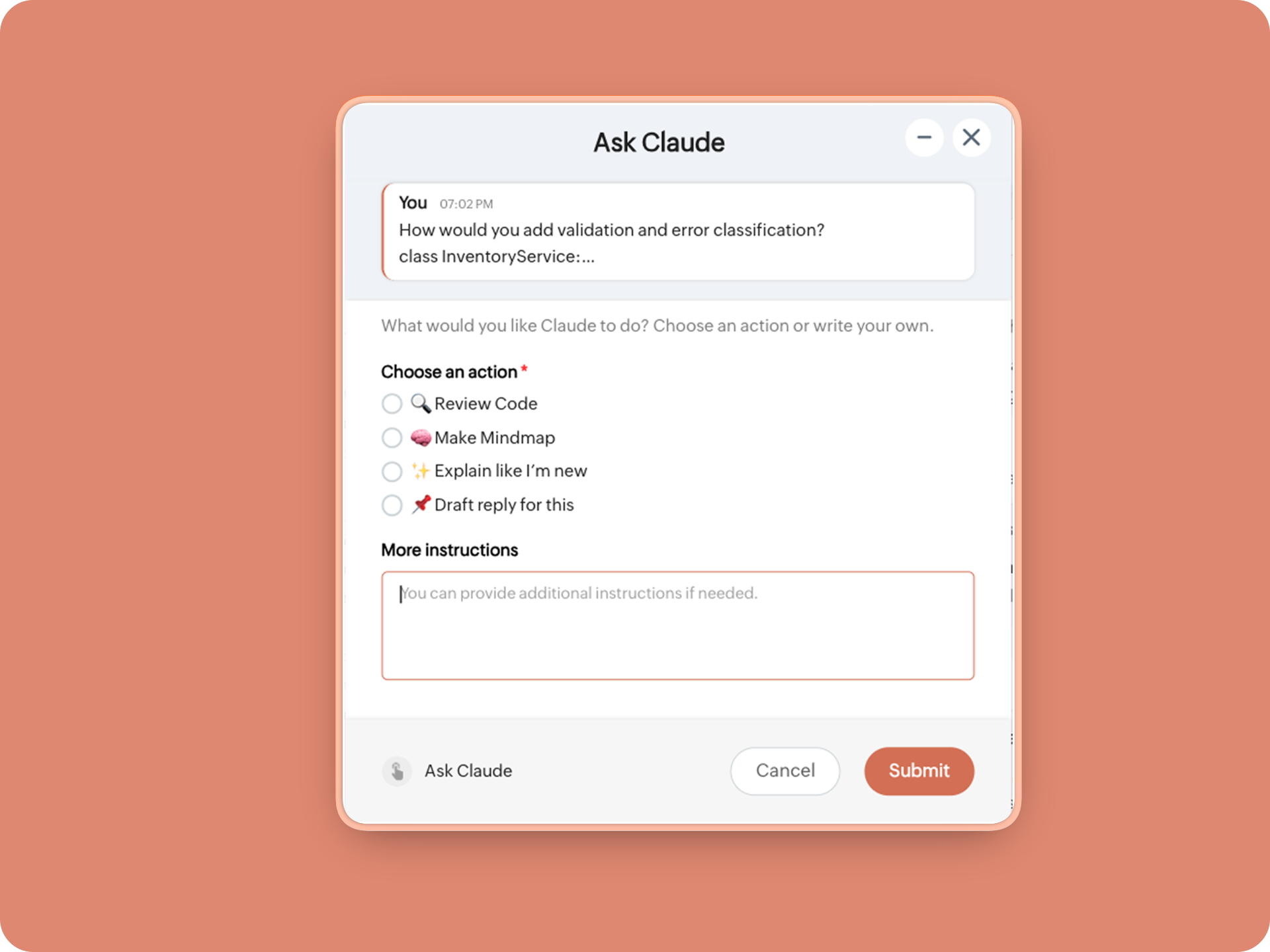
1. When executed on any message, a form opens to prompt:
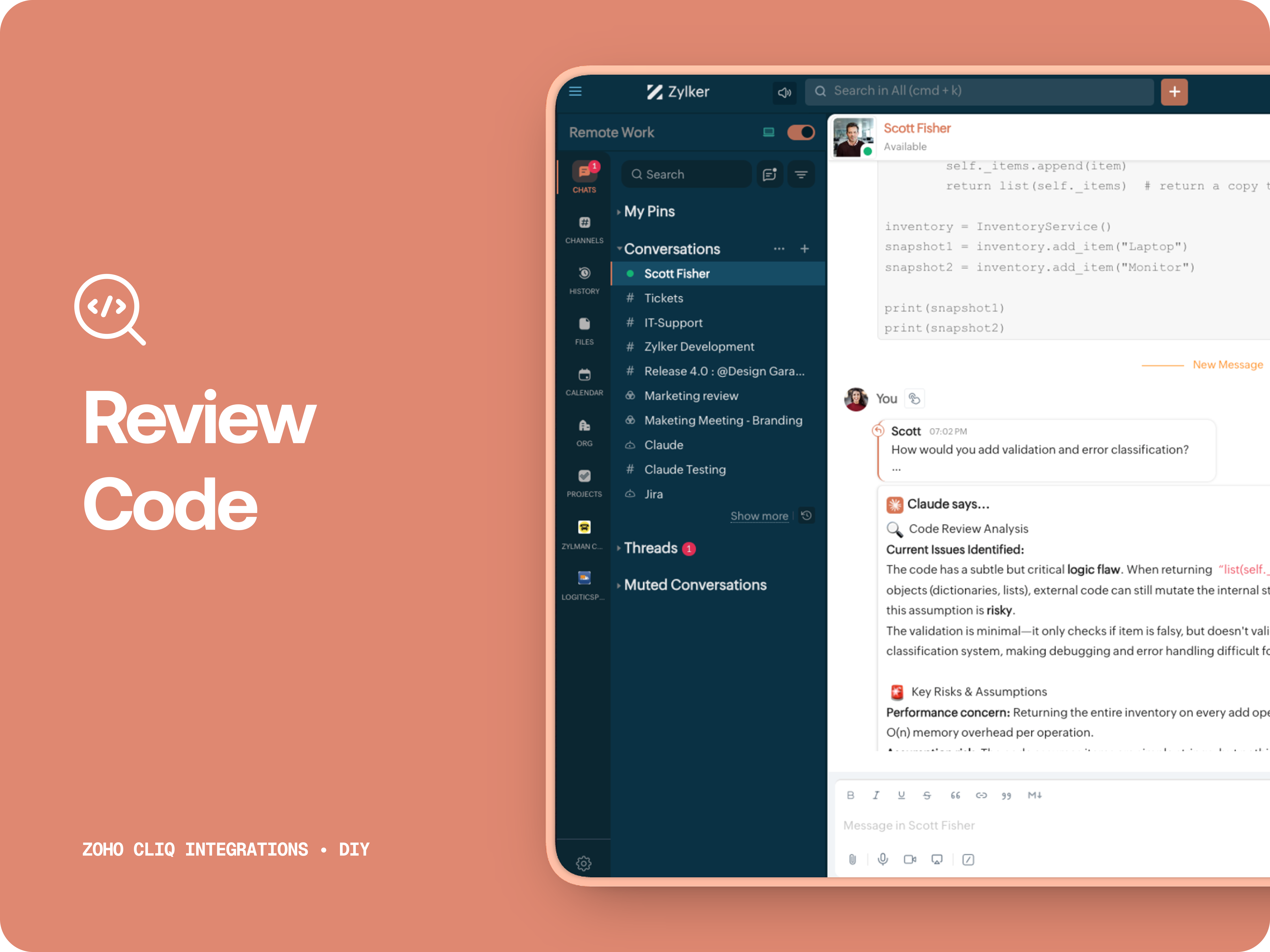
A. 🔍 Review code
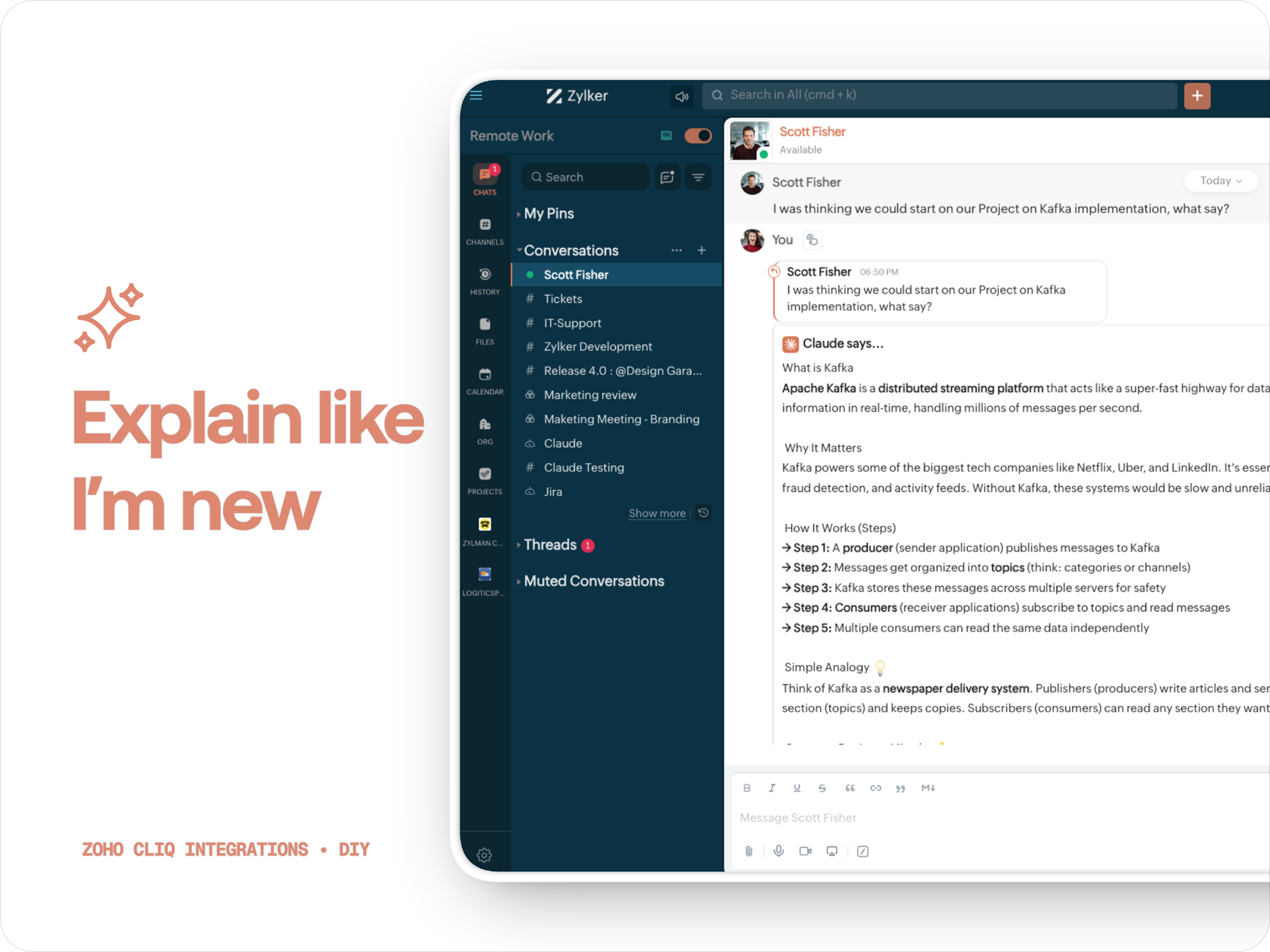
Claude teaches you what it is, why it matters, how it works, an analogy or common mistakes for any concept.
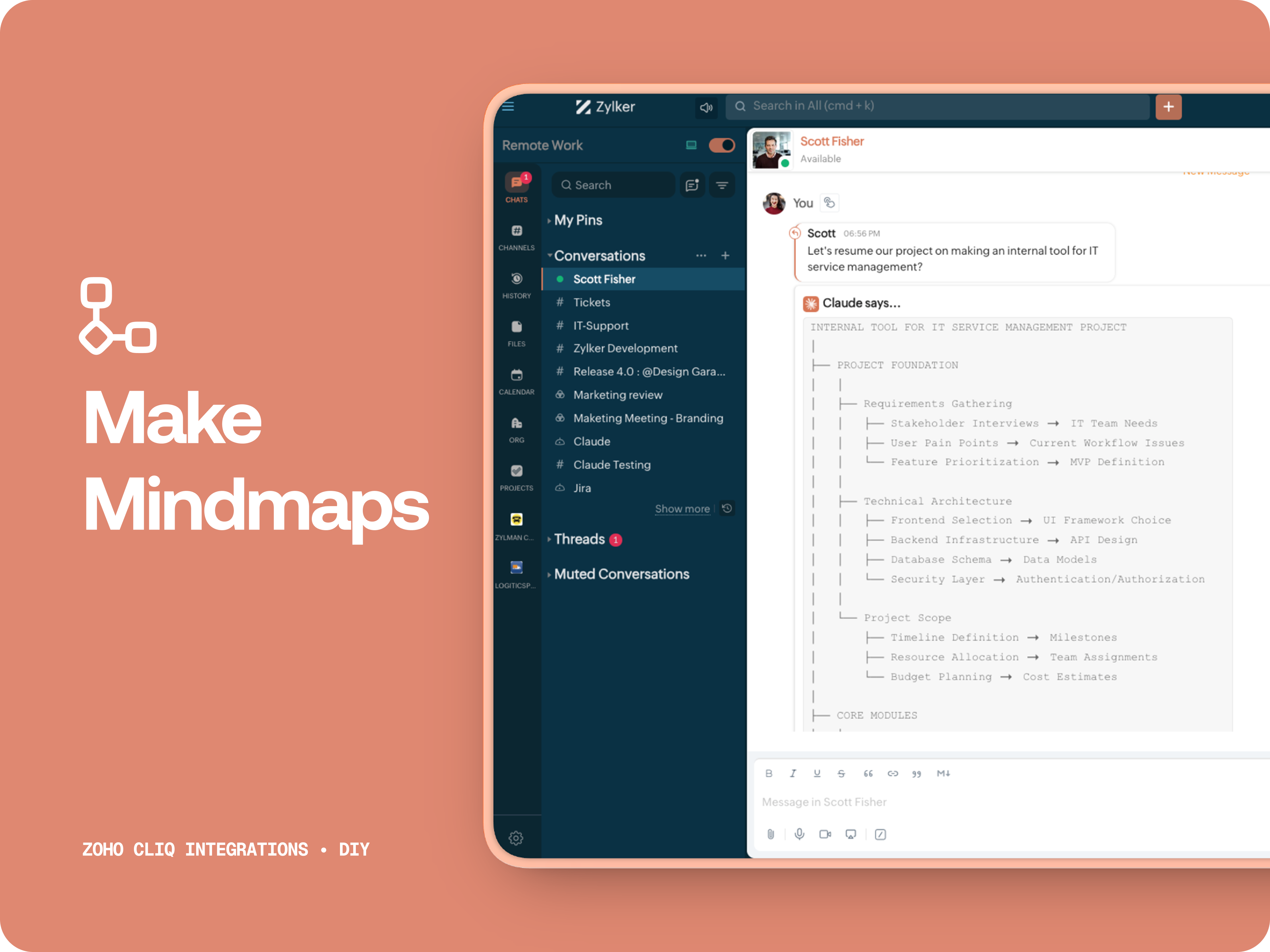
C. 🧠 Make Mindmap
Converts content into a structured ASCII flow chart for explaining system designs, feature breakdowns or general product thinking.
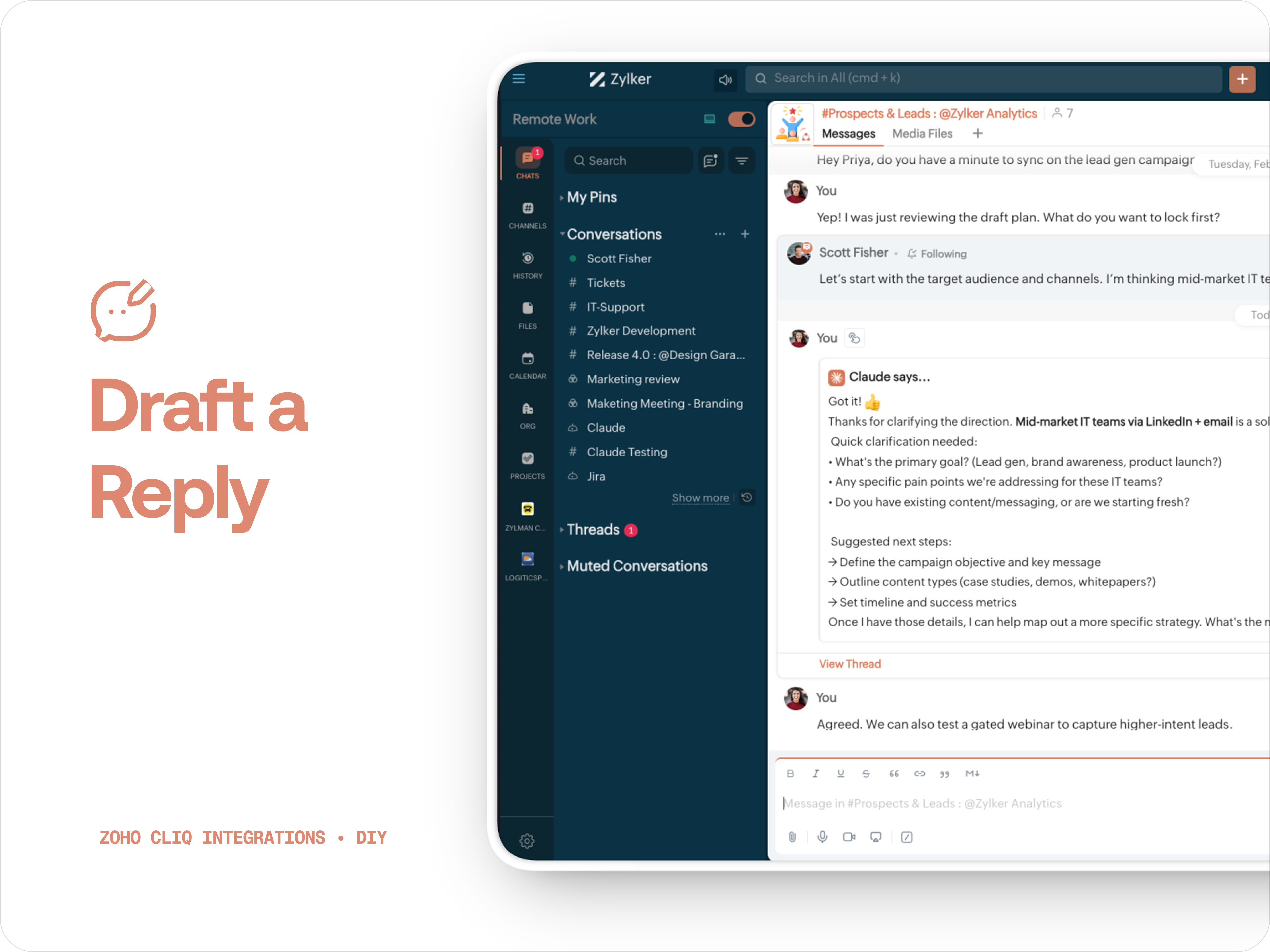
D. 📌 Draft a reply
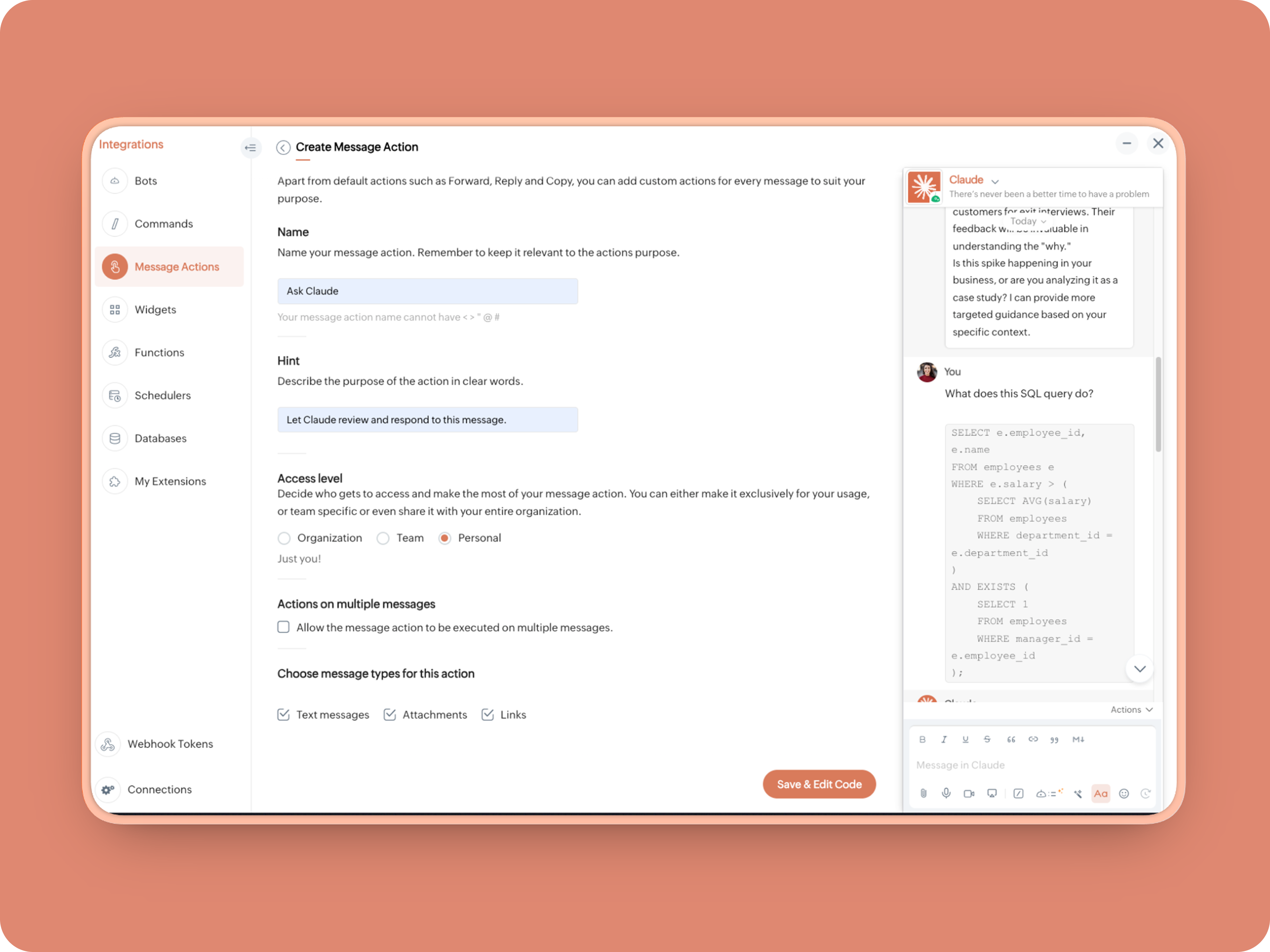
How to create:
1. Create a Message Action, name it Ask Claude and give any description of your choice.
- info message;
- returnForm = false;
- if(message.get("type") == "file")
- {
- fileType = message.get("content").get("file").get("type");
- if(fileType != "application/pdf")
- {
- return {"type":"banner","text":"Only PDF files are supported for this action","status":"failure"};
- }
- }
- inputs = list();
- inputs.add({"label":"Choose an action","name":"action","mandatory":true,"type":"radio","options":{{"value":"reviewcode","label":"🔍 Review Code"},{"value":"explainthis","label":"🧠 Make Mindmap"},{"value":"ExplainlikeImnew","label":"✨ Explain like I’m new"},{"value":"Draftreplyforthis","label":"📌 Draft reply for this"}}});
- inputs.add({"label":"More instructions","name":"additionalInstructions","placeholder":"You can provide additional instructions if needed.","min_length":"0","max_length":"500","mandatory":false,"type":"textarea"});
- return {"type":"form","title":"Ask Claude","hint":"What would you like Claude to do? Choose an action or write your own.","name":"INSERT-FUNCTION-NAME","button_label":"Submit","inputs":inputs,"action":{"type":"invoke.function","name":"INSERT-FUNCTION-NAME"}};
Form function:
1.Go to Functions → Name your function (Eg. askclaude) and add description
2. Select Form function
3. Create
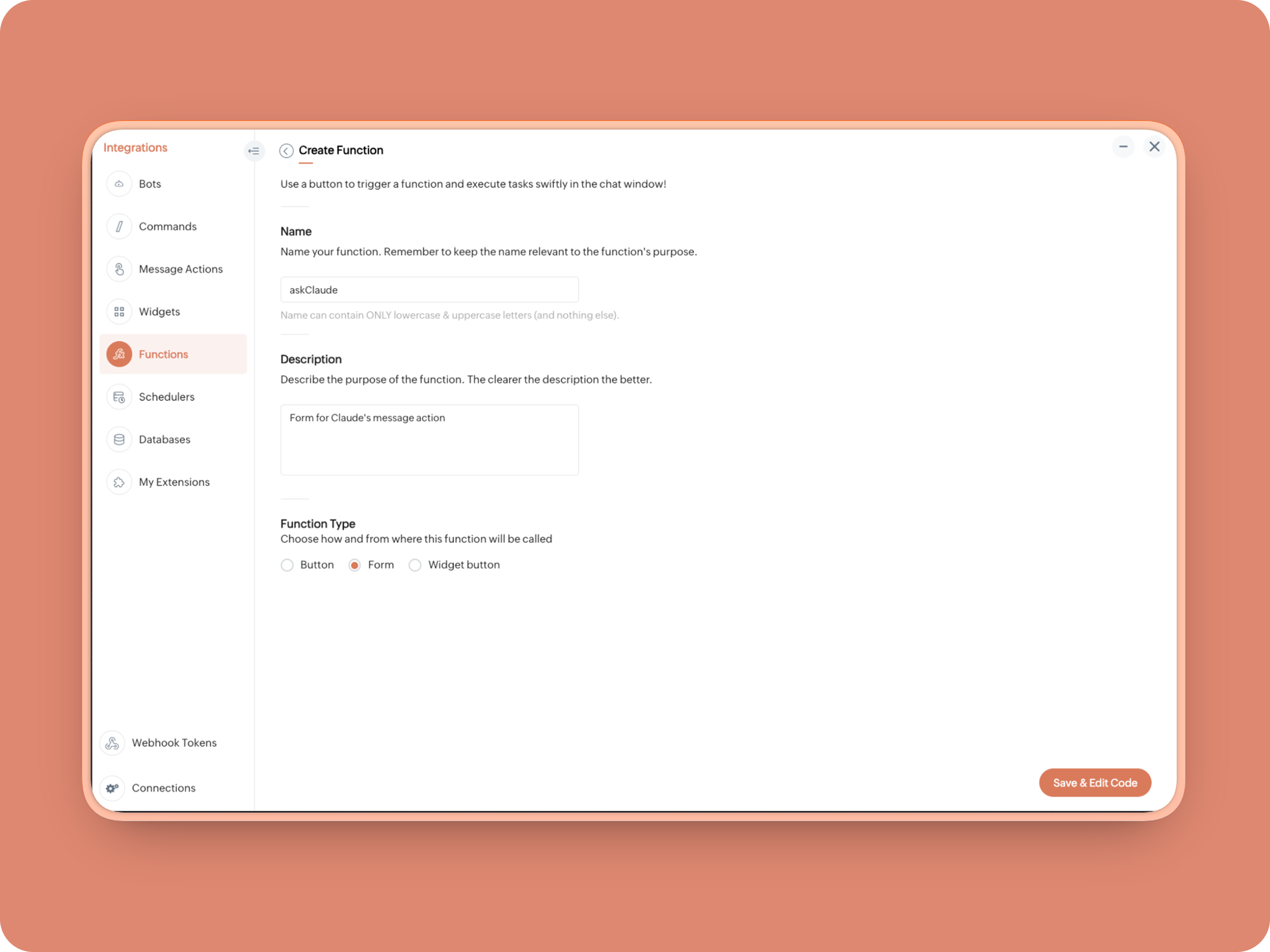
Once created, in the Form Submit Handler, paste this code:
- info form;
- info message;
- // Set up API headers
- apiHeaders = Map();
- apiHeaders.put("anthropic-version","2023-06-01");
- apiHeaders.put("Content-type","application/json");
- apiHeaders.put("ENTER-APIKEY-HERE");
- // Don't forget your API key!
- actionType = form.get("values").get("action").get("value");
- promptInstruction = "\"### Instructions ⓘ \nProvide a human-digestible, highly organized response (250-300 characters). Break down your output into bite-sized paragraphs and use bolding to guide the reader's eye. *Strictly avoid tables.* Use plenty of white space and only ### headings for a clean look. \n\n ### Formatting Protocol • \n - Bold: *text* \n - Italic: _text_ \n - Strike: ~text~ \n - Underline: __underline__ \n - Headers: ### Title \n - Quote: \"quote\" \n - Blockquote: > text \n - Bullets: Use • or → for lists \n - Emojis: Use ✨, 🚀, or 💡 to highlight key takeaways \n - Separator: --- \n\n ### and replace all ** to *";
- if(actionType == "reviewcode")
- {
- userPrompt = "🔍 You are a senior engineer. \nReview this code: \n• List bugs or logical errors \n• Note assumptions and risks \n• Suggest improvements \n• Provide corrected code \n• Explain why your version is better\n\n\n" + promptInstruction;
- }
- else if(actionType == "explainthis")
- {
- userPrompt = "🧠 You are a systems thinker. \n•Convert the input into a visual flow chart using plain text. \n•Strict Output Rules \n•Output ONLY inside a triple backtick code block \n•Do NOT use Mermaid \n•Do NOT write paragraphs \n•Do NOT explain anything \n•Do NOT use bullet lists outside structure \n•Use ASCII connectors to form a real flow chart \n•Use arrows (→, ↓, ↳, ├──, └──) to show relationships \n•Maintain clear hierarchy and spacing \n•One single root at the top \n•Logical directional flow (top → down) \n•Structure Requirements \n•Root node at top \n•First-level branches below \n•Subpoints indented \n•Cross-links if relevant \n•Clean spacing \n•No duplicated nodes \n•Required Format Example \n•MAIN IDEA \n•Branch 1 -> Subpoint -> Subpoint \n•Branch 2 -> Subpoint ->Subpoint \n•Branch 3 -> Subpoint -> Subpoint\n\n\n" + promptInstruction;
- }
- else if(actionType == "ExplainlikeImnew")
- {
- userPrompt = "✨ You are a teacher for beginners. \nExplain: \n• What it is \n• Why it matters \n• How it works (steps) \n• A simple analogy \n• One common beginner mistake\n\n\n" + promptInstruction;
- }
- else if(actionType == "Draftreplyforthis")
- {
- userPrompt = "📌 You are a professional responder. \nReply to this message: \n• Directly address main point \n• Ask for clarification if needed \n• Suggest next steps \n• Keep it concise and clear \n• Make sure message in a buisness casual tone, consise, human written.\n\n\n" + promptInstruction;
- }
- if(form.get("values").get("additionalInstructions").length() > 0)
- {
- userPrompt = userPrompt + "\n" + form.get("values").get("additionalInstructions");
- }
- // Check if message is text-only or contains a file
- if(message.get("type") == "text" || message.get("type") == "card")
- {
- // Handle text-only message
- userMessageText = message.get("text");
- requestPayload = {"max_tokens":1024,"messages":{{"content":userPrompt + "\n\n" + userMessageText,"role":"user"}},"model":"claude-sonnet-4-5-20250929"};
- }
- else
- {
- // Handle message with file attachment
- uploadedFile = invokeurl
- [
- url :"https://cliq.zoho" + environment.get("tld") + "/api/v2/files/" + message.get("content").get("file").get("id")
- type :GET
- connection:"ENTER-CONNECTION-NAME"
- ];
- info uploadedFile;
- base64EncodedFile = zoho.encryption.base64Encode(uploadedFile);
- if(message.get("content").containKey("comment"))
- {
- comment = message.get("content").get("comment");
- userPrompt = userPrompt + "\n" + comment;
- }
- else
- {
- userPrompt = userPrompt;
- }
- mediaType = message.get("content").get("file").get("type");
- mediaType = "application/pdf";
- requestPayload = {"max_tokens":1024,"messages":{{"role":"user","content":{{"type":"document","source":{"type":"base64","media_type":mediaType,"data":base64EncodedFile}},{"type":"text","text":userPrompt}}}},"model":"claude-sonnet-4-5-20250929"};
- }
- info requestPayload;
- // Make API call to Claude
- claudeApiResponse = invokeurl
- [
- url :"https://api.anthropic.com/v1/messages"
- type :POST
- parameters:requestPayload + ""
- headers:apiHeaders
- detailed:true
- ];
- // info claudeApiResponse;
- // Extract the actual text response
- if(claudeApiResponse.get("responseCode") == 200)
- {
- responseBody = claudeApiResponse.get("responseText");
- parsedResponse = responseBody.toMap();
- claudeMessage = parsedResponse.get("content").get(0).get("text").replaceAll("\n\n","\n").remove("---").remove("#");
- if(claudeMessage.length() > 4000)
- {
- claudeMessage = claudeMessage.subString(0,4000) + "...";
- }
- info "Claude's Response: " + claudeMessage;
- }
- else
- {
- responseBody = claudeApiResponse.get("responseText");
- parsedResponse = responseBody.toMap();
- claudeMessage = "*" + parsedResponse.get("error").get("type") + "* \n" + parsedResponse.get("error").get("message");
- info "API Error: " + claudeApiResponse;
- }
- responseContent = {"text":claudeMessage,"card":{"title":"Claude says...","icon":"https://uxwing.com/wp-content/themes/uxwing/download/brands-and-social-media/claude-ai-icon.png"},"reply_to":message.get("id")};
- info responseContent;
- info zoho.cliq.postToChat(chat.get("id"),responseContent);
- return Map();
When triggered: Opens a form → User selects an action → Adds additional instructions → Submits → Claude processes the selected message
What you built today is just the foundation.
Shape it around how your team actually works. Extend it to turn discussions into action items, review PRs before they’re merged, generate standup updates, extract tasks automatically, or create knowledge snippets from resolved threads.
Start with one real pain point. Solve it well. Then layer more intelligence on top.
The structure is already there. The possibilities are yours.
🔗 Explore Zoho Cliq: Developer Platform
🔗 Explore Anthropic API Docs
Topic Participants
Riya Raghunath
Sticky Posts
Add Claude in Zoho Cliq
Let’s add a real AI assistant powered by Claude to your workspace this week, that your team can chat with, ask questions, and act on conversations to run AI actions on. This guide walks you through exactly how, step by step, with all the code you'll need.Cliq Bots - Post message to a bot using the command line!
If you had read our post on how to post a message to a channel in a simple one-line command, then this sure is a piece of cake for you guys! For those of you, who are reading this for the first time, don't worry! Just read on. This post is all about howAutomating Employee Birthday Notifications in Zoho Cliq
Have you ever missed a birthday and felt like the office Grinch? Fear not, the Cliq Developer Platform has got your back! With Zoho Cliq's Schedulers, you can be the office party-cipant who never forgets a single cake, balloon, or awkward rendition ofAutomate attendance tracking with Zoho Cliq Developer Platform
I wish remote work were permanently mandated so we could join work calls from a movie theatre or even while skydiving! But wait, it's time to wake up! The alarm has snoozed twice, and your team has already logged on for the day. Keeping tabs on attendanceCustomer payment alerts in Zoho Cliq
For businesses that depend on cash flow, payment updates are essential for operational decision-making and go beyond simple accounting entries. The sales team needs to be notified when invoices are cleared so that upcoming orders can be released. In contrast,
Recent Topics
ISO 27001 Compliance
What are people doing to ensure ISO 27001 compliance for their Zoho environments? It would make sense for Log360 Cloud to integrate natively with the Zoho suite, but that is not the case. It requires a gateway cluster, which is not an option for a fullyZoho People - Retrieve the Leave Details - get("LeaveCount")
Hi, Zoho People I need to collect all of an employee's leave requests for the calendar year and check how many half-days they have taken. If I run the script on the query he just modified, I can retrieve the information related to that query and use theWhat's new in Zoho Sheet: Simplify data entry and collaboration
Hello, Zoho Sheet community! Last year, our team was focused on research and development so we could deliver updates that enhance your spreadsheet experience. This year, we’re excited to deliver those enhancements—but we'll be rolling them out incrementallyMarketer's Space: New to Campaigns? Some common early mistakes that might occur
Hello Marketers, Welcome back to another post in Marketer's Space. If you're just getting started with Zoho Campaigns, things can feel exciting and slightly confusing at the same time. You're not alone. Most early frustrations come from setup gaps ratherThis user is not allowed to add in Zoho. Please contact support-as@zohocorp.com for further details
Hello, Just signed up to ZOHO on a friend's recommendation. Got the TXT part (verified my domain), but whenever I try to add ANY user, I get the error: This user is not allowed to add in Zoho. Please contact support-as@zohocorp.com for further details I have emailed as well and writing here as well because when I searched, I saw many people faced the same issue and instead of email, they got a faster response here. My domain is: raisingreaderspk . com Hope this can be resolved. Thank youWorkflow Rule - Field Updates: Ability to use Placeholders
It will be great if you can use placeholder tags to update fields. For example if we want to update a custom field with the client name we can use ${CONTACT.CONTACT_FIRSTNAME}${CONTACT.CONTACT_LASTNAME}, etcNeed a Universal Search Option in Zohobooks
Hello Zoho, Need a Universal Search Option in Zohobooks to search across all transactions in our books of accounts. Please do the needful ThanksImplement Date-Time-Based Triggers in Zoho Desk
Dear Zoho Desk Support Team, We are writing to request a new feature that would allow for the creation of workflows triggered by specific date-time conditions. Currently, Zoho Desk does not provide native support for date-time-based triggers, limitingWhy is my Lookup field not being set through Desk's API?
Hello, I'm having trouble setting a custom field when creating a Ticket in Zoho Desk. The endpoint I'm consulting is "https://desk.zoho.com/api/v1/tickets" and even though my payload has the right format, with a "cf" key dedicated to all custom fields,How exactly does "Reply assistance" work in Zoho Desk? What context is sent to the LLM?
Hi, Im trying to better understand the technical behavior of the feature "Reply assistance" in Zoho Desk, and I couldn’t find detailed information in the current documentation. Specifically, I have questions about what data is actually being sent to theDeletion Workflows
Hello, Unless I missed it, we can't create deletion workflows. My usecase is to auto-delete junk leads. We have field called lead status, and an agent qualify all our new leads. When it's a junk lead she chose the correspondant value in the picklist. My goal is that the system delete them automatically. Is that possible? Planed ?URGENTImpossible to book an appointement
J'essaie plusieurs fois mais aucun créneau n''est disponible Message d'erreur lorsque j'essaie de sélectionner une dateSendpulse SMTP/IMAP Issues
It’s possible Zoho made some changes on their side. Sometimes, even if your regular password works, Zoho requires an app-specific password for external apps like SendPulse to connect via IMAP. You can create this in Zoho’s security settings and use itInsane mail security
I cannot access my email... anywhere. For some reason the password for the Mail app on my Mac is being rejected, it worked yesterday but now it doesn't? Ok let's try the web interface. I can access my general Zoho login with the password but if I wantUI issue with Organize Tabs
When looking at the organize Tabs window (bellow) you can see that some tabs are grayed out. there is also a "Add Module/Web Tab" button. When looking at this screen it's clear that the grayed out tabs can not be removed from the portal user's screenTask list flag Internal/External for all phases
Phases are commonly used in projects to note milestones in the progression of a project, while task lists can be used to group different types of tasks together. It makes sense to be able to define a task list as either internal or external however theHAVING PROBLEM WITH SENDING EMAIL
Hi all, I'm unable to receive emails on info@germanforgirls.eu. I'm getting an error code 550. 5.1.1. invalid email recipients. Moreso, I would like info@germanforgirls.eu to be the default "send from" email and not solomon@germanforgirls.eu. Kindly seeSharing my portal URL with clients outside the project
Hi I need help making my project public for anyone to check on my task. I'm a freelance artist and I use trello to keep track on my client's projects however I wanted to do an upgrade. Went on here and so far I'm loving it. However, I'm having an issue sharing my url to those to see progress. They said they needed an account to access my project. How do I fix this? Without them needing an account.Different Task Layouts for Subtasks
I was wondering how it would be possible for a subtask to have a different task layout to the parent task.Subscription went to default (@zoho.com) address instead for custom domain
Hello! So I bought a lite sub to test things out, wanting to use my own domain. However, after passing through all the verification steps (completed now), it seems that the sub I bought was assigned to the default email that I already had with Zoho andCanvas templates and font-family
i dont understant why its always the smallest things that waste all of my time! why in some videos i see they have tamplates in the Canvas editor and i cant seem to fint it? and why oih why cant i cange the font? i just want simple Arial! help meeeeeeeeeeRe: Ca.gory groups and not all email addresses being added to a group emails
Hi, I have added emails under 'Contacts' into categories but when sending a group email and putting the category name in not all email addresses go onto the email. I have refreshed the page, deleted and redone the info etc with no luck. I only found outIMPORTANT
Dear Zoho Support Team, I am currently experiencing an issue when trying to send emails from my Zoho Mail account. Each time I attempt to send a message, I receive the following error: "Unable to send message; Reason: 554 5.1.8 Email Outgoing Blocked."Able to Send Emails from Zoho but Not Receiving Emails from Gmail
Hello, I am experiencing an issue with my shopify domain email setup and would appreciate your help. Current situation: I can successfully send emails using Zoho. I can receive emails from some services (for example, Facebook). However, I cannot receiveAntispam validation failed for your domain in Accounts
I tried adding a domain to zeptomail.zoho.com, but the “add domain” operation failed. The front‑end error reads: “Domain could not be added. Please contact support@zeptomail.com.” The back‑end API returned: ``` { "error": { "code": "TM_3601", "details":Announcing new features in Trident for Windows (v.1.38.5.0)
Hello Community! Trident for Windows just received a major update, with a range of capabilities that focuses on strengthening and enhancing communication. Let’s dive into what’s new! View complete technical email details. For those who need deeper visibilityWindows Desktop App - request to add minimization/startup options
Support Team, Can you submit the following request to your development team? Here is what would be optimal in my opinion from UX perspective: 1) In the "Application Menu", add a menu item to Exit the app, as well as an alt-key shortcut for these menusAccounting of Amazon
I have recently started selling on Amazon.in and I am facing issues with different types of transactions: What entry to do in case of return? If I had sent two products and customer returned both the products but I had received only one and got the claimCompose Emails Faster Using Templates and Snippet
Hello everyone, We have made an enhancement to the Send as Email option in Tickets. Agents can use templates and snippets to draft their response, which helps save time and maintain consistency. The Send as Email page will display the available templatesCustomize Colors used on graphs and charts according to users desire.
It would be great if we could customize the graph's colors as we see fit. I hate that yellow is always the default color!Emails not integrating
My emails from Hubspot did not integrtate over. How do I fix that?Creating meetings from an email
Hi. Similar to Outlook, it would be helpful if a meeting can be scheduled from an email so that the attendees need not be manually entered every time it's created.Zoho Social API for generating draft posts from a third-party app ?
Hello everyone, I hope you are all well. I have a question regarding Zoho Social. I am developing an application that generates social media posts, and I would like to be able to incorporate a feature that allows saving these posts as drafts in Zoho Social.CRM Percent custom fields: When will it show the % symbol and behave like %?
1. Actually Percent custom fields fail to show the % symbol. 2. When in formulas Percent fields work like number: 100 x 5% = 5 ideal world 100 x 5% = 500 what happens actually 3. When importing Percent fields the % symbol has to be removed and the dataDeprecation of the Zoho OAuth connector
Hello everyone, At Zoho, we continuously evaluate our integrations to ensure they meet the highest standards of security, reliability, and compliance. As part of these ongoing efforts, we've made the decision to deprecate the Zoho OAuth default connectorRouteIQ for Zoho FSM
Beste, Zou wel top zijn dat we een RouteIQ hebben voor FSM aangezien we constant moeten zien wat de beste route is voor onze monteurs. Nu moeten we een speciale aparte programma hebben om de beste route te berrekenen voor onze monteurs aangezien de planningLet us view and export the full price books data from CRM
I quote out of CRM, some of my clients have specialised pricing for specific products - therefore we use Price Books to manage these special prices. I can only see the breakdown of the products listed in the price book and the specialised pricing forChanges to the send mail Deluge task in Zoho CRM
Hello everyone, At Zoho, we continuously enhance our security measures to ensure a safer experience for all users. As part of our ongoing security enhancements, we're making an important update on using the send mail Deluge task in Zoho CRM. What's changing?How to Invoice Based on Timesheet Hours Logged on a Zoho FSM Work Order
Hi everyone, We’re working on optimizing our invoicing process in Zoho FSM, and we’ve run into a bit of a roadblock. Here’s our goal: We want to invoice based on the actual number of hours logged by our technicians on a job, specifically using the timesheetsInclusion is the new engagement
When in a very challenging situation, you may have peers or friends around you saying, “Everything will be okay.” They speak to you in a way that they are connected or in a language or tone that feels close. But your inner voice comes to you in a trulyNext Page