Announcing DataPrep 2.0 Beta!

Being data-driven is an important end goal for all organizations, because when businesses can manage, analyze, and make actionable decisions based on data, they have a competitive advantage.
With that said, how confident are you in making business decisions based on your business data? How clean is your CRM data? Or how much time is spent on manual data cleansing and preparation?
To help you solve these problems, we're pleased to announce the release of the DataPrep 2.0 public beta! With this new version, it's now even easier to build an end-to-end pipeline and have complete control over the quality and movement of your data.
What's new in 2.0?

Visual pipeline builder
The all-new pipeline canvas lets you design a seamless end-to-end data flow. Earlier, you were limited to working with a single dataset at a time—but now data can be fetched from multiple sources, more than one dataset can be prepared and used simultaneously, and the data can be exported to multiple destinations. This helps businesses visualize data flows better, simplify complex workflows, and work with data with more confidence.
Unified scheduling of end-to-end pipelines
A massive upgrade has been made to our scheduling feature. In DataPrep 1.0, the sources and destinations had separate schedules which had to be manually managed by staggering the schedule timing, which was hard. But with 2.0, the scheduling can now be set up at the pipeline level. A single unified schedule can be used to manage imports, processing, and exports for all sources and destinations within the pipeline.
Monitor jobs with ease
With automated pipelines, data transfer happens around the clock. Sometimes, there can be issues with fetching data, and the data transfer can fail. But with jobs, you can easily monitor failed jobs with granular details and identify the points of failure. This ensures your organization doesn't miss out on any valuable data.
Comprehensive version history
Maintain a complete audit trail with version history. Working with data can be challenging; but with the help of this feature, you can easily track changes and run experiments to get more out of your data. Not happy with your experimental changes to data? Easily switch back to the previously published version with the click of a button.
Backfill your data effortlessly
There can be outages in the data pipeline, this can be due to source or destination failure, changes in the data or model requiring changes in the preparation steps, and can take a while to be restored. However there is no easy way to catch up on processing the data during the outage, to solve this we are now introducing the Backfill feature. The backfill feature can be used to fetch data and simulate a scheduled process for a selected period of time. For example, if there was an outage of 2 days on a pipeline that was setup to run every hour. With backfill, you can now create a configuration to process all that data by simulating the schedule process for the missed two days, this will create 48 new jobs that will run in sequence and process the missed data for two days.
Efficient row processing with incremental fetch
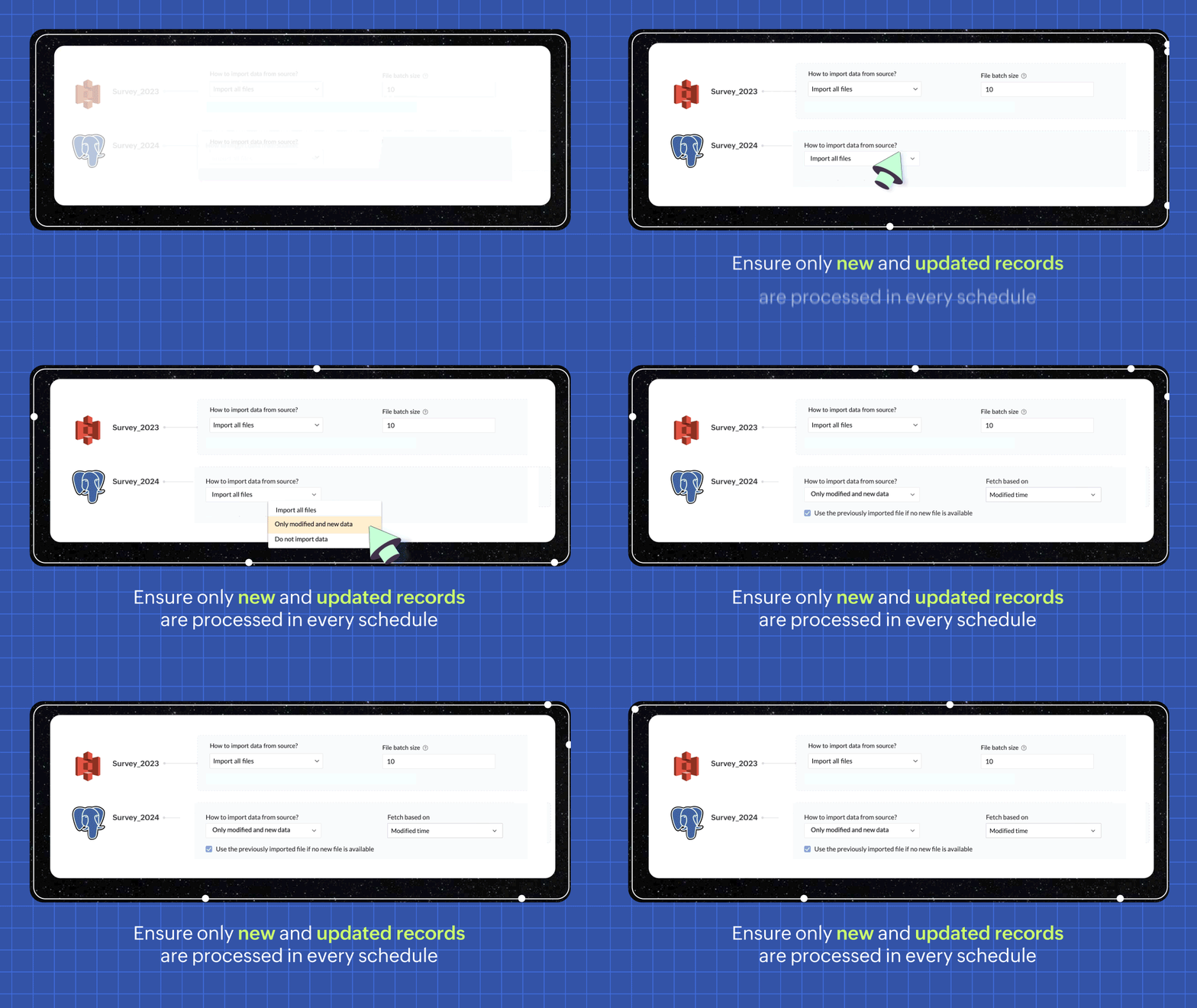
In every scheduled run, choosing the incremental fetch option fetches only the new and updated data from the source for processing. This was available for few sources in 1.0, but we're expanding the support to all data sources in 2.0. Incremental fetch job runs faster, compared to full fetch as only the newly added rows are processed, also making it more cost effective.
Transforms made simple with OpenAI
Our new transforms, powered by OpenAI, help generate complex formulas based on logic written in simple English or transform data based on the sample output given. This simplifies the data preparation process and makes Zoho DataPrep more accessible, even for organizations that don't have a dedicated data analyst team.

Create instant pipelines with templates
We built DataPrep with a vision of helping businesses, big or small, have better access to all their business data—but we understand that the data game can be tricky when you're starting out.
To keep our vision alive and to help everyone start using their business data better, we've built a template gallery based on various business use cases that can easily be used to create a pipeline architecture. Just click on the template to add the formula instantly and transforms needed for the data workflow.
You can also save your own data pipelines as templates to make recreating pipelines easier or to apply the data pipeline over a different set of data. You can also share the data pipelines with your organisation or export them as files to share across different organisations.

New dashboard showcasing your pipeline status
Our new and improved dashboard shows the status of all your pipelines instantly. Easily monitor your scheduled runs, identify failed jobs, and ensure your data is up-to-date in your system.

Make data movement easier with other business applications
We are expanding the list of data connectors supported in Zoho DataPrep and as a start we have released the Zoho Creator integration.

Migrating data into Zoho Creator, as well as seamlessly moving data between various modules within your custom Creator app, has been made easy with DataPrep.
As more organizations are adopting SaaS products in their tech stack, in order to make data more available, we're opening up integrations with HubSpot, Salesforce, and SurveyMonkey, as well as many more Zoho products, in the next couple of months. Stay tuned for more data connectors in Zoho DataPrep!
Can't wait to try DataPrep 2.0?
All our existing customers can access the Beta version right from within their DataPrep home page. The Beta is not available for Zoho One users yet, but if you want to try out the Beta on a standalone account, contact us at customersuccess@zohodataprep.com
Zoho DataPrep is designed to make data preparation and movement easy. With DataPrep 2.0, we have completely revamped our product with the new pipeline builder, unified schedules, pipeline templates and universal incremental fetch that lets you easily manage complex data preparation jobs and data movement. We've also included 50+ other updates to help you clean, prepare, and monitor your business data effortlessly.
Check out all updates in 2.0
Check out all updates in 2.0
Topic Participants
Viswanath Subramani SS
Ben Norman
SaaSguru
Sticky Posts
Announcement: Zoho DataPrep to Deprecate Password-Only Authentication for Snowflake Connections on July 31, 2025
As part of our ongoing commitment to security and in alignment with Snowflake's pledge to the Cybersecurity and Infrastructure Security Agency (CISA) Secure by Design initiative, Zoho DataPrep will no longer support single-factor password authentication.Announcement: Zoho DataPrep 1.0 will be deprecated on April 15, 2026
We'd like to inform you that the Zoho DataPrep 1.0 version will be officially deprecated as of April 15, 2026. This aligns with our efforts to streamline and improve your overall experience with Zoho DataPrep 2.0 which was released in Sep 2024 . To ensureAnnouncement: Migrate your workspaces to Zoho DataPrep 2.0
Zoho DataPrep 2.0 was recently launched with exciting new updates to the platform. You can read more about the new updates in the previous announcement. To take full advantage of the new data pipeline features, migrate your existing workspaces from theAnnouncing Zoho DataPrep 2.0: An AI-Powered Data Management Platform
Originally launched in 2021, Zoho DataPrep started as an efficient self-service data preparation solution. We are excited to launch our new version 2.0, with significant enhancements to our platform to help you manage your end-to-end data needs with theAnnouncing DataPrep 2.0 Beta!
Being data-driven is an important end goal for all organizations, because when businesses can manage, analyze, and make actionable decisions based on data, they have a competitive advantage. With that said, how confident are you in making business decisions
Recent Topics
Convert Lead Automation Trigger
Currently, there is only a convert lead action available in workflow rules and blueprints. Also, there is a Convert Lead button available but it doesn't trigger any automations. Once the lead is converted to a Contact/Account the dataset that can be fetchedI'm getting this error when I try to link an email to a deal inside the Zohomail Zoho CRM extension.
When I click "Yes, associate," the system displays an "Oops!! Something went wrong" error message. I have attached a screenshot of the issue for reference.Zoho Sheet - Desktop App or Offline
Since Zoho Docs is now available as a desktop app and offline, when is a realistic ETA for Sheet to have the same functionality?I am surprised this was not laucned at the same time as Docs.ZOHO add-in issue
I cannot connect ZOHO from my Outlook. I am getting this error.Marketing Automation
L.S. Marketing Automation is and has always been part of the Zoho One bundle - according to the information provided on the Zoho Website. Why when I open Marketing Automation do I get the following message?: "Your trial has expired. We hope you enjoyedWhat's New in Zoho Analytics - January 2026
Hello Users! We are starting the year with a strong lineup of updates, marking the beginning of many improvements planned to enhance your analytics experience. Explore the latest improvements built to boost performance, simplify analysis, and help youTranslation from Chinese (Simplified) to Chinese (Traditional) is not working. It randomly translated. Google Translate accurately but zoho translate is not working at all
Hi friends, The newly added language for translation. https://www.zoho.com/deluge/help/ai-tasks/translate.html "zh" - Chinese "zh-CN" - Chinese (Simplified) "zh-TW" - Chinese (Traditional) my original text: 郑这钻 (and it is zh-CN) translated traditionalThe Social Playbook - January edition: Getting started with content creation
Social media isn’t just about posting some random content. It’s about why certain content works, how brands stand out, and what makes people pause mid-scroll. The Social Playbook is a monthly community series where we break all of that down. Through realSupport for Custom Fonts in Zoho Recruit Career Site and Candidate Portal
Dear Zoho Recruit Team, I hope you're doing well. We would like to request the ability to use custom fonts in the Zoho Recruit Career Site and Candidate Portal. Currently only the default fonts (Roboto, Lato, and Montserrat) are available. While theseAdding bank details to the contact through API
How to add bank-related information to the contact while creating it using API? The account number needs to be encrypted before sending it through API but not sure how to encrypt and get those values. Please guide me in this.Font breakage in Zoho Mail Desktop Lite application for Mac
Dear Zoho Mail and Workplace Community, With the latest update of macOS Sequoia and macOS Tahoe, there has been font breakages in the email preview of Zoho Mail Desktop Lite application for Mac. This breakage is due to the corruption of the System fontsFeature request - image resizing on sales orders
I need to be able to show the items on the sales orders, currently the item image shows really small and no way to resize it, need the ability to make the image larger to showcase the product on the pdfsNueva edición de "Ask The Expert" en Español Zoho Community
¡Hola Comunidad! ¿Te gustaría obtener respuestas en directo sobre Zoho CRM, Zoho Desk u otra solución dentro de nuestro paquete de CX (Experiencia del Cliente? Uno de nuestros expertos estará disponible para responder a todas tus preguntas durante nuestraAutomation Series: Auto-Notify External Users on Issue Closure
Hello Folks! In Zoho Projects, you can notify external issue reporters via email when an issue is marked as Closed. This helps the users avoid manual follow-ups and keeps the reporter updated. In this post, we’ll walk through a simple setup using a WebTurn chat conversations into real action with Integration Blocks in Guided Conversations
When a Guided Conversation fails, it's usually not because the logic is wrong. They fail because the conversation stops moving. A customer starts a chat with a clear goal: report an issue, check a status, or confirm something. At first, the flow doesBasic Mass Update deluge schedule not working
I'm trying to create a schedule that will 'reset' a single field to 0 every morning - so that another schedule can repopulate with the day's calculation. I thought this would be fairly simple but I can't work out why this is failing : 1) I'm based inclick to call feature
I've Zoho CRM and in that i want click to call feature.Can the Product Image on the Quote Template be enlarged
Hello, I am editing the Quote Template and added ${Products.Product Image} to the line item and the image comes up but it is very tiny. Is there anyway that you can resize this to be larger? Any help would be great! ThanksCreating Parent Child relationship in Accounts
We have customers with multiple locations, I setup the HQ as an account, then I setup the different sites marking the HQ as the parent to that location. If I then do a Deal for one of the locations, is there a way to show by looking at the parent accountLearner transcript Challenges.
Currently i am working on a Learner Transcript app for my employer using Zoho Creator. The app is expected to accept assessment inputs from tutors, go through an approval process and upon call up, displays all assessments associated with a learner inClient and Vendor Portal
Some clients like keeping tabs on the developments and hence would like to be notified of the progress. Continuous updates can be tedious and time-consuming. Zoho Sprints has now introduced a Client and Vendor Portal where you can add client users andneed a packing list feature
In our business, goods listed on an invoice are packed in separate boxes and shipped off. for e.g. an invoice may have 10 items. each item could then be packed in different boxes depending on qty of each item. this packing list is as important as the invoice for purposes of shipping documents. Request you to add this feature asap.Recording the deducted TDS on advance received from Customer (Zoho Books India)
Hi, How can we record the tds that has been deducted by my customer for the advance that he has paid to me. 1) My customer has paid Rs 10000 to me as advance (Rs 9800 as cash and deducted Rs 200 as TDS). I am not able to record the tds that has been deducted#7 Tip of the week: Delegating approvals in Zoho People
With Zoho People, absences need not keep employees waiting with their approval requests. When you are not available at work, you can delegate approvals that come your way to your fellow workmate and let them take care of your approvals temporarily. Learn more!Admin Tip: Manage sub-domain emails using sub-domain stripping
As an admin, you may need separate domains for different departments such as sales, support, and marketing. While this approach offers flexibility, creating and managing multiple domains can quickly become overwhelming, especially since each domain requiresQuick Copy Column Name
Please add the ability to quickly copy the name of a column in a Table or Query View. When you right-click the column there should be an option to copy the name, or if you left-click the column and use the Ctrl+C keyboard shortcut it should copy theAbility to Edit YouTube Video Title, Description & Thumbnail After Publishing
Hi Zoho Social Team, How are you? We would like to request an enhancement to Zoho Social that enables users to edit YouTube video details after the video has already been published. Your team confirmed that while Zoho Social currently allows editing theHow do I remove a data source from Zoho Analytics?
I am unable to find a delte option on a datasource that i put in the system as an error. On teh web it refers to a setup icon but I do not see that on my interface?Add Employee Availability Functionality to Zoho People Shift Module
Hello Zoho People Product Team, Greetings and hope you are doing well. We would like to submit a feature request to enhance the Zoho People Shift module by adding employee availability management, similar to the functionality available in Zoho Shifts.Bigin, more powerful than ever on iOS 26, iPadOS 26, macOS Tahoe, and watchOS 26.
Hot on the heels of Apple’s latest OS updates, we’ve rolled out several enhancements and features designed to help you get the most from your Apple devices. Enjoy a refined user experience with smoother navigation and a more content-focused Liquid GlassIs Desk Down?
Across department - always an error. [Status Mode] - error [Table View and the rest] - workingHow do I change the wording of the tile of SignForm?
When my user opens a SignForm url, the title that is presented is always "SignForm signer Information" and a form is displayed asking for the username and email address. This can be confusing to the end user. How can I change the title at least (Or atHow to link tickets to a Vendor/Vendor Contact (not Customer) for Accounting Department?
Hi all, We’re configuring our Accounting department to handle tickets from both customers and vendors (our independent contractors). Right now, ticket association seems to be built around linking a ticket to a Customer / Customer Contact, but for vendor-originatedAutomatic Matching from Bank Statements / Feeds
Is it possible to have transactions from a feed or bank statement automatically match when certain criteria are met? My use case, which is pretty broadly applicable, is e-commerce transactions for merchant services accounts (clearing accounts). In theseUnify Overlapping Functionalities Across Zoho Products
Hi Zoho One Team, We would like to raise a concern about the current overlap of core functionalities across various Zoho applications. While Zoho offers a rich suite of tools, many applications include similar or identical features—such as shift management,Automation #7 - Auto-update Email Content to a Ticket
This is a monthly series where we pick some common use cases that have been either discussed or most asked about in our community and explain how they can be achieved using one of the automation capabilities in Zoho Desk. Email is one of the most commonlyTicket to article and Ticket to template
Hello! I would like to know if it is possible (and how) to do the following actions: 1. To generate an article from a ticket (reply + original message) 2. Easy convert an answer to an email templateIs there API Doc for Zoho Survey?
Hi everyone, Is there API doc for Zoho Survey? Currently evaluating a solution - use case to automate survey administration especially for internal use. But after a brief search, I couldn't find API doc for this. So I thought I should ask here. ThanKaizen #225 - Making Query-based Custom Related Lists Actionable with Lookups and Links
Hello everyone! Welcome back to another post in the Kaizen series! This week, we will discuss an exciting enhancement in Queries in Zoho CRM. In Kaizen #190, we discussed how Queries bridge gaps where native related lists fall short and power custom relatedWebDAV / FTP / SFTP protocols for syncing
I believe the Zoho for Desktop app is built using a proprietary protocol. For the growing number of people using services such as odrive to sync multiple accounts from various providers (Google, Dropbox, Box, OneDrive, etc.) it would be really helpfulNext Page