Enhancements to finance suite integrations

Update on the migration (October 28, 2025):
Starting this week (October 29 tentatively), we’ll begin migrating Zoho CRM users to Zoho Books as integration users. This means actions will now run under each user’s own Zoho Books access, instead of the admin’s.
As an admin, you can also choose to migrate users early from the Integration Settings page in Zoho CRM.

(Refer to the announcement for details).

Update:
Based on your feedback, we’ve updated the capabilities for integration users. In addition to the Estimates module, they can now create, view, and edit records in all the finance modules including Sales Order, Invoices, Purchase Order.
We're also running a migration and all existing users who have migrated already will receive an email once this change goes live.
Last modified on: May 15, 2025
Last modified on: May 15, 2025

Please note that Zoho Subscriptions is now Zoho Billing.
Hello everyone!
We're delighted to announce some enhancements we've recently made to the finance suite integration with Zoho CRM. These improvements focus primarily on two major integrations:
- Zoho Books
- Zoho Subscriptions
We've implemented these updates carefully based on the valuable feedback we've received to ensure that the user experience is smoother. So without further ado, let's dive into the details!
Enhancements to the Zoho Books integration
We've refined some of the integrated features between Zoho CRM and Zoho Books to address previous challenges and enhance user interactions.
What were the challenges?
- Users were unable to send emails using their email addresses.
- Zoho Books sometimes generated inaccurate reports during audits because records created from Zoho CRM weren't being updated with the correct user names in Zoho Books.
- User-level permissions, field-level permissions and processes such as the Approval process in Zoho Books weren't being properly handled in Zoho CRM.
- Users who did not have proper authorization to use Zoho Books were able to create transactions from CRM by using admin's permissions.
All of these challenges arose because the integration operated exclusively via the integration owner/admin's authentication (only the admin-level permissions in Zoho Books are handled, while other user-level permissions are not accounted for), which meant that any actions performed in CRM were recorded under the name of the admin in Books.
What have we enhanced?
1. Introducing Integration users
Sales personnel typically manage tasks up to the estimates stage in a sales process. Therefore, CRM users who have primarily worked on estimates modules and have not engaged in subsequent activities like invoices can now be added as Integration Users from CRM to Zoho Books without the need for new licenses in Books. In other words, integration users in Zoho CRM are standard CRM users whose admins can grant specific permissions to carry out certain tasks within the Estimates module, as required.
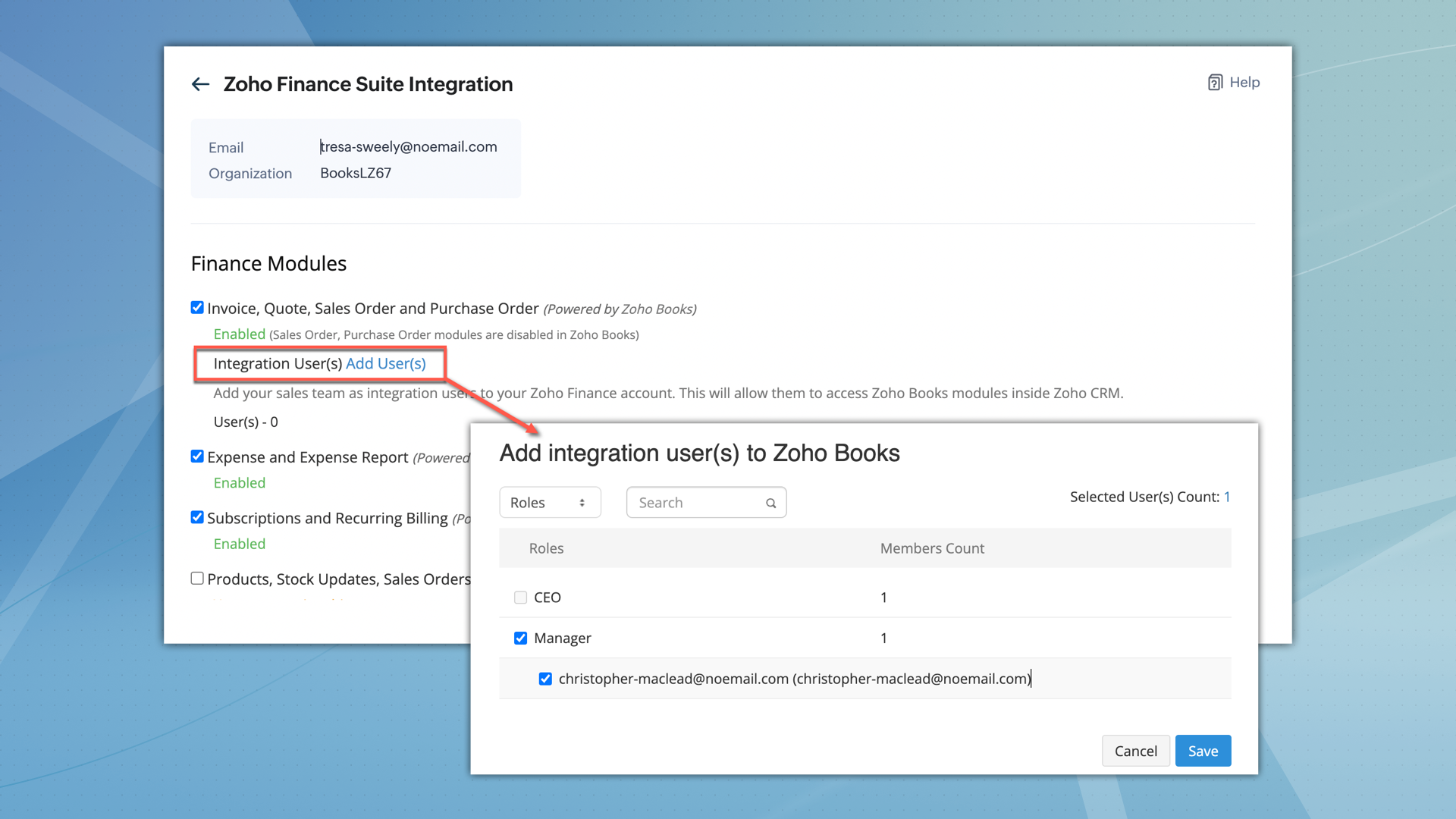

What permissions do integration users have?
- After being added, integration users can perform all operations, including creating, viewing, and editing records within the Estimates module.
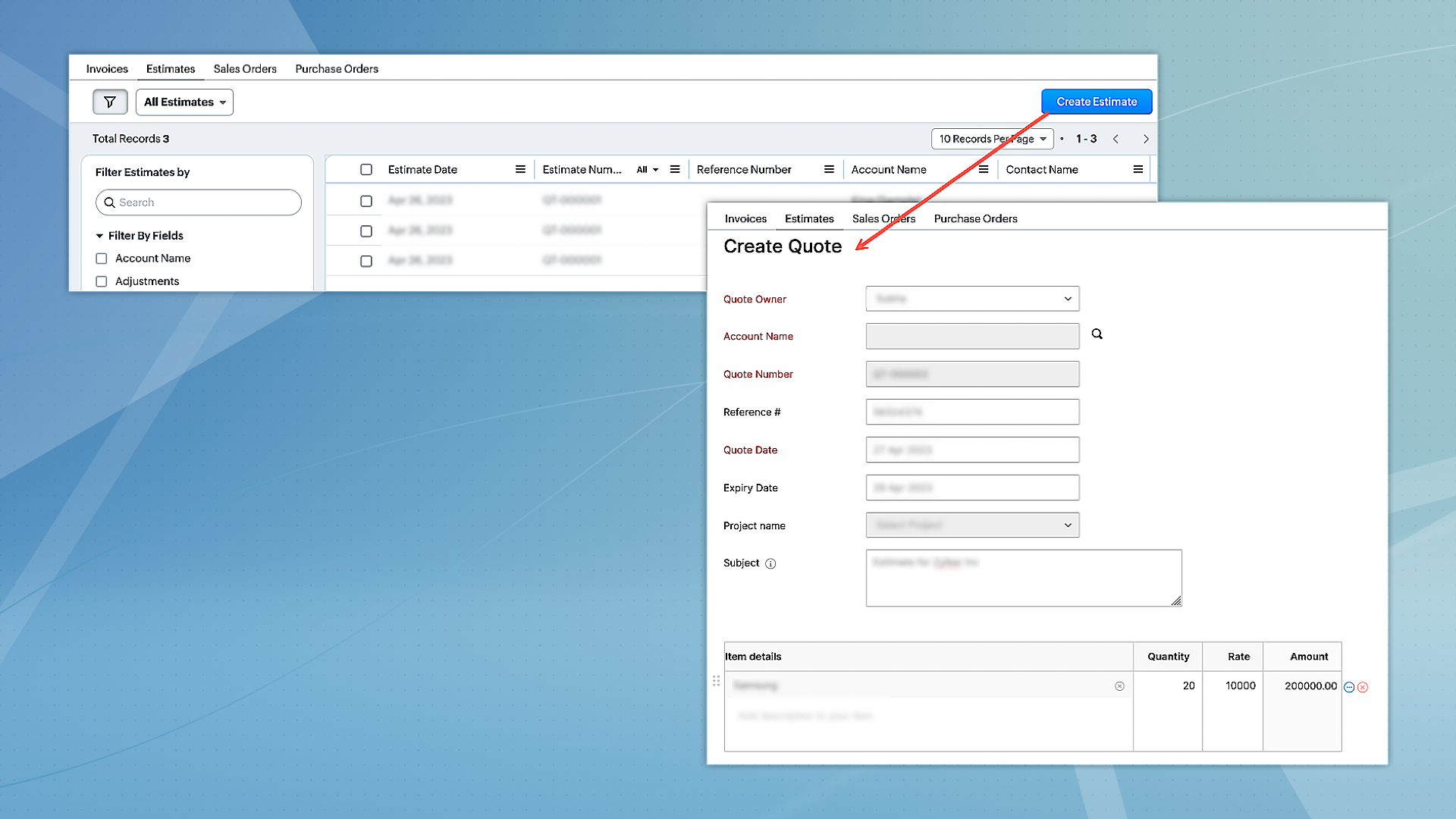
- However, they can only access other modules, such as Invoices, Sales Orders, and Purchase Orders in view mode.
- Integration users will not have direct access to Zoho Books.
- When integration users are part of multiple finance suite products, their permissions are collectively applied within CRM.
2. Unified permissions between Zoho CRM and Zoho Books
For users with access to both Zoho CRM and Books, the integration will now ensure proper management of permissions, covering all aspects. This means if a user is restricted from certain actions or features in Zoho Books, these restrictions will be consistently applied in CRM as well. Previously, users could access and interact with features in CRM that they were not authorized for in Zoho Books, leading to discrepancies. This enhancement will eliminate such inconsistencies, ensuring uniform permission management and preventing unauthorized access or actions across both platforms.
Migration for existing users
- For the integration between Zoho CRM and Zoho Books to function seamlessly, and to maintain uniform user permissions,existing users have the option to migrate immediately.
- Alternatively, they have a three-month window to complete the migration. After this period, users will be automatically added as 'Integration Users' based on their utilization of the finance module.
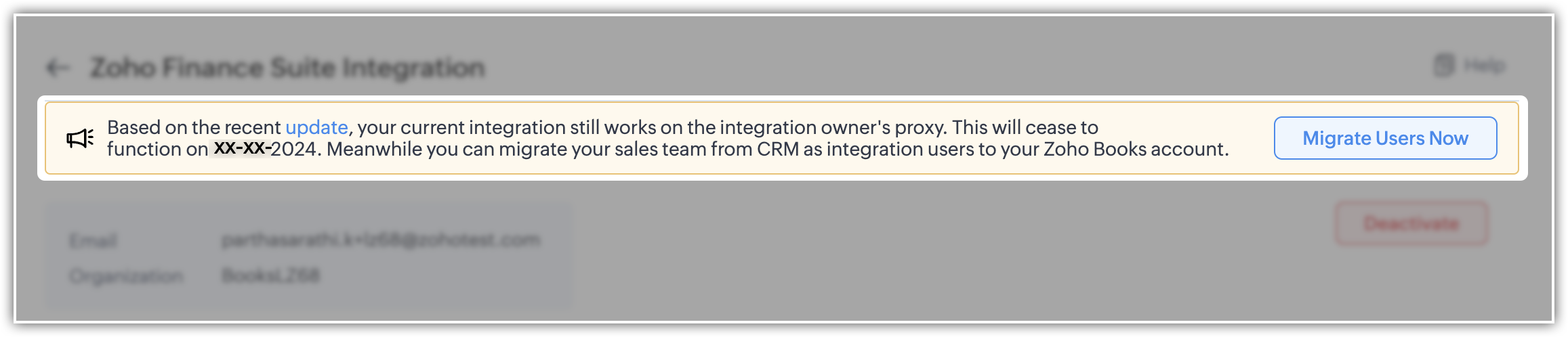
- To facilitate this, select the "Migrate Users" option to view and manage users common to both systems. Upon clicking "Save," the backend migration initiates. Following this, the integration adheres to each user's designated scope and permissions.
- Users can migrate up to 1,000 integration users initially. If they need to migrate more, they can contact the support team for additional help.
- Users who are already part of Zoho Books can't be added as integration users.
Please note that for new sign-ups, 'Integration users' will be available by default and they can set it up during the initial integration setup process.
Enhancement to the Zoho Subscription integration
Currently, when Zoho Subscription is integrated with CRM, it automatically adds Zoho Subscription as a related list in the Contacts and Accounts modules. You can view subscription details in a pop-up (iframe). Although users can create new subscriptions, there is a limitation on creating subscription-based reports and dashboards.
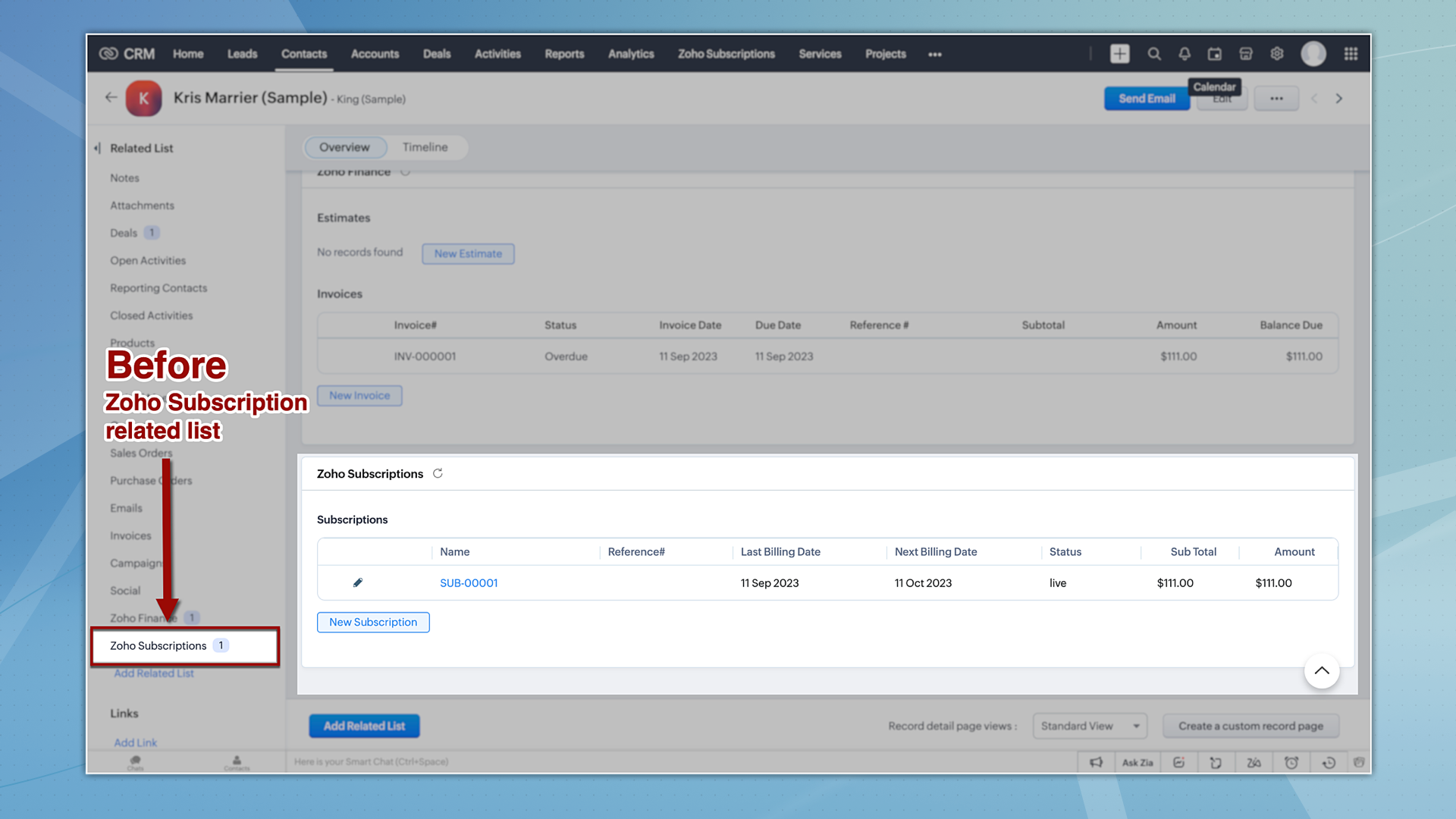
Now let's take a quick look at the enhancements made to the Zoho Subscription integration.
1. Introducing the Zoho Subscription Module
Zoho Subscriptions will now be available as a module in CRM, accessible to users with appropriate permissions. With this update, users now can generate reports based on Zoho Subscriptions data.
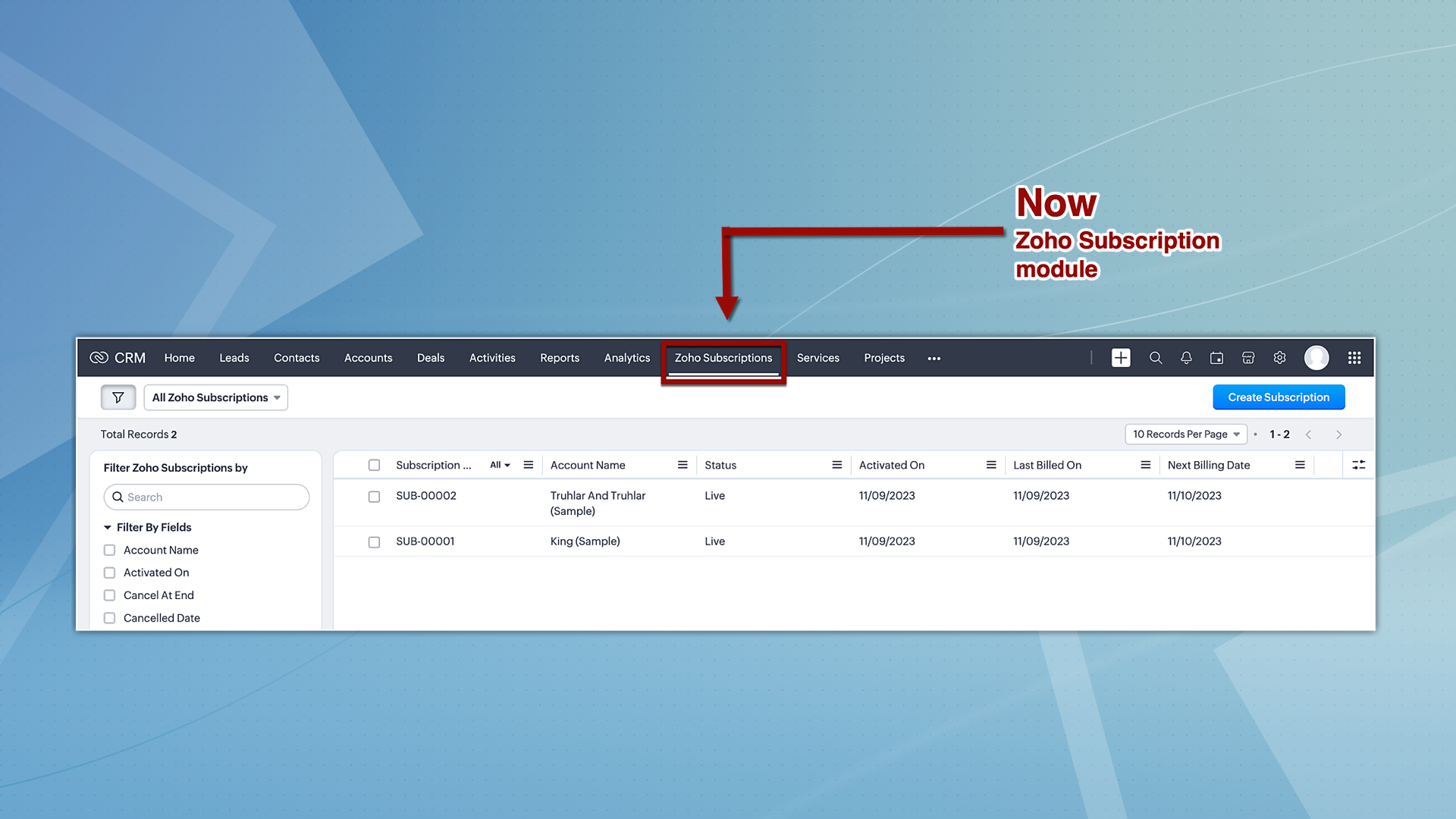
Hereafter, Zoho Subscriptions will be displayed both as a related list and as a module. Users with subscription permissions can currently create and view records in related lists; however, moving forward, they will be able to view and create records from the subscription module as well. Additionally, users will also have the option to view subscription records based on the pre-defined custom views.
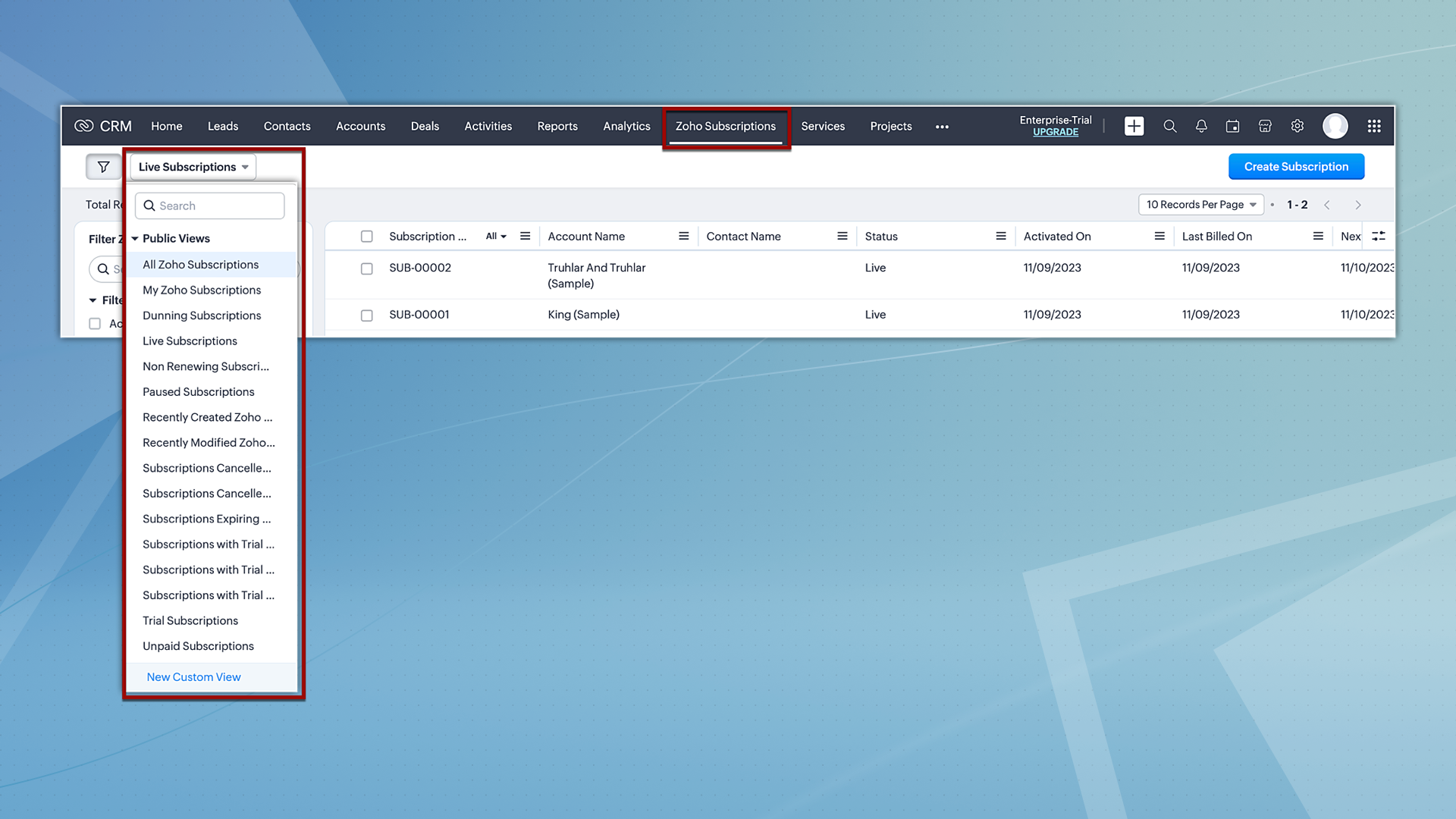
2. Reports and analytics for subscriptions
Zoho CRM offers report and analytical dashboard presets that users can adjust as needed to create personalized reports. In turn, this allows users to gain a better understanding of their customers and track key performance metrics, enabling them to make more informed decisions.
To try out system-defined reports based on Zoho Subscriptions, you can navigate to the Reports module and select any of the reports available under the Zoho Subscription Reports folder.
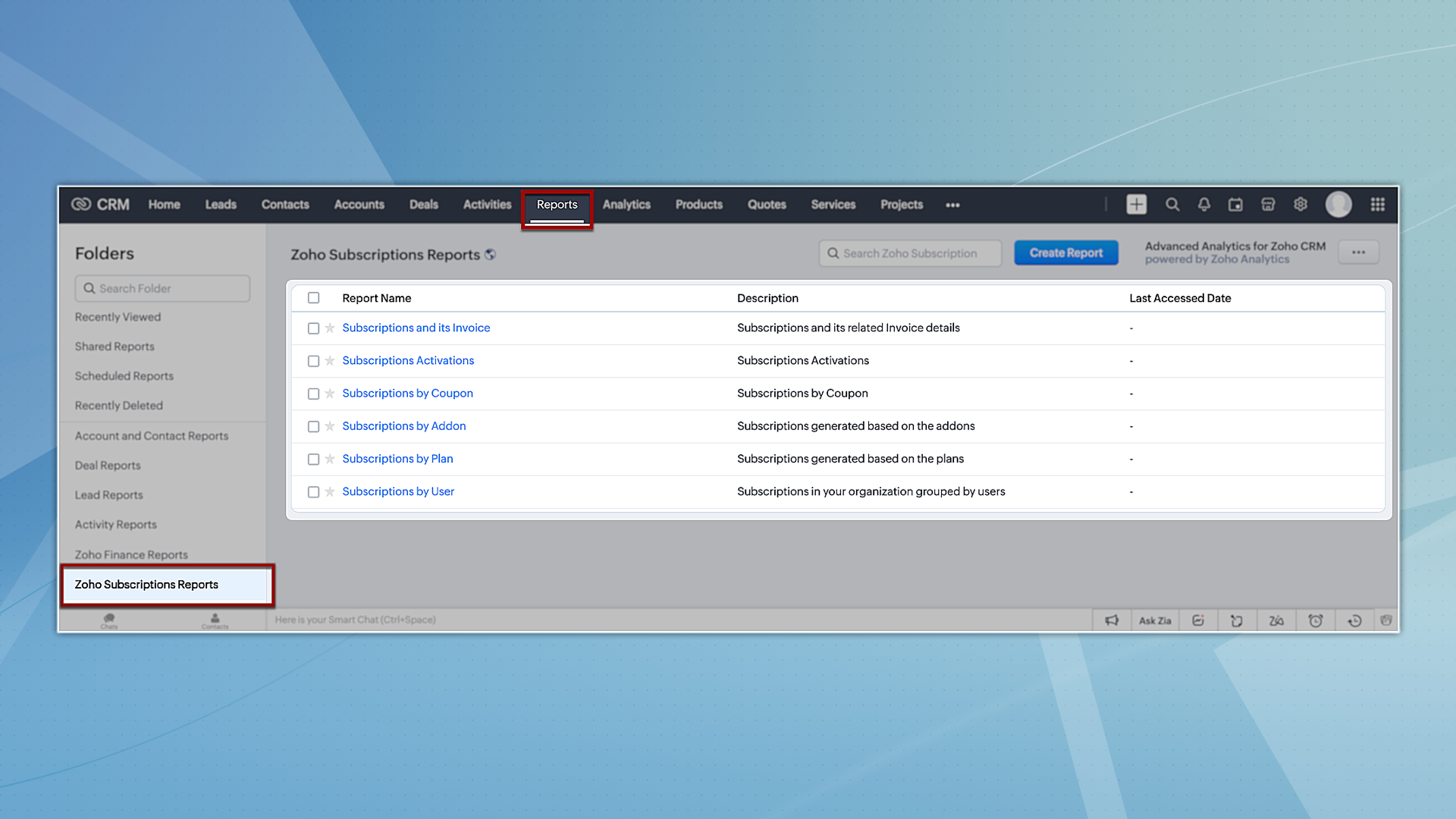
However, for analytics, we're providing two dashboards: Zoho Subscription Overview and Zoho Subscription Insights. You can navigate to the Analytics module and find these dashboards by default on the left panel.
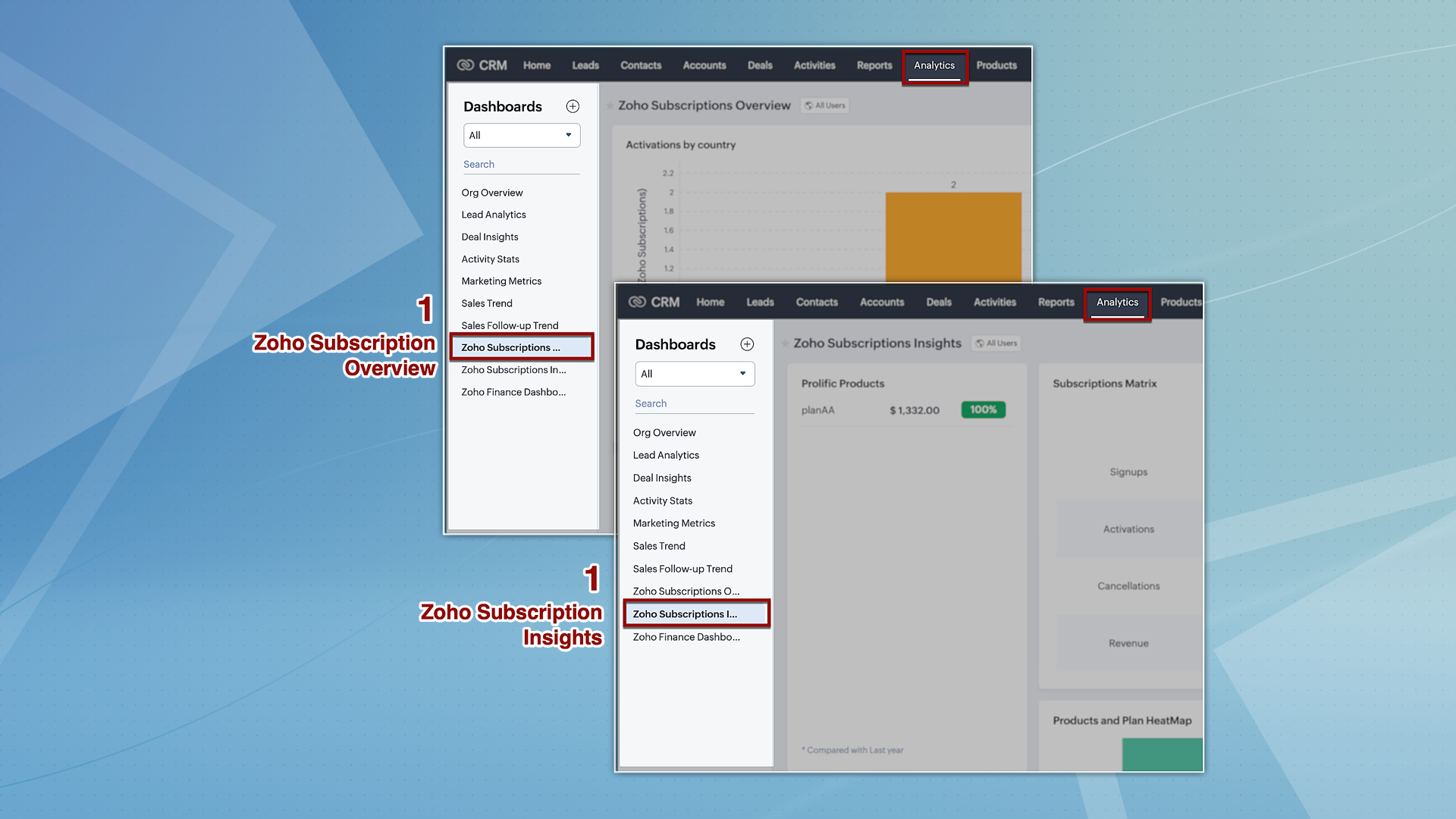
3. Streamlined user permissions
The integration between Zoho CRM and Zoho Subscriptions, which used to be controlled by integration owner/admin permissions, will now operate based on the current users' scope. This guarantees uniformity in user permissions across both platforms, preventing users from accessing CRM features that they do not have authorization for in Zoho Subscriptions.
That's all we have for the enhancements in this edition. We'll keep you posted on further updates. Please feel free to share your thoughts and feedback in the comments below.
Resources: Zoho Finance Suite Knowledge Base
Release Plan:
- These enhancements are being rolled out in phases and are now available to all users across all data centres, with the exception of the US DC, where they are currently available only to organizations on editions below Enterprise.
Thanks!
Nizamuddin
 P.S. We would like to acknowledge the significant contributions and ongoing recommendations provided by our MVP, @Kevin Flynn. His insights – shared in the community forum – have been instrumental in addressing challenges related to users experiencing difficulties in sending emails with their addresses, as well as issues concerning user and field-level permissions.
Topic Participants
Nizamuddin Sohel SK
Nick
Robert
Mikhail Koval
Sunderjan Siddharth
Sticky Posts
Introducing Incentives for Zoho CRM: Build, automate, and track sales commissions
Dear Customers, We are here with an amazing news! We built a direct solution to help manage your commission provisioning activity in your business. From creating commission plans to issuing payouts, this application leverages your sales reps’ performancePresenting ABM for Zoho CRM: Expand and retain your customers with precision
Picture this scenario: You're a growing SaaS company ready to launch a powerful business suite, and are looking to gain traction and momentum. But as a business with a tight budget, you know acquiring new customers is slow, expensive, and often deliversEnhancement in Zoho CRM: Introducing New Return Types for String Fields Based on Character Length
Dear Customers, We hope you’re well! In Zoho CRM, formula field with string return type is used in various scenarios where text is involved like concatenating customers’ first and last names, trimming characters from texts, performing find and replaceTransform your line of items into line items: ICR can now record your table values as subform values
Enhancement in Zoho CRM Dear Customers, We hope you're well! Zia Vision’s ICR capability can now recognize, extract, and store tabulated values in your subforms. An ideal example is a university application form. It has printed fields and handwrittenApprove records efficiently: Useful enhancements to My Jobs module and Approval process in Zoho CRM
Dear Customers, As you might know, approval process is a process automation tool that allows you to automate approvals in your organization and My Jobs is where you approve requests from a single point of view. Here's how you'd go about it: You’d add
Recent Topics
Edit PDFs using Zoho PDF Editor
Hello users, In a previous article, we covered the organizing capabilities of Zoho PDF Editor. Here, we'll provide a quick recap of its editing features, including a few new additions. A few highlights of Zoho PDF Editor's editing capabilities: Add andFeature Request - Ability to Customise Contact Info Card on Ticket Details View
Hi Desk Team, I've added a "Contact Priority" and "Account Prioirty" field and it would be very useful to agents if they could see that information in the Contact Info card on the Ticket Details view. It would be great if we could choose some fields toWhat is a realistic turnaround time for account review for ZeptoMail?
On signing up it said 2-3 business days. I am on business-day 6 and have had zero contact of any kind. No follow-up questions, no approval or decline. Attempts to "leave a message" or use the "Contact Us" form have just vanished without a trace. It stillCustomer portal: recommended way to scope lookup fields to the logged-in client?
Hi all, I'm building a customer portal on Creator for our clients (we're a esting lab, so each client has their own sites, contacts and jobs). Planning stage, so I'd rather get the approach right before I build it. The portal forms need several lookupZia for Mail: AI-powered assistance for Email, Calendar, and ToDo in Zoho Mail
Zia for Mail brings AI assistance into Zoho Mail for everyday email, calendar, and task activities. Administrators can integrate third-party AI providers, such as ChatGPT or Gemini, and decide which features are available to users. What is Zia for MailPartner with HDFC And Sbi Bank.
Hdfc and sbi both are very popular bank if zoho books become partner with this banks then many of the zoho books users will benefit premium features of partnered banks."Else / If" Statement in Zoho CRM Inventory Template
Hello, I would like to use the below "Else If" in my Inventory Templates, but it's not working correctly. Essentially, if the field "Quote Payment Terms" is filled in, display that. If "Quote Payment Terms" is blank, display "Account Payment Terms" instead.Office Integrator
Our users are complaining the slowness and speed when working in Zoho Office. Explicitly when working in a sheet. Here are observed issues *Copy and pasting values from one cell into another takes 10-20 seconds to show it has done it. *Modifying a valueSubform UI Unresponsive
Has subform with a couple of hundreds of rows but suddenly the you can't add any row nor edit any fields. The subform has 10 columns Any thoughts on this Zoho team?Kaizen #267: Four Developer Tools, One Prompt: Cracking Custom Cases with the Zoho CRM Skill
Hello everyone! Welcome back to another Kaizen post. In this Kaizen, we’ll see how the Zoho CRM Skill solves a custom use case that requires multiple Zoho CRM developer tools. You describe the requirement in plain language, and the skill identifies the【開催報告】 福岡 ユーザー交流会 NEXUS 2026/10/30 | CRM×AIの実践事例とZia Agents活用を紹介
Zoho ユーザーの皆さん、こんにちは。 コミュニティグループの中野です。 10月30日(金)、福岡にてZoho ユーザー交流会 NEXUSを開催しました。 今回は、Zoho CRM × AIをテーマに、ユーザーさんによる実践事例、 Zia Agentsのデモ、参加者同士のグループワークなどを実施しました。 ご参加いただいた皆さん、ありがとうございました! 本投稿では、当日の様子を一部ご紹介します。 ユーザー活用事例 :Zoho CRM × AIを、実際の営業業務でどう使う? 登壇者:株式会社etikaService Account Admin for API Calls and System Actions
Hello, I would like to request the addition of a Service Account Admin option in Zoho product. This feature would allow API calls and system actions to be performed on behalf of the system, rather than an active user. Current Issue: At present, API callsTrigger workflows from SLA escalations in Zoho Desk?
Hey everyone, I’m currently working with SLA escalation rules in Zoho Desk and ran into a limitation that I’m hoping someone here has solved more elegantly. As far as I can tell, SLA escalations only support fairly limited actions (like changing the ticketCustom templates
We are using Zoho Books with a custom module called Partner-Fulfilled Order. Templates created using the Default Editor, including clones of Elegant Life, display correctly in the Change Template preview. Templates created using the Code Editor, evenZoho Calendar's own notification domain (noreply@eu-sender.zohocalendar.com) bounces at Apple and is spam-filtered by Zoho Mail itself
Hi all, I'm really hoping there will be some solutions from this because despite a lot of emails, support from Zoho has not been forthcoming. I am posting as a single defect report, since both symptoms trace to the same sending domain. Summary: Zoho CalendarZoho One - Can I add a Custom View to All Departments
We have been using Desk for several years but are just making the leapt to using multiple departments. I have a custom view that is our default view. I'd like to apply that to All Departments. When I try to add a view when viewing All Departments I getA way to create kits (groups of items) that do not require bundling and are added to an order as the individual items
We are evaluating moving off of Sage BusinessWorks (which handles accounting, order entry, inventory control, accounts receivable, etc) to Zoho Books/Inventory. One of the things we heavily use is a feature called Kits, which allows creating a group ofZoho Campaigns 3.0 is here
Zoho CampaignsAnnouncements We're excited to introduce the all-new Zoho Campaigns, where we have introduced our biggest update yet. Marketing has evolved far beyond email. Today's campaigns span email, SMS, and WhatsApp, customers expect personalizedConnect with Zoho users from your industry, virtually!
A couple of years ago, we started setting up industry-wise channels for users with similar businesses to chat and discuss Zoho contextually. We started with Real Estate and E-commerce sectors, creating a chatroom and hosting regular meetups on niche areasTip #95 – Collect support requests right from your website with Web Forms – 'Insider Insights'
Hello Zoho Assist Community! When a customer needs help, the first step often decides how smooth the rest goes. They email a vague description, a technician asks follow-up questions, and the real details only surface after several rounds of back and forth.E-Invoicing Automation
Do you have an API endpoint for pushing the invoice through the e-tims for KenyaAutomation Series: Automate Project File Uploads from Zoho WorkDrive
Project documents are often prepared before development begins. When files such as product requirements, design files, guidelines, or plans are stored in a shared folder in Zoho WorkDrive, teams can automate copying them to the corresponding project teamIs it possible to report on Task Duration in minutes/hours rather than by start and due date?
I'm currently evaluating the free version of CRM and I like lots of things about it, it will definitely help my business with sales automation and I will upgrade to a paid version once the evaluation is finished. However, I also want to use CRM for existing clients (accounts) where I can track how much time is being spent on tasks for these clients. I can see clearly that both calls and events for each account have time tracking in minutes / hours but tasks do not have this. Is it possible in one¡Nuevo Meetup en Barcelona! - Automatiza procesos con los agentes de Zia en Zoho
¡Hola a todos! Estamos encantados de anunciaros que el próximo 3 de diciembre estaremos en Barcelona con un nuevo Meetup de Español Zoho Community. Estos encuentros son una oportunidad fantástica para conectar con otros usuarios de Zoho, ampliar conocimientosStock count by bin location
Is there a configuration to make a stock count by bin or area and not by product. these is useful to manage count by area RegardsBank Feeds - Again
Bank feeds broken again for me. I don't see other recent posts on this, so maybe it's just us? Tried: refresh update cred/ deact./react. feeds chat support Nothing. On day 2 without zoho as a result, which is crippling for us. We've used zoho for a yearIntroducing Auto Check-out for Attendance
We are pleased to announce the release of the Auto Check-out feature in Zoho People. Auto Check-out is now available as a built-in setting under Shifts to automatically check out employees who have not recorded their check-out for the day. AdministratorsIssue with SalesIQ Chats Automatically Closing Due to the 24-Hour Idle Timeout?
Hello, I am experiencing a significant issue with SalesIQ automatically closing chats due to the Idle Timeout setting. I use SalesIQ through the integration between SalesIQ and Line App. To be honest, this issue has become extremely frustrating. ProblemsZoho Amount Cell Greyed Out
I noticed a few days ago that the 'amount' cell on my Zoho App software in my windows PC is greyed out and I can't click on it to add an amount figure when recording invoice or expenses. Wheareas on mobile I can do it easily申請メール、まだ一件ずつ確認していませんか?― Zoho Formsで申請業務を効率化
ユーザーの皆さま、こんにちは。ゾーホージャパンの友田です。 「備品を購入したいので申請します」 「イベントに参加したいです」 「経費の申請をお願いします」 このような社内申請を、メールやチャットで受け付けていませんか? メールでも申請はできますが、 「必要な情報が書かれていない」 「申請内容をあとから一覧にまとめている」 「誰がどこまで確認したのか分からない」 といった手間が発生することも。 そんな申請業務にも、Zoho Formsを活用できます。 必要な情報を、フォームでまとめて入力 例えば、備品購入の申請なら、URGENT: Zoho Wiki searches return garbled nonsense
For at least the past few days, the Search function in Zoho Wiki has been returning only strings of random characters. Example search result: The page name is readable, but the context body text is gibberish. So something is obviously broken with eitherIs it really true that I can't set the default 'deposit to' account in 2025?
I've been using Books for 7 years and the default account has never been a problem. I usually manually reconcile invoices and have never had a thought about which account. It has always been my account. However, I recently noticed that for the past 4Zoho CRM gets a new email compose and lot more
Dear Customers, [UPDATE October 21, 2021: We have started opening these features to some of the customers already. And, it will be available to all the customers before November 2nd Week, 2021. Sorry for the delay caused] [UPDATE February 21, 2022:#19 What about the money I spend on the job?
Meera buys props for a shoot, keeps the receipt in her bag, and expects to photograph it on the way back and never think about it again. The props get billed to the client at cost. The usual way to do this Covered in our published Expenses FAQ. The shortHow To Implement an Auto-Check-out Feature for Attendance?
If an employee forgets to check out, the system should automatically check out the employee at 6:30 PMBookings Notifications for Staff
Good afternoon. We are currently working on the trial version of Bookings as we review its usage for our client needs to schedule with specific team members. We set everything up and it appears to be working, with the exception of sending an email toAccounting on the Go Series-54: Effortlessly Find Your Zoho Books Customers in Your Phone’s Contact List
Hello Zoho Books users! How are you all ? We’re happy to share a handy new feature in Zoho Books mobile app. Now, you can access your Zoho Books customers right from your phone's contact list, making it easier to stay connected on the go. How this canIs COQL known to have read delays?
Hello, I'm experiencing stale data returned by COQL from time to time. Most of the time it returns up-to-date data right after I update a record, but sometimes the change only shows up after several seconds or even minutes. Neither the COQL documentation#18 Billing for the Hours, Not the Job
A consultant in the comments last month put it plainly: her client pays by the hour and wants to see every hour on the invoice, including the dates. She was maintaining a spreadsheet and manually copying the totals into her invoices. If you bill by theWhatsApp con bot en Make y derivación a una persona en Zoho CRM
Estamos implementando en Zoho CRM un flujo de atención por WhatsApp con un bot en Make y una derivación a una persona. Necesitamos que cada mensaje quede registrado, que me avise cuando requiere atención y poder seguir la misma charla con el cliente.Next Page