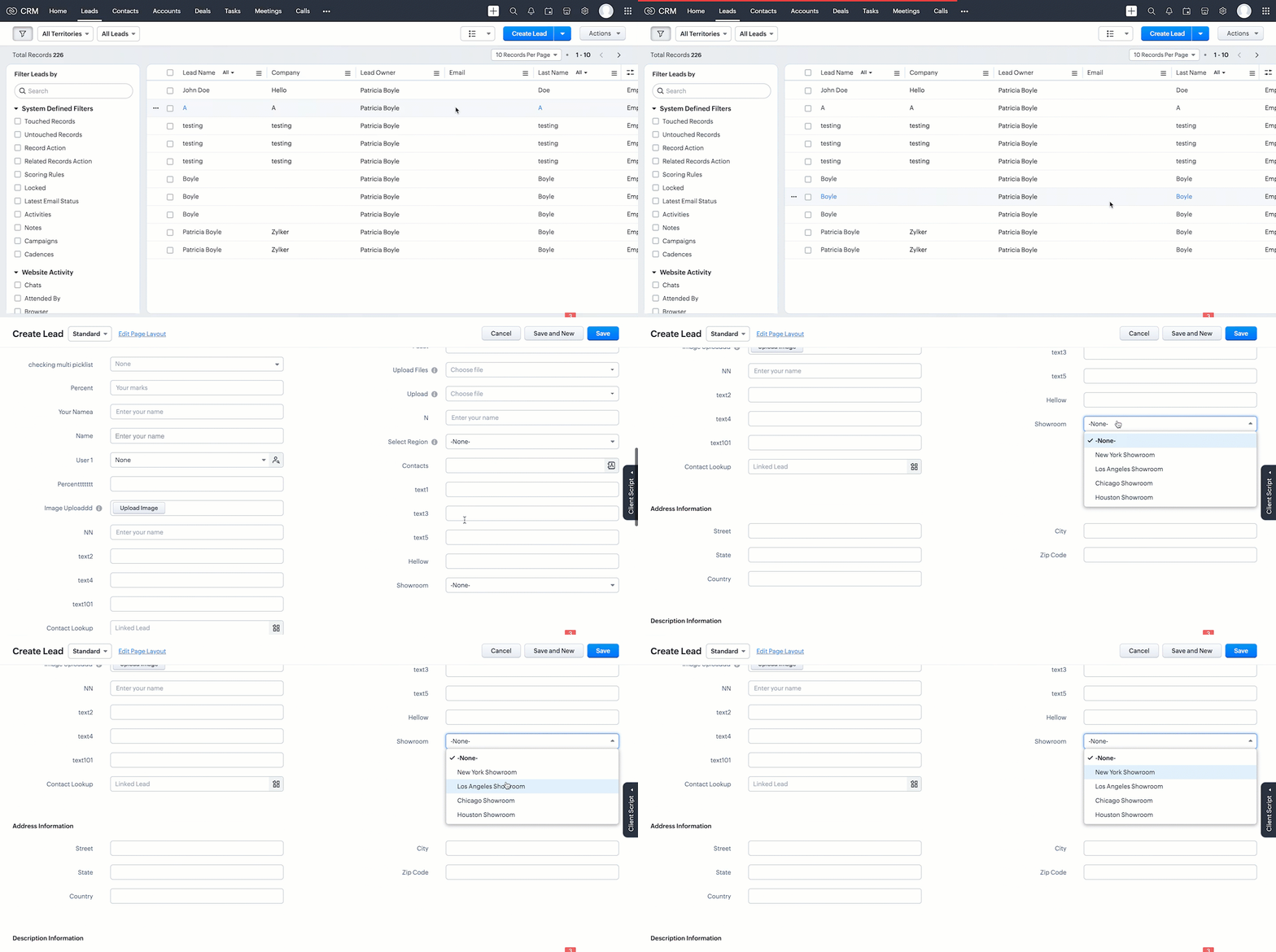
Kaizen #161: Global Sets using Zoho CRM APIs

Kaizen #161: Global Sets using Zoho CRM APIs

 Hello all!
In this week, we will see how to work on the Global Sets using our Zoho CRM APIs. Global Picklist APIs were introduced in Zoho CRM API version 6.

In this post, we will cover the following
  • Global Sets in Zoho CRM
  • Advantages of the Global Sets
  • Use case
  • Create a Global Set using the POST Global Picklist API
  • Use the Global Set with a Picklist Field in the Required Modules
  • Update the Global Set Values Using the PATCH Global Picklist Field API
  • Conclusion

Global Sets in Zoho CRM

Zoho CRM offers an efficient way to maintain a set of data that will be used commonly across the modules to maintain accuracy via the Global Sets or Global Picklists.
Global Sets or Global Picklists are collections of picklist values that can be associated with multiple picklists across modules. When you create Global Sets, you define a set of values that can be associated with fields in different CRM modules, ensuring uniformity in data input across your organization. Refer to this link to know more about Global Sets.

Advantages of Global Sets

  • Consistency: The same list of values is available across multiple modules, reducing errors and inconsistencies in data entry.
  • Time-saving: You do not have to update picklist values in each module manually. Once updated centrally, changes reflect across all associated fields in all modules.
  • Scalability: Easily expand your picklist when your business grows, adding new values (e.g., Adding new showroom location for franchises) without repetitive work.
  • Easy Management: Centralized management of picklist values means less administrative work.

Use case

Global Picklist for Showroom Locations at Zylker Electronic Franchise 
Zylker, an electronics business franchise, operates several showrooms across multiple cities, all managed in Zoho CRM. As the franchise expands, they need to add new showrooms to various modules such as Leads, Deals, and Services frequently.  Whenever a new showroom opens, they can update the Global Picklist, ensuring that all modules are updated instantly and preventing inconsistencies.
In these situations, different teams manually entering showroom locations in the picklist field can lead to mistakes like typos or different spellings of the same location.
By implementing a Global Picklist for "Showroom Location," Zylker ensures that all teams select from the same list of showroom locations.

Create a Global Set using the POST Global Picklist API

Create a Global Set with the desired values. 

Request URL:  {api-domain}/crm/{version}/settings/global_picklists
Request Method: POST

Request Body

{
    "global_picklists": [
        {
            "display_label": "Showroom Location",
            "description": "Use this picklist option to manage showroom locations across all modules in your CRM.",
            "pick_list_values": [
                {
                    "display_value": "New York Showroom",
                    "sequence_number": 1,
                    "actual_value": "New York Showroom"
                },
                {
                    "display_value": "Los Angeles Showroom",
                    "sequence_number": 2,
                    "actual_value": "Los Angeles Showroom"
                },
                {
                    "display_value": "Chicago Showroom",
                    "sequence_number": 3,
                    "actual_value": "Chicago Showroom"
                },
                {
                    "display_value": "Houston Showroom",
                    "sequence_number": 4,
                    "actual_value": "Houston Showroom"
                }
            ]
        }
    ]
}


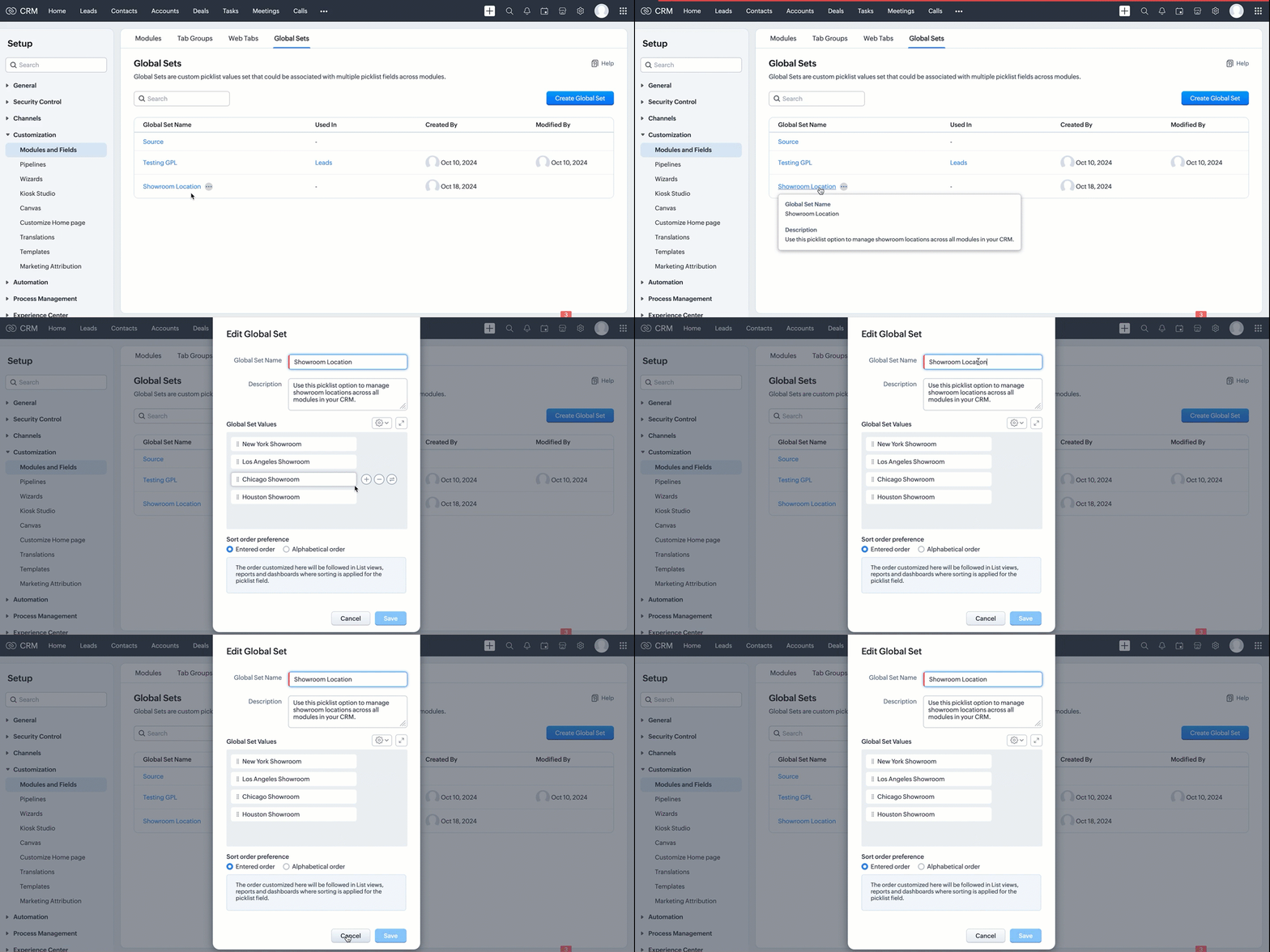
If the API call is successful, a global picklist will be created with the specified options. The following GIF demonstrates the newly created global picklist in the UI.


Use the Global Set with a Picklist Field in the Required Modules

Create picklist fields in the required modules, such as Leads and Contacts, and link the created Global Set with a picklist field in modules using the Create Custom Field API.

Follow the below steps to link the created Global Set with a picklist field in a module.

Step 1: Retrieve the unique ID of the Global Set 

Retrieve the unique ID of the created Global Set using the GET - Global Picklists API to link it with a picklist field. The below URL retrieves all Global Sets in your org.

Request URL: {api-domain}/crm/{version}/settings/global_picklists
Request Method: GET

Response:


The API retrieves all available Global Sets in the organization.

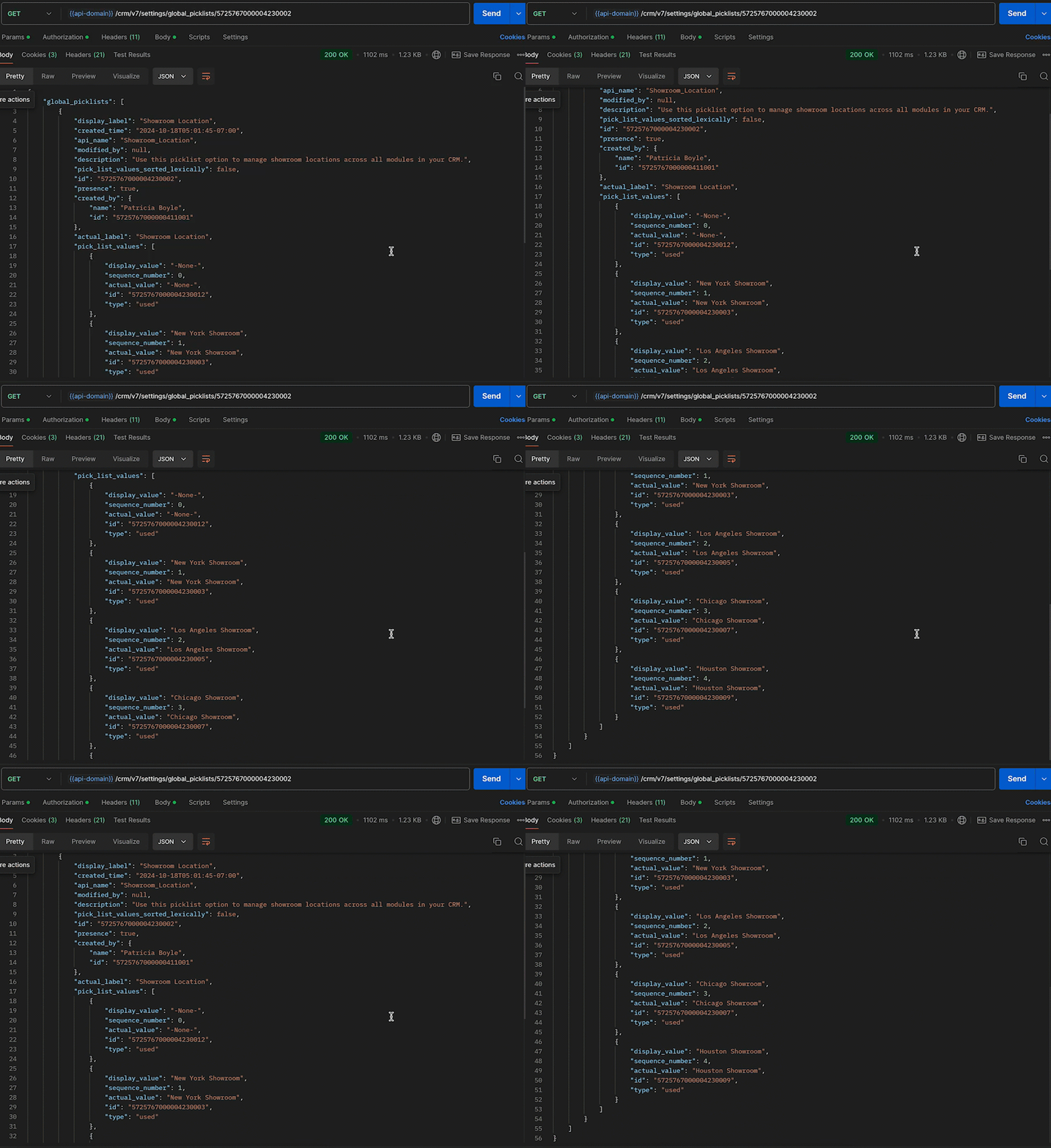
In this case, the "Showroom Location" field needs to be associated with the modules, and its unique ID is 5725767000004230002. Use the following request URL to view the specific global picklist field along with its options.

Request URL: {api-domain}/crm/{version}/settings/global_picklists/5725767000004230002
Request Method: GET

Response:


Step 2: Use the Global Set in the desired module

Create a new picklist field in the required modules and associate the "Showroom Location" Global Set with the picklist field.
  • Leads - To track customer inquiries by showroom location.
  • Deals - To monitor sales by showroom location.
  • Sales Orders - To process orders based on showroom location.
  • Service Requests - To handle customer service tickets by showroom location.
This post uses the "Leads" module as an example. Use the Create Custom Field API to associate the Global Set with the Leads module.

Request URL: {api-domain}/crm/{version}/settings/fields?module=Leads
Note: The module parameter is mandatory to create a field in a module.
Request Method: POST

Request Body:


{
    "fields": [
        //Associating the Showroom Location Global Set with the Leads module
        {
            "field_label": "Showroom",  //The Showroom field in the Leads module, where the "Showroom Location" Global Set is associated

            "data_type": "picklist", //To associate a global picklist, use the data type "picklist"
            "global_picklist": {
                "id": "5725767000004230002" //ID of the global picklist
            }
        }
    ]
}


Response in the UI:


Use the above process to create the Global Set across modules using the Create Custom Field API

Below are the request URLs to associate the field with other modules as per our use case:

  • {api-domain}/crm/{version}/settings/fields?module=Deals
  • {api-domain}/crm/{version}/settings/fields?module=Sales_Orders
  • {api-domain}/crm/{version}/settings/fields?module=Service_Requests


Update the Global Set Values Using the PATCH Global Picklist Field API

Any changes made to the Global Set will automatically reflect across all modules associated with it. Use the PATCH - Global Picklist Field API to update the values in a Global Set.

Request URL
{api-domain}/crm/{version}/settings/global_picklists/5725767000004230002
Request Method: PATCH

Request Body:


{
    "global_picklists": [
        {
            
            "pick_list_values": [
                {
                    //"display_value": "New York Showroom", 
                    "id": "5725767000004230003", 
                    "type": "unused" // to move the option to the unused state
                },
                {
                    "display_value": "Chicago Showroom",
                    "sequence_number": 3,
                    "actual_value": "Chicago Showroom",
                    "id": "5725767000004230007",
                    "type": "unused",
                    "_delete": null // deleting the option from the global Field
                },
                // Creating a new option or adding a new showroom location to the Global Set 
                {
                    "display_value": "San Francisco Showroom",
                    "actual_value": "San Francisco Showroom"
                },
                {
                    "display_value": "Boston Showroom",
                    "actual_value": "Boston Showroom"
                }
            ]
        }
    ]
}


Using the PATCH Global Picklist API, you can easily manage and perform various operations. In the above request, Zylker performed the following operations:

  • Moving an Option to Unused State: The "New York Showroom" option is marked with "type": "unused", meaning the showroom is moved to the "unused" state, indicating the option is no longer active but has not been deleted from the system.
  • Deleting an OptionThe "Chicago Showroom" option is deleted from the picklist field using the  "_delete": null, meaning the option is removed or deleted from the system and is no longer valid.
  • Adding New OptionsIn addition to the above operations, two new showrooms namely "San Francisco Showroom" and "Boston Showroom", are added to the field using the "display_value"(mandatory) and "actual_value" (optional), as Zylker expands its franchise to new cities and manages them across the modules.
Note: The updated value will replace its old value in areas such as Records, Criteria, Workflow Actions, and Field Dependency. 

Conclusion

Hence, the Global Sets help Zylker keep the showroom location list up-to-date and consistent across modules, making it easier to manage showroom locations in their CRM system.

We trust that this post meets your needs and is helpful. Let us know your thoughts in the comment section or reach out to us at support@zohocrm.com
Stay tuned for more insights in our upcoming Kaizen posts!

Cheers!!!


    • Sticky Posts

    • Kaizen #198: Using Client Script for Custom Validation in Blueprint

      Nearing 200th Kaizen Post – 1 More to the Big Two-Oh-Oh! Do you have any questions, suggestions, or topics you would like us to cover in future posts? Your insights and suggestions help us shape future content and make this series better for everyone.
    • Kaizen #226: Using ZRC in Client Script

      Hello everyone! Welcome to another week of Kaizen. In today's post, lets see what is ZRC (Zoho Request Client) and how we can use ZRC methods in Client Script to get inputs from a Salesperson and update the Lead status with a single button click. In this
    • Kaizen #222 - Client Script Support for Notes Related List

      Hello everyone! Welcome to another week of Kaizen. The final Kaizen post of the year 2025 is here! With the new Client Script support for the Notes Related List, you can validate, enrich, and manage notes across modules. In this post, we’ll explore how
    • Kaizen #217 - Actions APIs : Tasks

      Welcome to another week of Kaizen! In last week's post we discussed Email Notifications APIs which act as the link between your Workflow automations and you. We have discussed how Zylker Cloud Services uses Email Notifications API in their custom dashboard.
    • Kaizen #216 - Actions APIs : Email Notifications

      Welcome to another week of Kaizen! For the last three weeks, we have been discussing Zylker's workflows. We successfully updated a dormant workflow, built a new one from the ground up and more. But our work is not finished—these automated processes are
      • Recent Topics

      • Restoring records from the recycle bin programatically

        Background I'm working on a piece of software to automate conversion of Leads into Deals based on order status from my company's website. The process is mostly complete, right now I'm just working on handling a few edge cases to ensure data integrity.
      • How can I clone my website in order to try new templates?

        I want to try a new template for my existing Zoho website without the risk of changing the current site or accidentally publishing the wrong template. Therefore I thought a 'clone website'-option should be somewhere, but I can't find it. How do I try
      • Select forwarding

        For Zoho mail online on PC in web browser: I had forwarding enabled in section "Mail accounts / Forwards", and I also have some filters that send emails from some unwanted senders to Archive. But it doesn't work as intended, it forwards everything (obviously
      • Custom view inconsistencies

        Why is "is not" missing from criteria, along with other comparison operators ??? It makes it almost impossible to build required custom views, I don't want "void" invoices listed & why on earth would "Void" invoices be showing when the criteria includes
      • Cliq iOS can't see shared screen

        Hello, I had this morning a video call with a colleague. She is using Cliq Desktop MacOS and wanted to share her screen with me. I'm on iPad. I noticed, while she shared her screen, I could only see her video, but not the shared screen... Does Cliq iOS is able to display shared screen, or is it somewhere else to be found ? Regards
      • system not picking my default custom service report template

        Can you tell me why when we create a service report always pick the (standard old) template? Even when I have a custom service report selected as Default.
      • Restrict Appointment Booking to Approved Clients

        Dear Zoho Bookings Support Team, We'd like to propose a feature enhancement for managing appointments within Zoho Bookings. This feature would ensure only pre-approved clients can schedule meetings. Desired Functionality: We propose the introduction of
      • Automate Credit Card Surcharge

        Is there a way to create an automation that will add a 3.0% credit card surcharge to a subscription whenever a customer pays via credit card?
      • Product Request: Send email to Secondary email

        Guys, we should be able to send the campaign to the secondary email too.  Is this on the plans for Zoho Campaign? It looks like I can map the secondary email from the CRM to the Campaigs, but can not send the message.  
      • I have the item field and Quantity field in the sub form , on the submit of the form if the quantity is grater than inventory means show alert on submit validation only for item type goods ,

        I have the item field and Quantity field in the sub form , on the submit of the form if the quantity is grater than inventory means show alert on submit validation . Stock Check Validation only for item type goods , not for item type service . For the
      • CRM notes

        I want to be able to add notes to a task that do not necessarily get rolled up into an account or contact.   For example, I tasks to work on a Court Order for John Doe divorce account.  There might be lots of updates (in the form of notes) that employees
      • Disappearance of all articles in the knowledge base

        Hi there! It seems like all of our articles have disappeared from the knowledge base: However, the names still appear in the "sort articles" section:
      • Logic for sending to a non-primary email address

        Hi, I have a scenario where contacts are able to sign up for emails with 2 different email addresses (example: work, personal). I've mapped both to Campaigns from Zoho CRM, but when I go to target an email only the primary email addresses are pulling in. How can I update this to look at both of the email addresses - or specifically the secondary email address in Campaigns? Thanks, Jenny
      • Apple Messages for Business in Omnichannel communications?

        Hello, Apple launched "Apple Messages for Business" but Zoho CRM or Zoho Desk don't appear in the list of possible integrators. Zoho already promotes https://www.zoho.com/crm/omnichannel.html Omni Channel integration, but Apple Messages does not yet appear.
      • Add "Reset MFA" Option for Zoho Creator Client Portal Users

        Hello Zoho Creator Team, We hope you are doing well. We would like to request an important enhancement related to Multi-Factor Authentication (MFA) for client portal users in Zoho Creator. Currently, Creator allows us to enforce MFA for portal users,
      • Tables for Europe Datacenter customers?

        It's been over a year now for the launch of Zoho Tables - and still not available für EU DC customers. When will it be available?
      • Does Zoho has chatroom/chatbot url feature?

        Hi Zoho community! I’m looking for a quick "Yes/No" answer for my dev team regarding Zoho’s capabilities. We currently use Zoho Desk for our Service Team and Zoho CRM for our Marketing Team to bring both functions under one platform. Our question: Does
      • One Support Email Managed By Multiple Departments

        Hello, We use one support email (support@company.com). Incoming emails come to the "Support Department" and based on what the customer is asking, we route that ticket to different departments (billing, technical support, etc.). When users in these different
      • What's New in Zoho Analytics - February 2026

        Hello Users! We're back with another round of updates for Zoho Analytics. This month's release focuses on giving you greater flexibility in how you visualize, manage, and act on your data - with new features like custom visualizations, remote MCP server,
      • Is it Possible to Modify Standard Report Urls

        Is there a way to permanently modify standard report Urls? Use case: Suppose I have a Products report. Showing list as timeline, calendar, or kanban doesn't make sense. Want to hide that from users by adding #Report:Products?zc_ShowAs=false&zc_Print=false
      • Updated font library: New font styles and custom font options in Zoho Sheet

        Zoho Sheet's font library now supports 500+ font styles in 60+ languages! The updated font library is stacked with new font styles, and some of the previously available font styles have been replaced with equivalent options. There are two ways you can
      • scope for phonebridge in CRM and phonebridge API documentation

        Hi I cannot find the scope to be used for phonebridge in CRM API V2 calls. I am getting OAUTH_SCOPE_MISMATCH for scope group ZohoCRM.modules.ALL,ZohoCRM.setttings.ALL Also I am not able to locate the documentation for the same, All I have is phonebridge
      • Create custom rollup summary fields in Zoho CRM

        Hello everyone, In Zoho CRM, rollup summary fields have been essential tools for summarizing data across related records and enabling users to gain quick insights without having to jump across modules. Previously, only predefined summary functions were
      • Job Alerts for Candidates

        hi All, I have 2 questions relating to sharing job details with candidates. 1. is there a way to notify candidates that meet certain criteria of current jobs available? eg. I run a candidate search, and identify 50 candidates that might be suitable. Can
      • Zoho Wiki or new Zoho Learn

        We are currently evaluating if we should move off confluence. At present in Confluence we have multiple levels within our documentation but with learn it looks like you can only have Space       - Manual             - Chapter Is it possible to have levels below Chapter? Also the same question for the existing wiki, can I have more sub-levels?
      • Fix image at bottom of a page fot automatic proposal creation

        I'm working on a proposal document to automate our proposal creation process. So far it works fine, but I experience some problems with an image I want to have fixed at the bottom of the page AND above the footer. This section of the document consists
      • Can't scroll the page down unless I refresh the page

        Hello, This issue has been going on with me and a lot of other users in my organization, we can't scroll down! the scrolling side bar doesn't appear and scrolling down through mouse or keyboard keys doesn't work, it seems that the page just ends in the
      • Price List

        II want to restrict the items to display in sales, quote, etc for which custom rates are added in price list. How I can do the same in Zoho books
      • Let’s Talk Recruit: Still switching tabs to source?

        Welcome back to the Let’s Talk Recruit series. Let’s talk about how you actually source talent. Do you open multiple job boards every single time a role opens? Run the same keyword searches you ran yesterday? Download, upload, rename, and then do it again
      • Kaizen #231 - Embedding Zoho Desk Tickets in Zoho CRM

        Hello, CRM Wizards! This week, let us enhance cross-team visibility between Zoho CRM and Zoho Desk. We will use the Zoho Request Client inside a Related List widget to display open Zoho Desk tickets directly within the Contact record in Zoho CRM. This
      • EU Problem

        Hi all, we've been facing issues with the Europe data center for two days. It's starting to disrupt our daily workflow. Any word on when this will be resolved?
      • Introducing a smarter, faster, and more flexible charting experience

        Hello Zoho Sheet users, We're delighted to share the latest news about a major update to charts in Zoho Sheet! The new version supports dynamic data ranges, granular styling options, faster loading, and other interesting enhancements that allow you to
      • Introducing Job Alerts

        Keeping candidates engaged beyond their first application is one of the most consistent hiring challenges. Many interested candidates simply do not revisit career sites regularly, which can result in missed opportunities and reduced re-applications. To
      • Where is the settings option in zoho writer?

        hi, my zoho writer on windows has menu fonts too large. where do i find the settings to change this option? my screen resolution is correct and other apps/softwares in windows have no issues. regards
      • Client Script | Update - Client Script Support For Custom Buttons

        Hello everyone! We are excited to announce one of the most requested features - Client Script support for Custom Buttons. This enhancement lets you run custom logic on button actions, giving you greater flexibility and control over your user interactions.
      • Enhance Sign CRM integration

        Hello all, I'm working on a custom Deluge script to enhance the integration between Zoho CRM and Sign by using a writer merge template for additional flexibility. I want to replicate the post-sign document integration that exists between CRM and Sign
      • Task status - completed - other options

        I have a dumb question I know i can make custom statuses for the tasks - but is there anyway to make additional "completed" statuses like for instance if i have a task "call back customer" and i leave a vm for them to call back marking it "completed -
      • Bank feed integration First Abu Dhabi Bank (FAB) to Zoho? (UAE)

        Hello everyone, Is First Abu Dhabi Bank in the list of banks available for bank feed integration with Zoho Books? Thank you.
      • How to Export Filtered List of Contacts?

        This seems like it should be simple, but I'm stymied. I'm trying to export a filtered list of my Contacts for analysis in a spreadsheet. The use case is that I'm an ecom business based in the US. The bulk of our customers are individuals stored as Contacts.
      • Possible to Turn Off Automatic Notifications for Approvals?

        Hello, This is another question regarding the approval process. First a bit of background: Each of our accounts is assigned a rank based on potential sales. In Zoho, the account rank field is a drop-down with the 5 rank levels and is located on the account
      • Next Page