Introducing enhancements in Zoho CRM Plus

Introducing enhancements in Zoho CRM Plus

Hello everyone,
 
We've come up with some new updates for Zoho CRM Plus and can't wait for you to try them out. Let's take a look at what we've rolled out. 

Improved Email Parser in CRM

CRM's Email Parser which helps businesses automate the process of adding records by directly extracting information from emails, just got some major functional improvements. You can now use a single parser email ID for all parser rules, regardless of the number of vendors you have or the number of rules you create.
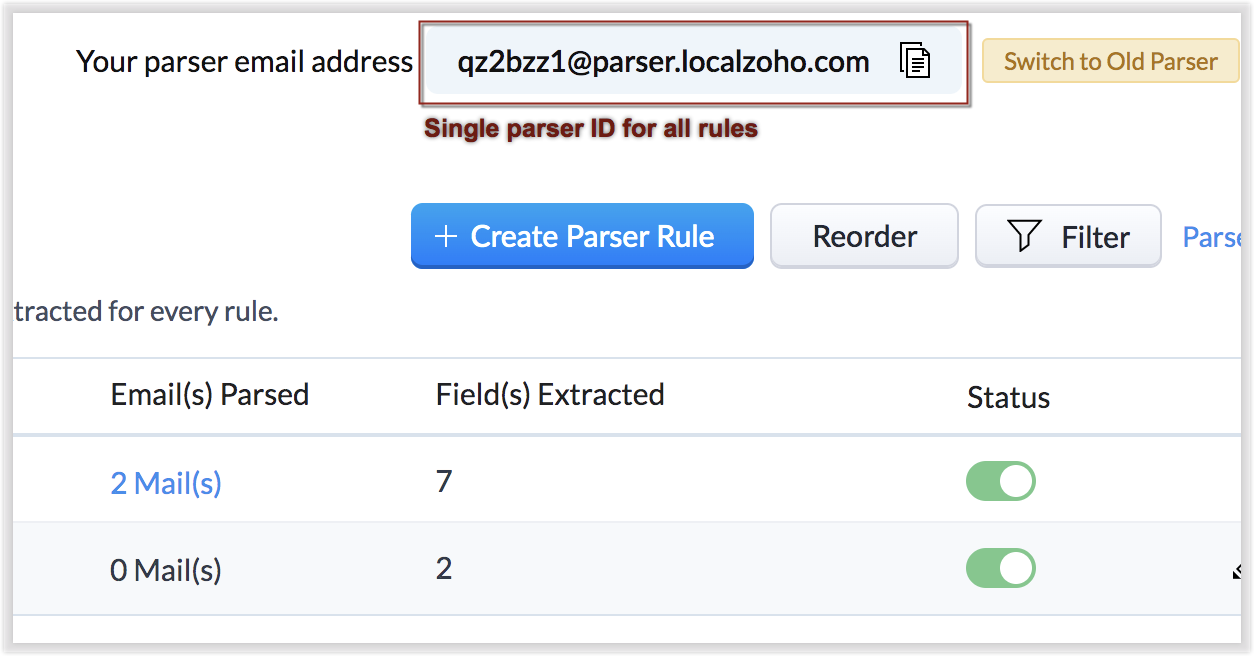


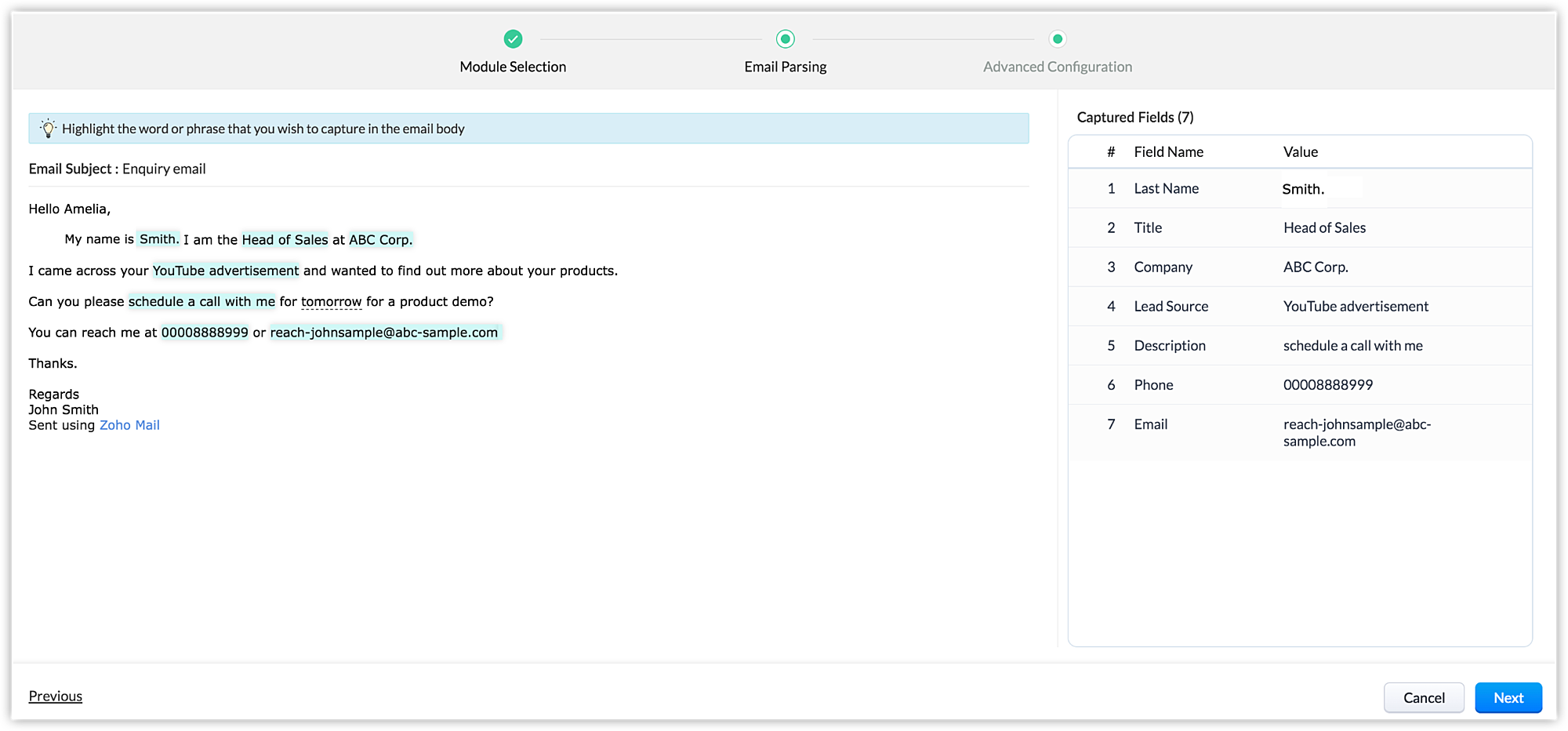
This replaces the previously time-consuming process of creating a separate parser email ID for individual vendors to track their information. The new parser interface displays a preview of the parsed data alongside where the field mapping occurs, and features an advanced configuration tab which enables users to filter emails according to different criteria.

Enhancements related to Emails in CRM 

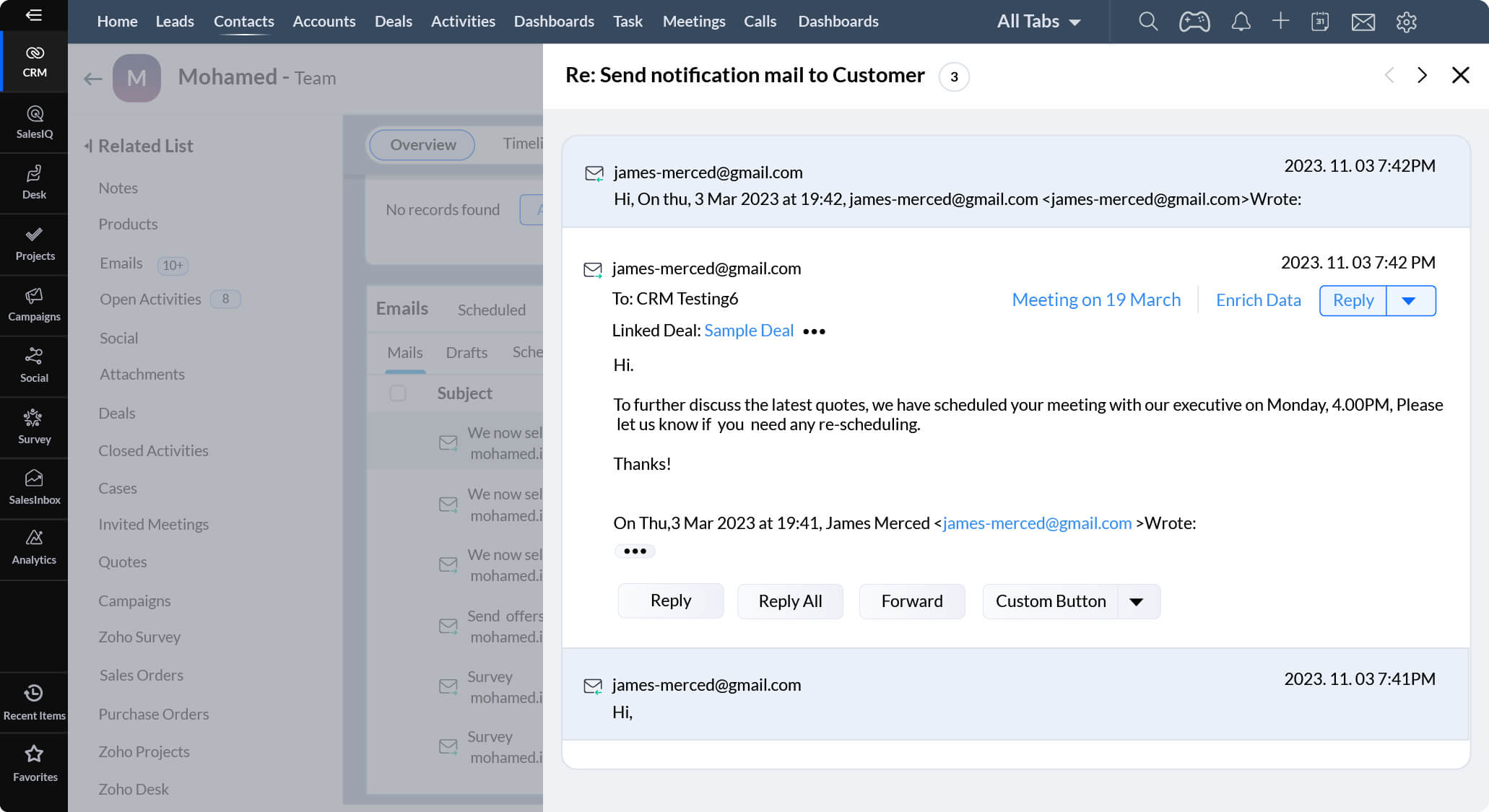
With our all-new email configuration, you can open an email and see the entire set of follow-up emails in a threaded view.


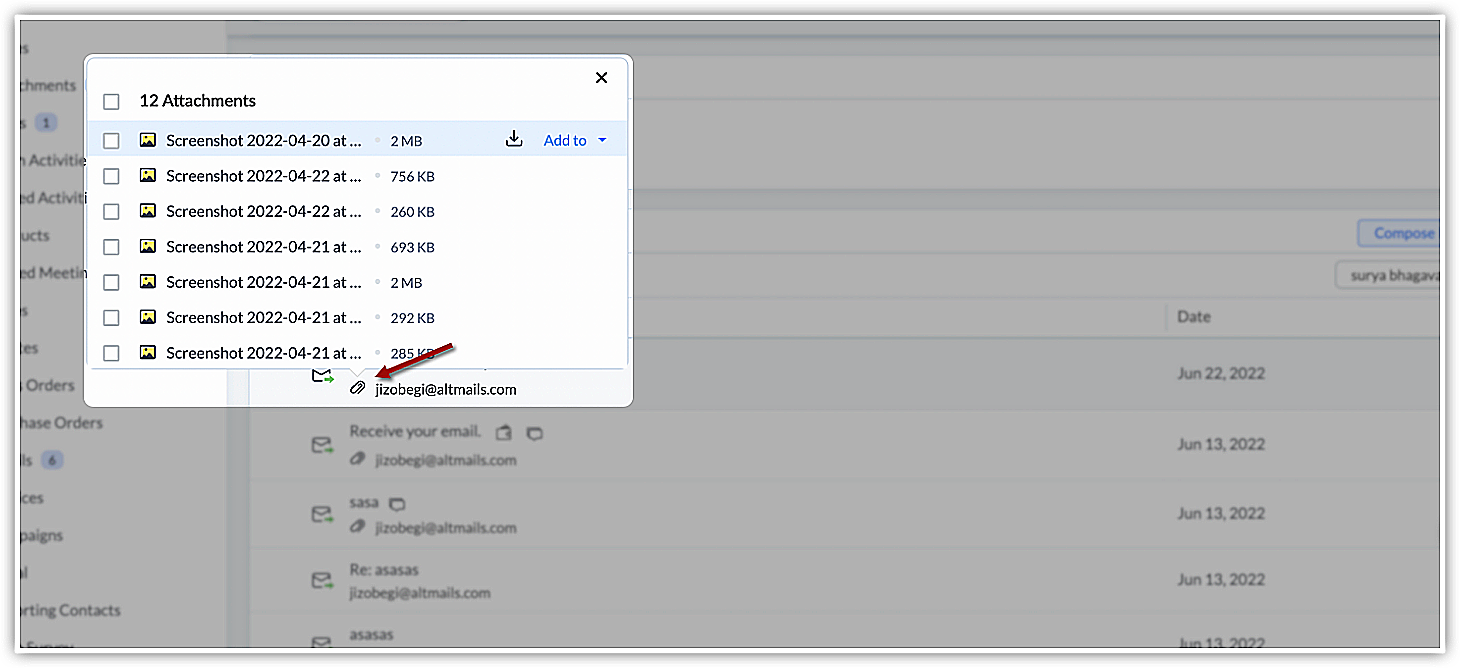
You can now add attachments from WorkDrive and other cloud drives, which saves you the time of having to download the attachments, and ensures that the files are always easily accessible in the cloud. You can also access attachments by clicking on the attachment icon next to a listed email, instead of having to open the email.
 

Enhancements in Desk's Community module

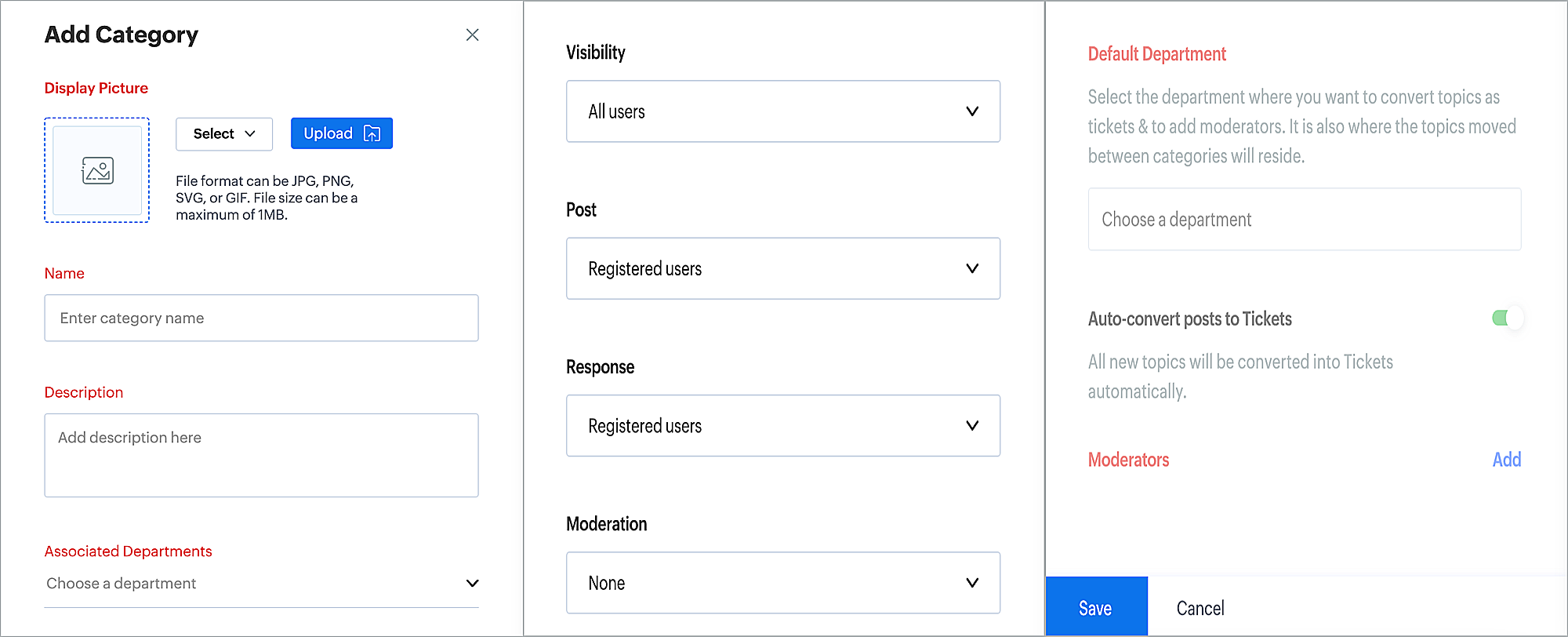
Categories are a collection of forums displayed in Desk. By default, each department has its own category. For example, you can manage categories for Sales and Support separately. The new enhancements enable you to create independent categories and define characteristics like logos, names, descriptions, associated departments, and others.
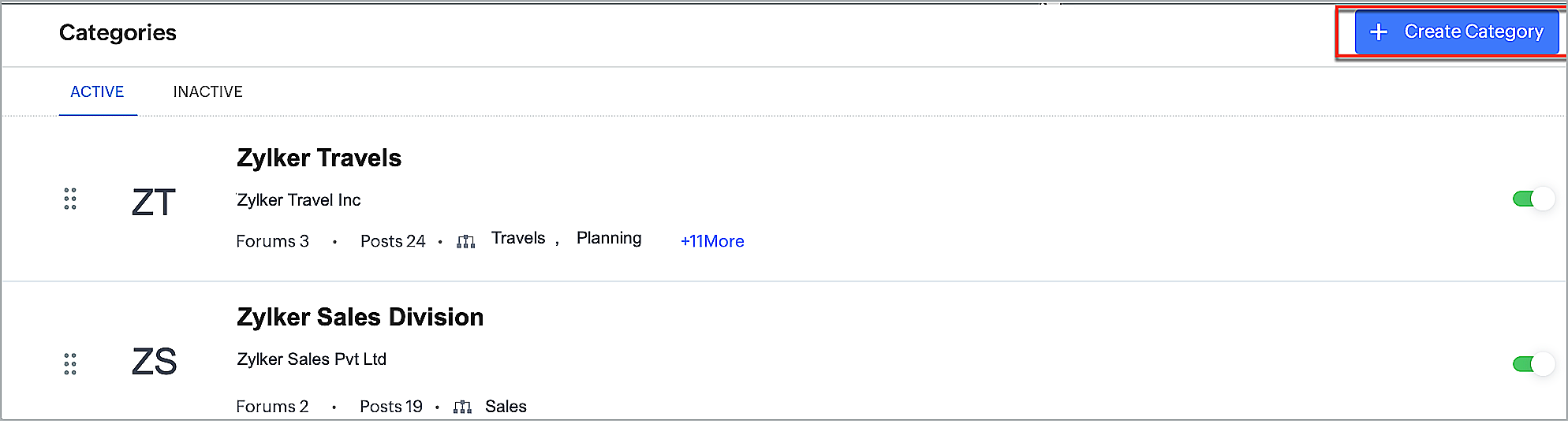


Furthermore, many-to-many mapping can be done between a category and department. A category created for a particular department can be mapped with a different department. This helps users create forums more quickly. Now, you can also set default departments and add topics directly as tickets.
 

Parallel Transitions in Projects

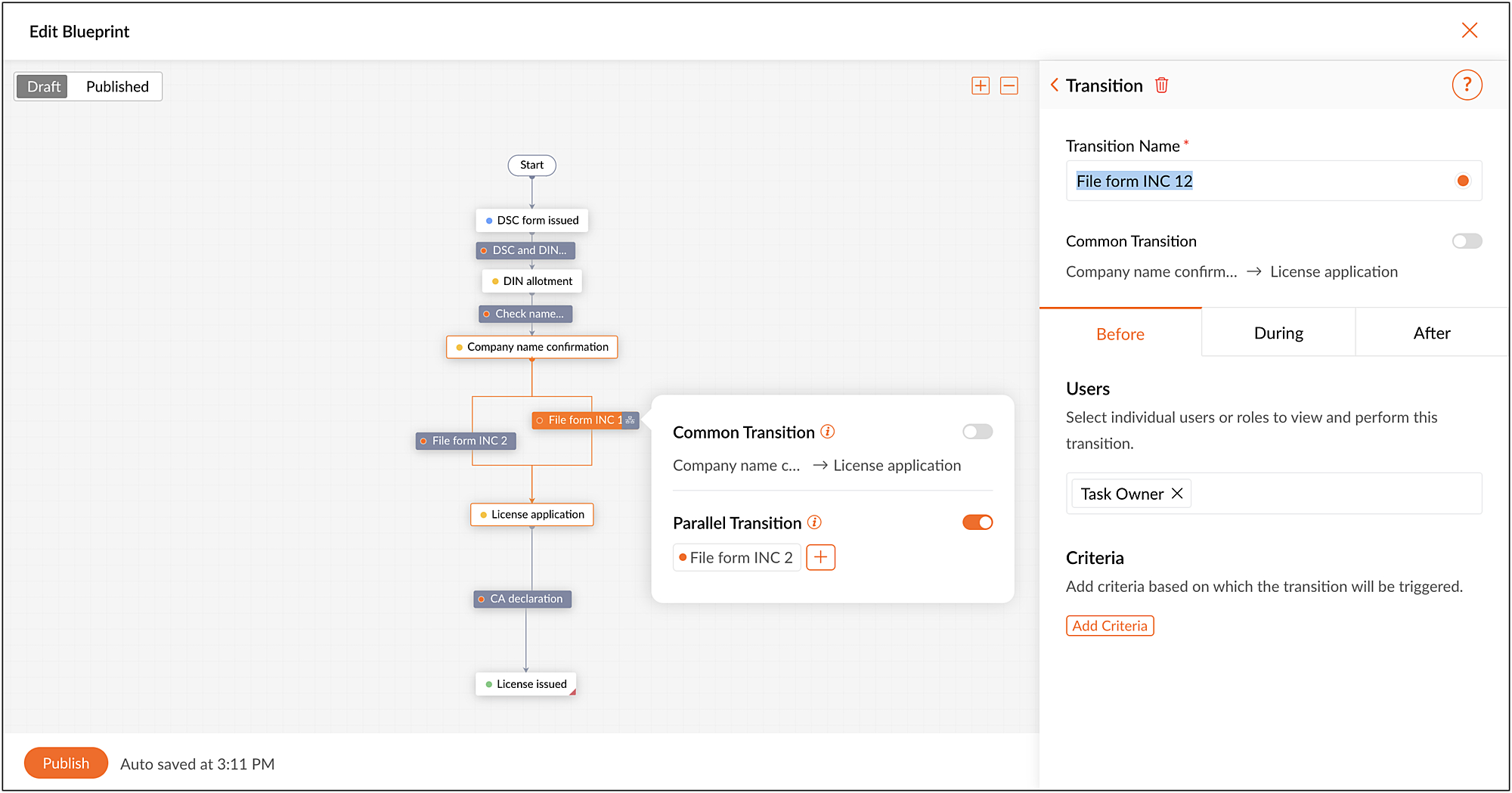
Projects' Blueprint feature helps you design and direct workflows to automate processes in a step-by-step manner. A blueprint has two main components: status and transition. Status denotes what stage a task is at, and transition is the link between two statuses and shows the movement of tasks from one status to another. Sometimes, these transitions need to be run in parallel. For example, in a production process, the production of a material can be approved only if the blueprint is approved by the engineering head, quality control manager, and production manager. All these processes can run as parallel transitions, and the entire process will be marked as complete only if all the transitions are complete. 
 

Enhancements in Social Reports

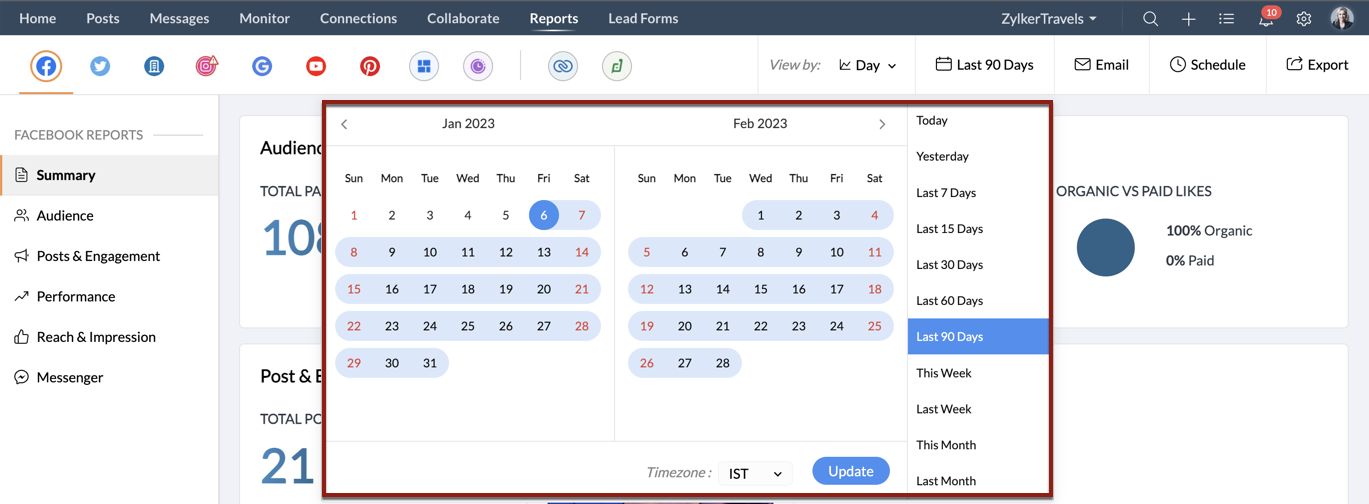
You can view in-depth analytics for your connected social media channels in the Reports module. These reports are now available for any specified date range over an extended period of one year. You can filter data by date, week, month, or quarter, and group it by brand. You can generate detailed summary reports, posts and engagement reports, Facebook Messenger insight reports, and much more for the past year. With this vast dataset, you can spot trends and understand how your social channels have been performing over time.


Cross-brand posting in Social

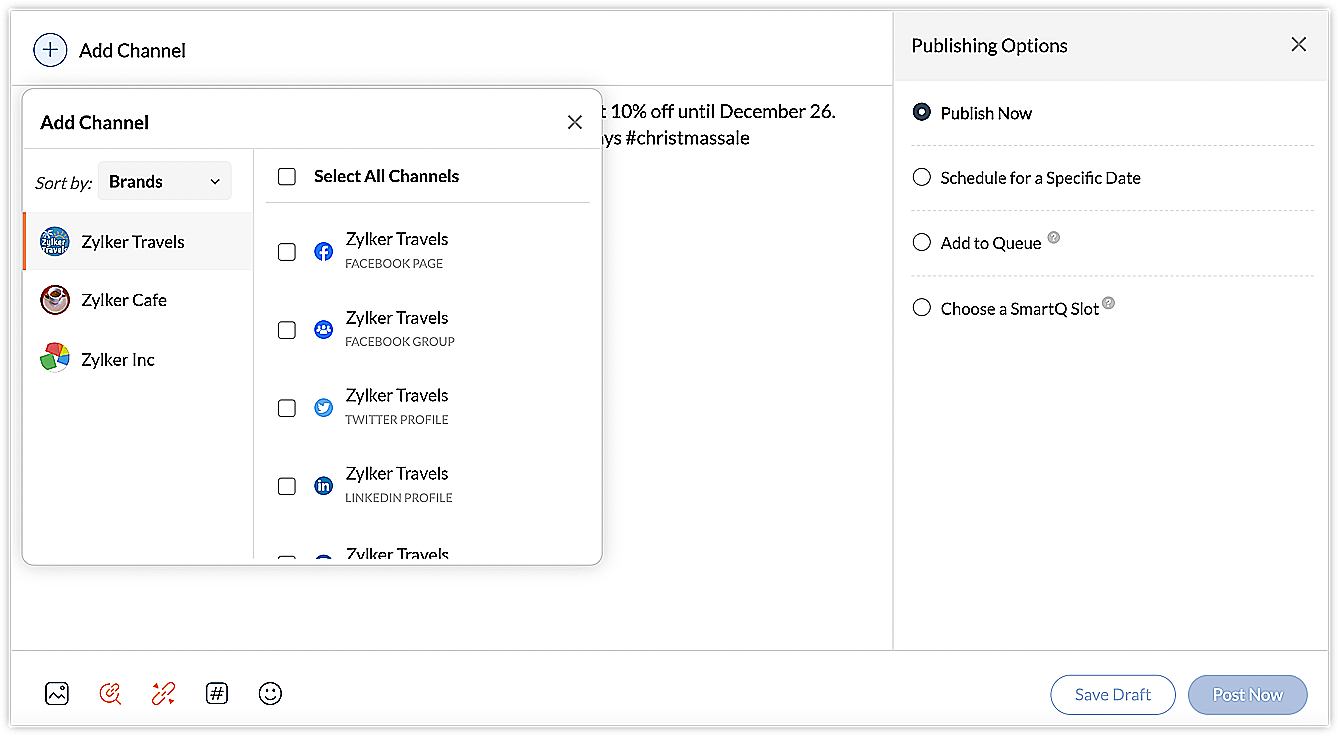
You've already been able to post across multiple channels, but with cross-brand posting, you can now post across all your brands and across multiple social channels at the same time. This enables easy and quick publishing so you can reach your entire audience in less time. Managing all your brands' publishing needs has never been easier.


Try out these updates and let us know what you think!
    • Sticky Posts

    • Zoho CRM Plus in 2023: Let's rewind

      Hey everyone, There's something about December that makes us want to sit back and remember all the wonderful moments, as we get ready for the New Year, 2024! (Psst! We are also turning 10—yay!) This year, CRM Plus had a lot of wonderful updates, taking
    • The CX Workshops are back in 2023!

      Hello, can you see my screen? Can you hear me? This is a phrase we've all been saying more often than "good morning" over the last couple of years. Well, now it's time to re-connect in person. We're excited to invite you all to the CX Workshops we've
    • Refer Zoho CRM Plus to your friends and earn rewards!

      Hey everyone,   We'd like to thank you from the bottom of our hearts for continuing to be our esteemed customers. Now you have the opportunity to refer Zoho CRM Plus to your friends or family members who are looking for a suitable solution to enhance
    • Social in CRM Plus now supports TikTok, Instagram Stories and Reels, and YouTube Shorts

      Hey everyone,   We are excited to inform you that Social in CRM Plus now allows you to publish on TikTok! We've also updated it to let you create Instagram Stories and Reels, as well as YouTube Shorts. Here's a brief about the updates.  Publishing on
    • Unified telephony in Zoho CRM Plus

      In any business, managing calls with the prospects or customers is an integral part of a salesperson or a support agent's daily life. They have access to information about the customers within Zoho CRM, and they also use a suitable PBX service to communicate
      • Recent Topics

      • OpenAI Is Moving to the Responses API: Here's What It Means for SalesIQ

        OpenAI has deprecated its Assistants API and is moving to the Responses API. If you're using OpenAI Assistants with SalesIQ, you may be wondering if you need to make any changes to your existing setup. You don't. SalesIQ has already taken care of the
      • Need Native Support for docx files in Zoho Writer

        Absolutely love Zoho Writer, but often need to share files by email with people who are in the Office ecosystem. Downloading a file as docx, then sending it by email, getting the comments back, converting it to Zoho format, editing it, then converting
      • CRM integration issues

        hi Just start testing Campaigns. Read up on up on these issues but can not find an answer. I am super admin. 1) its only showing 1002 contacts, I have a 2500 plan which is confirmed in dashboard. I says it sync'd 1400. I've looked at missing contacts,
      • What's New in Zoho Expense: Integrated Business Travel and AI-Powered Expense Management

        This release brings a wide range of updates across Zoho Expense, including new AI-powered capabilities, enhancements to corporate cards, expense management, audits, and more. Keep reading to know how the new updates can transform your travel and expense
      • I want to prefill CRM Account information using the GSTIN of the Customer

        Currently i need to add account details manually in zoho crm and when it syncs in zoho books manual working needs to be done. Whereas in zoho books i can prefill the customer details using the GSTIN which is great feature. Can the same be enabled for
      • ChatGPT Plugin / MCP Server auth error

        Hi all I'm trying to connect the ChatGPT plugin for Zoho CRM but after username stage of the auth process, I get this error from the URL https://mcp.zoho.eu/mcp-client/ {"error_description":"Invalid request url, Request is not as per defined in oauth
      • Project Management Platforms for AI Agents: What Matters Most?

        Zoho Projects is already going beyond basic AI assistance with MCP, AI Bridge, and integrations that let AI models access project data and perform actions. That raises an interesting question: what should a project management platform for AI agents actually
      • Cliq iOS can't see shared screen

        Hello, I had this morning a video call with a colleague. She is using Cliq Desktop MacOS and wanted to share her screen with me. I'm on iPad. I noticed, while she shared her screen, I could only see her video, but not the shared screen... Does Cliq iOS is able to display shared screen, or is it somewhere else to be found ? Regards
      • Sync workdrive feature inside ZohoCRM

        Hi, I'm exploring the new workdrive/ZohoCRM connector released by Zoho to replace the free extension workdriveforCRM which is decomissioned https://marketplace.zoho.com/app/crm/zoho-workdrive-for-zoho-crm I'm rather upset with this long awaited feature,
      • Adding Custom Status Options in Work Order Action Menu

        Hello FSM Team, We would like to inquire if it is possible to add more custom options in the Work Order action/status dropdown (e.g., Cancel, Terminate, Non-Billable, Void, etc.). Currently, the available options are limited, and we are unable to customize
      • Timesheet Task Icons

        In the image below which shows the task field drop down when creating a timesheet against a project and task. What do the icons mean the the right side column against each task? I can't find any documentation or guide that explains what the no entry sign,
      • Open Records in a New Browser Tab

        Hi FSM Team, Just a suggestion: It would be helpful to have a right-click → Open in New Tab option in FSM, similar to CRM. This should ideally work for any clickable record or module, allowing users to open multiple records in separate tabs without losing
      • Facturation électronique 2026 - obligation dès le 1er septembre 2026

        Bonjour, Je me permets de réagir à divers posts publiés ici et là concernant le projet de E-Invoicing, dans le cadre de la facturation électronique prévue très prochainement. Dans le cadre du passage à la facturation électronique pour les entreprises,
      • Marketing Tip #18: Make your online store mobile-friendly to improve traffic

        Most online shoppers browse on their phones first. If your store is hard to read, slow to load, or tricky to navigate on mobile, they’ll bounce fast. A mobile-friendly store doesn’t just look nice; it improves engagement, reduces drop-offs, and helps
      • Cannot add note to record on mobile

        In the latest version of the mobile app - if a record already has notes associated with it - you can add a note via the mobile app - if a record does not have previous notes there is no way to add a new one - it allows me only to send email
      • Admin Logging in as another User

        How can a Super Admin login as another user. For example, I have a sales rep that is having issues with their Accounts and I want to view their Zoho Account with out having to do a GTM and sharing screens. Latest Update (27th April 2026): With the early
      • Dashboards for Customers

        Is it possible to build dashboards for each customers in the community for their tickets?
      • Custom color coding for your entities

        Our brains are fine tuned to recognize colors before any text or shapes, making color coding a powerful tool to organize data and find items quickly. Color coding of our day-to-day work help with quickly processing the information, reducing cognitive
      • The Social Wall: August 2026

        Hello everyone. Welcome to the August 2026 edition of The Social Wall. This month, we're bringing you updates that make it easier to reach your audience, manage more channels, and streamline your publishing workflow. Here’s what’s new. WhatsApp bulk messaging
      • Check out in Meetings

        Why there is no check out in Meetings of Zoho CRM, very difficult to track
      • How do I get to "Admin Panel"

        I just started a Cliq account. I am the sole administrator. As I read the documentation, I keep seeing reference to an "Admin Panel". I see no way to access this from my Cliq account. How do I access this panel?
      • 【初開催! オンライン】Zoho Campaigns メール配信の基礎・活用勉強会を開催します! 10/15 参加無料

        ユーザーの皆さま、こんにちは。 Zoho コミュニティグループの中野です。 Zoho ユーザーコミュニティ初となる、メールマーケティングをテーマにしたオンライン勉強会を開催します! ▶︎イベント詳細・参加登録はこちら 今回取り上げるサービスは「Zoho Campaigns」です。 「Zoho CRMとZoho Campaignsのどちらからメールを配信すればよいか分からない」 「一斉配信はできるようになったけれど、現在のリスト管理や設定が正しいか不安」 「メールを送るだけで終わり、配信後の改善につなげられていない」
      • Lookups and Custom Modules

        I created a Custom Module that I'm calling "Item Purchasing Group". This module will store information for groups of Items that must be purchased together (including minimum overall quantities and/or values, etc.). This will have a one-to-many relationship
      • Marketing Tip #46: Run flash sales the right way

        A flash sale can do a lot for your store. It can clear slow-moving inventory, spike revenue on a slow day, or reward your most loyal customers. But if done carelessly, flash sales can backfire. Customers start expecting discounts, stop buying at full
      • Introducing Smart Fields in Zoho Forms

        Hello form builders! We are excited to introduce Smart Fields in Zoho Forms - a faster way to add calculations to your forms without writing formulas. Instead of creating multiple fields and configuring complex calculations yourself, you can now drag
      • Checkbox not displaying correctly in subform

        Greetings: I have shared my app (wv) with support.  I am having problems with a checkbox field not displaying correctly in a subform.  The main form is called volunteers and the subform is called volunteers_subform.  The field in question is called roles. When you access the subform by itself the checkbox lookup displays as checkboxes.  But when you view it in the main volunteers form, it displays as a multi-select dropdown instead.   I have attached jpegs showing the difference.   Any thoughts?
      • Unbundle feature for composite items

        We receive composite items from our vendors and sell them either individually or create other composite items out of them. So, there is a lot of bundling and unbundling involved with our composite items. Previously, this feature was supported in form
      • The reason I switched away from Zoho Notebook

        My main reason for switching to Zoho was driven by three core principles: moving away from US-based products, keeping my data within India as much as possible, and supporting Indian companies. With that intent, I’ve been actively de-Googling my digital
      • Valid characters for use in email addresses using Zoho's apps/APIs

        We have found an issue with the + sign character in zoho subs - we are allowed to create a customer with an email address that has a plus sign but the API doesn't allow the + so the billing portal is not created. We are going to prevent users from using
      • Expand Zoho Analytics Spatial Capabitlities

        Dear Analytics team Thanks for the great product - I'm a big fan on Analytics and the monthly release highlights is one of my favourite emails to receive. I'd like to request expansion and improvement of Zoho Analytics spatial data capabilities, namely:
      • Automate customer follow-ups with Sequences in Bigin

        Greetings, We hope you're all doing well! We're happy to announce a new feature that we've added to Bigin. Following up with every lead at the right time can be challenging, especially when your team is managing multiple conversations across emails, calls,
      • Displaying only unread tickets in ticket view

        Hello, I was wondering if someone might be able to help me with this one. We use filters to display our ticket list, typically using a saved filter which displays the tickets which are overdue or due today. What I'd really like is another filter that
      • Can we have an automated TDS Receivable Recon with Form 26AS of Income Tax Portal ?

        Can we have an automated TDS Receivable Recon with Form 26AS of Income Tax Portal ?
      • Customers would like to add tips when paying in Client Portal

        I am happy with the clean interface of the Client Portal. However, I am running into a challenge: my customers would like to be able to add tips/gratuities when making payments. Currently, this is very clunky because they have to 1) manually over-pay,
      • Tag Limi?

        is there any way to create more than 20 tags? 
      • prefill_data for Creator + Merge & Sign

        Hello, Is there an option to use prefill_data for signer fields from creator? I see the option for CRM but it will not work with creator? I have tried passing the value in the signer data, and that also does not work. Alternatively, is there a way to
      • Delug script

        I have been looking at auto-update a amount (home currency) field from another module. Zoho native multicurrency was used in the other module (we have 4 here). Custom script was input with no error, but the field was not updated on trigger. Script as
      • Can I Build a Gaming Website Using Zoho? Need a Quick Roadmap

        Hi Dear Members, I want to create a gaming website using Zoho. Is it possible? My goal is to build a sleek, unique, easy-to-navigate, and fast-loading website for a gaming project. I want the site to look professional, user-friendly, and optimized for
      • Remove Due Date from Statements

        Is it possible to remove the Due Date on the Invoice transation line on statements? I have figured work arounds to get the Invoice detail on the Statement but cannot work out haw to simplify the stament by removing the "- due on xx/xx/2026" - it really
      • What Should an Agent-Native Project Workspace Look Like

        AI is moving beyond assistants that simply answer questions. With tools like MCP, agents can now interact directly with project data and perform actions. That makes me wonder: what should an agent-native project workspace actually look like? For me, it
      • Next Page