Introducing the locking option for CRM records
Last modified on 06/04/2023: Record locking option in CRM is now available for all Zoho CRM users in all DCs. Note that it was an early access feature available only upon request.
Hello All,
Hope you're doing well!
We're thrilled to introduce our latest enhancement to CRM—record locking.
Certain business scenarios demand that records in your organization's modules be safe from editing or deletion once they reach a certain stage in your sales process or satisfy specific conditions.
For example, if a deal has reached the final stage—"closed won" or "closed lost"—then perhaps it shouldn't be further edited or deleted.
Alternatively, let's say a record is in its proposal or review stage. During such a stage, the details of the record need to be verified, and even though a sales rep may be the record's owner, you can't allow them to update the record while the review is ongoing.
There might also be situations where the record doesn't match certain criteria, but the user dealing with the record might want to lock the record to avoid changes. For example, when a sales rep is in touch with a prospect, they may want to temporarily lock the record while prospecting is in progress to prevent other reps from adding incorrect information to the record.
Zoho CRM's record-locking feature enables you to lock records manually or automatically when certain conditions are met.
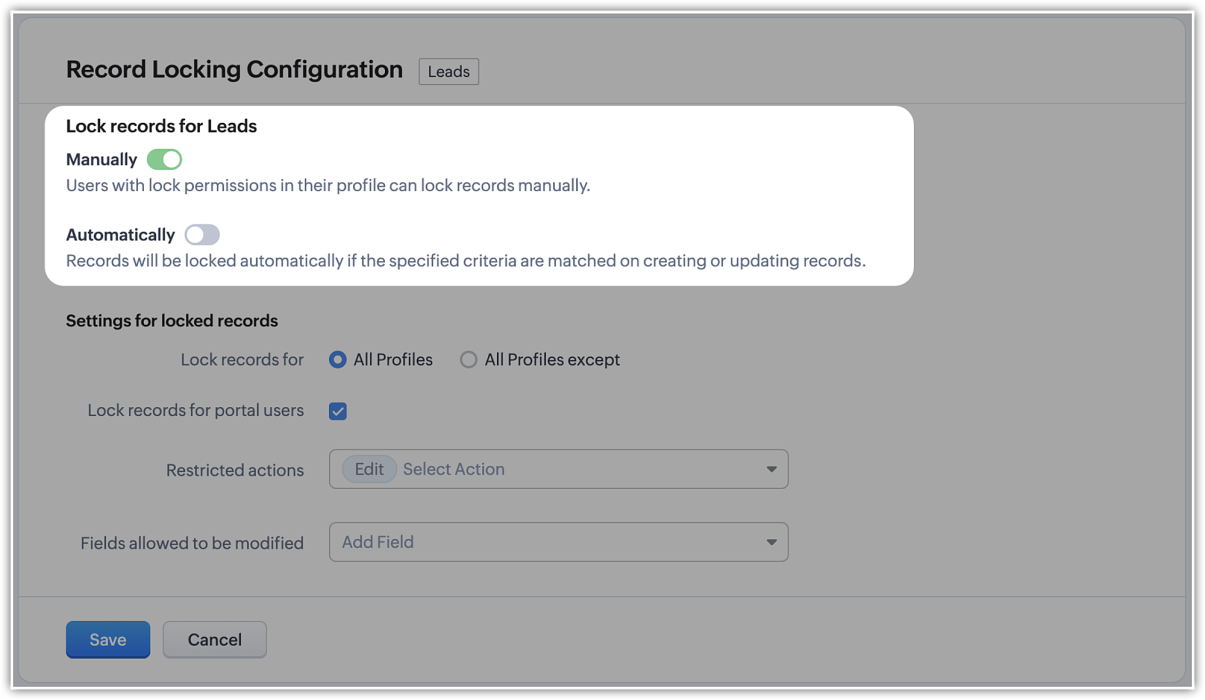
NOTE (added on 02/03/23): The locking configuration must be set up separately for each module. You can navigate to the specific module in Modules and Fields under Customization in your setup page, and you will find the Record Locking Configuration tab.
Record locking configurations
Now that we've established why locking records can be useful or necessary, let's take a quick look at the different configuration options available:
Now that we've established why locking records can be useful or necessary, let's take a quick look at the different configuration options available:
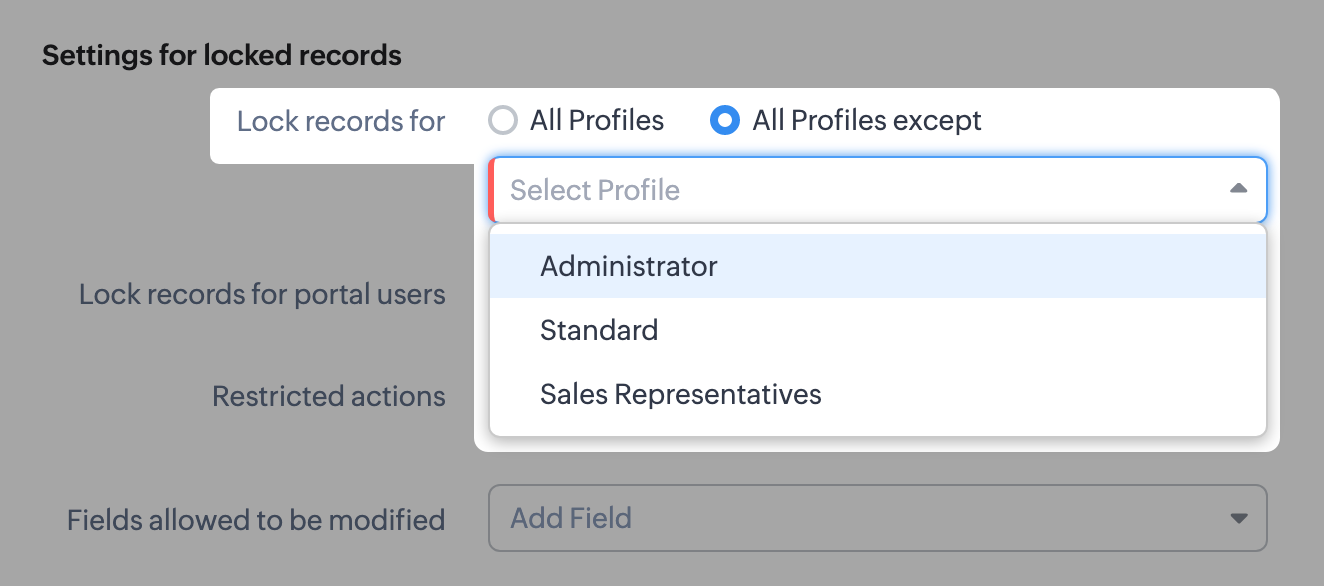
- There might be scenarios where, say, you want members of the accounts team to be able to edit quotes, but not other profiles. You can simply lock the records for all profiles except those belonging to members of the accounts team, any other set of exceptions using the multi-select menu. Additionally, you can also choose to lock records for all profiles.
- You can lock the records that are accessible to your portal users.
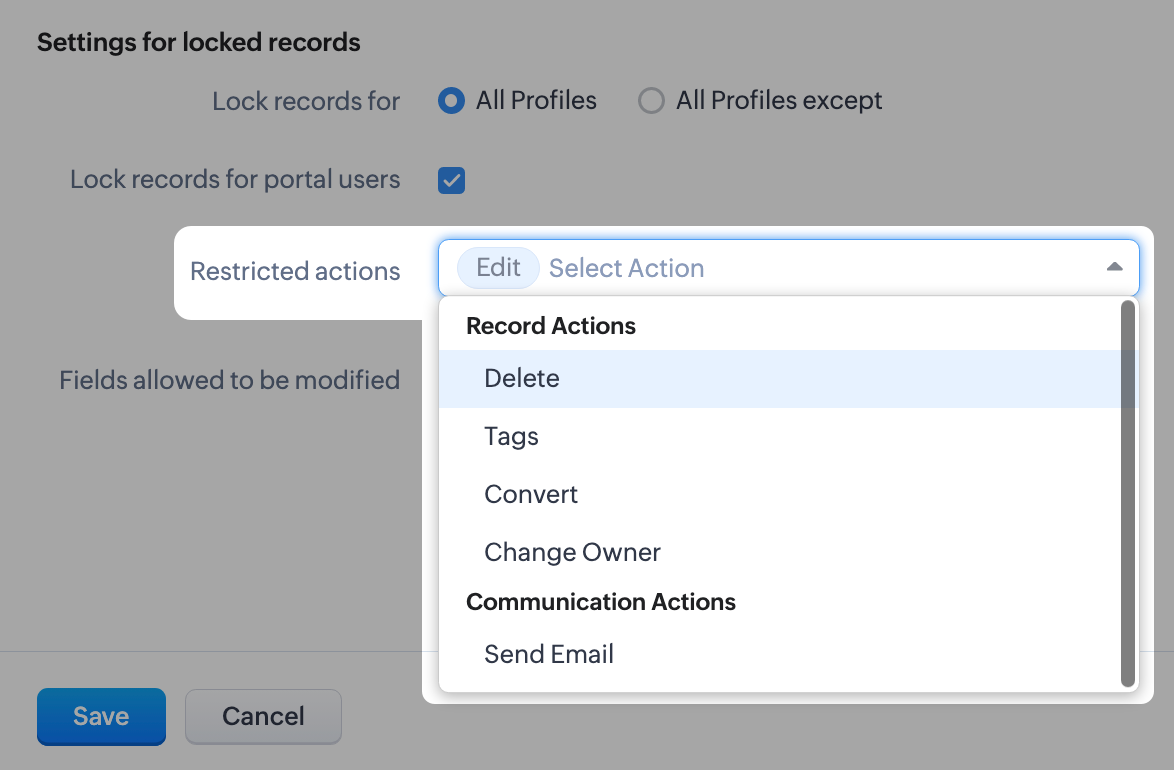
- For locked records, the edit action is disabled by default, but you can restrict other types of native actions, as well as custom buttons.
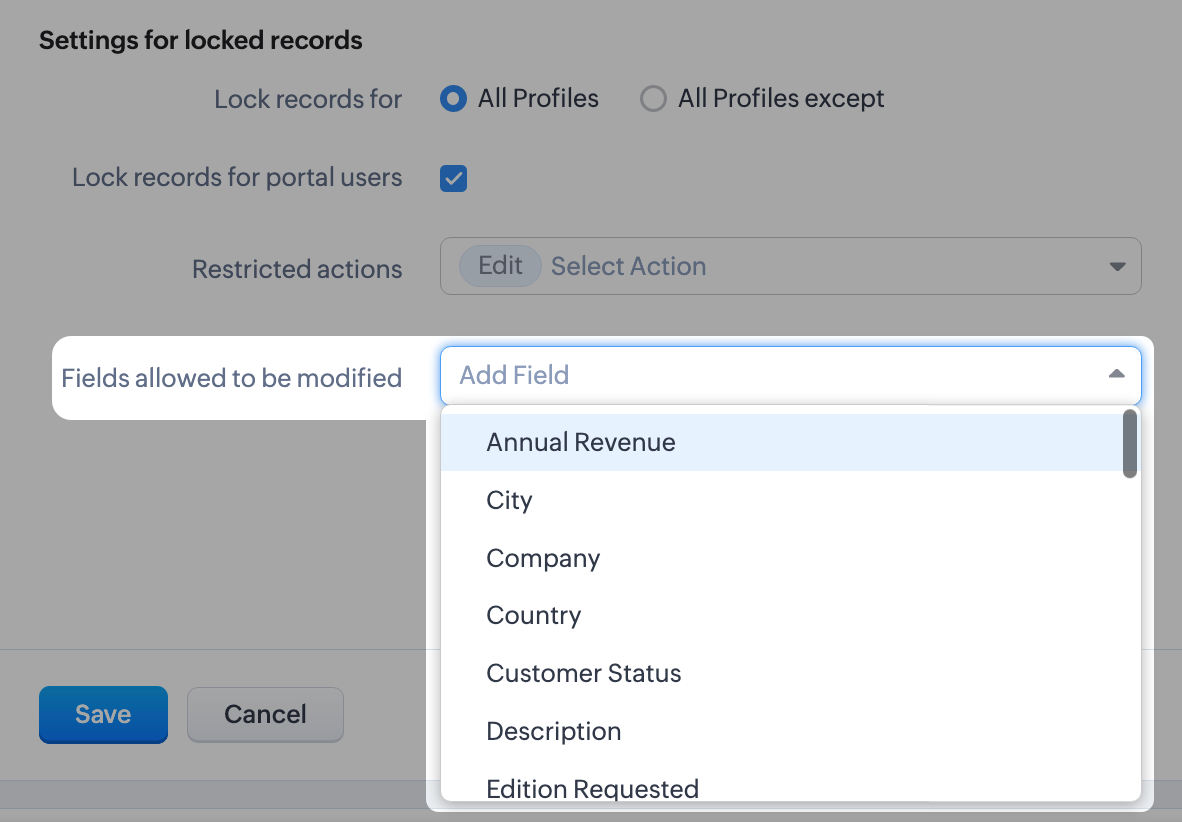
- Even when a record is locked, you can configure certain fields which don't affect your business process to remain editable. For example, you might want the Description or comment fields to remain editable. You can leave a maximum of 15 fields unlocked.
What happens when a record is locked?
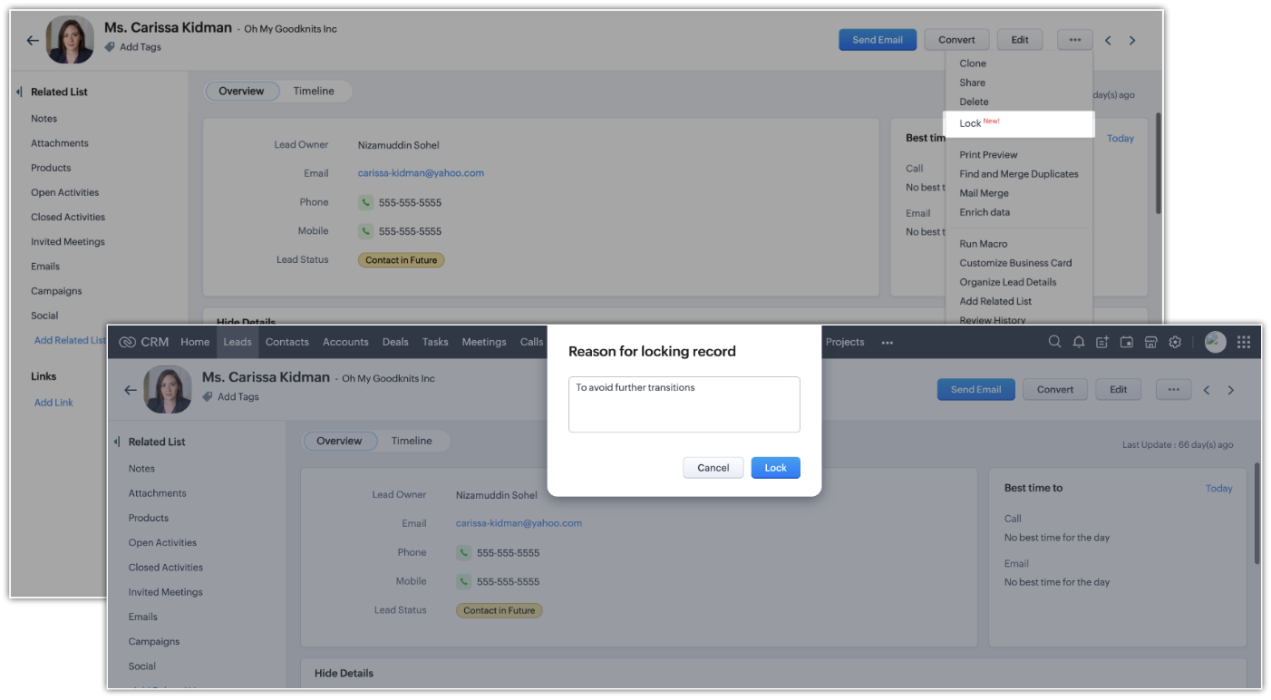
Once a record is locked, you will see the lock icon on the record image and in the UI of the record detail page itself. Only fields you've enabled will be available to edit.
Once a record is locked, you will see the lock icon on the record image and in the UI of the record detail page itself. Only fields you've enabled will be available to edit.
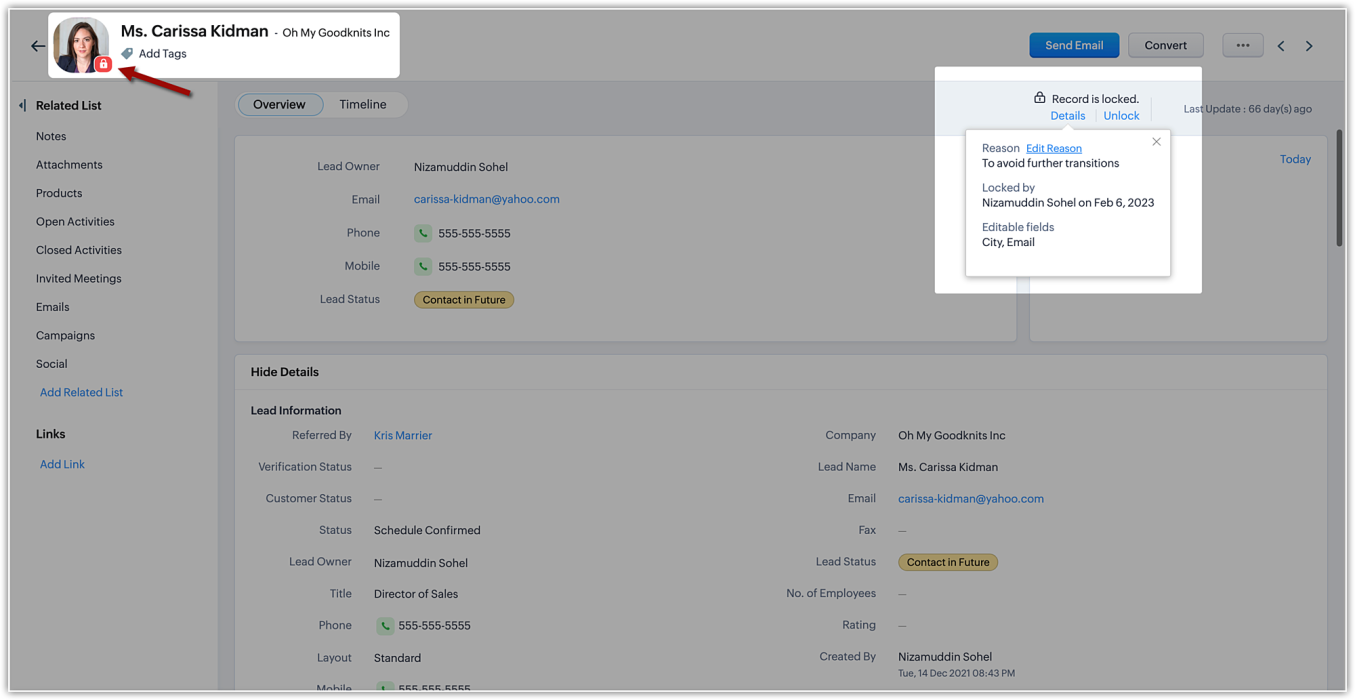
The details of the locking, such as the reason (i.e., the locking condition), locking date, and the fields available for edit will be shown on the details button available on the record detail page.
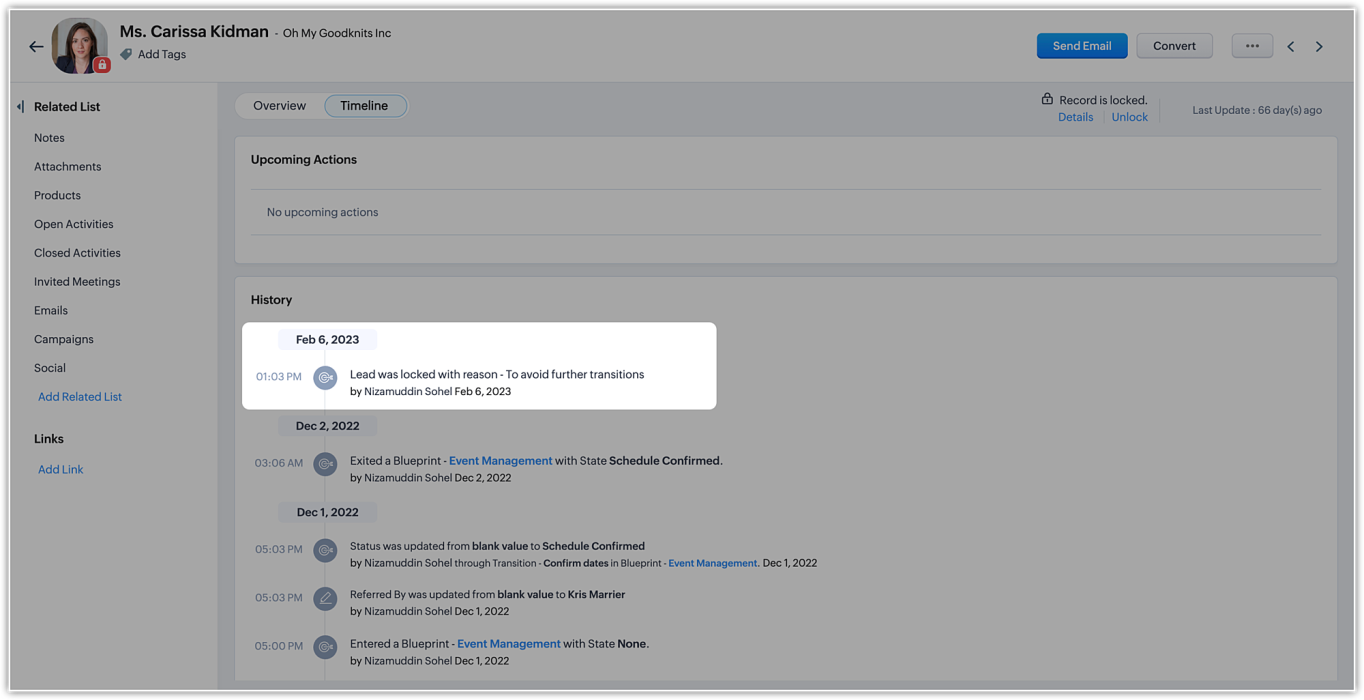
In the record's timeline, you can also see timestamped details like when the record was locked and the condition that was followed.
On the record list view, locked records are indicated by a lock icon.
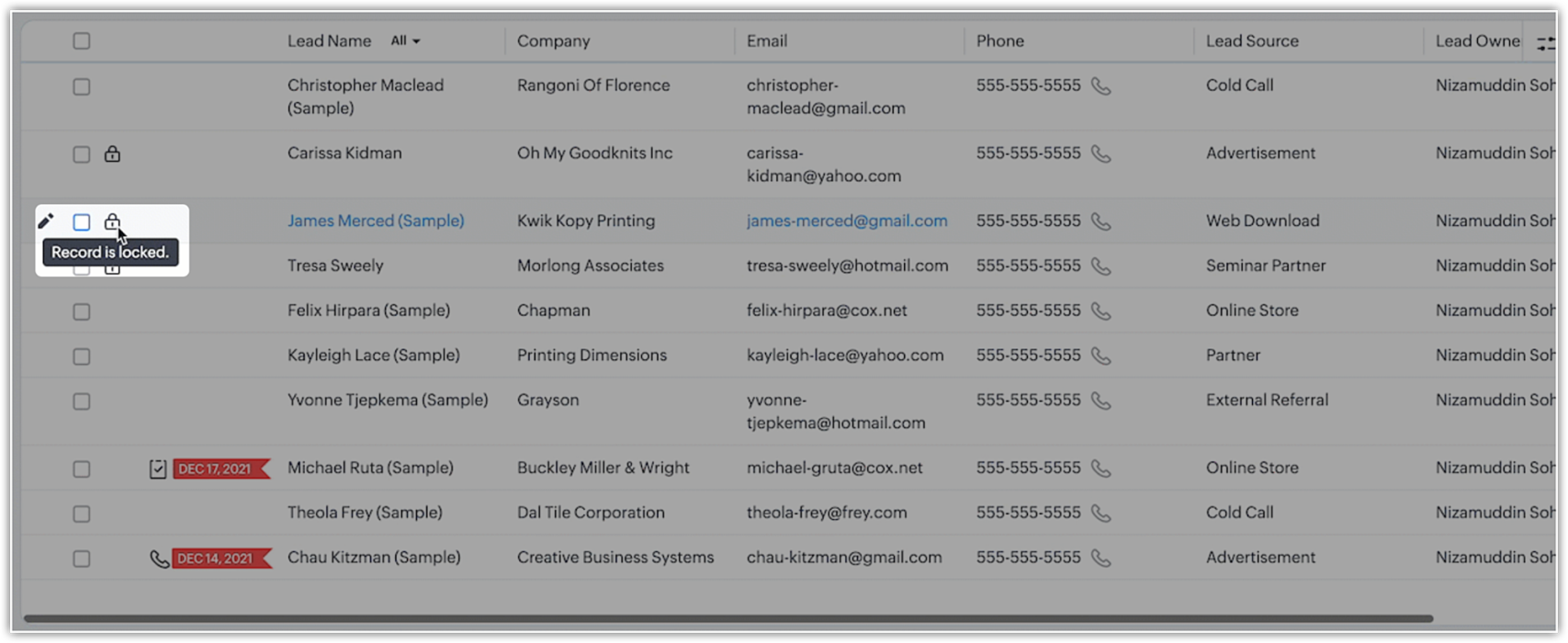
Additionally, you can filter records in the list view based on the pre-defined filter option, as well as based on the system-defined custom view.
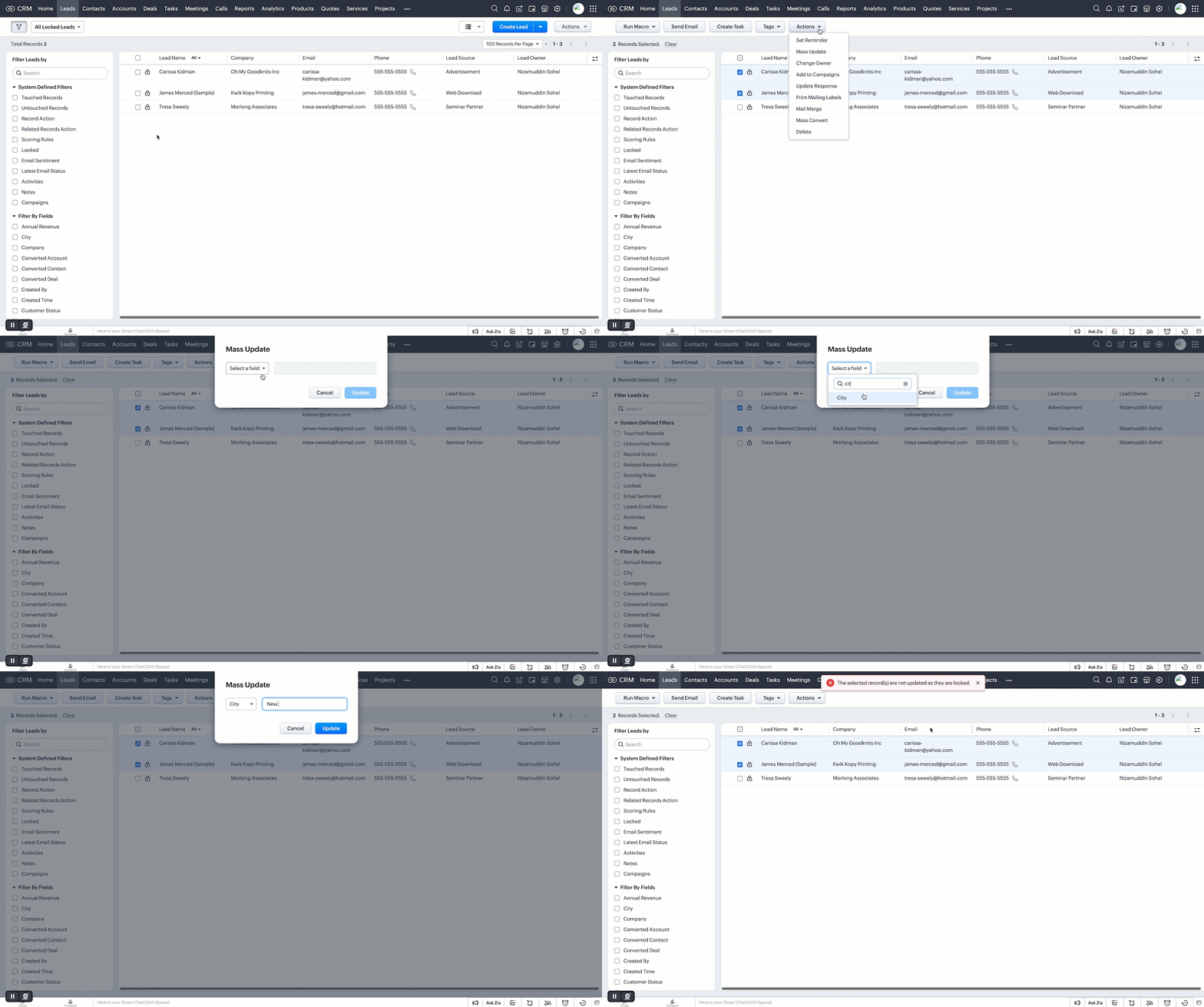
Who can unlock records and how is it done?
If a user locks a record manually, they can unlock it themselves. Admins can unlock records, too. On the other hand, automatically locked records will be unlocked only when they're no longer subject to the lock conditions or criteria.
However, deleting a rule or locking configuration will automatically unlock all records the rule or condition had previously locked.
Additional notes
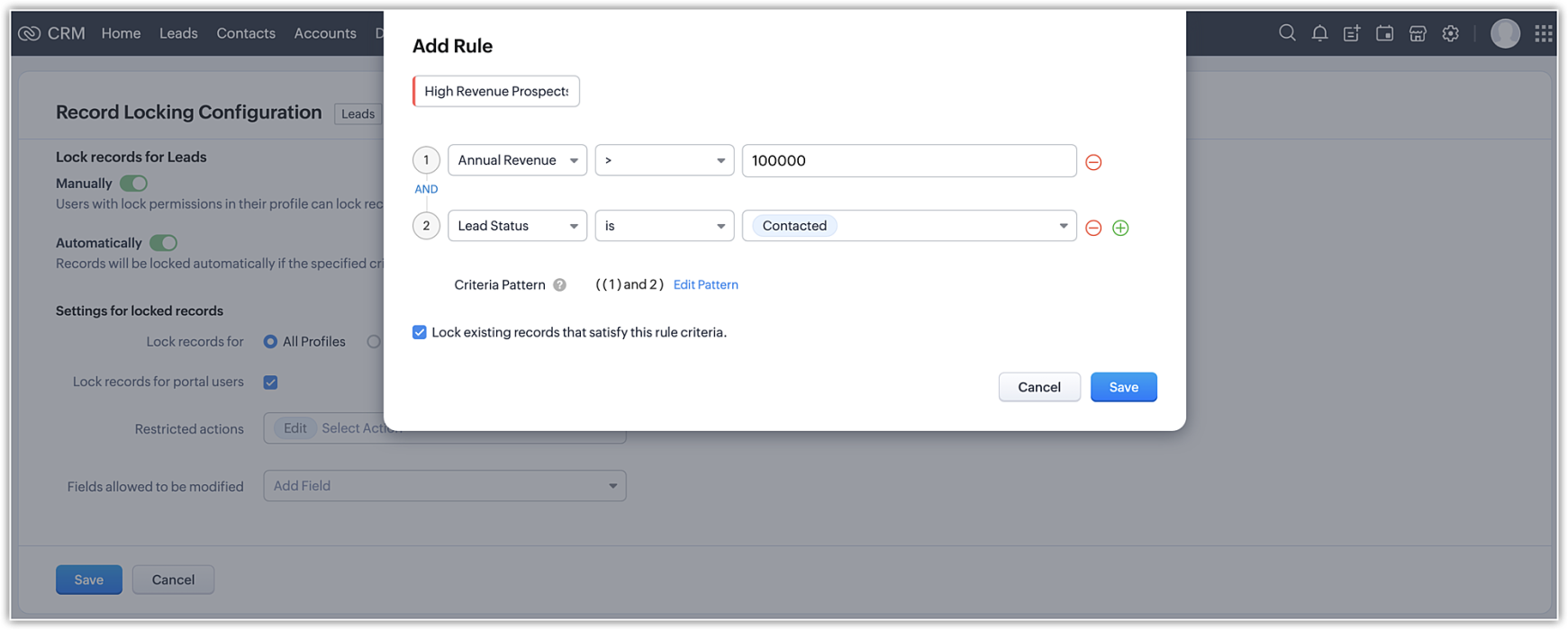
- Set up to five rules per module. Each rule will have a name that is displayed on the record detail page when a record is locked.
- System actions like automation and integration syncs will still be performed on locked records, even when a user who is excluded from locking triggers those processes.
- Locked records are still displayed in list views. However, bulk actions done from list views are not allowed if the respective action is restricted under the record locking configuration.
- Record locking configuration is available for enterprise and ultimate editions of Zoho CRM. If an user downgrades from enterprise edition, locking configurations will be ineffective and all records will be unlocked.
Locked status can not be regained upon upgrading back.
That's all for this exciting new enhancement. Read more about the record locking configurations and its usage in our help doc.
Thanks and have a good one!
Note:
- Manual locking/unlocking of records is not available for the mobile app as yet.
- Auto-locking of records will get reflected on the mobile app, and locked records cannot be updated from mobile app also.
- The locking configuration must be set up separately for each module.
Topic Participants
Saishree T K
Lane Von Pinkston
Jordan Talmor
Amit
Piyush Goyal
Sticky Posts
Announcing Early Access to "Zoho CRM for Everyone" — A new and exciting update to Zoho CRM
Update : Zoho CRM For Everyone's Nextgen Interface gets an upgrade! Hello everyone, We’ve updated the Zoho CRM for Everyone Nextgen interface based on your feedback. The UI is now simpler with a unified sidebar, a more visible global search and features[Early Access] Voice of the Customer (VoC) for Zoho CRM
Happy new year, everyone! We have an exciting addition to our suite of features and would like to introduce you to VoC (Voice of the Customer) for Zoho CRM, powered by Zia. 2023 is definitely the best time to be a customer with rapid innovations and advancementsAdding calls as a channel in Voice of the Customer
Dear All, We hope you're well! It's been almost a year since we opened Zoho CRM's Voice of the Customer solution up for early access. We are grateful for the reception and support you have been showing us with regards to its adoption and feedback. Since
Recent Topics
ZML vs HTML Snippet - which is better?
Are there certain use cases where one is better than the other?Load PO_Date field (Purchase Order) with current date in Deluge
Hi, I'm not a full time developer, just helping to customize our CRM, in the small company I work for. There must be something wrong with me, because I can't do something so simple as complete a field with the current date in a function using Deluge.Zoho CRM in Microsoft Power Automate Custom Connector
Hi everyone, I’m building a Power Automate flow that integrates Microsoft Bookings with Zoho CRM. The goal is to automatically create a meeting (event) in Zoho CRM whenever a new appointment is booked via Microsoft Bookings. To achieve this, I createdSpell check sucks
Come on guys, it's 2024 and your spell check is completely retarded. You gotta fix it.Zoho One Login Issue - Unable to receive OTP
Hi Support Team, I am experiencing a unique login issue with Zoho One. I am attempting to log in from India using Zoho Login credentials provided by a USA-based client. Their Zoho account is hosted on a US data center. After entering the username andIn the Zoho Creator Customer Payment form i Have customer field on select of the field Data want to fetch from the invoice from based on the customer name In the Customer Payment form i Have subf
In the Zoho Creator Customer Payment form i Have customer field on select of the field Data want to fetch from the invoice from based on the customer name In the Customer Payment form i Have subform update Invoice , there i have date field,Invoice numberProblem of Import Client Users From CRM and or Expense
I am premium plan user on Projects. I have about 500 customers on Expense and CRM that integrated with each other. According to at below link, I am trying to import clients from CRM, system not allowed to select any customer. If I import from Expense,equest to Disassociate Bigin from Zoho One and Migrate to Standalone (Upgrade to Bigin Premier – 3 Seats, Annual)
Dear Zoho One Support Team, I’m writing to request your assistance to disassociate (remove) the Bigin application from our Zoho One organization while preserving all existing Bigin data. After the disconnection is successfully completed, we intend toUnable to enable tax checkboxes
Hi Zoho Commerce Support, I'm writing to report an issue I'm having with the tax settings in my Zoho Commerce store. I've created several tax rates under Settings > Taxes, but all of them appear with the checkbox disabled. When I try to enable a checkbox,Zoho Commerce - Enable Company Name and Tax Number collection for B2B orders in Global Edition
Please enable Company Name and Tax Details option on checkout settings in Zoho Commerce Global Edition. It is still important to collect Company Name and Tax Number for B2B sales in many countries. My business is based in Ireland (in the EU) and I haveZohoSign and ZohoBooks Integration/Workflow
Hello All, We utilize ZohoSign for signatures on tax eFiles. We utilize Dynamic KBA. Additionally, we use ZohoBooks for invoicing for these services. Is there a way to accomplish the following: Send a copy of the Tax Return, Invoice and eFiles in oneManage monthly tasks with projectsf
Hi All I run a finance and operations team where we need both teams to complete monthly tasks to ensure we hit our deadlines. Can Zoho projects be used for this. There many finance focused tools but we have Zoho one so want to explore Thanks WillZoho Suite is very slow
Since today Zoho is incredibly slow over all applications! What's going on?Combine and hide invoice lines
In quickbooks we are able to create a invoice line that combines and hides invoices lines below. eg. Brochure design $1000 (total of lines below, the client can see this line) Graphic Design $600 (hidden but entered to reporting andZoho Devops
We have a Zoho one account which we have integrated with an SAS educational product, sold on a subscription model, using webhooks and API calls. We make some use of custom fields and cross module lookups and relationships. We utilize CRM, Books and billingFuel up your sales with the Zoho SalesIQ + Bigin integration
Hi everyone! We’re happy to bring you the all-new Zoho SalesIQ + Bigin integration. With this, every prospect from your website instantly becomes a contact in Bigin, complete with transcripts and follow-up tasks, so you never lose a lead again. Let'sIntroducing AI-powered Assessments & Zoho's native LLM, Zia
We’ve shipped a cleaner, faster way to create assessments in Zoho Recruit. 🚀 Instead of manually building question banks or copying old templates, you can now generate ready-to-use assessments in just a few clicks, all tailored to the role you’re hiringAbility to Reset Visitor Fields During an Active Chat Flow
Hello Zoho SalesIQ Team, We hope you are doing well. We would like to propose a feature enhancement to Zoho SalesIQ regarding the management of visitor fields within Zobot flows. Use Case: Our bot asks the visitor to provide information about a 3rd personExternal ID in Zoho CRM
Hello everyone! We know that Zoho CRM allows you to integrate third-party apps and manipulate data through APIs. While you integrate a third-party application, you may want to store the third-party reference IDs in Zoho CRM's records. To meet this needSome emails are not being delivered
I have this problem where some of my mail just seems to disappear. When I send it, it appears as sent with no mention of any problem, but my recipient never gets it, not even in the Spam folder. Same for receiving, I have a secondary e-mail address, andNew in Zoho Chat : Search for contacts, files, links & conversations with the all new powerful 'Smart Search' bar.
With the newly revamped 'Smart Search' bar in Zoho Chat, we have made your search for contacts, chats, files and links super quick and easy using Search Quantifiers. Search for a contact or specific conversations using quantifiers, such as, from: @user_name - to find chats or channel conversations received from a specific user. to: @user_name - to find chats or channel conversations sent to a specific user. in: #channel_name - to find a particular instance in a channel. in: #chat_name - to findTemplate modifiactions
Hello, I am struggling with the templates in ZOHO Books. Especially with the placement of some items, like company address, ship to, bill to etc. For example: One item I like from template X (placement of ship to and bill to next to each other in theAggregating the First Value in the Group By of a dataset
Hi I am trying to get the following Aggregate Formula to work in my chart, but cannot seem to get the right format. I have a series of data that I am running an include_groupby and want to SUM only a column in the first row of each group. So for example.Track Zoho Campaign and Workflow sales impact
I am attempting to measure the performance of our marketing workflows and campaigns by comparing the date each campaign was sent to a contact with the purchase date of the contact. For example, if Contact A was sent Email A on 9/1 and made a purchaseWhat is a line break code for zoho?
Hi, I am archiving data by adding values from a single line field from one form to a multi-line field in another form. So I need a code/function that starts a new line on that multi-line field so it does not just keep adding it on the same line. Example, doing something like this means that it will be on a same line. archive.field1 = archive.field1 + input.Field1 I need a code so the input.Field1 can just start on the next line. Instead of "value 1, 2,3,4,5" It will be: "1 2 3 4 etc.". somethingAutomatic Project Owner change
Is there a way to change Project Owner automatically once a specific Milestone in a project is marked as completed. Different Teams are working on projects in our Org, they have their own Milestones to complete and so we transfer the project from teamButton to add product to cart
Is there a way to have a button on a page, that when clicked, will add Qty 1 of a product to the cart?Problem with Submit Button Design
I have made a template to apply to my forms and under the button controls, I have it set to "standard" and yet it's still filling the container. This is super frustrating and looks weird. Why do we not have full control over button size? How can I fixZoho CRM- Authorize your Microsoft Teams account issue
Hi, I tried to link Zoho CRM with Teams and I got the following message: Clicking "Authorize now" sent me to the following page, Microsoft tried to start a session but, after 3 seconds the page closed and nothing happened. I get the same message eachIs there a way to associate an email in ZOHO Main to a Vendor record in ZOHO CRM
My situation is as below, I have a vendor in ZOHO CRM lets say "Vend A" and an associated contact, "Cont A" If Cont A sends me an email using the email I've registered in the contact record the standard OOTB email sync will work. But the vendor has someKaizen #207 - Answering your Questions | Advanced Queries using COQL API
Hi everyone, and welcome to another Kaizen week! As part of Kaizen #200 milestone, many of you shared topics you would like us to cover, and we have been addressing them one by one over the past few weeks. Today, we are picking up one of those requestsPrésentation de SecureForms dans Zoho Vault
Soyons francs : demander à quelqu’un de transmettre un mot de passe ou des informations sensibles n’est jamais une tâche facile. On attend, on relance, parfois de nombreuses fois. Et quand l’information arrive, elle se retrouve souvent dispersée dansGranular Email Forwarding Controls in Zoho Mail (Admin Console and Zoho One)
Hello Zoho Mail Team, How are you? At present, the Zoho Mail Admin Console allows administrators to configure email forwarding for an entire mailbox, forwarding all incoming emails to another address. This is helpful for delegation or backup purposes,Kaizen #190 - Queries in Custom Related Lists
Hello everyone! Welcome back to another week of Kaizen! This week, we will discuss yet another interesting enhancement to Queries. As you all know, Queries allow you to dynamically retrieve data from CRM as well as third-party services directly withinNeed the ability to have read only fields on a form.
There needs to be functionality in Creator that allows a field on a form to be read only. Most screen building software applications have this capability. I know you can hide certain fields from specific users and that you can also make the whole form read only but that's not the functionality I need. I want to be able to create a form where certain fields are editable and other are for display purposes only (read only). For example if the form was displaying information on an item that the userReverse payment on accidentally closed invoice.
An invoice was closed accidentally with the full payment added. However, only partial payment was paid. How can I reopen the invoice and reverse this to update it to show partial payment?New integration: Track booking page appointments in Google Analytics 4
Hello all, Greetings from the Zoho Bookings team! We’re excited to introduce our new Google Analytics 4 (GA4) integration designed to help you track booking activity, understand customer behavior, and measure marketing performance, all in one place. WhatHow to list emails in a folder, e.g. Inbox, on multiple pages when using Zoho mail webpage?
Something as shown in the figure. There are totally 50 emails in Sent folder. If "Mail per page" equals 20, then the Sent folder is split into 3 pages. When I wander through Sent folder, I can just select a specific page to jump to. BTW, it seems thatZoho Calendar soft bounce on @hotmail.com and @yahoo.com email addresses
Hello, our Zoho calendar recently does not send the calendar invites to emails with hotmail and yahoo domains and comes back with a "soft bounce". other domains like Gmail works fine. Also sending "email" to the same emails to the above domains work wellERROR CODE :512 - 5.4.4 DNS error:NXDOMAIN.
Suddenly we cant send mail, we are getting this error for all outbound mail to multiple domains.Next Page