Introducing the locking option for CRM records
Last modified on 06/04/2023: Record locking option in CRM is now available for all Zoho CRM users in all DCs. Note that it was an early access feature available only upon request.
Hello All,
Hope you're doing well!
We're thrilled to introduce our latest enhancement to CRM—record locking.
Certain business scenarios demand that records in your organization's modules be safe from editing or deletion once they reach a certain stage in your sales process or satisfy specific conditions.
For example, if a deal has reached the final stage—"closed won" or "closed lost"—then perhaps it shouldn't be further edited or deleted.
Alternatively, let's say a record is in its proposal or review stage. During such a stage, the details of the record need to be verified, and even though a sales rep may be the record's owner, you can't allow them to update the record while the review is ongoing.
There might also be situations where the record doesn't match certain criteria, but the user dealing with the record might want to lock the record to avoid changes. For example, when a sales rep is in touch with a prospect, they may want to temporarily lock the record while prospecting is in progress to prevent other reps from adding incorrect information to the record.
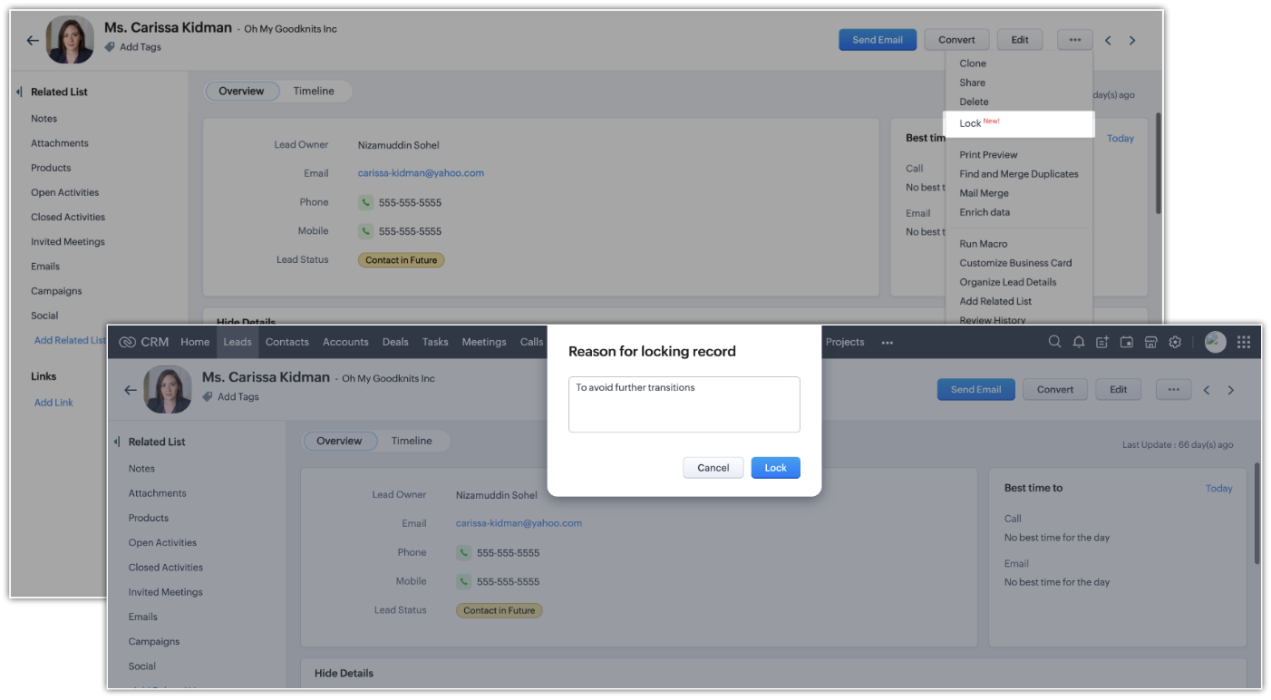
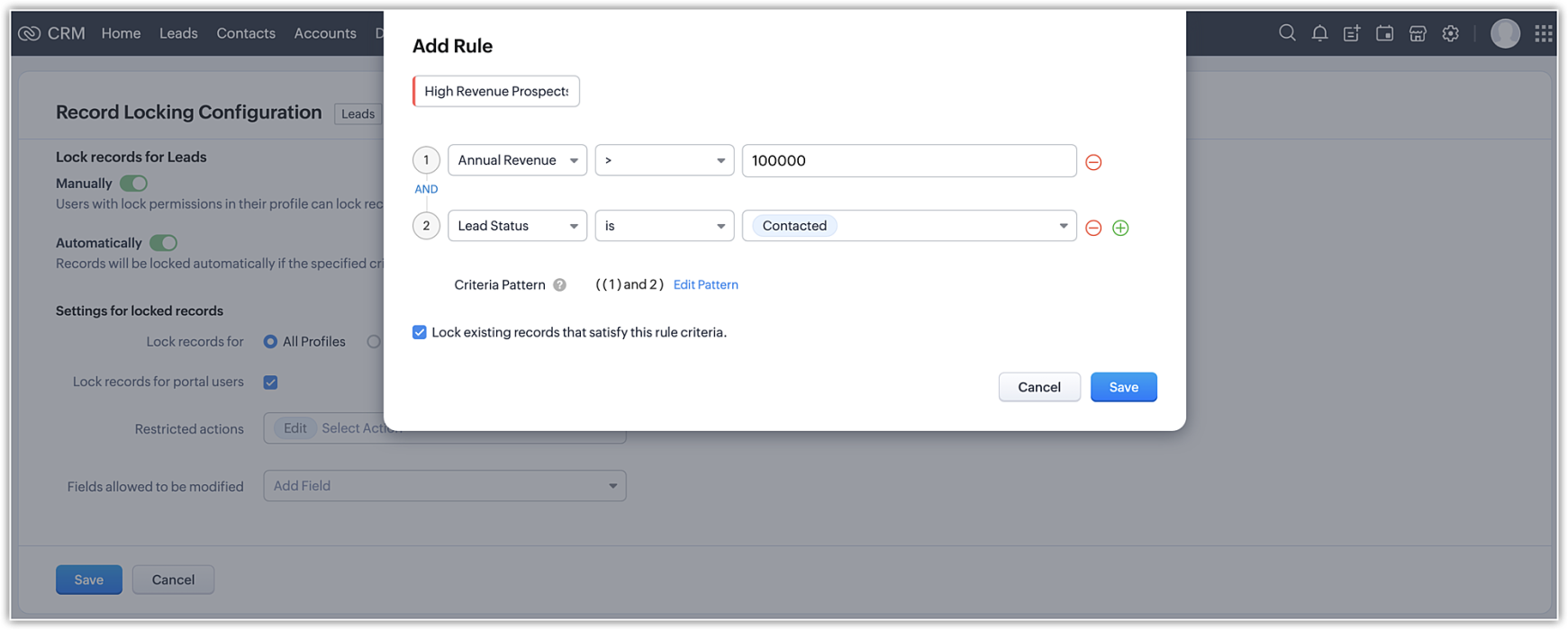
Zoho CRM's record-locking feature enables you to lock records manually or automatically when certain conditions are met.
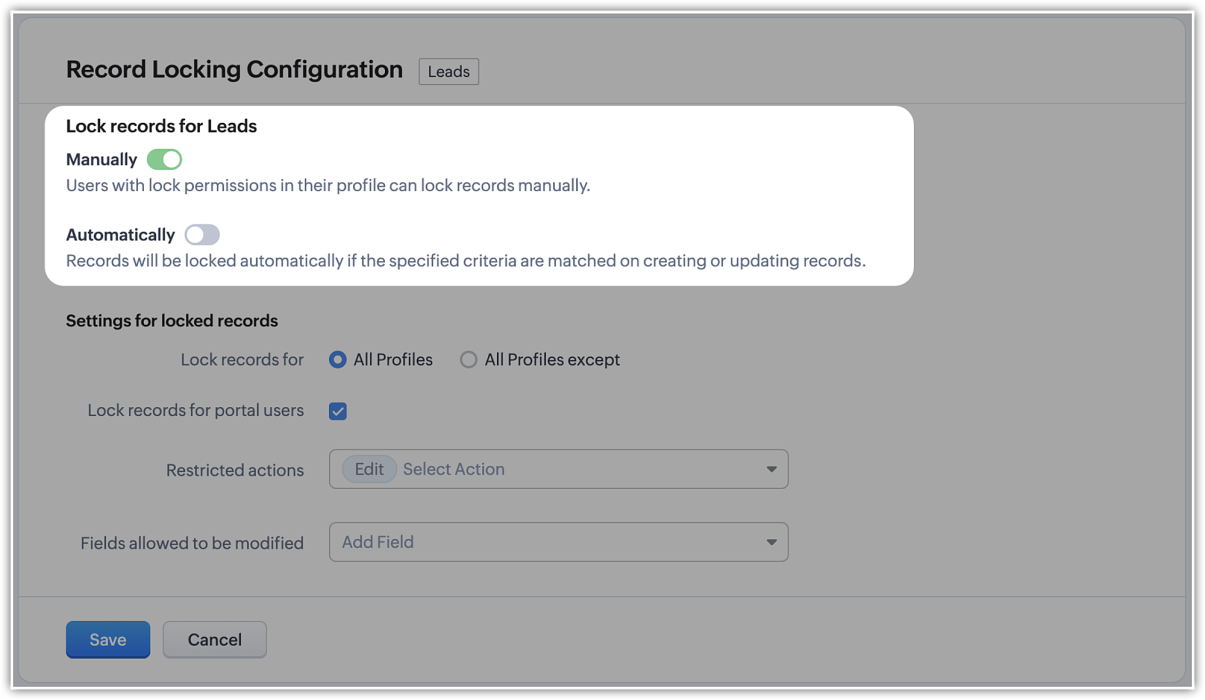
NOTE (added on 02/03/23): The locking configuration must be set up separately for each module. You can navigate to the specific module in Modules and Fields under Customization in your setup page, and you will find the Record Locking Configuration tab.
Record locking configurations
Now that we've established why locking records can be useful or necessary, let's take a quick look at the different configuration options available:
Now that we've established why locking records can be useful or necessary, let's take a quick look at the different configuration options available:
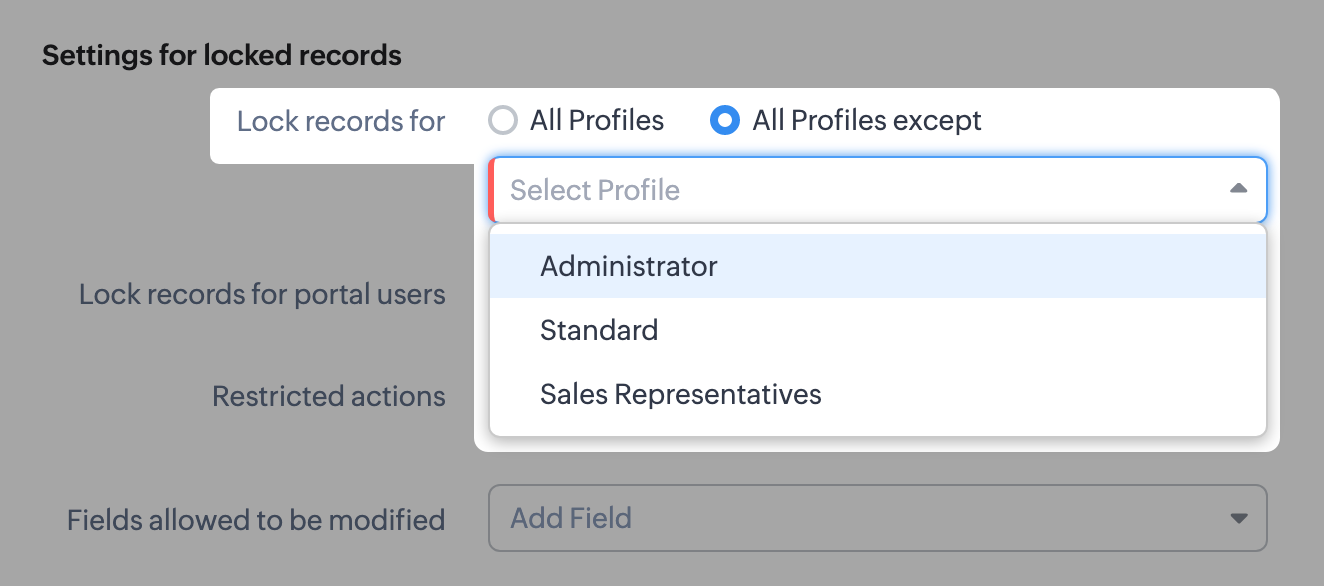
- There might be scenarios where, say, you want members of the accounts team to be able to edit quotes, but not other profiles. You can simply lock the records for all profiles except those belonging to members of the accounts team, any other set of exceptions using the multi-select menu. Additionally, you can also choose to lock records for all profiles.
- You can lock the records that are accessible to your portal users.
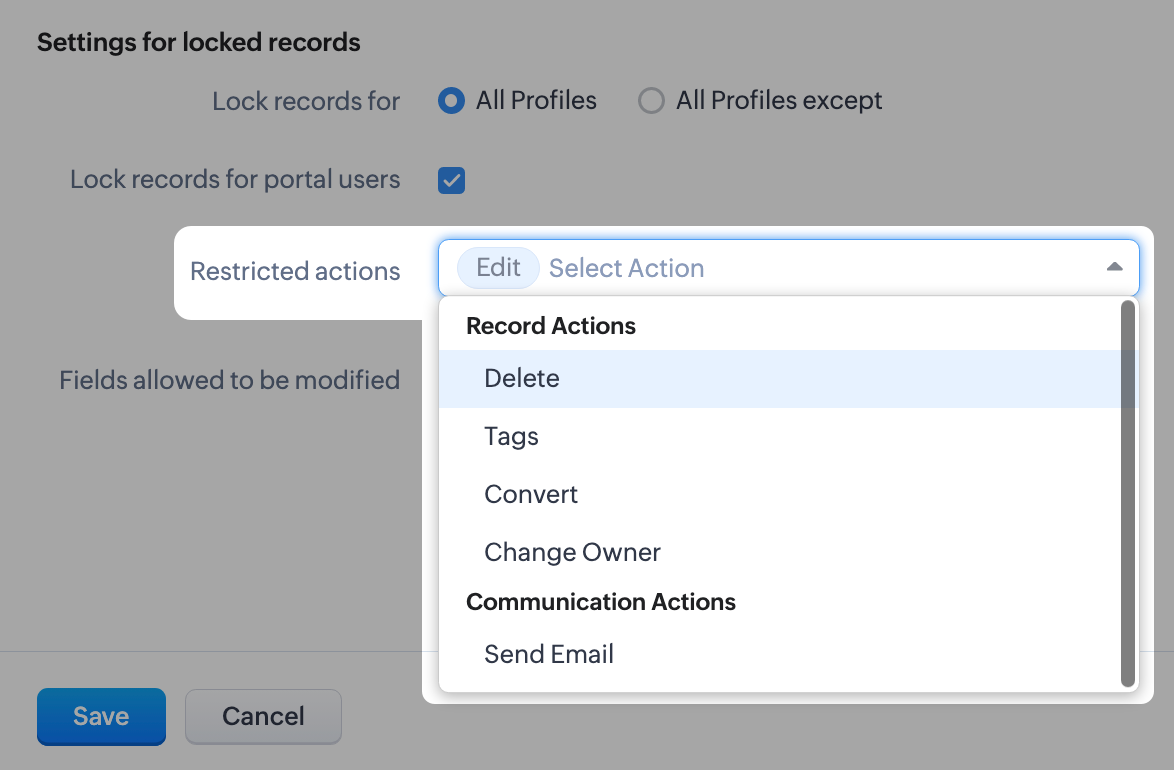
- For locked records, the edit action is disabled by default, but you can restrict other types of native actions, as well as custom buttons.
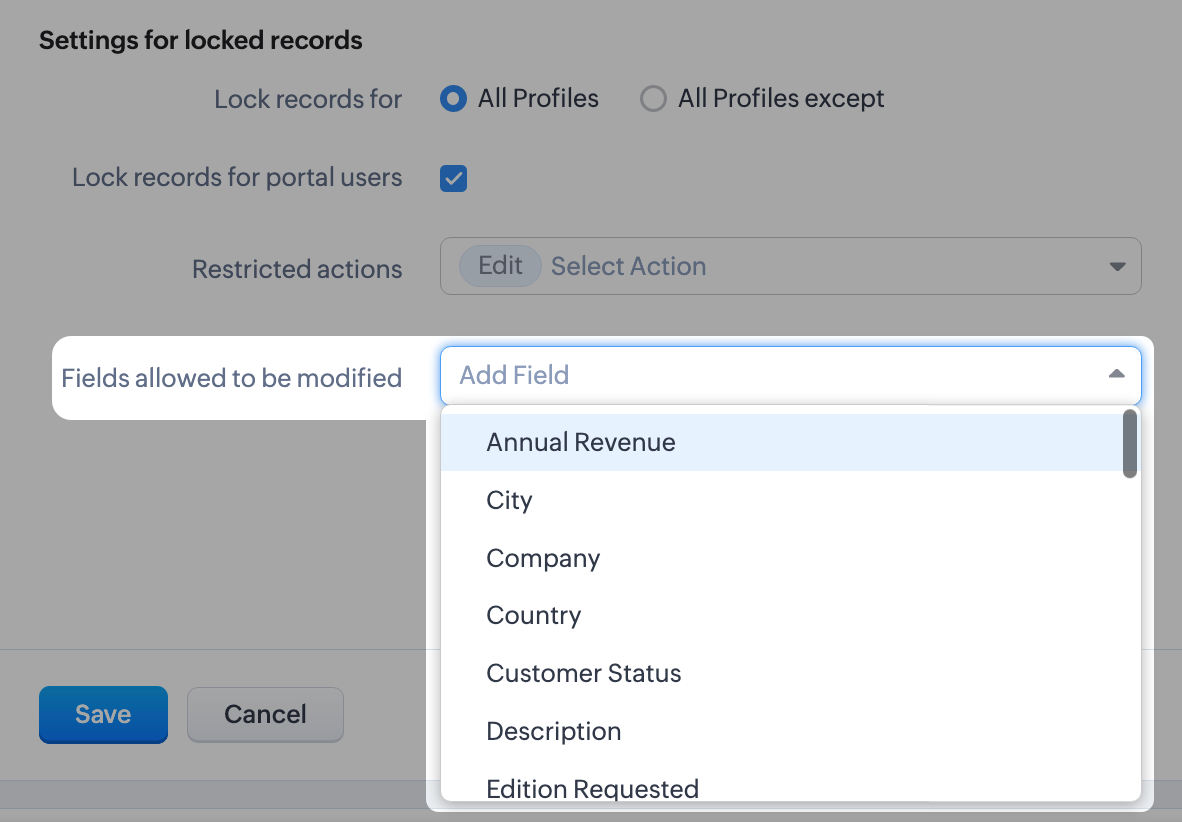
- Even when a record is locked, you can configure certain fields which don't affect your business process to remain editable. For example, you might want the Description or comment fields to remain editable. You can leave a maximum of 15 fields unlocked.
What happens when a record is locked?
Once a record is locked, you will see the lock icon on the record image and in the UI of the record detail page itself. Only fields you've enabled will be available to edit.
Once a record is locked, you will see the lock icon on the record image and in the UI of the record detail page itself. Only fields you've enabled will be available to edit.
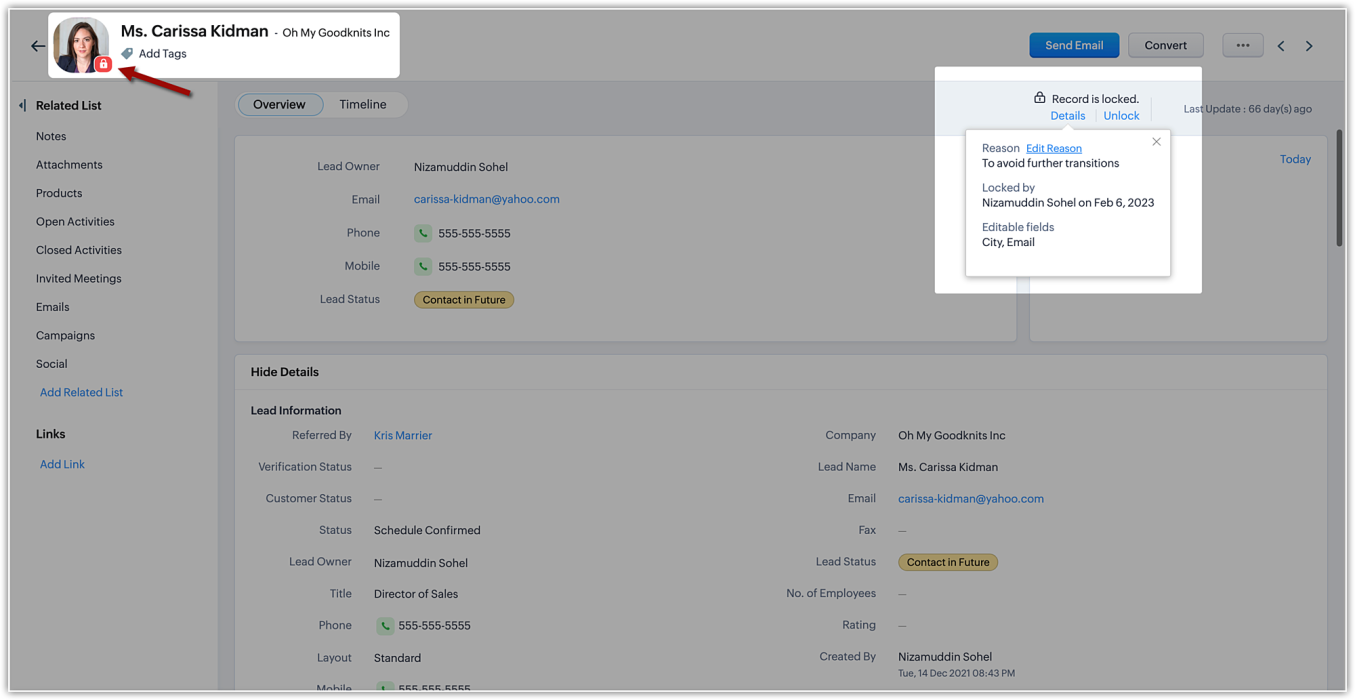
The details of the locking, such as the reason (i.e., the locking condition), locking date, and the fields available for edit will be shown on the details button available on the record detail page.
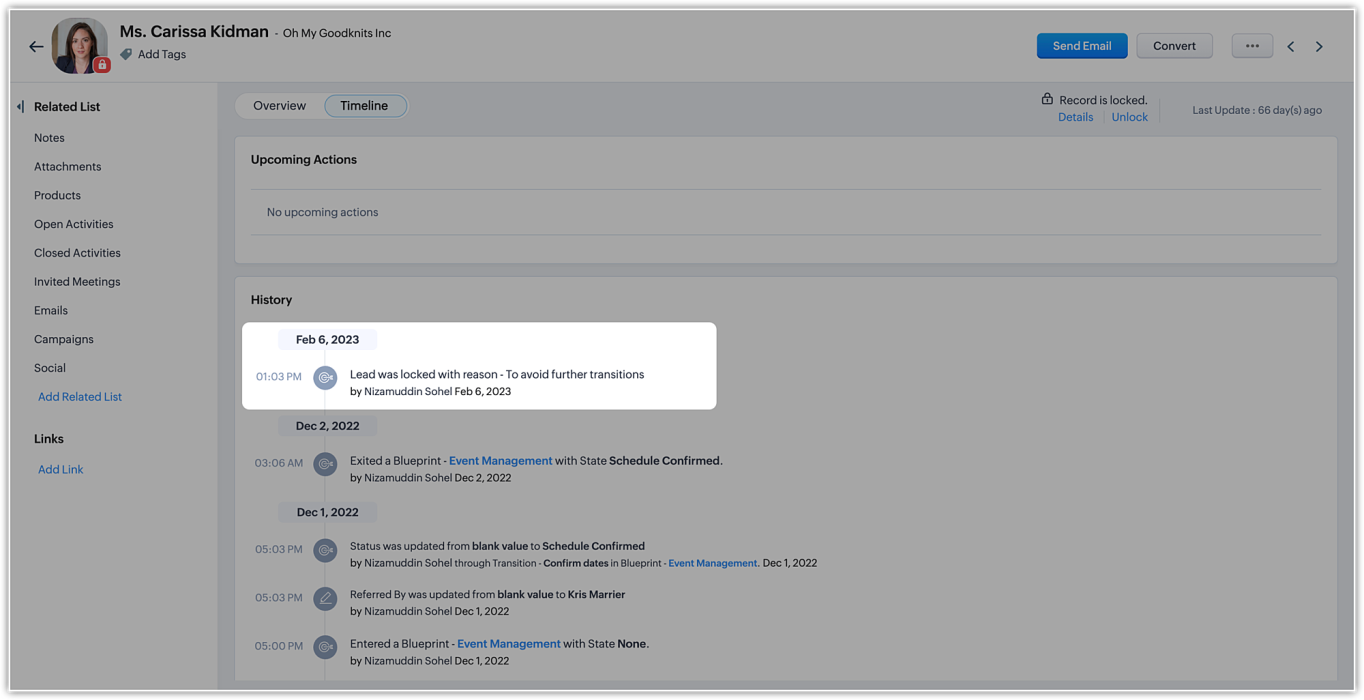
In the record's timeline, you can also see timestamped details like when the record was locked and the condition that was followed.
On the record list view, locked records are indicated by a lock icon.
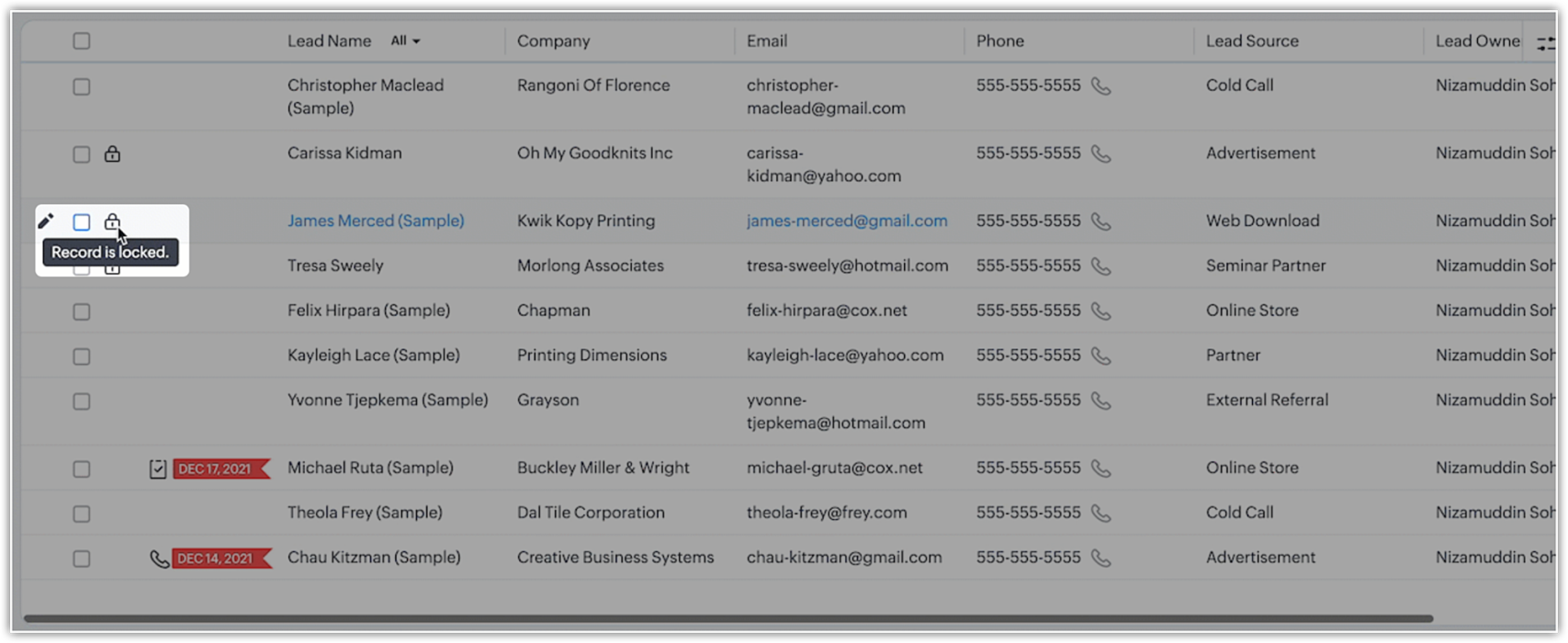
Additionally, you can filter records in the list view based on the pre-defined filter option, as well as based on the system-defined custom view.
Who can unlock records and how is it done?
If a user locks a record manually, they can unlock it themselves. Admins can unlock records, too. On the other hand, automatically locked records will be unlocked only when they're no longer subject to the lock conditions or criteria.
However, deleting a rule or locking configuration will automatically unlock all records the rule or condition had previously locked.
Additional notes
- Set up to five rules per module. Each rule will have a name that is displayed on the record detail page when a record is locked.
- System actions like automation and integration syncs will still be performed on locked records, even when a user who is excluded from locking triggers those processes.
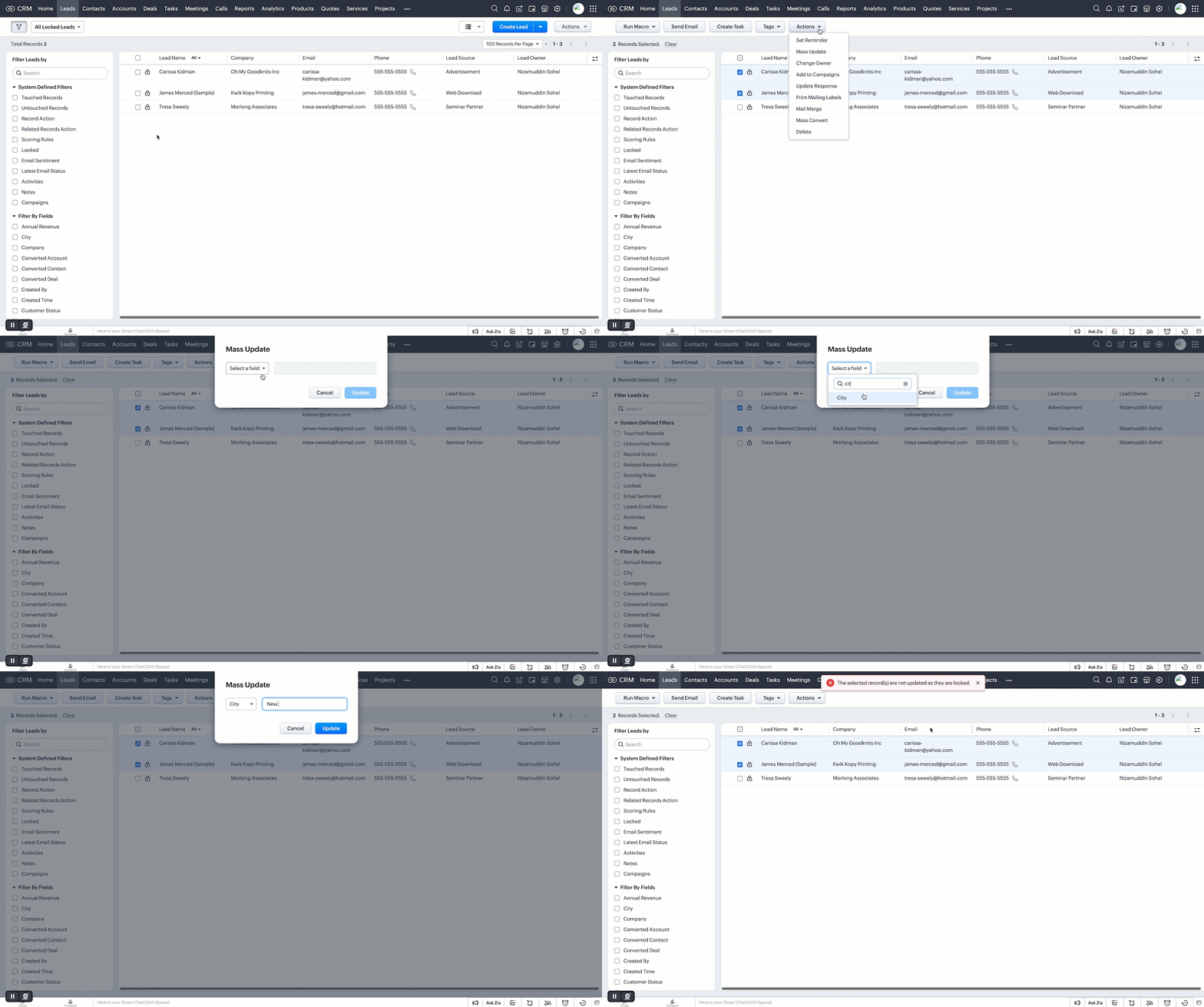
- Locked records are still displayed in list views. However, bulk actions done from list views are not allowed if the respective action is restricted under the record locking configuration.
- Record locking configuration is available for enterprise and ultimate editions of Zoho CRM. If an user downgrades from enterprise edition, locking configurations will be ineffective and all records will be unlocked.
Locked status can not be regained upon upgrading back.
That's all for this exciting new enhancement. Read more about the record locking configurations and its usage in our help doc.
Thanks and have a good one!
Note:
- Manual locking/unlocking of records is not available for the mobile app as yet.
- Auto-locking of records will get reflected on the mobile app, and locked records cannot be updated from mobile app also.
- The locking configuration must be set up separately for each module.
Topic Participants
Saishree T K
Lane Von Pinkston
Jordan Talmor
Amit
Piyush Goyal
Sticky Posts
Announcing Early Access to "Zoho CRM for Everyone" — A new and exciting update to Zoho CRM
Update : Zoho CRM For Everyone's Nextgen Interface gets an upgrade! Hello everyone, We’ve updated the Zoho CRM for Everyone Nextgen interface based on your feedback. The UI is now simpler with a unified sidebar, a more visible global search and features[Early Access] Voice of the Customer (VoC) for Zoho CRM
Happy new year, everyone! We have an exciting addition to our suite of features and would like to introduce you to VoC (Voice of the Customer) for Zoho CRM, powered by Zia. 2023 is definitely the best time to be a customer with rapid innovations and advancementsAdding calls as a channel in Voice of the Customer
Dear All, We hope you're well! It's been almost a year since we opened Zoho CRM's Voice of the Customer solution up for early access. We are grateful for the reception and support you have been showing us with regards to its adoption and feedback. Since
Recent Topics
Has anyone built a ticket export that allows Help Center users to export the tickets shown in the My Area list they are looking at?
Hi, We are moving to Zoho Desk soon. Our current support system displays an option in our help center allowing customers to export their Open, Closed, or all tickets based on which list they are looking at. We need to offer the same in Zoho Desk helpZoho Desk: Q2 2025 | What's New
Hello everyone, We are excited to announce Zoho Desk's 2025 Autumn updates. This release brings new features and enhancements that improve work management and enable businesses to provide a better overall support experience. Spanning from Zia Agents toCheckboxes not adhering to any policy in mail merge - data from CRM
I want checkboxes to appear depending on whether the checkbox in the CRM module is ticked or not. However, the tickboxes that appear are either ticked or not, but don't correlate to the actual selections in the CRM module. This is is despite updatingItems Landed Cost and Profit?
Hello, we recently went live with Zoho Inventory, and I have a question about the Landed Cost feature. The FAQ reads: "Tracking the landed cost helps determine the overall cost incurred in procuring the product. This, in turn, helps you to decide theCC and/or BCC users in email templates
I would like the ability to automatically assign a CC and BCC "User (company employee)" into email templates. Specifically, I would like to be able to add the "User who owns the client" as a CC automatically on any interview scheduled or candidate submittedCreate Contract API Endpoint Unclear "inputfields" Requirements
Hello, I'm trying to create a Deluge function that accepts inputs from a form in Zoho Creator and creates a barebones contract of a given type. See below for the current code, cleaned of authentication information. // Fetch form data // Hidden field client_nameKaizen #46 - Handling Notes through Zoho CRM API (Part 1/2)
Hello everyone! Welcome back to another week of Kaizen! This week, we will discuss Handling Notes through Zoho CRM API. What will you learn from this post? Notes in Zoho CRM Working with Notes through Notes APIs 1. Notes in Zoho CRM 1a. Why add Notes to records? Notes are a great way to summarize your observations on customer and prospect interactions and outcomes. By saving notes as CRM data, a sales rep will always be able to keep track of how a sale is progressing. To know more about notes inMarketer's Space - Why email marketing matters in ecommerce (and how to get started with Zoho Campaigns)
Hello Marketers, Welcome to this week's Marketer's space post. Today, we'll discus why email marketing matters in ecommerce businesses. Running an online store is exciting but challenging. If you're running an online store, you've probably experiencedZoho Campaigns Event timestamps do not propagate to Zoho CRM
We have integrated Zoho CRM and Zoho Campaigns. But when looking at Contact records, the Campaign event data is missing the actual timestamps: especially when a particular email was sent. They're not in the Campaigns related list, and the cannot be foundKaizen #121 : Customize List Views using Client Script
Hello everyone! Welcome back to another interesting Kaizen post. In this post, we can discuss how to customize List Views using Client Script. This post will answer the questions Ability to remove public views by the super admin in the Zoho CRM and IsSetting default From address when replying to request
At the moment, if I want to reply to a request, the From field has three options, company@zohosupport.com, support@company.zohosupport.com, and support@company.com. The first two are really internal address that should never be seen by the customer andTip #45 - Explore Your Support Reach with Zoho Assist’s Geo Insights - 'Insider Insights'
Understanding where your remote support sessions are happening can help you make smarter decisions, allocate resources effectively, and improve overall customer satisfaction. In this week's Zoho Assist's community post we will be exploring Geo InsightsFormatting of text pasted into Zoho documents
Howdy, I'm a newbie and finding Zoho an improvement to MS Word. Consider yourself hugged. High on my wish list would be plain text cut-and-paste. When pasting text from the web to Zoho, presently Zoho imports the formatting along with the text. This means that every cut-and-paste operation brings in text in a different font, size, or style. Can we have at least the option of importing plain text without formatting (or better yet, is this option already out there?) ... Thanks HelenAdd additional features to Zoho Tables
Zoho Tables is a really great tool, why not add features like diagramming capability into the tool from applications like Draw.io which I believe is open source, you should be able to do wireframes, process flow diagrams, network design, etc. Please noteThe Social Wall: August 2025
Hello everyone, As summer ends, Zoho Social is gearing up for some exciting, bigger updates lined up for the months ahead. While those are in the works, we rolled out a few handy feature updates in August to keep your social media management running smoothly.The Social Wall: July 2025
Hello everyone! July has brought some exciting new updates to Zoho Social. From powerful enhancements in the Social Toolkit to new capabilities in the mobile app, we’ve packed this month with features designed to help you level up your social media presence.Use Zoho Creator as a source for merge templates in Zoho Writer
Hello all! We're excited to share that we've enhanced Zoho Creator's integration with Zoho Writer to make this combination even more powerful. You can now use Zoho Creator as a data source for mail merge templates in Zoho Writer. Making more data fromTagged problem !!!
Damn it, we're one of dozens of construction companies in Africa, but we can't link purchasing invoices to projects. Why isn't this feature available?Syntax for URLs in HTML Snippets
What are some best practices for inserting a URL in an HTML snippet? I've looked at Zoho Help articles on navigation-based and functional-based URLs, but I'm still unclear on how to incorporate them in an HTML snippet. For example, 1. How do I link toThe Social Wall: June 2025
Hello everyone, We’re back with June Zoho Social highlights. This month brought some exciting feature updates—especially within the Social Toolkit—to enhance your social media presence. We engaged with several MSME companies through community meet-upsTip 7: How to fetch data from another application?
Hi everyone, Following our Zoho Creator - Tips and Tricks series every fortnight, we are back today with a tip based on one of the most popular questions asked in our forum. This tip would help you fetch data from another application(App B) and use itThe Social Wall: May 2025
Hey everyone, We're excited to share some powerful updates for the month of May! Let's take a look! Reply to your Instagram and Facebook comments privately through direct messages Are you tired of cluttered comment threads or exposing customer queriesSub-Form Fields as Filters for Reports
Hi, I would like to use the Sub-Form Fields as Filters in Reports just like we do for Main Page Fields. Thanks DanZoho CRM Formula - Current Time minus Date/Time field
Hello, I am trying to prevent duplicate emails going to clients when more than 1 deal is being updated. To do this, I would like to create a formula to identify if a date/time field is >= 2 hours ago. Can someone please help me write this formula? Example:Billing Management: #7 Usage Billing in Telecom & Internet Service Provider
Telecom and Internet Service Providers operate in markets where usage varies drastically from one customer to another. While flexible, usage-based models align revenue directly with consumption, they also introduce operational challenges like real-timeZoho Sprints - Q3 updates for 2025
The updates for the third quarter of 2025 are out. A few significant features and enhancements have been rolled out to improve user experience and product capabilities. The following are the updates: Manage tags and cluster tags Record and maintain projectKaizen #208 - Answering your Questions | Functions, AI and Extensions
Hello Developers! Welcome back to a fresh week of Kaizen! We are grateful for your active participation in sharing feedback and queries for our 200th milestone. This week, we will answer the queries related to Functions and Extensions in Zoho CRM. 1.Zoho CRM still doesn't let you manage timezones (yearly reminder)
This is something I have asked repeatedly. I'll ask once again. Suppose that you work in France. Next month you have a trip to Guatemala. You call a contact there, close a meeting, record that meeting in CRM. On the phone, your contact said: "meet meCreating Restaurant Inventory Management on Zoho
Hi, We run a small cloud kitchen and are interested to use Zoho for Inventory and Composite Item tracking for our food served and supplied procured to make food items. Our model is basically like subway where the customer can choose breads, veggies,To Zoho customers and partners: how do you use Linked Workspaces?
Hello, I'm exploring how we can set up and use Linked Workspaces and would like to hear from customers and partners about your use cases and experience with them. I have a Zoho ticket open, because my workspace creation fails. In the meantime, how isZoho Forms to Zoho CRM : First/Last Name to just Name ?
When integrating a Zoho Form into the Accounts menu of the CRM I'm having trouble with how names are formatted ; In Forms the data is available as First Name or Last Name In the CRM there is only one field called Name How can I ensure that "John" "Smith"This festive season, offer discounts with coupon code support in Stripe Checkout
Hello form builders! It’s the festive season, the perfect time to spread joy and great deals! Now, with Zoho Forms’ latest enhancement for Stripe Checkout, you can do exactly that with coupon codes! Your payment forms integrated with Stripe Checkout canCómo creo una factura negativa o de abono?
NEcesito anular una factura y crear una nueva igual pero en negativo. El sistema no me lo permitePower of Automation::Streamline log hours to work hours upon task completion.
Hello Everyone, A Custom Function is a user-written set of code to achieve a specific requirement. Set the required conditions needed as to when to trigger using the Workflow rules (be it Tasks / Project) and associate the custom function to it. Requirement:-CRM : Function to add user name to text field
I have a lookup field in a module that is linked to the CRM users so we can assign a Project Lead to the customer. Sadly Zoho Marketing Automation doesn't sync Lookup fields so I need to extract information from the lookup to text fields: Lookup fieldZoho CRM - Restrict Login based on work hours
Hi there, I'm wondering if we can restrict users to login during works - For example the users would be able to login from 8am to 5pm. I have seen the IP address restriction - the only downfall is what if the customer has dynamic IP. thanks JiriTips and Tricks #46: Customize themes and templates using Show's Master View
Hi All! Let's say you want to revamp your presentation and make changes to its visual design. You can do this easily using the Master Slide and its associated layouts. The Master Slide stores information about all the layouts used in the presentation.Sheet View in CRM portal
Hi, When will it be possible for my CRM portal users to edit/add records with Sheet View? GeorgeWhat's New in Zoho Invoice | July - September 2025
Hello everyone! We’re back with the latest updates and enhancements we’ve rolled out in Zoho Invoice from July to September 2025. Here’s what’s new this quarter: Introducing the Singapore Edition in Zoho Invoice Share Invoices through WhatsApp GST 2.0Alert: Audio Call Support to be discontinued for Old Live Chat Widget from December 31, 2025
Action Required: Upgrade to the New SalesIQ Live Chat Widget We're reaching out with an important update regarding the SalesIQ Live Chat Widget that requires your immediate attention. Effective December 31, 2025, audio call functionality will no longerNext Page