Kaizen #175 - Leverage Settings Widget for Zoho CRM Extensions

Kaizen #175 - Leverage Settings Widget for Zoho CRM Extensions


Howdy, innovators!

Welcome back to a fresh week of Kaizen.

This week, we will delve into configuring a Settings widget in Zoho CRM for the effective functioning of extensions. It centralizes around key configurations that will be carried out to various integrations in an extension. A user-friendly settings widget enhances the usability and flexibility of your extensions. 

Why use a Settings Widget?

A Settings Widget plays a crucial role in making extensions user-friendly and adaptable to specific business needs. Following are a few key advantages of using the settings widget:
  • Seamless Setup Post-Installation: Users can configure critical parameters right after installing the extension.
  • Dynamic Customization: Users can revisit and modify configurations at any time, ensuring that the extension adapts to changing needs without re-installation or development
  • Improved User Experience: Allows the end-users to control how the extension interacts with their workflows and data.
  • Enhanced Control: Provides an overview and centralized control, making maintenance, troubleshooting, and updates simpler and faster.

Business Scenario: Notification Settings for Lead Import Extension

Let’s take a real-world use case to understand the value of this settings widget.

Imagine an organization named Zylker, using Zoho CRM along with a lead import extension. This extension pulls in leads from multiple sources like web forms, social media, or third-party marketing tools.

Requirement

Whenever a new lead enters a Zoho CRM organization through this extension, the sales team wants to receive an instant notification on a specific Zoho Cliq channel for that organization. This ensures they never miss a lead. 

Solution

By adding a Settings Widget to the extension, users can:

> Select a Preferred Zoho Cliq Channel: From the settings page, users can choose the channel where notifications should be sent.

> Modify the Channel Anytime: Based on team restructuring or communication preferences, users can revisit the settings and update the channel as needed.

With this setup, the settings widget becomes the control center, ensuring the efficient functioning of both the extension and the sales process. 

Building a Settings Extension Widget

Let us create a sample settings widget for the above business scenario. 

Create a Private Extension Widget

       1. Log into Zoho CRM, navigate to Setup > Marketplace > Extension Builder, and create a new extension by selecting Zoho CRM as the service.  
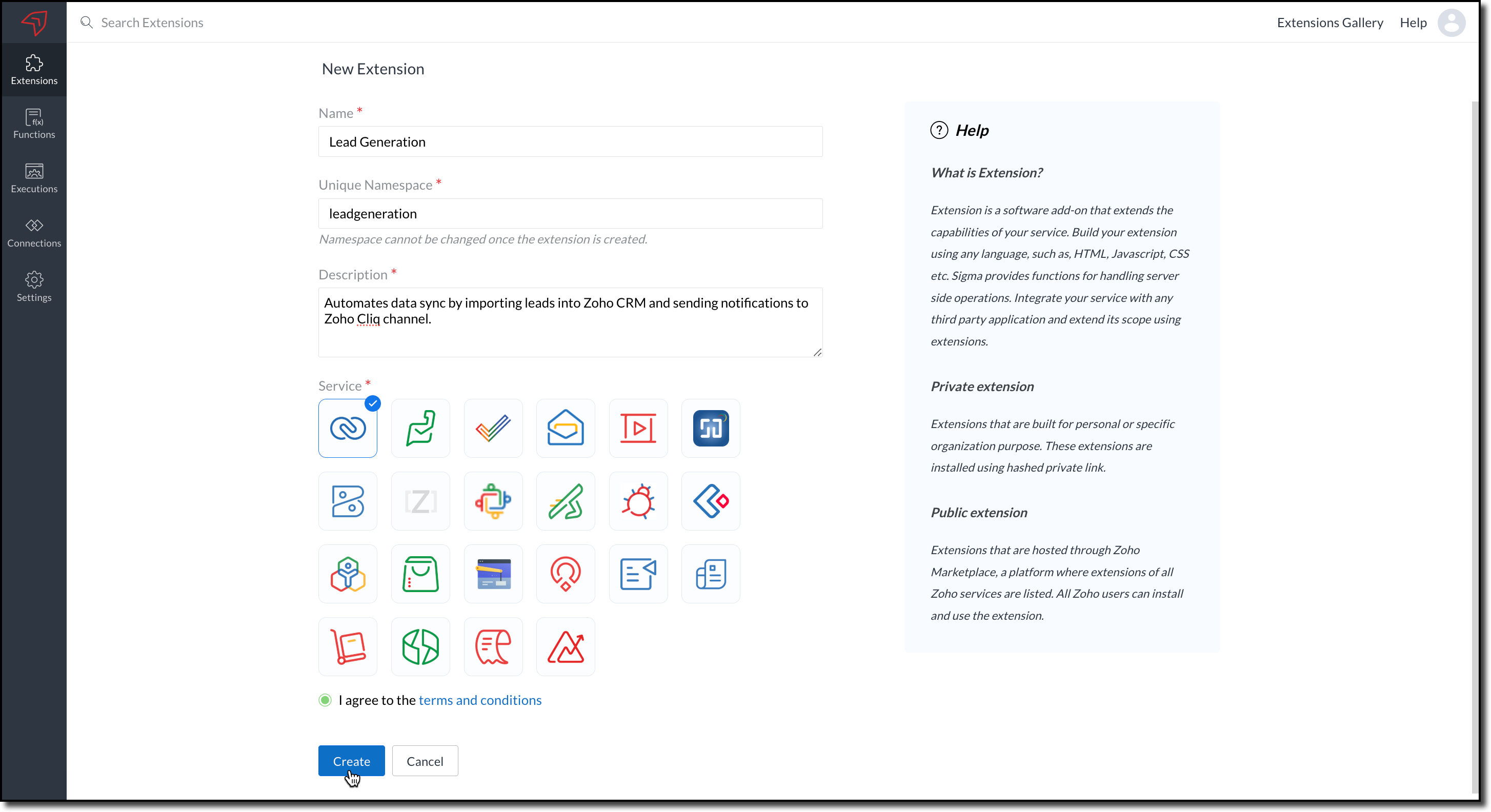
            

      2. The private extension that you have created will be listed in the Extensions page. Choose your extension and click the edit icon. 

            You will then be redirected to the Zoho Developer Console.
 
Dependency Configuration

Now, let us configure a couple of dependencies required for this use case in the developer console.  

Connectors 

To notify a Zoho Cliq channel, Connectors authorize the end user's Zoho Cliq account with the extension and grant access to the necessary data. Follow these steps to create a connector with the required APIs for the widget.

      3. In the console, navigate to Utilities > Connectors on the left-side menu.

      4. Click Create Connector and provide the required details using the guidance available on the Server-based Application help page.
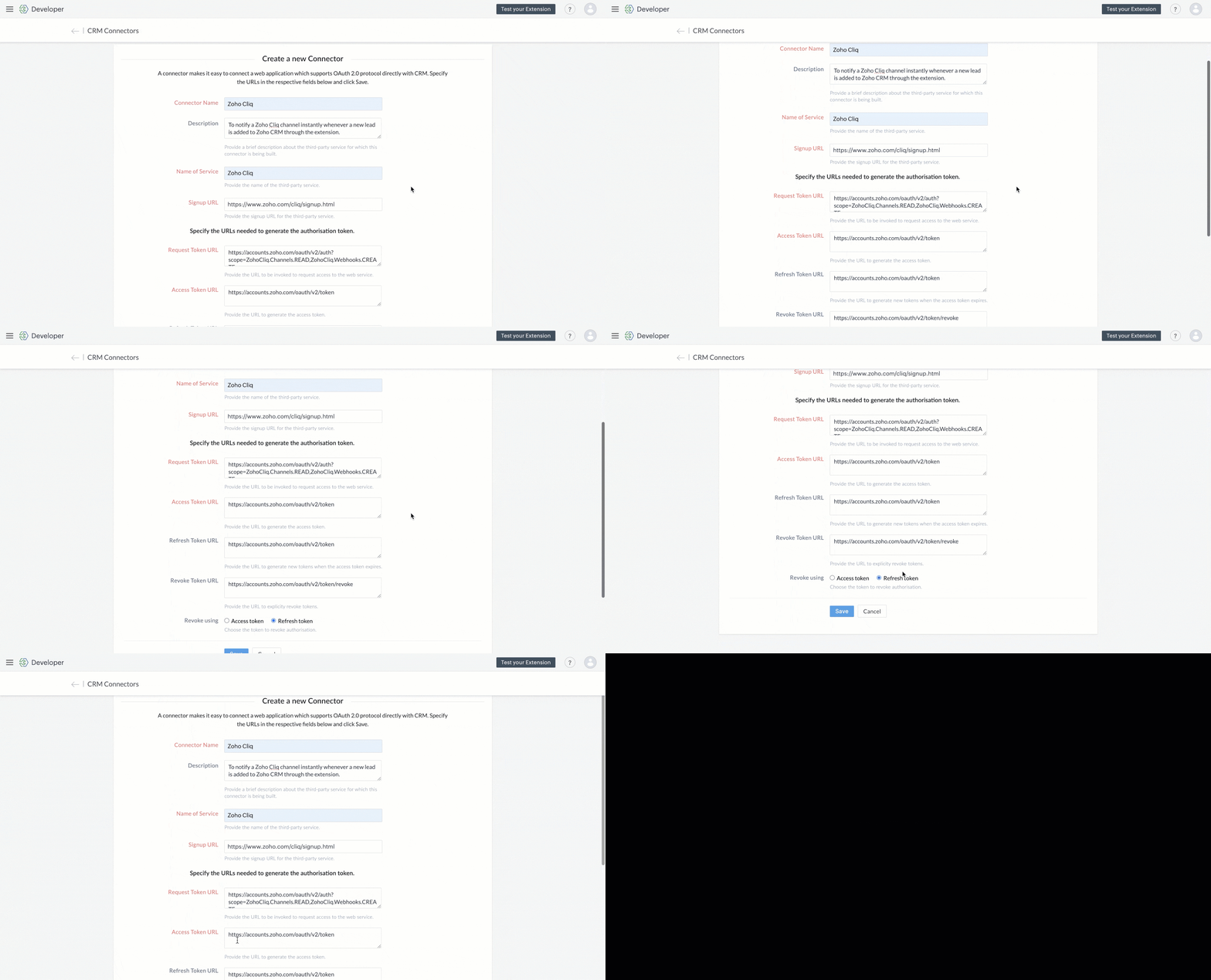
           

      5. Use the generated Redirect URL to register your application in Zoho's API Console. After registration, enter the Client ID and Client Secret in the developer console.  


      6. Create Connector APIs for the following: 
  •  GET List of all Channels to fetch all the available channels from your Zoho Cliq Account.  
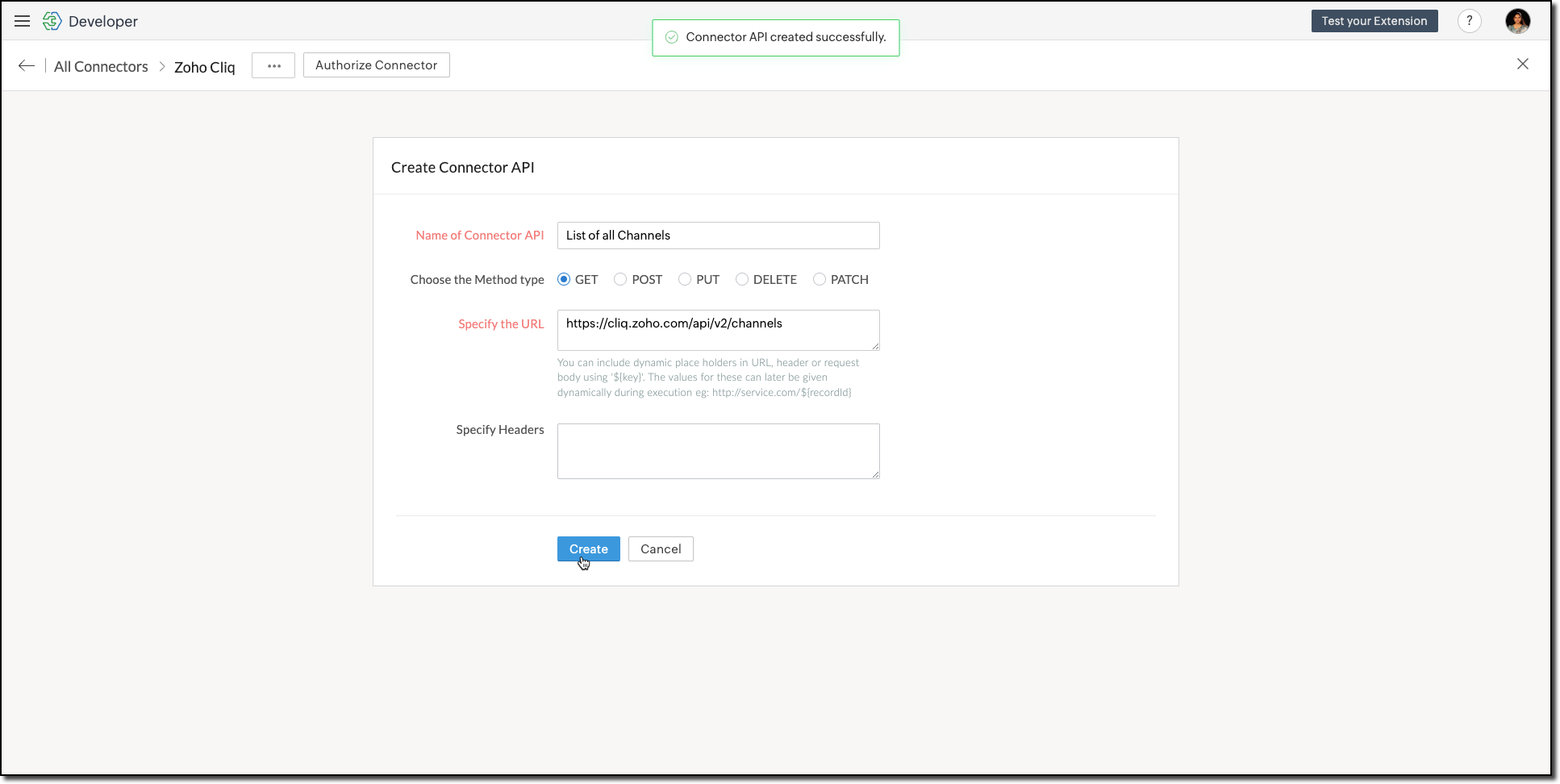


    The Authorization header is automatically added to all the Connector APIs. 
  • POST Message in Channel to notify the incoming leads in the channel. 
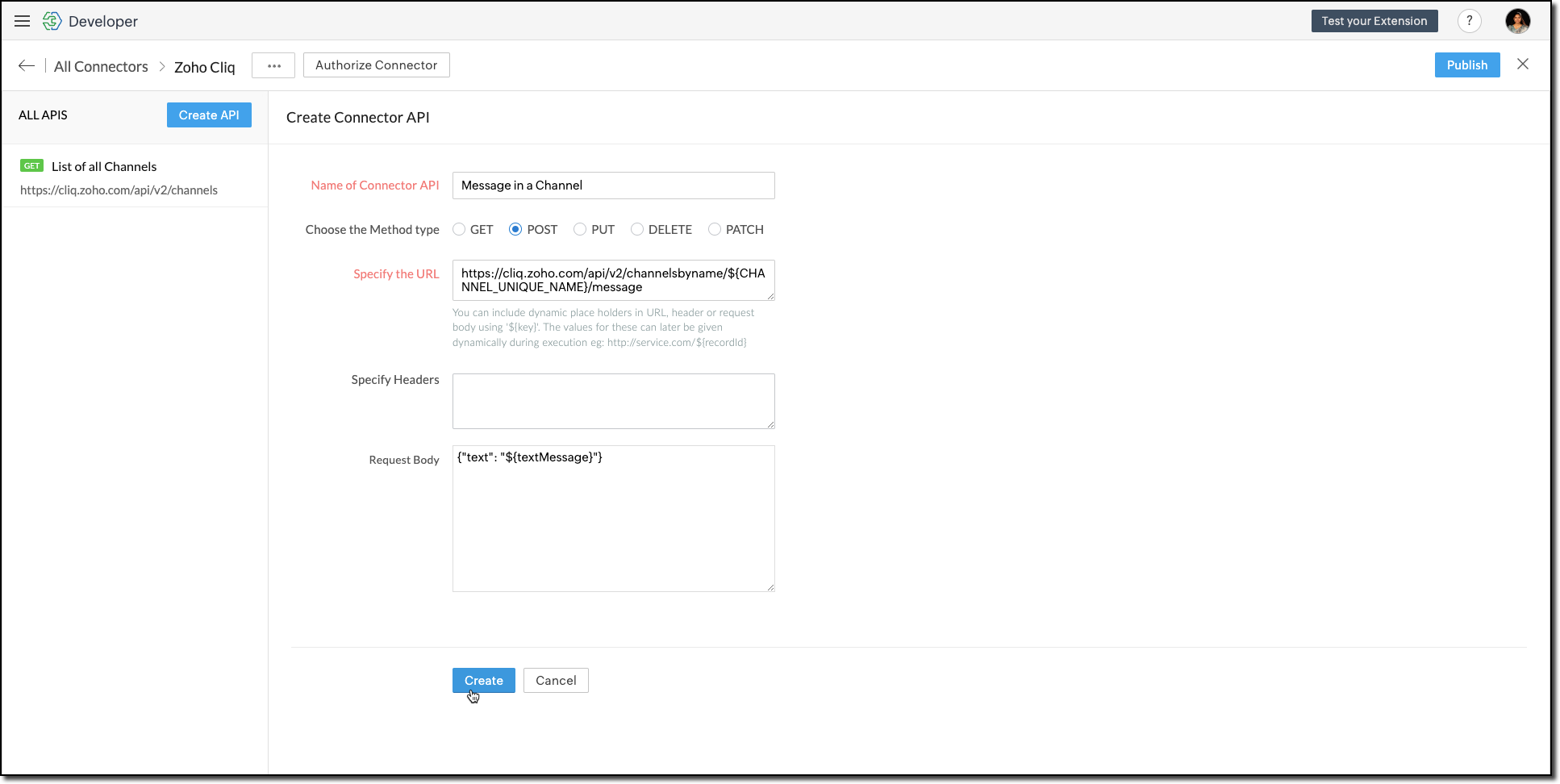


    You can include dynamic place holders in the URL, header, or request body using this format ${place_holder}.
      7. Once the APIs are configured, publish and associate the connector with the extension. 


           Refer to the Connectors help document to learn more. 

Variable 

Variables are required to store the admin's preferred channel details and retrieve them when a lead enters Zoho CRM through the extension. Upon installing the extension, this variable is automatically created in your Zoho CRM org. 

      8. Go to Build > Custom Properties and create a variable. 


Set the variable's permission to Hidden to prevent the CRM users from accessing/modifying the variable data from the Zoho CRM Variables page. This ensures that variables can only be configured through the extension.

For more information, refer to the Custom Variables help document

Idea
Tip

In your Zoho CRM, go to Setup > Security Control > Profiles and restrict permissions for your extension to prevent unauthorized access to the settings page.

Building a Connected App 

      9. In the console, go to Utilities > Connected Apps on the left-side menu.

      10. Follow the steps provided in this kaizen to create a new Zoho CRM widget for this use case. 

Code Logic for the Settings Panel
  • Create a drop-down field called Select Cliq Channel to the settings panel. This dropdown should dynamically list the channels from your Zoho Cliq account by invoking the GET Cliq Channels API. Follow the given Invoke Connector method to execute Connector APIs.           
 // Initialize Zoho Embed SDK
        ZOHO.embeddedApp.on("PageLoad", function () {
            fetchCliqChannels();
        });

        ZOHO.embeddedApp.init();

        // Fetch Cliq channels
        async function fetchCliqChannels() {
            const channelDropdown = document.getElementById("cliqChannel");
            try {
                console.log("Fetching channels from Zoho Cliq...");
                const req_data = {
                    "parameters": {}
                };
                const response = await ZOHO.CRM.CONNECTOR.invokeAPI("leadgeneration.zohocliq.listofallchannels", req_data);
                console.log("Response from Zoho Cliq:", response);
                const parsedResponse = JSON.parse(response.response);
                const channels = parsedResponse.channels;
                if (channels && Array.isArray(channels)) {
                    channelDropdown.innerHTML = channels.map(channel => `<option value="${channel.unique_name}">${channel.name}</option>`).join('');
                } else {
                    throw new Error("Invalid response structure");
                }
            } catch (error) {
                console.error("Error fetching channels:", error);
                if (error.code === '403') {
                    console.error("Authorization Exception: Please check your API permissions and authentication.");
                }
                channelDropdown.innerHTML = '<option value="">Failed to load channels</option>';
            }
        }

  • Add a Save Configuration button that stores the selected channel name and channel ID in the variable created earlier. To save the selected data into the variable, use the invokeAPI() function, with the namespace as crm.set
 // Save configuration
        async function saveConfiguration(event) {
            event.preventDefault();
            const channelDropdown = document.getElementById("cliqChannel");
            const selectedChannelUniqueName = channelDropdown.value;
            const selectedChannelName = channelDropdown.options[channelDropdown.selectedIndex].text;

            if (!selectedChannelUniqueName) {
                alert("Please select a channel.");
                return;
            }

            const settings = {
                unique_name: selectedChannelUniqueName,
                name: selectedChannelName
            };

            const data = {
                "apiname": "leadgeneration__Cliq_Channel",
                "value": JSON.stringify(settings)
            };

            try {
                const response = await ZOHO.CRM.CONNECTOR.invokeAPI("crm.set", data);
                console.log("Updated settings:", response);
                document.getElementById("setupStatus").innerText = "Configuration saved successfully!";
            } catch (error) {
                console.error("Error saving configuration:", error);
                document.getElementById("setupStatus").innerText = "Failed to save configuration.";
            }
        }

  • When a lead enters Zoho CRM through the extension, it should trigger a function that:Retrieves the saved channel details:  
                  > Retrieves the saved channel details: Uses the Get Organization Variable JS SDK to call the Zoho CRM GET Variable API to fetch the saved channel details.
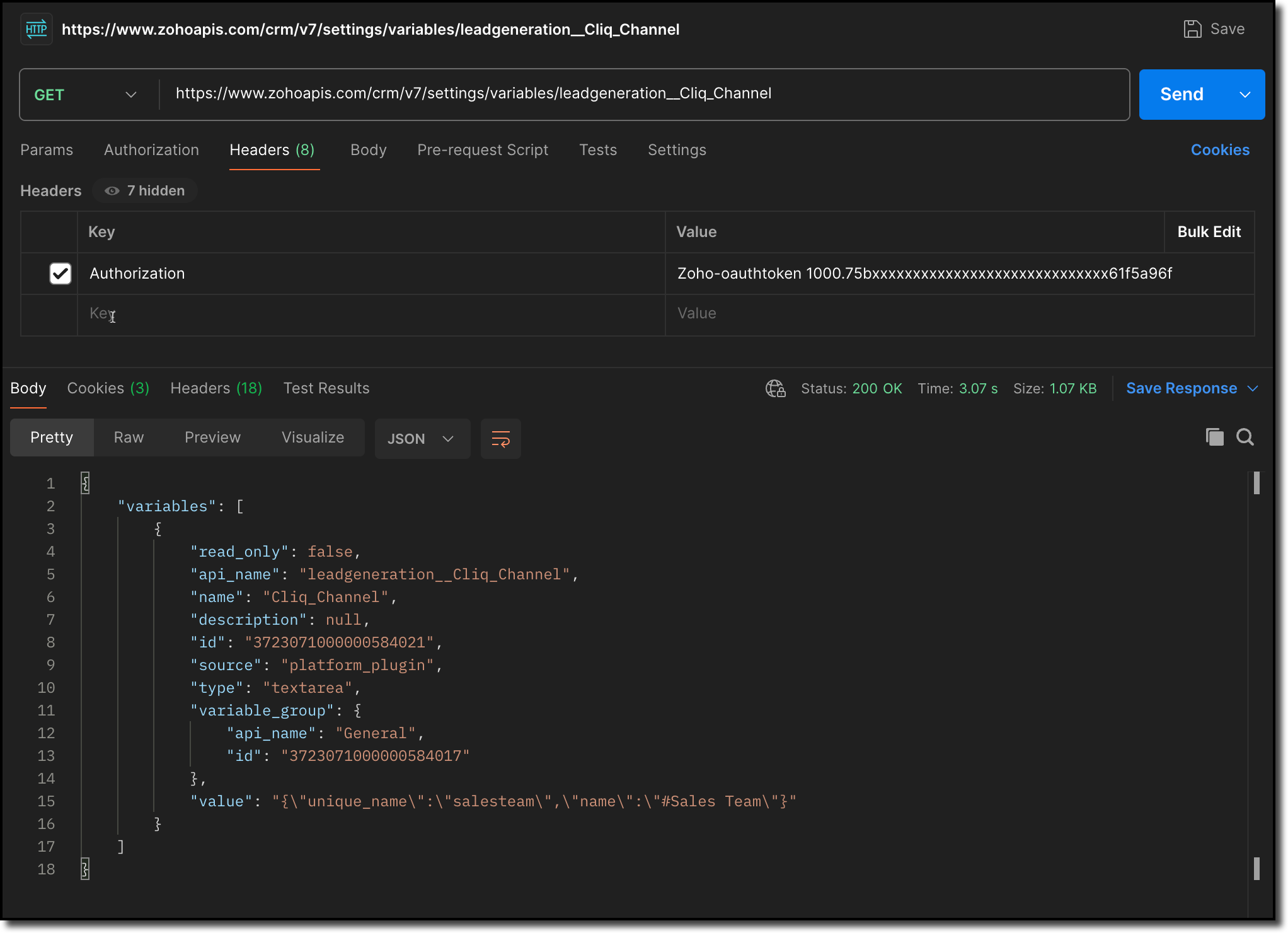


                  > Notifies the channel: Sends a message to the retrieved channel using the Post Message API

Info
Info

-> A complete working code sample for the use case is attached at the end of this post for your reference.  

-> The test function for triggering notifications is also included in the attachment. You can use the same snippet in your extension to initiate the notification process.

-> Ensure to replace the unique names of your Connector APIs and Variable.

      11. Fill in the details of the application as shown in this image and upload the widget ZIP file packed using the Zoho CLI command. 
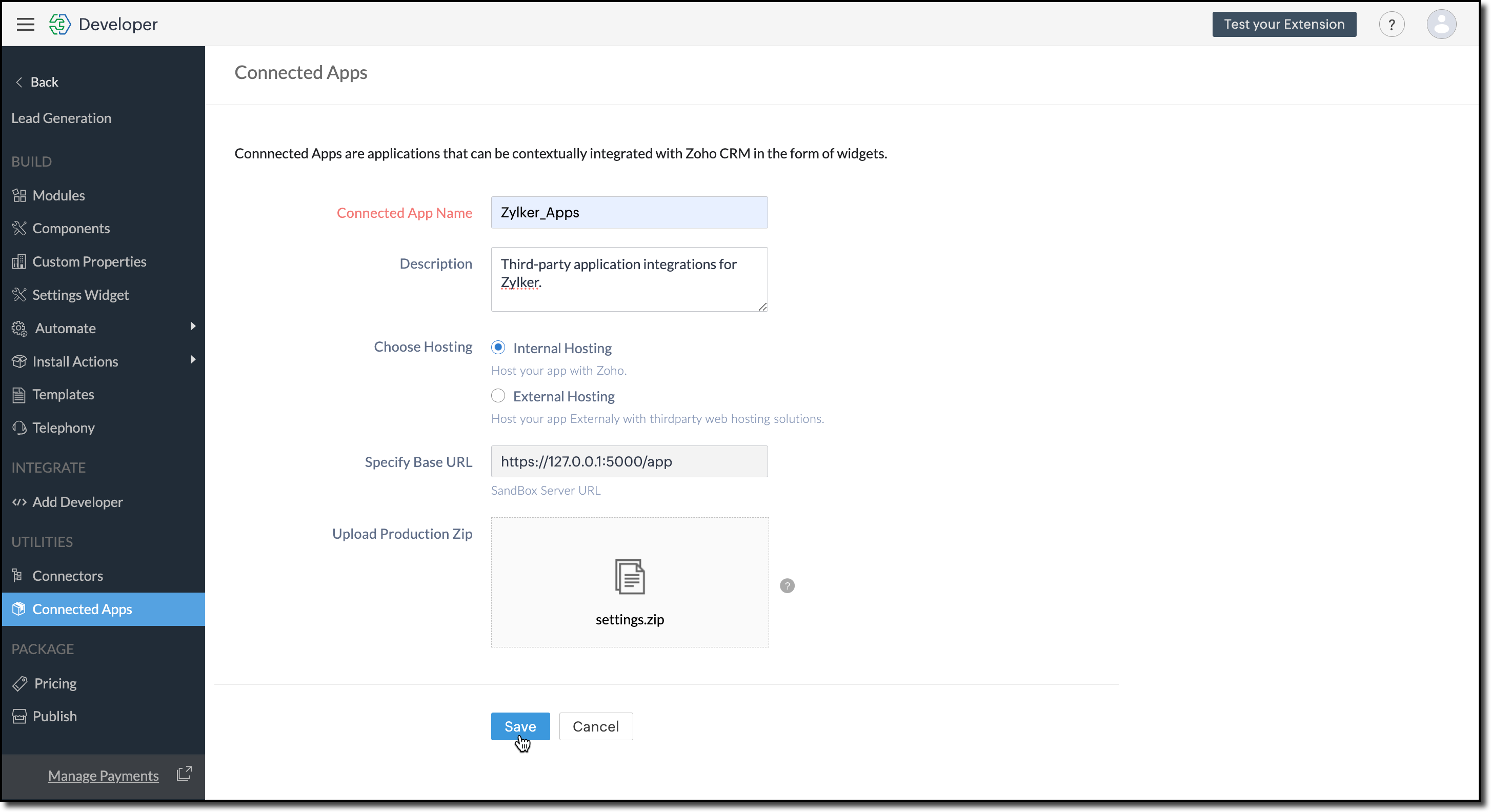
             

      12. Click Save.  

Configure the Settings Widget

      13. Navigate to Build > Settings Widget in the left menu.  

      14. Provide a Name and the Resource Path of your widget.   

      15. Click Save.

             
Info
The Settings Widget for Extension is available upon request. Contact support@zohocrmplatform.com to enable it for your account. 

Packaging, Publishing and Deploying 

      16. Go to Package > Publish on the left-side menu and publish the extension.   

      17. The review process for listing an extension in the Marketplace will take from three weeks to one month

            For the demo, we will proceed with deploying the extension using the private plugin deployment link.


      18. Now, replace the URL of your Zoho CRM page with the deployment link from the Developer Console and approve the extension installation.  

Try it Out! 

Once installed: 

A pop-up will appear, prompting you to authorize Zoho Cliq for the required configurations. 

If you do not already have a Zoho Cliq account, you can sign up directly from the pop-up and proceed with the authorization.
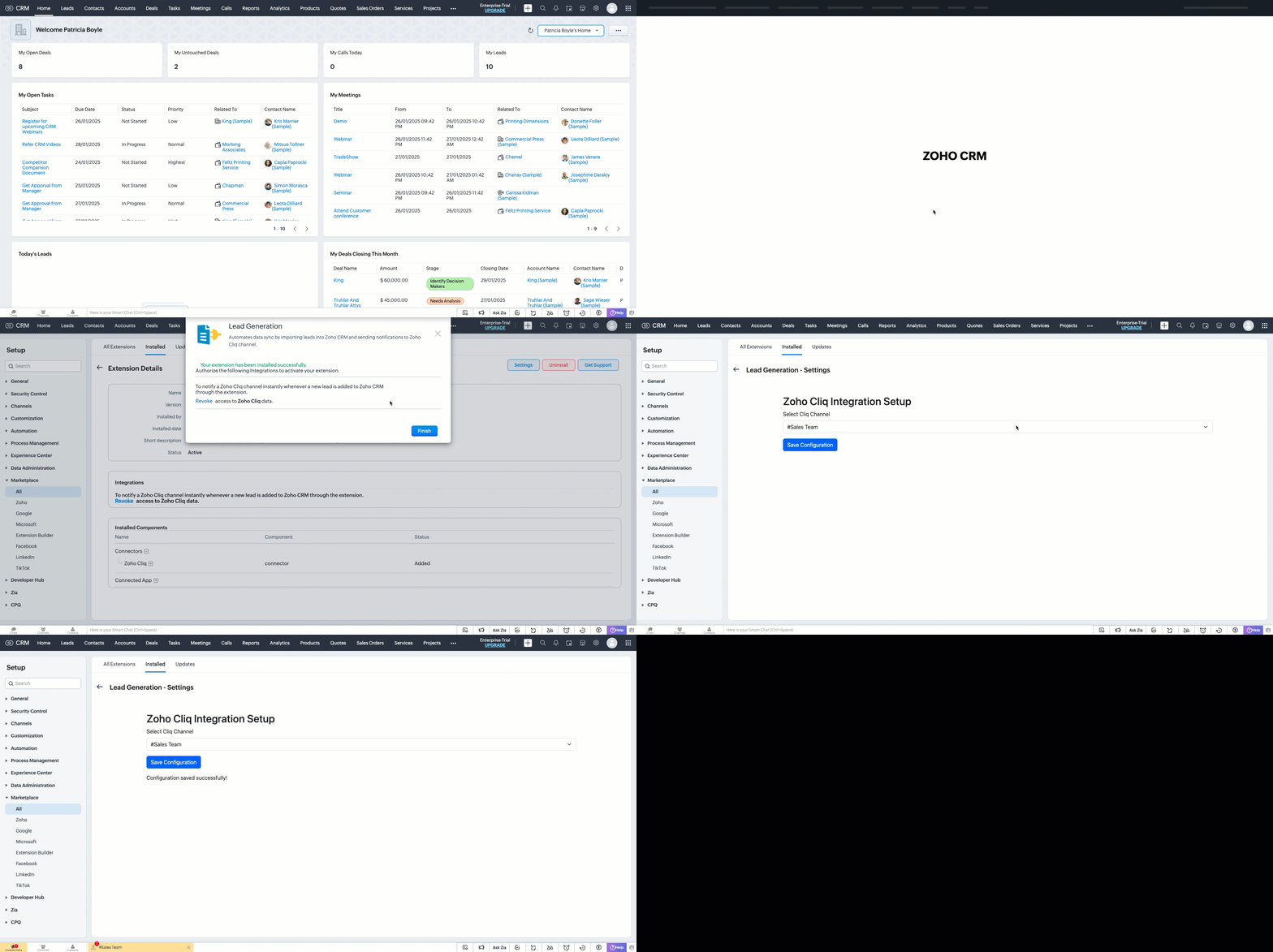

> After authorization, you will be redirected to the Settings widget page, where you can select and save your preferred Cliq channel.

> If you need to update the settings later, you can find them on the Installed Extensions page under the respective extension.


Notes
Note

The demo videos above use a testing function to notify the channel. You can deploy it anywhere in your extension to trigger a notification whenever a lead enters a Zoho CRM organization through the extension.

Find the function in the attachments at the end of this post.

Similar Scenarios

  • Sales Territory Management: An extension that auto-assigns incoming leads to sales reps can use a settings widget to allow managers to define territories and sales rep mappings dynamically.
  • Custom Field Mapping: For extensions that sync data between Zoho CRM and external systems, a settings widget can let users map CRM fields to external system fields.
  • Automated Email Preferences: In email automation extensions, the settings widget can allow users to specify email templates, recipients, or trigger conditions for follow-ups and campaigns.
Adding a Settings Widget to your Zoho CRM Extensions not only enhances user experience but also boosts the flexibility and efficiency of your extension. Whether it is notifying sales teams or customizing field mappings, a well-designed settings page is a game-changer for your extensions. 

Explore the Widget section in our Kaizen collection to try out various widget types and discover their unique use cases. 

If you have any queries or a topic to be discussed reach out to us at support@zohocrm.com or drop your comment below. 

Until next time, keep innovating!

Cheers! 

----------------------------------------------------------------------------------------------------------------------------------------

Related Reading

  1. Zoho CRM Widget - An Overview, Installation and Creation, Mobile Compatibility, Telephony Widget Extension, and other Kaizens.
  2. Widget SDKs - An Overview, Invoke Connector and Get Organization Variable.
  3. Zoho Developer Console - An Overview, Creating Extensions, Building Connected Apps, and A Quick Start Guide.
  4. Zoho Extensions - Custom Variables and Connectors
  5. Zoho Cliq - GET List of Channels and POST Message in Channel.
  6. Zoho Marketplace - An Overview
----------------------------------------------------------------------------------------------------------------------------------------

Idea
Previous Kaizen: Kaizen #174 - Client Script Commands | Kaizen Collection: Directory
Info
More enhancements in the COQL API are now live in Zoho CRM API Version 7. Check out the V7 Changelog for detailed information on these updates.
    • Sticky Posts

    • Kaizen #198: Using Client Script for Custom Validation in Blueprint

      Nearing 200th Kaizen Post – 1 More to the Big Two-Oh-Oh! Do you have any questions, suggestions, or topics you would like us to cover in future posts? Your insights and suggestions help us shape future content and make this series better for everyone.
    • Kaizen #226: Using ZRC in Client Script

      Hello everyone! Welcome to another week of Kaizen. In today's post, lets see what is ZRC (Zoho Request Client) and how we can use ZRC methods in Client Script to get inputs from a Salesperson and update the Lead status with a single button click. In this
    • Kaizen #222 - Client Script Support for Notes Related List

      Hello everyone! Welcome to another week of Kaizen. The final Kaizen post of the year 2025 is here! With the new Client Script support for the Notes Related List, you can validate, enrich, and manage notes across modules. In this post, we’ll explore how
    • Kaizen #217 - Actions APIs : Tasks

      Welcome to another week of Kaizen! In last week's post we discussed Email Notifications APIs which act as the link between your Workflow automations and you. We have discussed how Zylker Cloud Services uses Email Notifications API in their custom dashboard.
    • Kaizen #216 - Actions APIs : Email Notifications

      Welcome to another week of Kaizen! For the last three weeks, we have been discussing Zylker's workflows. We successfully updated a dormant workflow, built a new one from the ground up and more. But our work is not finished—these automated processes are
      • Recent Topics

      • Zoho CRM Quotes – Subform and PDF/Writer Limitations

        Hello, I am encountering the following limitations in Zoho CRM Quotes: Custom product images cannot be uploaded in the subform – the image upload field cannot be added; only the file upload field is available. File upload placeholders cannot be used in
      • Introducing Workqueue: your all-in-one view to manage daily work

        Hello all, We’re excited to introduce a major productivity boost to your CRM experience: Workqueue, a dynamic, all-in-one workspace that brings every important sales activity, approval, and follow-up right to your fingertips. What is Workqueue? Sales
      • Archiving Contacts

        How do I archive a list of contacts, or individual contacts?
      • Every time an event is updated, all participants receive an update email. How can I deactivate this?

        Every time an event is updated in Zoho CRM (e.g. change description, link to Lead) every participant of this meeting gets an update email. Another customer noticed this problem years ago in the Japanese community: https://help.zoho.com/portal/ja/community/topic/any-time-an-event-is-updated-on-zohocrm-calendar-it-sends-multiple-invites-to-the-participants-how-do-i-stop-that-from-happening
      • 3/18 オンライン勉強会のお知らせ Zoho ワークアウト (無料)

        ユーザーの皆さま、こんにちは。コミュニティチームの中野です。 3月開催のZoho ワークアウトの開催が決定しましたのでご案内します。 今回はZoomにて、オンライン開催します。 ▶︎参加登録はこちら(無料) https://us02web.zoom.us/meeting/register/BoNTN7zYR8OvOPGShqBY0A ━━━━━━━━━━━━━━━━━━━━━━━━ Zoho ワークアウトとは? Zoho ユーザー同士で交流しながら、サービスに関する疑問や不明点の解消を目指すイベントです。
      • Capture Last check-in date & days since

        I have two custom fields on my Account form, these are "Date of Last Check-In" and "Days Since Last Contact" Using a custom function how can I pull the date from the last check-in and display it in the field "Date of Last Check-In"? and then also display the number of days since last check-in in the "Days SInce Last Contact" field? I tried following a couple of examples but got myself into a bit of a muddle!
      • Zoho Sheet for Desktop

        Does Zoho plans to develop a Desktop version of Sheet that installs on the computer like was done with Writer?
      • Conversion Rate – Won Deals over Assigned Prospects

        Hello, I would like assistance configuring a KPI in Zoho Analytics titled: Objective of the calculation: Number of Won Deals divided by Total number of assigned prospects (not only converted prospects). Important clarification: The denominator must include
      • Perfomance Management - Zoho People

        Hi team, I am looking for performance management data such as KRA, goals, feedback, appraisals, etc., in Zoho Analytics. However, I am unable to find these metrics while editing the setup. Could you please confirm whether these fields are available in
      • Feature Request – Conditional Visitor Information Request in Zoho SalesIQ

        We would like to request the ability to conditionally ask for visitor details based on the communication channel used in Zoho SalesIQ. Specifically: When a visitor initiates a conversation through the live chat widget on the website, we want to continue
      • Apple Messages for Business in Omnichannel communications?

        Hello, Apple launched "Apple Messages for Business" but Zoho CRM or Zoho Desk don't appear in the list of possible integrators. Zoho already promotes https://www.zoho.com/crm/omnichannel.html Omni Channel integration, but Apple Messages does not yet appear.
      • Admin asked me for Backend Details when I wanted to verify my ZeptoMail Account

        Please provide the backend details where you will be adding the SMTP/API information of ZeptoMail Who knows what this means?
      • Cliq iOS can't see shared screen

        Hello, I had this morning a video call with a colleague. She is using Cliq Desktop MacOS and wanted to share her screen with me. I'm on iPad. I noticed, while she shared her screen, I could only see her video, but not the shared screen... Does Cliq iOS is able to display shared screen, or is it somewhere else to be found ? Regards
      • ZOHO.CRM.UI.Record.open not working properly

        I have a Zoho CRM Widget and in it I have a block where it will open the blocks Meeting like below block.addEventListener("click", () => { ZOHO.CRM.UI.Record.open({ Entity: "Events", RecordID: meeting.id }).catch(err => { console.error("Open record failed:",
      • 【Zoho CRM】通貨機能のアップデート:為替レートの自動更新やデータ更新オプションなど

        ユーザーの皆さま、こんにちは。コミュニティチームの藤澤です。 今回は「Zoho CRM アップデート情報」の中から通貨機能のアップデートをご紹介します。 CRMの複数通貨機能を使うと、地域ごとに通貨を管理し、顧客の現地通貨で記録したデータを自国通貨に自動換算して分析やレポートに活用できます。 従来は、為替レートを管理者が手動で定期更新する必要があり、各データには作成時点のレートが固定されるため、その後の市場変動は反映されませんでした。 本記事では、この問題を解消する「為替レートの自動更新」をはじめ、さまざまな新機能をご紹介します。
      • AI Bot and Advanced Automation for WhatsApp

        Most small businesses "live" on WhatsApp, and while Bigin’s current integration is helpful, users need more automation to keep up with volume. We are requesting features based on our customer Feedbacks AI Bot: For auto-replying to FAQs. Keyword Triggers:
      • Can we add zoho sign to a custom module?

        i understand out of the box it works with 8 modules. is it possible to add it to a custom module?
      • This domain is not allowed to add in Zoho. Please contact support-as@zohocorp.com for further details

      • Selected date present employees roster

        =CHOOSECOLS(FILTER(A2:E5;(INDEX(C2:E5;0;MATCH(VALUE(B8);INDEX(VALUE(C1:E1));0))<>"OFF")*(INDEX(C2:E5;0;MATCH(VALUE(B8);INDEX(VALUE(C1:E1));0))<>"EL"));1;2;2+MATCH(VALUE(B8);INDEX(VALUE(C1:E1));0)) This way sheet looks l
      • Credit Card Terminal for Zoho Books

        Hello, Instead of punching the credit card number manually for customer payment, do you have a third-party hardware credit card reader that works with Braintree? Thank You
      • Filtering in Help Center

        Hi, our ticket system is based on a set of structured status categories. The customer must be able to filter by these status. How can we add "Status" as filter to the help center. In the same moment we do not need filters e.g. as "channel". How can we
      • On Edit Validation Blueprint

        Hello, I have a notes field and a signature field. When the Approve button is clicked, the Signature field will appear and must be filled in. When the Reject button is clicked, the Notes field will appear and must be filled in. Question: Blueprint will
      • Google Fonts Integration in Pagesense Popup Editor

        Hello Zoho Pagesense Team, We hope you're doing well. We’d like to submit a feature request to enhance Zoho Pagesense’s popup editor with Google Fonts support. Current Limitation: Currently, Pagesense offers a limited set of default fonts. Google Fonts
      • Increase Round Robin Scheduler Frequency in Zoho Desk

        Dear Zoho Desk Team, We hope this message finds you well. We would like to request an enhancement to the Round Robin Scheduler in Zoho Desk to better address ticket assignment efficiency. Current Behavior At present, the Round Robin Scheduler operates
      • Can multiple agents be assigned to one ticket on purpose?

        Is it possible to assign one ticket to two or more agents at a time? I would like the option to have multiple people working on one ticket so that the same ticket is viewable for those agents on their list of pending tickets. Is something like this currently
      • Where is the settings option in zoho writer?

        hi, my zoho writer on windows has menu fonts too large. where do i find the settings to change this option? my screen resolution is correct and other apps/softwares in windows have no issues. regards
      • Zoho CRM Case Notes - Share to Customer

        Hi team does anyone know the Api to set a note, against a case, to shared with customer? i cant seem to find it  cheers 
      • When Does WorkDrive integrate with Books?

        When Does WorkDrive integrate with Books?
      • CRM gets location smart with the all new Map View: visualize records, locate records within any radius, and more

        Hello all, We've introduced a new way to work with location data in Zoho CRM: the Map View. Instead of scrolling through endless lists, your records now appear as pins on a map. Built on top of the all-new address field and powered by Mappls (MapMyIndia),
      • Synching changes to Stripe when changes are made in Zoho Billing

        We have a situation where we have merged customers in Zoho BIlling and then found out later that the payment in Stripe was not updated and still associated with the old customer record. The card gets updated and billed, but that payment is still associated
      • Zoho Sign Not Delivering

        I have sent several contracts out via Zoho Sign.   They do not seem to be getting delivered.  I had one person receive it, but the others have not.   I had one person tell me they sent it back to me and never got it and doesn't show as signed.  I've sent
      • Update latitude & longitude address field API

        How do I update the coordinates of an address field from a widget? I can't modify the latitude and longitude of the address field. I think the problem is how I'm writing formdata variable. zoho_init.then(function (data) { var queryParams = ZOHO.CREATOR.UTIL.getQueryParams();
      • Bank Feeds Breaking Constantly

        Hey Everyone, I have already reached out to support about this issue but I am wondering if anyone else is having the same issue. My bank feeds keep breaking within days of me fixing them by updating the credentials. Its been happening for a while and
      • Automatic Matching from Bank Statements / Feeds

        Is it possible to have transactions from a feed or bank statement automatically match when certain criteria are met? My use case, which is pretty broadly applicable, is e-commerce transactions for merchant services accounts (clearing accounts). In these
      • Zoho Payroll's USA and KSA editions are available in Zoho One!

        Greetings! We’re excited to share that Zoho Payroll, currently available only in India and the UAE, is now introducing the KSA (Kingdom of Saudi Arabia) edition and the USA (United States of America) edition, and these editions are now available in Zoho
      • Outlook/Hotmail Blocking Zoho SMTP IPs (S3150)

        We are currently facing a serious deliverability issue with Zoho SMTP while sending transactional OTP emails for our production application. Emails sent to Outlook / Hotmail addresses are being rejected with the following error: 550 - 5.7.1 Unfortunately,
      • Tip #63- Exploring Technician Console: Elevate to Admin Mode (Windows & Mac)- 'Insider Insights'

        Hello Zoho Assist Community! Ever been in a remote support session where you couldn’t complete a task because you didn’t have admin privileges? Maybe installing software, accessing secure system areas, or rebooting into Safe Mode just didn’t work because
      • Prevent accidental duplicate entry of Customer Ordersome

        Zoho Support has confirmed that Zoho currently does not have any method (using Deluge, flow or any other method) to alert a user when a sales order has been entered twice using the same customer reference number (i.e. a duplicate). Most ERP platforms
      • Permissões granulares por usuário além do modelo baseado exclusivamente em perfis

        Atualmente, o modelo de segurança do Zoho CRM é fortemente baseado em perfis. Embora funcional, esse modelo apresenta limitações quando equipes possuem variações individuais de acesso dentro do mesmo grupo operacional. Em cenários reais, é comum que usuários
      • Evolução do modelo de ambientes: Dev, Homologação e Produção com pacotes versionados

        Hoje o Zoho CRM já oferece Sandbox, o que é um avanço importante para organizações que trabalham com customizações mais complexas. No entanto, na prática, o modelo atual ainda apresenta limitações significativas quando múltiplas equipes ou consultorias
      • Next Page