Making the most of email notifications in Zoho Bookings
Email notifications are one of the most versatile tools in Zoho Bookings.
We've beautified and translated them. Now, let's see what other steps we can take to further stretch their use.
In this guide, we'll use email notifications to:
- Create product awareness
- Market other services
- Show social proof
- Thank customers
- Collect feedback
- Win repeat business and more
Check out the table below to see how you can pack more value into your outgoing emails.
Email Notifications
Booked | Rescheduled | Canceled | Completed | No-show | Reminders | |
| Agenda and meeting prerequisites | ✓ | ✓ | ✓ | |||
Case studies | ✓ | ✓ | ✓ | |||
Customer testimonials | ✓ | ✓ | ✓ | |||
Staff credentials | ✓ | ✓ | ✓ | |||
Post-appointment instructions | ✓ | |||||
Data gathering | ✓ | ✓ | ✓ | |||
"Book another appointment" button | ✓ | ✓ | ✓ | |||
Service promotions | ✓ | ✓ |
Yes, customer testimonials, case studies, and other value additions can be shared through social media. But think about this: Brands spend billions of dollars for customer attention, whereas on the other end, customers are overloaded with information. It's difficult to reach your customers amidst this chaos.
Even if you pack valuable content into your social posts, your customers are likely distracted and their attention fragmented.

But when you leverage email notifications in Zoho Bookings, you get more targeted customer attention with very little effort from your side. Above all, it is FREE.How?
Because even when faced with hundreds of emails, customers will open Zoho Bookings messages to view valuable information like appointment times and meeting links.

Plus, as customers often forget these details, they're likely to open your email notifications more than once. This means you get a customer's undivided attention on a recurring basis.
So why not leverage this?
You can double-down on the value you deliver to your customers during this attention window and let customers know more about what you have to offer.
This reinforces brand recall, strengthens customer trust, and increases repeat bookings, eventually leading to a boost in revenue.
Sending value packed emails
Let's explore different ways to deliver value to your customers.1. Agenda and prerequisites
An agenda helps you set clear expectations by giving a preview of the session. This way, customers can prepare for what's to come.
Prerequisites are beneficial for both you and the customer. Say, for example, you teach students programming languages online. Your prerequisites might be a laptop, a GitHub account, and an integrated development environment such as Visual Studio.
This helps your students prepare and makes your class time more effective. It's a win-win situation.
Two ways to send an agenda and prerequisites to your customers include visuals and text.
Visuals
For more detailed agendas, you can create a private page on your website with stunning designs and include the page's hyperlink in your email. This is easily done by creating a share link through Zoho WorkDrive or Google Drive.
Here's what a hyperlinked agenda will look like:
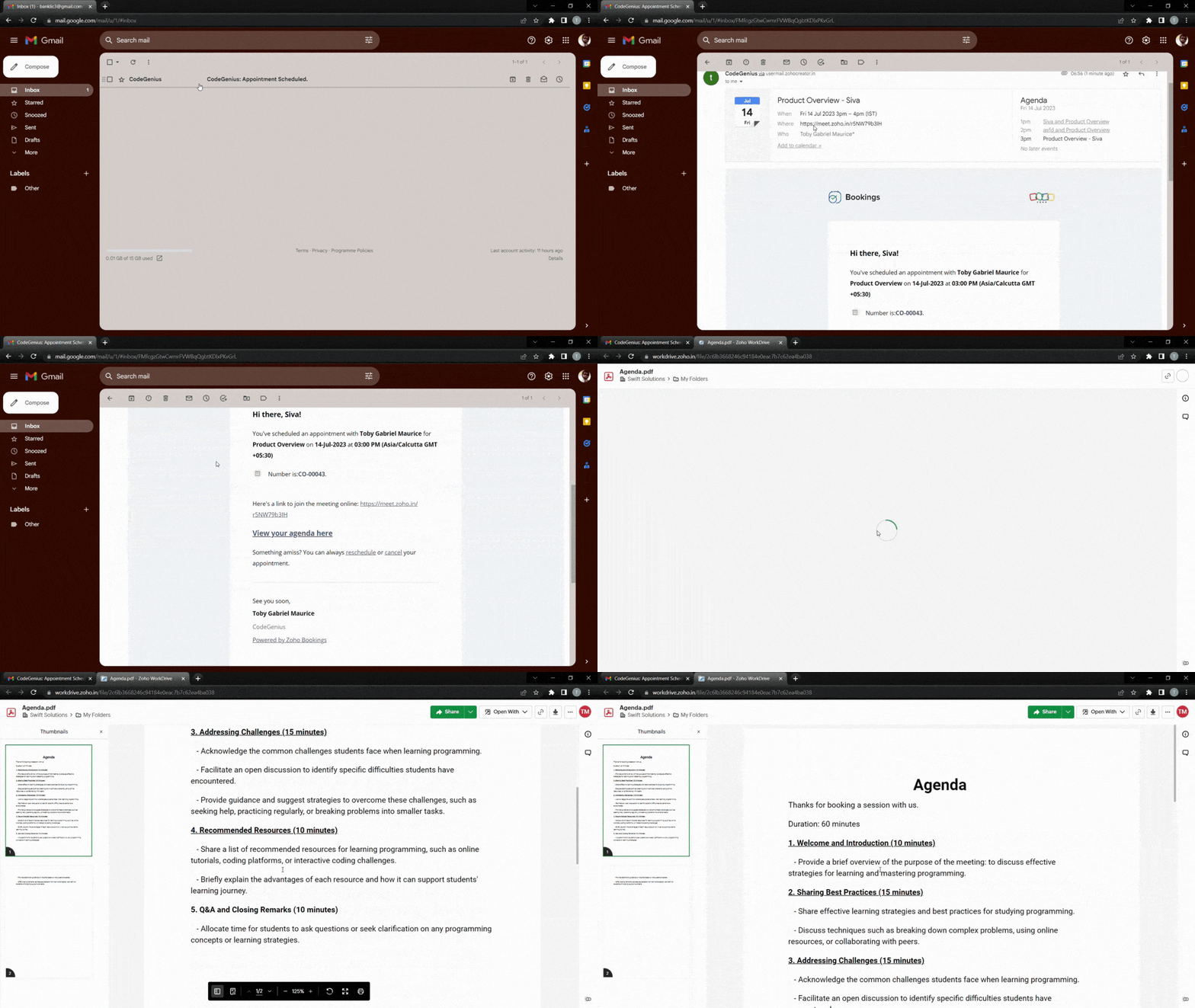
To make things even easier for customers, you can hyperlink a downloadable agenda. The following video demonstrates how to add a downloadable file to your outgoing emails.
Text
If your agenda is short, you can write it out using bullet points directly within your emails. We recommend having no more than six points to keep the message as concise as possible.
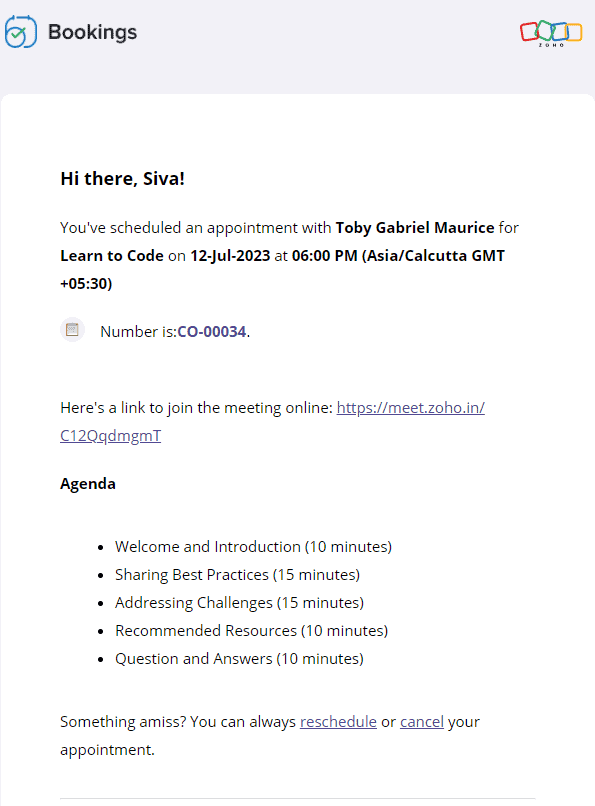
Text-based agenda

Text-based prerequisites
The following video shows how to add text-based agendas and pre-requisites to your emails.
2. Customer testimonials, case studies, and more
Customer testimonials and case studies help you showcase your credibility and gain trust. When your potential customers see highly rated testimonials and successful case studies, they'll put their faith in you.
It's also important to note that customers might have second thoughts about their appointment if it is far in advance. Sending these testimonials eliminates any such thought and reduces the possibility of a no-show.
Let's dive into some of the ways that you can send positive customer feedback along with your emails.
Landing pages and blog posts
Sometimes, the real estate in an email isn't sufficient enough. In those cases, you can hyperlink your testimonials or include buttons that lead to customer feedback forms.
Here's what the output will look like.
And here's how to add a button that links to any content of your choice.
Copy and paste the following code from the below snippet to add a button to your emails. In place of the blue "Button Text Here," you can add the text that you wish to see on your buttons.
- <button style="padding: 16px 32px; text-align: center; display: inline-block; font-size: 16px; margin: 4px 2px; background-color: rgb(80, 73, 127)">
- <a href="https://www.zoho.com/bookings/customers/loanstreet.html" style="color: white; text-decoration: none">
- <!-- Button Text Here -->
- </a>
- </button>
Videos
You can also embed your YouTube thumbnails as images in your emails and hyperlink them to the corresponding videos. We embed thumbnails rather than videos because most email clients cannot read video embeds.
We can use online image editors like Canva to create engaging thumbnails. This method intrigues your clients, increases click through rates, and enhances brand recall.
The following GIF shows how the output will look like:

Using the same technique, you can record videos of your staff speaking on camera about:
- The agenda, to give a preview of the session
- Any prerequisites, to prepare your customers for an engaging session
- Their own experience in the industry, to assure customers that they're under the guidance of an expert
Check out the following video to embed YouTube thumbnails in your outgoing emails.
- <a href="https://www.zoho.com/bookings/">
- <img src="https://i.imgur.com/JieK.png" alt="HTML tutorial" style="width:400px;height:250px;">
- </a>
4. Adding value after an appointment
It's best to go the extra mile and send thank you emails to your customers post-appointment. You can also send resources that may be helpful to them.
For example, a marketing team that does product demos could send out a PDF that contains help documents, support contacts, and other useful details. A solopreneur who teaches programming languages online might send a study plan and some words of encouragement.

All these steps show that you care about your customer's progress. This leads to increased trust, recurring bookings, and growth in revenue.
Depending upon the size of these instructions, you can choose to include them in the body of the email itself, or within a downloadable PDF, videos, hyperlink, or a button.
5. Collecting feedback
Both satisfied and dissatisfied customers add value to a business, and forms work well when you wish to gather their feedback. This comes in handy for cancellation and no-show emails as well because it allows us to find out why our customers have cancelled. You can also send forms along with your completed emails to find out what went well.
Here's what a hyperlinked form will look like:

Notes
1. Zoho Bookings offers five types of email notifications and three types of reminders. Not all content works with every email, and our table at the beginning of the article can help you decide on which to use. Depending upon your businesses, you can choose to stick with one or more value additions.
2. Be sure that your reminders are spaced out well. For example, if you have an appointment scheduled two weeks from now, you can send three reminders. However, if the appointment were just two days away, you would likely just want to send one reminder. This will also vary depending upon the industry you're in, so we recommend you use your best judgment.
Suggested flow ideas
So far, we've seen the content that works for different types of emails. But what should your ideal flow be?
Don't worry, we've got your back.
Here are some sample flows that you could emulate.
- Marketing team that offers product demo calls
- Booked email + agenda
- Reminder 1 + staff experience
- Reminder 2 + customer testimonial
- Completed email + post-appointment instructions
- Solopreneur who teaches programming languages
- Booked email + pre-requisites
- Reminder 1 + staff experience
- Reminder 2 + agenda
- Reminder 3 + case study
- Completed email + post-appointment instructions
In this article, we've pushed the boundaries of email templates in Zoho Bookings. We've also discussed different ways that we can group together email notifications and create flows that maximize value for your audience.
If you have any questions, drop them in the comments or email us at hello@zohobookings.com. We'll be happy to help you out.
Topic Participants
Siva
Sticky Posts
Zoho Bookings know-how: A hands-on workshop series
Hello! We’re conducting a hands-on workshop series to help simplify appointment scheduling for your business with Zoho Bookings. We’ll be covering various functionalities and showing how you can leverage them for your business across five different sessions.Announcing: custom color palette + free workshop
Hello everyone, We're excited to share new feature in Zoho Bookings—a color palette within booking page themes. You'll find this option under Manage Bookings > Workspaces > Booking Page Themes. You can customize the color of every element in your booking page and even alter the transparency of your background image. Please note that this is a paid feature included in the Basic and Premium plans. At the moment, it's available only under the Modern Web theme. This means you can create billions (7,Complete walk-through of Zoho Bookings (video)
Save time for both you and your customers. Use Zoho Bookings, the appointment scheduling app from Zoho, to free yourself from email and paper-based scheduling. Zoho Bookings can give you a common calendar by syncing multiple calendars, including yours and your staff's. Your customers can book a time convenient for them, and pay for services, through your website or the customizable webpage features available in Zoho Bookings. They'll also get emails reminding them about their appointments and anyNew Features: Service Availability and staff booking page themes!
Dear All, Want a dedicated schedule for your one-on-one services? How would it feel to have one-on-one services open for consultations only during certain times? You need a superpower to make that happen and we give it to you - Service Availability isZoho Bookings has a new pricing - Pay per user
Dear customers, Businesses around the world use Zoho Bookings. Customers have booked 1.5 million appointments and over 200K online meetings using Bookings. We are only set to cross more milestones, thanks to your support. We are excited to introduce to
Recent Topics
Incorrect Functioning of Time Logs API (Version 3)
We need to fetch the list of time logs for each task for our company internal usage. We are trying to achieve it by using the next endpoint: https://projects.zoho.com/api-docs#bulk-time-logs#get-all-project-time-logs Firstly, in the documentation theIMPORTANT: It doesn´t search for letters with portuguese characters.
Some of my articles have for example the word "vídeo". But if I search for "vídeo" it doesn´t find them. If I search for "video" it does find them. Idealy, it should find the articles either way. But if I have to choose, it would be better to find theIMPORTANT: It doens´t show full article name on search - Should add line break
When we search for articles, it doesn´t show the full name. There should be a line break so the user can see the full article name, otherwise the user can´t know if that´s the article he/she is looking for. This is very important, otherwise the user hasZoho Books - Payment Gateway - Revolut
Hi Books Team, My feature request if to include the popular platform Revolut as a payment collection option on invoices in Zoho Books. Please upvote if you are also looking for this option.Zoho Books | Product updates | January 2026
Hello users, We’ve rolled out new features and enhancements in Zoho Books. From e-filing Form 1099 directly with the IRS to corporation tax support, explore the updates designed to enhance your bookkeeping experience. E-File Form 1099 Directly With theKaizen #233 - Generating AI-powered Follow-up Emails Using CRM Functions and Widgets
Hey everyone! Welcome back to another interesting post in the Kaizen series! Sales teams regularly capture interaction notes in CRM after speaking with prospects. However, drafting a follow-up email that reflects the conversation context can be repetitiveConnect Bank in Zoho Books
Can I connect UOB or Ariwallex in Zoho Books?Using MPN across multiple SKUs and inventory tracking
I have several different SKU's that share a common MPN and would like to track inventory by MPN. SKU1 has MPN1 assigned SKU2 has MPN1 assigned Here is an example If I start with 5 of MPN 1 in stock I want each SKU1 and SKU2 to show as 5 in stock, If IExtend Zoho Canvas Customization to Zoho Creator Forms and Reports
Currently, Zoho Canvas allows users to design and customize the UI of Zoho CRM modules with a much better visual experience. This helps organizations create cleaner layouts, improve usability, and design interfaces that match their workflows. However,Marketing Tip #1: Optimize item titles for SEO
Your item title is the first thing both Google and shoppers notice. Instead of a generic “Leather Bag,” go for something detailed like “Handcrafted Leather Laptop Bag – Durable & Stylish.” This helps your items rank better in search results and instantlyFeature Enhancement Request – Text Formatting Options in Item Description (Zoho Books/Quotes Module)
Dear Zoho Development Team, Greetings from Radiant360 Integrated Technical Services LLC. We would like to bring to your attention a functional limitation we've encountered within the Item Table / Quote Description section of Zoho Books (and Zoho CRM Quotes).ZOHO Books Query
Good day, Can someone please advise. I recently migrated from ZOHO Invoice to ZOHO Books. No that I want to use the inventory on Books I cant as all my items have transaction history. The person I spoke to at ZOHO said I need to create a new Company profileBest way to schedule bill payments to vendors
I've integrated Forte so that I can convert POs to bills and make payments to my vendors all through Books. Is there a way to schedule the bill payments as some of my vendors are net 30, net 60 and even net 90 days. If I can't get this to work, I'll haveZOHO.CRM.UI.Record.open not working properly
I have a Zoho CRM Widget and in it I have a block where it will open the blocks Meeting like below block.addEventListener("click", () => { ZOHO.CRM.UI.Record.open({ Entity: "Events", RecordID: meeting.id }).catch(err => { console.error("Open record failed:",inventory removal at packing list or shipment.
currently our system is set to remove inventory at invoice. This is creating an inventory nightmare? Is it possible to change the settings to remove the item from inventory at either the packing slip stage or shipping the item.How to add employee and not invite them to log in?
I want to add 50 employees, but invite them only when everything will be configured and ready. Is it possible? Should we create employee profiles and then convert them later? Thank you,How is Your eCommerce Experience w/Zoho Inventory?
First off, I'm SUPER grateful for the advent of Zoho Inventory and now the Zoho Commerce Suite. Overall, Inventory is a great product, especially for customers without an eCommerce presence. For eCommerce companies (especially those shipping more than ~10 packages/day), however, there are certain drawbacks that keep my clients from moving over to Zoho Inventory: Cons: 1. Invoice + Package Creation from Shopify/Other eCommerce Integrations: Zoho Inventory makes the somewhat perplexing decision toAbility to Use Both AND and OR When Creating Rules (Advanced Conditions)
I'd like to be able to use more complicated logic when setting up rules. E.g. in Zoho Mail, I can choose "Advanced conditions (AND/OR) to create a rule that can be applied to multiple subject lines from the same sender. But in Zoho TeamInbox, I will haveZoho Desktop App- Unable to Minimize/Freezes
I'm having issues with my Zoho Mail desktop app (PC). When go on my desktop and open the app this is what happens: - Unable to minimize and close app (in the screenshot attached you can see at the top right there is no option to minimize/close) - UnableZoho Invoice Zapier Integration
Is there still a way to use Zapier with Zoho Invoice? I've read online that that migrated to Zoho Books or Billing but since I am just using Invoice I can not find a Zapier Connection anymore.Conect chat of salesiq with zoho cliq
Is there any way to answer from zoho cliq the chat of salesiq initiated by customers?Bug: OAuth 2.0 State Parameter fails with Pipe Delimiters (RFC 6749 Non-Compliance)
I've discovered a bug in how Zoho's API Console handles the OAuth 2.0 authorization flow when the state parameter contains pipe characters (|), and I'm hoping the Zoho team can address this in a future update. The Issue Zoho's OAuth 2.0 implementationZobot with Plugs
Hello, I am having a problem with Zobot using Plugs. Here is my current flow: When I run the flow, I should immediately see the messages from the initial cards (Send Message cards), then after running the plug, and finally, see the messages after thePrint a document from Zoho Writer via Zoho Creator
If i use the code below i can get writer to create a new document or email it to me but i want to be able to print it directly from the browser and not have to send it via email and then print. Below is the code im using. Attached options form zoho writerIs it possible to use HTML formatting in SMS messages sent from Zoho?
Hi everyone, I have a question regarding sending SMS from Zoho When we send emails from Zoho, we can include HTML code to format the message (like adding links, styling, etc.). Is it possible to do something similar when sending SMS messages through ZohoTraining for How can i Operate the Software Features
need to Help for Training of the ZOHO Billing SoftwareAutomating Vendor Contract Management between Zoho Contracts and Zoho Books using Zoho Flow
Managing vendor agreements across procurement and finance systems often requires manually downloading executed contracts and attaching them to vendor records. This can become time-consuming and difficult to manage when dealing with a large number of contracts.Problem applying batch operation error keeps looping that error
Problem applying batch operation error keeps looping that error an wont loginShared Email Sending Duplicate Copies of Emails
Hi there, We recently have moved our info@ email to Team Inbox to trial. We set this channel up using the Microsoft setup which works fine and have 3 users. I am wanting to know: 1. When I send a new email, it will create a copy of that email and sendmerhaba
merhaba sosyal medya paketimiz mevcut ama yorumları göremiyoruz ve o yüzden cevap veremiyoruz destek rica ediyoruz.Teaminbox not working
We couldn't send or receive any mail within the team inbox. Displaying error 'Unable to process this request.'Related lists New option in missing
hi I have created quite a few modules and added as related lists to my main module. Some have new, some dont I can not see why?Cliq and ToDo integrations?
I'm a bit surprised not to find any way to open a Cliq chat for the current thread, or to create a Zoho Mail ToDo from a thread. Are these on the roadmap?Reply-to names are mangled
Hello, I'm seeing an odd behavior in replies. Steps to reproduce: 1. Click reply to an email from "John Doe <doe.john@example.com> in TeamInbox Expected outcome: TO field pre-filled with "John Doe <doe.john@example.com>" Actual outcome: TO field pre-filledI CANT UPGRADE MY FREE ACCOUNT
I TRY TO UPGRADE MY FREE ACCOUNT AND I COULD NOT UPGRADE IT CAN SOMEBODY TELL ME WHY? AND I HAVE THE MONEY SO.Level up your ASO game with tags & categories in store reviews
Introducing tags and categories in Apptics' store reviews Dear Apptics community, If your app is listed on the Play Store or App Store, you already know how important store reviews and ratings are. They’re one of the most direct signals of user sentimentIncluding attachments with estimates
How can attachments be included when an estimate is sent/emailed and when downloaded as a .pdf? Generally speaking, attachments should be included as part of an estimate package. Ultimately, this is also true for work orders and invoices.Adding VENDOR SKU to PURCHASE ORDERS
how can we add the Vendor SKU when issuing a Purchase Order , so the PO shows the Supplier SKU and our own Internal SKU , which is what we want to receive into the system .Possible to freely prompt/query CRM data using Zia?
Is it possible to prompt Zia to query on any information stored in the CRM, especially on the data stored in custom text fields? My use case is the people in my organisation have entered lots of text in custom text fields to capture information from anRestrict employees to take only one day holiday from a multi-day festival holiday
Hi everyone, I have a requirement related to Optional/Festival Holidays in Zoho People. For example, in the month of May there are three optional holiday dates: May 11, May 12, and May 13. Employees can choose one of these days as their optional holiday.Next Page