Response time reports
From data to decisions: A deep dive into ticketing system reports
Every organization that interacts with its customers should have an established timeframe for how soon an agent is expected to send the first response and any reply to any follow-up messages.
It's common for the support team to operate under a service level agreement that requires the first response to any customer ticket to be sent within one hour of ticket creation.

If a team has 10 agents, the manager does not need to check each ticket to see if the response time SLA is met. Instead, the response time report can help identify whether all responses are sent on time or if there is a delay.
What are time-based reports?
Time-based reports are valuable tools that help us understand how well things are going by breaking down key metrics over specific periods. By tracking, measuring, and visualizing data, these reports allow us to evaluate performance, spot trends, and make better decisions. They enable businesses to monitor efficiency, productivity, and operational effectiveness.
If a ticket was raised on February 23, and the response was sent on February 28, the manager can review the details to understand why there was a delay. This might be due to reasons such as holidays, a mistake by a new agent who is unfamiliar with the process, or unusually high demand for support. By identifying the cause, the manager can offer more training on SLA processes, adjust the way agents' workloads are allocated, or arrange for extra help during holidays to ensure timely customer responses in the future.
Example of response time reports
Suppose a ticket was raised on February 23rd about a patient’s health concern, and the response was sent on February 28th. In this case, the hospital manager can review the details to see why there was a delay in addressing the patient's needs. This delay may be caused by factors such as holidays affecting staffing levels, staff being unfamiliar with the ticketing process related to patient care, or an increased workload resulting from a sudden rise in patients.
By figuring out the cause of the delay, the manager can take proactive steps. For example, they could provide more training on the standard procedures for handling patient inquiries to ensure all staff understand the process. The manager might also adjust the workload by redistributing cases among staff or bringing in temporary help during busy times or holidays.
Another strategy is to form a dedicated task force to handle customer inquiries during peak periods to provide quicker responses. By tackling these issues, the organization can improve its operations and ensure timely responses to ensure customer satisfaction.

Availability: All paid versions
Specific attributes of the report
- Ticket ID: Zoho Desk identifies and distinguishes tickets using a unique reference number called a ticket ID.
- Subject: The ticket subject is typically a summary or description of the issue the customer is experiencing.
- Ticket owner: Owner of the ticket.
- Contact name: The customer's contact name.
- Event owner: The owner of the event.
- Event team: The change in the ticket's status.
- Responded by: The name of the agent who responded to the customer's ticket.
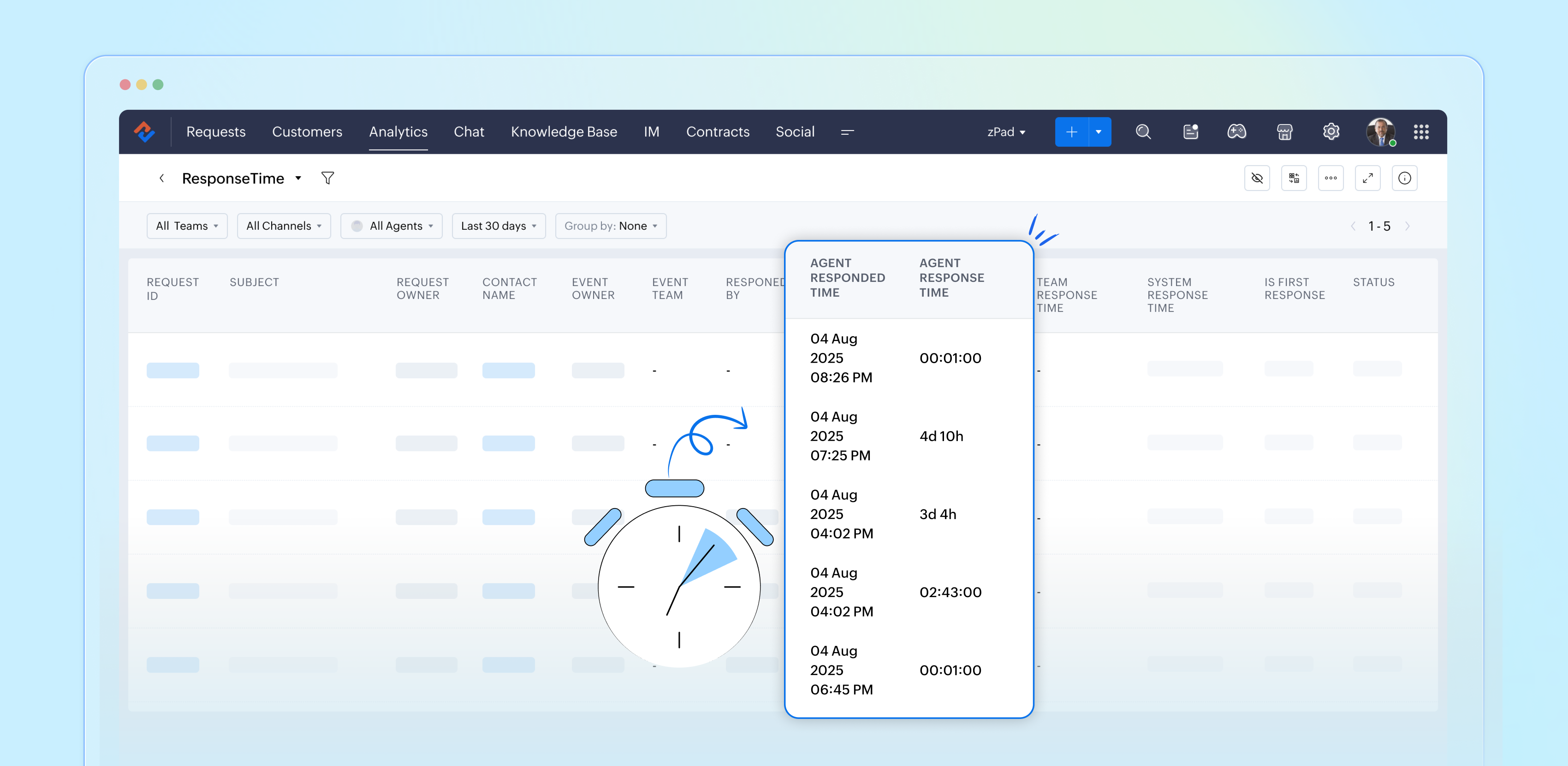
- Agent responded time: The time the response was sent.
- Agent response time: The total time taken to respond to the ticket.
- Team response time: The time the team responded to the ticket.
- System response time: The total time the team took to respond to the ticket
- Is first response: Confirms if this is the first response in the conversation's thread.
- Status: The current status of the ticket.
- Status during event: The status of the ticket at a particular point in time.
- Channel: The channel through which the ticket was submitted.
Importance of response time reports
Response time reports are important for support systems. They measure how quickly agents reply to customer inquiries.
- Enhance customer satisfaction
- Easily promote customer loyalty
- Enable performance tracking
- Drive operational efficiency
- Support data-driven decisions
- Reinforce brand reputation
Analyze and improve response times with reports
By closely examining both our first response times and the tickets that require more attention, the support team can gather valuable insights from every customer interaction. This continual analysis of response time reports allows us to identify patterns and areas for improvement, ultimately enhancing our overall performance and ensuring a superior experience for our customers.
Please stay tuned for more articles in our Desk Reports series.
Regards,
Kavya Rao
The Zoho Desk Team

Also read:
Time-based reports
Topic Participants
Kavya Rao Addepalli
Sticky Posts
Zoho Desk Partners with Microsoft's M365 Copilot for seamless customer service experiences
Hello Zoho Desk users, We are happy to announce that Zoho Desk has partnered with Microsoft's M365 to empower customer service teams with enhanced capabilities and seamless experiences for agents. Microsoft announced their partnership during their keynoteWhatsApp pricing changes: Pay per message starting July 1, 2025
Starting July 1, 2025, WhatsApp is shifting from conversation-based pricing to per-message billing. That means every business-initiated message you send will count. Not just the first one in a 24-hour window. Pricing updates on the WhatsApp Business PlatformLive Webinar - Work smarter with Zoho Desk and Zoho Workplace integration
Hello customers! Zoho Desk and Zoho Workplace are coming together for a webinar on 14th May, 2024. Zoho Workplace is a suite of productivity apps for email, chat, docs, calls, and more at one single place. Zoho Desk is closely integrated with a few toolsApple iOS 17 and iPadOS 17 updates for Zoho Desk users
Hello Zoho Desk users! Apple recently announced the release of iOS 17 and iPad OS 17. These latest OS updates will help you stay productive and efficient, through interactive and seamless user experiences. Zoho Desk has incorporated the updates to helpZoho Desk Cheat Sheet For The Year-End
Check out these Zoho Desk best practices to end this year on a high and have a great one ahead! #1 Set Business (Holiday) Hours - If you have limited working hours, please make sure you restrict your business hours or set them as holidays for the coming days. Let your customers know when you will, and won't, be available. #2 Update the Annual Holiday List - Check the holidays for the new year and update the holiday schedule. Usually, holidays from the current year will be carried over for the next
Recent Topics
Is there any way to bill one client in different currencies on different invoices?
I have some customers who have their currency set as USD and most of their billing is done in USD. However, from time to time I have a need to bill them in my base currency GBP for some specific invoices, but there seems to be no way of doing this that I can see. The only workaround that I can see is to create two client records for the same client, one for USD billing and one for GBP billing, but this is not an ideal situation. Is it likely that the (hopefully!) soon to arrive multi-currency supportAPI name for all fields in Zoho Project (Standard or custom)
Hi! I struggle to find easily all API name of all field in Zoho Project to build my API rest with other services. We can find them very fast in CRM but not in PRoject. Could you share a function to get the list of all API Name of any field of an AppDisappearing Mouse cursor in Zoho Mail / Windows 11 (Chrome + Edge)
I'm seeing an issue when writing mails with the light theme with the mouse cursor being white and the document area also being white - making it nearly impossible to see the mouse cursor. I see the problem on Windows 11 under Chrome and Edge. (Yet toZoho Assist not rendering NinjaTrader chart properly
Hi everyone. Just installed and testing Zoho Assist. I want to display my laptop' screen (Windows 11) on a monitor connected to my Mac mini. The laptop is running a stock trading program called NinjaTrader. Basically, when running, this program displaysDropshipping Address - Does Not Show on Invoice Correctly
When a dropshipping address is used for a customer, the correct ship-to address does not seem to show on the Invoice. It shows correctly on the Sales Order, Shipment Order, and Package, just not the Invoice. This is a problem, because the company beingBest way to schedule bill payments to vendors
I've integrated Forte so that I can convert POs to bills and make payments to my vendors all through Books. Is there a way to schedule the bill payments as some of my vendors are net 30, net 60 and even net 90 days. If I can't get this to work, I'll haveLink(s) between Notes
Hello Everyone, It would be great if links could be created between notes. Let's say we have 5 Notes A, B, C , D, E. I would like to be able to link Note A to Note B but not in other way, so no link appears in Note B linking to Note A. An so on, linkingZoho Books | Product updates | August 2025
Hello users, We’ve rolled out new features and enhancements in Zoho Books. From the right sidebar where you can manage all your widgets, to integrating Zoho Payments feeds in Zoho Books, explore the updates designed to enhance your bookkeeping experience.Feature Request: Assign Documents to Already Entered Bills, Expenses, Invoices, etc.
Hi Zoho Team, We are regular users of the Documents module in Zoho Books and appreciate its ability to keep financial records well-organized. However, we’ve noticed a limitation: There is no way to attach a document from the "Documents > Files" sectionI don't see any WITHDRAWL transaction at all
Hi I manually imported my bank statement to Zoho books today and I am a complete newbie. I have been reading the knowledgebase but unable to fix this. I only see "Uncategorized 91 DEPOSIT transactions". I don't see any WITHDRAWL transaction at all. Also,Shared inbox unable to see replies
Hi we are a small company me and someone else, we have a shared inbox for our sale@ and contact@ however we have this issue where by if i reply to an email or the other person reply to the email, it does not show it to them and therefore we end up replyingKaizen #136 - Zoho CRM Widgets using ReactJS
Hey there! Welcome back to yet another insightful post in our Kaizen series! In this post, let's explore how to use ReactJS for Zoho CRM widgets. We will utilize the sample widget from one of our previous posts - Geocoding Leads' Addresses in ZOHO CRM404 error at checkout
Our customers are getting a 404 error at checkout. Anyone else with the same problem?FONT Sizing in Notebook
Hi Kishore - What is the status of adding font sizing to the application? I have several things that I have pasted directly into Notebook and the fonts are HUGE! I would like the ability to highlight them and reduce the font to a legible size. NothingCan managers Upload documents to their direct rapports?
Admin employees have the ability to upload documents to employees' files; however, managers do not have add/manage button - is it possible for managers to upload their direct reports' documents, such as absence documents or 121 documents. Is there somethingLeave balance display for next year
Is there a way to not have a rollover or not limit the leave balance depending on the date. For example an employee has 10 days leave balance and wants to apply for January leave in December. They cant because the rollover doesnt show the leave balancePlease add an “Auto-Apply Unused Credits” toggle
Hello — please add a simple org-level option to automatically apply unused credits (credit notes, excess payments, retainers) to new invoices and/or bills. An ON/OFF toggle with choices “invoices”, “bills”, or “both” would save lots of manual work forZoho Books not working/loading
Hi! I haven't been able to access/load Zoho Books for the past hours. I get a time out (and it is not due to my internet connection). Could you please check this asap? Thank you!Custom Fields with Data Types for Expense and Payments Received in Zoho Books
Hi all, We are glad to present to you, the option to create Custom Fields for the Expense and Payments received modules in Zoho Books. This also comes with an icing on top of it - Yes, the custom fields can now be created with different data types. Types like Text, Number, Decimal, Amount, Auto Number and Check Box are supported as of now. Rush to the gear icon at the top right corner, select 'More Settings', choose 'Preferences' in the left pane. Click the Expense/Payment preferences where you canZoho Cliq - Incident alert (Server outage - IN DC) | August 28
We've received server down alerts and are currently investigating the issue (IN DC) to find the root cause. Our team is actively working to restore normal operations at the earliest. Status: Under investigation Start time: 09:44:21 AM IST Affected location:Claude + MCP Server + Zoho CRM Integration – AI-Powered Sales Automation
Hello Zoho Community 👋 I’m excited to share a recent integration we’ve worked on at OfficehubTech: ✅ Claude + MCP Server + Zoho CRM This integration connects Zoho CRM with Claude AI through our custom MCP Server, enabling intelligent AI-driven responsesHow can I see content of system generated mails from zBooks?
System generated mails for offers or invices appear in the mail tab of the designated customer. How can I view the content? It also doesn't appear in zMail sent folder.Limitations on editing a message in Cliq
Hi I've checked the documentations and there's no mention of how many times a message can be edited. When trying with code, I get various numbers such as ~1000 edits or so. Please mention if there's a limit on how many times one can change a message viaNarrative 10: Assignment Rules - Streamlining Ticket Management
Behind the scenes of a successful ticketing system: BTS Series Narrative 10: Assignment Rules - Streamlining Ticket Management In the complex world of customer support, a flood of incoming tickets can hit the help desk in seconds. Businesses must do moreFree webinar! Digitize recruitment and onboarding with Zoho Sign and Zoho Recruit
Hello, Tired of being buried in onboarding paperwork? With the integration between Zoho Sign and Zoho Recruit, a powerful applicant tracking system, you can digitize and streamline the entire recruitment and onboarding process, all from one platform.Custom form - Duplicate Value Present
I am new to Zoho People. I create a new form on Zoho People quite simple. A date (by default the current date) and a radio button with 3 options (Yes, No, Not applicable) I defined the date as ‘No duplicate’ as only one entry by date is allowed. I added:Zoho API connection issues
Hi, Today at around 1930 GMT our application started experiencing intermittent timeouts from the Zoho API. These intermittent timeouts are not enabling our app to work properly. The API connection was working just fine before. HTTPSConnectionPool(host='www.zohoapis.com',Query Regarding our Partnership between AIC-JKLU and Zoho
Dear Zoho Team, I am writing to raise a concern on behalf of AIC-JKLU, one of Zoho’s incubator partners. Recently, our startups have been facing difficulties while trying to get themselves onboarded on Zoho through our dedicated partner link. Unfortunately,Disputed Purchase Invoices
We have recently moved to Zoho Books from Sage. In Sage we were able to post a purchase/vendor invoice but mark it as on dispute. This would usually be a pricing query or if something was damaged. It would show in their ledger, so we could agree theirGetting events in the future
Hi I am trying to get events in the future by calling this API Endpoint https://www.zohoapis.eu/crm/v8/Events?fields=Event_Title,Created_By,Created_Time,Start_DateTime But that gives me all events in the database. How do I make a query that returns allCreated Date/Invalid Fields
Since Saturday we have suddenly had issues with our webhooks and data retrieval from CRM. Specifically how Created Date is handled. It appears there was some sort of change within CRM that broke a lot of our code that has been in place for several years.Zoho Inventory. Preventing Negative Stock in Sales Orders – Best Practices?
Dear Zoho Inventory Community, We’re a small business using Zoho Inventory with a team of sales managers. Unfortunately, some employees occasionally overlook stock levels during order processing, leading to negative inventory issues. Is there a way tointegration zoho form - drive
I integrated my form with Google Drive. The report of user submissions from the Google Form becomes a Google Sheets table. When I used Google Forms for the same task, the summary sheet adapted to the form. For example, if I added a new field to the form,add employees and customiz
I want a Zoho software to track employees record. I logged in a demo so now I tried adding employee, first thing when I click on add employee it takes me to a page where it says add user maximum 10 users, my first doubt why users I don't want employeesRevenue Management: #9 Revenue Recognition in Media & Publishing
Media & Publishing industry has evolved in recent times. It offers subscriptions, bundles digital and print access, runs sponsored content, and sometimes even sells ad spaces. If you run a media or publishing business, you will always get into a situationZoho CRM Community Digest - July 2025 | Part 2:
Hello, Everyone! We’re closing out July with a can’t-miss highlight: Zoholics Europe 2025! Happening from September to October, it’s your chance to level up your CRM skills, covering everything from automation and CPQ to dashboards and advanced workflows.How can I trigger a flow action only once while updating contact?
Hi, we have a trigger to merge&mail file when the field YYY is filled out. For this acion I used "Create or update module entry". But unfortunately we get tens of email on a day with this merged file, because the contact is being regularly updated. TheCopy a Record Template from one Form to another
I have a Creator application with several forms. I developed a record template for one of the reports/forms but want to use most of it for another of the form/report combinations in the application. Is there a way to copy the template (code or otherwise) to another form?Tip of the Week #70 – Create common team signatures for your shared inboxes
Did you know that a small detail, such as an email signature, can make a big difference in how your brand is perceived? One simple yet smart way to enhance your team’s communication is by creating common team signatures for your shared inboxes. InsteadEnhanced data export features: XLSX format, custom character encoding, and selective record export
Greetings all, Here are a few enhancements related to exporting CRM data, including the ability to export data in XLSX file format now. The Export feature under Data Administration now offers new options that expand its flexibility and enable users toNext Page