Team Modules in Zoho CRM: Empower Every Team, Break Silos and Boost Collaboration
Hello Everyone,
The ultimate goal of every business is to achieve customer delight—and achieving customer delight cannot happen with the effort of a single person or team. At Zoho CRM, we believe that it’s a shared mission that spans across your entire organization. From Sales and Pre-sale to Marketing, Onboarding, and beyond, every team plays a role in shaping the customer's experience.
While sales teams are the champions that lead customer conversions and make the tough negotiations with prospects, the ultimate clinching of a business deal is the result of cumulative efforts of multiple minds. So instead of limiting Zoho CRM's capabilities to just one team, we introduced Teamspaces to onboard multiple customer-facing teams onto the CRM platform.
However, how do these teams work in the CRM system?
Presenting Team Modules, a powerful new way to empower all customer-facing teams with the tools they need to manage relationships and contribute to business success.
With Team Modules, each department within a team can build and manage their own processes directly within Zoho CRM; there will be no need to rely solely on central admins. This enables cross-functional teams to work in sync toward a common goal: delighting your customers, every single day.
In this post, we’ll walk you through how Team Modules fit into Zoho CRM, the availability of automation within them, manage team users, and enable seamless coordination through requests.
How do Team modules fit into Zoho CRM?
In traditional CRM setups, the authority to configure processes across all teams typically rests with central admins — a necessary measure to ensure data privacy and consistency. However, this often creates bottlenecks, delaying essential internal processes.

With Zoho CRM for Everyone, we’ve changed that. Now, multiple customer-facing teams can operate from within their dedicated Teamspaces and each teamspace can have its own Teamspace Admin, who oversees the activities and workflows specific to that team. Learn more.
Within every Teamspace, processes can be configured and executed through Team Modules. Team modules are customizable modules that enable teams to set up their own workflows and manage data independently. Learn more.
Let's take the example of the Sales team. They may handle multiple processes such as Customer Conversions, Sales Administration, Renewals, and more. Each of these processes is typically managed by different departments. These departments with their own processes and responsibilities can be captured via Team Modules.
To ensure data security and integrity, Team Modules come with module-level access controls that let you manage permissions with precision. Team Modules include different types of users or roles:
- Team module admins,
- Managers,
- Members,
- Participants, and
- Requesters.
From our example above, the department heads for each sales process in the sale team can be assigned as team module admin. Team members from the department can be assigned with other types of users or personas depending on their roles and responsibilities.
Each role or type of user in the team module have specific permissions, ensuring that they perform their tasks without compromising data access or privacy. Learn more.

In conclusion, while a central admin will certainly continue to operate at the highest level to take care of company-wide priorities and governance, team module admins now have the flexibility to configure and run their own modules — leading to faster, more efficient operations.
The image below depicts a CRM system built for an ecommerce industry where there are multiple teams within their teamspaces, having multiple processes captured in a team module and each process will be managed by a team module admin.

Automation in Team Modules
Empowering teams to build their own processes means giving them the tools to automate those processes too. Team module admins or users with Create Team Module permissions enabled can set up automations for their team.
Team Module Admins or users with the appropriate permissions can:
- Create workflow rules, blueprints, approval processes, and assignment rules
- Design canvas pages, webforms, layout rules, validation rules, and wizards
This lets them handle a huge set of use cases when it comes to common tasks like assignment, approval, process compliance, notifications, etc. Learn more.
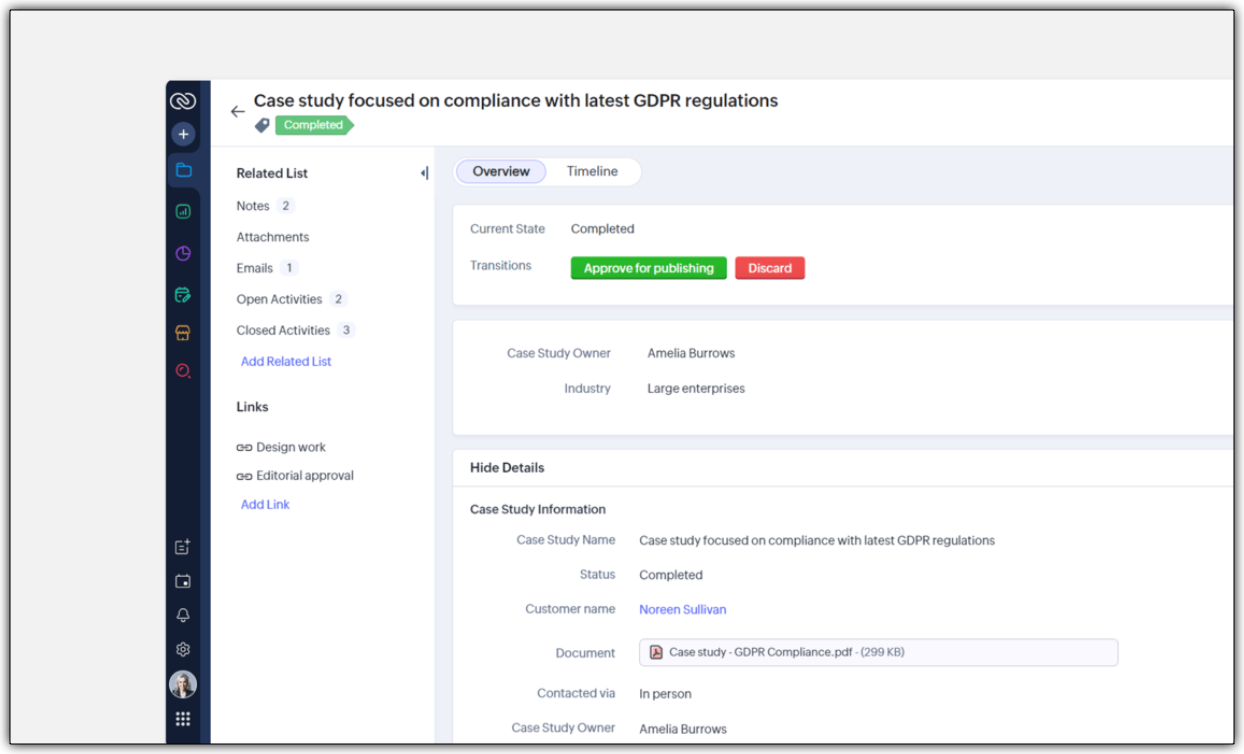
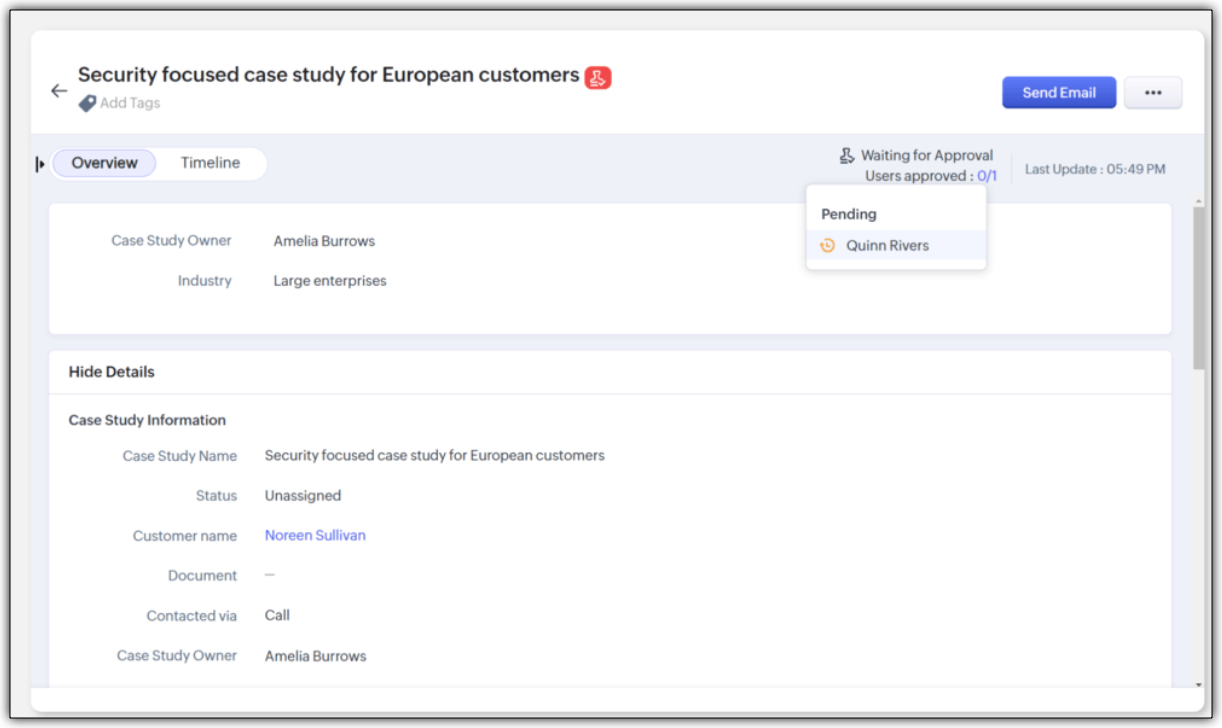
Let's look at an example of automation configured in a case study team module of the Marketing Team:
- An assignment rule to assign enterprise case studies to marketing managers automatically
- A workflow rule to send notifications to customers to keep them in the loop.
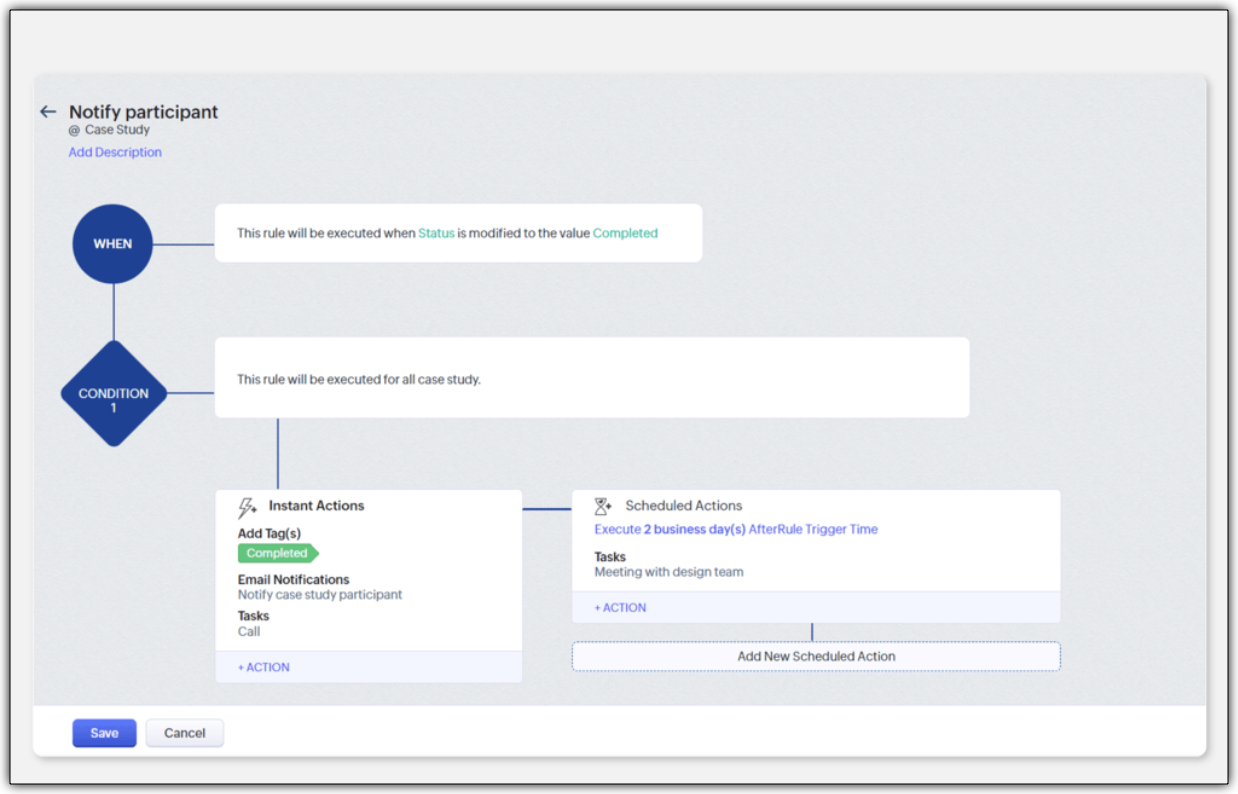
- A blueprint to streamline the case study publishing process
- An approval process to ensure that case studies are signed off by a team module manager
Improving Team Coordination
Winning a customer is often like running a relay race where one team hands off to the next until the goal is achieved. With multiple customer-facing teams onboard, how can they coordinate to achieve their goal - in case of any industry, it would be to close a deal successfully.
For example, in a typical SAAS industry, there would be multiple customer-facing teams : Sales team, Marketing team, Pre-sales team, Onboarding team and a Training team. Once all the teams are onboarded onto the CRM platform, teams would require information from each other during a sales process. Example,
- While the sales team is negotiating their next big deal, they may have to request supporting material like case studies from the marketing team.
- If a marketer wants to write a better case study, in turn, they may like to raise a request for customer implementation from the solutions experts team and so on.
In our current-day CRM system, these requests or the need for information between teams happen outside the CRM ; via chats, emails, or spreadsheets, thus leading to disconnects and inefficiencies.

CRM for Everyone addresses this challenge by making team coordination a seamless part of the user interface by introducing Requesters.
Each team could register a need for a deliverable from another team in order to move ahead in the process by raising what we call a "request". In the above case, the sales team is the "Requester" for Marketing, Presales, and Legal teams requesting different materials and action items in order to close a sale. Learn more

They can keep a track of their requests without being privy to their other teams' internal operations directly from the "My Requests" tab. The Requesters can also be kept informed once their requests have been met. In our example, when ultimately the case study does arrive, the sales team that "requested it" can follow it up, not via chat or email, but in the CRM itself.

How can users be assigned as Requesters?
Team Module Admins can assign Requesters in three ways:
- Individually : Add specific users when setting up a Team Module.
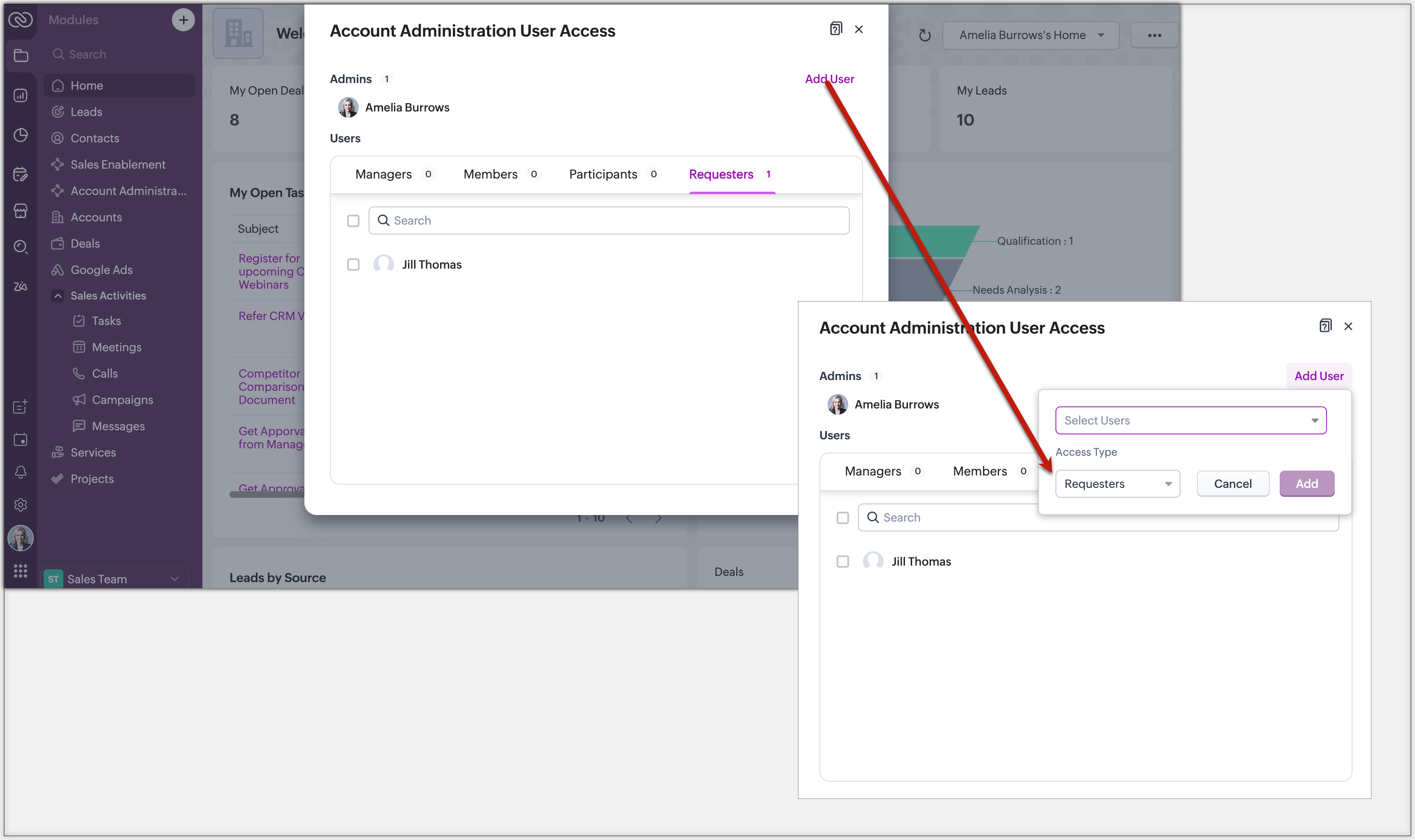
- QR Code or Link : Generate a link or code from requester settings. Anyone with access can instantly join and submit requests, no manual effort needed.
Example: Marketing can embed a QR code in an internal newsletter to allow regional sales reps to submit campaign briefs easily.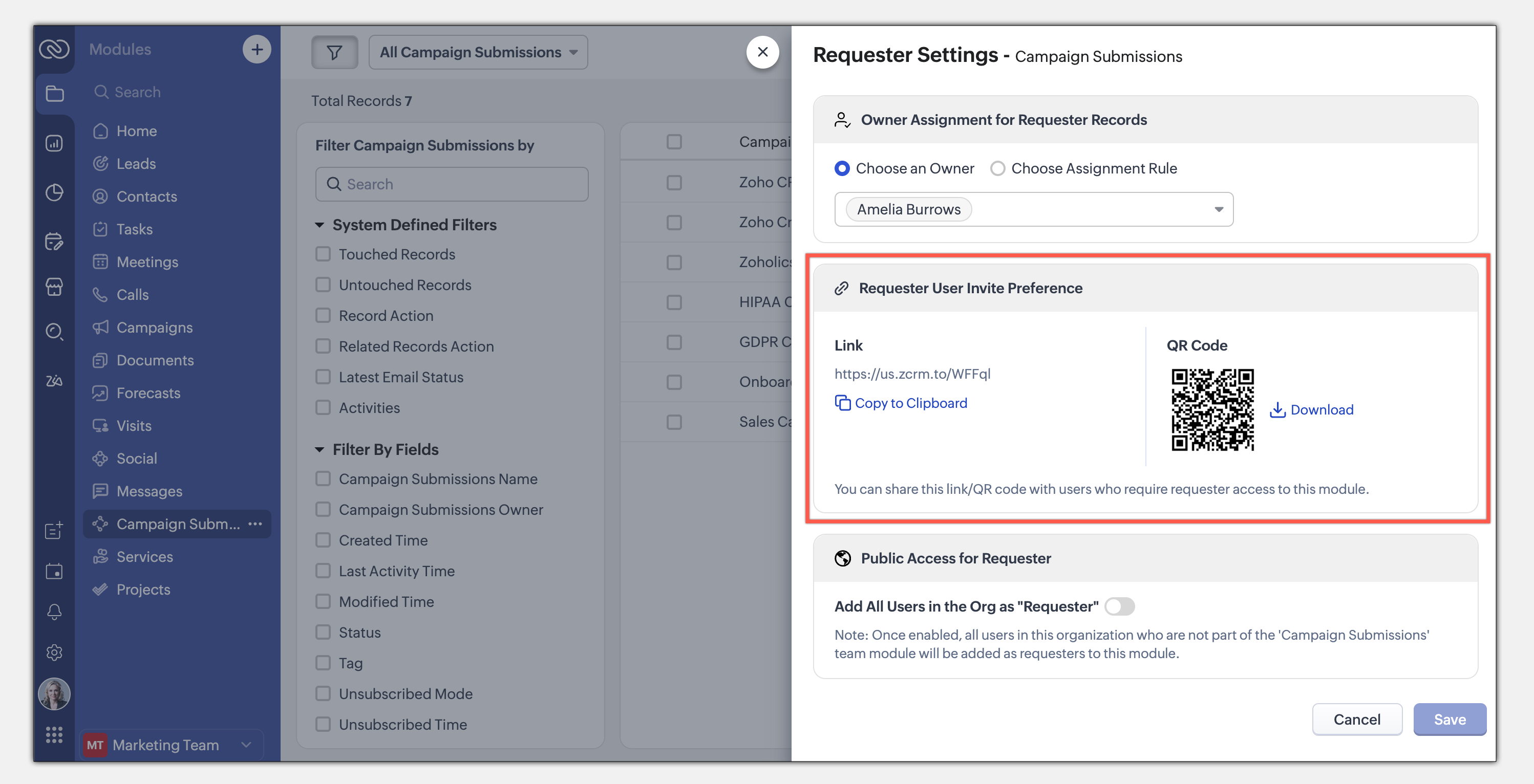
- Enable All Users : Allow all users in the organization to become requesters in a given module.
Example: A Sales Enablement module can be accessed by Product, Marketing, or Training teams to submit requests for sales insights.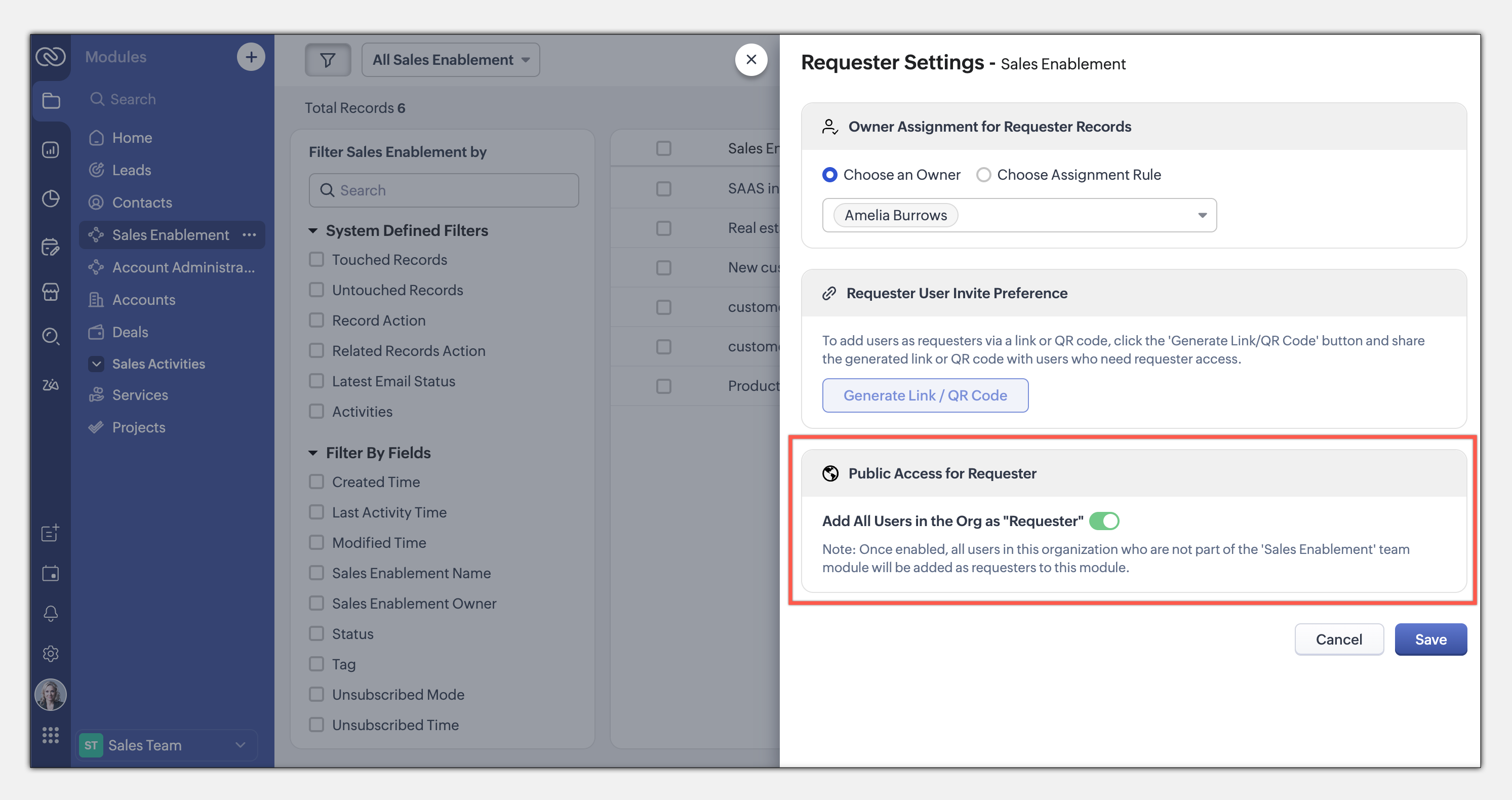
This seamless, integrated request system ensures teams can collaborate efficiently while maintaining privacy and process control. Learn more
This entire loop of requests and coordination between teams to meet a common goal is woven into the CRM interface as an integral part of the system, thus eliminating communication silos. This also puts us a good step closer to improving the adoption of CRM by several teams across the organization.
The details and nitty-gritty of who can manage what, who can view which data sets, etc., have to be carefully decided and managed. So CRM for Everyone also packs in an easy interface for each team to organize and manage their team modules.
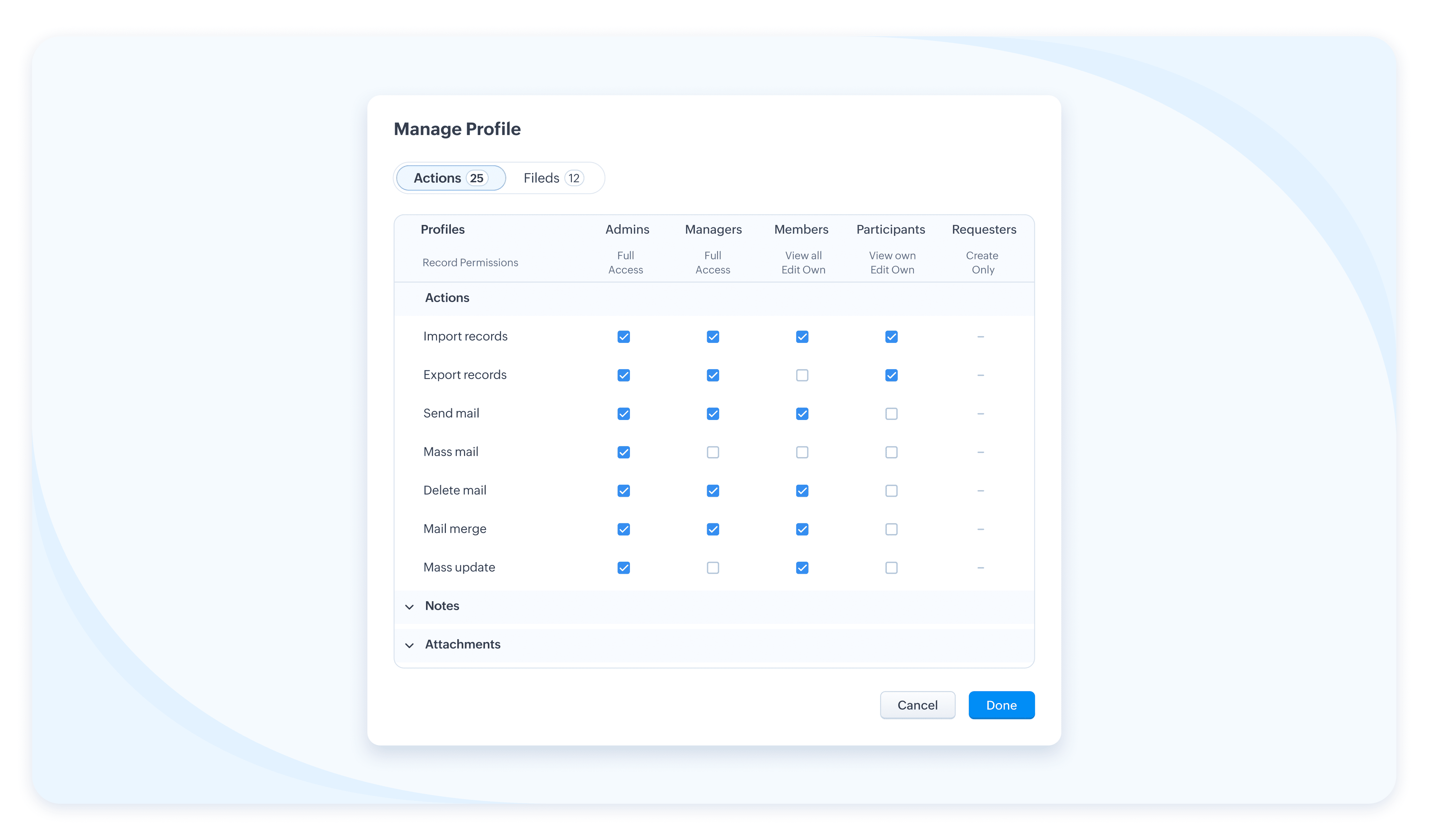
The details and nitty-gritty of who can manage what, who can view which data sets, etc., have to be carefully decided and managed. So CRM for Everyone also packs in an easy interface for each team to organize and manage their team modules.
Team Users For Team Modules
When we aspire to democratize the system and empower various non-sales teams, we hear you thinking, how do we take it from being an aspiration to ground level implementation? What motivates an organization to bring, most likely a large number of non-sales users, on to Zoho CRM? What’s their incentive?
Well, so far, the non-sales teams have probably not had the opportunity at all, to be a part of the same CRM system where all the customer data and processes are housed. The fact that Team Module will now give them that opportunity to be a part of this crucial system and simplify their work management is an incentive in itself, so to speak.
Of course, there is also a cost-related incentive. Since the non-sales team members will typically not need access to all of CRM, we have created a new type of user license to encourage their access to CRM— called the Team User license, which is priced lower than a regular CRM user license, and by design will allow only limited access to CRM.
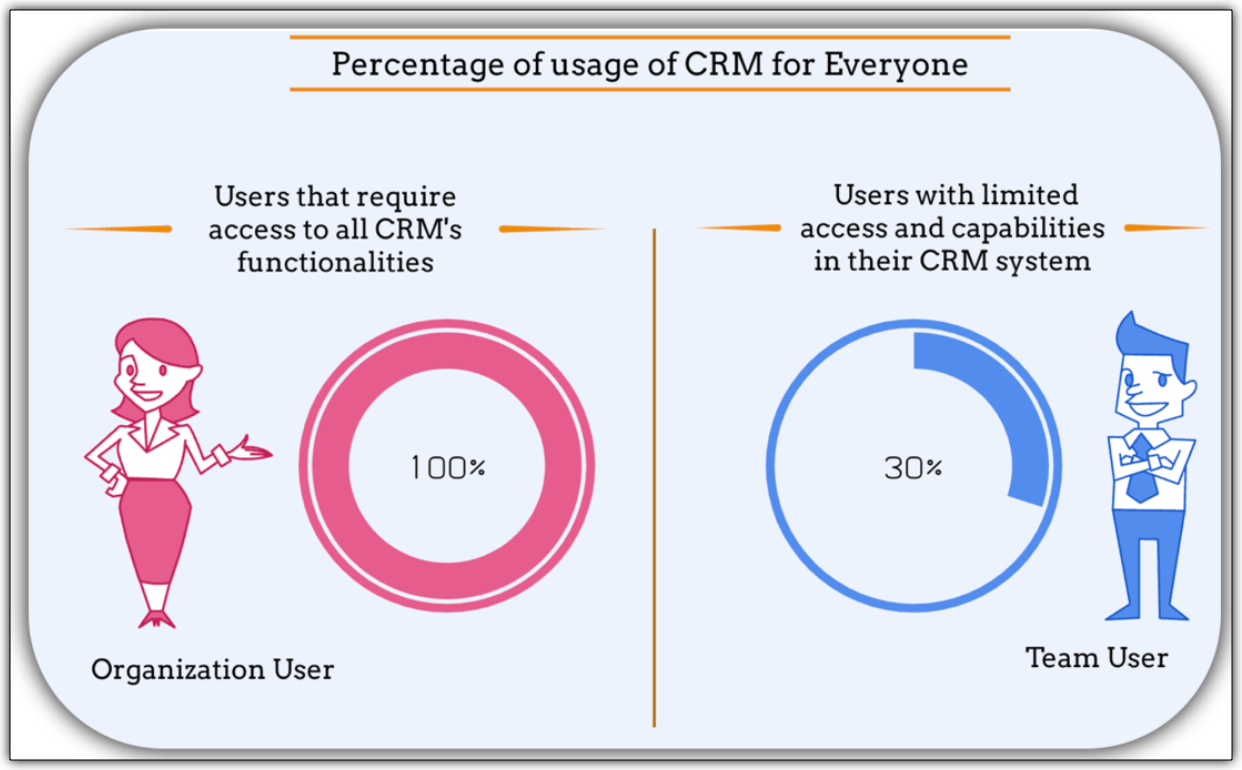
With the introduction of Team User licenses, we will now have two types of CRM users:
➤ Organization User
➤ Team User
Well, so far, the non-sales teams have probably not had the opportunity at all, to be a part of the same CRM system where all the customer data and processes are housed. The fact that Team Module will now give them that opportunity to be a part of this crucial system and simplify their work management is an incentive in itself, so to speak.
Of course, there is also a cost-related incentive. Since the non-sales team members will typically not need access to all of CRM, we have created a new type of user license to encourage their access to CRM— called the Team User license, which is priced lower than a regular CRM user license, and by design will allow only limited access to CRM.
With the introduction of Team User licenses, we will now have two types of CRM users:
➤ Organization User
➤ Team User
- The Organization User is your regular power CRM user who will need access to all CRM data and most functionalities. Typically, a sales team member.
- A Team User is typically a non-sales team member, whose work could be managed in CRM alongside sales, as they have a part to play in the entire customer-oriented process. For example: A presales executive who needs to step in to give a product demo to a customer right after a salesperson's pitch. Alternatively, a Legal team member might have to process contract signatures while closing a deal. Additionally, a Training team member who will take up a training request for a customer on-demand.
The legal team members, trainers, or pre-sales executives can make contributions only in their respective Team Modules. They don't require the entire range of features in the CRM system. In fact, they won't even need access to some key organization modules. They log into the system to fulfil their responsibilities, complete their deliverables, and then log out.
Such users are your ideal candidates for Team User Licenses.
Such users are your ideal candidates for Team User Licenses.
What is the cost of a Team User license?
Team User licenses are priced significantly lower than a regular CRM license and enable you to have cost savings, depending on how you want to distribute the Org Vs Team licenses among your users.
A Team User License costs:
➤ $9/ team license/ month (if paid annually)
➤ $11/ team license / month (if paid monthly)
For instance, Zylker Corp has onboarded 50 members of their sales team to the Zoho CRM Enterprise edition. They now wish to add an additional 30 non-sales customer operations members as Team Users. The distribution of licenses for these 80 users (on the Enterprise edition) will be as follows:
Organization Users - 50 users * 40 $ = 2000 $
Team Users [Annual ] - 30 users * 9 $ = 270 $
-----------------------------------------------------------------
Total Cost - 80 users = 2270 $
Let's see how much they would have to pay without this license in case they have to onboard all users using the regular CRM Org License :
All users as Organization users, therefore, 80 users * 40 $ = 3200
Thus, Zylker Corp's total savings with the Team User License is 930 $ which is significantly lower than regular CRM licenses.
A Team User License costs:
➤ $9/ team license/ month (if paid annually)
➤ $11/ team license / month (if paid monthly)
For instance, Zylker Corp has onboarded 50 members of their sales team to the Zoho CRM Enterprise edition. They now wish to add an additional 30 non-sales customer operations members as Team Users. The distribution of licenses for these 80 users (on the Enterprise edition) will be as follows:
Organization Users - 50 users * 40 $ = 2000 $
Team Users [Annual ] - 30 users * 9 $ = 270 $
-----------------------------------------------------------------
Total Cost - 80 users = 2270 $
Let's see how much they would have to pay without this license in case they have to onboard all users using the regular CRM Org License :
All users as Organization users, therefore, 80 users * 40 $ = 3200
Thus, Zylker Corp's total savings with the Team User License is 930 $ which is significantly lower than regular CRM licenses.
Team Modules in Zoho CRM make it easier for all your customer-facing teams to manage their own work, collaborate smoothly, and stay aligned. With CRM for Everyone, you can break down silos, speed up processes, and deliver better customer experiences—together.
It’s a smarter, more connected way to use CRM across your organization.
Start using Team Modules today and bring every team closer to your customers.
Regards,
Serena Woolridge
Resources
Topic Participants
Serena Woolridge
Sticky Posts
Enhancement to ICR’s field prompting: Preferred data extraction using advanced field prompting
Dear Customers, We hope you’re well A quick background Intelligent Character Recognition (ICR) comes as part of Zia’s optical recognition capability called Zia Vision. When we introduced it last April, the data extraction was training-based and was applicableGood news! Calendar in Zoho CRM gets a face lift
Dear Customers, We are delighted to unveil the revamped calendar UI in Zoho CRM. With a complete visual overhaul aligned with CRM for Everyone, the calendar now offers a more intuitive and flexible scheduling experience. What’s new? Distinguish activitiesAccessibility in Zoho CRM: Not just a feature—a way to empower
For instructions on setting up these controls, please check this help document: Configuring accessibility controls. Hello everyone, Today (December 3, 2024), on the International Day of Persons with Disabilities, we begin our journey towards a CRM thatScaling the customer journey: What's new in CommandCenter
Dear Customers, The last time we connected about CommandCenter, it was about the tool's new controls and revamped UI. Personally, the overhaul of the UI from the last update, still excites me. Today, we're here with news about its scalability and addedZoho CRM's sales trend and sales follow-up trend dashboards are now customizable
Dear Customers, We're here with good news! Sales trend and sales follow-up trend are two system-defined dashboards that help you understand trends and anomalies in your sales outreach and conversion efforts. They use Zia's intelligence to identify patterns
Recent Topics
Candidate Assessments, no workflows.
I have an issue where I would like to trigger a workflow based on a candidate assessment being completed. Sometimes a returning candidate will complete a second assessment, on completion the status of the candidate will be updated to "Unqualified" ifMail Merge in Zoho Desk
Hello Team, Do we have an option of mail merge within Zoho Desk like we have in Zoho CRM? We have a requirement to generate some pdf file in the form of mail merge doc from the ticket.Workdrive backup and default storage selection
Hi community, I have been informed by Zoho that workdrive will be the default storage mechanism for crm and projects. These 2 Apps seem to have different design on how they interact with workdrive for storage. 1. Crm: seems to have files saves at theZoho vault filling in a form it's not supposed to fill in
Hey there, I have a problem with ZOHO Vault autofill. In a software package, we have these options: For some reason zoho vault always replaces what's in the top option and fills a 2fa password in there, and then saves that value.. Meaning whatever wasZoho Booking Integration with Desk
Just wanting to share something in case it helps someone else who may run into a similar use case as we did. Issue: Currently, the Zoho Booking integration with desk will drop a comment into the ticket when a customer books a time, however it won't changeLet us view and export the full price books data from CRM
I quote out of CRM, some of my clients have specialised pricing for specific products - therefore we use Price Books to manage these special prices. I can only see the breakdown of the products listed in the price book and the specialised pricing forSyncing calendar with Google Calendar doesn't work when events are sent to auto repeat
Hi... The ZOHO CRM -- GOOGLE CALENDAR sync is broken. If I create a single event on either side, sync works, but if I create an event with auto repeat on either side it doesn't work. Furthermore, events created before the sync don't show up in the calendar.Organization wide Account and Contacts Visibility/Sharing Capabilities?
Has anyone figured out a way to make visibility or sharing of Accounts and Contacts to be available across the entire organization without having to have every individual user edit their Sharing permissions? For our sales folks they need to be able toNotification of Interaction Assignment
If a user is assigned an interaction, they should be notified via email. These are almost useless because if I assign an interaction for someone to respond to, they dont know that I assigned it to them without me telling them or them logging in and discoveringCountries List Global Set- Complete with Phone Country Code and Continent.
Dear Zoho Team I saw your recent addition to the Global Sets regarding the Countries list and states. While working on it, why didn't you also add things like Continent and Phone Country Code? Also, some ISO codes from some Countries/regions are misCustom Display Field for Lookup Dropdowns in Zoho CRM
Could Zoho CRM support changing the display field in lookup dropdowns, like Zoho Creator does? This would make it much easier to select the right record by showing a more useful field instead of only the default one. It would improve speed, clarity, andMessage as bot
I would like to be able to send a Cliq message truly as a bot. the current implementation of this function, while it sends the message as a bot it sends that message inside a chat from the user how authenticated the flow cliq connection instead of directlyBooks <-> CRM synchronisation with custom Fields
Hello, We are synchronising Books Customers with CRM Accounts. In CRM Accounts I set up last year a "segments" multiselect field shown below In Books, I set up a custom multi-select field with the same value as in the CRM And set up the synchronisation inside Books. Want to synchronise the Books Segments with the CRM Segments, but the later doesn't exist, and another non-existing is there ?! First, I don't understand where the field Segmentation is coming from. Second, I set CRM Segmentation to syncTrouble with using Apostrophe in Name of Customers and Vendors
We have had an ongoing issue with how the system recognizes an apostrophe in the name of customers and vendors. The search will not return any results for a name that includes the mark; ie one of our vendors names is "L'Heritage" and when entering theRecording overpayment?
So a customer just overpaid me and how do I record this? I can't enter an amount that is higher than the invoice amount. Eg. Invoice is $195 and he sent $200. He's a reccuring customer so is there a way to record so that he has a $5 advance for future invoice?Introducing the New Zoho Assist Quick Support Plugin
We are thrilled to announce the new Zoho Assist Quick Support Plugin, the upgraded and enhanced version of the Zoho Assist Customer Plugin. This new plugin allows organizations and IT administrators to deploy it directly onto their customers’ devices,Automate your signing workflows with Zoho Sign + n8n
Hello! We're excited to announce that Zoho Sign is now available as a community node on n8n, a popular open-source workflow automation platform used by tens of thousands of teams worldwide. n8n lets you connect apps, APIs, and services through a visualAsk the Experts 27: Onboarding and managing support reps
Hello everyone, We are back with our Ask the Experts (ATE) series for 2026. This year, we bring experts to help you address customer support challenges using Zoho Desk. For our first ATE, we are getting into the human side of customer support. "EveryRetainer invoice in Zoho Finance modlue
Hello, Is there a way of creating retainer invoices in the Zoho Finance module? If not can I request this is considered for future updates please.Spotlight #27: Embed visual collaboration Spaces in your presentations using the Vani add-on
Hello everyone! This month’s spotlight feature is the Vani add-on for Zoho Show. Every time you pause your presentation to open another tab or pull up supporting material, you lose a bit of momentum. At Zoho Show, we design features that keep everythingCRM
Is anyone else experiencing this issue? Our company is not moving out of using Gmail's web app. It just has more features and is a better email program than Zoho Mail. Gmail has an extension (Zoho CRM for Gmail) that we're using but we've found some seriousGood news! Calendar in Zoho CRM gets a face lift
Dear Customers, We are delighted to unveil the revamped calendar UI in Zoho CRM. With a complete visual overhaul aligned with CRM for Everyone, the calendar now offers a more intuitive and flexible scheduling experience. What’s new? Distinguish activitiesGlobal Search / Command Palette in Live App
Zoho Creator applications can contain many forms, reports, pages, and dashboards. While navigation inside the app is smooth, users still need to move through multiple menus or screens to find specific records or open particular modules. Currently, inNew 2026 Application Themes
Love the new themes - shame you can't get a little more granular with the colours, ie 3 different colours so one for the dropdown menu background. Also, I did have our logo above the application name but it appears you can't change logo placement positionSmarter appointment allocation with round-robin distribution
Greetings from the Zoho Bookings team! We’re excited to introduce the Appointment Distribution feature, a new way to decide how appointments are assigned among users. By default, appointments are distributed evenly across all event types, but this enhancementA2P 10DLC Opt-in Rejection Issue with Zoho Creator Public Form
Hi everyone, I’m working on an A2P 10DLC SMS campaign and running into repeated rejections due to opt-in issues. I’m using Zoho Creator for the registration flow. The form is public (no login required). Users enter their phone number and there is an uncheckedMake Quick Edits to Images Before Attaching
Hello everyone, We have enhanced how attachments are handled in tickets to help agents preview and share files more efficiently in Zoho Desk. Agents can preview image attachments before adding them to tickets and edit them using attachment annotator.3/18 オンライン勉強会のお知らせ Zoho ワークアウト (無料)
ユーザーの皆さま、こんにちは。コミュニティチームの中野です。 3月開催のZoho ワークアウトの開催が決定しましたのでご案内します。 今回はZoomにて、オンライン開催します。 ▶︎参加登録はこちら(無料) https://us02web.zoom.us/meeting/register/BoNTN7zYR8OvOPGShqBY0A ━━━━━━━━━━━━━━━━━━━━━━━━ Zoho ワークアウトとは? Zoho ユーザー同士で交流しながら、サービスに関する疑問や不明点の解消を目指すイベントです。Extend color coding to custom picklist fields
Objectively, Projects has the best UI of any Zoho app — clean, intuitive, and never feels bloated. Big props to whoever owns the design. Feature request: color coding for custom picklist field values in field customization. You've already done it in twoNew in Office Integrator: In-sheet text translation
Hi users, We're pleased to introduce translation capability in the spreadsheet editor in Zoho Office Integrator. This allows you to translate the text in your spreadsheet's cells into 70+ languages from within your web app. Office Integrator's spreadsheetStreamline email communication with Out of Office configuration
Managing user communication effectively is the key to ensuring timely responses and consistent messaging. However, when users are unavailable, the absence of an Out of Office response can lead to delays and missed expectations. Managing these settingsChanging settings for auto logoff
I've noticed that when I haven't used Cliq for a while, I have to re-enter my password. That is really clumsy, especially if you have a complicated password. Because it won't be filled in automatically. Is there a way to change that behaviour? We areA few Issues when using "Pay Bill via Check"
We have quite a bit of issues with how paying for Bills via Check works. Would love some feedback from the Zoho team in case we are doing something incorrectly. 1. When we go from a vendor and select "Pay Bill via Check" option, we see ALL the outstandingPrevent tracking users from specific countries
Currently, I’m receiving many bot visits from the United States and Malaysia. I would like these visits not to be recorded in SalesIQ. I already enabled the option to exclude traffic from cloud service providers, but I’m still receiving bot visits. Ideally,My client requires me to have custom pdf file names to except payment for invoices, how can I customize this before emailing.
Hello! I love the program so far but there are a few things that are standing in the way. I hope you guys can code them in so I can keep the program for years to come. My client requires I customize the pdf file names I send in for billing. Can you pleaseEdit Project Number?
Hi all: We just signed up for a trial of zoho one, which includes ZoHo Projects. We've noticed there was a 'dummy project' preloaded in projects to help familiarize yourself with the software. We've created a couple of our own projects now but noticed since the dummy project was preloaded, our projects start with number 2 then 3, sequentially. Since it seems we will be keeping zoho past the trial, If we delete the dummy project, how do we get our own projects renumbered, beginning with 1? We'd likeDownload pricebook products & details - not just pricebook creation date & name
We're looking to download a copy of a pricebook and its associated products & book prices (as we have several offices in different countries selling the same products), however, when using the export feature under Data administration it only gives me554 5.1.1 – Mail sending blocked for the domain(s): [gmail.com]
Here's your corrected text: Hello, I hope you are doing well. I was unable to send a message and received the following error: "554 5.1.1 – Mail sending blocked for the domain(s): [gmail.com]" I tried to send and deliver an email but got this error. IOutgoing Mail Blocked – Suspicious Login Activity (Need Clarification and Solution)
Hello, I’m currently facing an issue where my Zoho Mail account has been blocked due to “suspicious login activity,” and outgoing emails are restricted. Here are the details shown: Block type: Outgoing mail blocked Reason: Suspicious login activity AAssign Meeting in records
It would be nice to be able to "call and assing" meetings from a record, for example from a Deal. Right now - calendar is synced with CRM - meetings show in calendar - you can go in each meeting and assign it to a record It would be nice to be able toNext Page