What’s New in Zoho Analytics – September 2025
Hello Users!!
In this month’s update, we’re raising the bar across multiple touchpoints, from how you bring in data, plan and track projects to how you design and brand your dashboards.
We’ve added the all-new Gantt chart for project visualization, expanded our database integrations, introduced support for modern file formats, redesigned key user experiences with a visual refresh, and a brand new guide for white label solutions.

Let’s dive into what’s fresh this month!
Introducing Gantt Chart 
Manage projects more effectively with the brand-new Gantt Chart in Zoho Analytics. Use it to track tasks, monitor progress, and quickly identify delays in project execution.
You can customize your Gantt charts with:
- Different chart styles to suit your project needs
- Color schemes to visually distinguish tasks in progress and completed tasks
- Flexible date display ranges to match your preferred project view
Click here to learn more.

Database Connectivity
We’ve expanded our support to help you bring in data from more sources, more flexibly.
- Cassandra
You can now import data from Cassandra, a distributed NoSQL database widely used for handling high-volume, high-velocity data. Zoho Analytics automatically normalizes the collections into parent-child table structures, making it easy to analyze your data once imported.
Learn more about importing from Cassandra.
- SAP HANA & ClickHouse

Now import data directly from cloud-hosted SAP HANA and ClickHouse databases. Alongside local server connection, we’ve added cloud server connection as an additional option to give you more flexibility with how and where you connect.
Learn more about importing from SAP HANA.
Learn more about importing from ClickHouse. - Cloud Database Synchronization – Failure Notification Settings
You can now configure synchronization settings to trigger a failure notification when a chosen number of table imports fail. Simply set the value for “n” failed tables, and Zoho Analytics will notify you when the condition is met. This gives you more control over monitoring imports and helps avoid missing critical sync issues.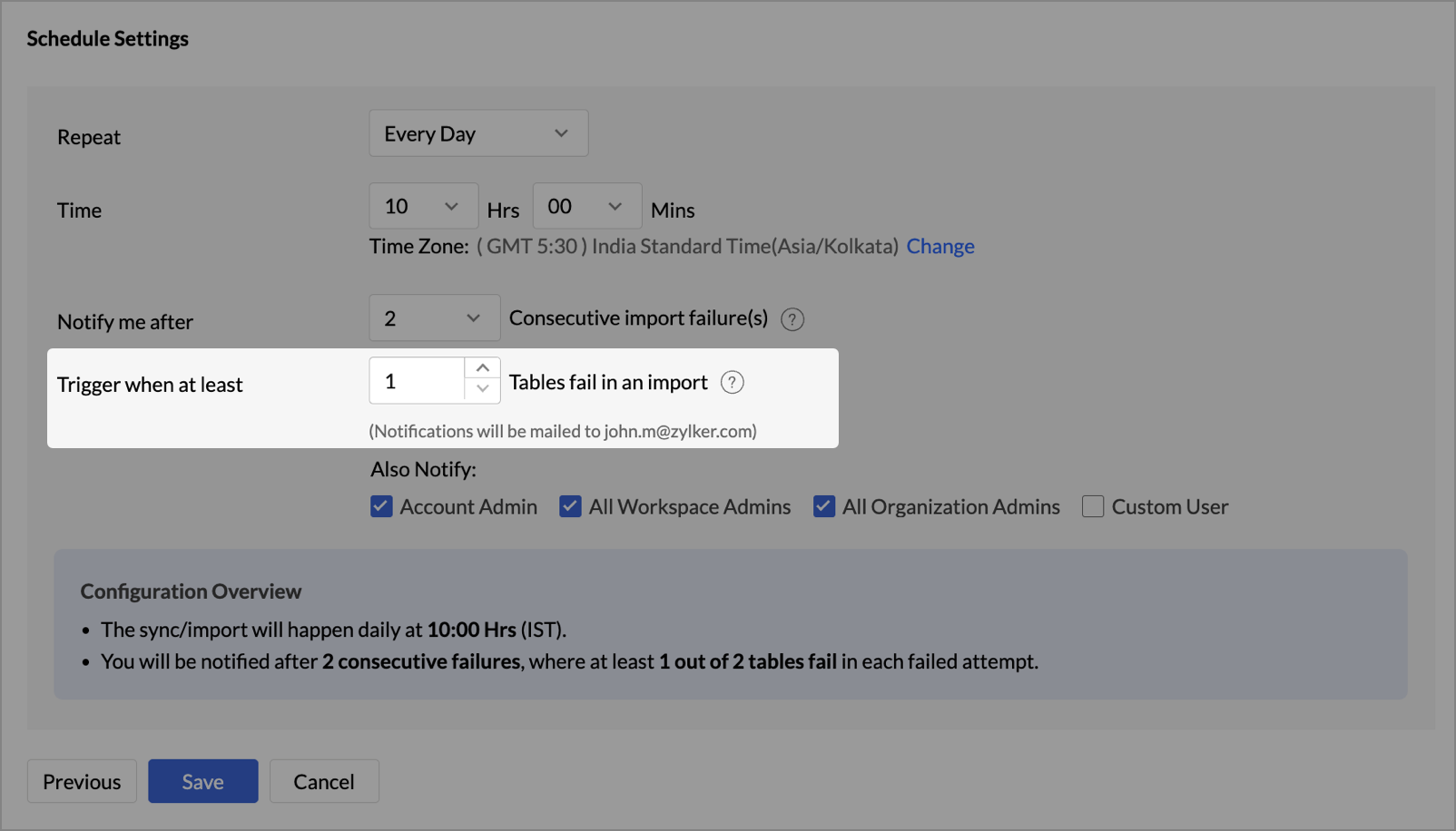
- Snowflake - New Authentication options
Zoho Analytics now supports two new authentication methods for connecting to your Snowflake data: - Private Key
- OAuth
These options provide more flexibility and enhanced security when configuring your Snowflake connections.
Learn more about Snowflake integration.
Local File Formats
Working with local files is now more powerful and flexible.
- New File Format Support - Parquet and Avro

You can now import Parquet and Avro files. These modern, columnar file formats are optimized for analytical workloads and are commonly used in big data pipelines.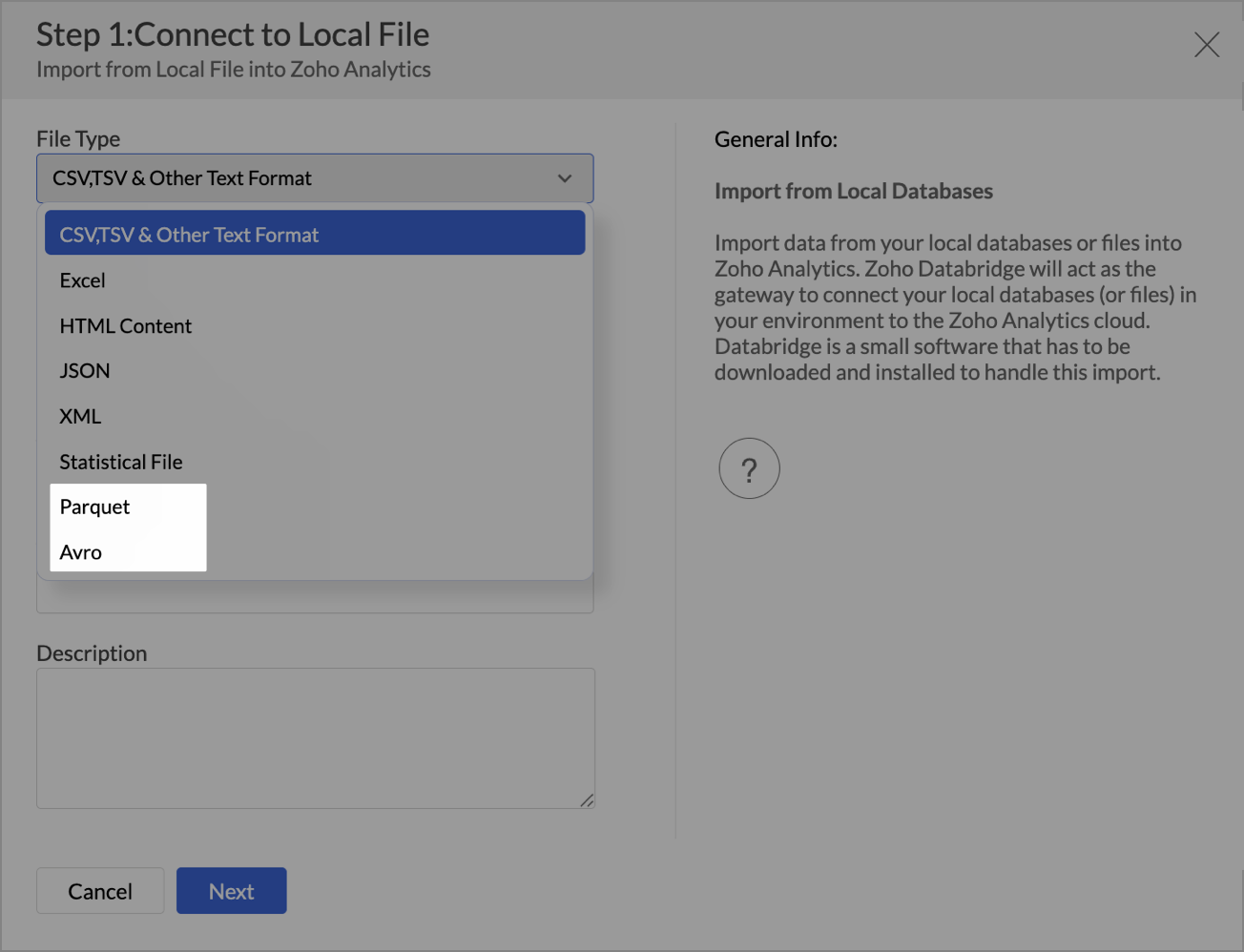
- Larger file uploads
Until now, Zoho Analytics supported large file uploads only for CSV files. With this update, you can now upload files larger than 100 MB for the following formats through Zoho Databridge: - Excel
- HTML
- JSON
- XML
- Statistical files
This enhancement removes the hassle of file size limits when working with heavy datasets across multiple formats.
Learn more about local file formats
Invitation-based User Invite Flow
Zoho Analytics now uses an invitation-based model for adding users to your organization.
You can invite users in multiple ways, based on your workflow:
- From the Organization Settings or Workspace Settings
- While sharing reports or dashboards using email addresses
- By adding users to Groups
Invited users will receive an email and must accept the invitation to join. Access to your organization and its shared content will be granted only after they accept the invite. This ensures better control and visibility over user access.
Learn more about inviting users.

Dashboard Background Image Customization
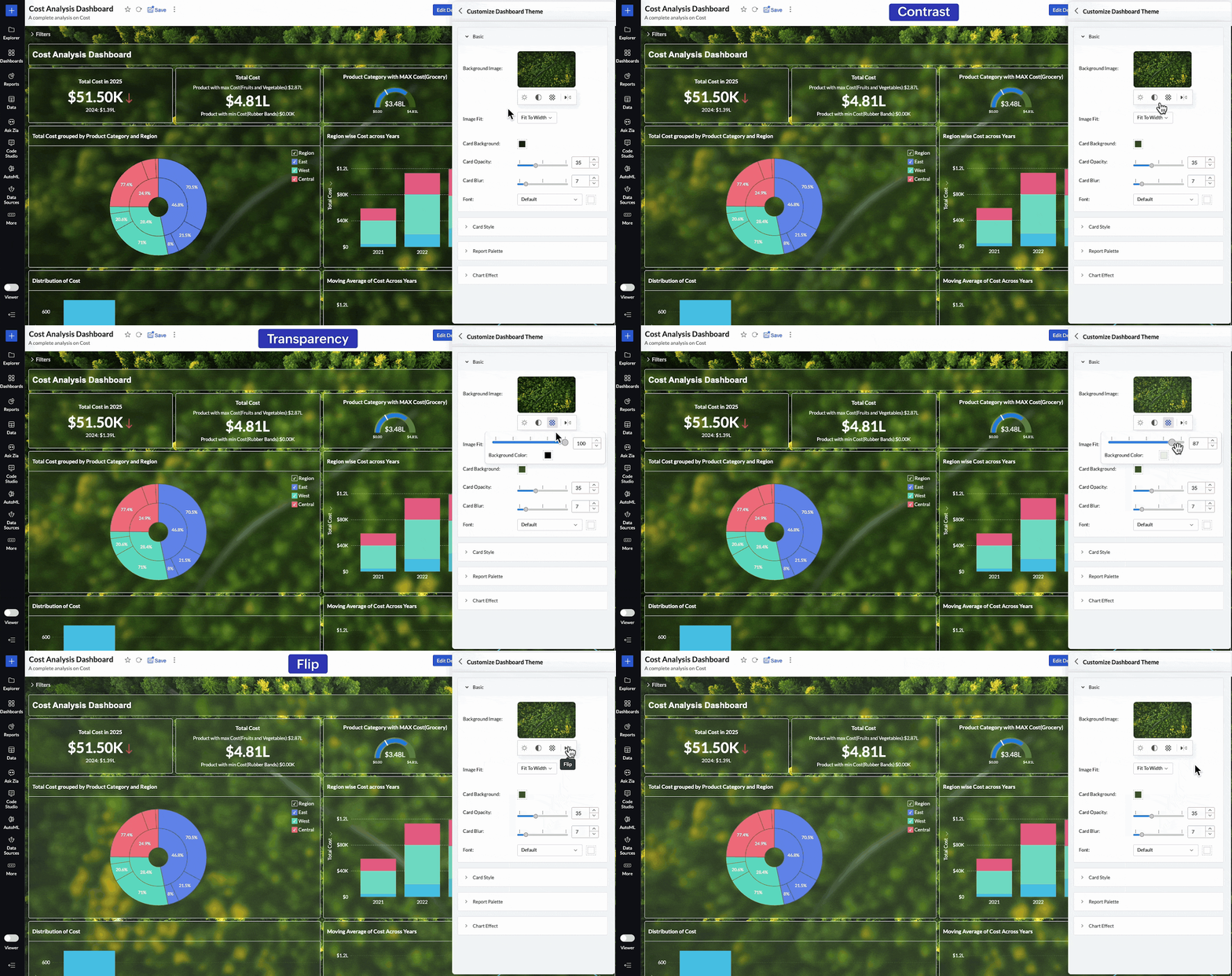
Personalize your dashboards like never before with new background image adjustment options. You now have greater control over how background images appear across your dashboards, helping you fine-tune visual impact and maintain readability.
You can now adjust:
- Brightness – Lighten or darken the image for visual balance
- Contrast – Enhance details and visual clarity
- Transparency – Soften the background to highlight dashboard elements
- Flip – Mirror the image horizontally for better composition
These controls allow you to create cleaner, brand-aligned dashboards that look professional and feel polished.
Learn more about dashboard customization.
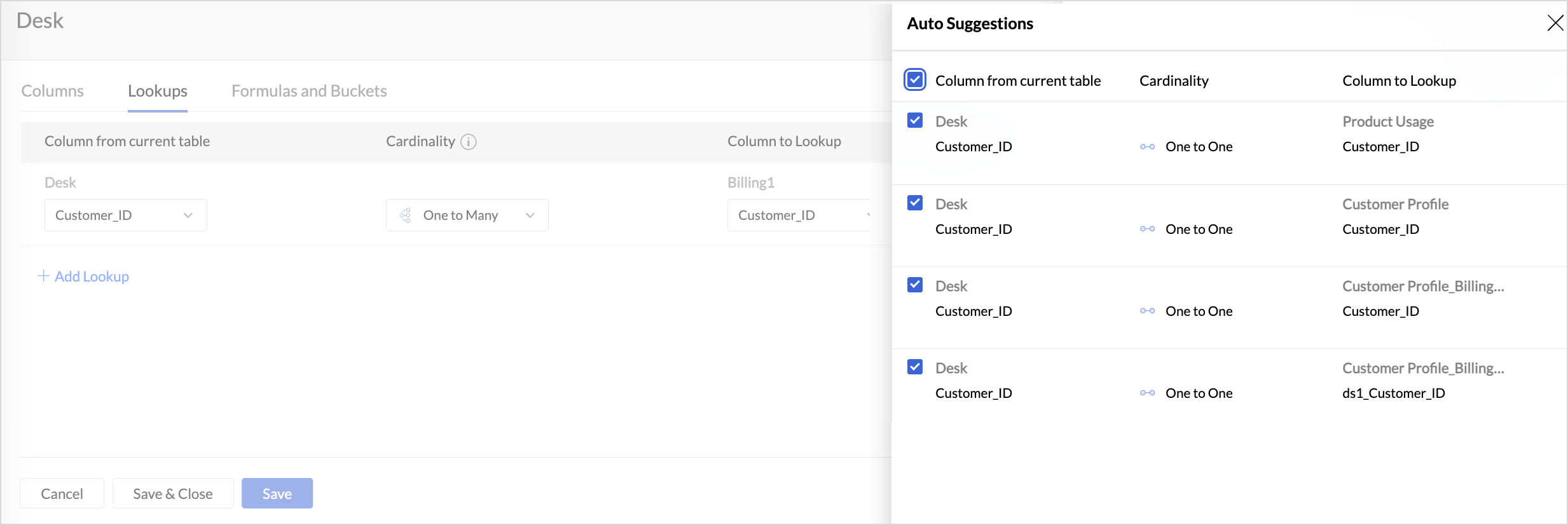
Lookup Suggestions
Creating relationships between tables is now even easier.
Zoho Analytics now offers lookup suggestions based on your table’s metadata. These smart recommendations help you:
- Quickly identify potential relationships between tables
- Reduce manual guesswork
- Simplify your data modelling process
Learn more about Lookup Suggestions
White Label Updates
We have introduced a more modern and consistent experience for white label.
- Zoho Analytics latest UI is now available for White Label
Users who opt for white label deployment can now offer the latest Zoho Analytics user interface to their end users. This includes the updated layout, navigation, and overall design, providing a seamless and branded analytics experience.
Click here to learn more. - Dedicated White Label Guide
To help you make the most of white label capabilities, we’ve introduced a comprehensive guide covering everything from setup to branding best practices. This guide is now available as a separate resource for quick reference.
Click here to access White Label guide.
Access Log Support for Zoho Analytics Mobile BI App
Zoho Analytics now extends access log tracking to the Mobile BI App, giving admins greater visibility into how users interact with reports and dashboards from mobile devices.
These updates are designed to make your Zoho Analytics experience more connected, customizable, and intelligent.
As always, we’re just a click away if you need help or have feedback to share.
Topic Participants
Pradeepkumar R
Sticky Posts
What's New in Zoho Analytics - February 2026
Hello Users! We're back with another round of updates for Zoho Analytics. This month's release focuses on giving you greater flexibility in how you visualize, manage, and act on your data - with new features like custom visualizations, remote MCP server,What's New in Zoho Analytics - January 2026
Hello Users! We are starting the year with a strong lineup of updates, marking the beginning of many improvements planned to enhance your analytics experience. Explore the latest improvements built to boost performance, simplify analysis, and help youWhat's New in Zoho Analytics - November 2025
We're thrilled to announce a significant update focused on expanding your data connectivity, enhancing visualization capabilities, and delivering a more powerful, intuitive, and performant analytics experience. Here’s a look at what’s new. Explore What'sWhat's New in Zoho Analytics - October 2025
Hello Users! We're are back with a fresh set of updates and enhancements to make data analysis faster and more insightful. Take a quick look at what’s new and see how these updates can power up your reports and dashboards. Explore What's New! ExtremeWhat’s New in Zoho Analytics – September 2025
Hello Users!! In this month’s update, we’re raising the bar across multiple touchpoints, from how you bring in data, plan and track projects to how you design and brand your dashboards. We’ve added the all-new Gantt chart for project visualization, expanded
Recent Topics
Is it possible to embed Zoho Bookmarks in the Cliq sidebar?
Is there any way that each Zoho user can access their bookmarks (that live in https://bookmarks.zoho.eu/ which is technically a part of Zoho Mail) directly within Cliq? As a widget, or an item in the sidebar? My team does not use Mail, it uses Cliq allEnhancing Zia's service with better contextual responses and article generation
Hello everyone, We are enhancing Zia's Generative AI service to make your support experience smarter. Here's how: Increased accuracy with Qwen One of the key challenges in AI is delivering responses that are both contextually accurate and empathetic whileLet us add Lookup fields in the Blueprint Transitions
We are unable to add Lookup Fields in the blueprint transitions in Zoho Desk, we wanted to make it a requirement for our workflow but since it's not available in the transition we cannot. The lookup field exists in the Layout: But it cannot be added/selectedHow can we clear a signature field with deluge?
I would like to clear a signature field in the Edit -> On Load. I have tried input.signature = ""; input.signature = null; clear input.signature; None of the above is working. is there any other way I am missing?Online PDF Editor
Hello Team, There is a small glitch i found when i was using your online software called "PDF Editor", There is a menu bar on right side comes when we click on 3 dots for any pdf, but that entire menu has no options to choose, that is totally blank, pleaseHow do I disconnect my Salesforce integration?
I need to integrate a different Salesforce sandbox with my Zoho form.Zoho Recruit - Email Relay
Good day, Has anyone succeeded in setting up an email relay for Office 365? If I add the details from https://support.microsoft.com/en-us/office/pop-imap-and-smtp-settings-8361e398-8af4-4e97-b147-6c6c4ac95353, I get the connection error. Regards, EkaZoho Recruit -> Exchange Online Relay
HI! I have tried to connect Recruit to our MS 365 Exchange Online without any luck. I use this guide https://help.zoho.com/portal/en/kb/recruit/outreach/email-relay/articles/email-relay-zoho-recruit#Configuring_Email_Relay_Settings Do anyone have theError AS101 when adding new email alias
Hi, I am trying to add apple@(mydomain).com The error AS101 is shown while I try to add the alias.an issue in Zoho CRM where the workflow rule is not triggering
H I’m currently facing an issue in Zoho CRM where the workflow rule is not triggering when a new lead is created through a webform. I’ve double-checked the criteria and field updates, everything seems fine but it still doesn’t fire. Has anyone faced this401 Unauthenticated Error – Zoho CRM to Google Sheets Integration
Hi I'm building an Automation Function in Zoho CRM using Deluge that appends contact data from Zoho CRM into a Google Sheet whenever a new contact is created. WHAT I'VE DONE: I created a connection in Zoho CRM (Developer Hub → Connections) with the followingPower up your Kiosk Studio with Real-Time Data Capture, Client Scripts & More!
Hello Everyone, We’re thrilled to announce a powerful set of enhancements to Kiosk Studio in Zoho CRM. These new updates give you more flexibility, faster record handling, and real-time data capture, making your Kiosk flows smarter and more efficientIncome not showing in direct bank feed
Hi, I am trying to enter income without knowing or mentioning customer, as i am told, my client wants single or cash basis accounting but i seriously struggling......................I am not able to check in and checkout in zoho people even location access allowed
This issue i am facing in mackbook air m1, I allowed location in chrome browser and i also tried in safari but getting similar issue. Please have a look ASAP.Preview future shift rotation in Shift Schedule
Hi, What if, instead of the current behavior, the Shift Rotation feature in Zoho People allowed users to preview future shift schedules before the scheduler execution? Currently, when a shift rotation is configured (for example, monthly rotation), theAutomatically Update Ticket Status in Zoho Desk Based on Actions in Zoho Projects
Hi Zoho Desk Team, Hope you’re doing well. We’re using the Zoho Desk–Zoho Projects integration to manage tasks related to customer tickets, and it works well for linking and tracking progress. However, there are a few important automation capabilitiesSign Out
Hello, I have a doubt with Permalink. I have a view created with critera to show only the records belonging to the user who has sign in. The problem is that the different users use the same computer and some times the user login keep signed, and when I send the permalink (by email) of the view, the users enter with other login signed. Moreover the permalink view doesn�t allow to do a log out. May I add something in the permalink to request always sign in? Sorry for my English. Many thanks! RegardsAnnouncing new features in Trident for Windows (v.1.39.4.0)
Hello Community! Trident for Windows just received a major update, with a range of capabilities that focuses on strengthening communication and simplifying workflows. Let’s dive into what’s new! Upload email attachments to WorkDrive. Until now, you couldIntroducing Automatic Field Addition (Text Tags) in Zoho Sign
Hello, Today we are excited to announce the general availability of automatic field addition (text tags) feature in Zoho Sign. Now, you can now add text tags in the content of your documents and Zoho Sign will automatically add the corresponding fields when they are uploaded for the signing process. For example: when you add text tags to your sales orders, new employee contracts, and NDAs, Zoho Sign will add the corresponding fields when these documents are uploaded for the signing process. If youIntroducing Built-in Telephony in Zoho Recruit
We’re excited to introduce Built-in Telephony in Zoho Recruit, designed to make recruiter–candidate communication faster, simpler, and fully traceable. These capabilities help you reduce app switching, handle inbound calls efficiently, and keep everyWrite-Off multiple invoices and tax calculation
Good evening, I have many invoices which are long overdue and I do not expect them to be paid. I believe I should write them off. I did some tests and I have some questions: - I cannot find a way to write off several invoices together. How can I do that,Splitting Transactions in Zoho Books
I have read in past forum posts that the ability to split bank transactions would likely be implemented - it's definitely a typical accounting program feature. I'm new to Zoho and thought I'd found nirvana until I realized this feature doesn't seem toStatement Aging On Cutomer Statement
Hello, Is it possible to put aging on customer statements? Current 1-30days 31-60days 61-90days 91-120days Over 120 days. See attached image from another accounting package. Many customers pay off a statement and clear older invoices.Unveiling the next iteration of Ask Zia in Zoho CRM: An all-new chat interface, conversation history, actions, and much more
Your CRM assistant just leveled up. Zoho CRM's Ask Zia functionality now offers a more conversational and context-aware experience to help you not just understand your data, but act on it—all from one chat window. With its redesigned interface and expandedResponse rate and time on social media
Hello, I just want to know if it's possible to manage the response rate and response time from my social media on zoho social ? I don't see any statistical reports on the online scoreboard ? Thank you in advance for your response and sorry if the question has already been postedWhatsapp BOT with CRM
Hello, how do you use Whatsapp integrations in zoho CRM?Ability to translate Zoho CRM Kiosks
Hi team, Is support for translating kiosk text and screen names in the Zoho CRM translation tool planned on the roadmap? Thanks,Whatsapp Limitation Questions
Good day, I would like to find out about the functionality or possibility of all the below points within the Zoho/WhatsApp integration. Will WhatsApp buttons ever be possible in the future? Will WhatsApp Re-directs to different users be possible basedEditing the list of Categories in the Categorize Manually section of Banking in Zoho Books
Hi, I need to create two new Categories called Withdrawals and Deposits to categorize payments in a bank account. How do I edit the Categories list?Can I write a check in Zoho Books with no associated bill?
This currently does not seem possible, and I have a client that desperately needs this function if I am able to convert them with Quickbooks. Thank you in advance for your reply.Internal Fillable Contract with Zoho Writer (Before Sending to Client)
Hi everyone, I’m trying to automate the following process in Zoho CRM and would appreciate some guidance. Process: When a Deal moves to a specific stage, CRM triggers an automation. CRM sends a contract template to an internal team member so they can[Free Webinar] Intelligent document processing with Zoho RPA
Hello everyone! Greetings from the Zoho RPA team! We're excited to invite you to our upcoming webinar on intelligent document processing with Zoho RPA, where we'll introduce powerful new capabilities designed to make your automation journey smarter, faster,Enhancements for Currencies in Zoho CRM: Automatic exchange rate updates, options to update record exchange rates, and more
The multi-currency feature helps you track currencies region-wise. This can apply to Sales, CTC, or any other currency-related data. You can record amounts in a customer’s local currency, while the CRM automatically converts them to your home currencyWhen I schedule calendar appointments in zoho and invite external emails, they do not receive invites
Hello, We have recently transitioned to zoho and are having a problem with the calendar feature. When we schedule new calendar appointments in zoho the invite emails aren't being sent to the external users that we list in participants. However, this worksSend emails directly via Cases module
Greetings all, The ability to send emails from the Cases module, which users have been eagerly anticipating, is now available, just like in the other modules. In Zoho CRM, Cases is a module specifically designed for managing support tickets. If your organizationWebinar Alert: Supercharge landing pages with data insights | Zoho LandingPage
Every visitor to your landing page leaves behind valuable data, but are you leveraging it to improve conversions? Join our expert-led Landing Page Analytics webinar to learn how to track, analyze, and optimize landing page performance with Zoho LandingPage’sBulk Deletion of Zoho Projects Using Node.js and Zoho Projects API
Zoho Projects currently does not provide a built-in option to delete multiple projects in bulk from the UI. When working with testing environments or large numbers of temporary projects, deleting them one by one becomes time-consuming. To address this,Show unsubscribed contacts ?
Hello, I would like to display the unsubscribed contacts. Unfortunately, I do not have this subscription type as described in the documentation (https://help.zoho.com/portal/en/kb/marketing-automation-2-0/user-guide/contacts/contact-management/articles/subscription-type-24-1-2024#Subscription_Type_field.)Track Marketing Automation Campaigns in Zoho CRM
Hello, I've been searching but haven't found the exact answer to this question. I am looking to track Marketing Automation email campaigns and activities inside of Zoho CRM. Use Case: Action: Prospect Submits A Lead Form Outcomes: Prospect created inValidation rule for Date field
The condition settings for a Date field are are absolutlly usless. Conditions can only be set for a specific date, which is logically ineffective in most cases. When setting a condition for a Date field, users usually need to compare the value relativeNext Page