What's New—February 2022
Hello Backstage users,
We're always working to improve the Backstage experience for you. This time, we've rolled out some features and updates to make your event planning a little more effortless.
Here's everything that's happened this month in a nutshell.
Integrate with Zoom Meetings to conduct sessions
We've added another webcasting service option for you to stream your event online. Now you can integrate with the Zoom Meetings to host your sessions online. The difference between the Zoom Webinar integration, which is already available in Backstage, and the Zoom Meetings integration is the way you can interact with attendees during sessions. Zoom Webinar provides the host and speaker with control over their audio and video as well as the audience's audio. This could be useful when you want to conduct a session for a larger audience where there would be less interaction between the speaker, hosts, and audience. Although Zoom Webinar does have options for the audience to communicate with the speaker or hosts, such as Q&A and chat, there will typically be only one or two primary people who will be speaking.
With the Zoom Meetings integration, you can increase audience interaction as every participant will have control over their audio and video, allowing them to be able to see who else is in the session. When you want to conduct a session where there needs to be more collaboration between the participants, you can use this integration.
Before you begin, ensure that you have configured Zoom in your Backstage portal or select the Zoom option in the Webcast service section of the Event details tab. Then you can click the Webinar settings link and select the Zoom Meetings radio button under the Zoom engagement type section. If you are changing the webcasting service for an older event, you may have to click the Reconnect link in this section to re-establish the connection between Backstage and your Zoom account.
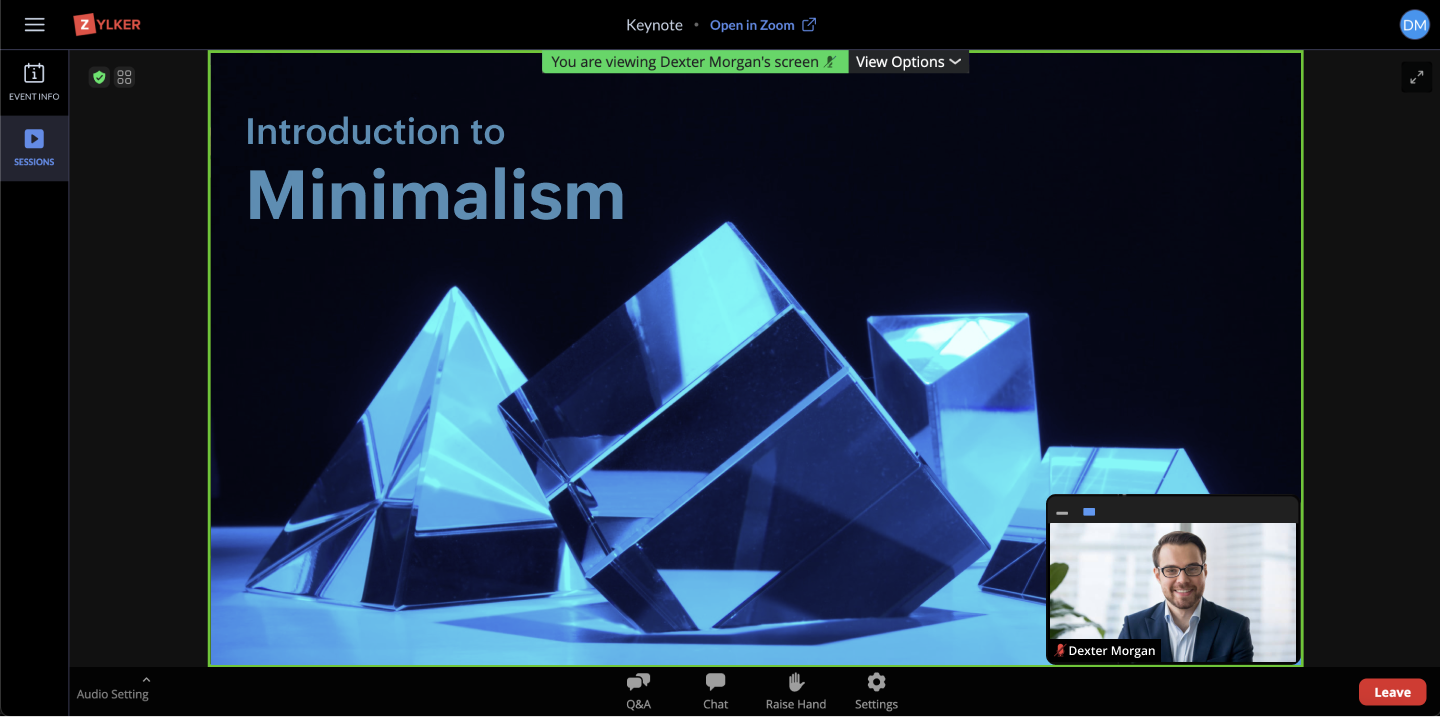
When using Zoom Meetings along with Backstage, you can seamlessly plan and conduct your sessions. You can also create polls for your session, which will automatically be populated in Zoom, and can rehearse sessions before the event. During your session, you can share your screen to allow participants to view any material as the session is being conducted. Apart from polls, the option for chat is also available for everyone. After the session, the poll results can be viewed on both Zoom and Backstage. Screen recordings can be captured as well and accessed later in your Zoom account. Along with this, Backstage allows you to see post-session analytics from the Summary tab inside the Sessions tab, which can help you gauge how your session went.
OTHER UPDATES
- You can now set a logo, background, and ambience for sessions, networking tables, and exhibitor meeting rooms in the Virtual Space.
- The number of ongoing meetings and visitors in the waiting room of an exhibitor booth can be viewed in the Exhibitors tab in the Virtual Space.
- Chats in exhibitor meetings rooms can be downloaded by exhibitors from the microsite.
- You can view analytics details for an exhibitor's booth. To do this, click the Exhibitors tile from the Overview tab in the Manage Dashboard.
- Attendees who are imported into Backstage can also receive a PDF copy of their badge if you've designed badges for your event. Enable the Attach badge PDF option in the Welcome attendee email under the Emails tab to send it.
- The A4 page size can now be selected to print badges.
- You can now set the Hero section to fill the browser screen for your event microsite.
- In addition to image and video support for the media element, a user can now embed iframe code from any source when designing the event microsite.
- You can also now use an iframe embed code to stream the audio and video for your event when using the Backstage OnAir webcasting service. When selecting this option, some features may be limited.
To get more information on the latest features, visit our help center. If you have any questions, drop us a line here or at support@zohobackstage.com.
Happy organizing!
Topic Participants
Tina Samuel
Recent Topics
Is Zoho Shifts included in the Zoho One plan?
In case the answer is no: there's any plan to make it available via One? Thank youZoho Tracking Image location
So we've been having an issue with tracking email opens. Specifically in Gmail. Our emails are not that long either, maybe 4 sections of image/250 characters of text/button per section. But all my test accounts I used via Gmail we're showing opens. But then come to find out the tracking image is at the very bottom of the email. So If the message is clipped (It always just clips our social icons on the bottom) and the user doesn't click the show more button it never tracks the open. Looking at otherIs there a plan to integrate zoho voice with zoho books?
Hello, Is there a plan to integrate zoho voice with zoho books? Right now we are using the Twilio SMS integration into zoho books, but have recently decided to switch to zoho voice for calls and sms. Is there a plan to integrate zoho voice natively intoZoho Tables is now live in Australia & New Zealand!
Hey everyone! We’ve got some great news to share — Zoho Tables is now officially available in the Australian Data Center serving users across Australia and New Zealand regions! Yes, it took us a bit longer to get here, but this version of Zoho TablesDelivery and handling of documents e-stamped using Zoho Sign
Hello everyone! Zoho Sign makes it easy to pay non judicial stamp duty online and automatically attach the digitally generated e-stamp challan to electronic documents. We also manage the delivery of physical e-stamped papers. We periodically receive theseIntroducing Dedicated Modules for Plans, Addons, and Coupons in Zoho Billing
We’ve enhanced the way you manage Plans, Addons, and Coupons in Zoho Billing. Previously, all three grouped together under Subscription Items. Now, each one has its own dedicated module, giving you a cleaner and more intuitive experience. This updateSortie de Zoho TABLE ??
Bonjour, Depuis bientôt 2 ans l'application zoho table est sortie en dehors de l'UE ? Depuis un an elle est annoncée en Europe Mais en vrai, c'est pour quand exactement ??Issue with WhatsApp Template Approval and Marketing Message Limit in Zoho Bigin
We are facing issues while creating and using WhatsApp message templates through Zoho Bigin, and we request your clarification and support regarding the same. 1. Utility Template Approval Issue Until December, we were able to create WhatsApp templatesHow to install Widget in inventory module
Hi, I am trying to install a app into Sales Order Module related list, however there is no button allow me to do that. May I ask how to install widget to inventory module related list?Zoho Social - Feature Request - Non-US Date Format
Hi Social Team, I have noticed that there is no option to change the date format from US mm/dd/yyyy to others like dd/mm/yyyy. It would be great to see this added as the platform matures. Thanks for considering this feedback.Drop Down Value
Hi, May I know why Zoho Flow treat this drop down as number and not as string. If so, how can I fetch the right value for filtering. This field is from Creator, in Creator upon checking by default it is a string since it's not a lookup field.Zoho CRM's mobile apps: A 2025 Recap
2025 marked a year of steady progress for Zoho CRM's mobile apps. We rolled out several updates and features to improve usability and make everyday CRM work a lot easier to manage. Here’s a look back at some of the key releases from 2025. Android releasesFacebook follower count doesn't match FB Analytics
Hi all, I am wondering if anyone else has issues with follower counts for Facebook not matching FB's native analytics tool. On the Zoho dashboard, it's showing 1,007, but FB shows 1,060. All the other channels match up. Any insights are much appreciated!Meta and Facebook data report discrepancy
I have been currently gathering manually facebook follower data thru meta. In zoho marketing plus the social media reporting only allows for page likes, and so there is a discrepancy with the data. please the difference in files attached. Is there wayDevelop and publish a Zoho Recruit extension on the marketplace
Hi, I'd like to develop a new extension for Zoho Recruit. I've started to use Zoho Developers creating a Zoho CRM extension. But when I try to create a new extension here https://sigma.zoho.com/workspace/testtesttestest/apps/new I d'ont see the option of Zoho Recruit (only CRM, Desk, Projects...). I do see extensions for Zoho Recruit in the marketplace. How would I go about to create one if the option is not available in sigma ? Cheers, Rémi.Unlocking New Levels: Zoho Payroll's Journey in 2025
Every year brings its own set of challenges and opportunities to rethink how payroll works across regulations and teams. In 2025, Zoho Payroll continued to evolve with one clear focus: giving businesses more flexibility, clarity, and control as they grow.Can I export all attachments from Zoho CRM?
Can I export all attachments from Zoho CRM?Please can the open tasks be shown in each customer account at the top.
Hi there This has happened before, where the open tasks are no longer visible at the top of the page for each customer in the CRM. They have gone missing previously and were reinstated when I asked so I think it's just after an update that this featureWhat's new in Zoho Sheet: Simplify data entry and collaboration
Hello, Zoho Sheet community! Last year, our team was focused on research and development so we could deliver updates that enhance your spreadsheet experience. This year, we’re excited to deliver those enhancements—but we'll be rolling them out incrementallyCommunity Digest — Noviembre y Diciembre 2025
¡Hola, Comunidad de Zoho en Español! Cerramos el año de la mejor forma con nuestro último Community Digest de 2025, donde podrás encontrar las últimas novedades de nuestros productos. ¿Todo listo para empezar 2026 con el mejor pie? ¡Vamos a ello! ZohoZoho Projects Plus’ 2025- the year we launched
We’ve been building project management tools for the past 19 years, and a question we often hear is: Different teams in our organization prefer different project management methods; while the development team prefers agile, the marketing and sales teamsWhy can't we change the Account type from an Expense to an Asset?
Like the question. Why in QuickBooks for example if I mistakenly created an account as an expenses and I already captured information in those accounts, I can just change the account type from expense to assetZoho Books emails suddenly going to Spam since 11 Nov 2025 (Gmail + now Outlook) — anyone else?
Hi everyone, We migrated to Zoho Books in July 2025 and everything worked fine until 11 Nov 2025. Since then, Zoho Books system emails are landing in customers’ Spam (first Gmail, and now we’re seeing Outlook/Office 365 also starting to spam them). ImpactedHow do you print a refund check to customer?
Maybe this is a dumb question, but how does anyone print a refund check to a customer? We cant find anywhere to either just print a check and pick a customer, or where to do so from a credit note.Data Import | Zoho Analytics Custom Query Window Size
Please increase the window size for the Custom Query Data Import. It's impossible to work with such a small query window.Company Multiple Branch/ Location Accounting
Hi All, anyone know whether company can maintain their multiple Branch Accounting in Zoho Books. It will be chart of Accounts & Master Data will be same but different report available as per per Branch. Thanks & regards, Vivek +91 9766906737Zoho Books Invoices Templates
It would be really helpful to have more advanced features to customise the invoice templates in Zoho Books. Especially I´m thinking of the spacing of the different parts of the invoice (Address line etc.). If you have a sender and receiver address inSupport for Developing Zoho Recruit Extensions via Zoho Sigma
Hi, I’m interested in building an extension for Zoho Recruit using Zoho Sigma. However, when I navigate to Sigma and attempt to create a new extension (via the "New Extension" option), Zoho Recruit does not appear as a listed service—only options likeEmail Administrators! Join our tips & troubleshooting series
Greetings to all the admins out there! This announcement is exclusively for you. As we step into the New Year, we’re excited to start a dedicated series of admin-specific tips curated to support you. These posts will help you overcome everyday challengesNotes badge as a quick action in the list view
Hello all, We are introducing the Notes badge in the list view of all modules as a quick action you can perform for each record, in addition to the existing Activity badge. With this enhancement, users will have quick visibility into the notes associatedDeprecation of the Zoho OAuth connector
Hello everyone, At Zoho, we continuously evaluate our integrations to ensure they meet the highest standards of security, reliability, and compliance. As part of these ongoing efforts, we've made the decision to deprecate the Zoho OAuth default connectorPersonalize your booking pages with Custom CSS
Greetings from the Zoho Bookings team! We’re introducing Custom CSS for Zoho Bookings, designed to give you complete control over the look and feel of your booking pages. With this new feature, you can upload your own CSS file to customize colors, fonts,Free Webinar : Unlock AI driven business insights with Zoho Inventory + Zoho Analytics
Are you tired of switching between apps and exporting data to build customized reports? Say hello to smarter & streamlined insights! Join us for this exclusive webinar where we explore the power of the Zoho Inventory–Zoho Analytics integration. LearnNo OR Filter for Views with a Related Modules Criteria
We would like to create a Deal View where the User can see all their deals. For that, we would need an OR to connect the criteria. One of the Fields is a "multiselect User", these (Related Modules Criteria) can only be Filter with an AND. Even betweenImport Function: ONLY update empty fields
When setting up an import from a spreadsheet to CRM, there is a checkbox "Don't update empty values for existing contacts" (see screenshot below). While I see some limited benefit from this functionality, I think there should also be an "ONLY update emptySales IQ Chat Widget is Only Displaying Last Name
Can anyone suggest why the widget is only displaying "last name"?! We have the latest version of the wordpress plugin installed. Thanks Thanks!Free Webinar: Zoho Sign for Zoho Projects: Automate tasks and approvals with e-signatures
Hi there! Handling multiple projects at once? Zoho Projects is your solution for automated and streamlined project management, and with the Zoho Sign extension, you can sign, send, and manage digital paperwork directly from your project workspace. JoinBegin the year with best practices in the Zoho Desk mobile app : Part 2
In focus: Optimizing collaboration and supervision Let's begin 2026 with Part 2 of our tips series on driving your ticketing operations at your fingertips. In Part 1, we explored streamlining operations within tickets. This helped individuals at OmniserveCan we disable add to cart in Zoho Commerce?
Hello, Our sales happen on the phone. During the call the customer is directed to our website to inspect the products together with the sales rep. So we need a way to present our inventory. I figured Zoho Commerce is a good fit for this use case. However we would have to disable the possibility to purchase products in the shop. Is that possible? Sunny regards, ArtjomHow to update "Lead Status" to more than 100 records
Hello Zoho CRM, How do I update "Lead Status" to more than 100 records at once? To give you a background, these leads were uploaded or Imported at once but the lead status record was incorrectly chosen. So since there was a way to quickly add records in the system no matter how many they are, we are also wondering if there is a quicker way to update these records to the correct "Lead Status". I hope our concern makes sense and that there will be a fix for it. All the best, JonathanNext Page