Announcing Bigin's integration with Zoho Directory
As a Bigin admin, you play an important role in managing your organization's user accounts and ensuring secure access to important data. To streamline and enhance your user management operations, Zoho Directory can be a powerful tool. Zoho Directory offers a range of advanced features, including IP restriction, password policies, multi-factor authentication, and Active Directory sync. In this post, we'll discuss how you can leverage Zoho Directory to perform these operations effectively and secure your Bigin account.
1. IP restriction
With Zoho Directory, you can enforce IP restrictions to allow access to Bigin only from specific IP addresses or ranges. This helps protect your organization's data by ensuring that users can only access Bigin from approved locations. You can easily configure IP restrictions within Zoho Directory's user management settings, providing an additional layer of security.
2. Password policies
Implementing strong password policies is vital for maintaining the security of your Bigin accounts. Zoho Directory enables you to define and enforce password complexity rules, such as minimum length and character requirements. By configuring these policies, you can enhance the overall security posture of your organization and reduce the risk of unauthorized access.
3. Multi-factor authentication (MFA)
To add an extra layer of security to user logins, Zoho Directory supports multi-factor authentication. You can enable MFA for Bigin users, requiring them to verify their identities through a secondary method, such as the following options:
- Authenticating with our industry-standard authentication app, Zoho OneAuth
- Enabling hardware-based MFA with YubiKey
- Using authenticator apps like Google Authenticator or Authy
This significantly reduces the chances of unauthorized access, even if the user's password gets compromised.
4. Active Directory sync
You can synchronize user accounts, groups, and attributes between your existing LDAP and Zoho Directory, enabling centralized management across platforms. This integration ensures that changes made, such as user additions or modifications, are automatically reflected in Bigin, saving time and reducing administrative overhead.
5. Single sign-on
Zoho Directory supports single sign-on (SSO) integration, enabling seamless authentication and session management across multiple applications, including Bigin. By configuring SSO, users can log in once using their credentials and subsequently access Bigin and other integrated applications without needing to provide their login information again.
6. Web session management
Zoho Directory provides comprehensive session monitoring capabilities, such as the following:
- Session lifetime - Users will automatically be signed out of their accounts after the defined period.
- Session timeout - Users will signed out of their accounts if they stay inactive for longer than the defined period.
- Concurrent sessions - Users will be allowed only the chosen number of active sessions at a time.
7. User session history
Zoho Directory keeps a record of user session history, allowing you to track and review past sessions. This feature enables you to monitor user behavior, investigate any suspicious activities, and perform audit trails if required. By having visibility into past sessions, you can maintain accountability and identify any security incidents or policy violations.
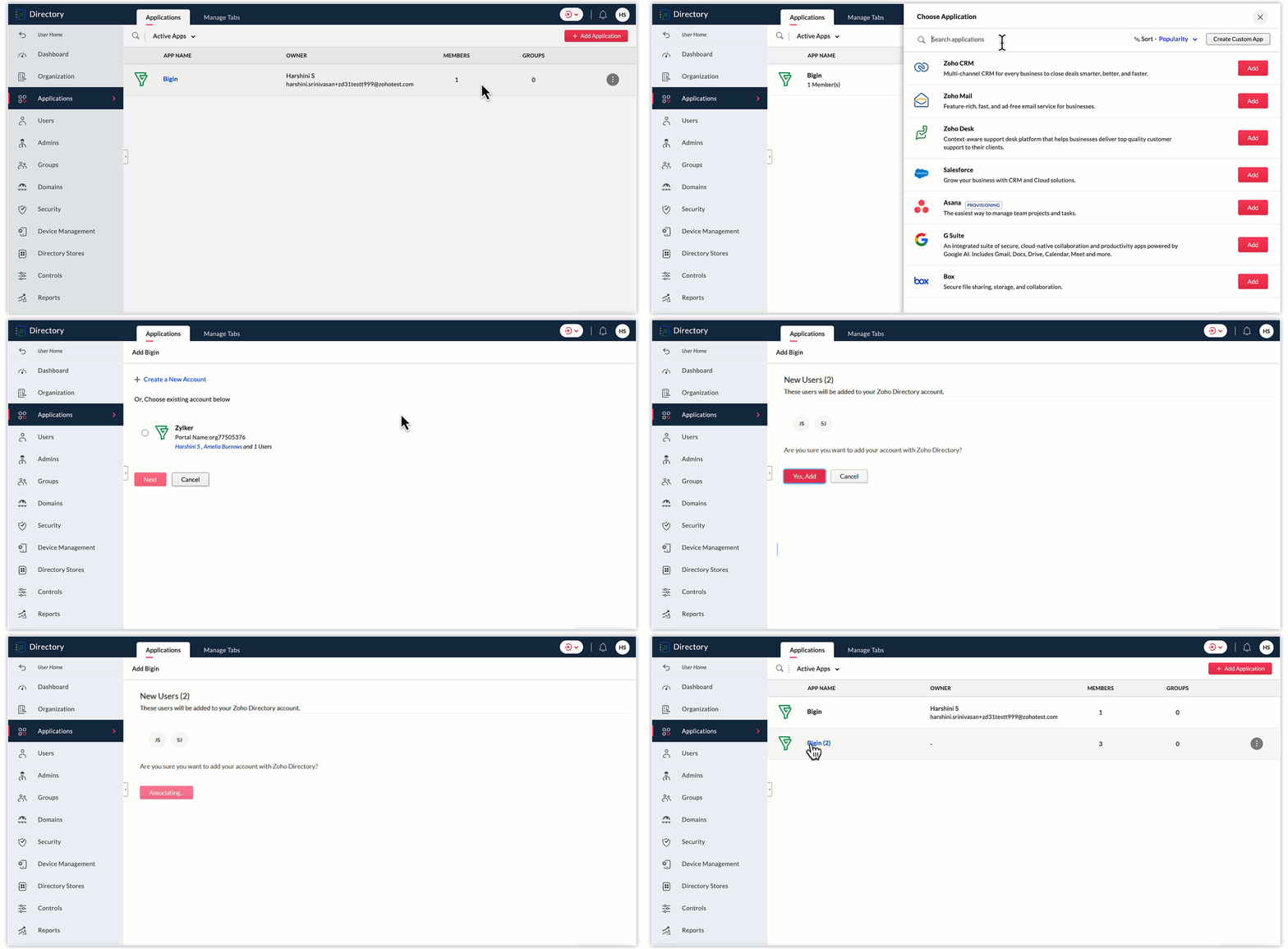
To add Bigin to Zoho Directory, follow these steps:
- Log in to your Zoho Directory account. Once logged in, navigate to the Zoho Directory Admin Panel.
- In the Admin Panel, look for the Applications section.
- Within the Applications section, search for "Bigin" and click on the Add button to initiate the process of adding Bigin to your Zoho Directory.
- Follow the on-screen instructions to configure the settings for the Bigin integration. Choose any of your Bigin accounts displayed, or create a new one. Click Next.
- In the next screen, select the Bigin users you wish to add to Zoho Directory, and click Yes, add.
- Once you've completed the configuration, Bigin will be added to your Zoho Directory.
- You can now manage user access and permissions for Bigin through the Zoho Directory Admin Panel. You can assign users to Bigin, control their roles and privileges, and ensure secure access to the application.
As a Bigin administrator, you can significantly improve the security and access management of your company's data by utilizing Zoho Directory's advanced user management features. From implementing IP restrictions and enforcing password policies to enabling multi-factor authentication and syncing with Active Directory, Zoho Directory provides comprehensive tools for effective user management. You can protect your organization's data, streamline user management, and ensure a positive user experience in Bigin.
Thank you,
Sai Shree | User Education
Sai Shree | User Education
Topic Participants
Saishree T K
Sticky Posts
Schedule mass emails, view mass emails status and more!
Hello everyone, Mass emails help you communicate with multiple customers in a couple of clicks. We have introduced a Mass Emails dashboard in Bigin so that users can see the status of the mass emails like how many emails were opened, clicked and bounced.Introducing Bigin 360: Our new pricing edition with increased feature limits and pre-installed toppings
Dear Biginners Club, Today, we're pleased to launch a brand-new pricing edition called Bigin 360, our highest pricing edition that will sit on top of Express and Premier editions. It's been over four years since our launch, and we're receiving some great[New] Create invoices and contracts in minutes with Zoho Writer's Merge Templates for Bigin!
Do you often find yourself manually entering customer information in your business documents like invoices and contracts? This can be a time-consuming process that can take up valuable time from your business operations. With Zoho Writer's Merge TemplatesAnnouncing #BiginnersClub meetups in US, Middle East, India & UK (Free Event)
Exciting news, Bigin enthusiasts! #BiginnersClub meetups are back, and we're hitting some major cities this time, starting from October. Here's what you can expect: Meet our experts face-to-face Deep dive into Bigin and its advanced features PersonalisedIntroducing Forms: Streamline data collection with Bigin's new form builder.
Hello everyone, Bigin's web forms just got a makeover! We are excited to introduce Forms: an online form builder designed to meet all your data collection need. This revamp was inspired by your feedback, resulting in an upgraded and versatile version
Recent Topics
Credit card transactions are backwards after importing statements
I am new to Zoho Books so I'm importing my firm's bank and credit card statements in. My credit card statements have a single column with negative numbers so that is the option I chose. But when I went to categorize the credit card transactions, I canPermissions on Views
Having the option of any agent creating custom views is firing back and got a situation where there are a hundred different views across the team and tickets are not being dealt in the most efficient of ways. Tickets seems to be missed by some agents,Function #8: Add additional charges to invoices
Here goes one of the highly sought-after custom functions in Zoho Books. If you find yourself needing to apply additional charges to customers on their invoices (say credit card surcharges, or fuel charges applicable to customers from a certain region,Knowledgebase SEO
We have a custom-domain mapped help center that is not restricted via login. I have some questions: a) will a robots.txt file still allow us to control indexing? b) do we have the ability to edit the sitemap? c) do category URLs get indexed by searchVIsual maindmaps in Zoho notebook Ai
Can I create and export VIsual maindmaps in Zoho notebook Ai1stDibs Integration to Zoho Inventory
Hello is it possible to integrate my Zoho inventory and 1stDibs?Community Question: Renewal vs Invoicing
This is a question for the community. Does anyone else consider there to be a difference between a subscription renewal event and sending out a recurring invoice for a subscription? For example, let's say customer XYZ purchases a 1-year subscription tocloud console support for music websites
Hi Friends, I am not from a very technical background.. So need support from the Zoho family. I want to build a e-commerce website which is in Musical Niche. It will help people learn music & play instruments of all types. There are a few players in the market like Chordify , Guitaa, Guitar Dashboard, ChordU & few others. But I all these websites allow only a few instruments to play. So I want to build a better website than the one I mentioned. So wnated to know what UI & AI should I use so thatScheduled Reports - Do not send empty report
Hello, We are intensively using reports in the CRM, especially for sales managers. When data is empty, they still receive an email. Can you add an option to avoid sending the report when data is empty?Is Zoho One Desktop more secure than Zoho One Web SaaS?
Is Zoho One Desktop more secure than using Zoho One in browser? Inherently, it seems desktop would be unless you don't do things like share your pw or leave pc on. I am concerned about data being on the cloud or someone else's server and database.Reminder Settings - Time Tracker
On the time tracker in Reminder Settings I created a reminder according to the Zoho manual. But a manager asked me to change the message that goes in the email. Is it possible to change the message? I didn't find that in the Zoho manual. Another question: I configured to receive the reminder everyone who logged in less than 40 hours. Does Zoho consider less than 40 hours of the current week or the whole month? Another situation, I put it so that I and another specific user would receive the notification,Main difference of Zoho Recruit Corporte version and Staffing HR vesion
Hi Zoho, I need help to fully understand what is the main key point differences of Recruit Corporate version versus the Staffing HR version? We are currently using Corporate HR version and we are looking on having an insightful automated reporting, doesOut of Stock items showing in Commerce
I have over 6000 items and most are not in stock, but all items are showing up in Commerce whether they are inventory or not. What option or feature can you use to hide items in Commerce at zero or negative quantities? I currently am using Commerce forIs it possible to transfer data from one related list to another within the same module ?
In the Leads module, there is an existing default Product related list that already contains data. Recently, I added a custom multi-lookup field, which created a new related list in the same Leads module. Now, I need to move the existing data from theHow to implement new online payment gateway?
Hello, Can you tell me how to proceed to implement my local payment gateway? DIBS has an open avaiable API that should be easy to implement into ZOHO BOOKS. http://tech.dibspayment.com/dibs_payment_windowFormula working in MS Excel , is not working in Zoho Sheets, Filter fuction which is working in MS sheets per the attached workbook / Daily update.
Filter function , which is working in MS Excel is not working in Zoho sheets. Please help on function of filter of particular class sheets and extract students name who has more than 3.5 hours of study hours on particular day depending on date in D7 cell.New in Smart Prompt: Record Assistant for contextual assistance, and support for new AI models
Smart Prompt helps teams stay informed and move faster by providing relevant suggestions where work happens in CRM. With this update, Smart Prompt becomes more adaptable to your organization’s AI preferences. You can now choose which Large Language ModelImproved Integration Failure Information (And Notification Options)
Hi, When an attachment service for example fails, you just get "Field x - Error", I can check the field it is failing on and find nothing wrong, same file size, type, dimensions, etc. so more information as to the actual issue would be helpful. And anChange User Role in a Form
Hi, When in a form, it would be good (And consistent) to be able to change the user role/permission like you can with Shared Reports, All Entries or the actual User itself, rather than having to delete the users permission and then add it back again withIncrease the "Maximum Saved Entries per User" Options Limit
Hi, You can create lots of saved entries, yet the Limit when you apply one is 25, we may often expect 32 to be in draft, and therefore want to enforce that, can we increase the limit of this field from 25 to 100 (As you can just turn it off and have moreProduct Updates in Zoho Workplace applications | December 2025
Hello Workplace Community, Let’s take a look at the new features and enhancements that went live across all Workplace applications this December. Zoho Mail Block emails without notifying the sender Block emails without sending a rejection notificationZoho CRM for Gmail Extension Not Working in Brave Browser?
Is anyone able to get the Zoho CRM Chrome Extension working in the Brave browser? They're both built on the Chromium platform and every other Chrome Extension works with the exception of Zoho CRM for Gmail so any ideas here?Set Frozen Cells in the Report Settings
Hi, It would be nice to be able to set the frozen cells in the report Settings, and have an option if this is fixed or can be changed after loading (On the next load it still goes back to the Settings). Thanks DanMicrosoft Teams now available as an online meeting provider
Hello everyone, We're pleased to announce that Zoho CRM now supports Microsoft Teams as an online meeting provider—alongside the other providers already available. Admins can enable Microsoft Teams directly from the Preferences tab under the MeetingsTip of the week #26: Import/ Export calendars in Zoho Calendar.
Any calendar on the web or calendars that you create in any other calendar application can be imported in to Zoho Calendar. This will help you to add the events from the calendars that you import to your Zoho Calendar. You also have the option to exportAdd Zoho Forms to Zoho CRM Plus bundle
Great Zoho apps like CRM and Desk have very limited form builders when it comes to form and field rules, design, integration and deployment options. Many of my clients who use Zoho CRM Plus often hit limitations with the built in forms in CRM or Desk and are then disappointed to hear that they have to additionally pay for Zoho Forms to get all these great forms functionalities. Please consider adding Zoho Forms in the Zoho CRM Plus bundle. Best regards, Mladen Svraka Zoho Certified Consultant andSocial icons, open in new tab?
Hello, I have two social icons on my footer, Facebook and Psychology Today. Clicking on the Facebook icon opens a new tab, the Psychology Today icon does not. I would like them both to open a new tab. Am I missing a setting somewhere?Real-Time Screen Annotation During Zoho Cliq Screen Sharing
Hi Zoho Support Team, Hope you're doing well. We’d like to request the addition of real-time screen annotation tools during screen sharing sessions in Zoho Cliq video calls. 🔍 What We're Looking For: The ability for the presenter—and optionally, otherAutofill address using smart fields mapped over the pdf document
Hi, I'm using mail merge to map smart fields onto PDF documents I plan to distribute for signing. I already have a Zoho Sign subscription. When mapping smart fields from the Employee form, I only see the permanent and current addresses which include theHow do I cap employee leave accrual
HI there, How do I cap an employee's leave accrual? The policy is that you accrue 15 days leave annually (1.25 days a month) and once you reach 15 days, you wont accrue more until you take leave. Thank you!Open sub form from a button as a popup form
Is there a way within a form to use similar code as below to show a button in the form when clicked opens the subform for data to be added to the record being viewed in the form OpenUrl("#Form:<Customer_Delivery_Address>?<Delivery_Address>=" + input.ID,"popupDont have backup option in setting
Hi guys. I started using zoho book a week ago. I bought premium package yet I don't have backup option in setting. I hope anyone can help me find a solution. Thanks in advanceMaking Tags Mandatory
When creating an expense, is it possible to make the Tags field mandatory? I see the option in settings to make other fields mandatory, like Merchant, Description, Customer, etc, but nothing about Tags. Thanks! KevinIs there a plan to integrate zoho voice with zoho books?
Hello, Is there a plan to integrate zoho voice with zoho books? Right now we are using the Twilio SMS integration into zoho books, but have recently decided to switch to zoho voice for calls and sms. Is there a plan to integrate zoho voice natively intoPass variables to Zoho Desk via URL to create a fast new ticket landing page
We are integrating our phone system into Zoho Desk. Currently when a helpdesk agent answers the phone, a soft client opens a new tab with zoho desk at the new case page. https://desk.zoho.com/support/companyname/ShowHomePage.do#Cases/new We would likeZoho Books Extension: What Happens If Custom Fields Already Exist?
When developing Zoho Books extensions, what happens if the target Zoho Books organization already has a custom field with the same API name as one defined in the extension? I’m asking because we originally created an on-Books version of this functionality,Modular Permission Levels
We need more modular Permissions per module in Books we have 2 use cases that are creating problems We need per module export permission we have a use case where users should be able to view the sales orders but not export it, but they can export otherFree Webinar on 21 January: Looking back at Zoho Mail in 2025
Hello Zoho Community! Curious about how Zoho Mail evolved in 2025? Wondering how these updates can make your everyday email work simpler? We’ve got a session you won’t want to miss. In our Zoho Mail 2025 recap webinar, we’ll walk you through the key featuresCliq Networks users can see all other network users contact information
Is there a way to hide user contact information from each user in networks? I would only like the users to see the admin's contact information, not other users. Network users information shared by defaultZoho Sheet - Printing - Page Breaks and Printing Customization
I think the title is descriptive enough in that I cannot find help documentation on a simple task of adding in page brakes for separating pages on print. ThanksNext Page