Commandes client
La commande client est un document commercial qui précise la vente de biens ou de services et détaille les spécificités de la vente, notamment le prix, la qualité des biens ou des services fournis ainsi que l'adresse, la date de livraison prévue, les conditions de paiement, de vente et de livraison. Elle vous permet de savoir si vos produits sont en stock ou en rupture , afin d'aider votre service achats à faire des prévisions.
Voici quelques-unes des façons dont votre entreprise peut bénéficier de l'optimisation du processus de commande client:
- Réduire le risque d'erreur humaine
- Gardez vos commandes en ordre
- Améliorer le suivi des stocks
Gestion de commandes client dans Zoho Inventory
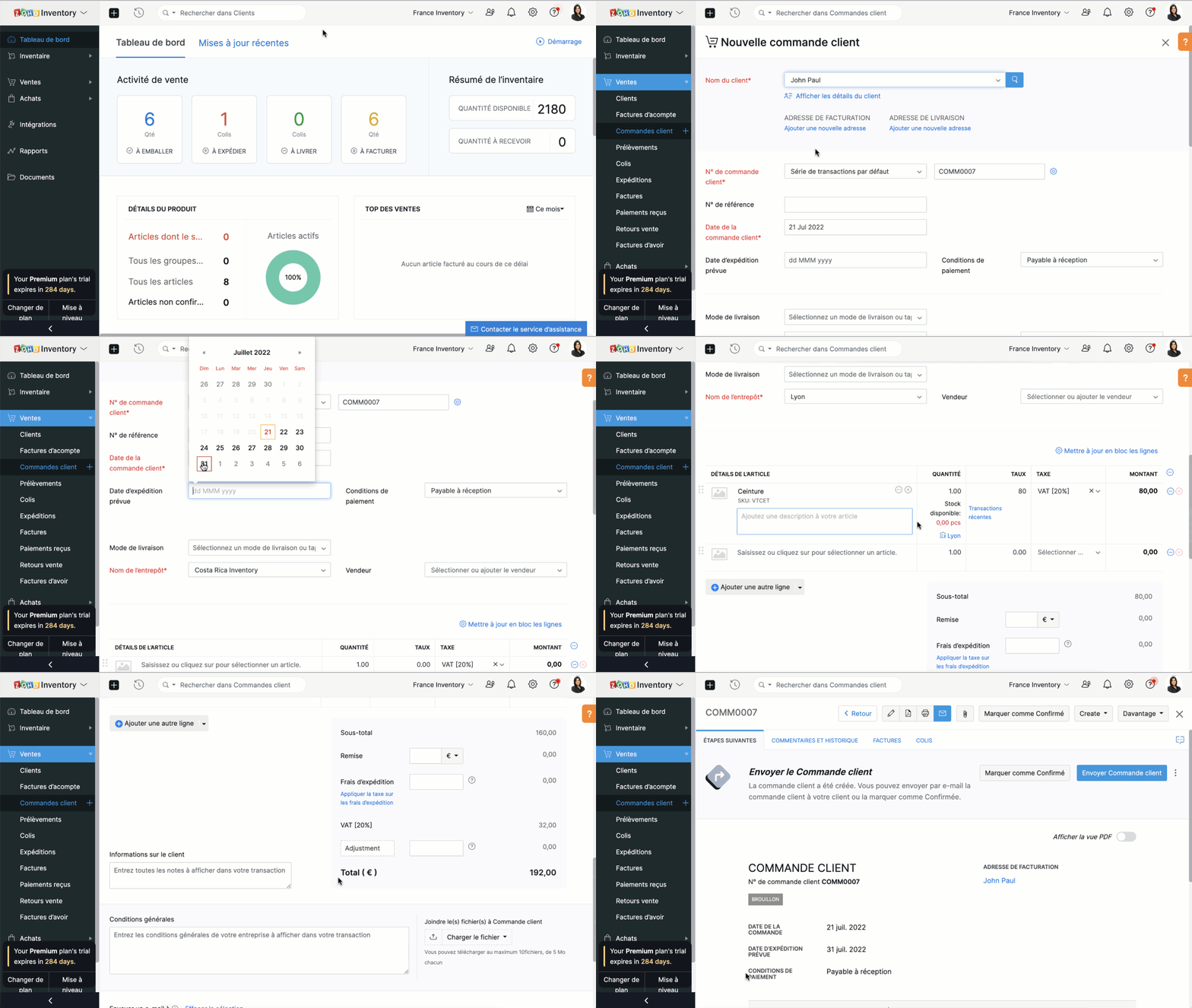
Créer une commande client
- Sélectionnez l'onglet "Commandes client" sous "ventes"
- Cliquez sur "+nouveau" et saisissez les détails du client. Dans le champs "Nom du client", vous pouvez soit sélectionner un client dans la liste déroulante, soit ajouter un nouveau client.
- Le N° de commande est généré par défaut. Si vous souhaitez le saisir manuellement , cliquez sur l'icône "Paramètres" à côté de l'onglet et une fenêtre s'affichera pour vous permettre de choisir entre la génération automatique et la saisie manuelle.
- Saisissez les autres informations comme la date d'expédition, le mode de livraison, les conditions de paiement, le nom de l’entrepôt. Ajoutez un produit ou un service à partir de votre inventaire. Vous pouvez également cliquer sur l'option "Ajouter des articles en vrac" pour ajouter plusieurs articles à la fois à votre commande client.
- Saisissez la quantité, le taux et la taxe applicable à partir de la liste déroulante. La liste déroulante des taxes affiche uniquement celles que vous avez créées dans l'onglet "Paramètres", sous la section "Taxes".
- Saisissez le taux de remise, les frais d'expédition et les modifications, si applicable.
- Vous pouvez ensuite choisir d' sur "Enregistrer comme brouillon" ou "Enregistrer et envoyer"
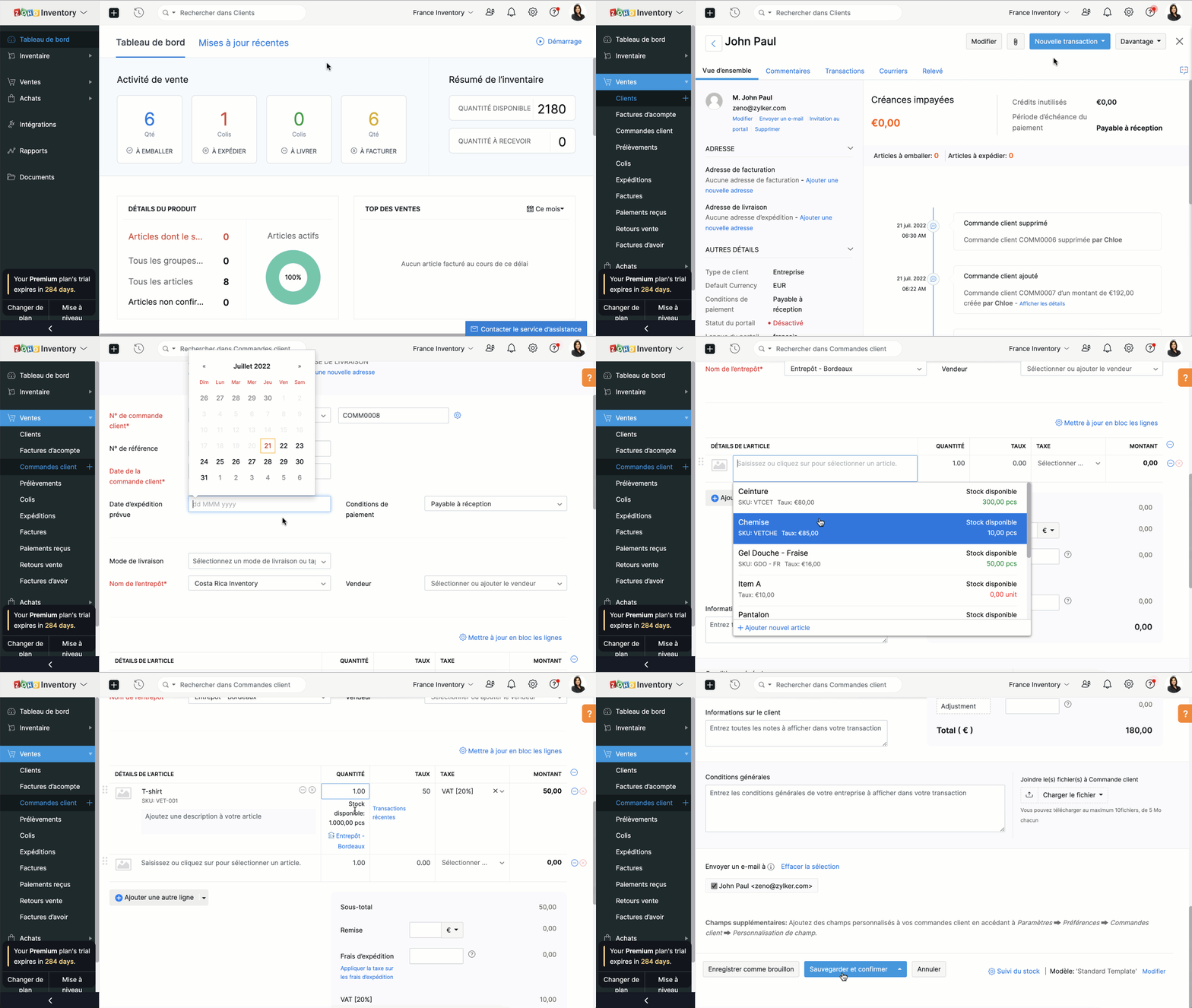
Créer une commande à partir du module "Clients"
- Passez à l'onglet "Clients" et sélectionnez un client pour lequel vous souhaitez créer une commande.
- Cliquez sur le bouton "Nouvelle transaction" et sélectionnez "Commande client", une nouvelle fenêtre apparaît pour créer une nouvelle commande client.
- Vous pouvez maintenant suivre le parcours ci-dessus.
Fermer une commande client
En fonction de vos préférences, vous pouvez choisir que le statut de votre commande client soit automatiquement défini comme clôturé. Les critères sont les suivants:
- Lorsqu'une facture est créée
- Lorsqu’une expédition est effectuée
- Lorsque l’expédition est traitée et que la facture est créée
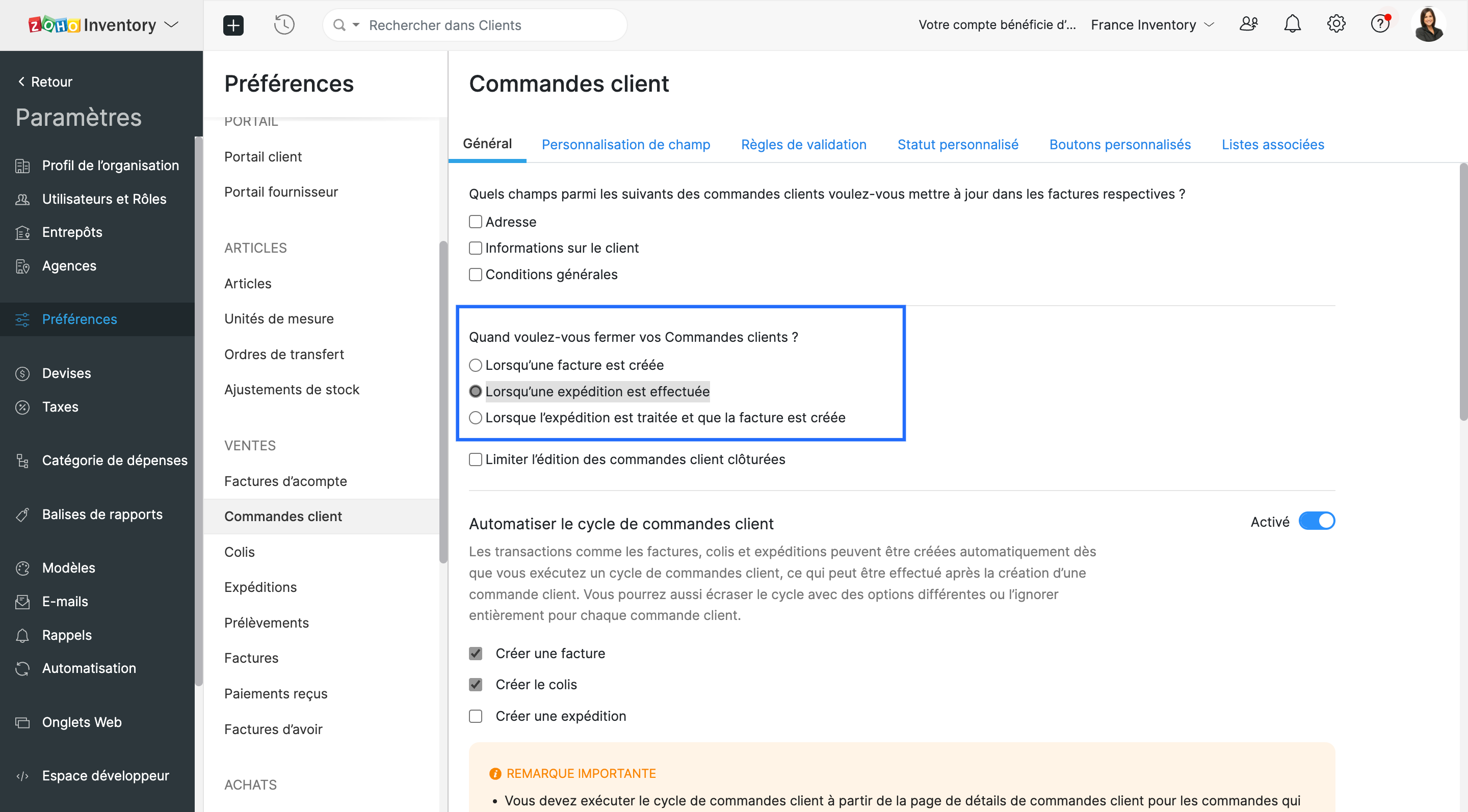
- Vous pouvez choisir l'un ou l'autre. Lorsque les critères sont satisfaits, le statut de la commande client est défini comme fermé.
Envoyer une commande à votre client
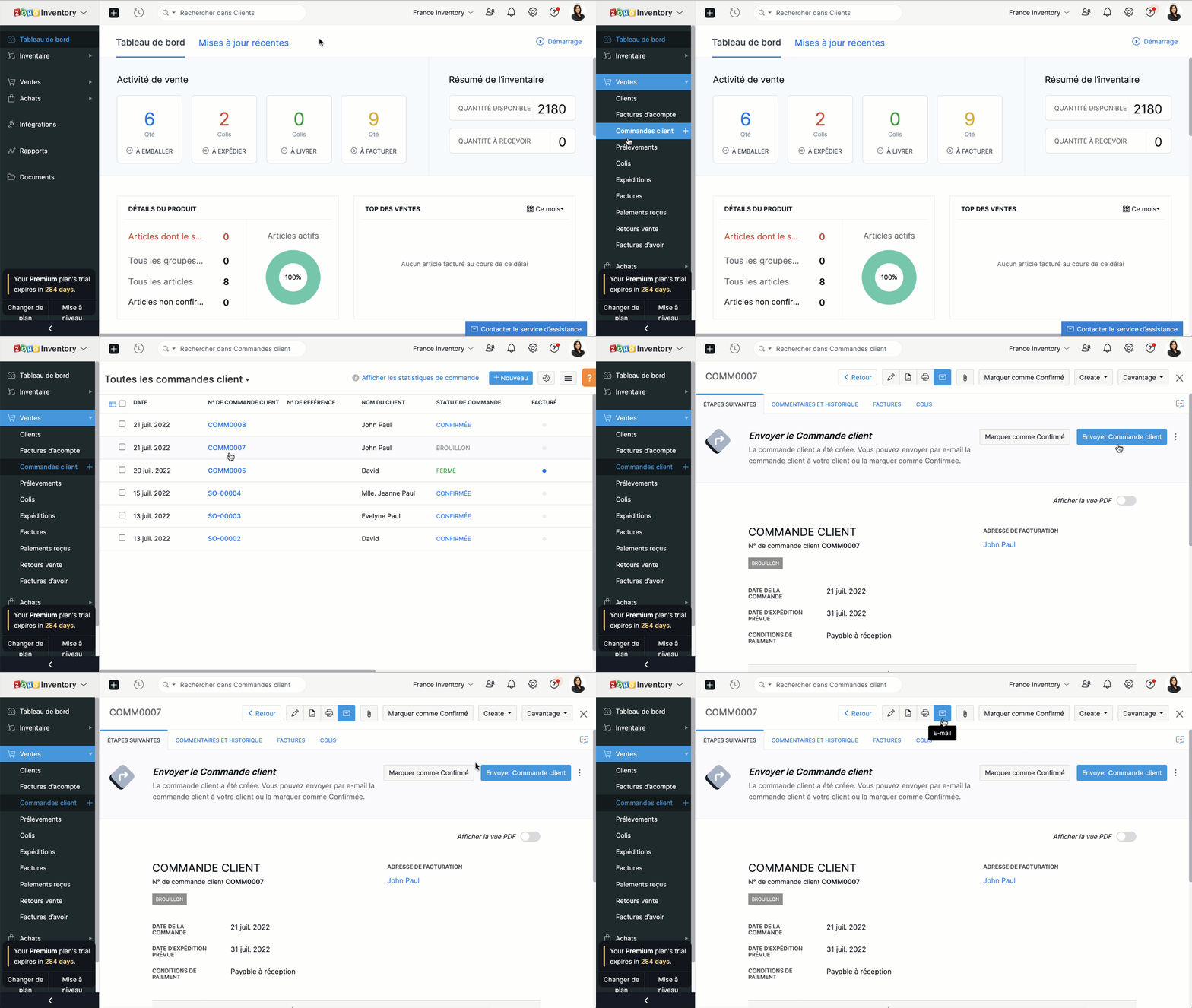
Vous pouvez soit envoyer la commande client au moment où vous la créez en cliquant sur "Enregistrer et envoyer", soit l'envoyer plus tard depuis le bouton "E-mail" situé en haut de la fenêtre.
Fusionner les commandes client.
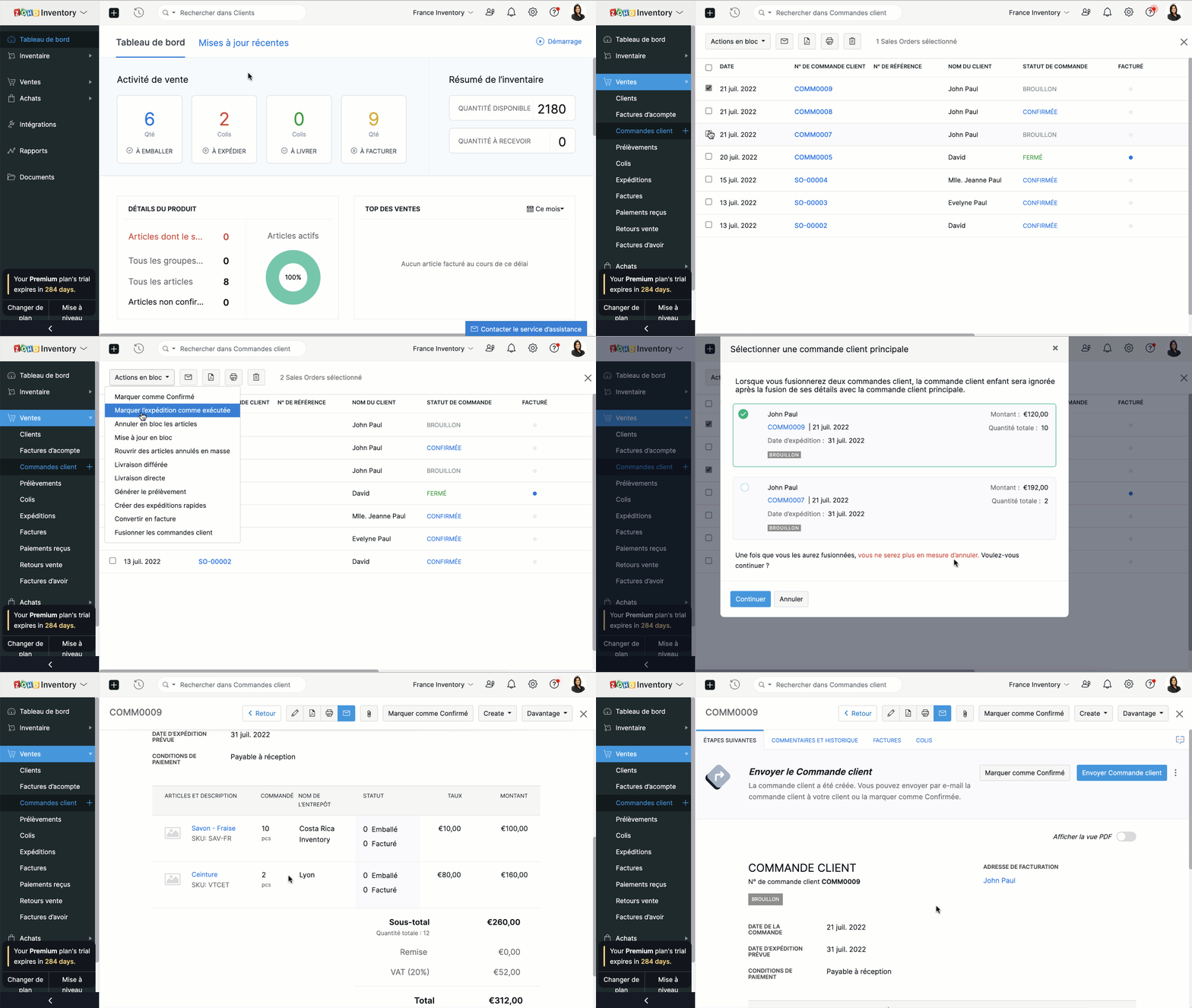
Si vous recevez deux commandes d'un même client, vous pouvez en regrouper les détails dans un seul document. Ainsi, vous pourrez préparer, expédier et facturer une seule commande au lieu de deux.
- Accédez au module "Commandes clients" depuis le panneau à gauche.
- Sélectionnez deux commandes clients à fusionner.
- Cliquez sur "Actions en bloc" et sélectionnez "Fusionner les commandes client".
Conditions préalables :
- Vous ne pouvez fusionner que deux commandes clients à la fois.
- Les deux commandes clients doivent être adressées au même client avec la même adresse de facturation et de livraison.
- Les deux commandes clients doivent avoir le même statut (statut Brouillon ou Confirmé uniquement) sans forfaits ou factures associés.
- Vous ne pouvez pas fusionner de commandes client de marketplace.
Créer des factures à partir de commandes clients
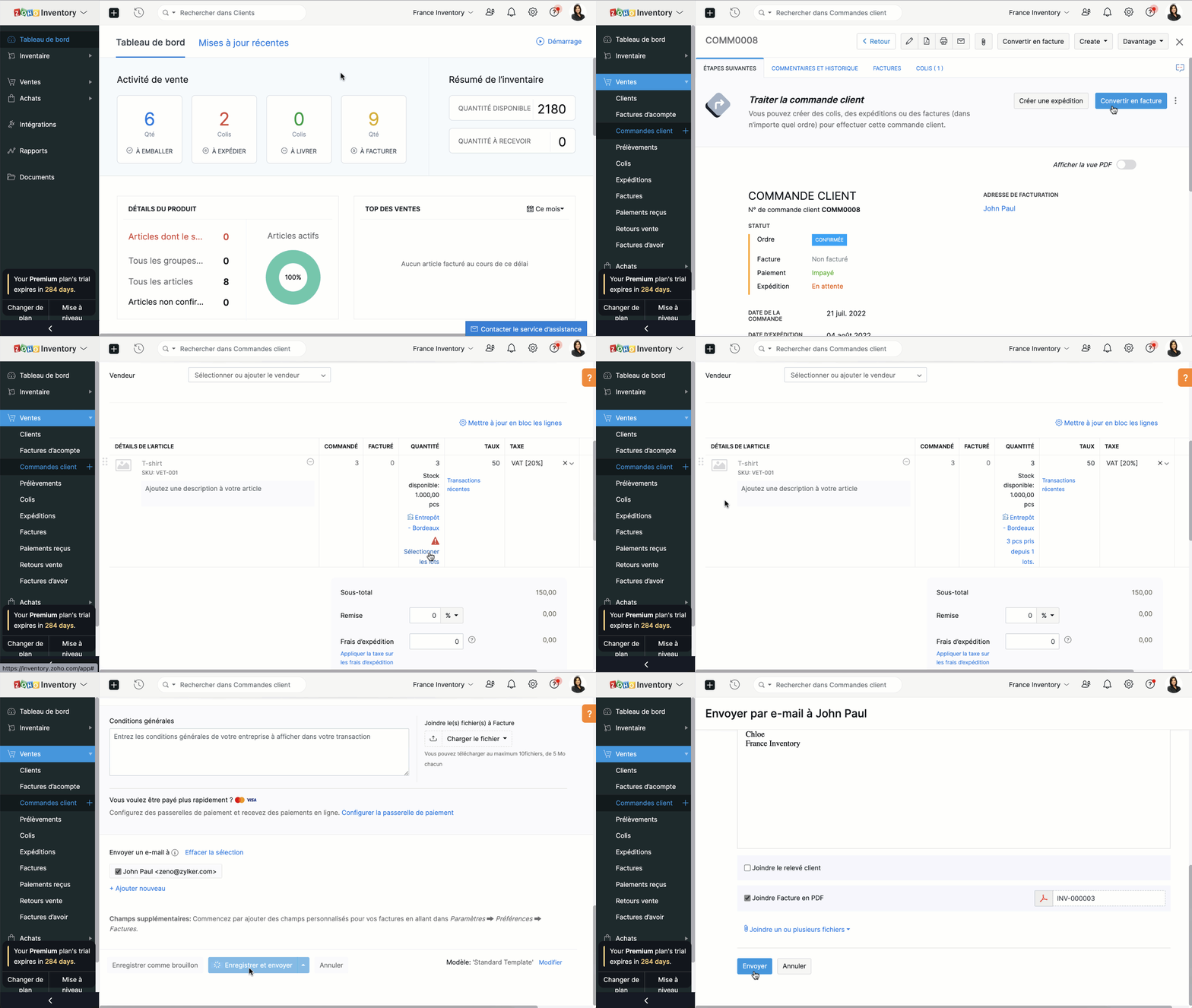
- Depuis le panneau à gauche, sélectionnez une commande client que vous voulez convertir en facture.
- Vous pouvez directement convertir en facture depuis l'onglet "Convertir en facture" soit depuis l'onglet "Facture".
- Vous serez dirigé vers la page de création de la facture. Par défaut, tous les détails fournis dans la commande client seront remplis automatiquement.
- En fonction des besoins, vous pouvez soit choisir de facturer partiellement la commande client et cliquer sur "Enregistrer", soit envoyer la facture immédiatement à vos clients en cliquant sur "Enregistrer et envoyer".
Merci
L'équipe Zoho France
Topic Participants
Kinjal Lodaya
renaud.laurent
Sticky Posts
Collaboration sans faille avec Zoho One
Bonjour à tous, Dans cet article nous allons voir comment Zoho One permet une collaboration à différents niveaux . La façon dont nous travaillons évolue. À mesure que les entreprises se mondialisent, la plupart des activités sont menées en équipe.
Recent Topics
Use of Zia within Forms
I have noticed that recently you have added Zia to help create forms from scratch. Would it be possible to add Zia functionality to free text fields for form submissions or if this is already on the roadmap an ETA for this please? We have a lot of fieldDefault in fields on Form B based on the user selection in Form A
Hi Everyone, I have added an action button to a form report to bring up a new form based on user selection, see it indicated in red below: Then when the ne form loads, I want to default in some of the fields based on the record the user was selected on.Last activity time is acting like last modified time
When i edit the description or any field in the potential, account, contact and lead, the Last Activity Time is being updated like the Modified Time. This is messing all workflows and reports and we are unable to track real last time of activities likeEnhancements to the formula field in Zoho CRM: Auto-refresh formulas with the "Now" function, stop formula executions based on criteria, and include formulas within formulas
Dear Customers, We hope you're well! By their nature, modern businesses rely every day on computations, whether it's to calculate the price of a product, assess ROI, evaluate the lifetime value of a customer, or even determine the age of a record. WithHEX/RGB Color Input in Visual Editor
Hello Zoho Pagesense Team, We hope you're doing well. We’d like to submit a feature request to improve the color selection options in the Pagesense popup editor. Current Limitation: Currently, to set text colors, users must move the color slider manually.CRM and Campaigns- tags not integrating?
Hi! I am setting up an automation in zoho campaigns and it says the crm is integrated...but when I want to use a trigger of a certain tag I created for people in the crm to denote those who purchased, it doesnt have that tag available as an option inMaximum limit of rows exceeded
I am trying to add a row to a spreadsheets that has fewer than 60 rows. I keep getting an error message that says I have exceeded the maximum limit of 65,536 rows. Any ideas out there?Tip #7: 5 formas de mantener tus listas de correo electrónico
Tips and Tricks #7, adaptado de Susmit Sen ¡Hola, comunidad! Esta semana volvemos con nuestros Tips and Tricks para Zoho Campaigns. En esta ocasión, voy a darte algunos consejos para mantener limpias tus listas de correo electrónico, y empezar el 2021Mail Merge related Lists
When I try to merge an associated list the fields do not have a checkbox to choose them as it does in the tutorials. Am I missing something? Any ideas would be appreciated.create-a-purchase-receive API issues
Hello all, I'm trying to use the create a purchase receive inventory API documented here (https://www.zoho.com/inventory/api/v1/purchasereceives/#create-a-purchase-receive) however when I do am getting the following error {"code":9,"message":"The purchaseZoho Pagesense really this slow??? 5s delay...
I put the pagesense on my website (hosted by webflow and fast) and it caused a 5s delay to load. do other people face similar delays?Heatmap: Missing Content Elements - Zoho Page Sense
Hi there, I'm trying out Zoho Page Sense to generate heatmaps for my Wix pages. My problem: Some parts of my Wix pages don't show on my heatmap, the heatmap is just empty there. Maybe Wix default lazy loading setting causes this error? Is there a wayMarketing Tip #3: Use social proof to build trust
People trust people. Showcasing reviews, testimonials, or “bestseller” badges on your product pages can nudge hesitant buyers toward purchase. Try this today: Add one customer testimonial or highlight your top-selling product on your homepage. Or, doMake CAMPAIGNS email look as simple as possible
Hi there I'm trying to make my Campaigns email look as much like a normal email as possible. I'm a bit stuck with the "justification" of the email email block. Can I LEFT JUSTIFY the "whole email" to make it look "normal"? (Please see screenshot attached)Zoho Sign Reminder email template
Is there a template we can edit for the reminder emails? I don't see it in Settings / Choose a templatePreview an upload PDF or File
I have a form where the customer has to upload a file (normally PDF - never jpeg) When in report view I want to be able to preview the uploaded file without having to download it. If I click on the upload it downloads to my computer, I want to be ableHow to filter emails by Reply-to field?
I receive a very particular newsletter from an association A registered on a website W (that is used by many associations), and the emails fields are not great: the From just contains the generic website's W's email, while A is only mentioned in the Reply-toHow to invite friends on other social media platforms to one of my group chats in arattai?
Hello, I have formed chat groups in arattai. I want to invite my friends on other social media platforms like WhatsApp/ FB to one of my groups. Different friends would be invited to different groups. How to share an invite link of one of my groups toLine spacing
I coudn't decrease the line spacing to space smaller then a single line. There is too much space between the lines that make the document look ugly. Please fix that. Liran. fonarControl Position of “X” (Close) Button in Popup Editor
Hello Zoho PageSense Team, We hope you're doing well. We would like to request a customization improvement in the PageSense popup editor. Current Limitation: Currently, the position of the “X” (close) button is fixed and cannot be customized in the popupAdd Standalone “Save” Button in Pagesense Popup Editor
Hello Zoho Pagesense Team, We hope you're doing well. We would like to request an important usability improvement in the Pagesense popup editor. Current Limitation: There is currently no dedicated Save button while building a popup. The only way to saveText Direction Control in Pagesense Popup Editor
Hello Zoho Pagesense Team, We hope you're doing well. We’d like to submit a feature request to add text direction control in the Pagesense popup editor. Current Limitation: Currently, the popup editor does not provide native support for RTL (Right-to-Left)Autosave in Pagesense Popup Editor
Hello Zoho Pagesense Team, We hope you're doing well. We’d like to submit a feature request to enhance the Pagesense editor with an autosave functionality. Current Limitation: Currently, changes made in the Pagesense editor must be manually saved. InBilling frequency is not displayed correctly.
Hello There is an issue while displaying the billing frequency on a subscription quote. I am able to activate the subscription details and get this lovely overview: If I am adding a Plan which I charge quarterly, first of all it should be possible toCreating Secret via Vault API
Hi I am trying to create a secret through vault api. This is the response I get. One thing I am not sure is how to decrypt the secretdata, how to get the secrettypeid? { "operation": { "result": { "error_code": "", "message": "Sorry, we are unable to process your request.",Is It Possible to Hide Menu Option from Main Navigation?
Is it possible to hide a menu option, e.g. Admin, from the Main Navigation based on some criteria, e.g. login = zoho.adminuserUnleash the power of detail, with Table View.
What use is context that's not available where you need it? With this in mind, we bring you the Table View. This feature will add more power to the way you organize and work through your ticket load. Table View comes in handy when you want more control over the ticket information you see. This is a nifty tool for users who find themselves limited in terms of the level of information that is being offered in the Classic View and Compact View. With an upper limit of 15 columns, agents can glean mostKaizen #126 - Circuits in Zoho CRM - Part 1
Hello everyone! Welcome back to another week of Kaizen! Today, we will discuss an exciting topic—Circuits in Zoho CRM. For starters, we will discuss what Circuits are, how beneficial they are for businesses, different views of a Circuit, and the differentWorkdrive on Android - Gallery Photo Backups
Hello, Is there any way of backing up the photos on my android phone directly to a specific folder on Workdrive? Assuming i have the workdrive app installed on the phone in question. EmmaRendering PDF to view on page
My company upload lots of PDF files onto Zoho. But every time we open it, it downloads the file instead of viewing it on the web page. Does Zoho allow uploaded PDF files to be rendered to view on web page yet? I've been trying to use <embed> or <object> but it cannot be loaded. (similar thread: https://help.zoho.com/portal/community/topic/how-to-open-a-pdf-file-of-a-view-in-preview-mode)Dynamically Fetching Lookup Field Display Value
I have an audit trail form, Audit_Changes, that tracks old vs new values across different forms. For lookup fields, the old/new value is the ID, but I also need the display value. What's a best practice for dynamically fetching the display value of theI have a problem. I use Zoho invoice
I have a problem. I use Zoho invoice, which is that when I create an invoice for a customer with specific items, let's say the value of these items is 2100, but my customers are not the type who pay the entire invoice amount at once, as they divide theAbility to Create New Items When Zoho Trident is Minimized via tray or taskbar icon
Allow users to create new items (emails, calendar events, tasks, etc.) directly from the system tray icon or by right clicking the task bar icon, even when the window is minimized or not actively running in the foreground. This enables quick access toI can not see Undeliverable emails from my Mass Email Leads activity in CRM
I am sending email templates and I can not see the Undeliverables? I only receive the "Out of Office" replies and any manual replies from the lead. Can you please let me know where the Undeliverable emails are sent so I can use the information to clean up the database?Select Zoho Contacts as Meeting Participants in Zoho Cliq
Hello Zoho Cliq Team, We hope you're doing well. We would like to request an enhancement to the meeting scheduling functionality in Zoho Cliq. Current Limitation: When scheduling a meeting in Zoho Cliq, participants can only be selected from: OrganizationAbility to Select External Users from Participants List When Scheduling Meetings
Hello Zoho Cliq Team, We hope you're doing well. We would like to request an enhancement to the meeting scheduling experience in Zoho Cliq. Current Limitation when scheduling a meeting in Zoho Cliq: External users can be selected from the list only underKaizen #212 - Map Dependency Fields in Zoho CRM using APIs
Hi Everyone!! Welcome back to another week of Kaizen series! Over the past few weeks, we have been addressing your questions and feedback shared through our Kaizen 200th feedback form. Thank you for your continued engagement and thoughtful queries. WeOutdated state in mexico
Hello Zoho team, the drop down to add the state for customers, when they introduce their state in mexico has a city named “Distrito Federal” that name changed many years ago to “ciudad de mexico”. could you please update this so my clients can find theIs anyone using Zoho Flow with airtable?
I need to build a flow that collects data from airtable and uses some of that data to create folders and files in google drive. I have fully function version of this in zapier and want to migrate to zoho. I am trying to perform a very basic fetch fromAI in Zoho Workplace: A Sneak Peek into What’s Coming!
Hello everyone, We’re super excited to share something we’ve been working on and we want you to be part of it! You may have seen our announcement blog post introducing a major evolution in how AI works within Zoho Workplace. Want to be among the firstNext Page