Effortlessly collaborate with your team and boost productivity using Zoho Forms
Effortlessly collaborate with your team and boost productivity using Zoho Forms


Working with a team can lead to complications, especially when it comes to sharing and editing forms. Zoho Forms, a powerful form-building tool, is equipped with features that make team collaboration efficient and seamless. In this article, we will explore the different ways you can share forms with users and groups, edit form structures, and share form entries across your organization.
 
Sharing forms: Enabling access to submissions for users in Zoho Forms
 
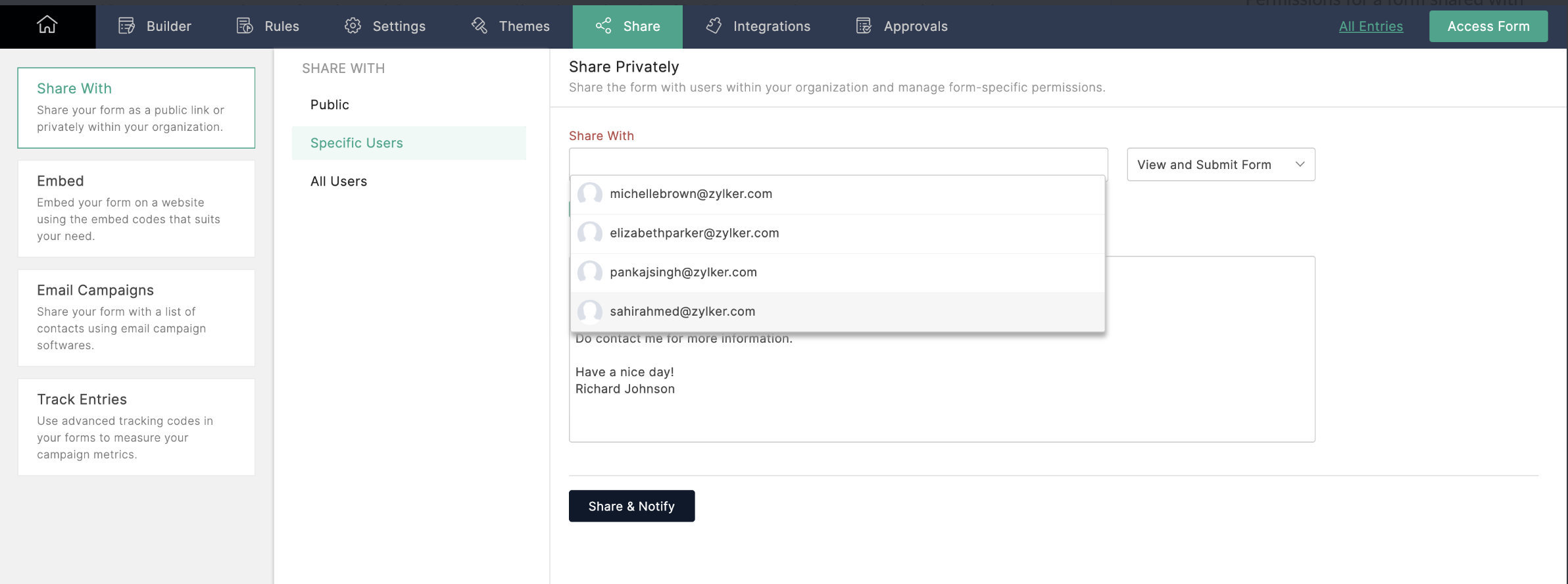
To share a form, navigate to the form's Share tab, select the users you want to share with, and enable the View and Submit permission. Now, users in your organization can access and submit a form directly from their own Zoho Forms accounts.


Editing forms: Collaborating on structures in Zoho Forms
 
If you want your collaborators to edit the structure of your form, simply enable the Modify Form permission. This will allow other users to make changes to the form's structure, so you can work together to improve the form's design, usability, and effectiveness.
 
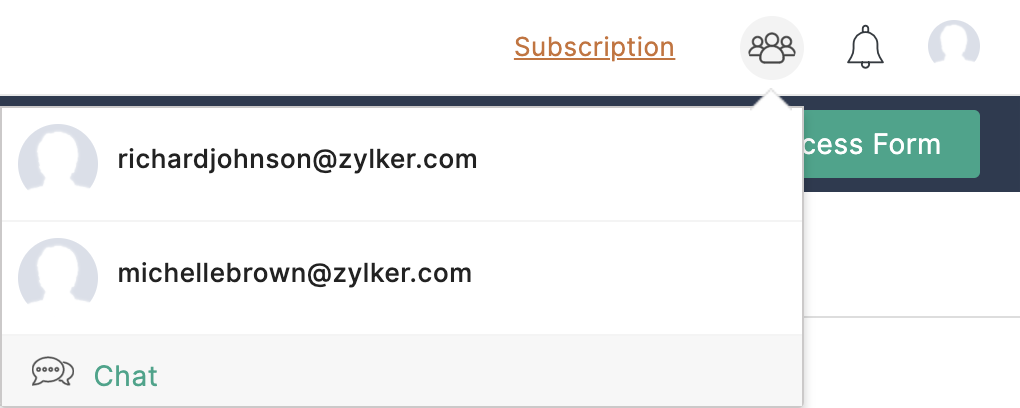
You can even start a Cliq chat with collaborators by clicking on the Collaborator icon at the top of the page.

 
Refer to this link for more information.
 
Sharing forms with groups: Multi-user access and submission in Zoho Forms
 
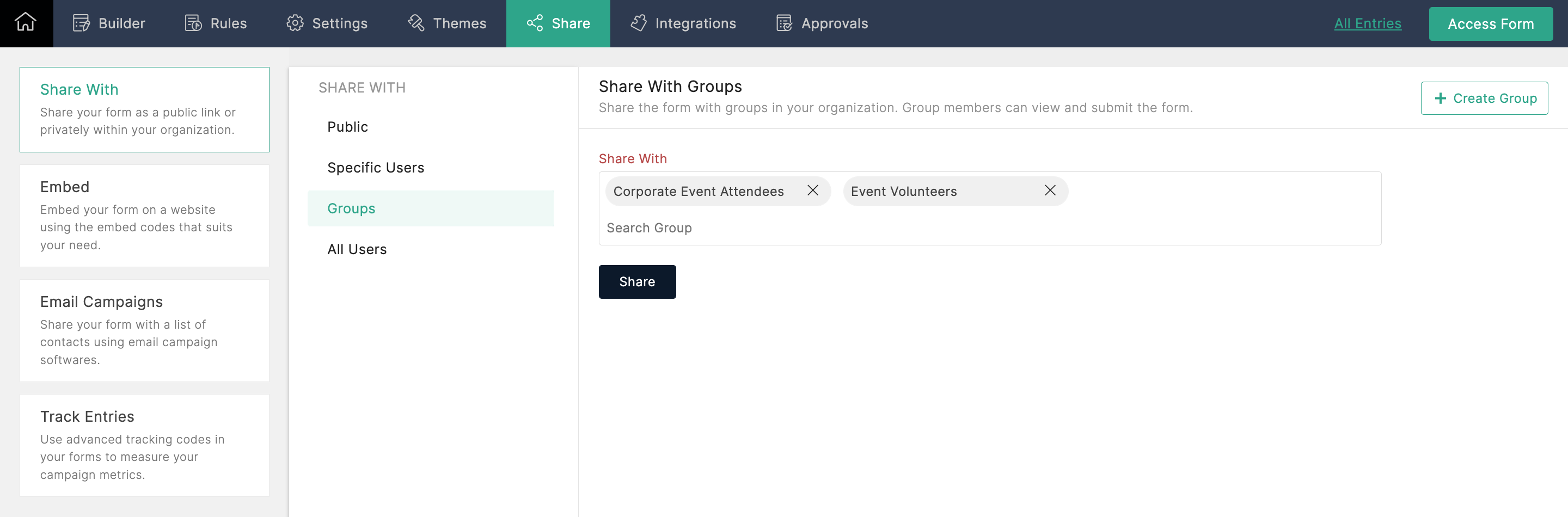
With this option, you can share forms with multiple groups in your organization and allow each group's members to view and submit the form. If you're an Admin, and you're not part of any group, you can create a group in your Zoho Directory by clicking Create Group from the top-right corner.


Sharing entries: Creating dynamic reports for collaboration in Zoho Forms
 
To share form entries with your colleagues, you can create a report from the entries and share it with other users. If the report is shared in Read/Write mode, users can even edit and export entries. Zoho Forms generates dynamic reports, which automatically reflect any changes made or new entries added. This enables your team to work together seamlessly, ensuring that everyone has access to the latest information.
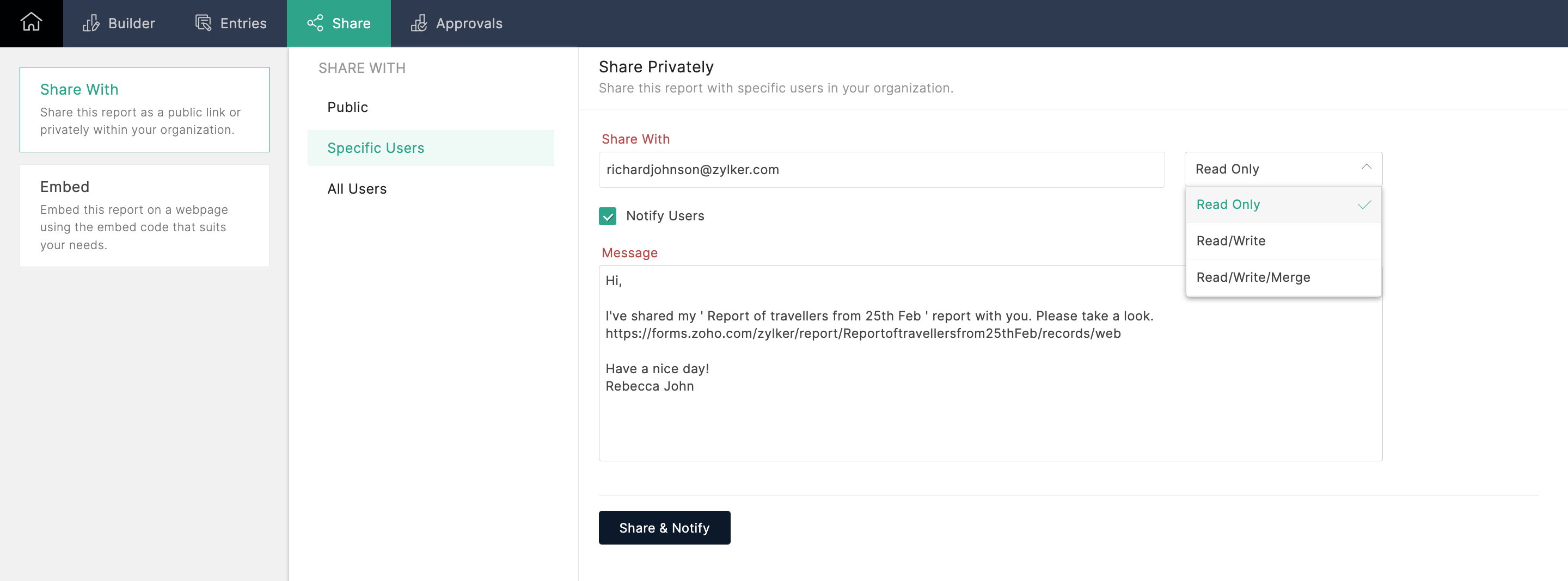

 
Collaborating with your team members using Zoho Forms has never been easier! Whether you want to share forms, edit form structures, or share form entries, Zoho Forms has got you covered. By leveraging these powerful features, you can streamline your workflows and boost productivity within your organization. Try out these collaboration options today!
 
Give this tip a try and let me know how it goes. You can also send your thoughts and feedback to support@zohoforms.com.


Until next fortnight,
Niveditha


      • Sticky Posts

      • Easily track referrals with Zoho Forms

        Referral tracking can be a powerful way for businesses to understand where their leads are coming from. With Zoho Forms, tracking the referral sources of your leads is an easy and straightforward process. Here are some tips to help you make the most of
      • 9 Ways to use Zoho Forms this Navratri

        Hello form builders!Navratri is almost here! It is a time for celebration and culture in the Indian community, and organizing such a grand event can be overwhelming. But with the right tools, you can streamline the process and focus on creating unforgettable
      • The secret to collecting data from valid users

        Collecting accurate data is crucial for making informed decisions. Zoho Forms offers two efficient ways to validate user data and ensure that you collect entries exclusively from valid users. Double Opt-in: Double Opt-in is a privacy feature that ensures
      • Storage space in Zoho Forms: The ultimate guide to efficiently managing your data

        Are you using Zoho Forms for data collection? As with any data-intensive application, understanding how storage space is calculated is essential. That's why we've created this guide— to show you everything you need to know about managing storage space
      • Linking primary form submissions to a second form submission

        Let's imagine you have a form that you use to request a minimal amount of data from your users. To collect additional information, you redirect them to another form either automatically or based on a condition. During the course of redirection, you can

        • Recent Topics

        • Important Update: Google Ads & YouTube Ads API Migration

          To maintain platform performance and align with Google's newest requirements, we are updating the Google Ads and YouTube Ads integrations by migrating from API v19 to the newer v22, before the official deprecation of v19 on February 11, 2026. Reference:
        • Canvas View bug

          I would like to report a bug. When clone a canvas view from an existing canvas view, if the original canvas view have canvas button with client script. Then the new create canvas view will have canvas button, it is make sense. But when I try to delete
        • Metadata API Access to Functions

          I think it would be incredibly helpful to have api access to every function's code. Our team primarily uses deluge functions to update fields across modules according to business logic. I would like to create a visual dependancy model for our CRM, but
        • Unable to produce monthly P&L reports for previous years

          My company just migrated to Books this year. We have 5+ years financial data and need to generate a monthly P&L for 2019 and a monthly P&L YTD for 2020. The latter is easy, but I'm VERY surprised to learn that default reports in Zoho Books cannot create
        • Zoho CRM Layouts

          I have customised all our modules, Leads, Contacts and deals, and within them, I have created lots of different layouts depending on the type of Lead or contact, for example. Since the new Zoho UI came out, they have all disappeared. I have gone into
        • Zoho CRM for Everyone's NextGen UI Gets an Upgrade

          Hello Everyone We've made improvements to Zoho CRM for Everyone's Nextgen UI. These changes are the result of valuable feedback from you where we’ve focused on improving usability, providing wider screen space, and making navigation smoother so everything
        • Sort by age

          It would be very helpful if there was a way to sort by age in the Age column. Please add this function if possible. Thanks!
        • Task Order

          Hello! I've recently switched to Zoho Projects and a long time user of MS Project, Asana and LiquidPlanner (which has recently been purchased) and I'm running into a frustration I'm hoping someone can assist with. It has to do with how tasks are ordered
        • Crossbeam

          Does anyone use Crossbeam with their Zoho CRM? I'm looking for a way to import Crossbeam partner leads into Zoho CRM. If so: - What's your experience been like? - Are you able to automatically import Crossbeam leads > Zoho CRM? How? - What doesn't work
        • Global Search placement in the new UI

          Having a hard time with the global search placement in the UI redesign. Surely I can't be the only one. Previously global search placement was perfect. A bar at the top/center of the page. Exactly where you would expect it to be. Since the new UI has
        • Change Last Name to not required in Leads

          I would like to upload 500 target companies as leads but I don't yet have contact people for them. Can you enable the option for me to turn this requirement off to need a Second Name? Moderation update (10-Jun-23): As we explore potential solutions for
        • Access forms within a form

          I have multiple forms that I would like to create access to for users within one form. Example: I have forms A, B, C, D. I would like to create a form with the links to forms A, B, C, & D. That way we can send one link and then the user can select the
        • WorkDrive issues with Windows Explorer Not Responding

          We are using WorkDrive to collaborate on editing video content. We have a lot of files and quite a few are a few gigs. Recently anytime I try and work with the files Explorer freezes for a couple minutes whether it's dragging the files into Premiere or
        • Multiple Cover Letters

          We are using the staffing firm edition of Recruit and we have noticed that candidates cannot add more than one cover letter. This is a problem as they might be applying for multiple jobs on our career site and when we submit their application to a client,
        • Issues with Actions By Zoho Flow

          Hi, I have a workflow that fires when a deal reaches a stage. This then sends out a contract for the client to sign. I have connected this up through Actions by Zoho Flow. Unfortunately this fails to send out. I have tracked it down to the date fields.
        • WhatsApp IM in Zoho Desk always routes to Admin instead of assigned agent

          Hello Zoho Experts, I connected WhatsApp IM to my Zoho Desk account. I only assigned my Customer Service (CS) agent to the WhatsApp channel, and I did NOT include Admin in this channel. However, every new WhatsApp conversation automatically gets assigned
        • Fill Mail Merge document up with subform fields of an Inventory module record being in the Related List

          Hi, I try to insert subform fields from an inventory module record being on the Related List of another inventory module record into a Mail Merge template without success. For example: we use ratecards in licensing and this ratecard items are available
        • Enhancements for Currencies in Zoho CRM: Automatic exchange rate updates, options to update record exchange rates, and more

          The multi-currency feature helps you track currencies region-wise. This can apply to Sales, CTC, or any other currency-related data. You can record amounts in a customer’s local currency, while the CRM automatically converts them to your home currency
        • Introducing Record Category in CRM: Group options to see record status at a glance.

          Release update: Currently available for CN, JP, and AU DCs (all paid editions). It will be made available to other DCs by mid-March. Hello everyone, We are pleased to introduce Record Category in Zoho CRM - a new capability where the user can get an overview
        • CRM x WorkDrive: File storage for new CRM signups is now powered by WorkDrive

          Availability Editions: All DCs: All Release plan: Released for new signups in all DCs. It will be enabled for existing users in a phased manner in the upcoming months. Help documentation: Documents in Zoho CRM Manage folders in Documents tab Manage files
        • Sender Email Configuration Error.

          Hello Team, Hope you are all doing well. We are in the process of creating the Zoho FSM environment in the UAE. When we try to add the sender email address “techsupportuae@stryker.com”, we receive the error message: “Error occurred while sending mail
        • Better use of contacts

          Zoho inventory has the ability to add multiple contacts to customers. However Zoho inventory doesn't currently provide a way to link a contact to objects like sales orders. This means that while you can tell what company has placed a sales order you can't
        • How can we add products using a Wizard?

          We want to create a Wizard to add products. Why is there no possibility to use the products module when creating a wizard?
        • Orphan email alias blocking user creation – backend cleanup required

          Hello Zoho Mail Support, I´m unable to assign or create the address xx@iezzimatica.ar in my organization. Current situation: Alias cannot be assigned to any user (system says it is already in use) New user with this address cannot be created Address does
        • Direct Access and Better Search for Zoho Quartz Recordings

          Hi Zoho Team, We would like to request a few enhancements to improve how Zoho Quartz recordings are accessed and managed after being submitted to Zoho Support. Current Limitation: After submitting a Quartz recording, the related Zoho Support ticket displays
        • Ensure Consistent Service Delivery with Comprehensive Job Sheets

          We are elated to announce that one of the most requested features is now live: Job Sheets. They are customizable, reusable forms that serve as a checklist for the services that technicians need to carry out and as a tool for data collection. While on
        • Something wrong with client script??

          Someone have the same feeling? Client script behavior become very strange..
        • Polish signer experience to compete with docusign

          I would like to suggest that someone spend the little bit of time to polish the signer experience, and the email templates to more of a modern professional feel. They are currently very early 2000s and with some simple changes could vastly improve the
        • how to change the page signers see after signing a document in zoho sign

          Hello, How can I please change the page a signer sees after signing a document in Zoho Sign? I cannot seem to find it. As it is now, it shows a default landing page "return to Zoho Sign Home". Thanks!
        • Digest Janvier - Un résumé de ce qui s'est passé le mois dernier sur Community

          Bonjour chers utilisateurs, Le premier mois de l’année est déjà derrière nous ! Découvrons ensemble comment s'est passé janvier pour Zoho Community France. Nous avons démarré le mois avec une nouvelle intégration entre Zoho Desk et Zoho Contracts. Cette
        • CRM gets location smart with the all new Map View: visualize records, locate records within any radius, and more

          Hello all, We've introduced a new way to work with location data in Zoho CRM: the Map View. Instead of scrolling through endless lists, your records now appear as pins on a map. Built on top of the all-new address field and powered by Mappls (MapMyIndia),
        • Closing off tasks automatically based on project status

          Is there a way to close off all open tasks when a project is set as Cancelled?
        • Customize Calendar view in Teamspaces Settings

          Right now every customization that happens inside of the calendar view inside of CRM is only visible for the specific user. We want to be able to set up calendar views as an admin for specific roles. I would suggest to do that inside of the settings of
        • Power up your Kiosk Studio with Real-Time Data Capture, Client Scripts & More!

          Hello Everyone, We’re thrilled to announce a powerful set of enhancements to Kiosk Studio in Zoho CRM. These new updates give you more flexibility, faster record handling, and real-time data capture, making your Kiosk flows smarter and more efficient
        • Can we fetch Deal owner and Deal owner email with COQL?

          While fetching deal deatils with coql api and while fetching deal owner name and email it is just giving owner id not ginving name and email https://www.zohoapis.in/crm/v2/coql
        • Zoho Social - Cliq Integration / Bot

          Dear community / zoho, I am looking for a way to create a bot within Zoho Cliq to update my colleagues about our Zoho Social activities. For example, if a new post is published, it would be great if this post automatically would be shared in our social
        • Comment to DM Automation

          Comment to DM automation feature in Zoho Marketing Automation, similar to what tools like ManyChat offer. Use case: When a user comments on a social media post (Instagram / Facebook), the system should automatically: Send a private DM to the user Capture
        • Send / Send & Close keyboard shortcuts

          Hello! My team is so close to using Zoho Desk with just the keyboard. Keyboard shortcuts really help us to be more efficient -- saving a second or two over thousands of tickets adds up quickly. It seems like the keyboard shortcuts in Desk are only for
        • Handling Agent Transfer from Marketing Automation Journey to SalesIQ WhatsApp

          We are currently using Marketing Automation for WhatsApp marketing, and the features are great so far We have a scenario where, during a campaign or journey, we give customers an option to chat with our sales team. For this, we are using SalesIQ WhatsApp
        • Cliq iOS can't see shared screen

          Hello, I had this morning a video call with a colleague. She is using Cliq Desktop MacOS and wanted to share her screen with me. I'm on iPad. I noticed, while she shared her screen, I could only see her video, but not the shared screen... Does Cliq iOS is able to display shared screen, or is it somewhere else to be found ? Regards
        • Next Page