Solution of the Week: Financial Reports with Impactful Visuals
Finance reporting is a critical part of understanding an organization’s financial health. With Zoho Analytics, you can easily create dynamic reports such as Balance Sheets, Budget Statements, and Profit and Loss Statements.
Now, with the release of Zoho Analytics 6.0, the platform offers even more advanced tools to optimize the financial report view. While Zoho Analytics has always enabled comprehensive financial reporting (through its integration connectors for Zoho Books, QuickBooks, Xero), the latest version enhances this with powerful visual features like Data Bars, which provide clearer insights into performance trends.
This document outlines how these reports can be generated using simple drag-and-drop functionality and customizable features in Zoho Analytics.
Creating a Balance Sheet Using Finance Data
Generating a Balance Sheet in pivot using Zoho Analytics allows you to visualize your organization’s financial position in a comprehensive and structured way.
- Drag and Drop the Data: Start by selecting the Balance sheet base type, Account group, Balance Sheet Account Type, and Balance Sheet Account Name from the Accounts table and drop them into the Rows shelf. Drag and drop the Credit Amount, Debit Amount, and Balance Sheet Total from the Accrual Transactions table into the Data shelf.
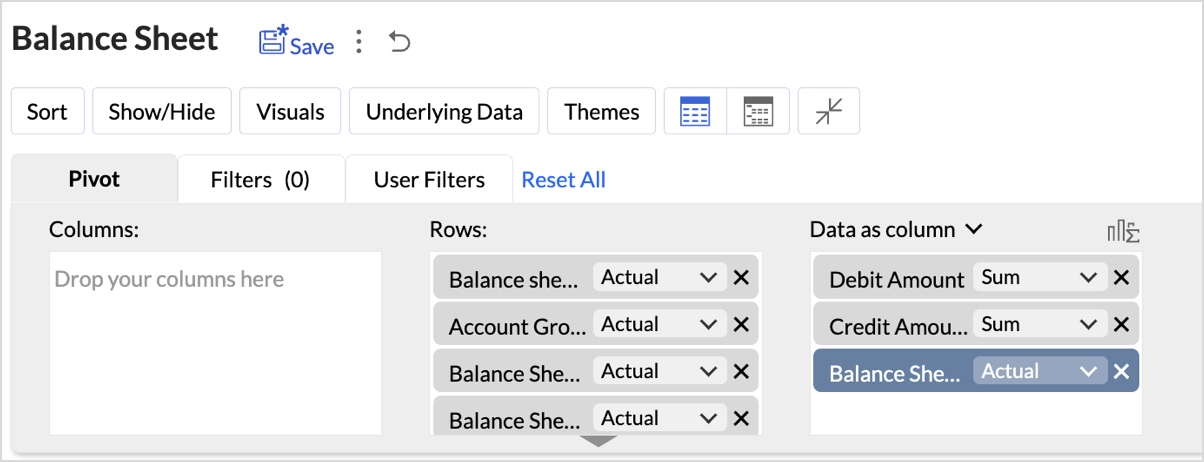
- Layout Adjustments:
- Navigate to Settings > Layout.
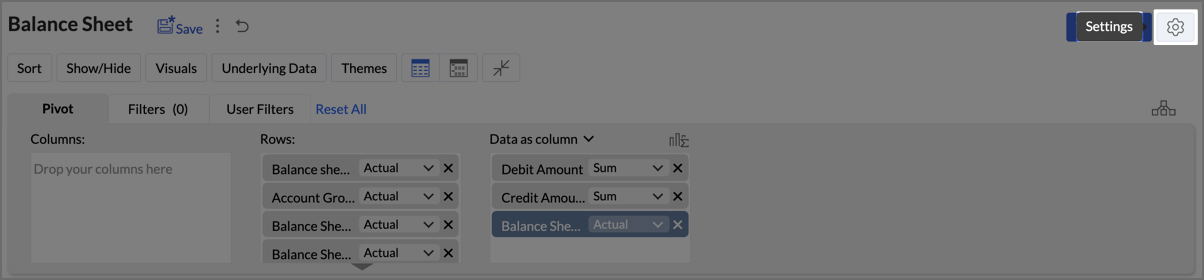
- Change the Layout to Compact.
- Check Increase Font Size for each higher group in Rows.
- Uncheck Show row numbers.
- Uncheck Show vertical lines between them.
- Set Column Width to Fit to Screen.
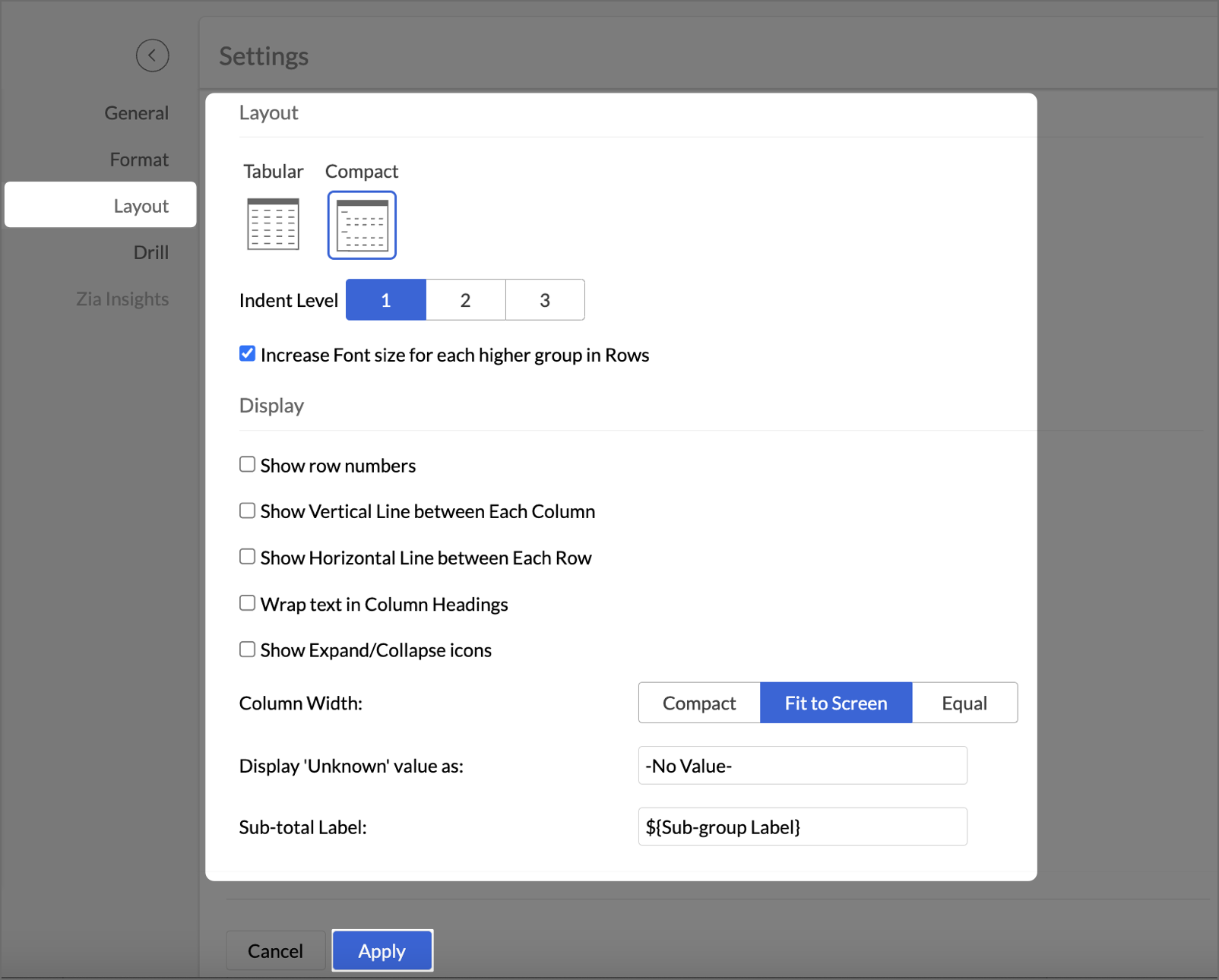
- After making layout adjustments, click Apply to finalize the formatting.
- Go to Visuals and select Data Bars With Data to improve the presentation of financial data, making it easier to interpret key insights visually.
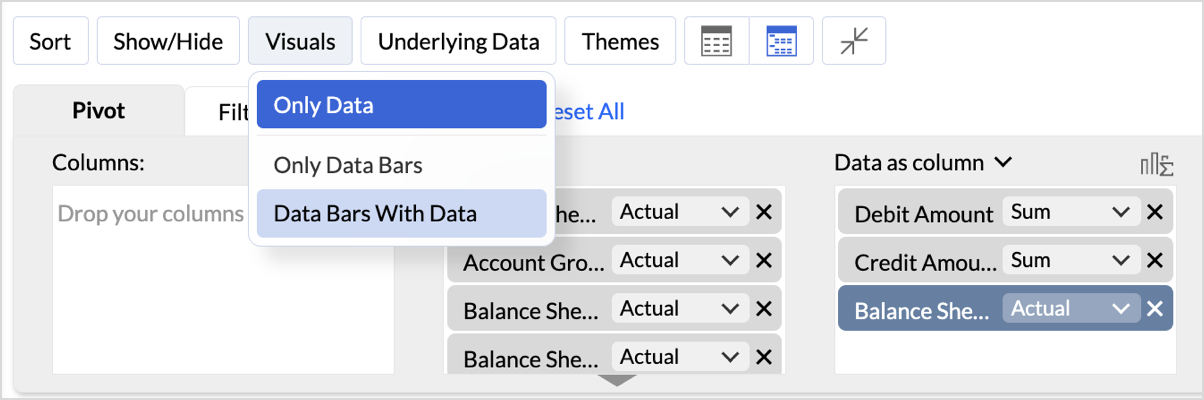
By following these steps, you will generate a clear and structured Balance Sheet that highlights your organization's assets, liabilities, and equity.
Key Features of the Balance Sheet Report
- Increased Font Size for Key Categories
Emphasizes important financial categories like Assets, Equity, and Liabilities, improving readability and focus. - Compact Layout
Ensures a clear, organized display of financial data, enabling efficient consumption of the report. - Line Removal for Clean Aesthetics
Removal of vertical and horizontal lines results in a cleaner visual presentation, improving the user experience. - Data Bars for Quick Insights
Visual data bars provide a quick snapshot of financial status, allowing users to identify key trends at a glance. - Timeline Filter for Flexibility
Filters allow users to view financial data across different periods, making it easier to analyze financial trends over time.
In Zoho Analytics, utilizing the Timeline Filter allows users to transform static financial data into a time-based, dynamic report. The formulas used in creating this filter enable detailed insights into financial performance over a selected period. Below, we explain the key aggregate formulas and how they enable users to achieve greater flexibility and customization, going beyond the typical app potential.
- Opening Balance Formulasum_if("Accrual Transactions"."Transaction Date" < ${system.timeline.date.from},if("Accounts"."Account Base Type" in ('Asset') OR ("Accounts"."Account Base Type" in ('Equity') and "Accounts"."Account Name" in ('Drawings')),"Accrual Transactions"."Debit - Credit","Accrual Transactions"."Credit - Debit"),0)
This formula calculates the Opening Balance for a selected period by summing transactions that occurred before the specified date (timeline.date.from).
This approach allows users to view the Opening Balance as of a given date, making it highly flexible for periods that differ across user's datasets.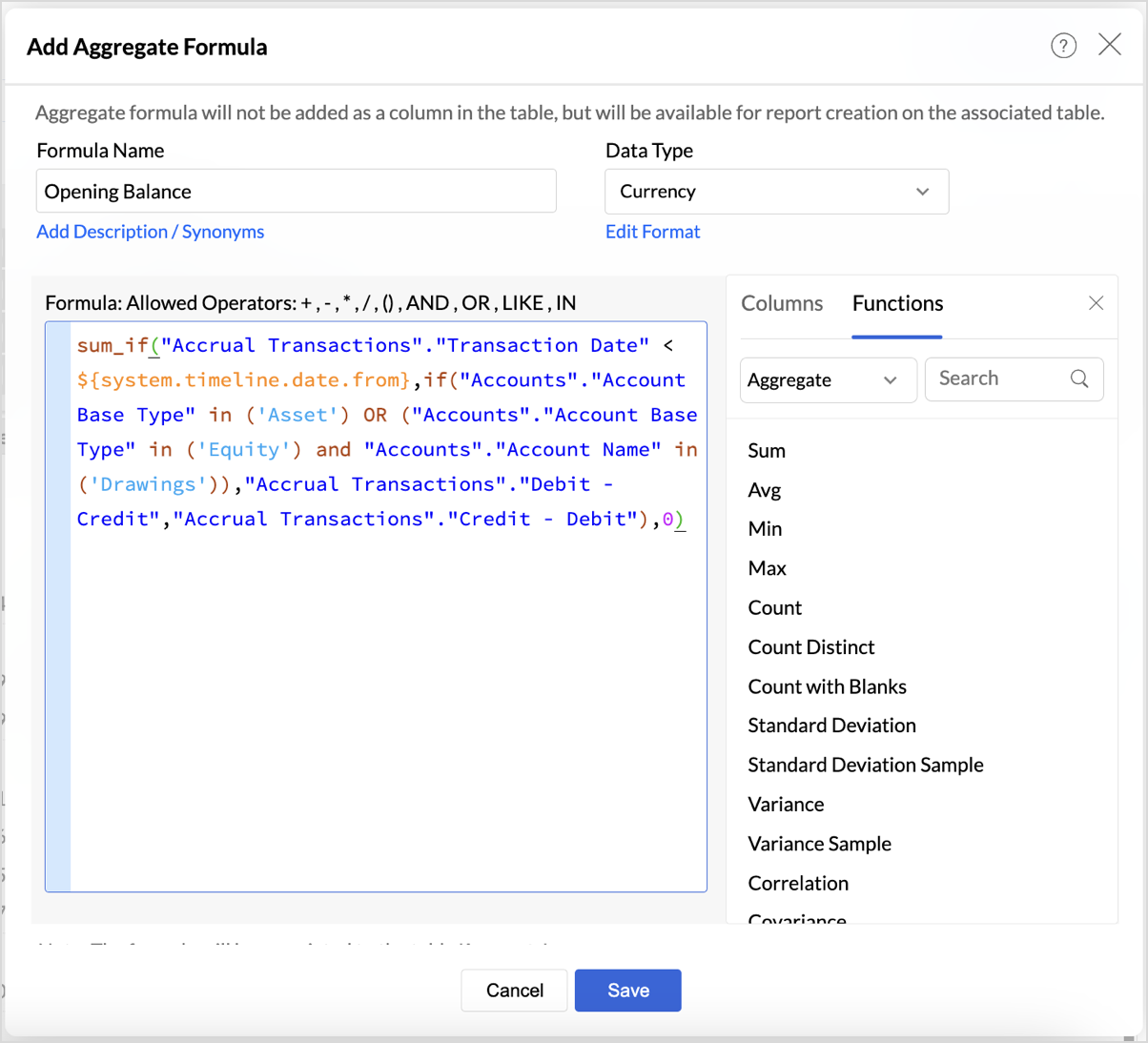
|
if("Accounts"."Account Base Type" in ('Asset') OR ("Accounts"."Account Base Type" in ('Equity') and "Accounts"."Account Name" in ('Drawings')),"Accrual Transactions"."Debit - Credit","Accrual Transactions"."Credit - Debit")
|
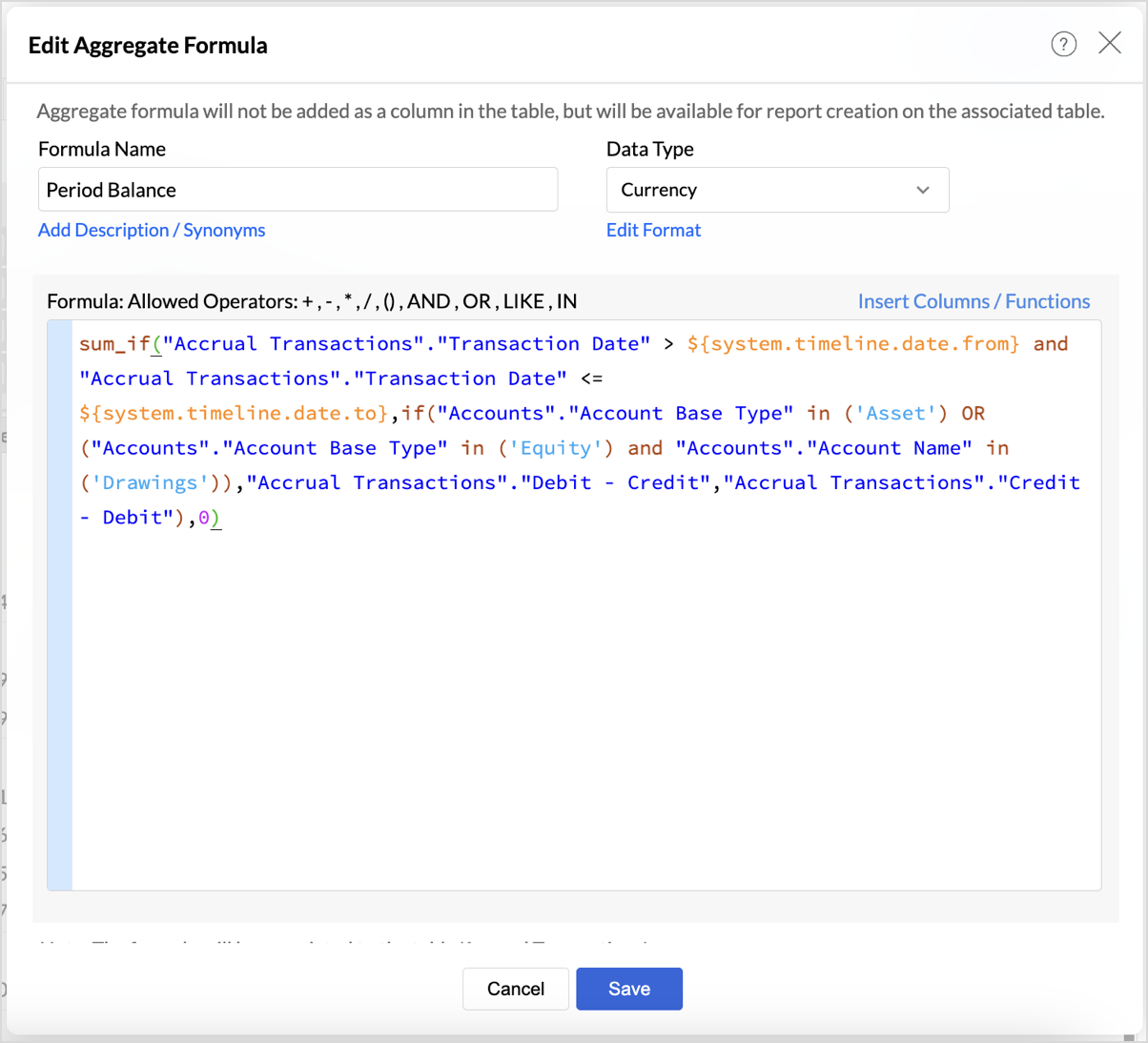
- Period Balance Formulasum_if("Accrual Transactions"."Transaction Date" > ${system.timeline.date.from} and "Accrual Transactions"."Transaction Date" <= ${system.timeline.date.to},if("Accounts"."Account Base Type" in ('Asset') OR ("Accounts"."Account Base Type" in ('Equity') and "Accounts"."Account Name" in ('Drawings')),"Accrual Transactions"."Debit - Credit","Accrual Transactions"."Credit - Debit"),0)
- Closing Balancesum_if("Accrual Transactions"."Transaction Date" <= ${system.timeline.date.to},if("Accounts"."Account Base Type" in ('Asset') OR ("Accounts"."Account Base Type" in ('Equity') and "Accounts"."Account Name" in ('Drawings')),"Accrual Transactions"."Debit - Credit","Accrual Transactions"."Credit - Debit"),0)
The Closing Balance formula calculates the final balance as of a selected date (timeline.date.to). It works by summing all transactions up until the specified date, following the same account type distinctions used in the previous formulas.
This formula is essential for determining the financial standing of an organization at the end of a reporting period, such as the end of a quarter or year.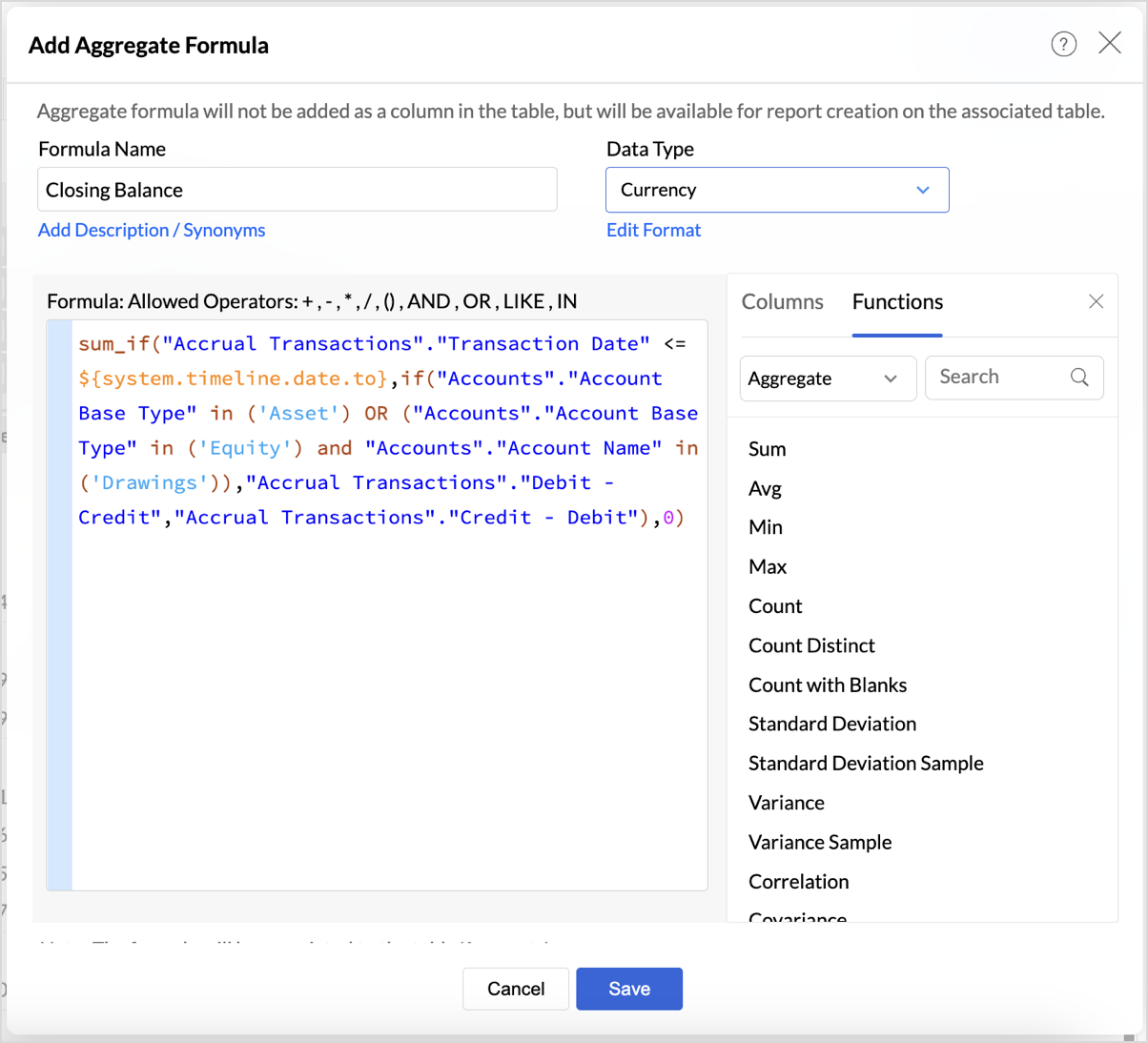
Follow the below steps to create opening and closing balances with timeline filters:
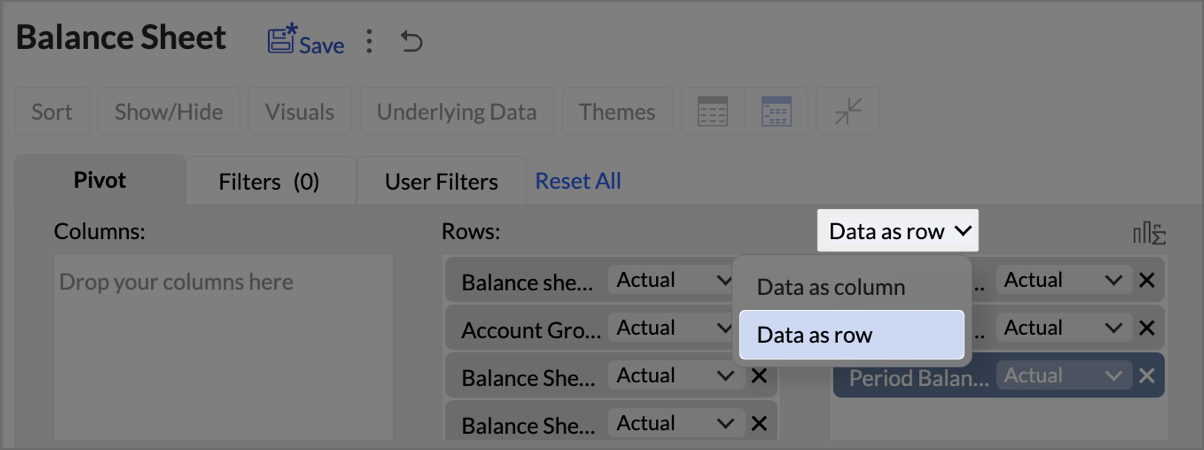
- Drag and drop the created aggregate formulas into the data shelf.
- Select Data as row from the drop-down.
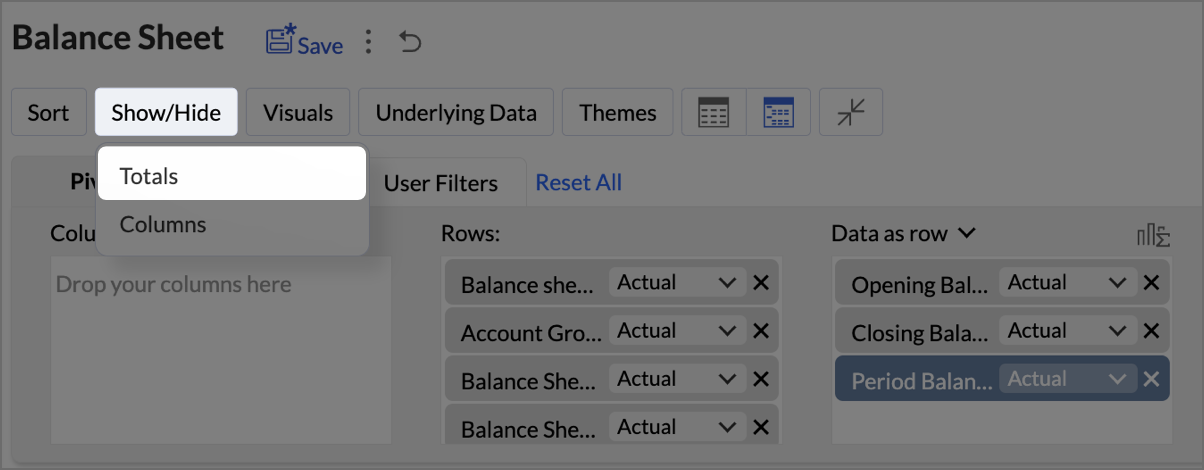
- Click on Show/Hide, then select Totals.
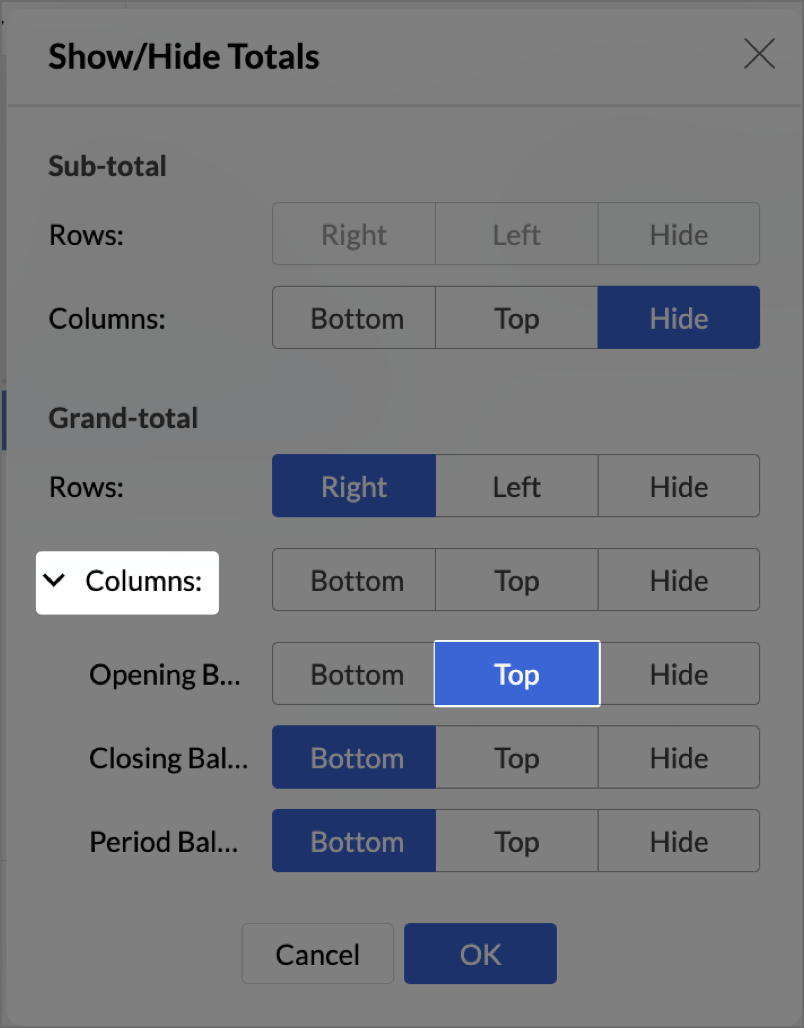
- Click on Columns drop-down, then set the Opening Balance as Top.
- Navigate to Settings > Layout and set Column Width as Equal. Provide Width value as required in px.
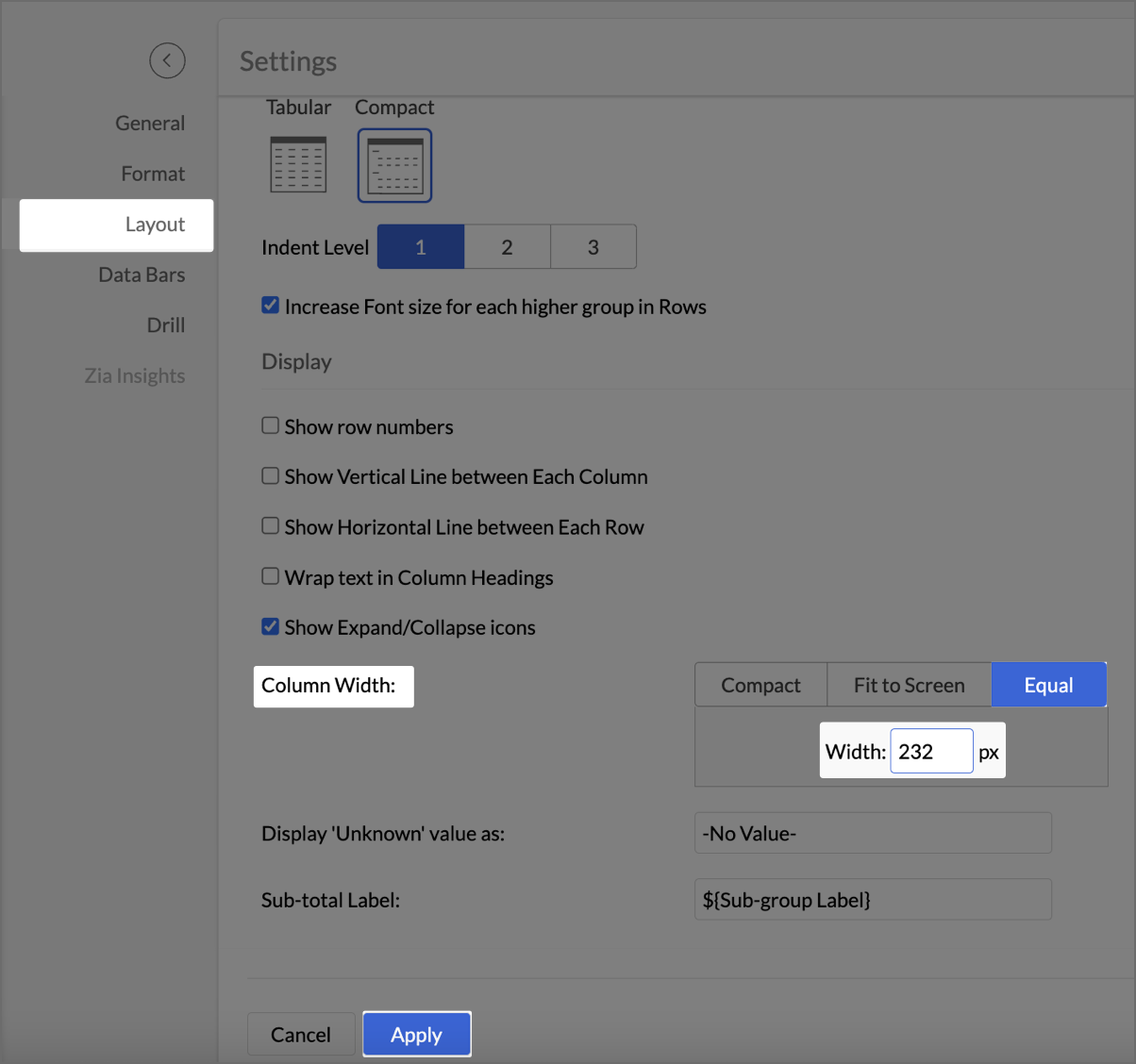
- Click Apply.
- Check Include Timeline Filter.
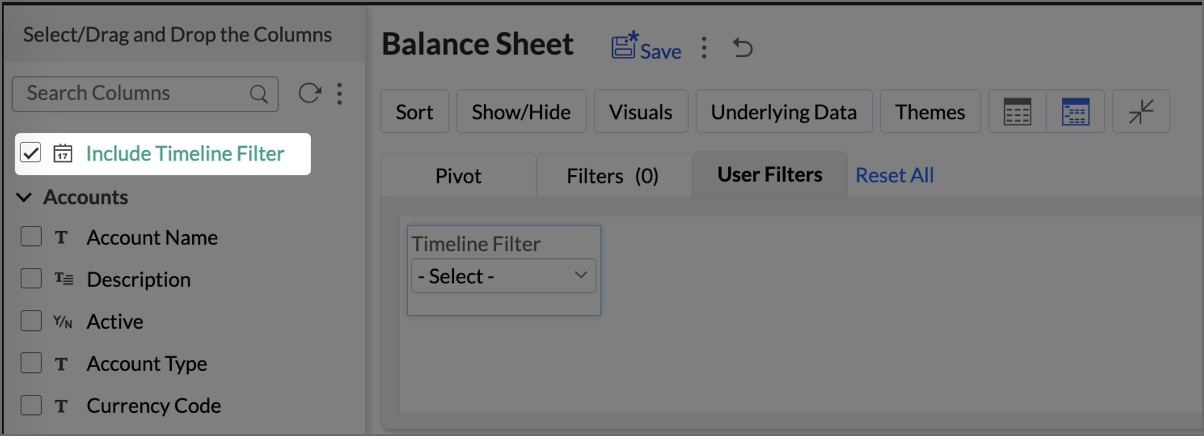
The Timeline Filter is now enabled, and users can apply time-based filters to their data.
Creating a Budget Statement
A Budget Statement helps compare actual financial performance against projected budgets, identifying variances and areas of concern. This visually enhanced report is designed to help businesses quickly assess deviations between expected and real expenditures, allowing for better budget management and financial decision-making.
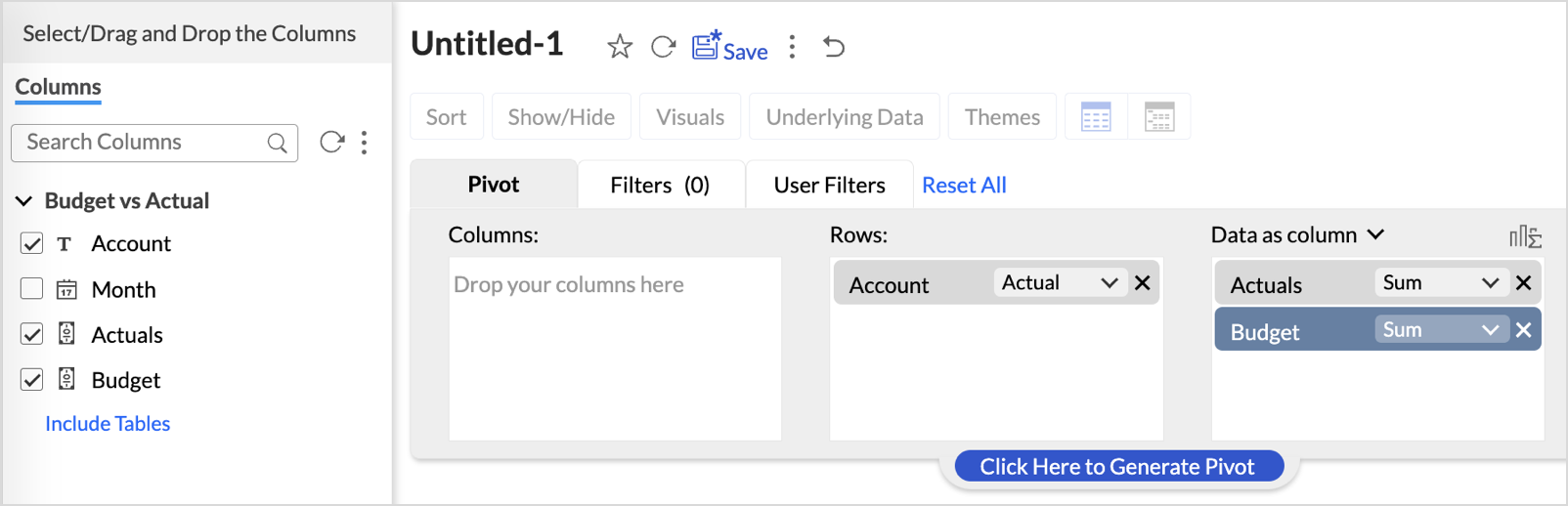
- Drag and drop Account into the Row shelf, and Actuals and Budget into the Data shelf from the Budget vs Actual table.
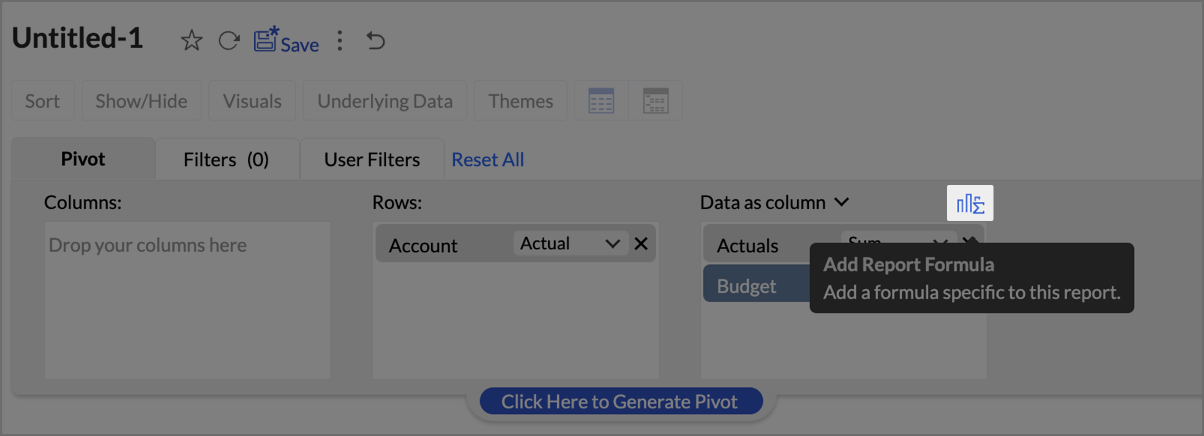
- Add Report Formula:
- Click Add Report Formula to create custom calculations.
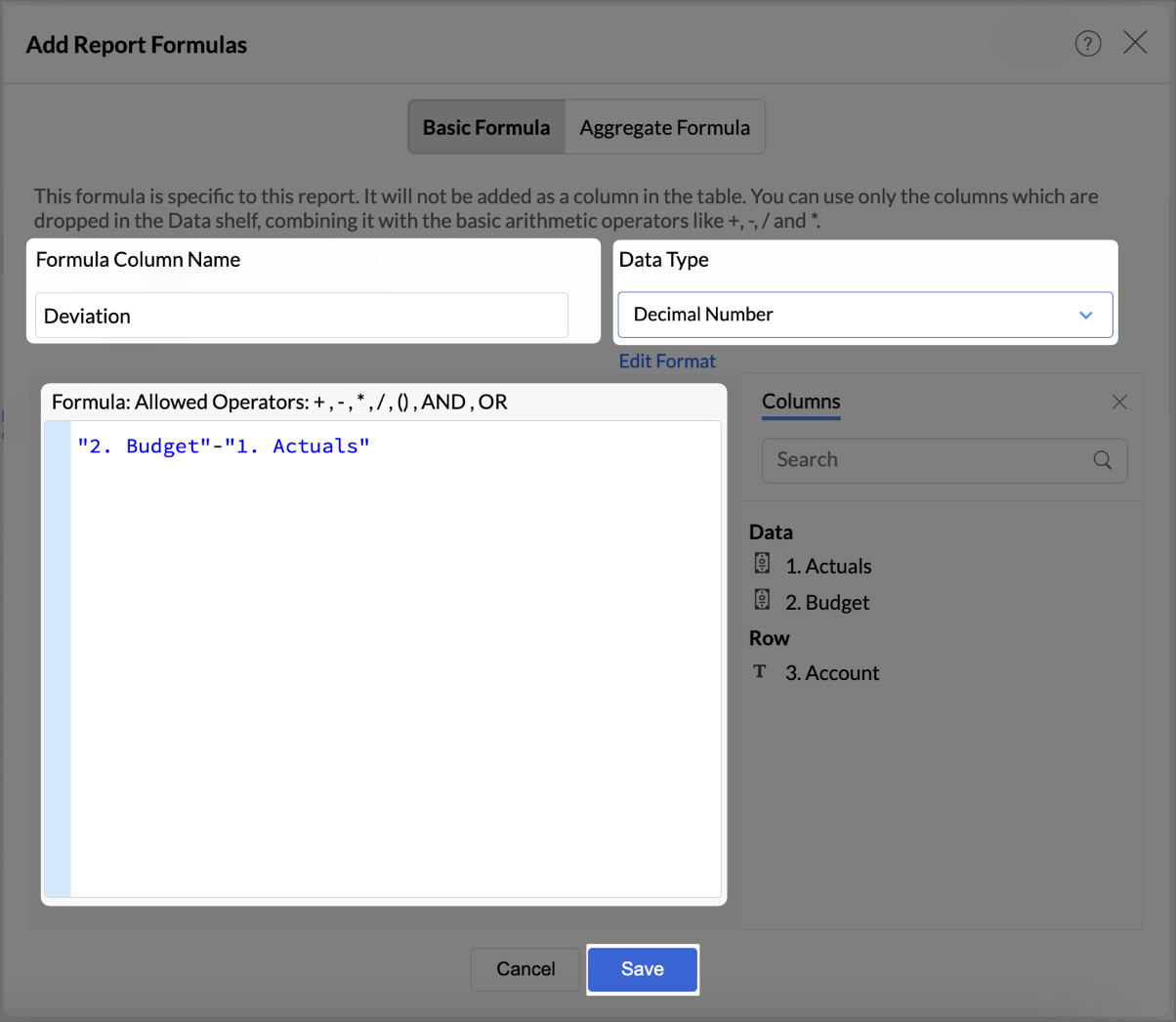
- Name the formula column appropriately (e.g., “Deviation”).
- Set Data Type as Decimal Number
- Create a formula to calculate the difference between actuals and budget as shown in the image.
- Click Save.
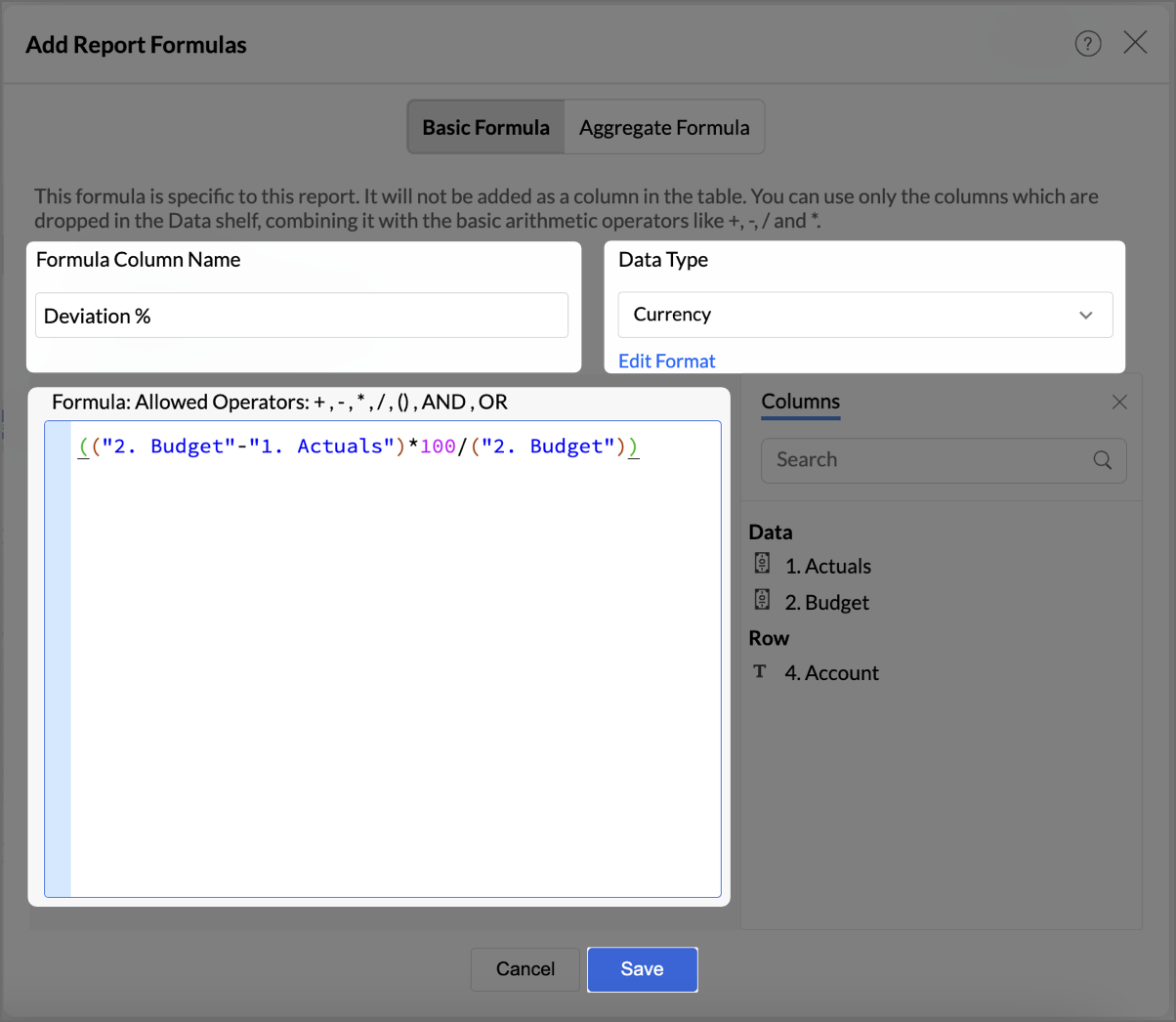
- By following the same steps mentioned above, create one more formula to calculate the percentage difference between actuals and budget as shown in the image.
- Click Save.
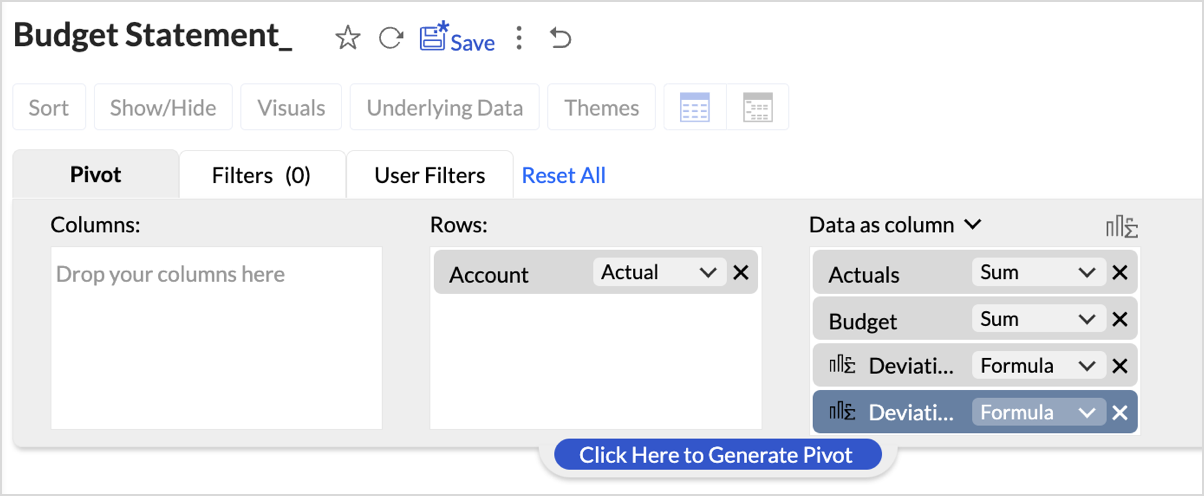
The created formulas will appear in your data shelf and columns, reflecting in the report. - Go to Visuals and choose Data Bars With Data for a more intuitive understanding of budget performance.
By following these steps, you will have a detailed Budget Statement that compares actual spending to the budget, highlighting deviations.
Report Structure and Visuals
- Account Breakdown
The report is organized by account categories, such as Bank Fees, Cost of Goods Sold, and more, showing both Budgeted and Actual amounts for each category. - Key Columns
The report includes the following key columns: - Total Budget - Displays the budget allocated for each account.
- Total Actuals - Shows the actual amount spent or earned for each account.
- Variance (Deviation) - Represents the difference between the budgeted amount and the actuals.
- Variance Percentage (Deviation %) - This column shows the percentage difference between the budgeted and actual amounts, highlighting under- or over-expenditure.
- Data Bars for Clarity
- Green Bars indicate favorable performance (within or under budget).
- Red Bars highlight overspending or budget deviations (e.g., Office Expenses or Rent).
Key Features of the Budget Statement Report
- Visual Representation of Deviations
Data bars visually indicate how spending aligns or deviates from the budget, enabling quick identification of problem areas. - Concise Overview of Financial Performance
The report provides a clear overview of actual versus budgeted performance, allowing decision-makers to assess financial health efficiently. - Enhanced Usability with Percent Deviations
Percentage-based deviation columns allow users to understand the scale of over- or under-performance relative to the budget, making it easy to identify areas that are significantly off track.
Creating Profit and Loss report
A Profit and Loss (P&L) report in Zoho Analytics helps businesses assess their revenue, expenses, and profitability over a specific period. By following these steps, you can create a detailed and visually engaging P&L report.
- Drag and drop Account base type, P&L Operating Profit Type, P&L Gross Type, Base type P&L, and Account Name into the Columns shelf from the Accounts table and Profit and Loss Balance into the Rows from Data shelf from the Accrual Transactions table.
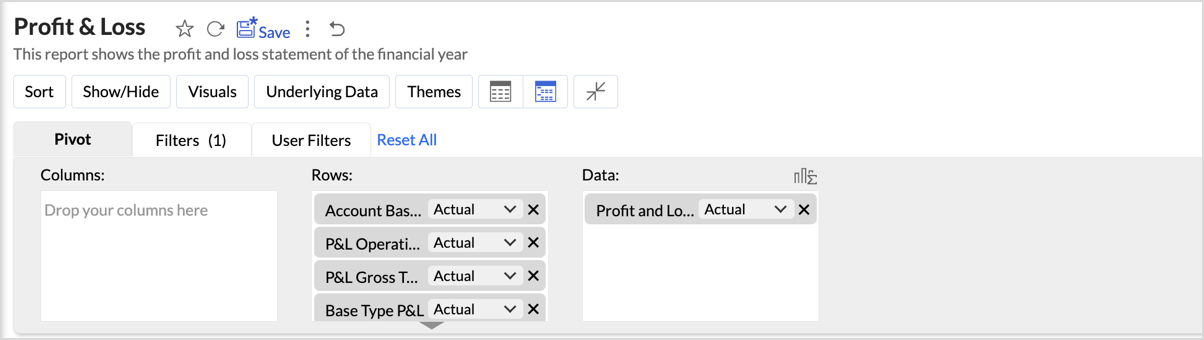
- Layout Adjustments:
- Navigate to Settings > Layout.
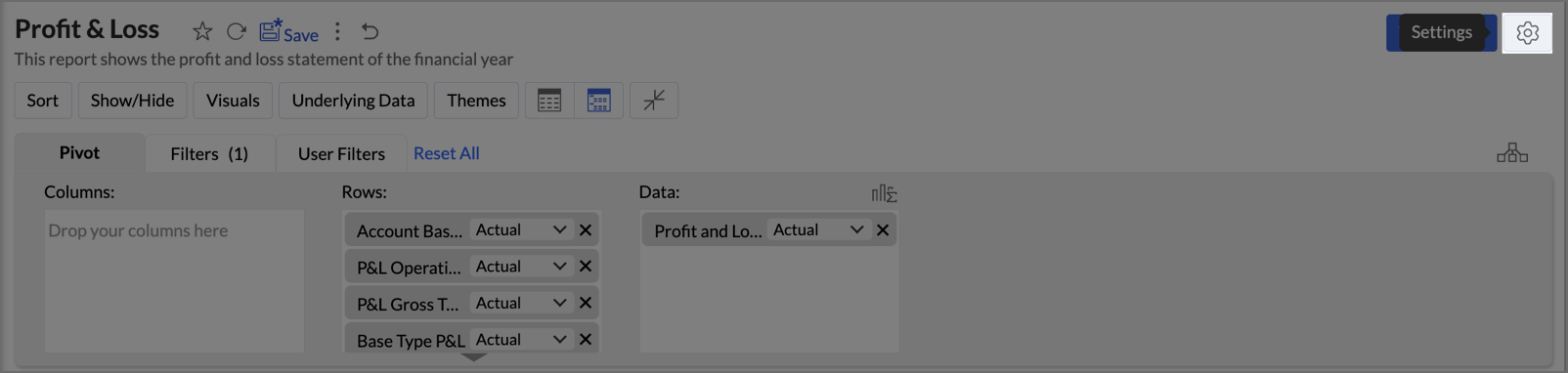
- Change the layout to Compact.
- Set Indent Level to 3.
- Check Increase Font Size for each higher group in Rows to make key categories more visible.
- Uncheck Show row numbers for a cleaner report.
- Uncheck Show Vertical Line between Each Column to streamline the visual presentation.
- Set Column Width to Equal and specify the width as required in px.
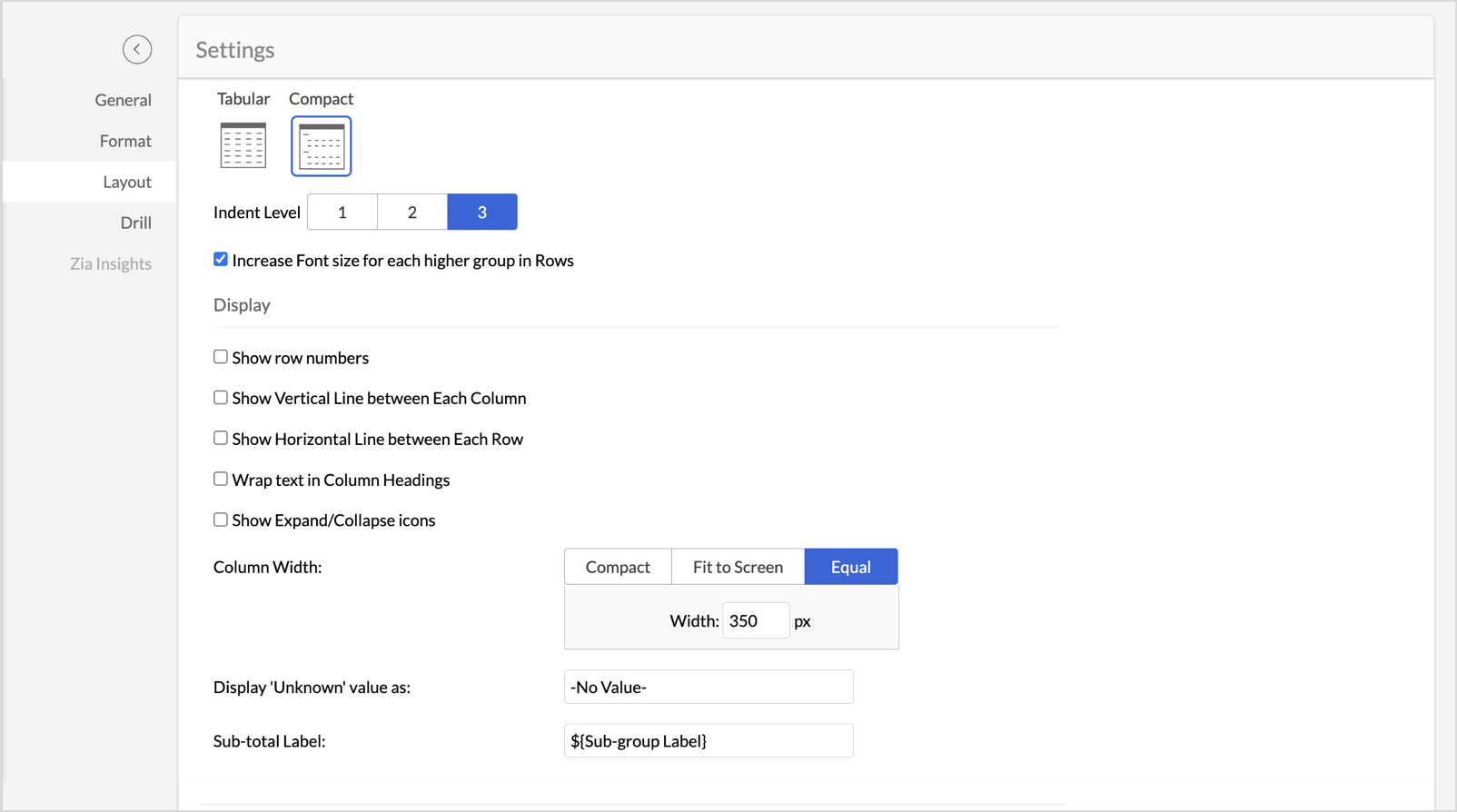
- Navigate to Settings > Layout.
- Once the layout adjustments are made, click Apply to lock in the formatting.
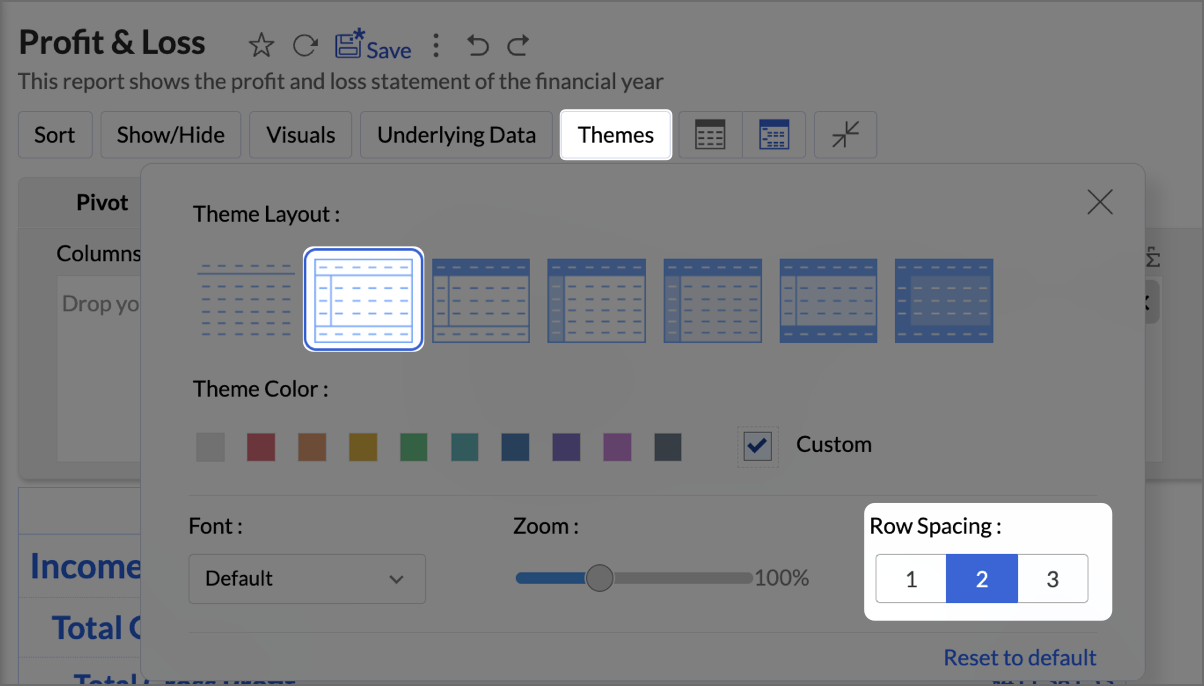
- Click Themes, and select the second theme. Set Row Spacing as 2.
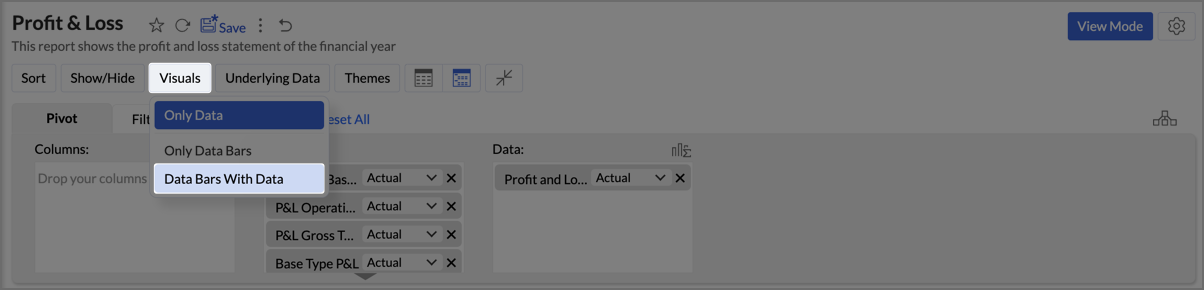
- Navigate to Visuals and select Data Bars With Data to provide a quick and clear visual representation.
By following the above steps, you will create aProfit and Loss report which provides a concise and structured view of your business’s financial performance, making it easy to track profitability over time and identify key financial trends.
Zoho Analytics provides an intuitive and customizable platform for generating comprehensive Balance Sheets, Budget Statements, and Profit & Loss reports. With its drag-and-drop functionality and powerful visual tools, Zoho Analytics transforms finance reporting into a data-driven process that improves decision-making, forecasting, and resource management.
Start leveraging Zoho Analytics today to create reports that provide actionable insights, helping your organization thrive financially!
Topic Participants
Pradeepkumar R
Storytelling BeanCounter - www.storytellingbeancounter.com
Inform
Pradeepkumar R
Sticky Posts
Tip of the Week - Spot Risky Sales with Conditional Formatting
In Zoho Analytics, small tweaks can lead to big insights. One such feature is Conditional formatting based on other columns, your key to instantly spotting where sales success is overshadowed by product returns. Our tip this week shows you how to apply
Recent Topics
Zobot to handle single choice menu when dynamic list content is more than 10 items
Whatsapp supports maximum of only 10 items for its single choice menu. When we need to show a dynamic list with content more than 10, this could be challenging. We essentially need to add a next and previous buton here in order to make it functional.Add the ability to Hide Pages in Page Rules
Hi, We have Field Rules to show and hide fields and we have page Rules, but we can't hide a page in Page Rules so it isn't completed before the previous page (And then have the Deny Rules to prevent submitting without both pages completed), we can onlyColumn letter from number
Hello, I am trying to select a cell and i have the column number. How do i do this or is there a way of getting the letter from the number? Thank youZoho One Spaces UI
Zoho One も UI が新しくなっていくようです。 Switch Space Overview https://help.zoho.com/portal/en/kb/one/spaces/spaces-ui/articles/swi#Overview Your new space for personalized business productivity https://www.zoho.com/blog/one/your-new-space-for-personalized-business-productivity.htmlZoho CRM NextGen UI
Zoho CRM の Everyone 画面の UI がまた変わるのですね。NextGen UI 更新日時が1ヶ月前で、Zoho Japan でもアナウンスされていたようですが、気が付きませんでした。 【Zoho CRM】Zoho CRM for EveryoneのUIアップデートのお知らせ https://support.zoho.co.jp/portal/ja/kb/articles/zoho-crm-zoho-crm-for-everyone-s-nextgen-ui-gets-an-upgradeView Answer Bot conversations?
We are trialing Zia and are experimenting with Answer Bot on our knowledge base. So far so good! Management asks me if it is possible to view Answer Bot conversations, the purpose being to look over its shoulder and confirm that it is working as desTrain Zia answer bot on only part of Knowledge Base?
We are trialing Zia answer bot and hope to use it on the knowledge base to help our users find the information they are looking for. I have found how to train Zia on the entirety of our knowledge base. But is there a way to train it on only certain categoriesSmarter holiday planning with yearly-specific Holiday Lists
Hello everyone! Managing holidays and business hours is now easier and more efficient. Holiday Lists now support holidays that fall on different dates every year, while business hours now supports more than one holiday list. This helps businesses manageTemporary Outage in Zoho Cliq Affecting US Users – July 23, 2025
We experienced a service disruption in Zoho Cliq that impacted core functionality for users in the US region. The issue occurred between Jul 23, 2025, 06:54:00 PM IST and 07:13:13 PM IST, lasting approximately 19 minutes. To restore service stability,Function #20: Custom calculation in item table of invoices
When you create an invoice in Zoho Books, the 'Amount' of a line item is typically calculated as the product of the "Quantity" and the "Rate" of the item. For instance, if an item has a sales rate of $50 and a quantity of 5 is sold, then the amount wouldWie veröffentliche ich ein PDF Datei?
Hallo! Wie veröffentliche ich PDF Datein ich habe ein PDF Datei und den sieht ihr im Upload ich möchte ihn veröffentlichen wie? Mit Freundlichen Grüßen, Herr Bahaa Addin ChkiridZoho NOTEBOOK: What are file size restrictions?
I understand that Zoho NOTEBOOK is a free product, and what it offers is great. But I'm wondering what the file size restrictions are. When I record an audio note in Zoho Notebook, what is the maximum length of recording time/audio file size? When I wish to upload MP4 video, what is the maximum video size I can upload per Zoho Notebook restriction? Moreover, does Zoho Notebook use its own storage structure, or can I upgrade my storage for Zoho Notebook to add larger file attachments, videos and audioZoho Campaigns: An Outstanding Email Marketing Tool
Introducing Zoho Campaigns! A product designed by Zoho, the Zoho Campaigns is made to create, deliver, and manage integrated email campaigns that can help in boosting the sales of a company and its customer base. Zoho Campaigns is actually an email marketingZoho Creator Developer Console | Improved Distribution and Lifecycle Management for apps
Hello everyone, We're excited to introduce new enhancements now in the Zoho Creator Developer Console. These updates strengthen private app distribution through licensing controls and extend environment support across all installed apps, helping teamsSync images with Shopify/Cart
Hello, sync images with shopify or other cart, it cuts out the double work of having to upload to shopify/cart and zoho. ThanksExternal User onboarding for zoho connect is not really intuitive.
So the external user is sent an invite, which has a button that directs them to login to zoho to view the invite, but if they don't have a zoho account, they cannot access that invite, which seems kinda silly, as there is not real way on for them to createHaving trouble fetching contents of Zoho Connect Feeds using the API, requesting alternative API documentation.
I'm trying to retrieve feed/post data from Zoho Connect using the API but facing challenges with the current documentation. What I've tried: OAuth authentication is working correctly (getting 200 OK responses) Tested multiple endpoints: /pulse/nativeapi/v2/feeds,How to upload file to Connect using API?
Hi there. I looked at the API documentation and nowhere did it mention how to use the API method to upload a file even though it is mentioned that it is possible to be done so. Please help.Select the task view on the board in the Zoho Connect iPhone app
Hello. How do I select the task view on the board in the Zoho Connect iPhone app? The Android app has this functionality.Auto tagging
Some of the articles I enter into Notebook get there when I enter them in Raindrop.io and IFTTT copies the articles in Notebook. When this happens the notes are tagged but instead of useful one word tags with topic the tag pertains to the specific articleWebDAV support
I need WebDAV support so that I can upload/download (and modify) documents from my local file system. Is anything planned in his direction?Constant refresh required in lots of Zoho tabs
"Hey Zoho, if you can sync my notification bell across 15 tabs using a BroadcastChannel, why can't you send a 'Data Refresh' signal the same way? We don't need a browser reload—we just need the data to sync without us clicking F5 like it's 1999." "PS:What's New in Zoho Billing | January 2026
Excited about the latest enhancements in Zoho Billing? Our January updates bring an intelligent AI assistant, smarter subscription management, and improved tax compliance, saving you time and reducing manual work. Dive into the details below to see howInserting images into Articles or Knowledgebase
Hi, Are there any plans in improving the Knowledgebase text editor so it would allow inserting images through Windows clipboard via copy-paste? Say for example I took a screenshot using the snipping tool in Windows and I'd like to insert that image toLinks not functioning in Zoho mail
Links that are included in emails I receive are not activating. Nothing at all happens when I click on them. I have researched FAQs and this forum to no avail. Any suggestions?Zoho Mail iOS app update: Manage folders and tags
Hello everyone! In the most recent version of the Zoho Mail iOS app, we have brought in support to manage(create, edit and delete) the folders and tags. Create folders Create Tags Edit/ Delete folder In addition to this, we have also brought in support[Important announcement] Zoho Writer will mandate DKIM configuration for automation users
Hi all, Effective Dec. 31, 2024, configuring DKIM for From addresses will be mandatory to send emails via Zoho Writer. DKIM configuration allows recipient email servers to identify your emails as valid and not spam. Emails sent from domains without DKIMShowing the map along with mileage expense
When you use the GPS to track mileage, it shows you the map of the actual path travelled. It would be very useful and practical to save that map with the mileage expense, so that when the report is created, it provides a map of each mileage expense associatedLink Purchase Order to Deal
Zoho Books directly syncs with contacts, vendors and products in Zoho CRM including field mapping. Is there any way to associate vendor purchase orders with deals, so that we can calculate our profit margin for each deal with connected sales invoicesExtend the Image Choice Field
Hi, The New Yes/No field is great for what it does, and the Image Choice Field is good but could be better with some functions from the Yes/No field. Take an example, rather than just Yes/No you want Yes/No/Maybe (Or more than 3 choices), but unlike theZoho Desk: Macro to assign Ticket to self
Hello, We are using macros in Zoho Desk to set some fields and send a response. I would also like to assign the ticket to myself (or whoever applies the macro). I can only set a fixed agent in the macro, so I would have to create one for every agent.Turn off Knowlege Base Follow options and Follower lists
Is there a way to hide or turn off the option in the Knowledge Base for users to follow specific departments/categories/sections/articles? If not, is there a way to turn off the public list of followers for each of those things? Otherwise, customer namesNew Feature: Audit Log in Zoho Bookings
Greetings from the Zoho Bookings team! We’re excited to introduce Audit Log, a new feature designed to help you track all key actions related to your appointments. With Audit Log, you can maintain transparency, strengthen security, and ensure accountability.Automated Task reminder
First question: If a task does not have a reminder set, will it still send an email notification that the task is due today? If not, how can I set up an automated reminder to send the task owner an email that it is due on a certain date?Zoho Support - contract notifications
Hi, I have a few questions about using Zoho support. Is there a way to add custom contract notifications like (90 days before expiry send notification e-mail to agent and customer, then another 60 days before expiry and another 30 days.). And is it possibleKaizen #230 - Smart Discount-Based Quote Approvals Using CRM Functions and Approval Process
Hello everyone! Welcome back to the Kaizen series! Discount approvals are a standard part of sales governance. Most organizations need something like this: Discount % Required Action < 10% Auto-approve 10–19.99% Sales Manager approval ≥ 20% VP Sales approvalHow to create a new Batch and update Stock via Inventory?
Hi everyone, We are building an automation where a user enters batch details (Batch Number, Mfg Date, Expiry, and Quantity) into a Custom Module. I need this to trigger an API call to Zoho Inventory to: Create the new batch for the item. Increase theOAuth2 Scope Error - Incorrectly defaulting to CRM instead of Analytics.
Hello Zoho Team, I am trying to connect n8n to Zoho Analytics API V2 for a simple automation project. Despite using the correct Analytics-specific scopes, my OAuth handshake is failing with a CRM-related error. The Problem: The authorization screen shows:Archive Option in Conversation View
Hello, I have a suggestion\request to add an "Archive Thread" button in conversation view of Zoho Mail. The best suggestion I have is to put an "Archive Thread" button next to the "Label Entire Thread" button in conversation view. Most users don't justIs it possible to create a meeting in Zoho Crm which automatically creates a Google Meet link?
We are using Google's own "Zoho CRM for Google" integration and also Zoho's "Google Apps Sync" tools, but none of them provide us with the ability to create a meeting in Zoho CRM that then adds a Google Meet link into the meeting. Is this something thatNext Page