Function 58: Custom calculation in item table of invoices (2 fields)

Hello everyone, and welcome back to our series!
In Zoho Books, the Item Amount in invoices is calculated by multiplying the Quantity and Rate fields. Previously, we shared a function to include a custom field in this calculation. Today, we are taking it a step further to make it even more versatile for various business needs. Instead of just one custom field, you can include two custom fields to determine the Item Amount.
Item Amount = Custom Field 1 × Custom Field 2 × Rate × Quantity
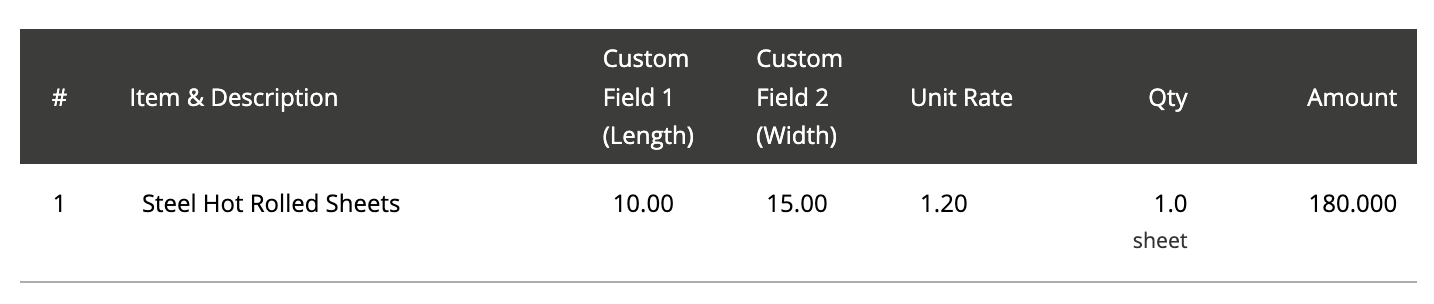
Consider Mr. John Hector, who runs a steel production plant. He processes orders for steel sheets according to their dimensions. For accurate billing, he can utilize today's function. When creating the invoice, John can enter the length and width of each steel sheet into the custom fields and specify the number of sheets ordered, and the rate per square foot in the default fields. The function will automatically calculate the Item Amount using this formula:
Item Amount = Length × Width × Quantity × Rate
Prerequisites:
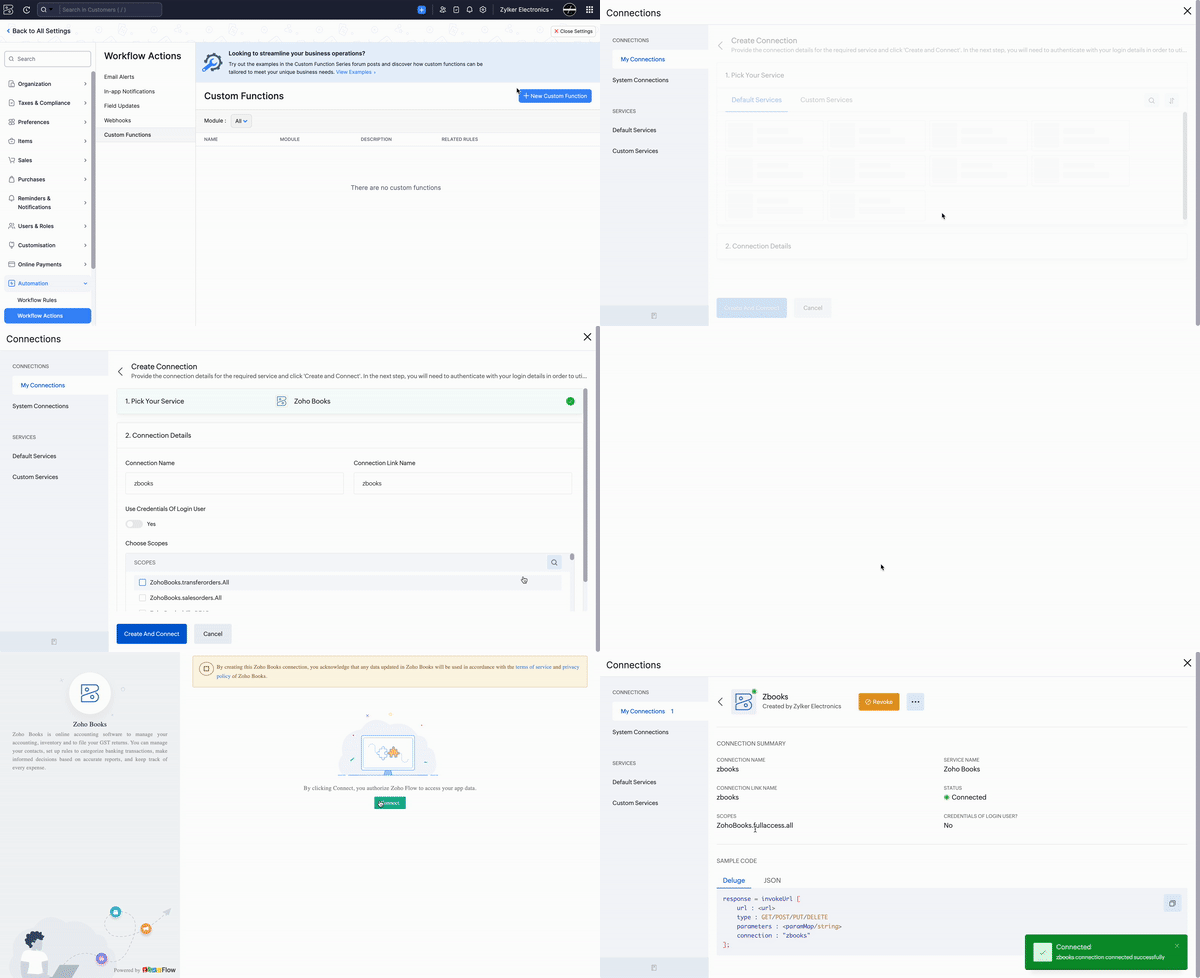
1. Create a Connection named "zbooks" to successfully execute the function. You can watch the GIF attached below to know how to create the connection.
2. Create the third (Length) and fourth (Width) variables as item-level custom fields (Decimal type) to be displayed in the sales transactions.
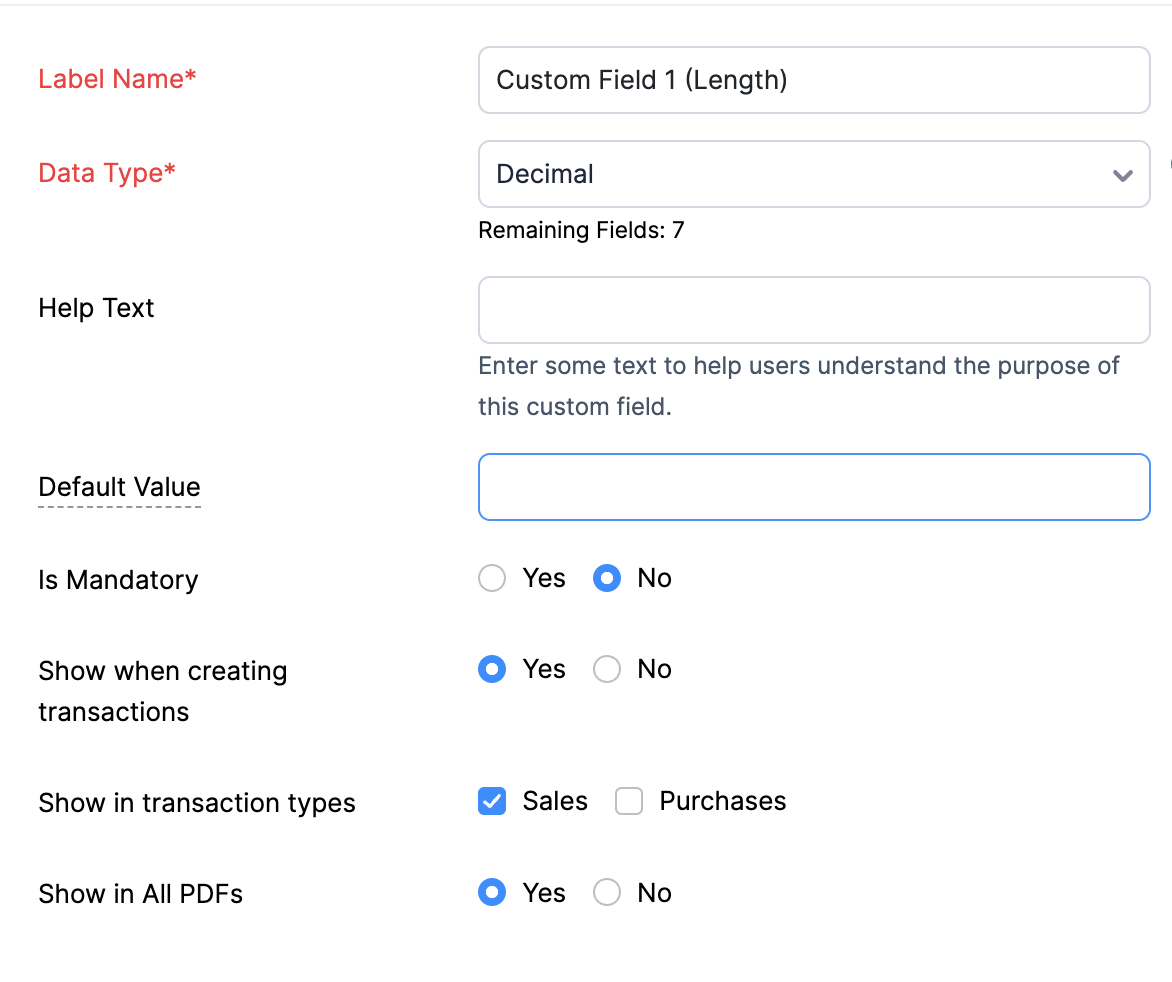
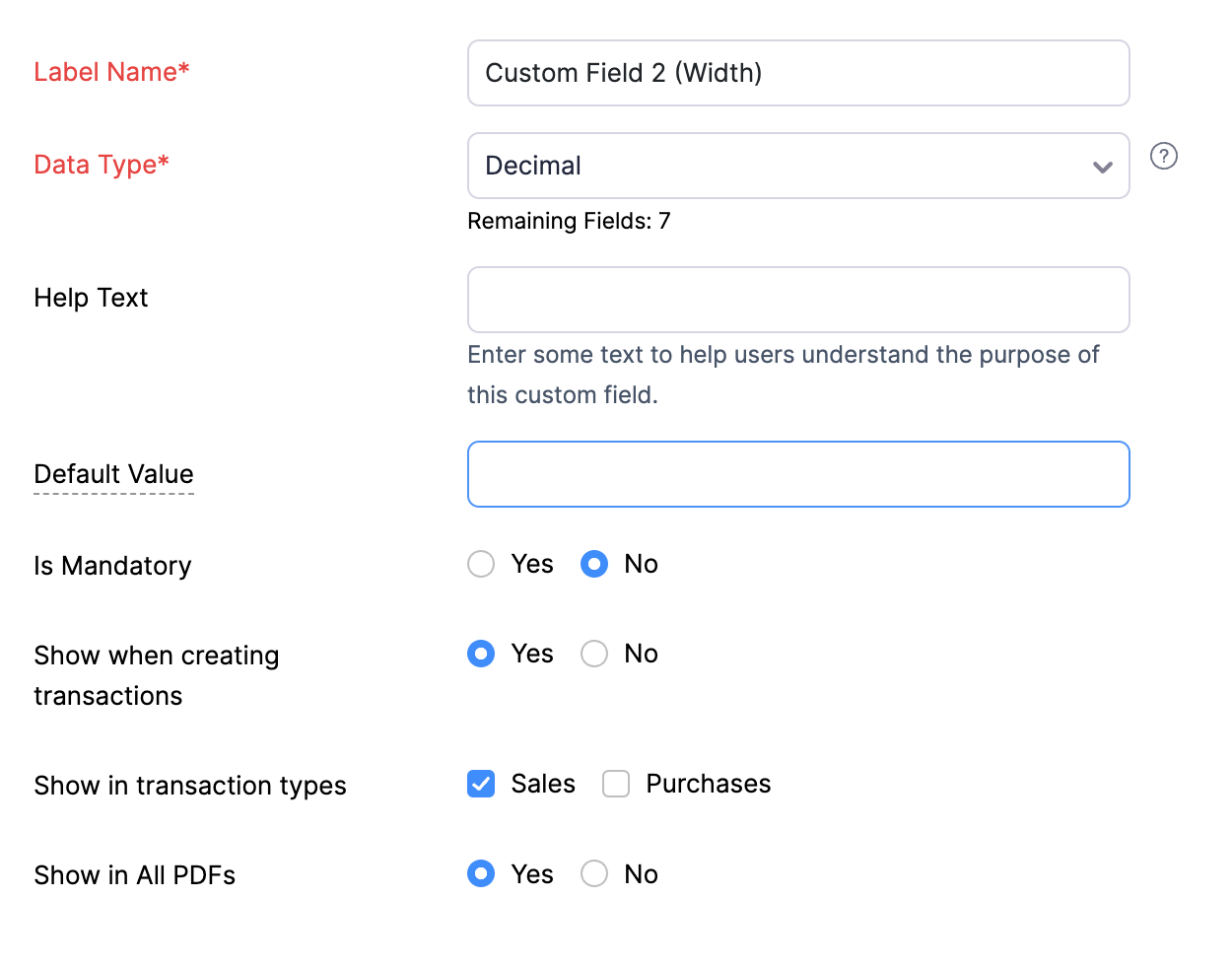
2. Create the third (Length) and fourth (Width) variables as item-level custom fields (Decimal type) to be displayed in the sales transactions.
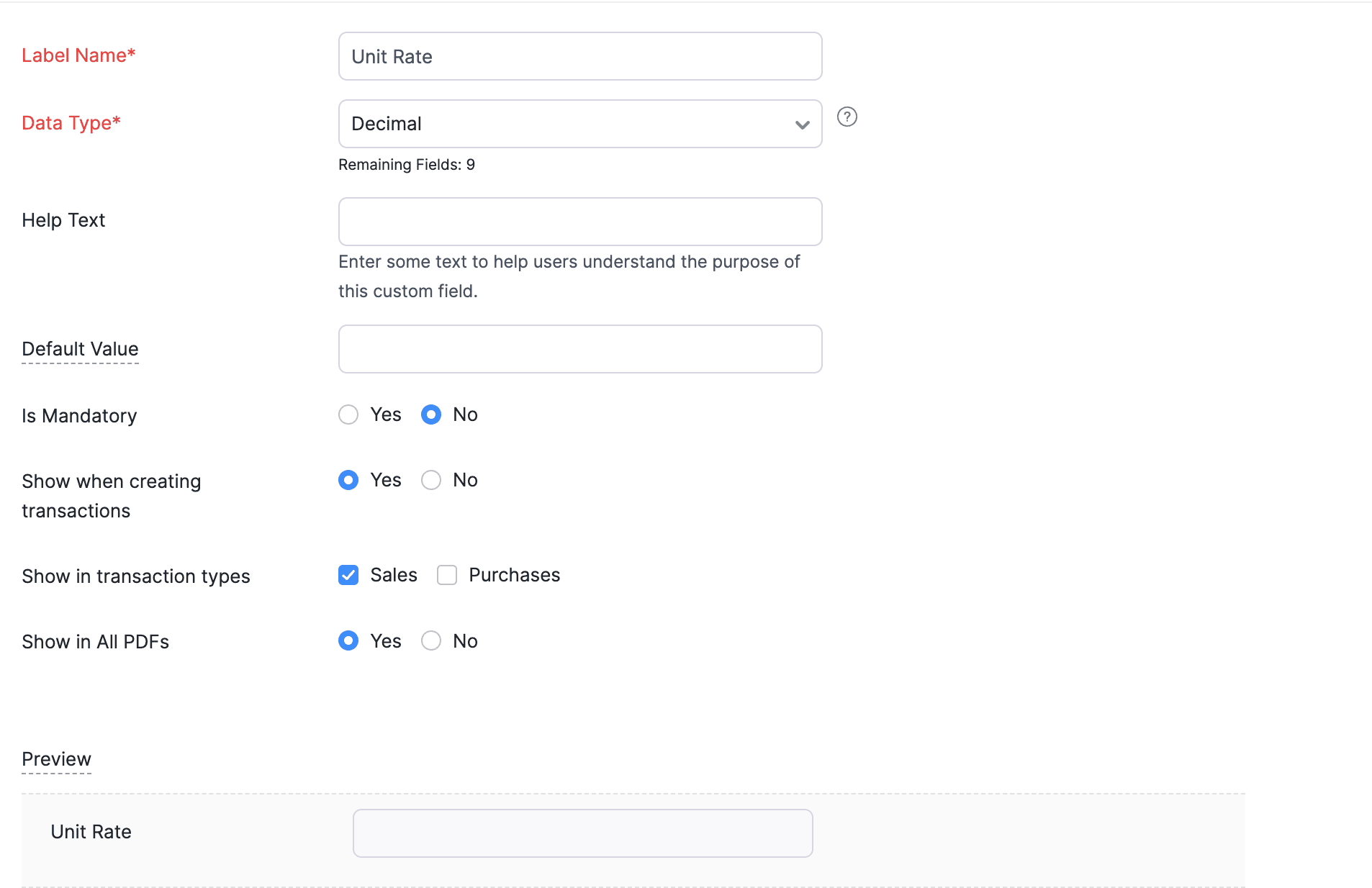
3. Similarly, create another custom field called " Unit Rate" to be displayed in the item table. The purpose of this custom field is to store the original sales rate of the line item.
Navigate to Settings -> Automation -> Workflow Actions -> Custom Functions -> +New Custom Function -> Add the function code from this GitHub link -> Save.
Workflow Rule:
Go to Settings -> Automation -> Workflow Rules -> +New Workflow Rule and set up the workflow rule as shown below:-
Custom Function:
Navigate to Settings -> Automation -> Workflow Actions -> Custom Functions -> +New Custom Function -> Add the function code from this GitHub link -> Save.
Workflow Rule:
Go to Settings -> Automation -> Workflow Rules -> +New Workflow Rule and set up the workflow rule as shown below:-
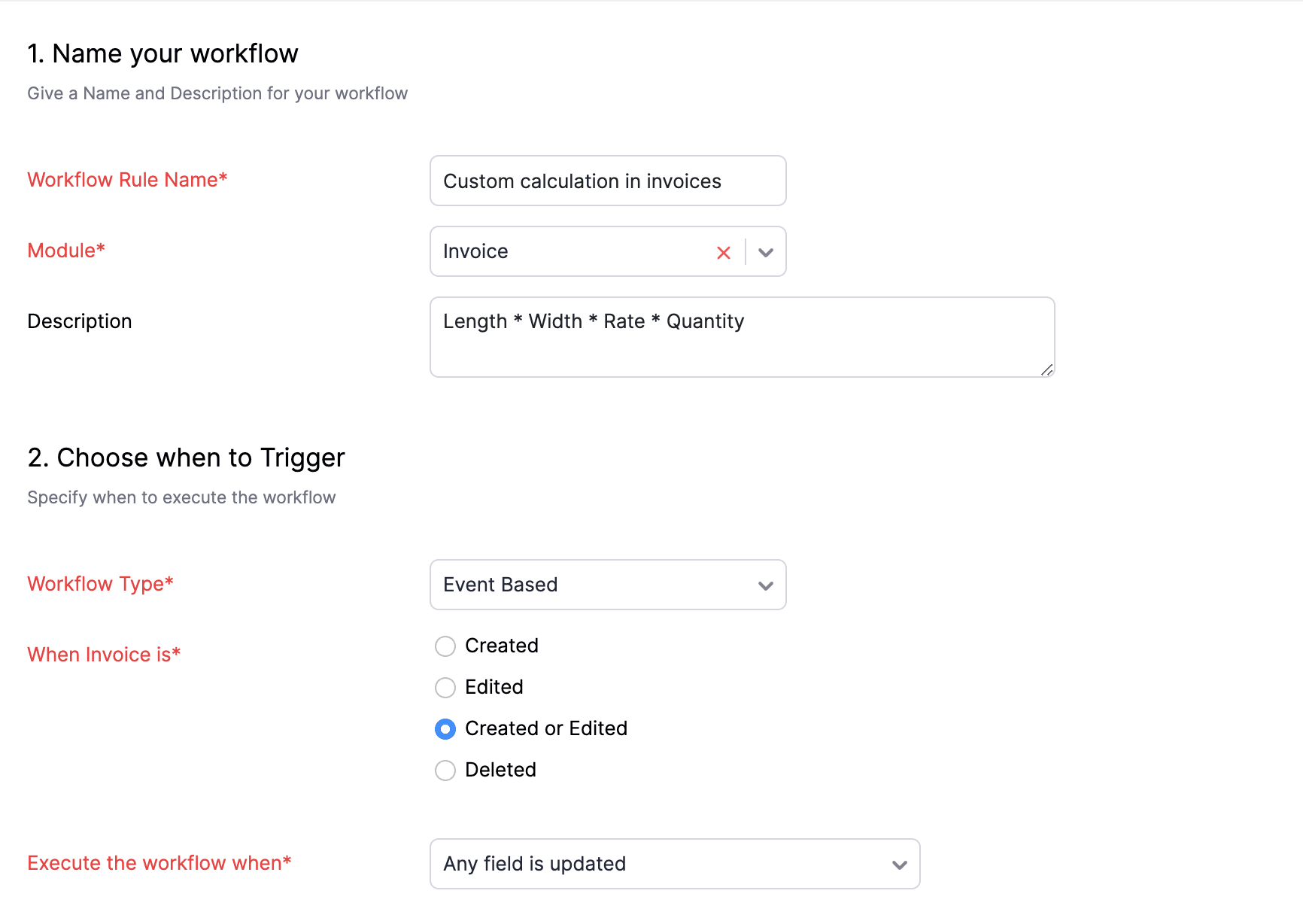
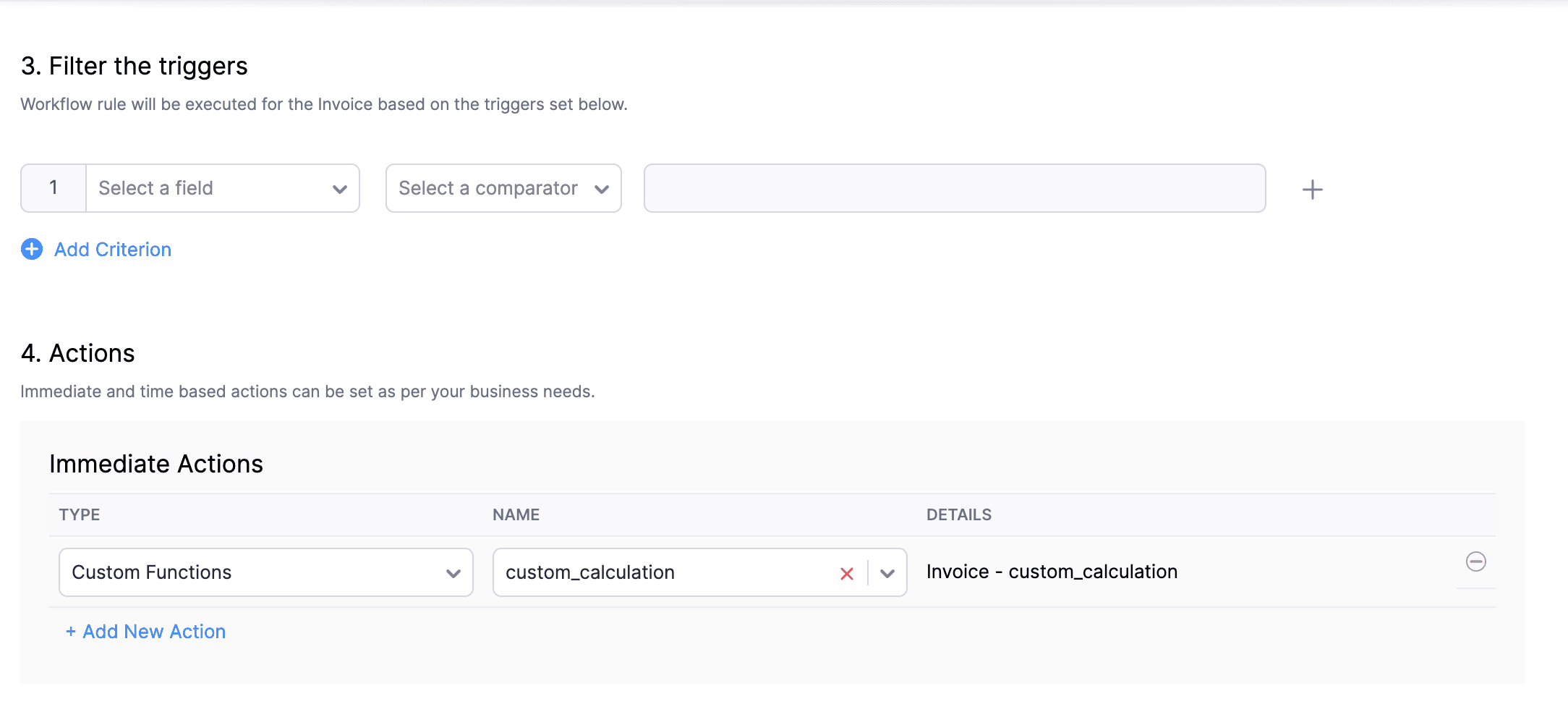
In the final step of this workflow rule, associate the custom function you created and then hit Save.
Here's how the function will work:
The custom function will be executed once the invoice is saved. Initially, it copies the original sales rate to the Unit Rate (Custom) field. Then, it multiplies Length × Width × Unit Rate and populates the result in the Rate (Default) field. Following this, Zoho Books calculates Rate (Default field) × Quantity and fills the result in the Amount field.
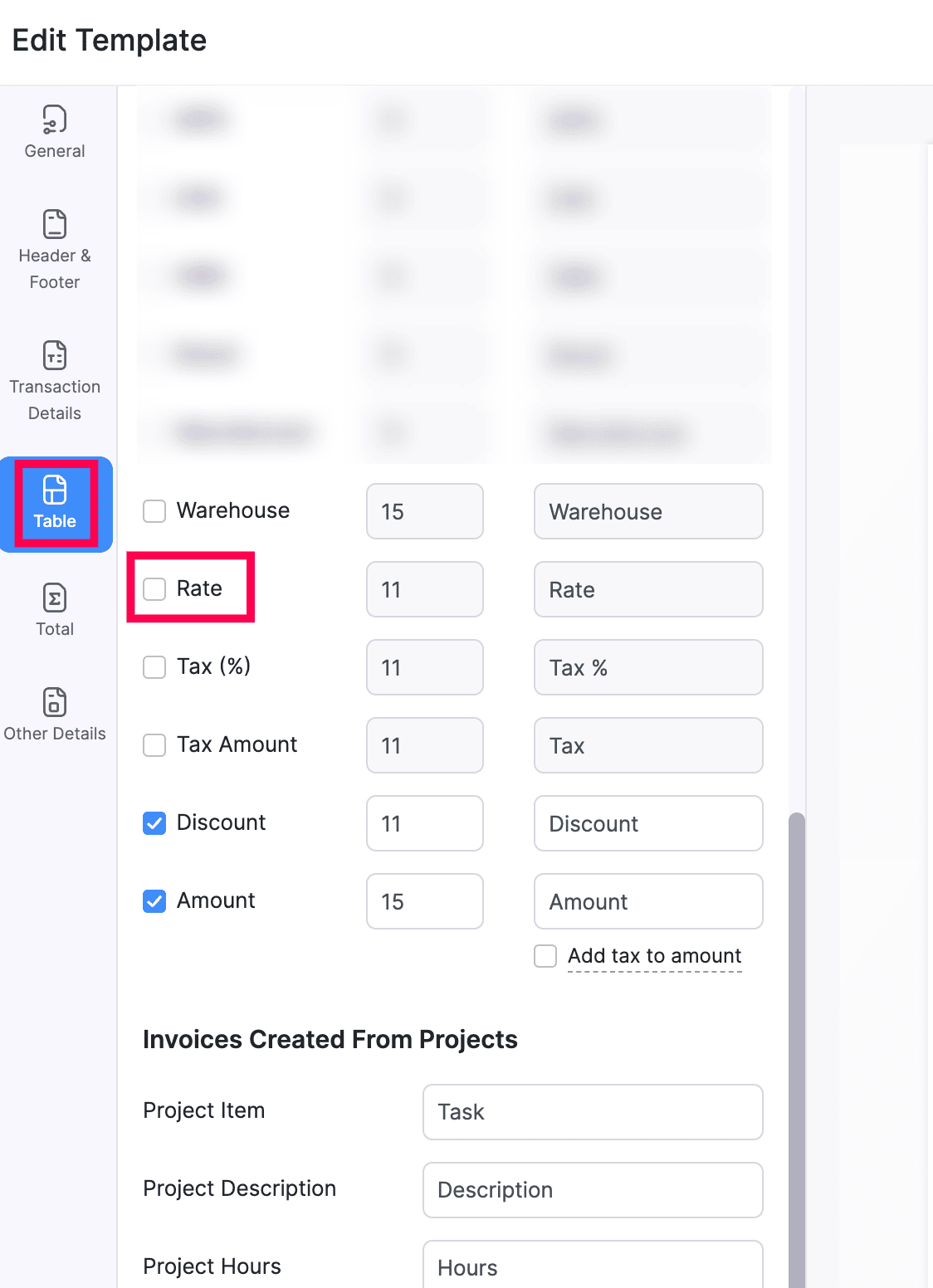
Note: If you wish to hide the "Rate" - default field at the template level, go to Settings > Customisation > PDF Templates > Invoices > Edit > Table > Disable the checkbox for Rate field > Save. Now, the Custom Field 1 (Length), Custom Field 2 (Width), Unit Rate (Custom Field), Quantity and the Amount field will be displayed on the invoices.
If you have to incorporate two extra values into your Item Amount calculation, this function is perfect for you. For further customization or assistance, please reach out to our Support team at support[at]zohobooks[dot]com. We're here to help!
Regards,
Shireen Farhana
Zoho Cares
Topic Participants
Shireen Farhana
YABS
Geek
Naveen Promoth D
L.zahr
Sticky Posts
[Webinar] Understanding the New Invoice Management Systems
Join industry expert CA Pritam Mahure as he discusses the importance of the new Invoice Management System (IMS) and its impact on taxpayers. Topics Covered: - Concept of IMS and pre-requisites - Applicability and Restrictions on Invoices/Records for IMSZoho Books Roadshows are back in the UAE!
Hello there, Business owners and accounting professionals of the UAE, we’re coming to your cities! FTA accredited Zoho Books is now officially one of the Digital Tax Integrators in the UAE. With the newly launched direct VAT filing capabilities, we'reZoho Books will discontinue support for older browser versions soon
Hello users, Starting from May 15, 2024, Zoho Books will no longer support the following browser versions: Browsers Version Restrictions Firefox Browser Versions older than 100 Google Chrome Versions older than 100 Microsoft Edge Versions older than 100Latest Updates of the 53rd GST Council Meeting & Its Business Implications
Join industry expert CA Venugopal Gella as he discusses the importance of 53rd GST Council Meeting, the latest notifications and changes introduced by the Finance Act 2024. Register Now: https://zoho.to/GST_WebinarBest practices for financial year-end closing with Zoho Books | Free Webinar
Ready to close your year-end finances like a pro? Join our free webinar and learn how Zoho Books helps you maintain clean accounts, carry forward balances, and get geared up for the new financial year. Register now - https://zoho.to/9f1
Recent Topics
Filter Based API request in Zoho Books using POSTMAN
How do I GET only specified CONTACTS based on created time or modified time in Zoho Books using POSTMAN. In the api documentation, it is written we can apply filters but I need a sample request.URL validation
We use an internal intranet site which has a short DNS name which Zoho CRM will not accept. When attempting to update the field it says "Please enter a valid URL". The URL I am trying to set is http://intranet/pm/ Our intranet is not currently setup with a full DNS name and given the amount of links using the shortname probably isn't a feasible change for us.Has anyone been experiencing slow issues?
Dear all, I just want to ask if anyone has been experiencing slow issues with Zoho Creator in the past two weeks? I worked with the ISP to improve network quality by changing routes and upgrading bandwidth, but nothing changed. I am in Vietnam.Zoho Projects Roadshows 2025 - USA
Dear Users, After an amazing response to our roadshows in 2024, we are excited to be back for the second year in a row! Join our team of experts as they walk you through the most-used features in Zoho Projects, explore powerful automation capabilities,Billing Management: #6 Usage Billing in SaaS
Imagine a customer shuffling across multiple subscriptions, a streaming service, a music app, cloud storage, and a design tool. Each one charges a flat monthly fee, regardless of how much or how little they use. Some months, the customer barely opensIs there anyone who has been experiencing issues regarding the Zoho Creator Certification Website in the past 2 weeks?
Dear all , I just wanted to ask is there anyone who was planning on taking the Zoho Creator Developer Certification Test in the past 2 weeks and have been facing errors stating that the website is under maintennance and also not allowed to access theDirectly Edit, Filter, and Sort Subforms on the Details Page
Hello everyone, As you know, subforms allow you to associate multiple line items with a single record, greatly enhancing your data organization. For example, a sales order subform neatly lists all products, their quantities, amounts, and other relevantAllow syncing Activities from other applications
Marketing Automation could be a much more powerful platform if you were able to sync activities into the platform (e.g. purchase, donation, etc) outside of a user doing something on your website. I'd love it if you could sync Custom CRM Modules as activities,Global Sets for Multi-Select pick lists
When is this feature coming to Zoho CRM? It would be very useful now we have got used to having it for the normal pick lists.Integración Books para cumplir la ley Crea y Crece y Ley Antifraude (VeriFactu)
Hola: En principio, en julio de 2025, entra en vigor la ley Crea y Crece y Ley Antifraude (VeriFactu). ¿Sabéis si Zoho va a cumplir con la ley para cumplir con la facturación electrónica conectada a Hacienda? GraciasAsk the Experts #1
Hello everyone! It’s time to transform how you manage projects. Define the processes. Automate the tasks. Streamline the workflows. Let us dive into automation in Zoho Projects — from configuring workflows and custom functions to building triggers, usingHow to overcome Zoho Deluge's time limit?
I have built a function according to the following scheme: pages = {1,2,3,4,5,6,7,8,9,10}; for each page in pages { entriesPerPage = zoho.crm.getRecords("Accounts",page,200); for each entry in entriesPerPage { … } } Unfortunately, we have too many entriesChecking if Creator has Change History
Like zForms - whenever an entry was updated there's an option to attached change history to email notif. Trigger -> Successful form submissionhow to use validation rules in subform
Is it possible to use validation rules for subforms? I tried the following code: entityMap = crmAPIRequest.toMap().get("record"); sum = 0; direct_billing = entityMap.get("direct_billing_details"); response = Map(); for each i in direct_billing { if(i.get("type")Adding contact role to a specific deal js sdk malfunctioning
i was trying to add the contact role to a specific deal contact but repeatedly i am getting this error: { "code": "SUCCESS", "details": { "statusMessage": { "code": "INVALID_DATA", "details": { "expected_data_type": "jsonobject" }, "message": "body",Q3 Updates from Bigin!
Hey Biginners, Hope you’re doing great! As we approach the end of 2025, we truly hope Bigin has been a part of helping you build your dream business this year! We've been busy working behind the scenes to bring you features that make running your businessClient Script | Update - Introducing Subform Events and Actions
Are you making the most of your subforms in Zoho CRM? Do you wish you could automate subform interactions and enhance user experience effortlessly? What if you had Client APIs and events specifically designed for subforms? We are thrilled to introduce{"errors":[{"id":"500","title":"Servlet execution threw an exception"}]}
Here's the call to move a file to trash. The resource_id is accurate and the file is present. header = Map(); header.put("Accept","application/vnd.api+json"); data = Map(); data_param1 = Map(); att_param1 = Map(); att_param1.put("status",51); data_param1.put("attributes",att_param1);Converting Sales Order to Invoice via API; Problem with decimal places tax
We are having problems converting a Sales Order to an Invoice via API Call. The cause of the issue is, that the Tax value in a Sales Order is sometimes calculated with up to 16 decimal places (e.g. 0.8730000000000001). The max decimal places allowed inZoho Canvas - Custom templates for related lists
Hi, I see that the example pages load always one of our related lists in a custom template, but I dont know how to work with that: 1) How can i make my own custom templates for related lists? 2) Where and how can i check out existing custom templates?Kaizen #147 - Frequently Asked Questions on Zoho CRM Widgets
Heya! It's Kaizen time again, folks! This week, we aim to address common queries about Zoho CRM Widgets through frequently asked questions from our developer forum. Take a quick glance at these FAQs and learn from your peers' inquiries. 1. Where can Iopen word file in zoho writer desktop version
"How can I open a Microsoft Word (.doc or .docx) file in Zoho Writer if I only have the file saved on my computer and Zoho Writer doesn't appear as an option when I try 'Open with'? Is there a way to directly open the .doc file in Zoho Writer?"Zoho PDF editor has a lot of issues.
Zoho PDF editor needs a lot of work. It hangs and glitches a lot. Deletes annotations and clearings randomly.Syncing contacts on Android
I'm using the Zoho mail app on Android and although I can see my contacts from within the app, they're not synced to my native contact list and so I can't access them from within the native dialer. Is there any way that I can sync my contacts into my native address book? Regards, MartinZohom mail
Plz resolve the problem . I hope u understand .Zoho sheet desktop version
Hi Zoho team Where can I access desktop version of zoho sheets? It is important as web version is slow and requires one to be online all the time to do even basic work. If it is available, please guide me to the same.ZOHO SHEETS
Where can I access desktop version of zoho sheets? It is important to do basic work If it is available, please guide me to the sameUsing Zoho Flow to create sales orders from won deal in Zoho CRM
Hi there, We are using Zoho Flow to create sales orders automatically when a deal is won in Zoho CRM. However, the sales order requires "Product Details" to be passed in "jsonobject", and is resulting in this error: Zoho CRM says "Invalid input for invalidIs Zoho Sheet available for Linux ?
Is Zoho Sheet available for Linux ?Bharat
ahow to disable staff selection Zoho Booking integrated to SalesIQ?
currently there is only one Consultant in my Zoho Bookings like this I integrate Zoho Bookings into Zoho SalesIQ to create a chatbot. Unfortunately, even though I only have one consultant for a consultation, the user have to pick the consultant. It willZoho Bookings No Sync with Outlook
Zoho Bookings appointments are showing on my Outlook Calendar but Outlook events are not showing on Zoho Bookings. How do I fix this?End Date in Zoho Bookings
When I give my appointments a 30 minutes time I would expect the software not to even show the End Time. But it actually makes the user pick an End Time. Did I just miss a setting?Custom confirmation message
How can I change the message that users see after they submit the booking form? I have to confirm some details before their appointment is officially "confirmed", so I want to change it where it doesn't say their appointment is "confirmed" but ratherIssue showing too many consultations in my workspace link.
Hi Team, I’ve set up two Workspaces to track meetings from different sources. So far, this has been working well, and the two Workspaces are differentiated without any issues. However, when I navigate to Consultations and share the link to my personalDeluge sendmail in Zoho Desk schedule can't send email from a verified email address
I am trying to add a scheduled action with ZDesk using a Deluge function that sends a weekly email to specific ticket client contacts I've already verified the email address for use in ZDesk, but sendmail won't allow it in its "from:" clause. I've attachedunblock e-mail
please unblock my e-mails info@meatnews.gr and myrtokaterini@meatnews.grChanging Corporate Structure - How Best to Adapt Current and Future Zoho Instances
My current company is Company A LLC with a dba ("doing business as" - essentially an alias) Product Name B. Basically, Company A is the legal entity and Product Name B is what customers see, but it's all one business right now. We currently have a ZohoHow to Install Zoho Workdrive Desktop Sync for Ubuntu?
Hi. I am newbie to Linux / Ubuntu. I downloaded a tar.gz file from Workdrive for installing the Workdrive Desktop Sync tool. Can someone give me step by step guide on how to install this on Ubuntu? I am using Ubuntu 19.04. Regards SenthilHow to upload own video?
How can you upload your own video on your zoho website? I do not want to use another host, but i want to insert my own files. how can i do this?Next Page