Implement JWT Authentication Mechanism for Help Center
Hello everyone!
 This feature is released in a phased manner and will be available only to those who request for it. To request early access, click the registration link and provide your details. We will enable the feature for your Desk account.
 In the Desk help center, end-users can be categorized as either guest users or authenticated users based on their decision to log in or not.
- Guest Users: Guest Users, those who opt not to log in, have access to the knowledge base tab, where they can view help articles, submit tickets, and participate in the user community.
- Authenticated Users: Authenticated Users, those who opt to log in to the help center, have access to the knowledge base tab, viewing help articles, submitting tickets, viewing their submitted tickets, and actively participating in the user community. Authenticated users can perform various actions, such as following a topic, adding a topic, and commenting on existing posts.
Authenticated users currently have the option to access the help center through self-signup or SAML authentication mechanisms.
- Self-signup: The self-signup option enables users to independently register and log in to the help center using their preferred credentials.
- SAML: Security Assertion Markup Language is a mechanism used for exchanging authentic and authorized data between applications, particularly between an identity provider (IdP). Admins can configure SAML-based single sign-on (SSO) for end users, so they can access the help center without being prompted to enter separate login credentials.
We are now introducing another form of authentication mechanism called: JWT.
What is JWT Authentication?
JWT, or JSON Web Token, is a compact, URL-safe means of representing claims between two parties. In simpler terms, it's a secure way to transmit information between parties, ensuring the integrity and authenticity of the data being exchanged. In the context of the Desk Help Center, this means a more robust and reliable authentication process for the end-users. Admins can now configure the JWT-based authentication mechanism in Zoho Desk, adding an extra layer of security and control over user access for the help center.
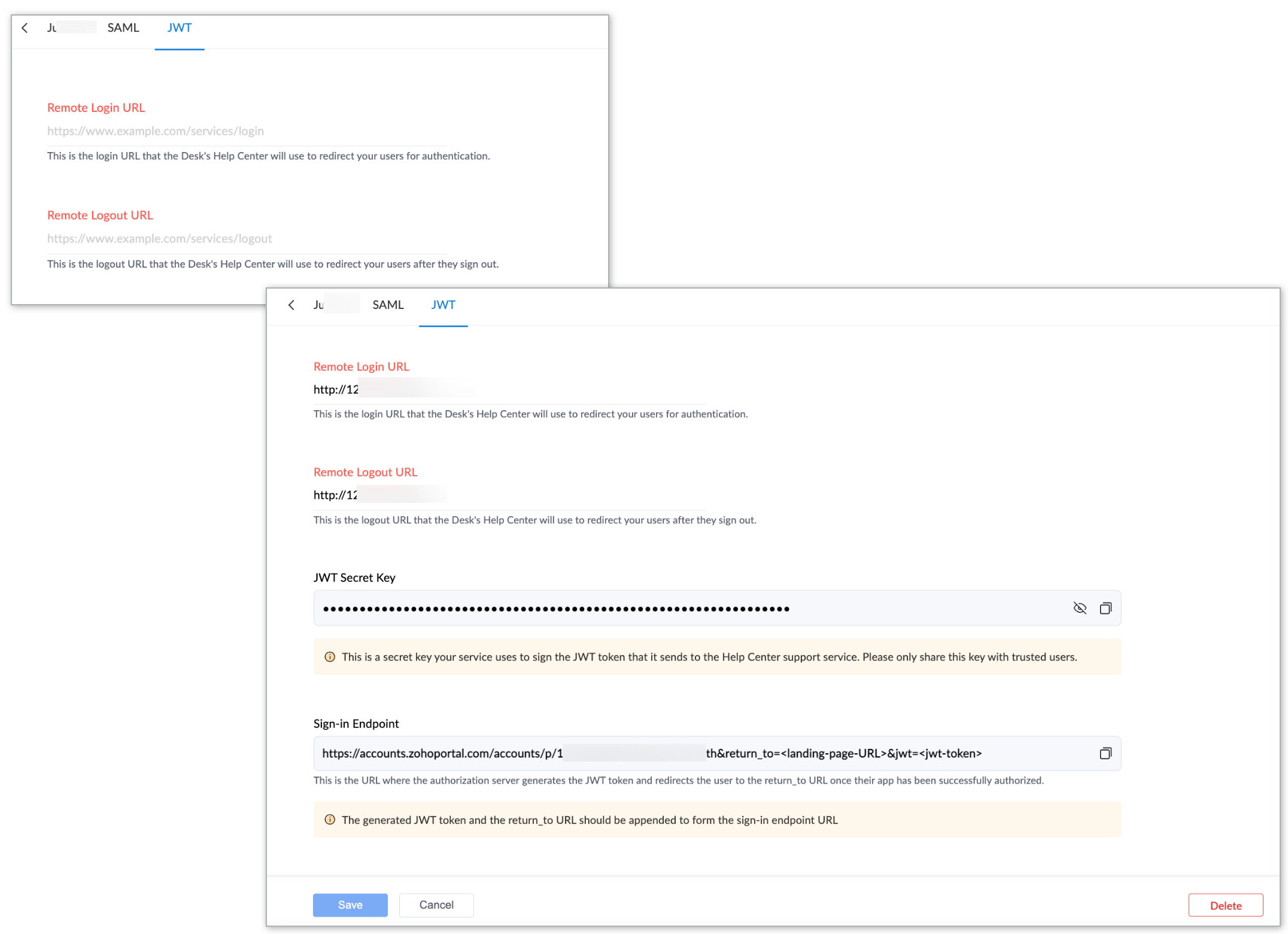
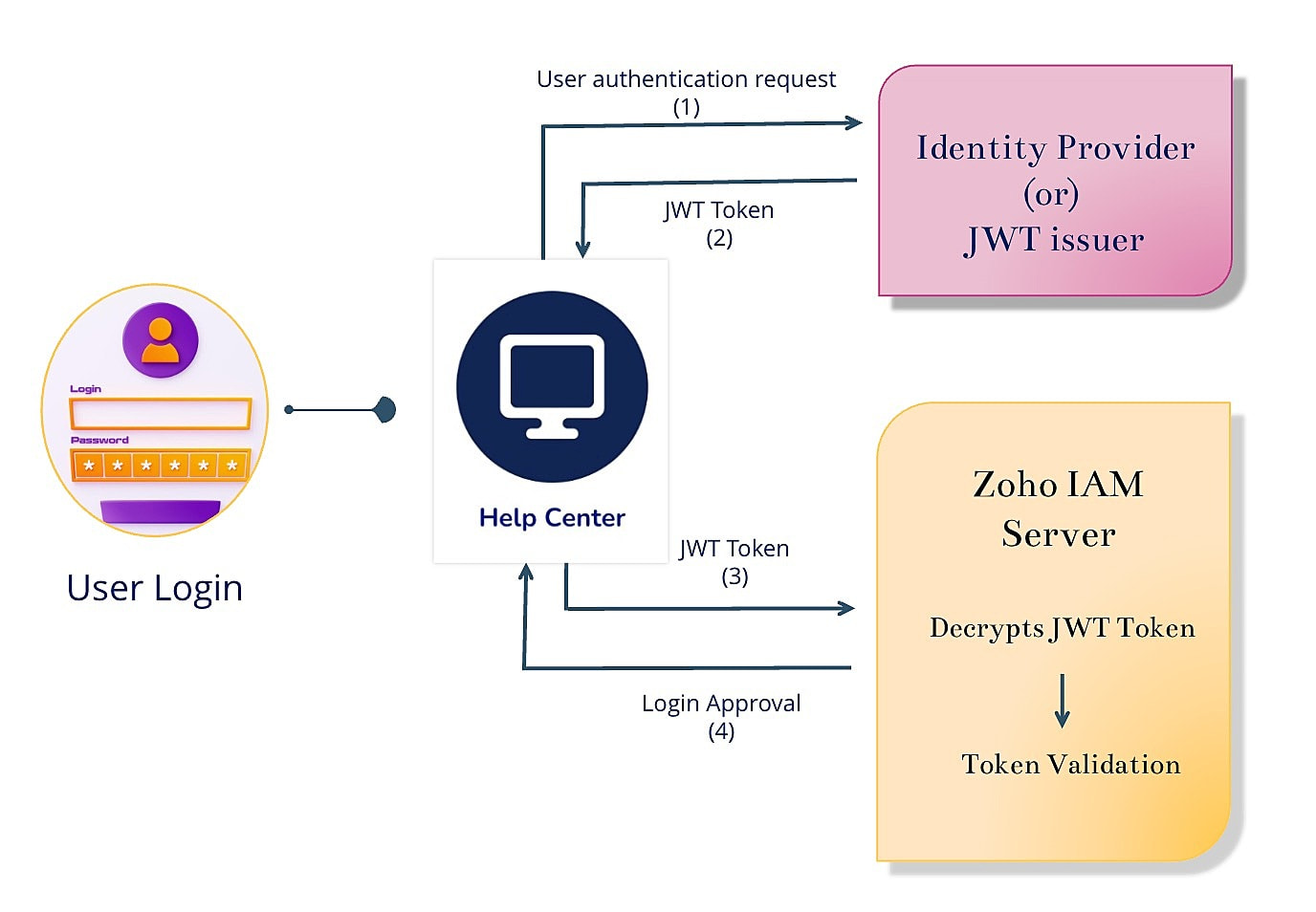
This feature is now available for standard, professional, and enterprise plan users across data centers. For more information about the configuration, please refer to the help doc on JWT authentication mechanism for help center.

Important Note: Deprecation of Remote Authentication mechanism
Sooner the remote authentication mechanism for the help center will be deprecated hence requesting all existing users relying on the Remote Authentication mechanism to migrate to either SAML or JWT at their earliest convenience.
We believe that these updates will contribute to a more secure and efficient help center experience. For any questions or feedback, feel free to share them with us in the comments section.
Thanks and have a great day!
Regards,
Varsha P.
Zoho Desk | User Education
Topic Participants
Varsha P
Dominic Pouzin
Ajith(AJ) | Zoho Desk
Sticky Posts
2024 Email Authentication Standards: Elevating Security with Google and Yahoo
In contemporary email communication, email authentication plays a pivotal role in mitigating email fraud, spam, and phishing attacks. Brace yourself for a new level of security. Starting February 2024, Gmail and Yahoo will be implementing robust emailUsing Agent Email Address as From Address
Currently, while replying to a ticket, it is possible for agents to choose their own email addresses as 'from' addresses. Although we built this just for that little extra flexibility, in hindsight, it hasn't figured much in conventional usage. Almost all businesses prefer that responses to their customers' tickets be sent from the common support/service email address and NOT from those of individual agents. During personal interactions at events, some of you have even made passing mentions aboutEdit and Delete options in Comments
A lot of teams have been using ticket comments extensively to collaborate everyday. Notification Center further improved this experience by bringing real-time updates. As we continue to build more improvements to this experience, we've shipped a small-yet-importantWebinar 2: Supercharged customer support for growing business
Join us for this webinar and learn how to step up your support game using a real-time communication platform to generate happier, more successful customers. In this live webinar, we will will discuss the importance of SalesIQ for your support team and how it can help you: Understand your customers better and their journeys to proactively support and engage them even before they ask for help. Integrating real time conversations into Zoho Desk’s Support, providing a conversational customer serviceCustomize Colors of your Customer Self Service Portal
You asked for it. We heard you. We're happy to roll out the most sought after feature request, Customizing the Colors of your Customer Self-service Portal. Now you can set the color of your customer portal to mimic your company's web site, so that your customers visiting the portal will not feel alienated by the default theme. Go ahead and configure the color of the header, tabs, fonts and background according to your needs. You can either choose between default color themes like Blue, Grey, Green
Recent Topics
Zoho Projects - Attachments added to Task and Bug emails are not saved
Hi Projects team, I have been experimenting with emails into projects to create tasks and bugs. I have noticed that attachments added to the emails are not saved to the task or bug. Is this normal behaviour? Thanks, AshleyZoho Inventory's latest shipping integration updates at a glance.
Hello Users, We would like to share some important news about our latest improvements in the Shipping integration capabilities of Zoho Inventory that we achieved in 2024 with some of our major integration partners in key editions across APAC, North America,Sorting a list of record acquired from the zoho.crm.searchRecords function.
This is something for which I'm trying to figure out a straightforward way to do. The searchRecords does a great job fetching me the records that I want. However, in some cases, where it returns multiple records, I want it to sort the returned list by date of creation of that record, so that when I do records.get(0), I get the most recent record. As an example, here's my sample pseudo code: records = zoho.crm.searchRecords("Clients", "Office_Number:equals:123456"); Now the "records" list above containsZoho Inventory Custom Field Update
Hello All, In this post I am describing how can we Update the Custom Field Value in Zoho Inventory. // Get Org ID orgid = organization.get("organization_id"); // Field Value resvp = ifnull(item.get("purchase_rate"),null); // Record ID iid = item.get("item_id");Deprecation of the Zoho OAuth connector
Hello everyone, At Zoho, we continuously evaluate our integrations to ensure they meet the highest standards of security, reliability, and compliance. As part of these ongoing efforts, we've made the decision to deprecate the Zoho OAuth default connectorAlphabetically
How can i arrange alphabetically - (Manage Manufacturer) Field in Item MasterCan i set a default value for country and state in address field in zoho creator?
Can i set a default value for country and state in address field in zoho creator?Convert HTML to PDF & Send as Email Attachments in Zoho Creator (Deluge)
This approach is useful for sending welcome letters, instructions, or promotional offers after order creation. // 1. Define the variables using the submitted input customerName = input.Customer_Name1; orderID = input.ID; customerEmail = input.Email_Address; //Redirect after submission is not working after a few submission
I have setup redirect url correctly and everything works as expected. However, it seems that there's a limit to the number of submissions before the redirect stops working. After the "limit" is reached, the page redirects to a seemingly zoho hosted page,Enhancement Request for Multi-Asset Work Order Feature
Hello Latha, Thank you for your continued support. The multi-asset Work Order feature is extremely helpful. I did some testing based on our requirements, and during the process, I noticed a few areas where we need your team’s support to improve the featureMarketing Tip #8: Run limited-time offers
Exclusive offers that don't last long make shoppers purchase right away instead of waiting. Run a flash sale or limited-time discount to convert interest into sales. Try this today: Set up a "Buy X Get Y" coupon in Zoho Commerce valid for a limited timeAdd Option to Mass Dispatch by User
Hello! We are using the dispatch console to dispatch service appointments to our service ressources. Right now, the process is our dispatcher verifies each ressource's route for the day and dispatches it after validation. Sadly, there doesn't seem toZoho Projects - Email notification relabelling of modules not present on default templates
Hi Projects Team, I noticed that in the default email template notification, the word "bug" was not renamed to the lable I am using in my system. As many users may used the Bugs modules for various purposes including Changes, Revisions, Issues, etc...Include the "Added Email ID" to the Filters of a Report
Hi, With a Report and lots of entries, a normal thing is to filter entries by the submitter, but that is not included in the Auto Filter of Reports and you can't add a custom filter to a Report without specifying the actual value. I would like to be ableLoops in Deluge
Hi, Can someone tell me how I do a simple loop in deluge? For example, if i have a variable "X" containing a number of loops to perform, i would like to perform an action X amount of times. X = 10; do while (Y < X){ // ... do something } to further explain, the equivalent in PHP of what i am trying to acheive would be: $X = 20; for($Y = 1; $Y < $X; $Y++ ){ // ... do something } ThanksI am facing a problem with an if-else condition
If I use if, else if, and else conditions in Deluge with the same variable name, sometimes the variable causes an error because the same variable name is present in every blockZoho Projects - Reply by email to @ mentions posted on the Feed.
When mentioning someone on the Feed (Status), it would be great if that mentioned person could reply to the email notification to update the Feed thread.Zoho Analytics Bulk Api Import json Data
HI, I’m trying to bulk-update rows in Zoho Analytics, and below are the request and response details. I’d like to understand the required parameters for constructing a bulk API request to import or update data in a table using Deluge. Any guidance onRecord Overseas Transactions Along with CC charges
Hi All, We receive payments via stripe in multiple currencies and stripe takes around 2.5% fees. The amount is settled in INR into our local bank. What should be the currency of the income account used for Stripe payments? Here is a sample flow that weProduct Updates in Zoho Workplace applications | October 2025
Hello Workplace Community, Let’s take a look at the new features and enhancements that went live across all Workplace applications this October. Zoho Mail Create Signature from Compose window You can now effortlessly create a Signature using the CreateSubform data to Sheets
I have been trying to setup a Zoho Flow automation to bring any Subform input to a Zoho Sheets but it seems impossible to post the subform entries to a Zoho Sheet. Is there any way to do it via Zoho Sheet API? https://www.zoho.com/sheet/help/api/v2/#CONTENT-Insert-row-with-JSON-dataEdit Contact Roles in the Potentials Mod
New to ZOHO so I need some help. I work the same people on different projects concurrency. Their contact info remains the same but their role changes from project to project. In the Potential Mod you can pick contacts and assign a Role to them. I knowIs there a way to disable the Activity Reminders Pop-Up Window every time I log in?
Just wondering if there is a setting to disable the window from opening every time I open my CRM? Thanks ChrisHide fields only for creation
Hello, I'd like to hide some fields only during the creation of a contact in Zoho CRM. In fact I have some fields that are automatically calculated thanks to an automation, so when my users create a contact I don't want them to fill those fields. I knowRich-text fields in Zoho CRM
Hello everyone, We're thrilled to announce an important enhancement that will significantly enhance the readability and formatting capabilities of your information: rich text options for multi-line fields. With this update, you can now enjoy a more versatileFont Size 11 - Zoho CRM Email Templates
Our company communicates with our vendors exclusively using Calibri Font Size 11, as this is the standard formatting for professional emails. Since the CRM only allows for the selection of font sizes 10 & 12, we have been unable to utilize the CRM emailError 400 Booking
Added a custom domain to Booking. Am Getting a SSL Error that has some other domain on the SSL and giving a 400 error. Followed instructions and it stated it verified our domain.. However it is not working. Please Help!Link Purchase Order to Deal
Zoho Books directly syncs with contacts, vendors and products in Zoho CRM including field mapping. Is there any way to associate vendor purchase orders with deals, so that we can calculate our profit margin for each deal with connected sales invoicesZoho Projects - Email Notifications for Feed Updates
Hi Projects Team, I'm working with a client who wants a simple way to communicate with their customers on projects. Getting the customer to add comments to Tasks or Bug records is not ideal, as we need a way which is easy with minimal training, and hasZoho Analytics Export API
Hi Team, I’m working on some integration tasks and wanted to confirm if it’s possible to retrieve a Zoho Analytics table as JSON data using a Deluge script. I’ve already stored my custom data from multiple sources and combined it into a single source.Request to Remove LinkedIn Verification from My Emai
I would like to submit a complaint regarding my Zoho Mail account. I previously used this email address to verify a LinkedIn account, but that LinkedIn account has now been closed. I need to remove or cancel the verification associated with the closedHow to Billed from two different GST Numbers
How to Billed from two different GST Numbers. Suppose ABC & Co had GST registration in Delhi and Haryana and Zoho account is created with Delhi GST Registration number. Now i also want to issue invoice from Haryana GST Registration number. How can i proceed ?Introducing the all-new email parser!
Greetings, We are pleased to introduce to you, a brand-new, upgraded version of the Zoho CRM Email Parser, which is packed with fresh features and has been completely redesigned to meet latest customers needs and their business requirements. On that note,Zoho Projects - Refine Access to Collaboration Menu
Hi Projects Team, I noticed that Calendar, Chat and Meeting menu options in the Collaboration section are visible to client users, even when they don't have access to the features. This could be confusing and frustrating, because if it's there you expectKaizen #217 - Actions APIs : Tasks
Welcome to another week of Kaizen! In last week's post we discussed Email Notifications APIs which act as the link between your Workflow automations and you. We have discussed how Zylker Cloud Services uses Email Notifications API in their custom dashboard.Extracting Images from a Zoho Creator Report into a Pages
If you’ve uploaded images in a form and can see them in your report, you might also want to display those same images inside a Page (custom HTML page). This is useful for dashboards, profile pages, or any place where images should be visible dynamicallyZoho is blocking emails I subscribe to from one sender
About 4 months ago I stopped receiving newsletters that I subscribe to from @thedispatch.com. They tell me that zoho's server is blocking them. I've added them to my contacts list, but they're not even reaching my inbox. I don't know how to troubleshootInactive Items - Make Less Prominent by Default
Currently, when one marks an Item as "Inactive", it really doesn't do much of anything to hide it or get it out of the way. Search and reporting within Finance should, by default, hide inactive Items from standard reports, searches, etc. If one specificallyItems should display under specific warehouse
I have configured the multi warehouse but it show all the items under all warehouse which is not correct according to our business logic, so i want that items should only display under that specific warehouse not under all the warehouses not even with zero quantity. Some items should be common but not all so is there any option for that purpose so i can specific the items to its warehouse. RegardsHow to calculate GST based on "Ship To Address"
We into the interior designing work, providing "Works Contract Services" to our clients across India. We are registered under GST in Maharashtra state. For works contract services as per the GST rule, we need to decide place of supply based on "Ship toNext Page