Introducing the all-new email parser!
Greetings,
We are pleased to introduce to you, a brand-new, upgraded version of the Zoho CRM Email Parser, which is packed with fresh features and has been completely redesigned to meet latest customers needs and their business requirements.
On that note, the Old Email Parser will reach end-of-life on June 1, 2023. After EOL, old email parser will not be available in your CRM account. In the spirit of preparing for this deprecation, we encourage all of you to try the all-new email parser at the earliest. In this post, we will discuss key pointers on the following:
— the improvements made in the New Email Parser
— how to prepare for deprecation of the Old Email Parser
What is the email parser?
Email parser is a data extraction tool in Zoho CRM that helps an organization in various business functions such as lead generation and information updates. It is designed to automate the process of adding records to Zoho CRM by extracting information from incoming emails.
Now, let's have a detailed look at the functionalities that we have brought with this enhancement.
Enhancements in the New Email Parser
The following are the enhancements you can now see when you switch to the latest version of the email parser:
1. Single parser email ID for all parser rules
Previously, for each parser rule there was a different parser address. It was often tedious to assign and keep track of a new parser ID for each individual vendors. The logistics involved in tracking and maintaining these parser IDs was itself often time-consuming. However, in the new version of the email parser, there's only a single, common parser email ID for all rules, meaning that regardless of how many vendors you're working with or how many rules you create, you can use one parser ID for all. This makes working with the email parser much easier and cuts down your setup and maintenance time significantly.
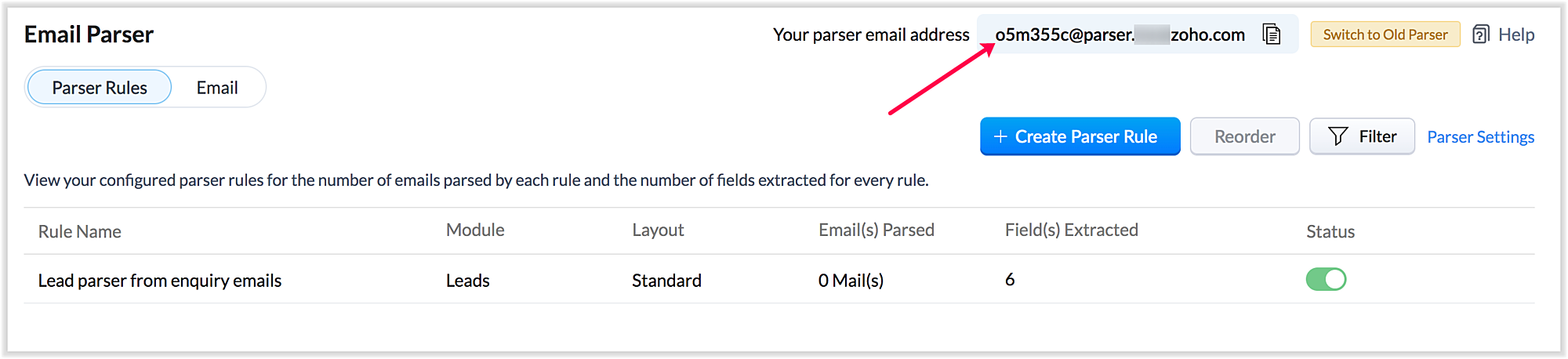
Also, a maximum of five approved parser addresses can be set up in common for all rules early on during the configuration.
2. A more powerful and intuitive configuration interface
In the latest version of email parser, the entire configuration interface allows free parsing and is highly intuitive, powerful, and, most importantly, user-friendly—unlike the previous version, which demanded rigid adherence to delimiters.
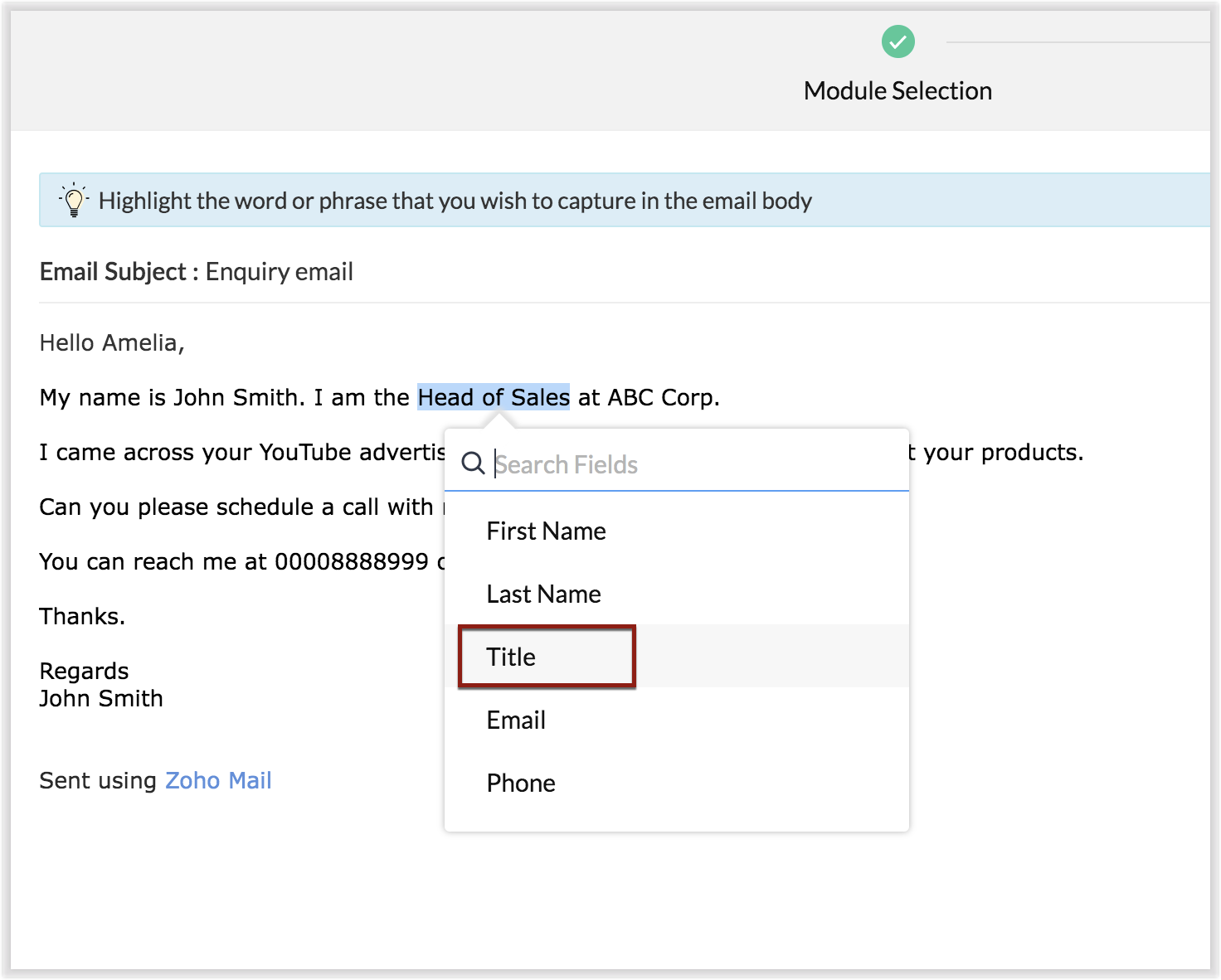
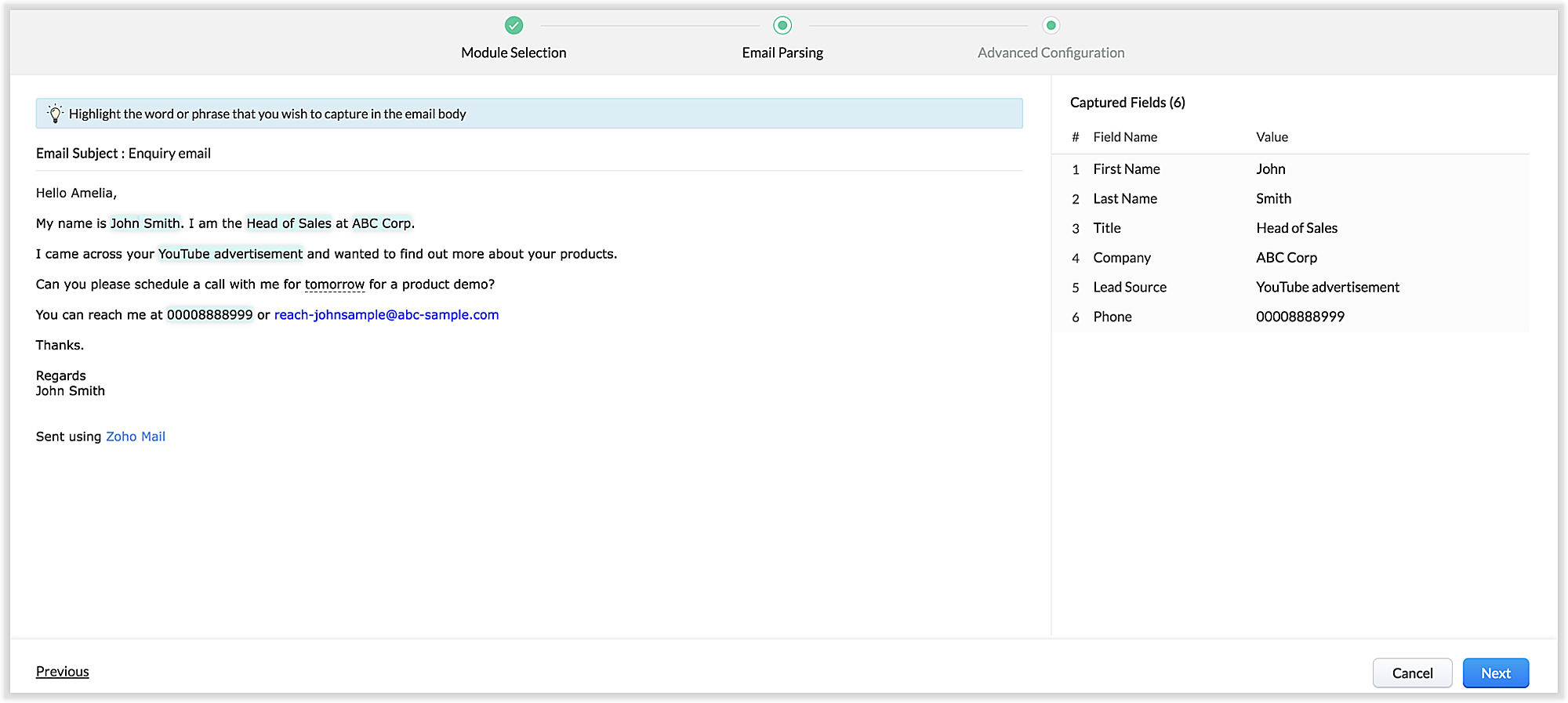
The email parser interface automatically gives you a preview of the parsed data on the same screen where the field mapping occurs, so it's easier to get a snapshot of all the fields that are being parsed.
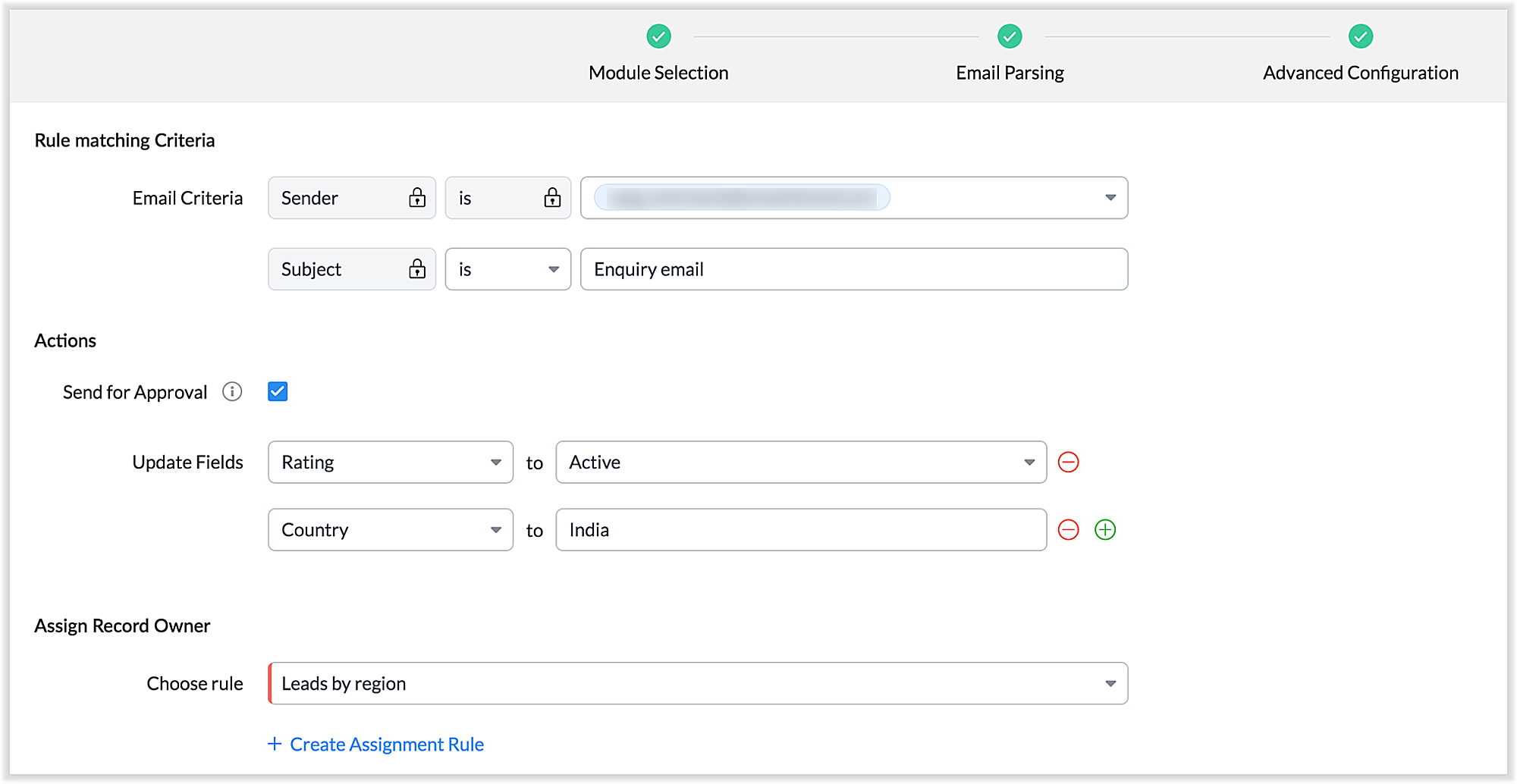
There's also an advanced configuration tab which involves options for filtering emails applicable to the parser based on criteria and associating automated actions, such as sending for approval, updating fields, and assigning records to certain users based on assignment rules.
You can also parse HTML emails directly, as opposed to converting them to plain text emails first—which was necessary for the old parser. You can also create email parser rules for each layout in a module.
3. Custom functions: Configure the email parser without associating a module
The new email parser now supports the execution of custom functions based on parsed data. In this case, the parser rule is not associated with a particular module. Using custom functions helps you with extensibility and interoperability in Zoho CRM. You can extend the email parser function to more than one module within Zoho CRM, and even to connect with other Zoho services. You can also perform ad hoc actions in third-party applications based on the parsed data.
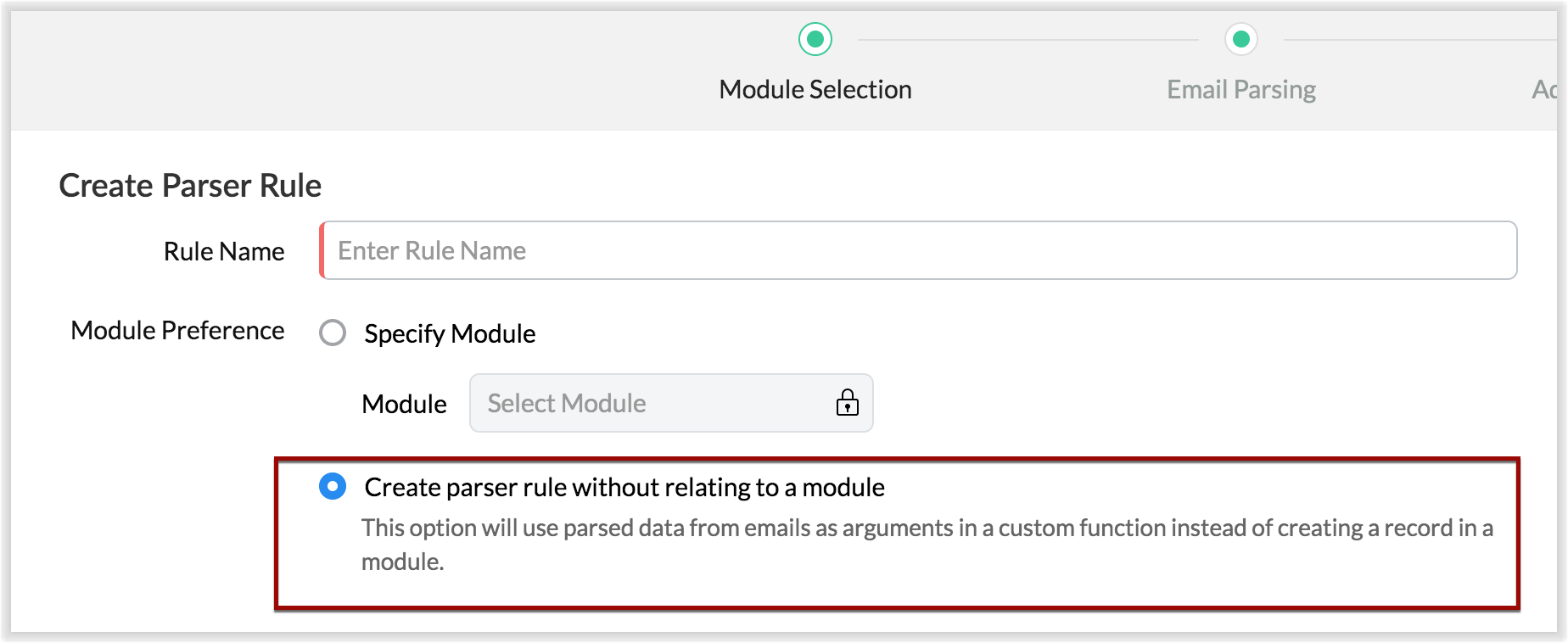
- For example, let's say that based on an incoming email inquiry, a property management company called Zylker wishes to update both Contact and Account records in CRM. The email sender's name, phone number, and address will go to the Contacts module, whereas their company information will go to the Accounts module.
- Let's say also that the same company has another requirement: Based on an incoming email from a customer regarding the status of their property, they want to update corresponding information on a third-party listing website automatically. They can achieve this by using the email parser to execute custom functions.
Once you have the required custom functions written, you can associate them to the parser rule and have the action executed for subsequent incoming emails.
4. Update records and send them for approval
Update Record is a function by which you can update the latest information on a record from an incoming parsed email.
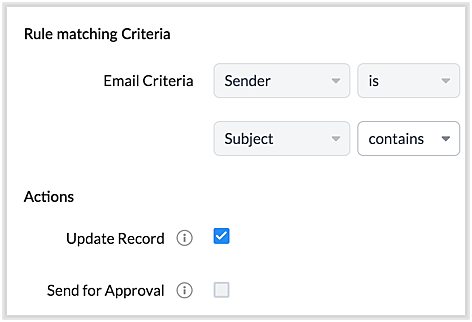
For example, say you receive an incoming email from a prospect named Jane Evans. Normally, a new lead record would be created for a new inquiry email, but if Jane is already in the CRM system, you want the CRM to update Jane's information on the same record as opposed to creating a duplicate record. If this is your expectation, you can check the Update Record option in the parser rule's Advanced Configuration settings.
Note: CRM will use the email field to detect duplicate records. For the Update Record option to show up, you must have first mapped the "Email" field from the email content, which serves as the primary identifier, or a "unique field" for a record.
You can also choose the Send for Approval option—in which case, records parsed via email parser need to be reviewed and approved from the Waiting for Approval tab in the selected module in order to become a part of the CRM system.
5. Informative parser reports
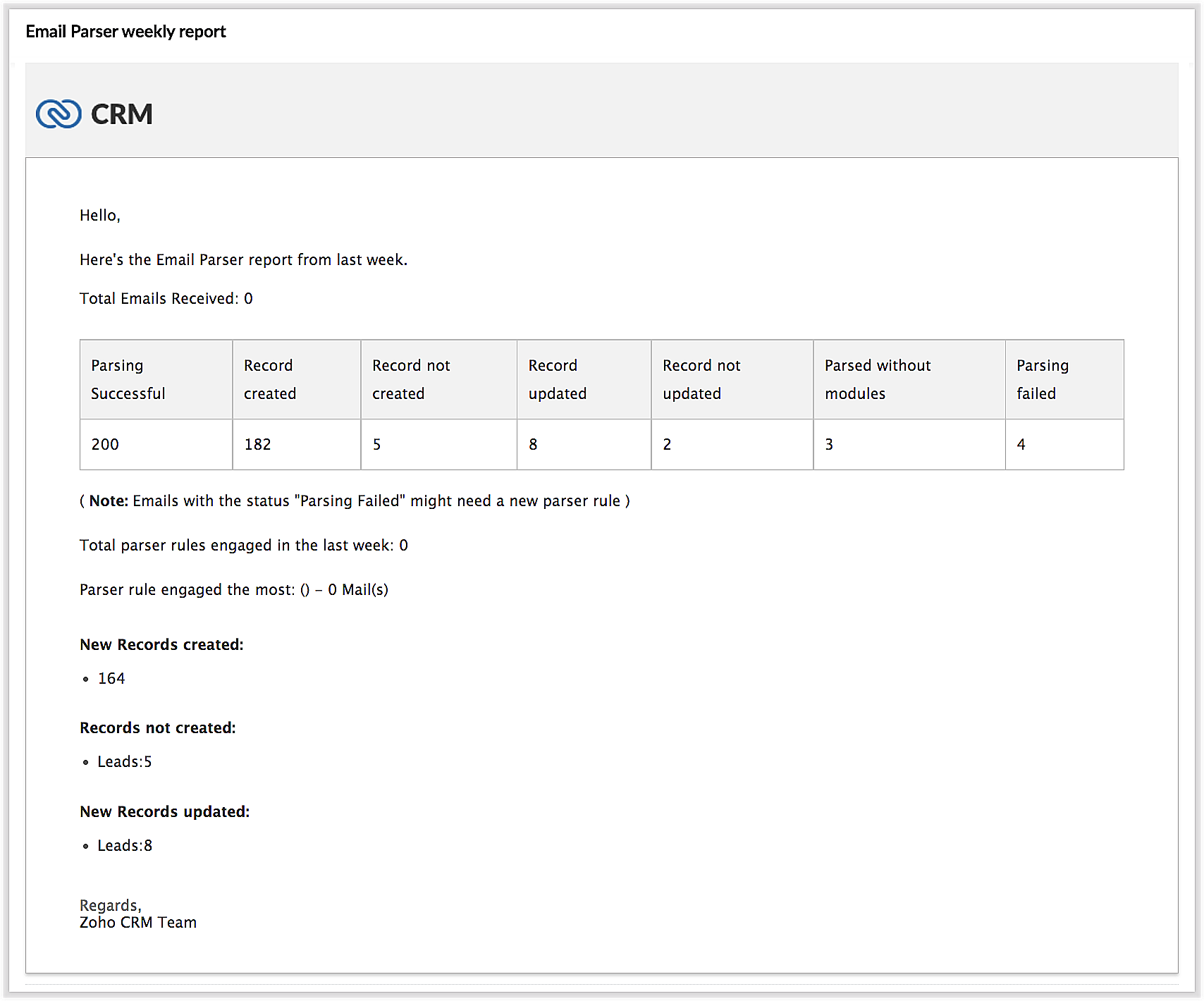
In the new version of the email parser, you're presented with accurate, detailed insights on the number of emails being parsed per rule, the fields extracted, and a list of customized actions associated with the records the parser has created. This detail summary gives you a clear picture of how effective your rules have been and indicates the revisions you may need to make to those rules based on those insights.
Detailed weekly performance reports can be sent to the creator of these rules or a custom email ID. Email reports are also sent upon record creation failure so that the appropriate users can take immediate action.
6. Reorder and filter
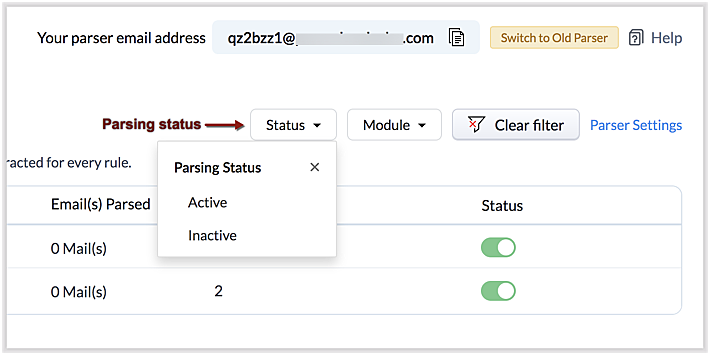
You now have an option to reorder the list of parser rules based on your preferred order. This is important because the email parser system is designed to execute only the very first rule whose criteria an incoming email meets. Therefore, the order of the parser rules becomes essential for effective email parser performance.
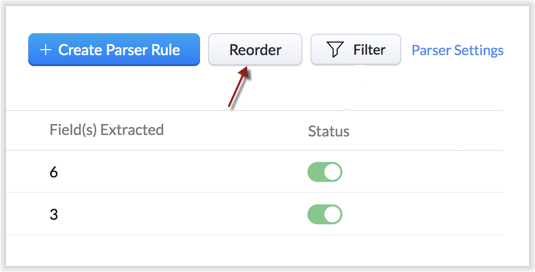
You can also filter rules by status (active/inactive) and also by module.
7. Contextual access to parsed emails
You can view not only the Configuration Info for each parser rule, but also insights based on parsed emails.
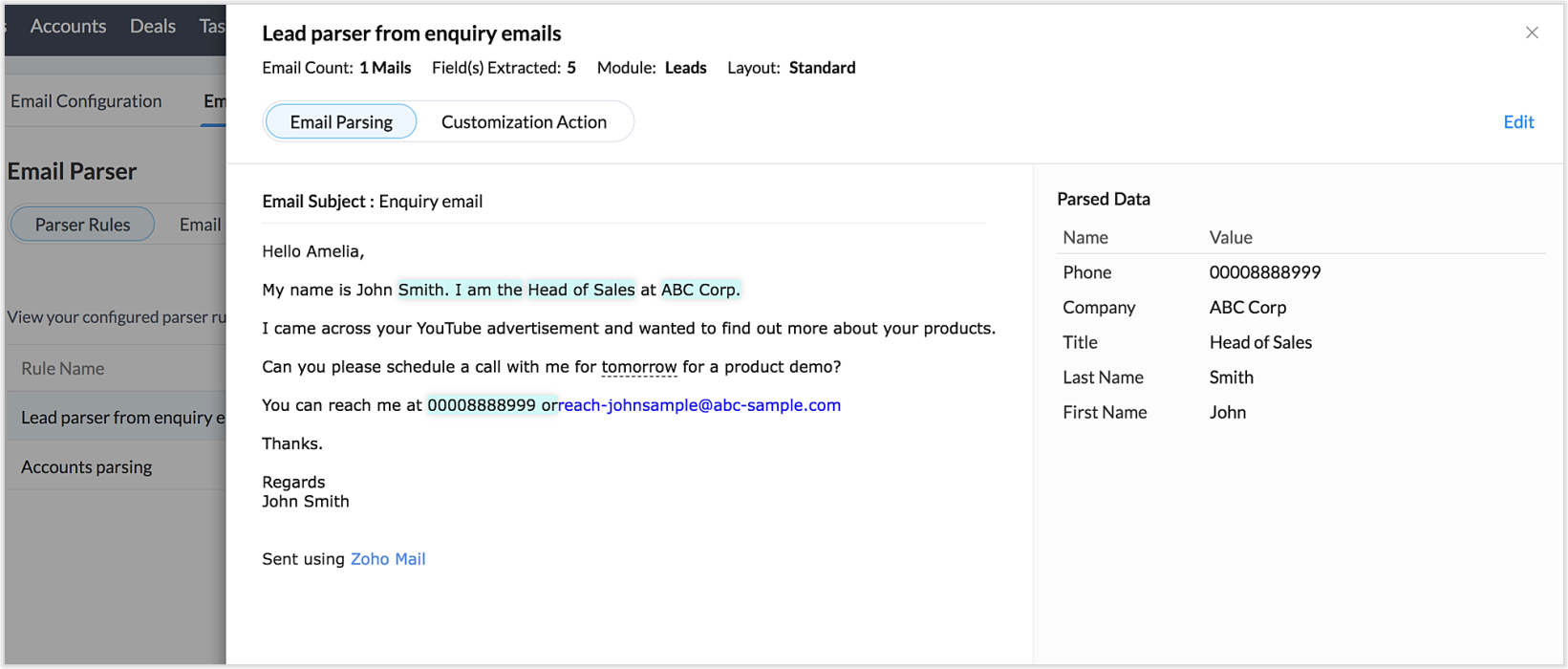
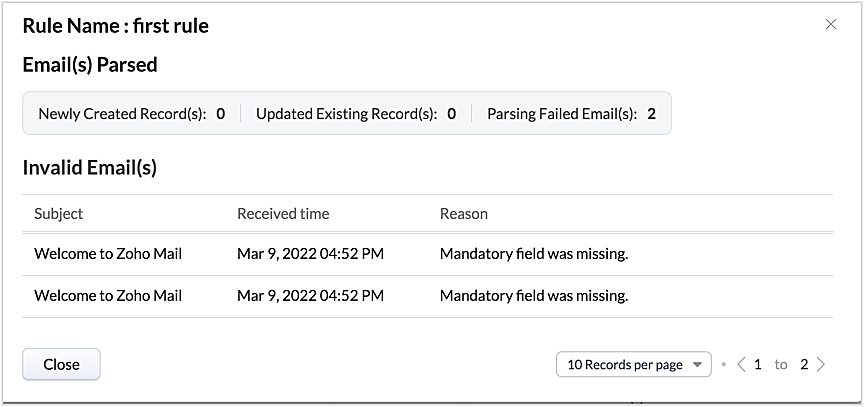
This way, from the perspectives of both parser rules and parsed emails, you can derive useful insights.
The "Email" tab lists the most recent email in your parser inbox, where you can check properties like parsing status, the rule used to parse it, and more. If the email has not met any rule, you may also create a new parser rule contextually from this email page.
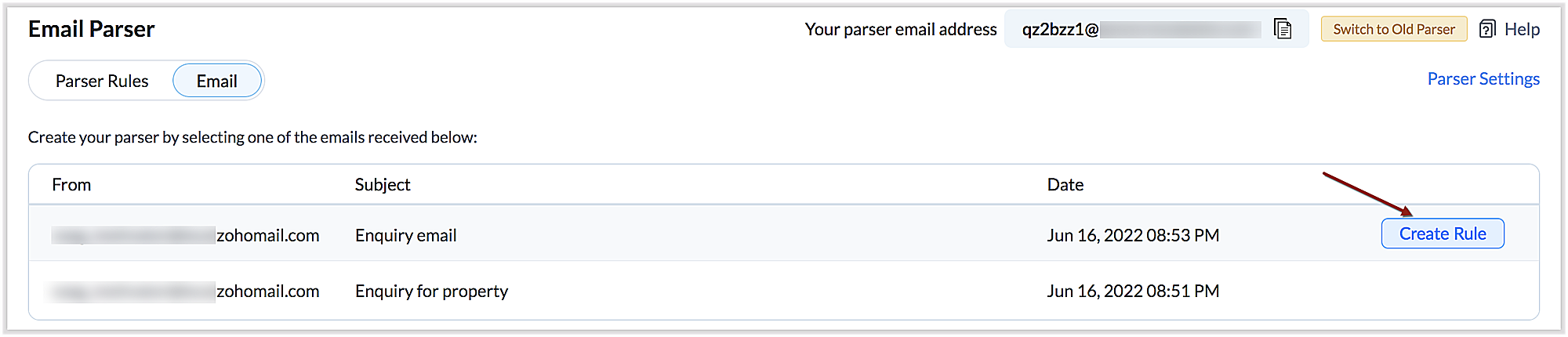
You can also re-run an email in the event of parser failure if there's no match found, as well as parse emails in bulk. (Note that this is applicable only for the emails that have a template match and for which the parsing was unsuccessful.)
Preparing for deprecation of the Old Email Parser
For existing users:
Existing users, who have not already switched to the new parser can do so by clicking on the Switch to New Parser button. Rules available in both the parsers will be working simultaneously until the Old parser is deprecated, but the rules available in the Old parser will not be displayed in the New parser view, and vice versa.

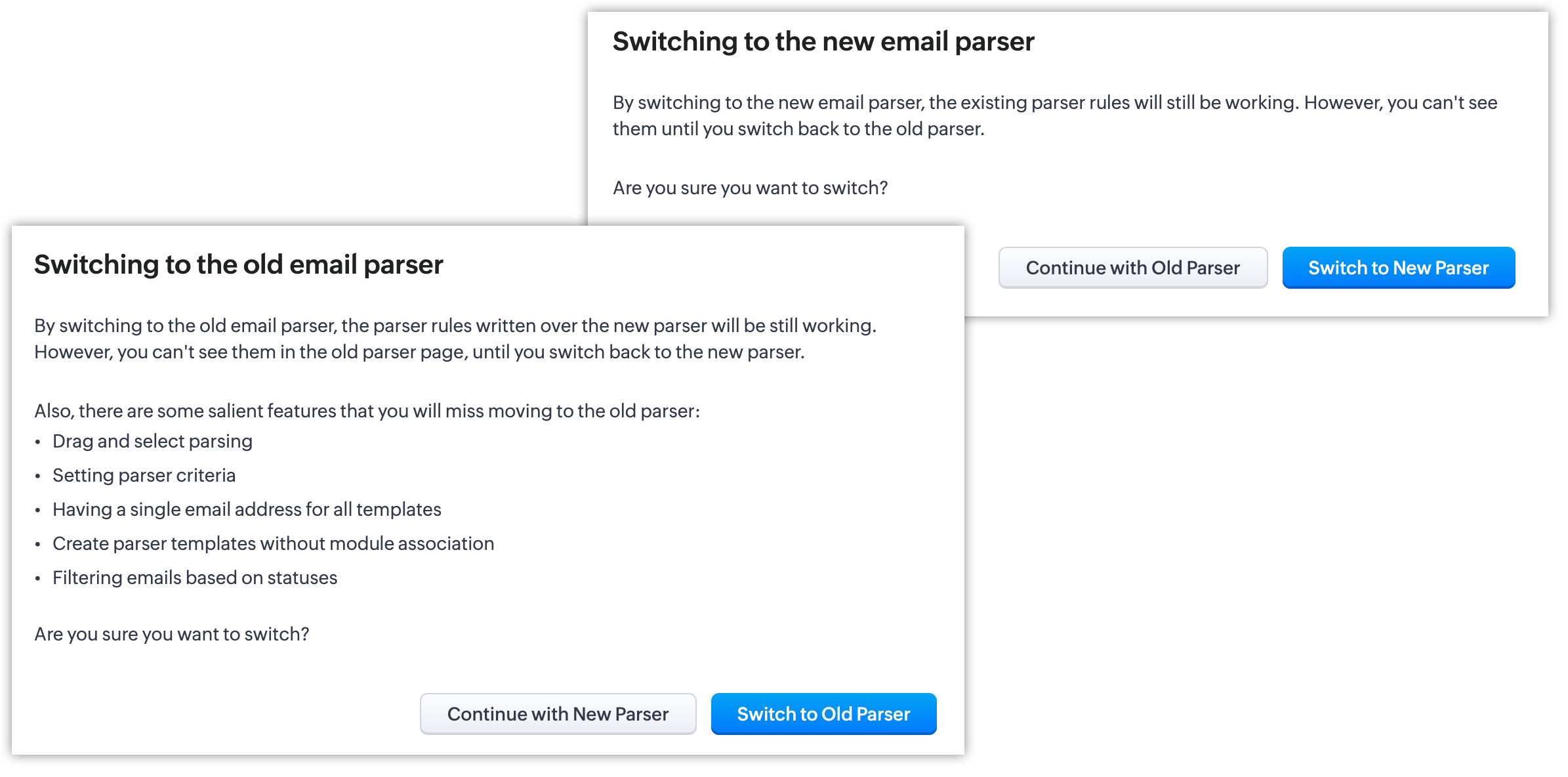
It's essential to manually create the existing rules in the New parser because once the Old parser is deprecated, only the rules present in the new parser will function. Since there won't be any rules from the previous parser available, the new parser will require that you create all rules from scratch.
Please note:
- Until the deprecation of the Old Email Parser on June 1, 2023, both the old and new versions will co-exist, after which, the New Email Parser will become the default version. .
- The rules in the Old Email Parser parser won't be available once it has been deprecated. Therefore, if no rules are added to the New Email Parser , there won't be a parser to run. So be sure to write rules in the New Email Parser before the deprecation. Additionally, keep in mind that once your old rules have become obsolete, they cannot be recovered.
For new signups
For new signups, only the new parser will be available as the default feature, and not the old parser. There is no action required from users in new signups.
Further reading
Thanks, have a great day.
Regards,
Sai Shree | Zoho CRM
Sai Shree | Zoho CRM
Topic Participants
Saishree T K
Ian Imamura
Sunderjan Siddharth
Krizia Tenorio
Emily Bridges
Sticky Posts
Presenting ABM for Zoho CRM: Expand and retain your customers with precision
Picture this scenario: You're a growing SaaS company ready to launch a powerful business suite, and are looking to gain traction and momentum. But as a business with a tight budget, you know acquiring new customers is slow, expensive, and often deliversGood news! Calendar in Zoho CRM gets a face lift
Dear Customers, We are delighted to unveil the revamped calendar UI in Zoho CRM. With a complete visual overhaul aligned with CRM for Everyone, the calendar now offers a more intuitive and flexible scheduling experience. What’s new? Distinguish activitiesCreate and populate a record in an instant: Introducing zero-shot field prompting to Zia's ICR
A couple of months ago, we upgraded our in-house AI image detection and validation tool, Zia Vision, with intelligent character recognition (ICR). By training Zia with sample images, you could create and enrich CRM records with data extracted from standardIn-person ZUG Meetups for Real Estate Professionals - US Q1 2026
The Real Estate Zoho User Group is going on a multi-city, in-person meetup tour across the US, and we’d love to see you there! These meetups are a great opportunity to: Connect with fellow real estate professionals using Zoho Share challenges and discoverNimble enhancements to WhatsApp for Business integration in Zoho CRM: Enjoy context and clarity in business messaging
Dear Customers, We hope you're well! WhatsApp for business is a renowned business messaging platform that takes your business closer to your customers; it gives your business the power of personalized outreach. Using the WhatsApp for Business integration
Recent Topics
Send email template "permission denied to access the api"
Hello, Per the title, I'm trying to send a Zoho CRM Email template based on the advice given here: https://help.zoho.com/portal/en/community/topic/specify-an-email-template-when-sending-emails-in-custom-functions (I'd prefer to send right from DelugeZia’s AI Assist now helps you write clearer notes — in seconds
After helping recruiters craft job descriptions, emails, and assessments, Zia’s AI Assist is now stepping in to make note-taking effortless too. Whether you’re recording feedback after an interview or sharing quick updates with your team, you can nowShortcut to fill a range of cells
Good evening: I'm writing because I haven't been able to find a feature that allows you to select a range of cells, type in one of them, and then use a key combination to type in all of them. In Excel, the keyboard shortcut is Ctrl+Enter. I haven't foundIntroducing Dark Mode / Light Mode : A New Look For Your CRM
Hello Users, We are excited to announce a highly anticipated feature - the launch of Day, Night and Auto Mode implementation in Zoho CRM's NextGen user interface! This feature is designed to provide a visually appealing and comfortable experience forObject required error
Hi, I am getting an 'Object required' error on the line Call HideColumnsOutsideRange(ws, startOfWeek, endOfWeek) when I run the ShowCurrentWeek macro but not when I run the ShowCurrentMonth macro. Any ideas? Regards, GW Option Explicit Sub HideColumnsOutsideRange(wsZoho CRM - Rename "Estimates" in CRM Finance Suite Integration to "Quotes"
I'm not sure if it's been 2 or 3 years now since Zoho Books renamed Estimates to Quotes. I still see "Estimates" in the Zoho CRM integration. Could this be added to Translation settings so that some customisation could be made on an account by accountIts 2022, can our customers log into CRM on their mobiles? Zoho Response: Maybe Later
I am a long time Zoho CRM user. I have just started using the client portal feature. On the plus side I have found it very fast and very easy (for someone used to the CRM config) to set up a subset of module views that make a potentially extremely usefulNew Series Announcement - Ecommerce Marketing Tips
Running an online business is more than just having a website. It’s about getting the right customers to discover you, trust you, and keep coming back. To support your growth journey, we’re launching a weekly Marketing Tips series right here on Zoho CommerceMarketing Tip #7: Add a blog to your online store
A blog is more than content. It’s a magnet for new customers. Sharing product guides, styling tips, or industry insights through blog posts builds trust and helps you rank higher on search engines. Try this today: Write one blog post answering a commonKanban view on Zoho CRM mobile app!
What is Kanban? The name doesn't sound English, right? Yes, Kanban is a Japanese word which means 'Card you can see'. As per the meaning, Kanban in CRM is a type of list view in which the records will be displayed in cards and categorized under the givenAllow Regular Users to Directly Transfer Ownership of Files & Folders
Hi Zoho WorkDrive Team, Hope you are doing well. We would like to request an important enhancement related to file and folder ownership management in Zoho WorkDrive. At the moment, a regular user cannot directly transfer ownership of their files or foldersTriggering rules on lead conversion
There is no field on the Rule list for rule conversion to trigger an alert on liead conversion to a potential. I assigned a rule to file on any creation or update of a lead. The lead was changed a lead to a potential but no rule was fired. Rajesh BhadraCustomised Funnel
We are running the standard plan for our ZOHO CRM. I have been asked if there is a way to combine data from the Calls module, Deals module and Contact Module into 1 funnel, similar to the view you can get when viewing Deals By Stages, you can see theTrigger Zapier on Deluge Insert Into Function?
Hello, To get around the limitation of not being able to trigger a Zapier Zap on Record Update(this would be extremely useful to be able to do btw), I have created a Deluge script to copy the data from Form A to a Trigger Form B using the Insert Into expression from a Custom Action button on a Report from Form A. This action does not trigger the Zapier Zap whereas manually adding a record or duplicating an existing record does trigger the Zap. Is Insert Into not the same as a manual Add in the contextCan you inject JS in an HML+CSS+Deluge Page?
I have an HTML + CSS + Deluge page and need just a little vanilla JS functionality. However, it seems like Zoho Creator does not allow that. I'm required to create a JS widget. Is this correct? If so: 1. Won't this quickly consume my API limit if thereDisplay Client Name in Zoho Creator Client Portal Dashboard
Hello Zoho Creator Team, We hope you are doing well. Zoho Creator recently introduced the option to set a client’s display name in the Client Portal settings, which is very helpful for providing a personalized portal experience. However, there is currentlyZoho unified inbox
The new changes have definitely improved things for switching between accounts. But zoho still desperately needs a unified inbox. It sucks to have to enter filters and folders for each and every inbox. This seems like such a simple thing, i wonder why Zoho hasn't done it?Marketer’s Space - Multi-Channel Campaigns for the Biggest Shopping Week with Zoho Marketing Automation
Hello marketers, Welcome back to another post in Marketers Space! The biggest shopping week of the year is almost here, and it’s your moment to shine without the stress. With Black Friday and Cyber Monday just around the corner, being present across email,Is there a problem with sharing workdrive files with links since last night?
As per title, we can't access folders/files through share links since last night. I created ticket but we need quick solution and didn't hear back from the support yet. The files are still accessible by the main account but all zoho files that we areEnable Screen Recording in Zoho WorkDrive Mobile Apps (Android & iOS)
Hi Zoho WorkDrive Team, How are you? We are enthusiastic Zoho One users and rely heavily on Zoho WorkDrive for internal collaboration and content sharing. The screen-recording feature in the WorkDrive web app (similar to Loom) is extremely useful- however,Production Management Tool (MRP / BOM)
Hi Guys, is there any recommended App available that works with zoho and covers the needed applications for a production? What we need is a system that covers the BOM (bill of materials), MRP (material ressources planning), MRP II (manufacturing ressourcesFunction #53: Transaction Level Profitability for Invoices
Hello everyone, and welcome back to our series! We have previously provided custom functions for calculating the profitability of a quote and a sales order. There may be instances where the invoice may differ from its corresponding quote or sales order.Bug in Zoho Cliq Signup Flow – "%s" Placeholder Visible Instead of Product Name
Hi Zoho Team, I would like to report a UI bug in the Zoho Cliq signup/enable flow. During the step where Cliq asks to enable the product for the company, the following text appears: Great! Your company is already available in Zoho, so you just have toZoho Invoice Customer Login Portal
Are there any plans for a customer portal to Zoho Invoice, ala Freshbooks? I would like customers that I invoice to be able to login to review invoices and invoice history. I have not switched from Freshbooks for this very reason.Exporting tickets
I went to Setup -> Organization -> Import/Export in order to export tickets but found 2 issues: 1. The email body never gets exported. 2. There are some large numbers (like 5.57E+16) under certain columns of the exported CSV file. I could not find any export options. Please can you help with this?Editing the Ticket Properties column
This is going to sound like a dumb question, but I cannot figure out how to configure/edit the sections (and their fields) in this column: For example, we have a custom "Resolution" field, which parked itself in the "Ticket Information" section of thisCopy field information to clipboard
I need to be able to transfer some field information in to the clipboard, so that I can then paste it in to our helpdesk system. Is there a way I could add a button to a detail report that does this?Issuing reconciling a bank statement
HELP! I'm trying to reconcile a bank statement. The prior month reconciled perfectly. Beginning balance is correct yet I'm off by the same amount each time. Both myself and my office manager, separately and together, have tried to complete this reconciliationUnknown table or alias 'A1'
I would like to create a subquery but i am getting the following error: Unknown table or alias 'A1' used in select query. This is the sql statement: SELECT A1.active_paying_customers, A1.active_trial_customers, A1.new_paying_signup, date(A1.date_active_customers),Detect and ignore bots in visitors
The SalesIQ visitor numbers are basically useless to us because there is no bot detection. We get the same bots coming in from the same countries looking at the same pages every day. It can't be that difficult to tell the difference between an actualAdd Real-Time Microphone Audio-Level Indicator During Screen Recording
Hi Zoho WorkDrive Team, Hope you are doing well. We would like to request an important enhancement to the Zoho WorkDrive screen-recording experience. Current Limitation: During a recording session, there is no visual indication that the microphone isZero Personalization of the File Sharing Experience
By now (2025) this is the maximum level of personalization available for a Zoho sharing link. We gently asked Zoho if we could modify at least the background, and they replied that it cannot be customized. We're truly disappointed – and surprised everyTwo factor authentication for helpdesk users
The company i work for wants use the helpdesk site in Zoho desk, as a place for their distribution partners to ask question and look for information about our product. The things there is suppose to go up there is somewhat confidential between my companyKiosk can't merge picklist or multiselect
There is no ability to load a multiselect or picklikst field into a kiosk with the values that have been previously selected. So, I essentially have 3 unacceptable options: 1.)Load the value into a text string and include instructions like this: "PicklistAGE field from DATE OF BIRTH Field.
HI! I have a field called date of birth in my CRM (LEADS, CONTACT etc…) How can I know the AGE today I would like to create a field AGE. I now how to create a field but I don´t which calculation (CUSTOM FUCTION) to make ¿ANY HELP?How to update/remove file in zoho creator widgets using javascript API
Hi Team, I have developed a widget which allows inserting and updating records I have file upload field with multiple file upload. Now while doing insert form record, I am using uploadFile API to upload files for that record. I am using updateRecord APIAnnouncing new features in Trident for Windows (v.1.34.4.0)
Hello Community! Trident for Windows just got better! With this update we have features that make your daily work easier and more efficient. We've added some features that are exclusive to our app and we're sure you'll find them useful. Let’s dive intoReport Hover Setting
Would be great if we will able to show information to the user while hovering a record in a report.Vertical images displayed as horizontal
Some pictures that originally are in vertical position are displayed in horizontal after the upload. It seems that system rotates them by 90 degrees. How can I fix this issue?Zoho Desk iOS app update: Saved filters and sort options
Hello everyone! Saved filters created on the web(desk.zoho.com) for tickets are now accessible on the Zoho Desk iOS app. You can easily rename, delete, or clear filters on the go. We have also introduced Sort options on the ticket listing screen, allowingNext Page