Kaizen #121 : Customize List Views using Client Script
Hello everyone!
Welcome back to another interesting Kaizen post. In this post, we can discuss how to customize List Views using Client Script. This post will answer the questions Ability to remove public views by the super admin in the Zoho CRM and Is it possible to restrict ZCRM user to see only custom views created by administrator?
In this post,
- What is a List View?
- Use Case - To hide all public views except one
- Solution using Client Script
- Other ZDKs available to customize List Views
- Summary
- Related Links
1. What is a List View?
A List View is grouping of records based on a defined set of criteria. List Views are beneficial for displaying customer specific data according to your business requirements. For example, you may be interested in following-up on the leads created during the last week or reviewing overdue tasks. The best way to handle these scenarios is to filter the records using the list views. Click here for more details on List Views.There are two types of List Views in Zoho CRM -
- Standard List Views : You can modify the standard views and sort the order of the columns in the list.
- Custom List Views : You can create, modify, and delete custom views, and you can also sort the order of the columns in the list.
Often, there are business requirements where you need to customize these views, like hiding a view from certain users or masking a particular column in the view. Let us see how to control the list views visible to a user, using Client Script.
2. Use Case - To hide all public views except one
Zylker is a manufacturing company that uses Zoho CRM. A Salesman creates records in the custom module named "Orders".The name of the profile assigned to a Salesman is "Sales". The Admin does not want the "Sales" profile users to view the standard public views except the "My Orders" public view.
3. Solution using Client Script
Admin should remove the visibility to all public views for the profile "Sales" and permit only the "My Orders" view. Here are the list of steps to be followed.
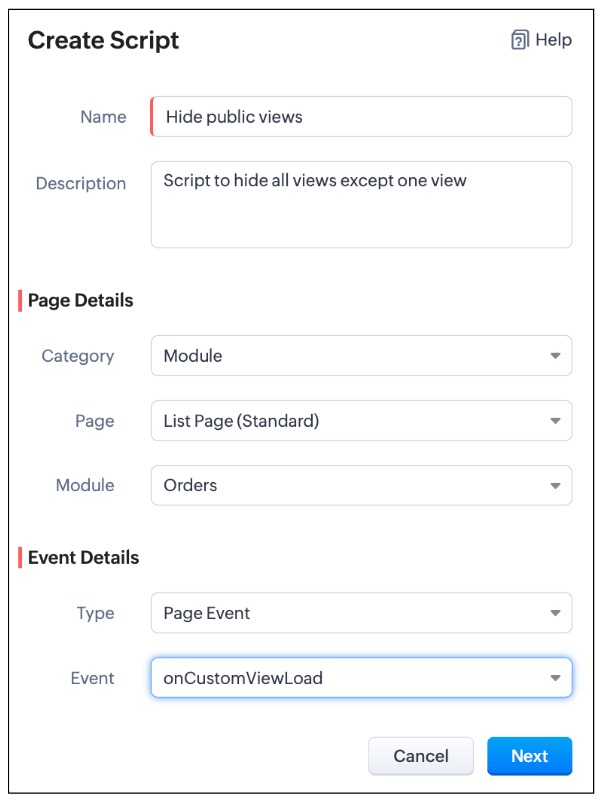
- Create a Client Script for List Page (Standard) of Orders module and specify the event as onCustomViewLoad. To know more about how to create a Client Script, click here.
- Now, using the getComponent.getOptions() , copy the id of My Orders view from the Messages panel in the "Run" component of Client Script IDE as shown below.
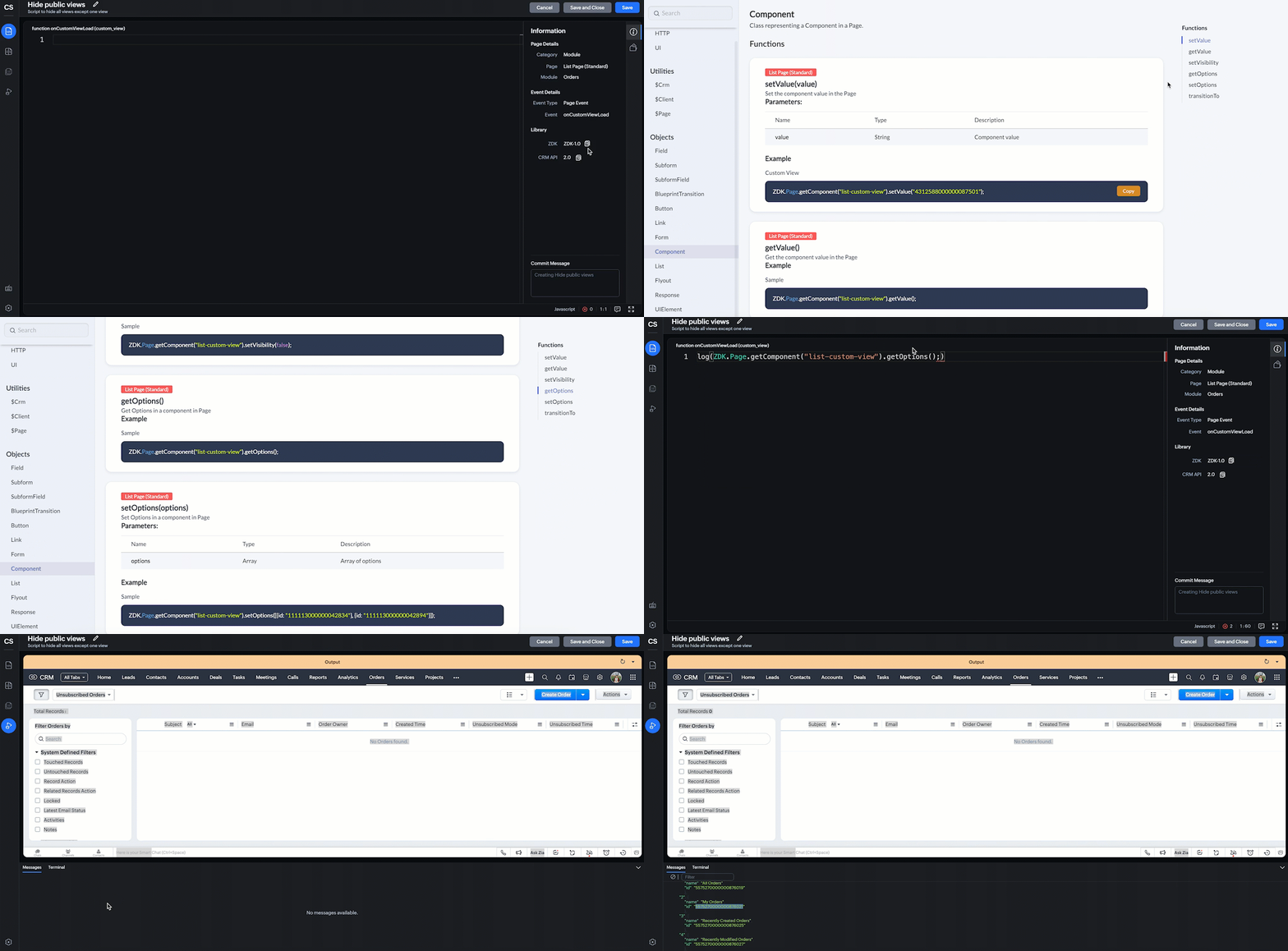
log(ZDK.Page.getComponent("list-custom-view").getOptions()); |
- In this script, ZDK.Page.getComponent("list-custom-view") will get the component that corresponds to the views drop down on the List Page.
- Then, getOptions() will return the options in the component of List Page. Here the component is 'list-custom-view'.
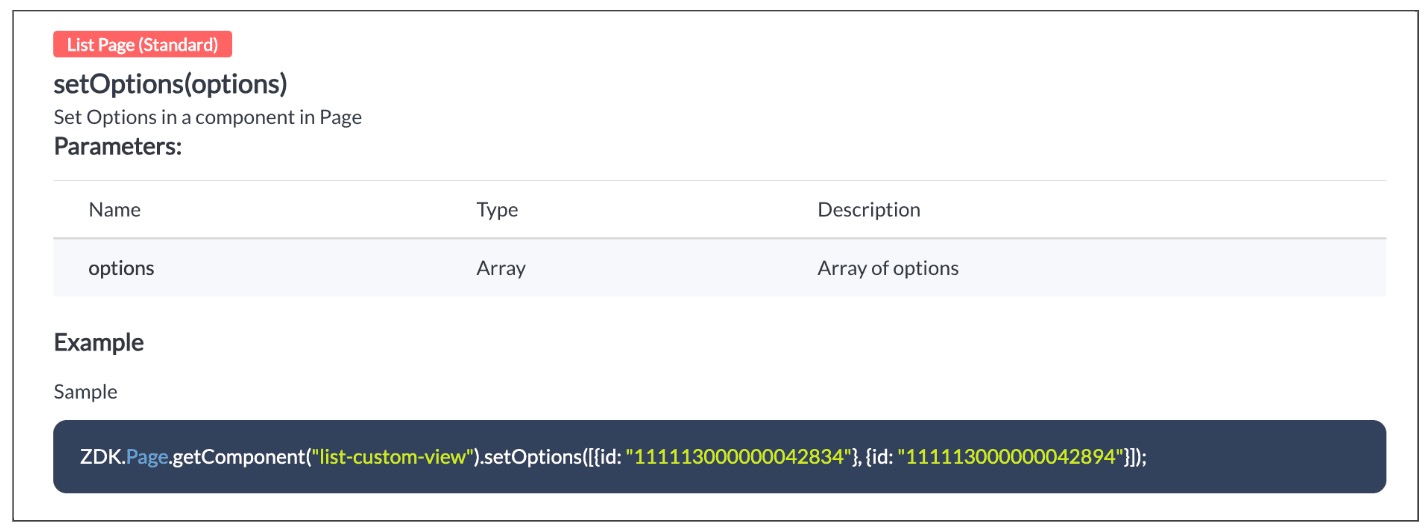
- Now with the copied id of "My Orders" view , use "getComponent.setOptions()" and add the only option on list-custom-view as "My Orders" view, if the profile is "Sales".
var user = ZDK.Apps.CRM.Users.fetchById($Crm.user.id); if (user.profile.name != 'Sales') { ZDK.Page.getComponent("list-custom-view").setOptions([{ id: "5575270000000876021" }]); } |
- Save the Script.
- Here is the syntax for setOptions(options).
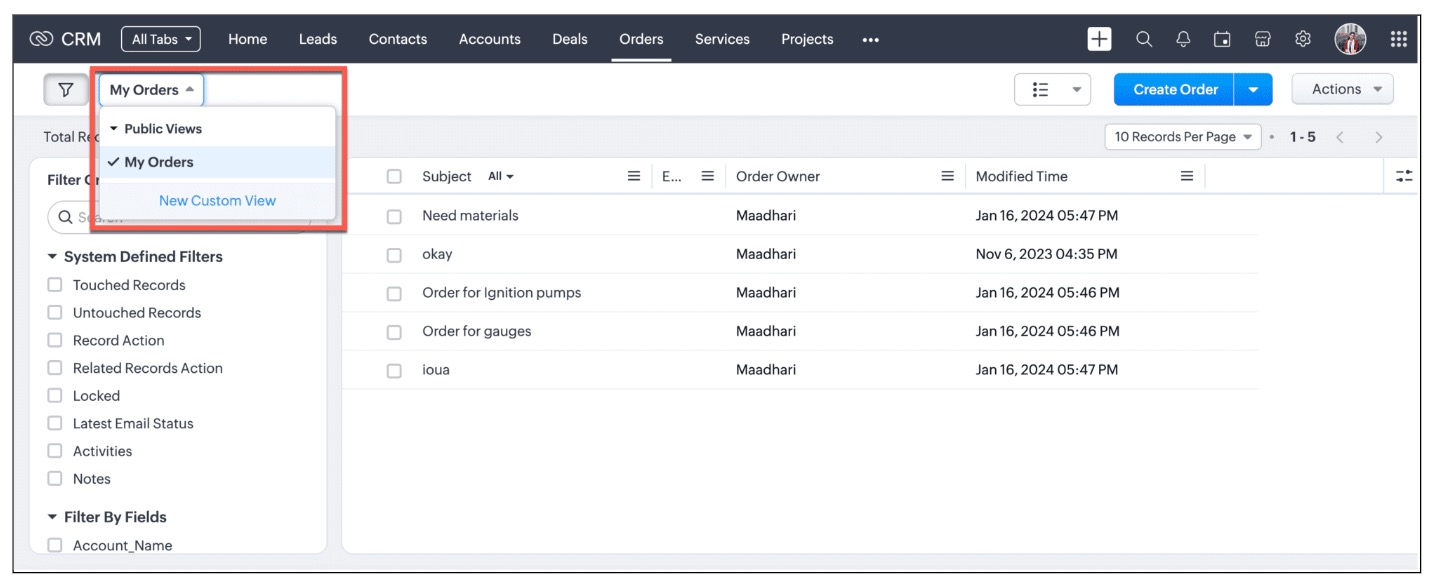
- You can now see that only "My Orders" view is visible for the "Sales" profile, and all other public views are hidden.
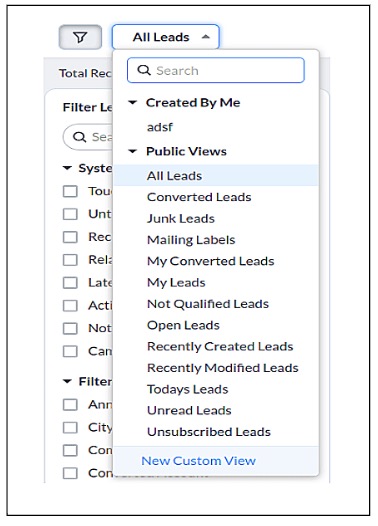
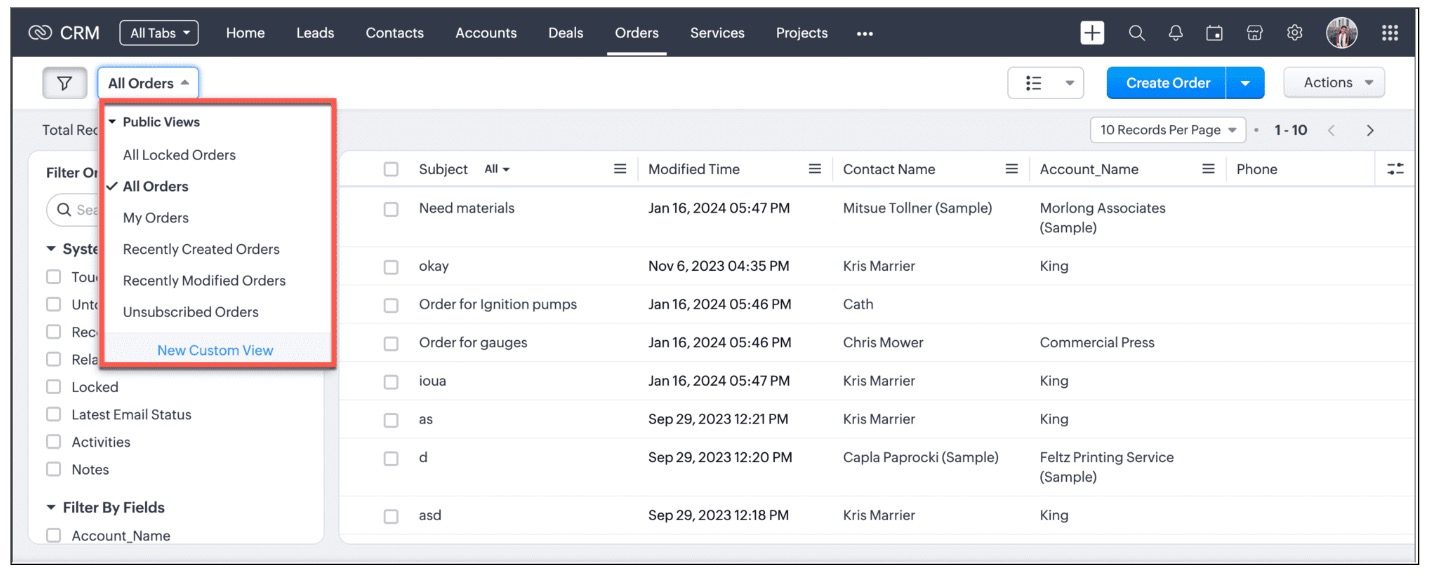
- For other profiles like Manager and Admin, all public views will be visible as shown below.
We are working on the other components in the List Page, and will let you know once they are live.
4. Other ZDKs available to customize List Views
Client Script enables you to customize List Views using the following list of ZDKs and Client Script functions.
- freezeColumns(option) - You can freeze list view and disable modifying columns.
- maskField(field_name, (length,character,reverse)) - You can mask fields in the List View
- sortByField(field_name, option) - You can sort field in the List View
- getRecords() - You can get Records in the List View
- selectRecords(criteria) - You can select Records in the List view by criteria
- selectRecordsByID(ids) - You can select Records in the List view by record ID
- clearSelection() - You can clear selected Records in the List view
- style(style_config, criteria) - You can style Records in the List View. Click here to view the related Kaizen post.
- setValue(value) - You can set the component value in the Page
- getValue() - You can Get the component value in the Page
- setVisibility(value) - You can set visibility of the component in the Page
5. Summary:
In this post, we have discussed,
- About standard and custom List Views.
- How to control the visibility of List Views using Client Script.
- How to fetch the list of views available for a module using Client Script.
- How to set your desired views for users using Client Script.
- ZDK methods available in Client Script to customize List views
6. Related Links
- Client Script Overview
- Creating a Client Script
- Client Script Events
- Client Script IDE
- Use cases of Client Script

Kaizen Collection :
Click here to view our Kaizen Collection.
Also, check our previous post - Kaizen #120 - A Guide to API Calls in Zoho CRM Sandboxes
We hope you found this post useful. We will meet you next week with another interesting topic!
If you have any questions, let us know in the comment section.
Cheers!
Topic Participants
Maadhari M
Irmyahou Azan
Ishwarya SG
Brandon
859953848@zohoclosedAccount.com
Sticky Posts
Kaizen #198: Using Client Script for Custom Validation in Blueprint
Nearing 200th Kaizen Post – 1 More to the Big Two-Oh-Oh! Do you have any questions, suggestions, or topics you would like us to cover in future posts? Your insights and suggestions help us shape future content and make this series better for everyone.Kaizen #226: Using ZRC in Client Script
Hello everyone! Welcome to another week of Kaizen. In today's post, lets see what is ZRC (Zoho Request Client) and how we can use ZRC methods in Client Script to get inputs from a Salesperson and update the Lead status with a single button click. In thisKaizen #222 - Client Script Support for Notes Related List
Hello everyone! Welcome to another week of Kaizen. The final Kaizen post of the year 2025 is here! With the new Client Script support for the Notes Related List, you can validate, enrich, and manage notes across modules. In this post, we’ll explore howKaizen #217 - Actions APIs : Tasks
Welcome to another week of Kaizen! In last week's post we discussed Email Notifications APIs which act as the link between your Workflow automations and you. We have discussed how Zylker Cloud Services uses Email Notifications API in their custom dashboard.Kaizen #216 - Actions APIs : Email Notifications
Welcome to another week of Kaizen! For the last three weeks, we have been discussing Zylker's workflows. We successfully updated a dormant workflow, built a new one from the ground up and more. But our work is not finished—these automated processes are
Recent Topics
Zoho Notebook API
Hi there, I was wondering if you guys are planning to create an API service for this product? Currently, I have developed a custom program based on Evernote's API that allows me to automate my notes. The program completely changes the way notes are taken and makes anyone more productive, combining notes, logging, reminders, tasks and time management. I would love to deploy it on the Zoho Notebook API. In fact, I think this would be the perfect product for Zoho to package and offer as a service/product.Add Reauthentication Option for Zoho Bug Tracker Integration in Zoho Desk
Hello Zoho Desk Team, We hope you're doing well. We would like to request an enhancement to the Zoho Bug Tracker integration within Zoho Desk. Current Limitation: At the moment, there is no option to reauthenticate the Zoho Bug Tracker integration inNewby Questions
Q1. The top bar of Zoho Books has a "Search in Banking (/) " field. What is the proper use of this text box? - Searching for Amazon for example has no results but there are transactions. - Is the search case sensitive? - Are regular expressions allowed?Three Zoho Billing Limitations Blocking Standard Subscription Operations
After working through Zoho Billing support for over a year on these three issues without resolution, we wanted to flag them to the broader community. We are curious whether other businesses are running into the same walls. 1. Cannot Prepone (Move Earlier)Automation #3 - Auto-sync email attachments to tickets
This is a monthly series where we pick some common use cases that have been either discussed or most asked about in our community and explain how they can be achieved using one of the automation capabilities in Zoho Desk. Most of our customers use emailCan't add a sender adress from zoho campaigns
hi, I need to change the sender address for a campaign. When i try to add it i get a message to say 'duplicated email address found while adding your sender address'. This is the first campaign i'm sending so I don't understand why this message is displayed? Thanks JaneIntroducing Workqueue: your all-in-one view to manage daily work
Hello all, We’re excited to introduce a major productivity boost to your CRM experience: Workqueue, a dynamic, all-in-one workspace that brings every important sales activity, approval, and follow-up right to your fingertips. What is Workqueue? SalesDashboard target enhancements
Often individuals in IT are creating dashboards for their sales team. The ability to create a single dashboard that can be used by multiple people is key. A components for a dashboard have the ability to filter by logged in user which is great. HoweverZoho Campaigns - Feature Request - Re-Send Existing Email Action in Automations/Journeys
Hi Zoho Campaigns and Zoho Marketing Automation teams, I would like to suggest a feature that would make building and managing complex automations significantly easier. The Feature Introduce a “Re-Send” or “Send Existing Email” action within AutomationsISO 3166-2 Compliant Country and Regions
Zoho should consider implementing ISO 3166-2 standards for countries and regions in address dropdowns. It adds a lot of noise in the data when items added programmatically conform to ISO 3166-2 (e.g., TX for Texas, CA for Canada, etc.), but the few itemsZoho Books | Product updates | October 2025
Hello users, We’ve rolled out new features and enhancements in Zoho Books. From iOS 26 updates to viewing reports as charts, explore the updates designed to enhance your bookkeeping experience. Zoho Books Updates for Apple Devices At WWDC 2025, AppleBill sent for Payment Approval
Zoho Books currently supports three levels of transaction approval for bills: Draft, Submit, and Approved. We are looking to add a layer of approval like a bill marked for payment before initiating payment requests through HSBC Bank. Can you please guideKaizen #235 - Automating record restoration using Recycle Bin APIs in Zoho CRM
Welcome to another Kaizen week. Here's a question that came up in our developer forum: "I'm working on a piece of software to automate conversion of Leads into Deals based on order status from my company's website. There are some cases where a previouslyOpen PDFs using Zoho PDF Editor
Hello users, In this article, we will be exploring the open PDF capability in Zoho PDF Editor to collaboratively edit PDFs, insert text and images, add fillable and e-signature fields, and more. You can upload PDFs upto 50 MB or 150 pages. Password-protectedOne Contact with Multiple Accounts with Portal enabled
I have a contact that manages different accounts, so he needs to see the invoices of all the companies he manage in Portal but I found it not possible.. any idea? I tried to set different customers with the same email contact with the portal enabled andBank Feeds Breaking Constantly
Hey Everyone, I have already reached out to support about this issue but I am wondering if anyone else is having the same issue. My bank feeds keep breaking within days of me fixing them by updating the credentials. Its been happening for a while andTimed addition to segments
Hi there - hoping you can help me figure out a graceful way of doing this: • I want to add contacts to a Segment in Campaigns based on a Stage pick-list field value X in CRM - that bit's fine. The problem is that I only want to add them to the SegmentZoho Developer AI Agent = Claude AI + MCP Server + Zoho Ecosystem
Hello Zoho Community 👋 I’m excited to share a recent integration we’ve worked on at Officehub Tech: ✅Claude + MCP Server + Zoho Creator Zoho Developer AI Agent – an AI-powered Zoho automation platform This solution connects Zoho applications with anCRM
How do I build an email funnel of 10 emails with decision tree ie; if yes use this email if no use this email. Also I cannot figure out how to add more groups or see my whole groups. I've set up different groups like attorneys is one group of companies/peopleWebDAV support
I need WebDAV support so that I can upload/download (and modify) documents from my local file system. Is anything planned in his direction?Is there a way to show contact emails in the Account?
I know I can see the emails I have sent and received on a Contact detail view, but I want to be able to see all the emails that have been sent and received between all an Accounts Contacts on the Account Detail view. That way when I see the Account detailInternal Fillable Contract with Zoho Writer (Before Sending to Client)
Hi everyone, I’m trying to automate the following process in Zoho CRM and would appreciate some guidance. Process: When a Deal moves to a specific stage, CRM triggers an automation. CRM sends a contract template to an internal team member so they canImport Quote from CRM into document in Writer?
Hi, I created a quote for a proposal in the Zoho CRM and was wondering if there is a way to embed the quote into a document in Zoho Writer so I can make our sales proposals look a little nicer. Is that possible?Zoho Sheet for Desktop
Does Zoho plans to develop a Desktop version of Sheet that installs on the computer like was done with Writer?Can I convert MSG to HTML on Mac?
Yes, you can convert MSG files to HTML on a Mac using software Aryson MSG file Converter. This tool allows you to convert Outlook MSG emails into multiple formats, including HTML, PDF, EML, PST, and more. It preserves all email content, attachments, metadata,Duplicate Leads Notification Help!
Hello! I have several web forms that have a duplicate lead notification that are being sent to the creator of the web form. I understand how to change the form entry notification, but I am specifically looking to change the recipient of the "Duplicate Lead" notification. Any help you can offer is greatly appreciated! TIA, ~ JennAdding Calendar Display to Home Page
I would like to display my calendar in a module on the Zoho CRM Home Page. I can't figure out a way to do this. Is it possible to display the CRM Calendar on the Home Page?Schedule a Call by Date and Time when a specific lead status is selected
Hi Wanting to create a workflow where a call can be scheduled by date & time when a specific lead status is selected. Can only currently set the date by Due Date - Trigger Date - Plus 'x' day(s) ThanksIncoming email replies not automatically associating with Deals/Opportunities - Is this possible in Zoho CRM?
Hello Zoho Community, I'm running a travel agency (B2B and B2C) and we've been struggling with what seems like a basic functionality that we cannot get to work properly. Our use case: We send emails to suppliers (hotels, transportation companies) andDuplicate Leads Concerns with Round Robin and Lead Approval Process
It is great to have the Duplicate Lead Approval Process, there are a few issues with the process that I would greatly appreciate taken consideration in enhancing. It appears that A Lead comes in Lead owner assigned by the Round Robin Check for Duplicate,Private email threads
When sending a Private email or receiving a response once the email thread has been marked as 'Private'- is there a way to trigger the system to "restart the clock"? I am finding that when someone responds to a 'Private' thread that it is opening theSLA Notification
Team members have been receiving this notification and feel as though it is as random. Explanation on this notification is appreciated! Also, is there a way to disable this notification?Map: Output None
Hi, Checking if you help me inspect this block The code below triggers during Successful form Submission from another Form. // rec_a = formA[ID!=0]; rec_b = formB[ID!=0]; ListA = List(); //subformA for each recA in rec_a.ItemSubform { for each recB inUse arbitrary images in deluge
I am sending emails from my deluge code and I would like to be able to include a few images in the email template. While I know that I could put the on a website somewhere and link to them in the HTML, that is not what I want due to email client securityHow to add "All Open AND Overdue" back to the Home Page Task Component?
Hi everyone, I’m looking for a way to restore the Tasks component dropdown list on the Zoho CRM Home Page. Since the recent update to the Task area in my Home Page Classic View, the dropdown options (e.g., My Next 7 Days + Overdue) are too restrictiveSync Attachments in Comments from Zoho Desk to Zoho Projects
Hello Zoho Desk Team, We hope you're doing well. We are actively using the Zoho Desk–Zoho Projects integration, especially for reporting and managing bugs/issues between support and development teams. Current Limitation: After creating a bugs/issues viaFuncionalidades y configuration ZohoDesk
Creo que no estoy sacando el provecho adecuado a la application quisiera solicitar una capacitación al respectoHow to call Functions and perform Write Operations using Page Scripts?
Hi everyone, How to call a function from a Zoho Creator application within a Page Script, also how to perform write operations (adding or updating records) using page scripts?Connecting Airwallex in Zoho Books
I have a question. I’m trying to connect our Airwallex account to Zoho Books, but the integration does not seem to work. Could you please guide me on how to properly connect Airwallex? I need to see the expenses also, since it only shows the profits nowQuestions Regarding Helpdesk & SalesIQ Customization and Email Setup
Hello, I hope you’re doing well. I have a few questions regarding Helpdesk and SalesIQ: Can the emails sent to customers via helpdesk tickets be fully customized — including signature, subject line, and other elements? Also, is it possible to send theseNext Page