Actions API - Webhooks APIs - Part 1

Actions API - Webhooks APIs - Part 1


Hello all!!
Welcome back to a fresh Kaizen week.
In the previous weeks, we covered Workflow Rules APIs, Actions APIs - Email Notification APIs, Tasks Update API, and Field Update API.

This week, we will continue with another Actions API - Webhooks API in Zoho CRM.

Webhooks in Zoho CRM

A webhook allows Zoho CRM to send real-time information to another application the moment something important happens. Webhooks let CRM push data instantly to an external URL whenever the workflow condition is met.
Webhooks do not notify on every record event by default. They trigger only when specific automations, such as a Workflow Rule you configure, are executed. This helps for specific real-time automation needs, such as sending high-value leads to an external validation service.

Use case

Zylker, an IT solutions provider, uses Zoho CRM to manage all incoming leads. But not every new lead is ready for the Sales team right away. Not all leads need immediate follow-ups. For leads with a high Profit Score (80+), it usually means strong buying intent, but they may contain fake information.

Why does Zylker use Zoho CRM and send these leads to an external validation application?

Before Sales reaches out, Zylker wants to make sure these high-value leads have valid information. While CRM keeps the lead data organized, a specialized third-party validation systems check any fraudulent activities and confirm whether the email, phone number, or other details are real.

To do this quickly, Zylker uses Webhooks in Zoho CRM. The moment a lead crosses the 80+ score, Zoho CRM automatically sends the lead’s data to Zylker’s external validation system. This lets Zylker verify the lead in real time and send back a clean, accurate, sales-ready profile for the Sales team to follow up on.

From here, we will explain every part of Webhooks by showing how it looks in the Zoho CRM UI and how to do the same using the API. Each step will be shown side-by-side, so you can clearly see how the UI setup translates into the API request.

Configuring Webhooks for Zylker’s Use Case - UI Method

  1. Go to Setup 
  2. Navigate to Automation
  3. Choose Actions -> Webhooks
  4. Click Configure Webhook
You will see the window shown below.
Webhook - UI view

The following sections explain what each field means in three parts:
  1. Basic fields to configure Webhook.
  2. Configuring Headers 
  3. Configuring Body

Filling the basic Webhook details via UI
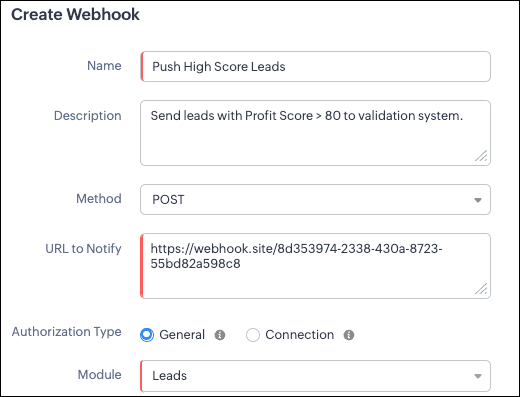


Filling the basic Webhook details via Create Webhook API

Request URL: {{api-domain}}/crm/v8/settings/automation/webhooks
Request Method: POST
Input JSON

{
    "webhooks": [
        {
            "name": "Push High Score Leads",
            "description": "Send leads with Profit Score > 80 to validation system.",
            "module": {
                "api_name": "Leads",
                "id": "5725767000000002175"
            },
            "authentication": {
                "type": "general"
            },
            "http_method": "POST"
        }
    ]
}


Keys explanation

  1. name (mandatory): Name of your webhook.
  2. description: Add a short note about what this webhook does.
  3. module (mandatory): Select the module from where the external application listens the changes. In our case, select Leads module to push high-score leads.
  4. url (mandatory):  Specify the external endpoint where CRM will send the data. This lets the external application see what CRM sends.
    1. Note: In this post, we have used an endpoint from Webhook.site
  5. authentication (mandatory): Specify authentication type for the webhook endpoint. 
  6. Possible types:
    1. general: The receiving system does not require OAuth. You can pass OAuth tokens manually in headers.
    2. connections:
      1. OAuth-based integrations: Systems that use Zoho’s Connections.
      2. For our Zylker use case, we select General.
            Note: In Zoho CRM API V8, Webhooks currently support only General authentication. Connection-based authentication will be available in a future update.
  1. http_method (mandatory): Select a HTTP method that allows you to send structured data. 
            Possible values: POST, GET, PUT, DELETE

In our case, we use POST to create a new record in the external app with the necessary lead details, allowing the external system to run its validation checks.

HTTP methods and their supported parameters - Headers, Body, URL Parameters

  HTTP Method

  Headers

  Body

  URL Parameters

POST

  • Module parameters

  • Custom parameters

Type: form-data

Module parameters
Custom parameters
User-defined parameters

Formats: null

Type: raw

Formats: Text, JSON, HTML, XML

      Not Supported

PUT

  • Module parameters

  • Custom parameters

Type: form-data

Module parameters
Custom parameters
User-defined parameters

Formats: null

Type: raw

Formats: Text, JSON, HTML, XML

      Not Supported

GET

     Not Supported

           Not Supported

  1. Module parameters
  2. Custom parameters
  3. User-defined parameters   
  

DELETE

   Not Supported

          Not Supported

  • Module parameters

  • Custom parameters

  • User-defined parameters


Each HTTP method supports different parameter types. The above table shows which methods support Headers, Request Body, and URL Parameters. Detailed explanations of these parameter types are provided in the following section.

Creating a Webhook with Headers, Body, and URL Parameters

When a webhook is triggered in Zoho CRM, the data is sent to the external application as part of the HTTP request.
The data can be sent in three places:
  1. Headers
  2. Body (Form-Data or Raw)
  3. URL Parameters 
Each part serves a different purpose.

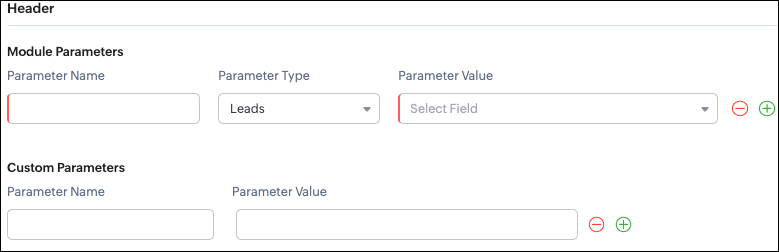
Configuring Headers 

UI - Configuration

Headers allow you to send extra information along with your webhook request. These help when the external app needs extra data like auth tokens or CRM field values.

Zoho CRM supports two types of headers:
  1. Module Parameters - Dynamic values from CRM fields
  2. Custom Parameters  - Static values you define

Module Parameters - dynamic CRM data

Module parameters allow you to send values from CRM fields inside the header. These values change depending on the record that triggered the webhook.

A module parameter consists of:
  1. Parameter Name - A unique header key that you define. It does not have to match the CRM field API name.
  2. Parameter Type - Defines the source of the data you are mapping. It can come from the selected CRM module such as Leads and Contacts, lookup fields, User fields such as Lead Owner, or Organization fields.
  3. Parameter Value - The merge field value. Example, ${!Leads.Created_By.id}
Note: If you decide to use Headers, then you must add at least one module_parameter. Otherwise CRM will show an error. 

Example:

Parameter Name

Parameter Type

Parameter Value

Lead_Email

Leads

Email

Annual_Revenue

Leads

Annual Revenue

Profit_Score

Leads

Profit Score

Created_By

Created  By

User Id


Custom Parameters - static values

Custom parameters are key-value pairs that never change.

These are useful for:
  1. API version
  2. Tags like “zylker-crm”

Name

Value

source

zylker-crm

version

v1


Configuring Headers via Create Webhook API

Request URL: {{api-domain}}/crm/v8/settings/automation/webhooks
Request Method: POST

Input JSON

{
    "webhooks": [
        { 
            .
            .
            .
            "http_method": "POST",
            "headers": {
                "module_parameters": [
                    {
                        "name": "Lead_Email",
                        "value": "${!Leads.Email}"
                    },
                    {
                        "name": "Annual_Revenue",
                        "value": "${!Leads.Annual_Revenue}"
                    },
                    {
                        "name": "Profit_Score",
                        "value": "${!Leads.Profit_Score}"
                    },
                    {
                        "name": "Created_By",
                        "value": "${!Leads.Created_By.id}"
                 }
                ],
                "custom_parameters": [
                    {
                        "name": "source",
                        "value": "zylker-crm"
                    },
                    {
                        "name": "version",
                        "value": "v1"
                    }
                ]
            }
        }
    ]
}


When should Zylker use Headers?
For the 80+ Profit Score validation use case, Zylker can include module parameters such as Lead Email, Profit Score, and Lead ID, which are helpful for fraud-detection tools.
Similarly, Zylker can include custom parameters like source=zylker-crm and api_version=v1 to help the external system identify where the webhook originated.

Configuring the Body of a Webhook - form-data & raw formats

After setting up the basic details and Headers, the next step is to configure the Body.
The Body is where the main CRM record data is sent, which is different from the Header section that only carries metadata like auth tokens or quick identifiers.

Depending on your needs, the Body can be either Form-Data or Raw. The list below shows the supported options for each format.
  1. Form-Data:
    1. Module parameter
    2. Custom parameter
    3. User-defined format.
  2. Raw:
    1. Text - plain messages
    2. JSON -  structured API payload
    3. HTML - formatted messages
    4. XML - traditional enterprise systems


Form-Data Body: key-value 
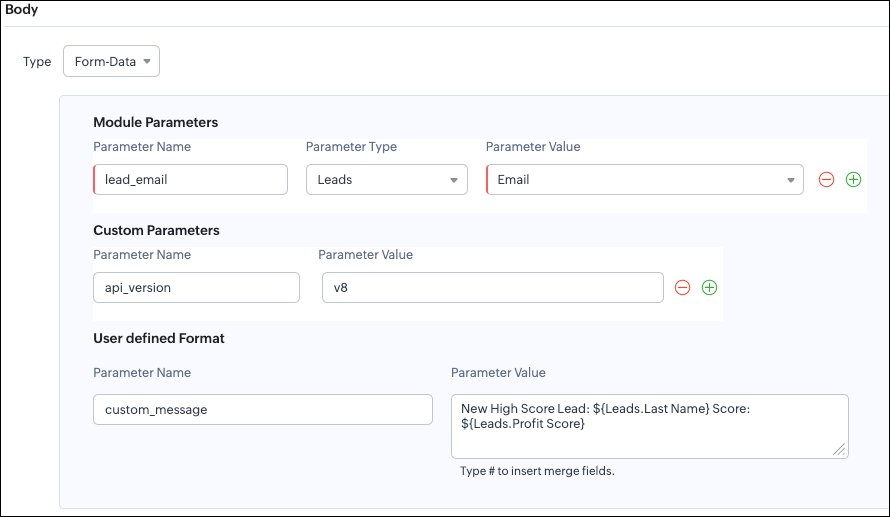
UI - Configuration


Zoho CRM lets you build Form-Data using three types of parameters:
  1. Module Parameters
  2. Custom Parameters
  3. User Defined Parameters
Use Form-Data when the external app expects key-value pairs - similar to how HTML forms submit data.

Note:
  1. Headers are for sending supporting information that helps the external system understand the request - this can include auth details, source identifiers, or key CRM fields like email or score that help with quick categorization or filtering. 
Why do Module and Custom parameters appear again in Form-Data?

The same Module Parameters and Custom Parameters are available in the Body because:
  1. Headers - Provide supporting details such as identifiers or quick-check values. For example, Lead ID, or source tags that help the external system check and route the request.
  2. Body - Contains the complete lead information that the external validation system needs to process.
Although the parameter names look the same (Module, Custom), their purpose changes:

Where parameters are used

Purpose

Example

Headers

Metadata - OAuth,tags, and context

source: zylker-crm

Form-Data (Body)

Main record data - actual lead details sent to the app.


lead_email=patricia@zylker.com

So Zoho CRM gives you the same structure, but used differently depending on where the data is placed.

User-Defined Parameters
User-Defined parameters let you build custom, human-readable messages or templates. This parameter is available only in the Body, not in Headers. 

Parameter Name

Parameter Value

custom_message

New high-score lead: ${Leads.First Name}${Leads.Last Name} (Score: ${Leads.Profit Score})


This is very helpful if your external app expects a text message, notes, or a description field.

Configuring the Body of a Webhook - form-data via Create Webhook API

Request URL: {{api-domain}}/crm/v8/settings/automation/webhooks
Request Method: POST

Input JSON

{
    "webhooks": [
        {
             .
             .
             .
            "body": {
                "form_data_content": {
                    "module_parameters": [
                        {
                            "name": "Lead_Email",
                            "value": "${!Leads.Email}"
                        },
                        {
                            "name": "Annual_Revenue",
                            "value": "${!Leads.Annual_Revenue}"
                        },
                        {
                            "name": "Profit_Score",
                            "value": "${!Leads.Profit_Score}"
                        },
                        {
                            "name": "Created_By",
                            "value": "${!Leads.Created_By.id}"
                        }
                    ],
                    "custom_parameters": [
                        {
                            "name": "source",
                            "value": "zylker-crm"
                        },
                        {
                            "name": "version",
                            "value": "v1"
                        }
                    ],
                    "user_defined_parameters": {
                        "name": "custom_message",
                        "value": "New high-score lead: ${!Leads.First_Name}${!Leads.Last_Name} (Score: ${!Leads.Profit_Score})"
                    }
                },
                "type": "form_data"
            },
            .
            .
            .
        }
    ]
}


Raw Body - JSON / XML / HTML / Text

Zoho CRM’s Webhook Body section allows you to send data to an external application in a Raw format. This is useful when the receiving system expects structured data in the following structure.

You can choose:
  1. Raw + Text
  2. Raw + JSON
  3. Raw + HTML
  4. Raw + XML

Raw + Text:

Text format is the simplest. You can type any text and insert merge fields.

UI - Configuration


When to use Text?
  1. When sending a simple message. 
  2. When the external app only expects plain text.

Configuring the Body of a Webhook - Raw - "Text" via Create Webhook API

Request URL: {{api-domain}}/crm/v8/settings/automation/webhooks
Request Method: POST

Input JSON

{
    "webhooks": [
        {
           .
           .
           .
            "body": {
                "raw_data_content": "New high score lead: ${!Leads.First_Name} ${!Leads.Last_Name}, ${!Leads.Email}, ${!Leads.Annual_Revenue}, ${!Leads.Phone}, ${!Leads.Industry}, ${!Leads.Owner}",
                "format": "Text",
                "type": "raw"
            },
            .
            .
            .
        }
    ]
}


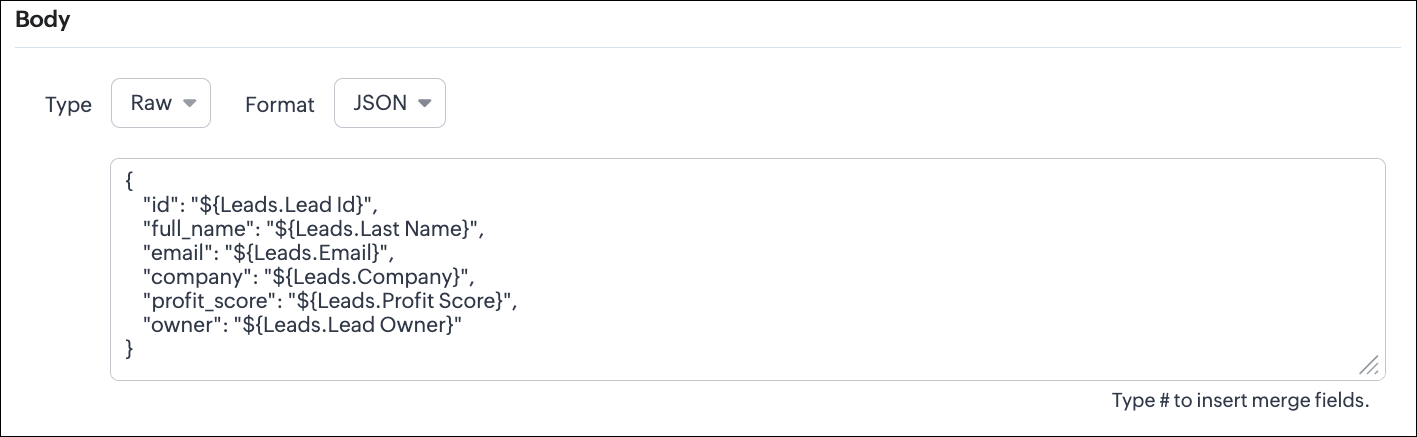
Raw + JSON:

This is the most common format for APIs. Use this when the receiving system expects structured JSON data.

UI - Configuration


Configuring the Body of a Webhook - Raw - "JSON" via Create Webhook API

Request URL: {{api-domain}}/crm/v8/settings/automation/webhooks
Request Method: POST

Input JSON

{
    "webhooks": [
        {
          .
          .
          .
            "body": {
                "raw_data_content": "{\n    \"id\": \"${!Leads.id}\",\n    \"full_name\": \"${!Leads.Last_Name}\",\n    \"email\": \"${!Leads.Email}\",\n    \"company\": \"${!Leads.Company}\",\n    \"profit_score\": \"${!Leads.Profit_Score}\",\n    \"owner\": \"${!Leads.Owner}\"\n}",
                "format": "JSON",
                "type": "raw"
            },
           .
           .
           .
        }
    ]
}


When to use JSON?
  1. When the external system expects structured data
  2. Easier validation

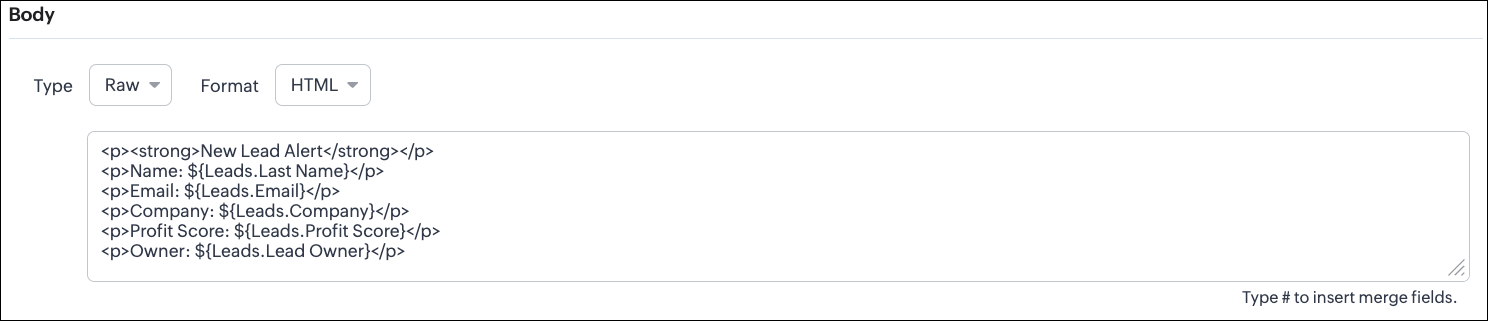
Raw + HTML:

HTML format is useful for sending stylized messages or formatted content.

UI - Configuration

Configuring the Body of a Webhook - Raw - "HTML" via Create Webhook API

Request URL: {{api-domain}}/crm/v8/settings/automation/webhooks
Request Method: POST

Input JSON

{
    "webhooks": [
        {
            .
            .
            .
            "body": {
                "raw_data_content": "<p><strong>New Lead Alert</strong></p>\n<p>Name: ${!Leads.Last_Name}</p>\n<p>Email: ${!Leads.Email}</p>\n<p>Company: ${!Leads.Company}</p>\n<p>Profit Score: ${!Leads.Profit_Score}</p>\n<p>Owner: ${!Leads.Owner}</p>",
                "format": "HTML",
                "type": "raw"
            },
            .
            .
            .
        }
    ]
}


When to use HTML?
  1. If the external system displays formatted output
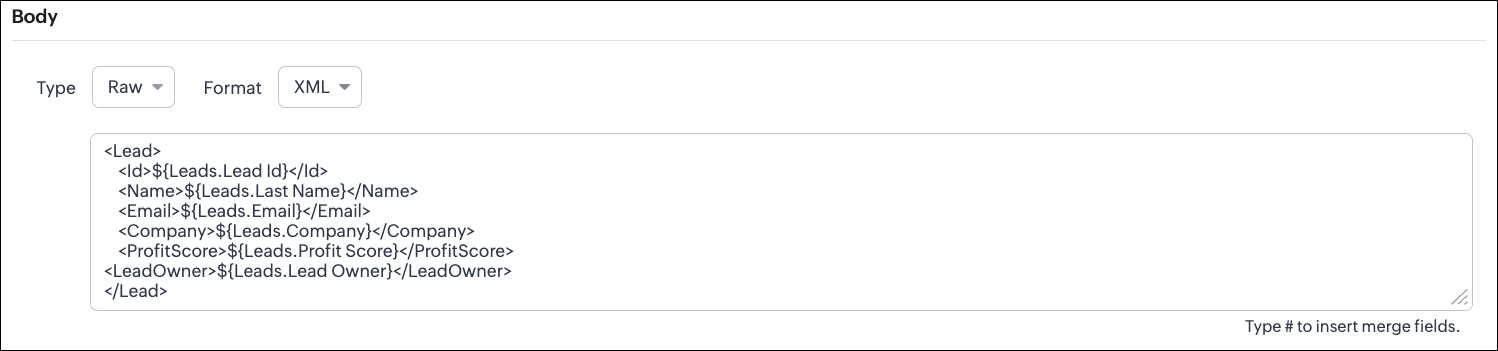
Raw + XML:
Some legacy systems or enterprise applications prefer XML.

UI - Configuration

Configuring the Body of a Webhook - Raw - "XML" via Create Webhook API

Request URL: {{api-domain}}/crm/v8/settings/automation/webhooks
Request Method: POST

Input JSON

{
    "webhooks": [
        {
          .
          .
          .
                "raw_data_content": "<Lead>\n    <Id>${!Leads.id}</Id>\n    <Name>${!Leads.Last_Name}</Name>\n    <Email>${!Leads.Email}</Email>\n    <Company>${!Leads.Company}</Company>\n    <ProfitScore>${!Leads.Profit_Score}</ProfitScore>\n<LeadOwner>${!Leads.Owner}</LeadOwner>\n</Lead>",
            "format": "XML",
            "type": "raw"
        },
            .
            .
            .
    }
]
}


When to use XML?
  1. With older systems
  2. When the receiving system only supports XML

Note:
  1. When you switch the webhook method in the UI, Zoho CRM changes the options you can configure:
            GET Method
    1. Only URL Parameters are available
    2. Headers are hidden
    3. Body is hidden
    4.  Because GET requests always send data through the URL and cannot carry a body.
            DELETE Method
    1. Headers are available
    2. URL Parameters are available
    3. Body is still not supported
    4. DELETE requests can include headers, but Zoho CRM does not allow sending a body for DELETE webhooks.

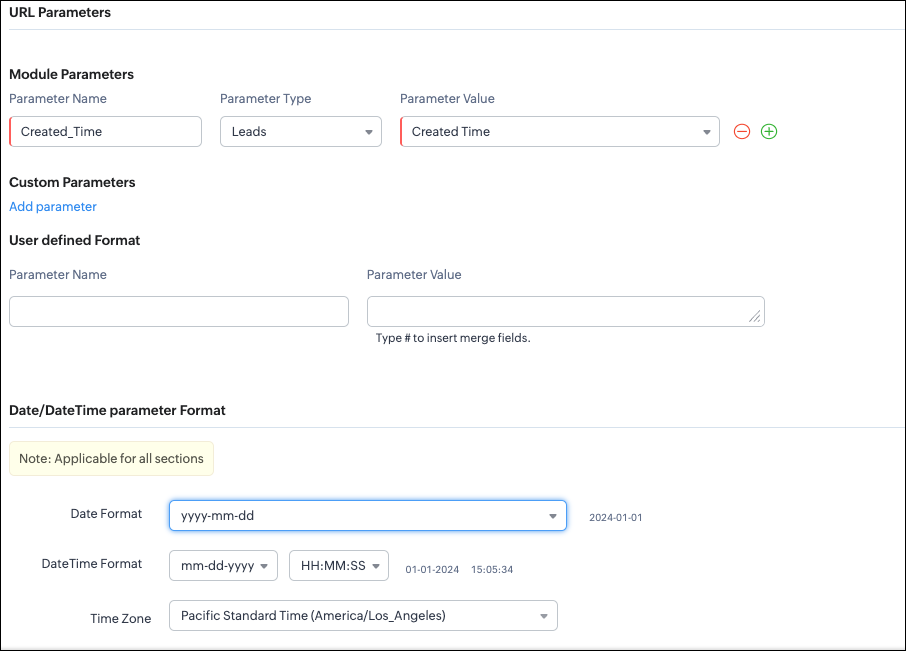
  1. Date-time format:
            Zoho CRM will format any Date or DateTime fields in your webhook according to the format you select.
            
            UI - Configuration


           API - Configuration

 
  {
    "webhooks": [
        {
            "module": {
                "api_name": "Leads",
                "id": "5725767000000002175"
            },
            "url_parameters": {
                "module_parameters": [
                    {
                        "name": "Created_Time",
                        "value": "${!Leads.Created_Time}"
                    }
                ]
            },
            "description": "Send leads with Profit Score > 80 to validation system.",
            "http_method": "GET",
            "name": "Push High Score Leads",
            "date_time_format": {
                "datetime_format": "mm-dd-yyyy HH:MM:SS",
                "date_format": "yyyy-mm-dd",
                "time_zone": "America/Los_Angeles"
            },
            "authentication": {
                "connection_name": null,
                "type": "general"
            }
        }
    ]
}


With this, we have covered what a Webhook is in Zoho CRM, how to configure a basic Webhook, how to configure a Webhook with Headers, Body, and URL Parameters, how each component works, how to configure them using the UI, and how the same setup can be created through the POST Webhooks API.

In Part 2, we will explain 
  1. How to manage Webhooks using the GET, PUT, and DELETE Webhook APIs
  2. How to associate a Webhook with a Workflow
  3. How to perform real-time testing by creating records
  4. How an external application receives data from Zoho CRM via Webhook.

We hope this post helps you understand how to use Webhooks through the Zoho CRM Actions API - Webhooks API.

Try it out, and let us know your experience in the comments section or reach out to us at support@zohocrm.com.
Stay tuned for more insights in our upcoming Kaizen posts!

Cheers!


      • Sticky Posts

      • Kaizen #217 - Actions APIs : Tasks

        Welcome to another week of Kaizen! In last week's post we discussed Email Notifications APIs which act as the link between your Workflow automations and you. We have discussed how Zylker Cloud Services uses Email Notifications API in their custom dashboard.
      • Kaizen #216 - Actions APIs : Email Notifications

        Welcome to another week of Kaizen! For the last three weeks, we have been discussing Zylker's workflows. We successfully updated a dormant workflow, built a new one from the ground up and more. But our work is not finished—these automated processes are
      • Kaizen #152 - Client Script Support for the new Canvas Record Forms

        Hello everyone! Have you ever wanted to trigger actions on click of a canvas button, icon, or text mandatory forms in Create/Edit and Clone Pages? Have you ever wanted to control how elements behave on the new Canvas Record Forms? This can be achieved
      • Kaizen #142: How to Navigate to Another Page in Zoho CRM using Client Script

        Hello everyone! Welcome back to another exciting Kaizen post. In this post, let us see how you can you navigate to different Pages using Client Script. In this Kaizen post, Need to Navigate to different Pages Client Script ZDKs related to navigation A.
      • Kaizen #210 - Answering your Questions | Event Management System using ZDK CLI

        Hello Everyone, Welcome back to yet another post in the Kaizen Series! As you already may know, for the Kaizen #200 milestone, we asked for your feedback and many of you suggested topics for us to discuss. We have been writing on these topics over the

        • Recent Topics

        • Client Portal ZOHO ONE

          Dear Zoho one is fantastic option for companies but it seems to me that it is still an aggregation of aps let me explain I have zoho books with client portal so client access their invoice then I have zoho project with client portal so they can access their project but not their invoice without another URL another LOGIN Are you planning in creating a beautiful UI portal for client so we can control access to client in one location to multiple aps at least unify project and invoice aps that would
        • Zoho CRM Kiosk issues

          Firstly this is for a system on the AU servers if that makes a difference. Issues are as follows (For Kiosk): 1. Re-ordering fields in the screen builder is broken. The fields seem to be re-ordering themselves, unless you order everything by moving the
        • Zoho Books emails suddenly going to Spam since 11 Nov 2025 (Gmail + now Outlook) — anyone else?

          Hi everyone, We migrated to Zoho Books in July 2025 and everything worked fine until 11 Nov 2025. Since then, Zoho Books system emails are landing in customers’ Spam (first Gmail, and now we’re seeing Outlook/Office 365 also starting to spam them). Impacted
        • Adding Multiple Files to a Zoho Vault Entry

          There is a old blog post talking about adding multiple file attachments to one Zoho Vault Secret: https://www.zoho.com/blog/vault/introducing-new-features-in-zoho-vault-powerful-password-sharing-wider-storing.html Is that still possible, I can see how
        • Zoho Voice lance BYOC (Bring Your Own Carrier) : intégrez votre opérateur

          Pour accompagner sa croissance, une entreprise a besoin d’une infrastructure téléphonique flexible et évolutive. Les solutions de téléphonie s’adaptent aux exigences du centre de contact, tout en intégrant aisément les opérateurs locaux de votre choix.
        • Email Template Edits Not Saving

          I can make an edit, click save, and see the blue bar annimation at the top, but the edits don't actually save. Important, because my email templates are now broken and clients are receiving bad emails. Tried on Chrome, Firefox and IE.
        • Default Ticket View - Table?

          Guys, We mostly use the table view to queue tickets. Maybe I am missing it - but how can I set that view as 'default" for all our agents? Thanks JV
        • Duplicate customers being created in Desk

          Hi I've trying to work out why I've getting duplicated customers being created in my desk. I have an external booking system that generates an email when I get a customer booking a job. A booking email gets sent to Desk where I manage the booking and
        • Can I have different users see different pick list values for Potential Stage?

          We have some users focusing on new business and others focusing on existing business, and they follow different sales processes/cycles, so we would like them to see different pick list values for Stage (eventually leading up to Closed Won/Lost in both cases).   And just to keep it interesting - some of these users will of course do a combination, so would need to see one pick list for their New business potentials and a different pick list for their Existing business ones.   Salesforce does this
        • Links in Instagram

          Hi there, I have been using Later for a while now but keen to come back to Zoho Social as Later doesn't offer tagging of pages on Facebook but they offer something Zoho doesn't. You can add a link to your bio which opens up your profile feed where images
        • Tracking Snippet not working in Zoho Marketing Automation!

          First off, the fact that you have to wait about 12-24 hours for every response is terrible. How are we supposed to conduct business? Second, we have been trying for several days to get the Tracking Code Snippet in marketing automation to work, to no avail.
        • email moderation issue when email is sent in the name of a mail group

          Symptom: an email that is sent by a mail group moderator in the name of a moderated mail group is held back for approval. Reproduction: Create a moderated mail group with members and moderators. Allow that mails can be sent in the name of the group (extended
        • Is there any way to send an Excel received by email to Dataprep?

          Every day I receive an email alert with an Excel file that I want to process through a Dataprep pipeline. To do this, I need to: -Save the file to disk -Open the pipeline -Run the pipeline -Update the source -Several clicks to select and open the saved
        • Recruit paid support?

          Hi all, Could anyone who has paid support package advise if it provides value for money with regards to support response times? Exploring the idea as unfortunately when we have faced issues with Recruit it has been a 7+ day timescale from reporting to
        • Using IMAP configuration for shared email inboxes

          Our customer service team utilizes shared email boxes to allow multiple people to view and handle incoming customer requests. For example, the customer sends an email to info@xxxx.com and multiple people can view it and handle the request. How can I configure
        • Add Lookup Field in Tasks Module

          Hello, I have a need to add a Lookup field in addition to the ones that are already there in the Tasks module. I've seen this thread and so understand that the reason lookup fields may not be part of it is that there are already links to the tables (
        • Hotmail is blocking the zoho mail IP

          Greetings, Since last Tuesday (5 days ago today) I wrote to Zoho support and I still haven't received a single response (Ticket ID: 2056917). Is this how you treat people who pay for your email service? I am making this public so that those who want to
        • Read webpage - MSXML2.ServerXMLHTTP

          I have the following VBA script, put together from various sources (mainly zoho forum/help/support, so it once worked, I guess): private Sub GetListOfSheets() Dim url As String Dim xmlhttp As Object Dim parameters As String Dim html As String range("B1").value
        • Zoho Creator Form Search

          I'm new to Zoho Creator and so far i do like it but im shocked there seems to be no easy way to add a search function and/or navigation to there forms as this readily available in every platform i have used in the past. Anyway i have a form which i have
        • How to setup DKIM / SPF in Zoho Mail

          Hello there! I'm having a hard time understanding how to setup the TXT records for SPF and DKIM with Zoho Mail. I'm following the instructions here: https://www.zoho.com/campaigns/help/setup-spf-dkim.html Specifically, when it comes to the value for the
        • Mass update cant trigger a workflow?

          Hello there, Is this a normal Creator behaviour? In a report, if I manually edit each data row, it will pass those changes to all other reports. However, if I perform a Mass Update on a few data rows at once, the new data is not pushed to other reports.
        • Exciting Updates to the Kiosk Studio Feature in Zoho CRM!

          Hello Everyone, We are here again with a series of new enhancements to Kiosk Studio, designed to elevate your experience and bring even greater efficiency to your business processes. These updates build upon our ongoing commitment to making Kiosk a powerful
        • search and Smart Bar both missing in Mail

          One of the users on my account does not have the search bar at the top right or the Smart Bar at the bottom left of the desktop Mail app. Any ideas how to get those back?
        • "Wrong password or login" Problem to configure Zoho on MAIL App on my Macbook

          Hi, I'm having problems to configure my e-mail on my MAIL App(Macbook pro). My e-mail is hari@trespontoum.net Actually was working perfectly, and still working on my Iphone. My MAIL App prompt me that my login or password is wrong. I tried to change 3
        • Remote Control Functionality During Screen Sharing in Zoho Cliq

          Hello Zoho Cliq Team, We would like to request the addition of remote control functionality during screen sharing sessions in Zoho Cliq. Currently, while screen sharing in Cliq is very useful, it lacks the ability for another participant to take control
        • Looking for best practices to import data from SAP Business One (on-prem) into Zoho Analytics via Zoho DataPrep / Databridge — daily automated schedule

          Hi all, I’m using SAP Business One on-prem (SQL Server / or HANA — depending on DB backend) as our ERP. I want to build a pipeline that, every morning at 9:00 AM IST: pulls transactional data (invoices, customers, products, stock, etc.) from SAP B1, loads
        • Let us add Lookup fields in the Blueprint Transitions

          We are unable to add Lookup Fields in the blueprint transitions in Zoho Desk, we wanted to make it a requirement for our workflow but since it's not available in the transition we cannot. The lookup field exists in the Layout: But it cannot be added/selected
        • Zoho Projects API Scope for Issue Attachments

          I try to download issue attachments via the API, unfortunately I always get the following error code when trying to download the file from the supplied URL: {"ERROR_MESSAGE":"INVALID_OAUTHSCOPE","ERROR_CODE":401} indicating an auth scope error. I've tried
        • How to fetch custom fields for time entries in Zoho Project API v3

          In the previous Zoho Projects REST API, we were able to retrieve custom field details for time entries, including picklist options, using the endpoint: GET /restapi/portal/[PORTAL_ID]/timesheetcustomfields In the new Zoho Projects API v3, we tried using
        • Zoho Survey Enhancements

          We love Survey. We use it a ton. It needs some enhancements. Maybe some of these are already on the roadmap? API - this is crucial. We have some complex surveys that take place and need to update records, trigger other functions/automations, etc. I would
        • Images Don't Display on Blog

          Hi, I've just posted a new blog entry, but regardless of format (png or jpeg) Images that display in Preview mode do not display on any browser in the published post.  I've not done anything different with this post than others regarding images, please advice. Thanks! Edit:  I've discovered that moving the image files from a my sub directory folder "Pics for Blog" to the top level of the "Files" folder on my site allows the images to display live.  This, even though my other blog posts are correctly
        • Creating multiple CRM leads from a Zoho Forms subform

          Hi all, We have a heavily used intake form that is used for new leads as a part of our intake. There is a subform that allows the lead to add additional team members, their titles and other basic info. That form submission creates a new Lead and the subform
        • Checkbox Field Mapping Zoho Forms to Zoho Sign

          I have an application that will be filled out via Forms that I am mapping into a PDF Filler on Zoho Sign. I need to have a series of checkboxes mapped to the corresponding fields in Sign and I only see single checkboxes available via the mapping, though
        • MCP > Creator connection failing with Claude

          I'm trying to get claude to access any of my Zoho Creator apps and it keeps failing. I have enabled all tools for creator and ensured in claude settings that everything is authorised. Here is what claude says : Unfortunately, the error messages I'm receiving
        • Books P&L by Customer

          Lately, we have found that the Customer field filter for the Profit & Loss report in Zoho Books is no longer available. We have several projects with the same customer and look at the P&Ls by project AND by Customer (overall). Can you please add back in this field selection alongside the Project field to the P&L report filter? Thanks! -Gina
        • Sent mail sort by date disappeared

          Hello, We used to be able to sort the emails by date in the sent folder, but this feature has recently disappeared. Can we bring it back?
        • I cannot check out to Zoho People.

          When I tried to check out today, there's prompt that inhibits me to check out: To add entry in Attendance, log time for any of your jobs
        • Pricing Strategies: #2 Plan your Service Offerings using Plans

          Meet Harvey & Mia, hailing from the same Tech school, carrying the dream of setting up their own IT maintenance firm in their location. They drew up a clear business plan and put their business in motion on New Year's Eve. They had great reception right
        • Open a record to edit based on another form being edited

          Hi all, I am trying to edit a record based on another record being edited. It works out like this: When I create a Monthly_Update and then submit I open the Monthly_Levels form and pass the ID from the Monthly_Update to a field called mu. I want it to
        • Problem with signature on zoho survey

          Hello, I'm trying to export individual responses with signatures on zoho survey. But the signatures on some of my surveys are not exported as the original image, but as a generic image, same for all (screen joins). Is there a solution to have the signatures
        • Next Page