Llega Zoho One 2021: una nueva experiencia de usuario unificada
 Nuevo Zoho One 2021, el sistema operativo unificado para empresas
¡Hola, comunidad!
Por fin podemos desvelar lo último en lo que hemos trabajado: un nuevo Zoho One, más unificado que nunca. Con el fin de seguir impulsando a los negocios y combatir sus desafíos actuales, como la dispersión de datos y las brechas de comunicación entre equipos aislados, hoy os presentamos la versión 2021 de Zoho One, con 5 nuevas aplicaciones, 3 nuevos servicios y 7 importantes mejoras en la plataforma. ¿Quieres saber más? Quédate leyendo esta publicación.
Navegación unificada y panel de control personalizable
Cada miembro de tu equipo puede ver ahora sus aplicaciones, servicios y paneles de información en una sola vista con la centralización a través de calendarios, paneles de control, navegación y más. Ahora puedes anclar o desanclar tus aplicaciones favoritas con un solo clic. Y, gracias a las personalizaciones y a los más de 50 widgets preconfigurados, los usuarios tendrán visibilidad de toda la organización en una única vista, con la posibilidad de profundizar en ella con un solo clic.
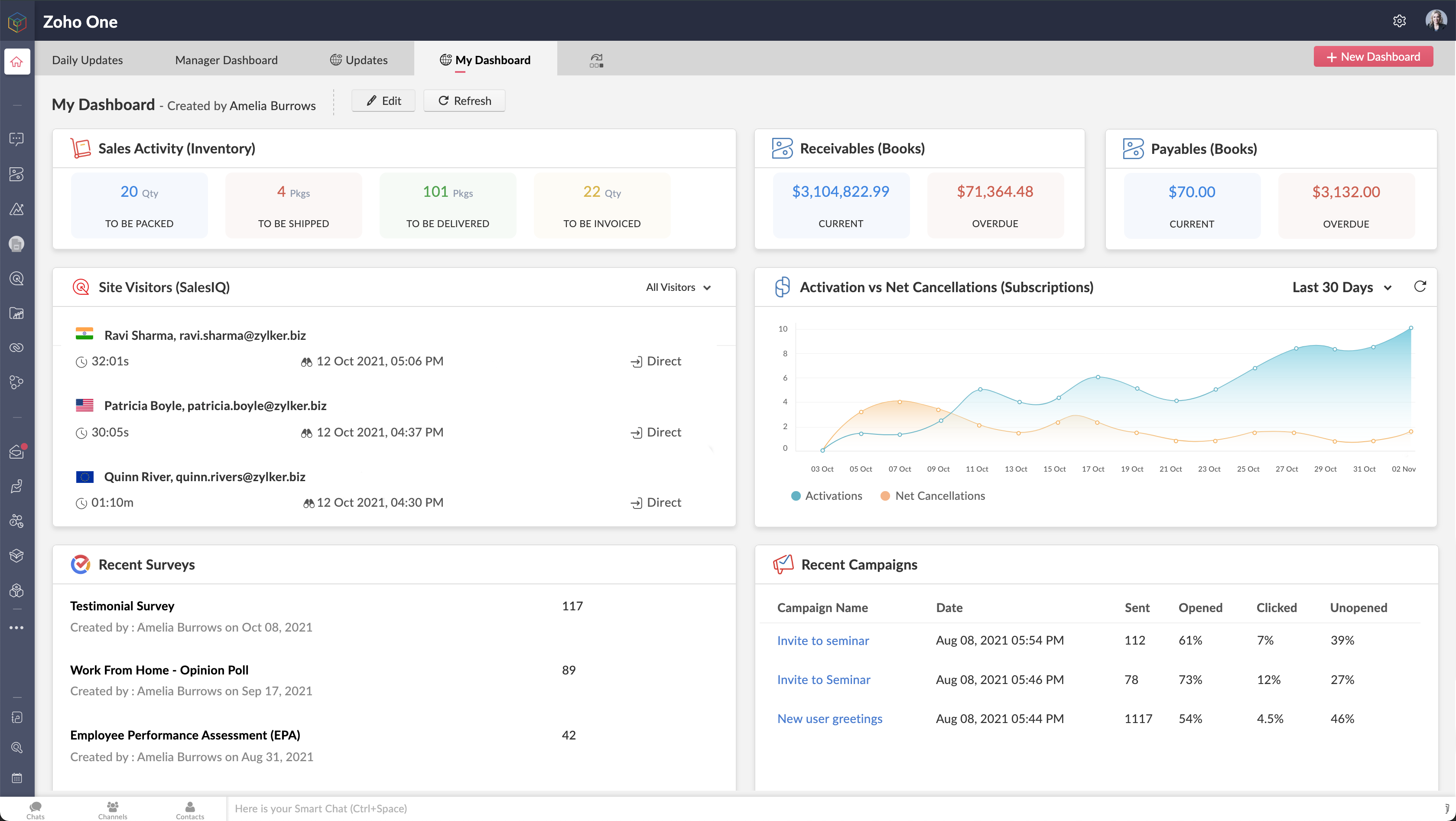 Paneles de control unificados y widgets en Zoho One
Búsqueda mejorada de ZIA: información unificada y en tiempo real para la toma de decisiones empresariales críticas
¿Te cuesta encontrar un correo electrónico específico o un análisis en tiempo real que antes se perdía entre los departamentos? Ya no. Zia, la asistente de IA de Zoho y la plataforma de BI y análisis de Zoho permite a los usuarios predecir y proporcionar información en toda la organización, lo que permite tomar decisiones con confianza. Las nuevas innovaciones incluyen:
- BI integrado y conversacional: Zoho One pone a tu disposición más de 1.500 informes y paneles de análisis pre-construidos, con análisis integrados y conversacionales que permiten a los responsables de la toma de decisiones profundizar en los datos y obtener información interdepartamental, todo ello mediante comandos de lenguaje natural utilizando Zia Insights.
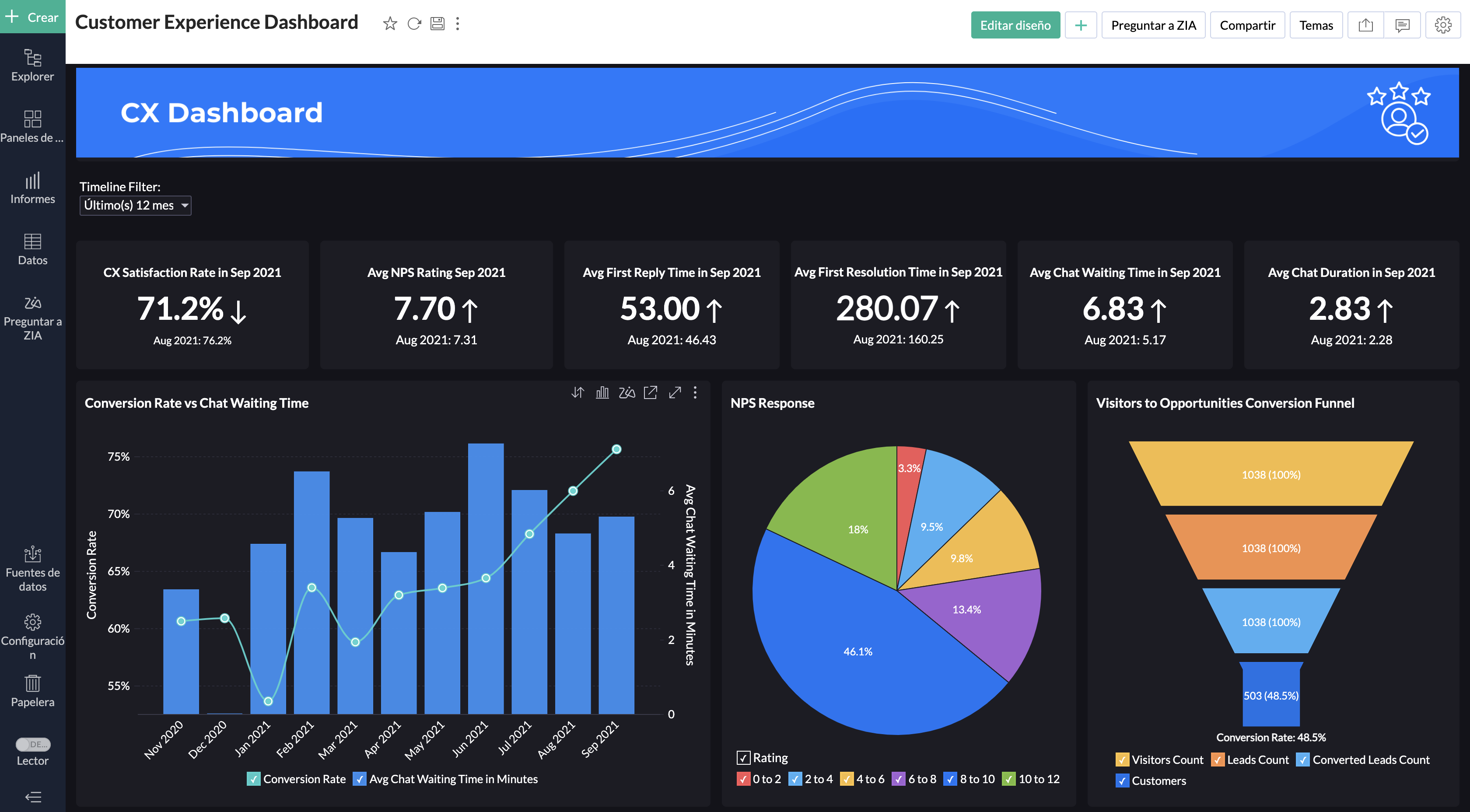 BI unificado y conversaciones en todo Zoho One
- Preparación de datos: Zoho Data Prep, una herramienta de preparación y gestión de datos de autoservicio está ahora disponible en Zoho One. Tanto si los usuarios preparan datos de aplicaciones de terceros como de otras fuentes, DataPrep, con tecnología de aprendizaje automático, puede ayudarles a integrar, modelar, limpiar, transformar, enriquecer y catalogar los datos, así como a integrarlos con Zoho Analytics o con un tercero para obtener nuevos conocimientos.
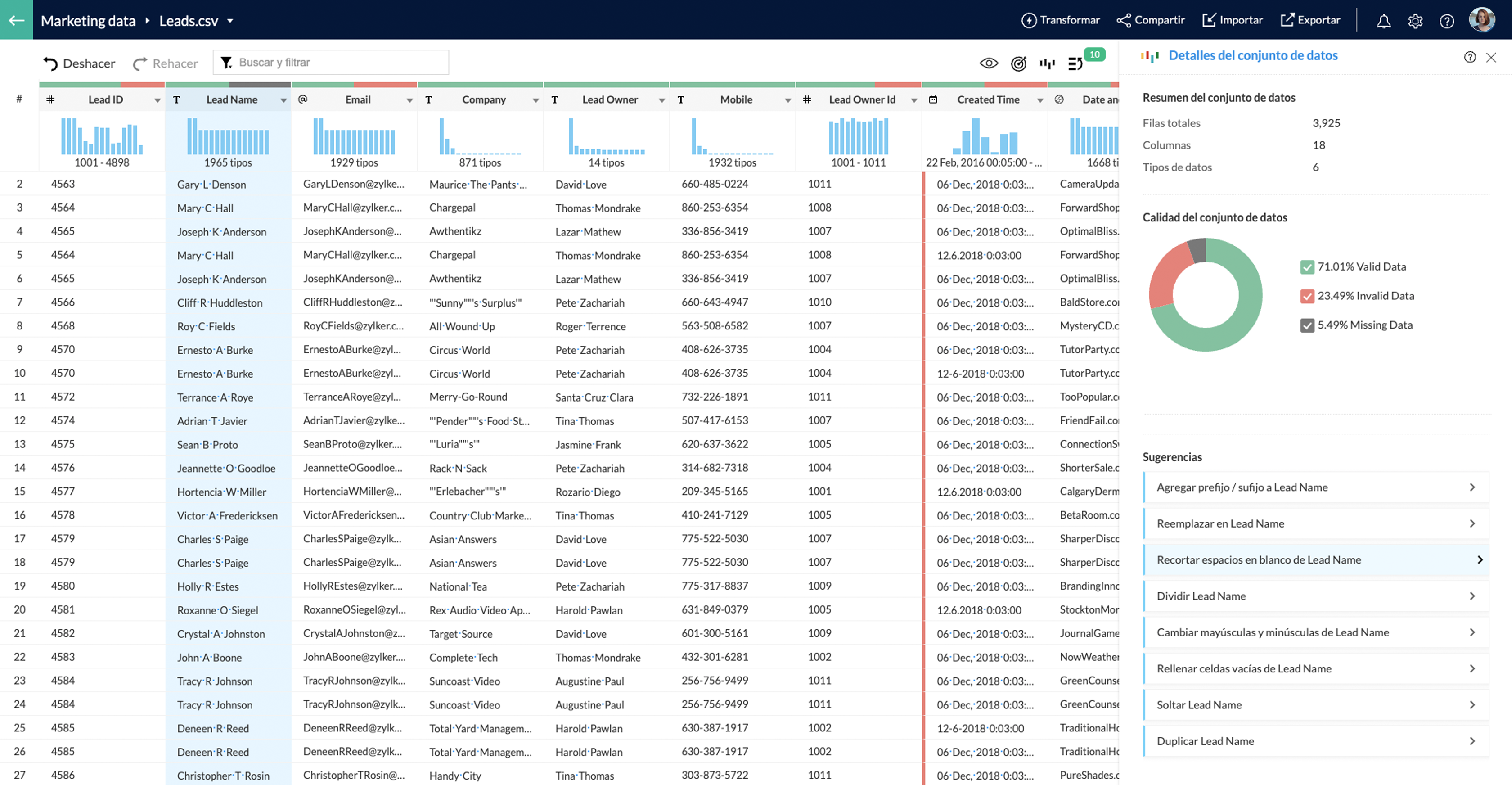 Preparación de datos con Zoho DataPrep
- Work Graph: El nuevo servicio de back-end de Zoho mapea las interacciones entre las personas, los recursos, los sistemas y los procesos mediante el estudio de las señales y su fuerza en todo el entorno para construir un gráfico de trabajo en toda la empresa, que es específico para cada individuo dentro de la organización.
- Búsqueda empresarial: Hemos mejorado la búsqueda de Zia en toda la organización: ahora Zia puede entender las solicitudes de lenguaje natural (NLP - sólo disponible en inglés). Busca en base a múltiples factores como el contexto, la proximidad y la relevancia.
- Org Dictionary: Este nuevo servicio ofrece un diccionario central para toda la organización. Incorpora automáticamente el nombre de los empleados en la organización y otras fuentes, ofreciendo una dicción central y consistente a través de varias aplicaciones y usuarios de Zoho.
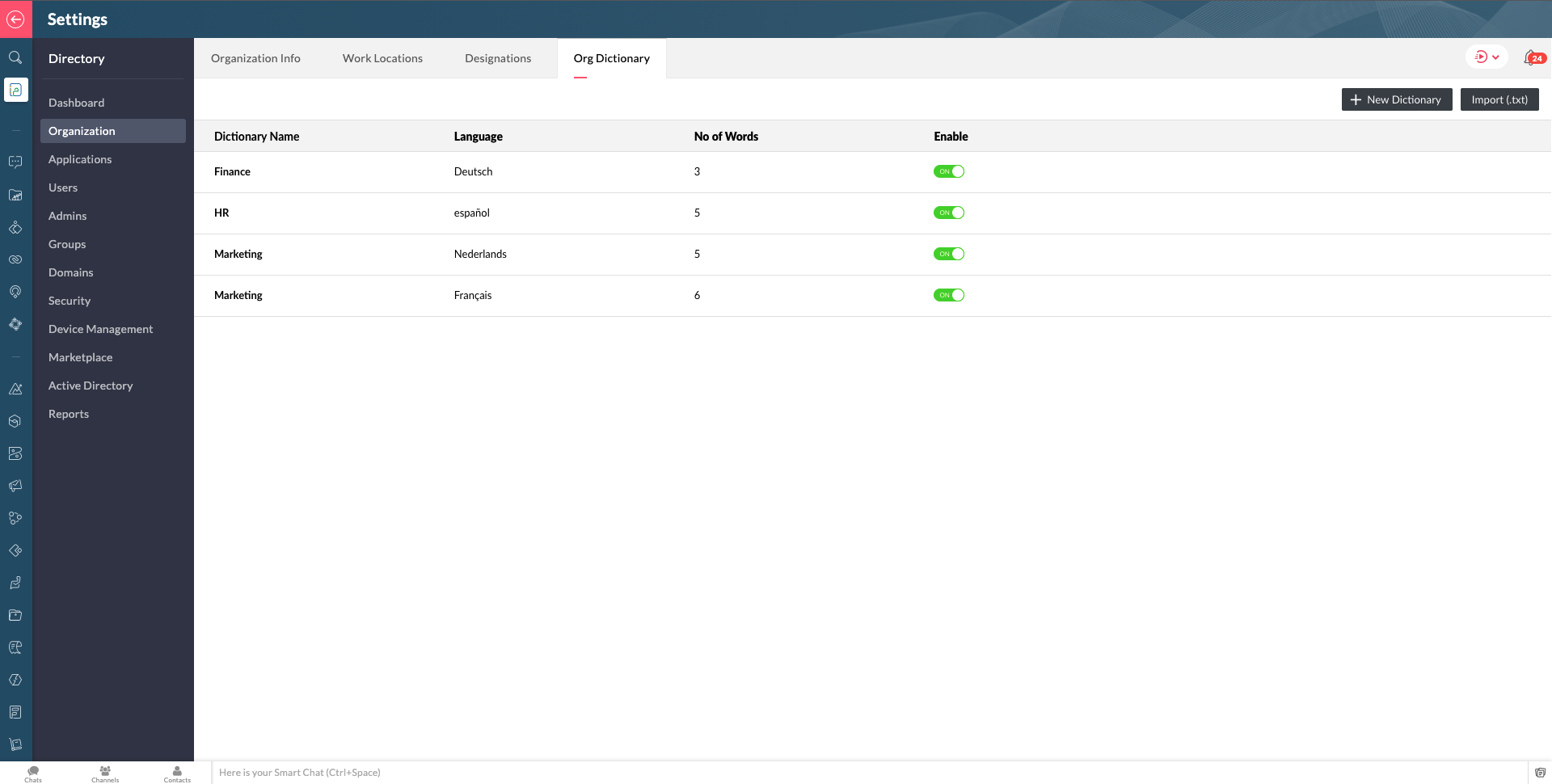 Org Dictionary en Zoho One
Construye una experiencia sólida para los empleados desde cualquier lugar
Para ayudar a acortar la distancia entre empleados, empresas y equipos que se ha ampliado con el trabajo remoto, Zoho One ofrece soluciones que promueven una mayor colaboración y experiencia de los empleados para apoyar cualquier modo de trabajo:
- Mobile Application Management (MAM) y Mobile Device Management (MDM): Con el trabajo remoto ahora persistente, Zoho One ahora incluye la capacidad de gestión de aplicaciones móviles de nivel empresarial. Los administradores pueden añadir y gestionar fácilmente todos los dispositivos de sus usuarios para tener una mejor visión y control del aprovisionamiento, los permisos y las políticas específicas de las aplicaciones, el bloqueo y la eliminación de los dispositivos de forma remota, y más, para apoyar la movilidad y la flexibilidad de los empleados.
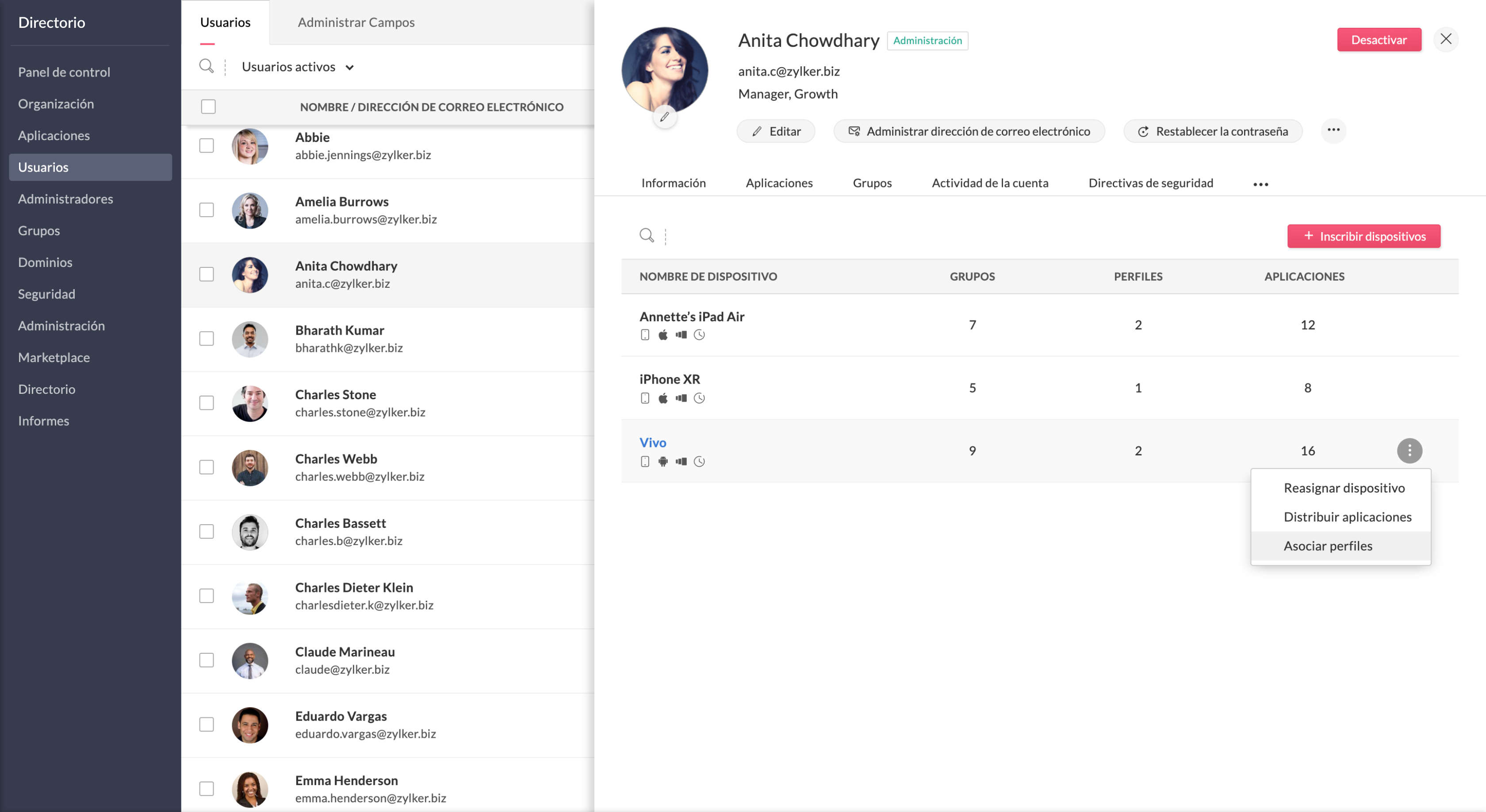 Gestión de aplicaciones móviles de nivel empresarial en Zoho One
- Zoho Commerce: La incorporación de Zoho Commerce te permite crear tiendas online fácilmente con las herramientas necesarias para construir un sitio web, aceptar pedidos, hacer un seguimiento del inventario, procesar los pagos, gestionar los envíos, comercializar tu marca y analizar los datos. Además, Zoho Commerce también se integra con pasarelas de pago de terceros.
- Zoho Learn: Ahora puedes disponer de una herramienta de gestión del aprendizaje que permite crear programas de formación y evaluaciones interactivas, para así fomentar el crecimiento de tus equipos.
- Zoho Lens: Para facilitar una mejor comunicación y colaboración en un entorno de trabajo remoto, Zoho Lens proporciona asistencia y orientación remotas a los empleados a través de la Realidad Aumentada (RA) mediante anotaciones de RA en tiempo real, VoIP y chat de texto, y más.
- TeamInbox: Tus equipos pueden utilizar esta bandeja de entrada de correo electrónico compartida para eliminar la duplicación de tareas y agilizar las conversaciones por correo electrónico en una ubicación central.
Capacidades de la plataforma en constante expansión
Zoho Marketplace ofrece miles de integraciones abiertas que permiten las extensiones de terceros y mejoran la potencia de la plataforma.
Ahora puedes conectar todas tus aplicaciones favoritas a través de Single-Sign-On y construir flujos de procesos empresariales activos entre ellas. Construye aplicaciones personalizadas, portales, widgets y soluciones verticales con nuestras herramientas internas para desarrolladores.
¿Emocionados? ¡Sin duda nosotros lo estamos!
El miércoles 20 de octubre está previsto un Zoho Live para explicar todas las novedades de Zoho One.
Para usuarios en España: 17h CEST
Para usuarios en Mexico y otros países de Latinoamérica: 10h CST
Esperamos recibir vuestros comentarios sobre la nueva versión de Zoho One.
¡Gracias!
Topic Participants
Elsa Perpiñá Subiñas
juan.bartra
manuel.losa
Alberto Verdú - ZOHO Partner - Neointec
Sticky Posts
Nuevos tiempos en Zoho Community en español
¡Hola! Os saluda Elsa Perpiñá Subiñas, la cara visible de la comunidad en español, y encargada de crear y mantener esta plataforma como un lugar donde conectar y compartir con otros usuarios. Os doy la bienvenida a una nueva era en esta comunidad, en la que las publicaciones, contenido, preguntas y respuestas estarán escritas en español, y realizadas especialmente para vosotros. A partir de esta semana podréis encontrar: 1. Nuevos subforums en los que encontrar información y realizar vuestras consultas,
Recent Topics
Separate Items & Services
Hi, please separate items and services into different categories. Thank youItems Below Reorder Point Report?
Is there a way to run a report of Items that are below the Reorder Point? I don't see this as a specific report, nor can I figure out how to customize any of the other stock reports to give me this information. Please tell me I'm missing something sAllocating inventory to specific SO's
Is there a way that allocate inventory to a specific sales order? For example, let's say we have 90 items in stock. Customer 1 orders 100 items. This allocates all 90 items to their order, and they have a back order for the remaining 10 items which couldCancelled Transfer order problem
Hello, We've canceled a transfer order, and we can't add the related items to a new Transfer Order. The system tells us that the bin doesn't have the required quantity, but when we check the item, it indicates that there are 2 units in the bin. It alsoCreating a Chart from a Report
In Zoho Analytics, is it possible to create a chart from a Pivot View report? We are looking to use Zoho Analytics to replace Excel for Sales reports and would like to be able to show both the table and the chart together.Client Portal ZOHO ONE
Dear Zoho one is fantastic option for companies but it seems to me that it is still an aggregation of aps let me explain I have zoho books with client portal so client access their invoice then I have zoho project with client portal so they can access their project but not their invoice without another URL another LOGIN Are you planning in creating a beautiful UI portal for client so we can control access to client in one location to multiple aps at least unify project and invoice aps that wouldEmail Insights included in Bigin emals are marked as SPAM everywhere
Today I noticed that email recipients who use Office 365 never receive emails sent from Bigin. Further examination showed that all Email Insights links in email headers are marked as spam/phishing by Office 365. Example screen included. The problem isData Import | Zoho Analytics Custom Query Window Size
Please increase the window size for the Custom Query Data Import. It's impossible to work with such a small query window.Name changed in settings for mailbox but still not changed when typed in To field
In the email account secretary@ i have updaetd the new staff members details but the old members name still appears when I type secretary@ in the To field. I cant work out where Zoho is finding the old name from. I have deleted the browser cache. If ICannot add my name to my domain name
I want to have My name@mydomain.com and it says my name is linked to another account already. Please fix it since I do not have another account.Invoice status on write-off is "Paid" - how do I change this to "Written off"
HI guys, I want to write off a couple of outstanding invoices, but when I do this, the status of the invoices shows as "Paid". Clearly this is not the case and I need to be able to see that they are written off in the customer's history. Is there a wayEstablishing new Zoho email account on laptop
Good Morning: I am very long time Outlook business user and decided to try your email service last night and had established an account. I am trying to verify my account; how do I establish my Zoho email account on my laptop? I opened the account withunable to send message reason 550 5.4.6 unusual sending activity
My email account can't send message. It shows unable to send message reason 550 5.4.6 unusual sending activity detectedhow to add email to existing organization i w
I am already registered my organization and i have an email id. I need one more email id but i can't find anywhere .i want the cheapest email id . how to add ?e-mail bloqueado
Estou com meu e-mail lucas@peplus.me bloqueado, preciso desbloquear para retorno de usos em minhas atividades.zoho labels api not working
We're using n8n to automte email reply using zoho api. I'm facing issue with label api. I added the required scopes but its not working. i followed zoho api documentation but didn't work. also, where do i find/how do i create zoho oauth token mentioneeedDesk DMARC forwarding failure for some senders
I am not receiving important emails into Desk, because of DMARC errors. Here's what's happening: 1. email is sent from customer e.g. john@doe.com, to my email address, e.g info@acme.com 2. email is delivered successfully to info@acme.com (a shared inboxStreams/Shared email doesn't show up in windows trident app. It works fine on MAC. Is there any difference between 2 install ?
I can see streams/share email boxs on my MAC version of trident app but i can't see them in windows version of trident app. Is there any difference between 2 install? I try to find setting but not able to see any setting to add stream/share email boxes.add zoho account
How to add a zoho mail to previous zoho account? I have twoZoho Desk Mobile App Year-End Roundup - 2025
Dear Zoho Desk users, Greetings! As you gear up for the festive season, we are excited to share a quick journey into all that is released in 2025! Zia's generative AI capabilities Zia insights can be highly beneficial in helping agents manage daily supportNarrative 17: The role of Zia AI in customer support
Behind the scenes of a successful ticketing system: BTS Series Narrative 17: The role of Zia AI in customer support Overview Zia in Zoho Desk is a layered AI assistant that combines generative AI, prediction, and automation to support agents, automateDomain Transaction
I have purchased a domain name called trainedworkforce.co.in I made the payment got the receipt but the domain is still not purchased after successful transaction .Ability to Set a Unified Tab Order/View for All Users in Zoho Projects
Hello Zoho Projects Team, We hope you are doing well. We would like to submit a feature request regarding tab/menu organization in Zoho Projects. Current Behavior: The tab (module) order in Zoho Projects is user-specific. Each user (internal or external)Zohomail - The "All Messages" vs "In Box"
Why do some new email message appear under the all messages view but not in my inbox? That's really annoying but to be fair I've experienced the same with gmail.error while listing mails
I can't access email in any of my folders: Oops, an error occurred - retry produces the second error response: error while listing mails (cannot parse null string). I've signed in and out of Zoho, restarted my iMac.Introducing the Zoho Projects Learning Space
Every product has its learning curve, and sometimes having a guided path makes the learning experience smoother. With that goal, we introduce a dedicated learning space for Zoho Projects, a platform where you can explore lessons, learn at your own pace,Where to show Customization Field ?
Dear Sir, I have made some New Field in Item Field Customisation. Now I don't require that field in Estimate, Sales Orders etc. I just wants that field in Sales Invoice to Show/Hide... Is that possible ?Zoho Desk 2025 round-up: Key highlights on feature releases
Hello everyone, As we gear up for 2026, here is a detailed round-up of all feature releases in Zoho Desk web throughout the year. For consolidated information on releases check out the What’s New page You can also watch these webinars. Zia in web ZiaPrint Sales Orders, Purchase Orders or Invoices from API
Hello, Is it possible to use the print option that is available in Sales Orders Purchase Orders and Invoices with the API?. I don't see any information in the docs about this. ThanksHow to show a hided report??
in CRM Report , I clicked Hide incidently , how to show the floder again? Nowhere I can find the hided report floder...Converting Customer Invoice to Purchase Bill
Hi, In my service-based business, I sometimes create the customer invoice first, and later I receive the purchase bill from the vendor for the same job. Is there any option in Zoho Books to: Convert a customer invoice into a purchase bill, or Link/associateEmail tracking inquiry
I am trying to track when my emails are opened and clicked like I previously did in HubSpot. HubSpot pretty much did the entire process automatically. After digging through, I finally found in settings --> emails --> BCC Dropbox there is an email I canMass Update of Lookup Fields not possible
Hello List I've created a custom field for Leads and Contacts 'Current Campaign'. This is very Handy as I can filter leads and then related them to a campaign. Everything ready, but then I realized that mass update doesn't work for lookup fields... aCollapsible Sections & Section Navigation Needed
The flexibility of Zoho CRM has expanded greatly in the last few years, to the point that a leads module is now permissible to contain up to 350 fields. We don't use that many, but we are using 168 fields which are broken apart into 18 different sections.Quick Create needs Client Script support
As per the title. We need client scripts to apply at a Quick Create level. We enforce logic on the form to ensure data quality, automate field values, etc. However, all this is lost when a user attempts a "Quick Create". It is disappointing because, fromDownload Attached Files
Hi everyone, Brand new to Zoho Creator. I have a form with a subform. The subform has a field for "File Upload" I have this in a subform to allow multiple files to be uploaded to the parent form. Once the files are uploaded, how can i download or view them? Is this a setting I am just not seeing? If there isn't a way to download them, could i create another form field that dynamically creates the file's URL? That way a user can click the URL to get to the file? Any help with this would be greatlyTicket layout based on field or contact
Hi! I want to support the following use-case: we are delivering custom IT solutions to different accounts we have, thus our ticket layouts, fields and languages (priority, status field values should be Hungarian) will be different. How should I setupNo funcionan correctamente el calculo de las horas laborales para informe de tickets
Hola, estoy intentando sacar estadísticas de tiempo de primera respuesta y resolución en horario laboral de mis tickets, pero el calculo de horas en horario laboral no funciona correctamente cree los horarios con los feriados : Ajusté los acuerdos deZoho Mail Android app update: Set out of office response exclusively for organization members and external users, response interval
Hello everyone! We have now introduced an option to configure out of office messages exclusively for organization members and external users within the Zoho Mail app. Additionally, now you can also customize response intervals for the Out of office messages.Feature Request: Detailed View - Related Block Links!
Desperately need a view record link option on records displaying in the related blocks on a Detail View. For the love of god, please add this feature. Thank you!Next Page