Tip #13: How to share 'Drafts' in Zoho Mail

Struggling with drafting your emails? Drafting certain emails can be tricky. Whether it is a communication to a client or announcing a new discount to your customers or sending feedback to your employees, choice of words and tone of emails can be confusing.
We always get help from someone or get someone's feedback before we send out such emails. But copying the content from your editor, putting it in a chat and getting feedback and again correcting your draft gets clumsy. The troubles multiply when you have more than one person providing feedback and when the feedback comes back and forth multiple times.
Zoho Mail's Draft sharing feature allows you to easily share, collaborate and repeat the review cycle any number of times. The instant notifications and the ability to view updated drafts helps everyone involved stay on the same page.
Steps to share drafts:
- Login to Zoho Mail account
- Click 'New Mail' and draft the email you want to write.
- Click 'Save draft' to save the draft email.
- Once you have finished drafting the content, click the 'Share' link.
- In the comment box, type in the names of your colleagues with whom you want to share the draft with.
- Click 'Share' draft to share the draft with the mentioned users.
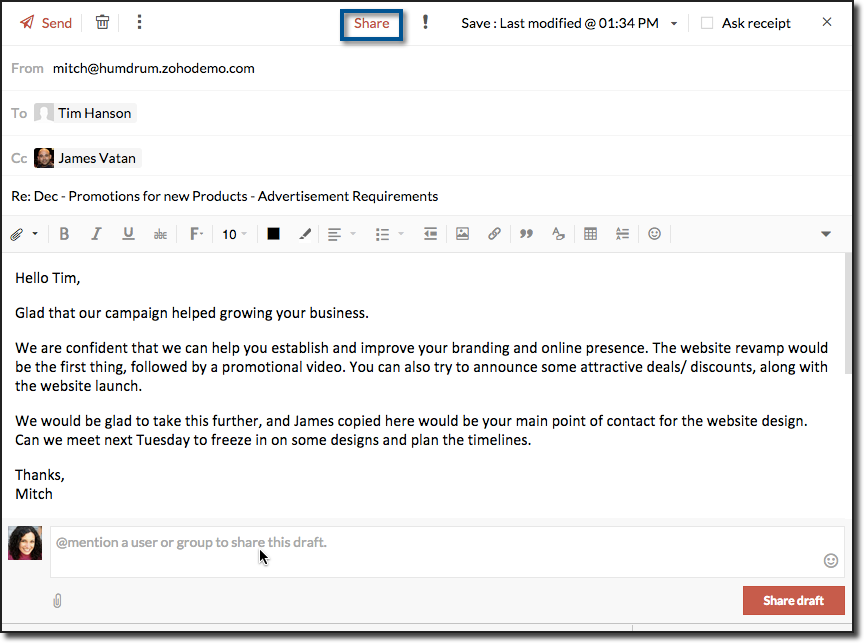
- The users with whom the drafts are shared will receive a notification about shared draft.
- The collaborators will now be able to add comments to your drafts.
- You will be notified for every new comment.
- You can make changes to the draft.
- Whenever your draft is auto-saved or manually saved, the collaborators viewing your old draft will notice a refresh icon.

- Once you complete all the intended changes, you can also manually trigger a notification using the 'Notify all' link in the top.
Share drafts enables a smooth collaboration and communication around a draft and a neat draft review process and result in well drafted and effective emails.
Go ahead and send effective emails using shared drafts. Let us know your feedback / suggestions to make draft sharing even more effective.
See you next week with yet another interesting tip!
Topic Participants
Ramya A
rkeith
andrey
peaky bliner
Sticky Posts
Get Holiday ready with Zoho Mail's Templates
As the holiday season approaches, it’s time to step away from work and unwind. You may not be able to respond to every email or send individual messages to wish everyone holidays greetings—but It is still important to stay connected. How do you send thoughtfulWeekly Tips: Protect Confidential Information with PGP in Zoho Mail
We deal with confidential information almost every day, whether it is being sent out or received. Though emails sent using Zoho Mail are encrypted both during transit and at rest, attempts to access and steal your sensitive data are always a threat thatWeekly Tips: Secure your attachment downloads with Zoho Mail
Safety is one of our main concerns, whether it’s about device security or online protection. We use tools like fingerprint scanners, facial recognition, and two-factor authentication to keep our devices and email accounts secure. We use methods like OTPGet Holiday ready with Zoho Mail's Offline mode
With the holiday season right around the corner, this is the perfect time to get ready to unplug, relax, and enjoy a well-deserved break. In addition to preparing yourself, you can also make sure your organization members are set for their time away fromWeekly Tips : Make collaboration effortless with Whiteboard in Zoho Mail
Working with your team often means switching between emails, notes, and other applications just to explain an idea. Maybe you are trying to sketch a layout, plan a workflow, or quickly brainstorm ideas—with text alone, things can get confusing. So how
Recent Topics
Problem with reports due to "Connected" items change - Yes this IS a problem
Now that the change has been made to use "connected" items I can no longer run the reporting I need in CRM. I should be able to start with Deals as the parent, connect down to the Account (Account_Name) on the deal as the child, then to any child itemsIntroducing notifications in the vendor portal
Imagine this: You're a recruiter working with multiple vendors on a high-volume hiring project. You’ve just updated a job description after a last-minute change from the hiring manager. One of your vendors, however, is still working off the older versionAnalytics for notes created
Is there a way I can see how many notes were created per day? Via reporting or analytics?Cannot update Recurring_Activity on Tasks – RRULE not accepted
Hello, I am trying to update Tasks in Zoho CRM to make them recurring yearly, but I cannot find the correct recurrence pattern or way to update the Recurring_Activity field via API or Deluge. I have tried: Sending a string like "RRULE:FREQ=YEARLY;INTERVAL=1"Add image to report...
Greetings, I send a weekly color coded report via Creator email. I would like to add the legend somewhere in the report. Header, footer where ever. I have the legend saved on Google Drive and can access it via shared link. Sure someone has wanted to addMore controls for User Fields in CRM
Dear All, We are here with a minor but crucial enhancement to the user fields—now set accessibility permissions to the records for user field. User field allows you to extend co-ownership of records to your peers. You can collaborate with them for certainCalls to accounts rather than leads or contacts?
So..... We have a dilemma and I'm hoping someone has encountered this before and figured out a fix. We have just migrated to Zoho. It's great.....expect for how "Calls" are handled.... We are B2B. We do not use the leads module. A "Lead/Prospect" forImage Upload Field | Zoho Canvas
I'm working on making a custom view for one of our team's modules. It's an image upload field (Placement Photo) that would allow our sales reps to upload a picture of the house their working on. However, I don't see that field as a opinion when buildingPower of Automation :: Automated 'Delayed & Closed' Status Update Based on Due Date
Hello Everyone, A custom function is a software code that can be used to automate a process and this allows you to automate a notification, call a webhook, or perform logic immediately after a workflow rule is triggered. This feature helps to automateRange names in Zoho Sheet are BROKEN!
Hi - you've pushed an update that has broken range names. A previously working spreadsheet now returns errors because the range names are not updating the values correctly. I've shared a video with the support desk to illustrate the problem. This spreadsheetpopulate email address and name in zoho desk?
Is it possible to populate the email address and name in the zoho desk widget? We only use it in the context of an authenticated user, so we already know the user's name and email. Thanks,Are there default/pre-built dashboards in Zoho Desk?
Hi, I am looking for some pre-built dashboard templates in Zoho Desk, similar to what we can find in CRM/Projects, etc Thank youSAP S/4 HANA to CRM Integration - change the SAP Client ID
Hi I am trying to push the business partners from SAP S/4 HANA to ZOHO CRM module. The SAP Client ID is 421 in my case....kindly let me know how do I specify the sap client because it's a dropdown with specific values as of now. Thanks Ravi AswaniAdding branded signature to tickets reply
Hi, i am unable to figure out how to add signatures with logo to tickets reply. please advice .How to share ticket numbers across different ticket types
I'm running an event and have three different ticket types. Add on Event + Main Event - Early bird Main Event only - Early bird Add on Event only - Early bird And Standard class - shown but not available until early bird finishes Add on Event + Main EventAdding Social Media Buttons to Basic Campaigns
Hi, I'm quote new to using Zoho Campaigns and I can't work out how to add Social Media Buttons into my basic campaign? In MailChimp there's a button that brings the icons into your campaign for you. I've tried adding the social media icons as 'buttons' in Zoho but it's not looking great. Can anyone help? Thanks!Hide Inactive Social Sign-In Providers from Login Screen
Hello Zoho Team, We hope you are doing well. Currently, Zoho One allows admins to configure security policies and enable or disable Social Sign-In options for third-party providers such as Apple, Google, Microsoft, LinkedIn, Yahoo, Twitter, Facebook,[Free Webinar] AI Agents in Zoho Creator - Creator Tech Connect
Hello Everyone! We welcome you all to the upcoming free webinar on the Creator Tech Connect Series. The Creator Tech Connect series is a free monthly webinar that runs for around 45 minutes. It comprises technical sessions in which we delve deep intoDownload All Attached Files
It would be extremely useful to have "download-all" functionality for downloading files attached to a task, subtask, comment, forum post or hosted in the "Documents" section etc. We've instructed our users to zip multiple files prior to uploading, but of course they forget all the time. Having to download lots of files one-at-a-time off a comment or task wastes a lot of time.Ship via Carrier Not Working Since Commerce Update
Since the recent update to the Commerce platform, I can no longer use the ship via carrier function. It will take me to the address screen and let me verify them but when I go to save and move tot he next screen it will not do anything. This is happeningautomations: Can I execute a step on a specific date?
I have created a form in Zoho forms, and created a contacts list. I have also begun setting up an automation with the intention of sending the form to the contact list on a specific date every month (via email) for the entire year (essentially sendingZoho Expense - The ability to add detail to a Trip during booking
As an admin, I would like the ability to add more detail to the approved Trips. At present a requestor can add flights, accommodation details and suggest their preferences. It would be great if the exact details of the trip could be added either by theAdding Folders in Android App
Is it possible to create a new email folder within the Zoho Mail Android app? Or can this only be done from the desktop version of Zoho Mail? Cheers!Schedule Exports for Regular Project Updates
Tracking project data often means exporting data at regular intervals. Instead of manually exporting data every time, users can schedule exports for Phases, Tasks, and Tasks in Zoho Projects. These exports can be set to run once, daily, weekly, or monthlyQuestion about custom fields using Pivot Tables.
I have created a pivot table showing annual revenue of a client and how much payment that client is paying my company. Is there a way using pivot table to add an additional field that subtracts those to fields / shows me a percentage of that difference?Request for Light/Dark Mode
Would love the ability to switch between Light and Dark mode similar to Zoho CRM. https://help.zoho.com/portal/en/community/topic/introducing-dark-mode-light-mode-a-new-look-for-your-crmJourney Email - Ignored Contacts
I have a journey setup which simply sends a string of emails over time. For some reason I am getting large amounts of the contacts who enter the first email being ignored and I can't find anywhere in reports or audit logs why these contacts are notInvolved account types are not applicable when create journals
{ "journal_date": "2016-01-31", "reference_number": "20160131", "notes": "SimplePay Payroll", "line_items": [{ "account_id": "538624000000035003", "description": "Net Pay", "amount": 26690.09, "debit_or_credit": "credit" }, { "account_id": "538624000000000403", "description": "Gross", "amount": 32000, "debit_or_credit": "debit" }, { "account_id": "538624000000000427", "description": "CPP", "amount": 1295.64, "debit_or_credit": "debit" }, { "account_id": "538624000000000376", "description":Zoho Books - Include Payment Terms as a Custom View filter
It would be great if you could created a custom view based on Payment Terms. This would be really handy for seeing a list of customers who have credit terms. A workaround is not required. I could do something with a creditor checkbox, but it would beHow to update changed purchase account of item in invoice
I have selected the wrong purchase account for various articles and created invoices. I had to adjust the purchase account in the article afterwards, but the old purchase account is still posted in the transaction-journal of the invoice. To adjust theHelp - Zoho CRM notification on mobile (IOS/Android)
Hello Community! Can I get the IOS/Andoid CRM app to notify me of events, calls, etc. due as I can with MANY other apps? I am running the free Zoho I would like this to be native to the Zoho CRM app. I do not want to write a sep. mobile appZoho Books Idea - Include another field in Bank Details for Address
Hi Books team, Currently use the Description field in the Bank Details to store the bank's address. This works fine but it would be great if you could add another field for Bank Address, so that other notes about the bank account could be stored in thea question about the COQL API v8
When I specify eight or more values in a WHERE IN clause and execute it, an error occurs. Is there a limit to the number of values that can be specified in a WHERE IN clause? ↓Error select * FROM Vendors WHERE (id in (1, 2, 3, 4, 5, 6, 7, 8, 9)) ↓SuccessZoho Books Idea - Bank Details Button on Banking
Hi Books team, Sometimes I'm asked to share bank details with a customer or a colleague. So I go to the Banking Module, find the correct bank account, click Setting > Edit, then copy and paste the bank details. Wouldn't it be great if there was a buttonJS SDK 8.0 – TypeError: Cannot read properties of undefined (reading 'getCacheStore') with sample code
Hello Zoho Support Team, I’m integrating the Zoho CRM JavaScript SDK v8.0 and I’m getting the error below when running your official sample. I tested directly from: https://github.com/zoho/zohocrm-javascript-sdk-8.0/blob/main/samples/create_records_sample/create_records.jsFunction #55: Convert multiple quotes to single SO using Custom Button
Hello everyone, and welcome back to our series! In Zoho Books, after a quote is accepted by your customer, it can be converted into a sales order or an invoice. Often, a customer might have multiple quotes, and for easier billing or upon the customer'sTime based workflow without edit/action
Hello I need help solving this problem if possible. We have Deals come into the CRM via Live Transfer which have the field properties: Stage = New Channel = Inbound Some of them don't get answered so we want these to automatically go into our OutboundWhat's New - August 2025 | Zoho Backstage
Every month, Zoho Backstage grows with you. These updates aren't just features and fixes, they're about making your workday smoother, your events more impactful, and your attendees happier. We’ve listened, learned, and shaped this release to keep thingsprevent selling expired items
Hello. I need to make a constraint on expired batch items not to be sold. Is it possible in Zoho Inventory? if so, then how? Thanks for further help.Product details removed during update from other system
We maintain our product details in an other system. These details are synchronized with Zoho at the end of each day, through an API. This has worked perfectly sofar. But last Monday, all product codes and some other product data have been wiped duringNext Page