What's New in Zoho Billing | Q3 2025

What's New in Zoho Billing | Q3 2025

Hello everyone, 

We are excited to share the latest set of updates and enhancements made to Zoho Billing in Q3 2025. From the latest GST updates to multi-level discounting, Zia-powered report summaries, and customizable web forms, these updates are designed to make your billing operations faster and more intuitive.

If you missed the previous updates, you can check out What's New in Zoho Billing Q2 2025.

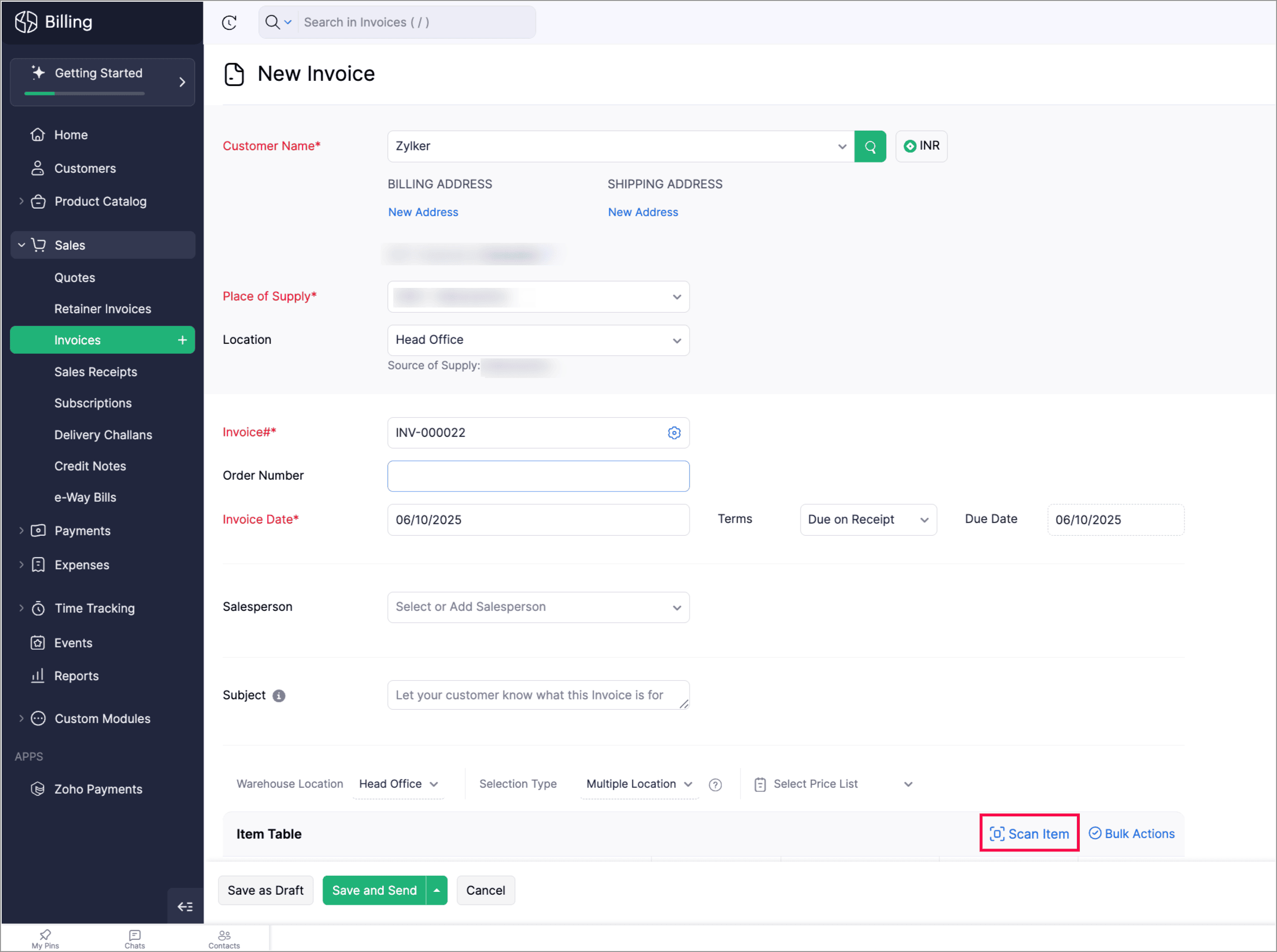
Scan To Add Items in Invoices

Zoho Billing now supports the Scan Items option in invoices, allowing you to quickly scan and add them to invoices. You can also scan an item multiple times to increase its quantity in the existing line item.

You can find it in: Sales > Invoices > Edit or create an invoice > Scan items. 


Apply Multi-Level Discount to Transactions

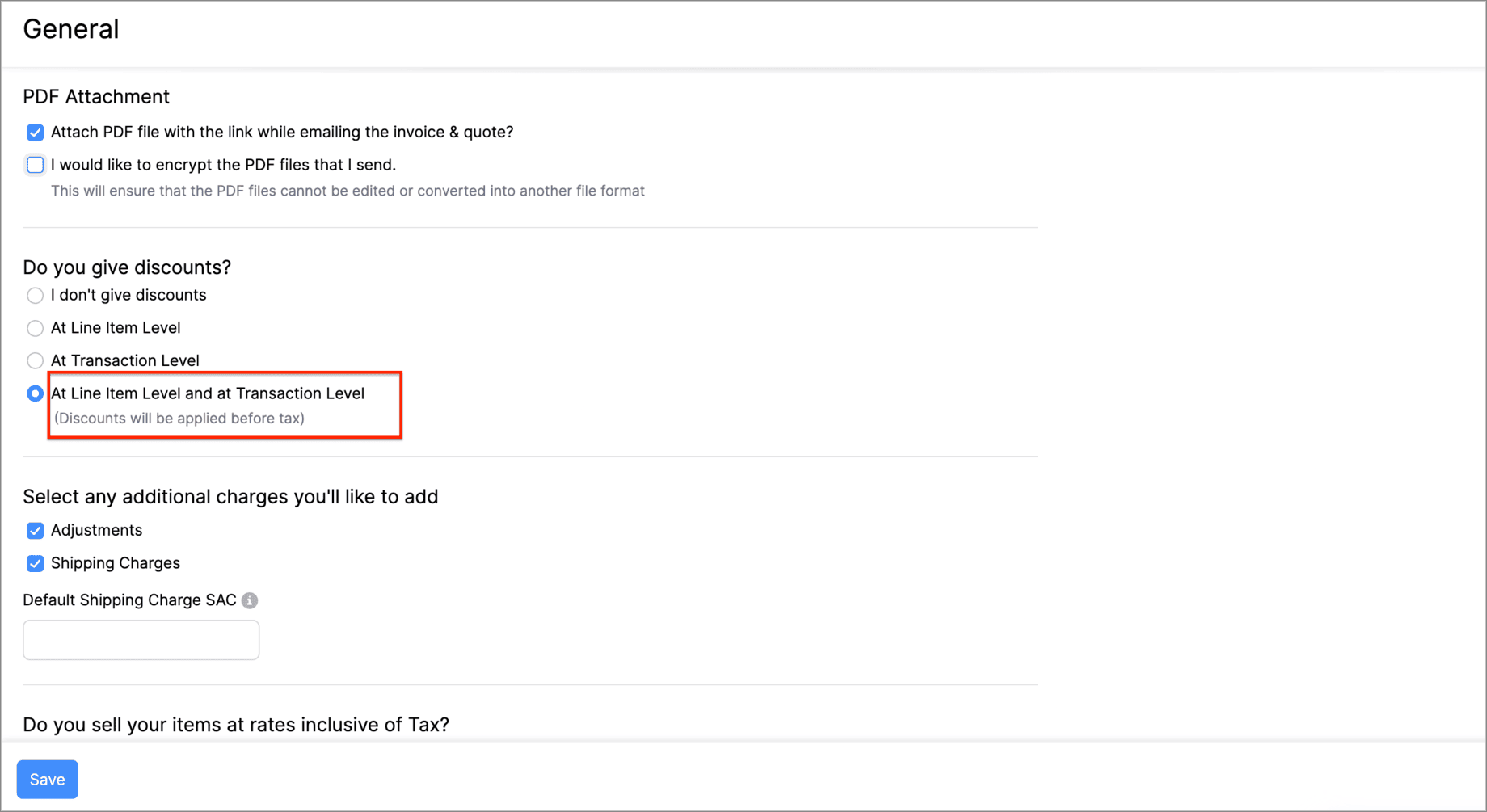
You can now apply discounts at both the line-item level and the transaction-level simultaneously. This means that you can offer specific discounts on individual items or services while also applying an overall discount to the entire transaction. 

Let's say you run a weekend sale and would like to provide a 10% discount for some items and offer a 5% transaction level discount as a part of your weekend sale. You can do this using the Multi-Level Discount option.

Go to Settings > General > Do you give discounts? > At Line Item Level and at Transaction level.


Gold Movements is Now Supported in e-Way Bills [India Edition]

You can now generate e-way bills for gold intra-state movements in Zoho Billing.  

Set the threshold value for generating e-way bills when transporting gold items within the same state. You can then start creating e-way bills for gold movements from the e-Way Bills module under Sales on the left side bar.
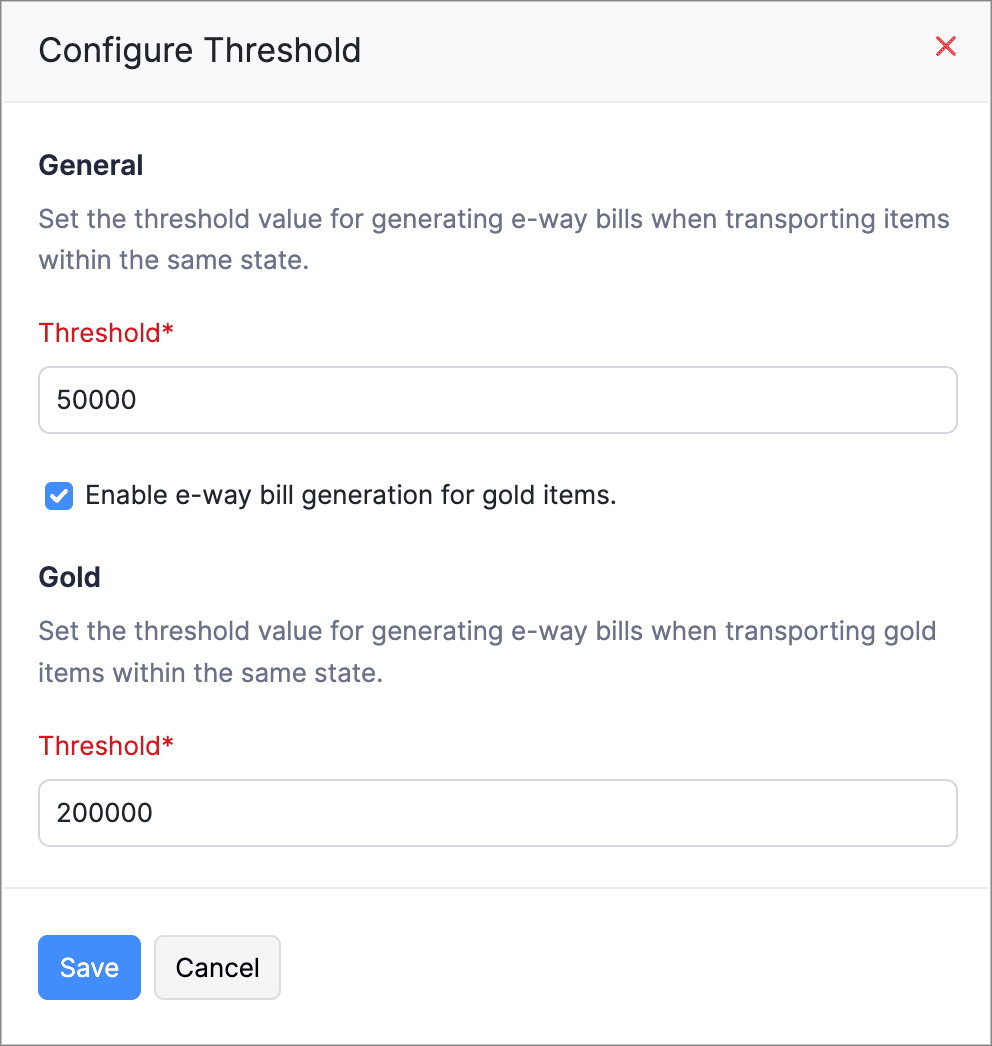
Here's how you can configure the threshold: Go to Settings > e-Way Bills > GSTIN which is connected to the e-Way Bill portal > Configure Threshold.


Access Widgets in Your Preferred Language

We’ve enhanced language customization to help you have a localized experience when accessing widgets.

You can define key–value pairs in language-specific JSON files (for example, en.json, ta.json, etc.) and display the widget content based on your organization’s language.
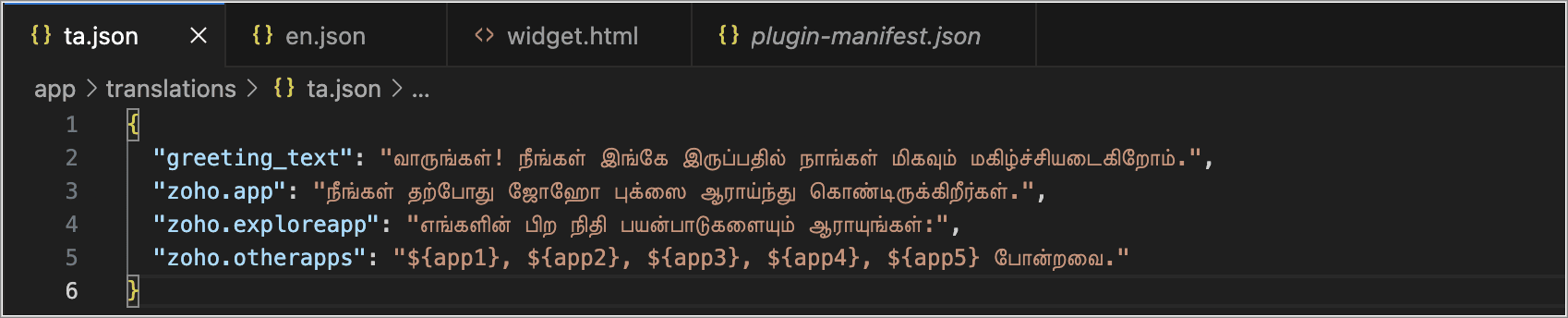
Create language-specific JSON files with key–value pairs and upload them into your widget when you access the widget, and the content in your widgets will automatically appear in that language.


Postpone Subscriptions' Billing Date

You can now change the Next Billing Date of subscriptions. When you change, it you can view the charges for the extended period and choose how you would like to handle the charges.

You can:

  • Choose to charge for the extension; a prorated child invoice will be generated based on the length of the extension.

  • Or, you can choose only to change the billing date. This will add the prorated amount to the invoice generated on the next billing date.
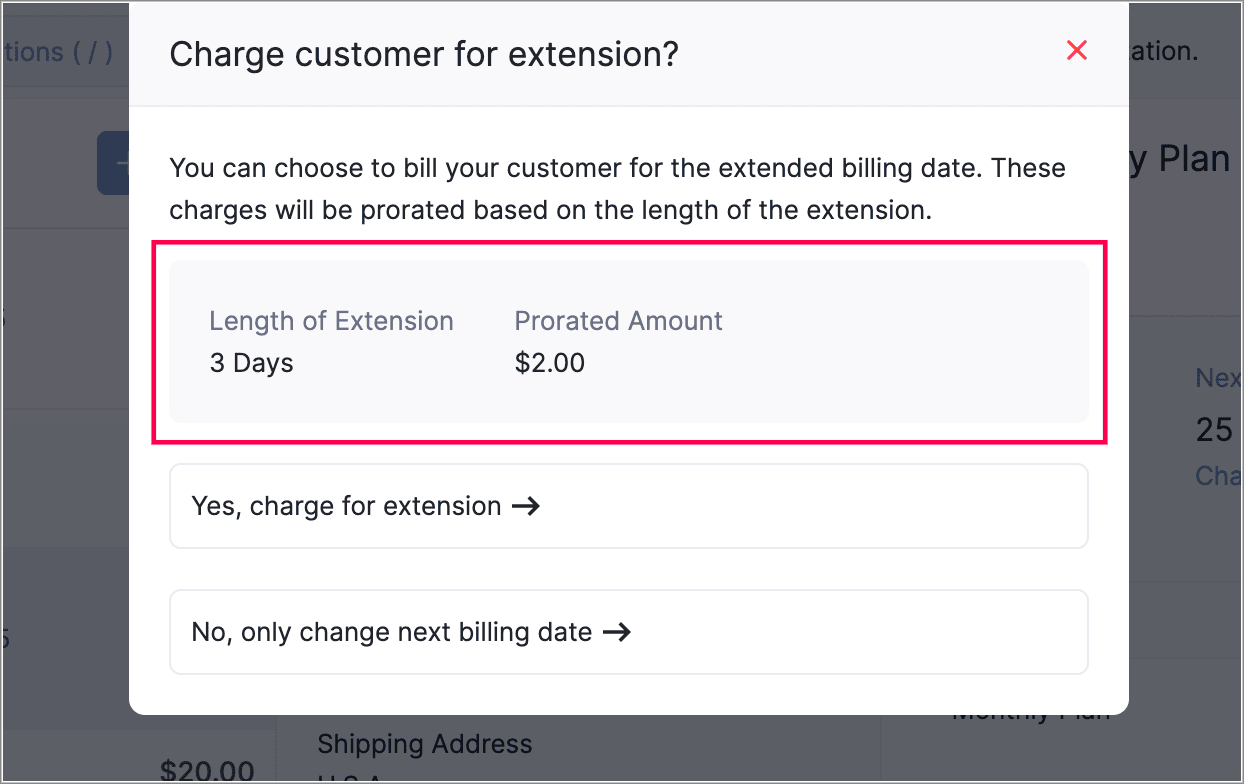
This gives you more flexibility in managing billing dates. You can also view the prorated amount for the adjusted days before charging your customers.


View Proration Break-Up in Subscription Summary
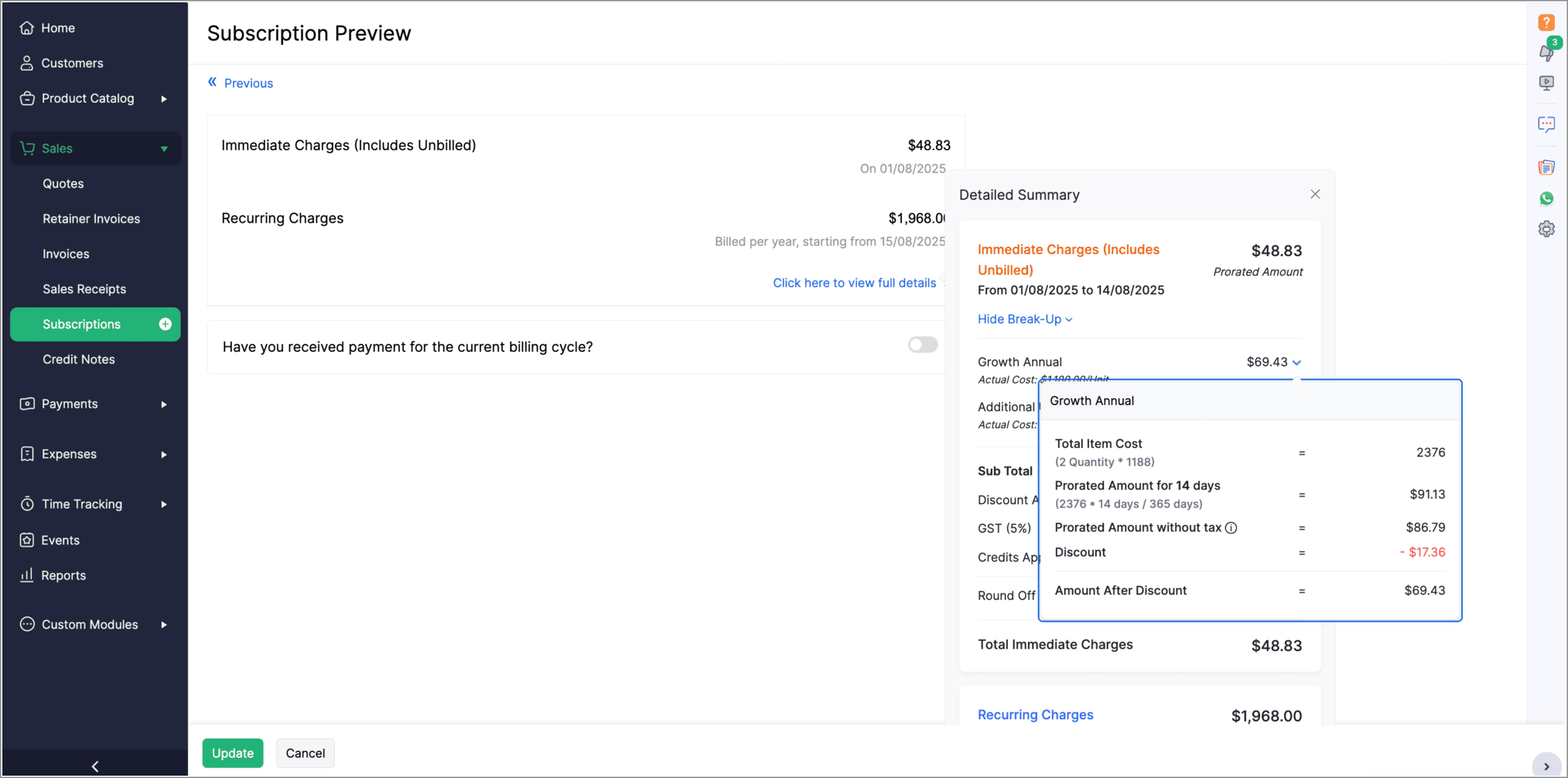
The Subscription Preview page has been enhanced to give a clearer view of prorated charges for plans and addons. The summary section now shows the detailed proration break-up for each plan and addon. To see this, go to the view full details in the Subscription Preview page.


Introducing PayNow Payment Method

We now support PayNow as a payment method via Stripe integration. PayNow is a Singapore-based payment option that lets your customers pay in SGD by scanning a QR code through supported banks and non-bank financial institutions.

Note: This payment method is not supported in the India edition of Zoho Billing.

Generate AI Summaries with Zia Insights

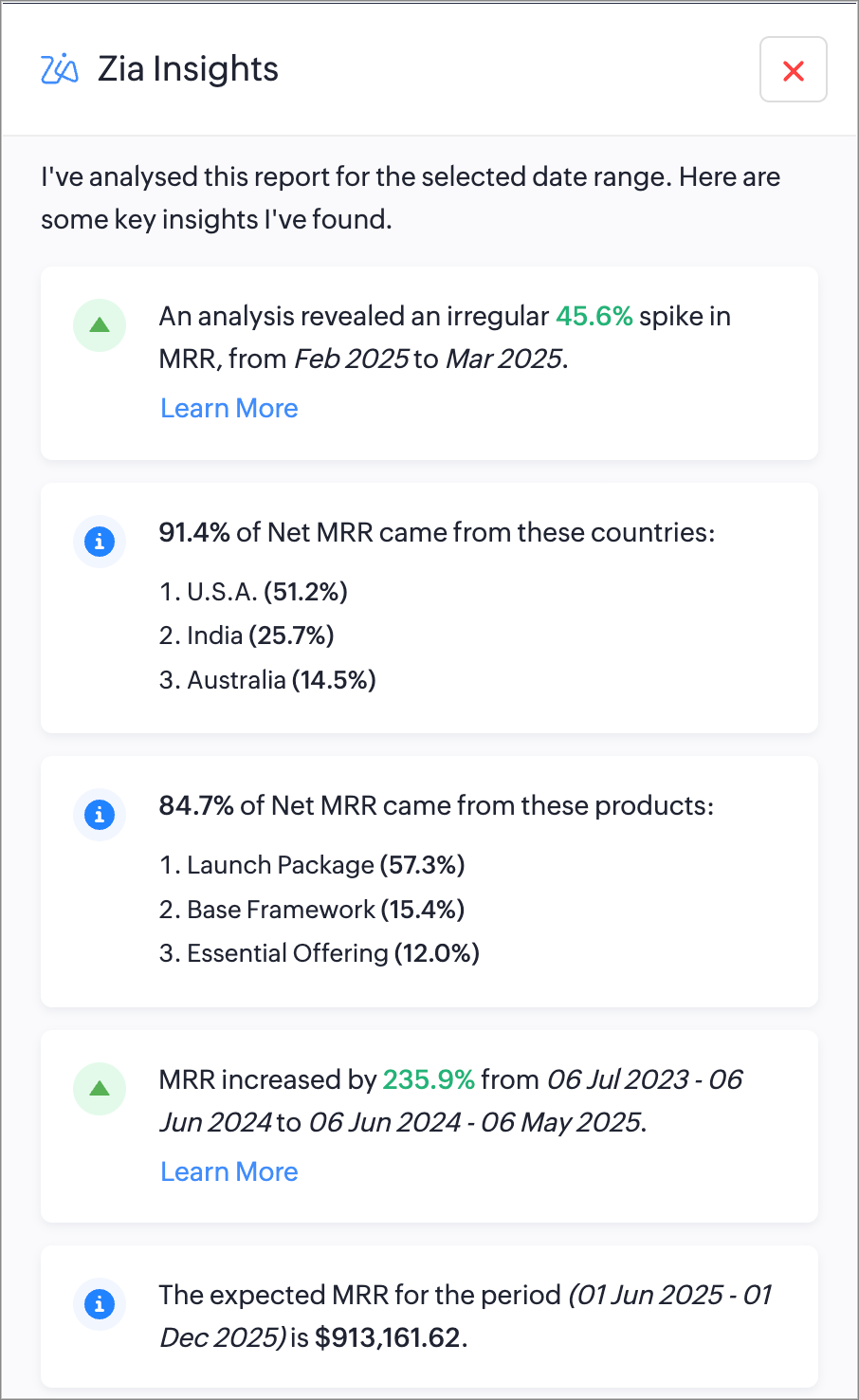
You can now use Zia Insights to generate AI-powered summaries, detect anomalies, spot top contributors, compare performance over time, and forecast trends within reports. Zia Insights can identify any unusual spike or dip in your reports, highlight the possible cause, give region-specific analysis, and can also predict future trends based on your organzation's records. Learn More

Increase API Limits From the API Dashboard

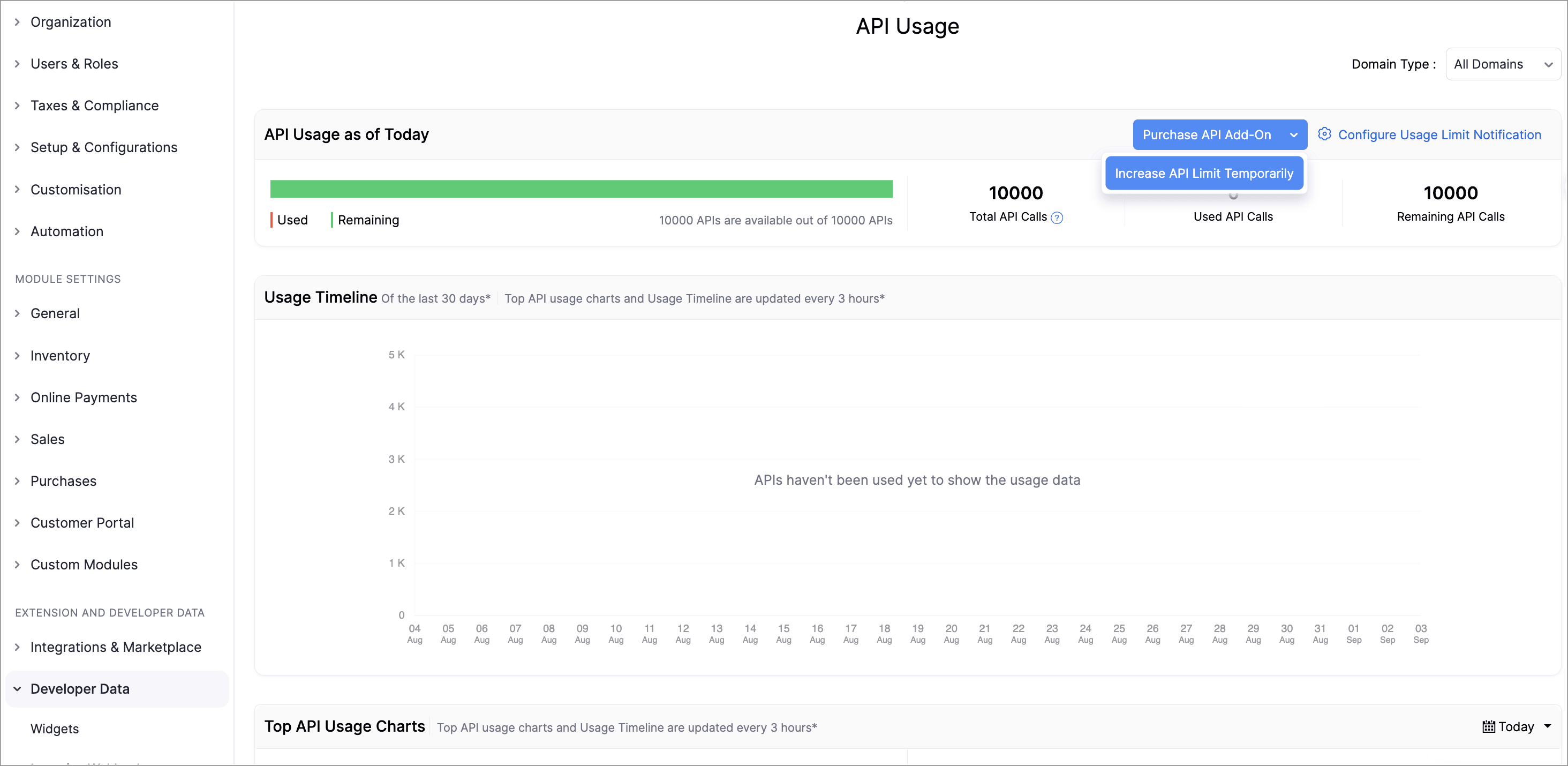
Admins can now temporarily increase API limits directly from the API Dashboard. You can boost your API limit by 50% of your current plan for one week, with automatic reset afterward. You can request multiple boosts consecutively once the previous one expires and can also purchase additional API addons directly from the dashboard.

This enhancement provides greater control, faster response to usage surges, and a streamlined workflow to keep your operations running smoothly.

To increase your API limits, go to Settings > API usage > Purchase API Add-on or Increase API Limit Temporarily.
Lookup Custom Fields Support for Locations

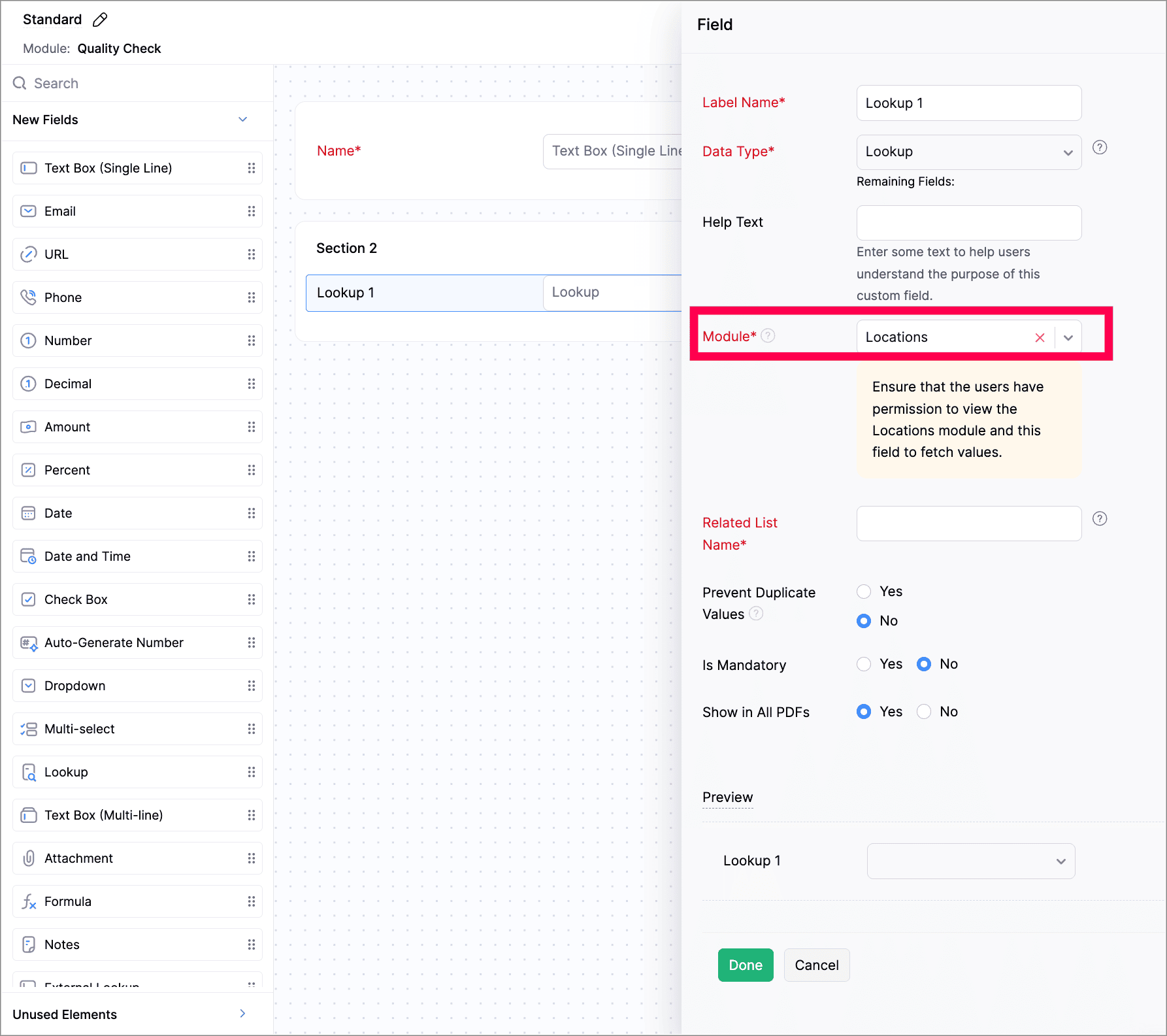
We've now introduced lookup custom fields for Locations. You can now use lookup custom fields for Locations in both Custom Fields and Custom Modules.

While creating a new custom field, select Lookup as the data type and select Locations from the Module dropdown. While creating a custom module, add a section to your module and select Locations.

Customize PDF File Names

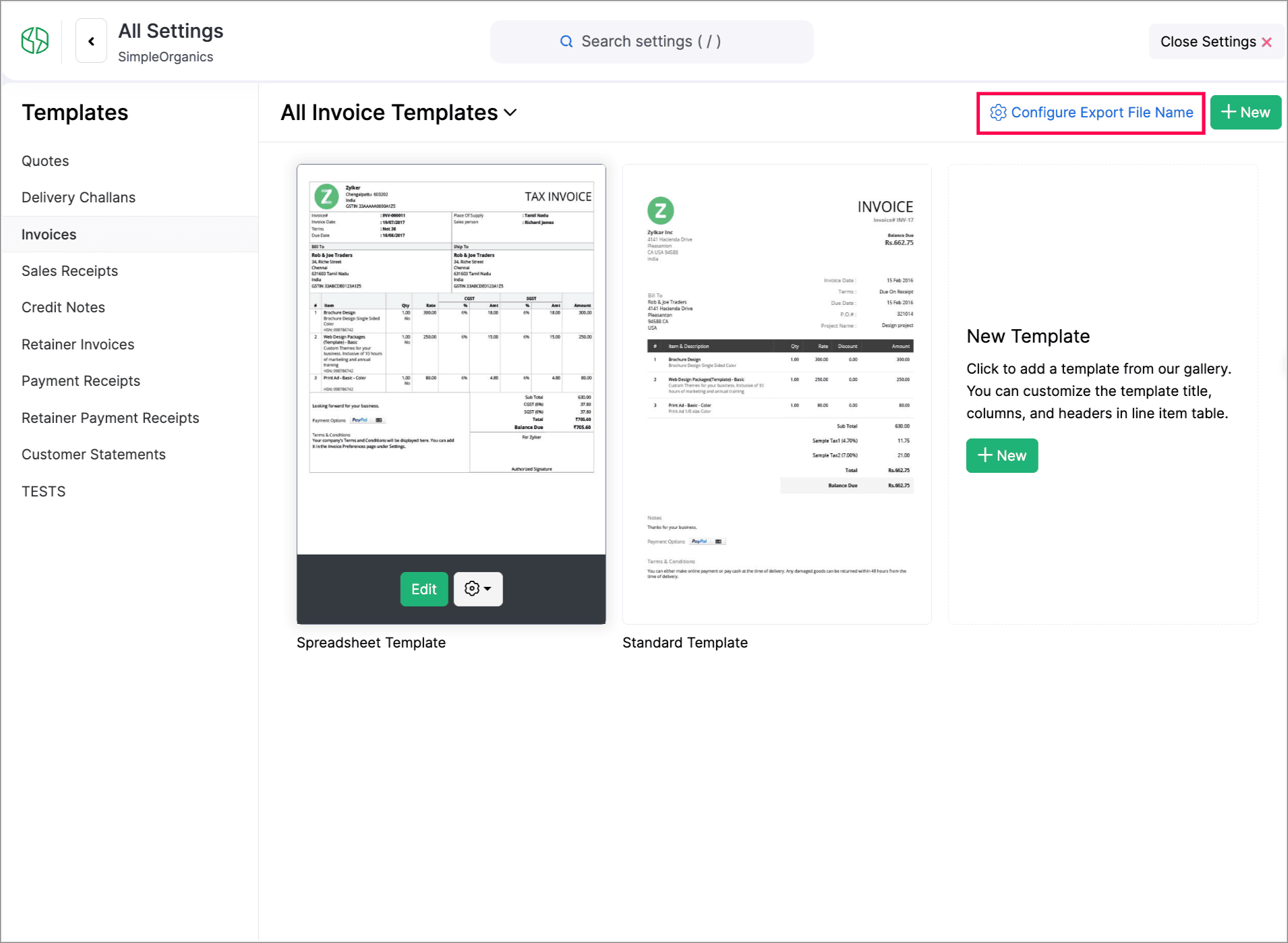
You can now customize PDF file names during export. You can set how your PDFs should be named using placeholders of transaction numbers, dates, customer names, organization names, and salesperson names.

To do this, go to Settings > Customization > PDF Templates > Configure Export File Name to set it up.


Create Web Forms for Custom Modules

We have introduced Web forms to collect and create records directly in a custom module via a unique link. You can configure layouts, success actions, and CAPTCHA. Once the web form is created and the unique link is generated, users can access and submit data. The submitted data will be stored in the module upon approval. Learn More
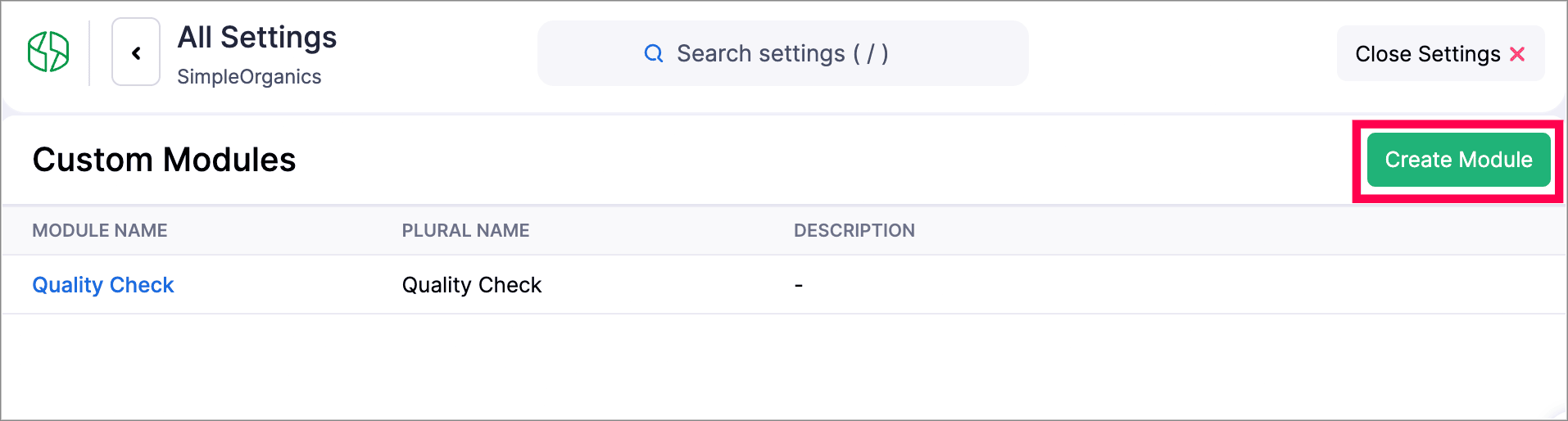
Navigate to Settings > Developer & Data > Web Forms to create a new Web form.


Other Feature Enhancements

  • Zoho Billing now supports the new GST slabs. Migrate to the revised 18%, 5%, and 40% slab, using the banner of your organization to update rates (via HSN/SAC), preview changes, schedule migration, track progress, and download audit-ready files.

  • You can now use the column customization and custom views in Timesheet, allowing users to select preferred columns and create personalized views for easier timesheet management.

  • We have enhanced our Custom Modules, you can now attach up to 10 documents for each record in your custom modules. Learn how it works.

  • Zoho Billing now supports custom views for Sales Receipts, allowing you to personalize and organize your sales receipt list view.


We hope you enjoy exploring these new features and enhancements in Zoho Billing! Each update is designed to make your billing experience simpler, smarter, and more efficient.


We’ll be back with even more improvements as we continue to elevate your billing and subscription management experience.


You can also visit the What's New timeline for bite-sized information about our previous feature updates and enhancements. If you require any assistance, please write to our dedicated support team at support@zohobilling.com – we'd be happy to help!


      • Sticky Posts

      • What's New in Zoho Billing - February 2024

        Hello everyone, We are excited to share the first set of updates for Zoho Billing in 2024. Read along to know more about a wide range of updates, from the Aging Summary in customer statements to Apple Pay support in Stripe. One-Time Invoice with Plans
      • Zoho Finance Workshop 2023 is coming to the USA. Get exclusive training on Zoho Finance apps, one-on-ones, and more.

        Hello all, We'd like to invite you to our biggest Zoho Finance workshop in the United States. After a brief break, we are excited to be back. This year, we're bringing together our customers and community members for two days of curated hands-on sessions,
      • Zoho Subscriptions wins IDC's 2020 SaaS CSAT Award for Subscription Billing

        Dear customers, We're excited to share that Zoho Subscriptions has won IDC's 2020 SaaS Customer Satisfaction Award! As a team, we cherish each and every milestone with our customer community. And this particular award, focusing on customer satisfaction,
      • Introducing: SMS notifications via Zoho Subscriptions

        Dear customers, We hope you are doing well! We are happy to announce that you can now send SMS notifications to your customers right from Zoho Subscriptions. To facilitate this, we've integrated with Twilio, a leader in the business communication space.
      • What's new this December in Zoho Subscriptions

        The year is almost over and we here at Zoho Subscriptions have released new features and updates on the month of November. Let's take a look at the features we have worked on in the past month. Zendesk Integration The Zoho Subscriptions app for Zendesk allows your customer support executive to access customer details in an instant. You will be able to view the customer information from Zoho Subscriptions right from your ticket view. On enabling the integration, you will be able to: Get your customer

        • Recent Topics

        • Scheduled Reports - Do not send empty report

          Hello, We are intensively using reports in the CRM, especially for sales managers.  When data is empty, they still receive an email. Can you add an option to avoid sending the report when data is empty?
        • Customised Funnel

          We are running the standard plan for our ZOHO CRM. I have been asked if there is a way to combine data from the Calls module, Deals module and Contact Module into 1 funnel, similar to the view you can get when viewing Deals By Stages, you can see the
        • Trigger Zapier on Deluge Insert Into Function?

          Hello, To get around the limitation of not being able to trigger a Zapier Zap on Record Update(this would be extremely useful to be able to do btw), I have created a Deluge script to copy the data from Form A to a Trigger Form B using the Insert Into expression from a Custom Action button on a Report from Form A.  This action does not trigger the Zapier Zap whereas manually adding a record or duplicating an existing record does trigger the Zap. Is Insert Into not the same as a manual Add in the context
        • Can you inject JS in an HML+CSS+Deluge Page?

          I have an HTML + CSS + Deluge page and need just a little vanilla JS functionality. However, it seems like Zoho Creator does not allow that. I'm required to create a JS widget. Is this correct? If so: 1. Won't this quickly consume my API limit if there
        • Display Client Name in Zoho Creator Client Portal Dashboard

          Hello Zoho Creator Team, We hope you are doing well. Zoho Creator recently introduced the option to set a client’s display name in the Client Portal settings, which is very helpful for providing a personalized portal experience. However, there is currently
        • Finding missing records

          I have a challenge and I am not really sure where to start with it. I can't find any similar threads on here, can anyone help: I have two forms, FormA and FormB. Both forms have records that contain a field called Job_Number. What I am trying to achieve
        • Creator HTML page refresh

          Hi, I have added around 5 different html snippets in single creator page. I understand, I can refresh the entire page from page script using Navigational URLs https://help.zoho.com/portal/en/kb/creator/developer-guide/others/url-patterns/articles/navigational-urls
        • Custom Related List Inside Zoho Books

          Hello, We can create the Related list inside the zoho books by the deluge code, I am sharing the reference code Please have a look may be it will help you. //..........Get Org Details organizationID = organization.get("organization_id"); Recordid = cm_g_a_data.get("module_record_id");
        • Zoho Vault API: Create new Secrets

          Hello, I attempt to Post Secrets to the vault, since the encrypted entries are almost impossible to decrypt, since there is no documentation on how to decrypt them. Like with the lack of documentation on how to descrypt, there are missing information regarding on how to create new secrets/post secrets. Source: https://www.zoho.com/vault/api/#create-a-new-secret When I try to send JSON Informationen as a POST-Request I only receive the error message: {     "operation": {         "result": {             "error_code": "",
        • Introducing the all-new email parser!

          Greetings, We are pleased to introduce to you, a brand-new, upgraded version of the Zoho CRM Email Parser, which is packed with fresh features and has been completely redesigned to meet latest customers needs and their business requirements. On that note,
        • Marketer’s Space - Multi-Channel Campaigns for the Biggest Shopping Week with Zoho Marketing Automation

          Hello marketers, Welcome back to another post in Marketers Space! The biggest shopping week of the year is almost here, and it’s your moment to shine without the stress. With Black Friday and Cyber Monday just around the corner, being present across email,
        • Is there a problem with sharing workdrive files with links since last night?

          As per title, we can't access folders/files through share links since last night. I created ticket but we need quick solution and didn't hear back from the support yet. The files are still accessible by the main account but all zoho files that we are
        • Managing functions

          Can someone let me know if there are any plans to improve the features for managing functions in CRM? I have lots of functions and finding them is hard. The search only works on the function name and the filter only works on function type. I have created a naming convention based on tags to filter the list which helps a bit and for some projects I keep lists in a spreadsheet.  I'd like a spreadsheet-style list in CRM with a few custom fields and a way to construct views (like in modules). Maybe even
        • Enable Screen Recording in Zoho WorkDrive Mobile Apps (Android & iOS)

          Hi Zoho WorkDrive Team, How are you? We are enthusiastic Zoho One users and rely heavily on Zoho WorkDrive for internal collaboration and content sharing. The screen-recording feature in the WorkDrive web app (similar to Loom) is extremely useful- however,
        • Issue in Annual Leave

          We created a policy to credit 21 days at the Start of the Year An employee has taken 16 days of leaves thought the year, so we expect to see 5 Leaves remaining right? But Zoho People is Showing 12 Days of Leave Balance Available If we check the Leave
        • Regarding not having Bots section in the sidebar of the cliq.zoho.com

          I have registered and participated Cliqtrix for developing Bots or extension, when i refer the bots & tools section in my profile , i can't see the Bots option in the sidebar to create , edit and configure, is there something i have to enable?? and how
        • Flow - Fetch info from drop down in another module

          I am running into a road block which I thought would be a simple task. My goal - The account is assigned to a "route" which can be selected from a drop down menu and adds a tag to the account accordingly (easy enough). Now when I create a task for this
        • Tags get removed from notes on mobile

          I don't know why this keeps happening even after all these app updates but if you log out and log back into the app or you reinstall it, all the tags you assigned to your notes get taken off, but if you go on the desktop version the tags are still there.
        • Production Management Tool (MRP / BOM)

          Hi Guys, is there any recommended App available that works with zoho and covers the needed applications for a production? What we need is a system that covers the BOM (bill of materials), MRP (material ressources planning), MRP II (manufacturing ressources
        • Function #53: Transaction Level Profitability for Invoices

          Hello everyone, and welcome back to our series! We have previously provided custom functions for calculating the profitability of a quote and a sales order. There may be instances where the invoice may differ from its corresponding quote or sales order.
        • Prevent Unapproved Quotes from Exporting to Zoho CRM Finance Module

          Is it possible to prevent unapproved quotes in Zoho Books from being exported from Zoho Finance module inside Zoho CRM?
        • Kanban view on Zoho CRM mobile app!

          What is Kanban? The name doesn't sound English, right? Yes, Kanban is a Japanese word which means 'Card you can see'. As per the meaning, Kanban in CRM is a type of list view in which the records will be displayed in cards and categorized under the given
        • Bug in Zoho Cliq Signup Flow – "%s" Placeholder Visible Instead of Product Name

          Hi Zoho Team, I would like to report a UI bug in the Zoho Cliq signup/enable flow. During the step where Cliq asks to enable the product for the company, the following text appears: Great! Your company is already available in Zoho, so you just have to
        • Account name not populating when importing contacts

          When importing a csv file to add contacts the account name is blank? Every other filed gets mapped and imported correctly, i.e contact name, phone number. However not the account name which I have mapped to "company" field in my csv file
        • Zoho Invoice Customer Login Portal

          Are there any plans for a customer portal to Zoho Invoice, ala Freshbooks?  I would like customers that I invoice to be able to login to review invoices and invoice history.  I have not switched from Freshbooks for this very reason.
        • Exporting tickets

          I went to Setup -> Organization -> Import/Export in order to export tickets but found 2 issues: 1. The email body never gets exported. 2. There are some large numbers (like 5.57E+16) under certain columns of the exported CSV file. I could not find any export options. Please can you help with this?
        • Editing the Ticket Properties column

          This is going to sound like a dumb question, but I cannot figure out how to configure/edit the sections (and their fields) in this column: For example, we have a custom "Resolution" field, which parked itself in the "Ticket Information" section of this
        • Copy field information to clipboard

          I need to be able to transfer some field information in to the clipboard, so that I can then paste it in to our helpdesk system. Is there a way I could add a button to a detail report that does this?
        • Issuing reconciling a bank statement

          HELP! I'm trying to reconcile a bank statement. The prior month reconciled perfectly. Beginning balance is correct yet I'm off by the same amount each time. Both myself and my office manager, separately and together, have tried to complete this reconciliation
        • Use the searchBy parameter to find user by email address

          I'm trying to find a user is Zoho Desk via the Api. In the documentation I see that there is the possibility to add a searchBy parameter in the request. But I can't find how the search values should be formatted. I've tried multiple things and get either
        • Correlated subqueries not supported in Zoho Analytics. This creates huge limitations

          Running into a major limitation in Zoho Analytics: correlated subqueries simply don’t work, even in completely standard SQL patterns inside a JOIN. Example: LEFT JOIN "Bills" b ON d."Id" = b."Deal ID" AND EXISTS ( SELECT 1 FROM "Bill
        • Unknown table or alias 'A1'

          I would like to create a subquery but i am getting the following error: Unknown table or alias 'A1' used in select query. This is the sql statement:  SELECT A1.active_paying_customers, A1.active_trial_customers, A1.new_paying_signup, date(A1.date_active_customers), 
        • Detect and ignore bots in visitors

          The SalesIQ visitor numbers are basically useless to us because there is no bot detection. We get the same bots coming in from the same countries looking at the same pages every day. It can't be that difficult to tell the difference between an actual
        • Zoho CRM - Rename "Estimates" in CRM Finance Suite Integration to "Quotes"

          I'm not sure if it's been 2 or 3 years now since Zoho Books renamed Estimates to Quotes. I still see "Estimates" in the Zoho CRM integration. Could this be added to Translation settings so that some customisation could be made on an account by account
        • Add Real-Time Microphone Audio-Level Indicator During Screen Recording

          Hi Zoho WorkDrive Team, Hope you are doing well. We would like to request an important enhancement to the Zoho WorkDrive screen-recording experience. Current Limitation: During a recording session, there is no visual indication that the microphone is
        • Properly Capture Dropdowns & Hover Elements When Recording a Window/Tab

          Hi Zoho WorkDrive Team, Hope you are doing great. We encountered a limitation when recording a selected window or browser tab: Certain UI elements, such as dropdown lists, hover menus, and overlays, are not captured unless we record the entire screen.
        • Allow Recording Only a Selected Portion of the Screen

          Hi Zoho WorkDrive Team, Hope you are doing well. We would like to request a more flexible recording option in Zoho WorkDrive. At the moment, we can record either the entire screen or a specific window/tab — but not a custom selected portion of the screen
        • Add Camera Background Blur During Recording

          Hi Zoho WorkDrive Team, Hope everything is well. We would like to request an enhancement to the video recording feature in Zoho WorkDrive. Currently, the camera preview displayed during a recording does not support background blur. This is an essential
        • Make Camera Overlay & Recording Controls Visible in All Screen-Sharing Options

          Hi Zoho WorkDrive Team, Hope you are doing well. We would like to request an improvement to the screen-recording experience in Zoho WorkDrive. Current Limitation: At the moment the recording controls are visible only inside the Zoho WorkDrive tab. When
        • Introducing Dark Mode / Light Mode : A New Look For Your CRM

          Hello Users, We are excited to announce a highly anticipated feature - the launch of Day, Night and Auto Mode implementation in Zoho CRM's NextGen user interface! This feature is designed to provide a visually appealing and comfortable experience for
        • Next Page