What's New - March 2025 | Zoho Backstage

What's New - March 2025 | Zoho Backstage

Hello there,
 
We’re thrilled to introduce a much-awaited lineup of powerful features and enhancements designed to fulfill your event management needs. Here's a round-up of the latest updates that will enhance your experience with Zoho Backstage this month.

Offer Tickets 

Early bird and limited-time offers are powerful tools to boost ticket sales and generate early revenue. With the new Offer Tickets feature, you can create multiple offers as tiers within a single ticket class, making the process more streamlined and automated.

Previously, you had to create separate ticket classes for each offer and manually manage their availability. Now, you can:
  • Add multiple offers under a single ticket class
  • Automate the offer start and stop conditions
  • Reduce manual intervention
Key benefits
 
  • Increased marketing impact: Time-sensitive discounts create a sense of urgency, encouraging faster ticket purchases.
  • Early revenue and cash flow: Early sales provide immediate cash flow to cover event expenses like venue deposits, marketing, and logistics.
  • Leverage Psychological Triggers:
    • FOMO (Fear of Missing Out): Limited-time availability compels attendees to act quickly.
    • Perceived Savings: Attendees feel they are getting a deal, making them more likely to buy.
How to use
 
Setting up offers


You can add offers as tiers within a ticket class and configure their availability based on:
  • Time: Set specific start and end dates for the offer.
  • Quantity: Define the number of tickets available at the offer price.
Flexible offer progression
 
From the second offer onward, you can choose to automatically start the next offer when the previous one ends. Or, set a custom start date for the new offer.

Customizing offer display

You can customize how offers are displayed on your event website using the Website Designer. The offer card can show:


  • Current Offer
  • Previous Offer
  • Next Offer
  • Both Previous and Next Offers
This flexibility helps you highlight the most relevant deals and enhance visibility.
 
Good to know 
  • During the ticket purchase process, the offer name appears alongside the ticket class name. The order summary clearly displays the applied offer.
  • After attendees purchase their tickets, the "Your Orders" section displays the offer name along with the ticket class name. The invoice also reflects the offer name for transparency.
  • When manually adding an order, any valid offers associated with the ticket class are applied automatically. There's no need for manual price adjustments.
  • During check-in, only the original ticket class amount is displayed.
  • Offer-tiered tickets cannot be selected during manual check-in.
Click here to learn more. 

Tax Rules - Canada (Early access)

Accurate tax calculation is essential for ensuring compliance and transparency in event management. With the new Tax Rules feature for Canada, you can automatically apply the correct tax rates based on your event location, making tax management simpler and more efficient. Zoho Backstage now allows you to create tax rules for all 10 provinces and 3 territories, which can be selected and applied to an event automatically, ensuring the correct tax rates are applied without manual adjustments. This feature supports in-person, hybrid, and online events, offering flexibility and accuracy.
 
The Canadian tax rule engine covers 10 provinces, 3 territories, multiple tax agencies, and 12 sales tax rates, providing a comprehensive solution for handling event-related taxes.


How do taxes work on Canadian events?  
 
For in-person and hybrid events, the tax rate is determined by the event’s physical location, based on the Place of Supply, in compliance with Canada Revenue Agency (CRA) regulations. This ensures attendees are charged the appropriate tax rate according to the province or territory where the event takes place.
 
For online events, where no physical venue exists, the tax is calculated based on the attendee’s location. This ensures the correct sales tax is applied, even when attendees purchase tickets from different provinces or countries.
 
How to use
 
To enable Canada Tax Rules, configure your organization’s location:
  1. Go to Portal Settings > Payments and Tax.
  2. Select Canada as the organization location. 
Once configured, the system automatically populates:
  • 12 default tax rates covering all provinces and territories.
  • 13 tax rules (one for each region).
  • A default rule for online events, applying the correct tax based on the attendee’s location.
  • 5 tax agencies for accurate tax handling. 
You can create new tax rates, groups, and authorities to meet your event’s specific needs. Additionally, you can add custom tax rules for both in-person/hybrid and online events, giving you full control over how taxes are applied.
 
Applying Tax Rules to In-Person and Hybrid events  
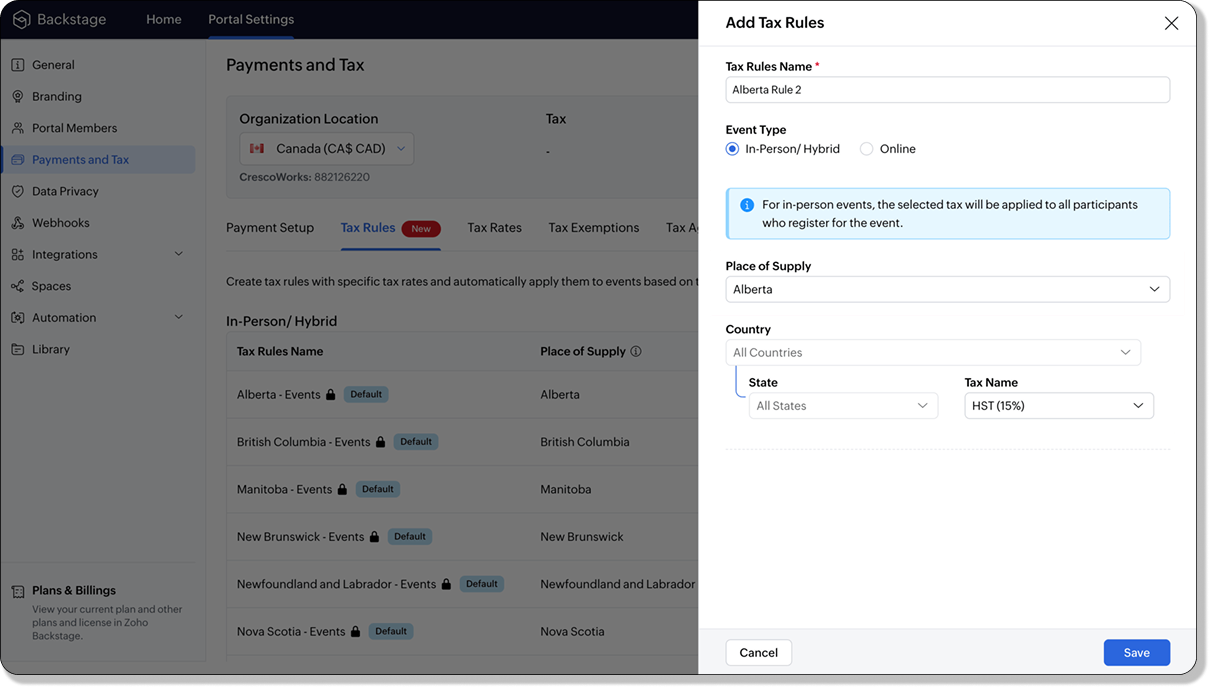

 
For in-person and hybrid events, Zoho Backstage automatically suggests tax rules based on the event location. The 13 default tax rules cover all Canadian provinces and territories. If the event location changes, the system automatically updates the relevant tax rules to reflect the new region’s rates.
 
You can also create custom tax rules by selecting a specific province or territory and applying a custom tax rate, offering greater flexibility for managing event taxes.
 
Applying Tax Rules to Virtual events
 
For online events, the system uses a default tax rule that covers all Canadian provinces and territories. Taxes are applied based on the attendee's location.
 
Canadian attendees are charged the applicable provincial tax rate.
International attendees are assigned a zero tax rate by default.
 
If you need to apply taxes to international attendees, you can create new tax rules tailored for online events, ensuring compliance with international tax regulations.
Info
  • Tax rules in Zoho Backstage are flexible and dynamic. You can modify them at any time during your event setup. However, changes will only apply to new transactions. Existing transactions will retain the original tax rule, ensuring previous purchases remain unaffected.
  • If you select a non-Canadian location for your event, the Canada Tax Rule will not be applied. This ensures taxes are only charged where applicable, preventing errors in cross-border events.

Event Category  


Categorize and filter events based on custom classifications for organizers and attendees to find and manage events easily. This new addition is aimed at improving event management by giving organizers the flexibility to create, manage, and filter events using custom categories. Organizers can now create up to 100 custom categories when setting up an event, giving them the freedom to define categories that suit their specific needs.
 
Previously, categories selected in Event Info were not utilized elsewhere, and there was no option to add new/manage categories.
Now, organizers can tailor categories to their specific needs and filter them on the Event Directory.

To access: 
  • While Creating an Event: On the Event Info page.
  • For Category Management: Under Portal Settings > Branding > Event Category.
Permissions:
 
Portal Owners & Admins:
  • Add, edit, and delete custom categories.
  • Cannot edit or delete default categories.
Event Organizers:
  • Can only add new categories.
  • Cannot edit or delete existing custom or default categories.


Other Enhancements 

Floor plan Focus Area 


The Focus Area in the floor plan refers to designated spaces within the event venue that are visually highlighted to draw attention to specific sections, such as booths, stages, or key locations. These areas allow organizers to emphasize important spots, making navigation easier for attendees and improving the overall flow of the event. Focus areas help guide visitors to essential parts of the venue, enhancing their event experience.

Custom Dates for  ticket classes (Early access)

In cases where smaller sessions or events (like welcome events, after-event parties, etc.) occur before or after the main event, this feature allows organizers to assign specific dates to separate ticket classes, ensuring tickets are only valid for the selected dates.
Info
Custom dates can be set within 30 days before or after the main event.

New WhatsApp triggers and templates 

The WhatsApp Integration, designed to enhance communication and engagement with all event stakeholders, now includes new triggers and templates to facilitate messaging and ensure timely updates for everyone.
 
For Purchasers:
  • Send Registration Confirmation: Instantly confirm registration to enhance the attendee experience.
  • Order Canceled: Notify purchasers promptly in case of any order cancellations.
For Speakers:
  • Welcome Speaker: Extend a warm welcome to our speakers and set a positive tone for their participation.
  • Speaker Added to a Session: Inform speakers when they’re added to a session, ensuring they are well-prepared.
  • Speaker Removed from a Session: Provide timely updates should there be any changes to their session involvement.
For Sponsors:
  • Thank a Sponsor Before Website is Live: Show appreciation early on, fostering positive relationships with sponsors.
  • Welcome and Thank Sponsor After Website is Live: Acknowledge sponsors publicly once the event website goes live.
  • Deny Sponsor Proposal: Deliver sensitive information with professionalism and clarity.
  • Acknowledge Sponsor Proposal: Confirm receipt of sponsor proposals, keeping communication open and transparent.
For Participants:
  • Event Canceled: Quickly inform participants in the event of cancellations, ensuring they’re kept in the loop.
We are continuously refining Zoho Backstage to make your event management experience even more powerful and intuitive. Stay tuned for more updates in the coming months!
 

If you have any questions, please contact support@zohobackstage.com


        • Recent Topics

        • Different form submission results for submitter and internal users

          I'm looking for suggestions on how to show an external submitter a few results while sending internal users all the results from the answers provided by the external user. The final page of our form has a section with detailed results and a section with
        • Help Desk Services Solution

          I am here looking for Help Desk services solution for organization. I also searched this on many different website and found many solutions. We are bit confused to which one to choose. One of my friend suggest me this platform, and i am hoping i will
        • Facing Issues with Sites Mobile font sizes

          my page renediaz.com is facing issues mobile view, when i try to lower font sizes in home page, instead of changing the size, it changes the line space
        • Remove 'This is an automated mail from Zoho Sign' in footer

          Hi there, Is it possible to remove or change the text under the e-mail templates? I can't figure out how to do that: Would love to hear from you. Kind regards, Tristan
        • Formatting and slow

          Creating campaigns are difficult.  I'm fairly computer literate but some of the way Zoho Campaigns formatting works is painful.  Images fail to upload or are very slow. To top it off, syncing the contacts is a pain as well as temperamental links to create Segments. At this rate I'm afraid we might need to migrate back to Mailchimp.
        • Default Ticket View - Table?

          Guys, We mostly use the table view to queue tickets. Maybe I am missing it - but how can I set that view as 'default" for all our agents? Thanks JV
        • Boost your Zoho Desk's performance by archiving tickets!

          The longer your help desk operations are, the more likely it is to accumulate tickets that are no longer relevant. For example, ticket records from a year ago are typically less relevant than currently open tickets. Such old tickets may eventually lead
        • Paste emails to create segment

          We are moving over from Mailchimp to ZOHO. However Mailchimp allows me to create a segment by pasting in emails from excel (or importing a .csv) can I do the same in Mailchimp?
        • COQL API in JS Widget only pulling 200 records

          Hello! We've been building a custom homepage widget using the Zoho JS SDK, and it seems that this https://help.zwidgets.com/help/latest/ZOHO.CRM.API.html#.coql only allows 200 records. I thought the limit was 2000 for COQL queries, but am I mistaken?
        • Getting the Record ID of a form once it is submitted - so that form can be edited later

          In Zoho Forms, where can I access the record ID of a form once the form is submitted? - Record ID is not available in webhook payloads - It is not available to form fields, including in formulas - It is not available as a parameter in a thankyou page
        • Auto-Generate Line Numbers in Item Table Using HTML & CSS Counters (Zoho Books & Zoho Inventory Custom Templates)

          <div> <style> /* Start counter from 0 inside tbody */ tbody#lineitem { counter-reset: rowNumber; } /* Increment counter for each row */ tbody#lineitem tr { counter-increment: rowNumber; } /* Show counter value in first column */ tbody#lineitem tr td:first-child::before
        • Possible to define default font and size in Zoho Campaigns?

          Is it possible to define a default font (font, size and colour) for the text, H1 and H2 in Zoho Campaigns? For example: In a campaign, I add a text block, and the text is automatically century gothic, size 11, grey (6f6f6e) by default? Thank you!
        • Zoho Sites - General Feedback

          Hi Everyone-- Quick question for discussion: is it me or is working with Zoho Sites like entering the Twilight Zone? I've built many sites over the years, but this platform seems impossible. I've spent an entire day and a half trying to get a simple one-color
        • File Upload field not showing in workflow

          Hi, I have added a field on Zoho CRM. I want to use it in a workflow where that particular field is updated based on another field, however it is not showing up in the field list to select it in the workflow. Why is this please?
        • You cannot send this email campaign as it doesn't have any eligible contacts in the selected mailing list. You can try adding contacts or choose other mailing lists.

          please help
        • Strengthening the capabilities of CommandCenter in Zoho CRM Plus

          When you look at the prospect-to-customer journey in most businesses 10 to 15 years ago, it was relatively straightforward. Many of us remember walking into a store, sharing our requirements with a sales associate, reviewing a few options, and making
        • World date & time format

          Hello, Is there a timeline to get the worldwide used date and time format ? I mean not the american one... I mean day month year, and 24 hours clock. Regards
        • How can Data Enrichment be automatically triggered when a new Lead is created in Zoho CRM?

          Hi, I have a pipeline where a Lead is created automatically through the Zoho API and I've been trying to look for a way to automatically apply Data Enrichment on this created lead. 1) I did not find any way to do this through the Zoho API; it seems like
        • Announcing Kiosk 1.1 - Customize screen titles, configure new fields & actions, use values from your Kiosk to update fields, and more.

          Hello all We are back again with more enhancements to Kiosk. So what's new? Enhancements made to the Components Add titles for your Kiosk screens and adjust its width to suit your viewing preferences. Three new fields can be added to your screen: Percentage,
        • Any recommendations for Australian Telephony Integration providers?

          HI,  I am looking for some advice on phone providers as we are looking to upgrade our phone system, does anybody have experience with any of the Australian providers that integrate with CRM Telephony? So far we are looking at RingCentral and Amazon Connect, and would love to hear feedback on any of the other providers you might have tried.  Thank you
        • CRM Cadences recognise auto-responses

          I have leads in a Cadence. I get an auto-responder reply "I'm out of the office..." Normally Cadences seems to know that isn't a real reply and keeps the lead enrolled in the cadence. However, today, Cadences has UNENROLLED a Lead who sent an auto-reponse
        • Zoho Campaigns Workspaces

          Hi, I’m currently working on a Zoho CRM + Zoho Campaigns setup for a franchisee-based organization, where each franchise must only see and use its own contacts. At the moment, franchisees cannot properly access their contact lists in Zoho Campaigns unless
        • Limited System because of Limited Number of Fields for Car Dealership

          Dear Zoho Support, we want to have all the information about a car inside of a car record. We want to have Zoho CRM as our single source of truth for our data, but the limited number of fields are not allowing that. The data consist of: technical data
        • Automatically Update Form Attachment Service with Newly added Fields

          Hi, When I have a Form Setup and connected to a 3rd Party Service such as OneDrive for Form Attachments, when I later add a new Upload Field I have to remove and redo the entire 3rd Party Setup from scratch. This needs to be improved, such as when new
        • Zoho CRM for Everyone's NextGen UI Gets an Upgrade

          Hello Everyone We've made improvements to Zoho CRM for Everyone's Nextgen UI. These changes are the result of valuable feedback from you where we’ve focused on improving usability, providing wider screen space, and making navigation smoother so everything
        • Newsletter in multiple languages

          Hi We are planning on starting to use Zoho Campaigns for our newsletters. Since we send our newsletters in three languages, I would need the "unsubscribe page" and other pages related to the NL (Thank you page and so on) to be available in different languages
        • Fixed assets in Zoho One?

          Hi, We use Zoho Books and have the fixed asset option in it. I started a trial for Zoho One and I do not see that as an option. Is the books that is part of zoho one equivalent to Zoho Books Elite subscription or is it a lesser version? Thanks, Matt
        • Set Default Status of Assembly to "Assembled" When Entered in UI

          I've just discovered the new "confirmed" status of Assemblies within Inventory. While I understand the intent of this (allowing for manufacturing planning and raw material stock allocation), it was initially confusing to me when manually entering some
        • I need to Record Vatable amount and non vatable amount separately in zoho books in a single line

          I need to Record Vatable amount and non vatable amount separately in zoho books in a single line give me the customisation option and in invoice copy to customer the total amount should be inclusive 5%vat and no need to show the vatable and non vatable
        • Sort Legend & stacked bar chart by value

          I'd love to see an option added to sort the legend of graphs by the value that is being represented. This way the items with the largest value in the graph are displayed top down in the legend. For example, let's say I have a large sales team and I create
        • Scanned Doc - selecting Item overwrites Rate

          I have a Vendor Invoice which was uploaded to Documents. I select Add To > New Bill. The OCR is actually quite good, but it is reading an Item Description instead of an Item Number. I remove the description and select the correct Item Number... and it
        • Timesheet invalid data error

          Getting the "Invalid Date" error when trying to add a time sheet to an appointment in a work order. I initially though the work order was corrupt or something so I deleted the work order and recreated it. I added the first time sheet to the AP and saved
        • Convert invoice from zoho to xml with all details

          How to convert an Invoice to XML format with all details
        • Any update on adding New Customer Payment Providers who support in store terminal devices?

          Currently there is only one Customer payment provider listed for terminal devices in USA- Everyware. They charge a monthly fee of almost $149 minimum. Will you add other providers - like Zoho Payments or Stripe or Worldpay that would allow integrated
        • Dealing With One-Time Customers on Zoho Books

          Hello there! I am trying to figure out a way to handle One-Time customers without having to create multiple accounts for every single one on Zoho Books. I understand that I can create a placeholder account called "Walk-In Customer", for example, but I
        • Customizing Helpcenter texts

          I’m customizing the Zoho Desk Help Center and I’d like to change the wording of the standard widgets – for example, the text in the “Submit Ticket” banner that appears in the footer, or other built-in widget labels and messages. So far, I haven’t found
        • Passing the image/file uploaded in form to openai api

          I'm trying to use the OpenAI's new vision feature where we can send image through Api. What I want is the user to upload an image in the form and send this image to OpenAI. But I can't access this image properly in deluge script. There are also some constraints
        • "Temporary" Field Value?

          I have a custom action in Form A report Detail View that passes the Rec ID and updates a Temp Record ID lookup field in the Form B record via openURL (and opens the Form B report in popup) . The updated Temp Record ID field value in Form B is then used
        • File Upload field automatically replaces spaces with underscores – support experience

          Hi everyone, I want to share my recent experience regarding the File Upload field behavior in Zoho Creator and my interaction with the Zoho support team. When a user uploads a file, the system automatically renames the document by replacing spaces in
        • We Asked, Zoho Delivered: The New Early Access Program is Here

          For years, the Zoho Creator community has requested a more transparent and participatory approach to beta testing and feature previews. Today, I'm thrilled to highlight that Zoho has delivered exactly what we asked for with the launch of the Early Access
        • Next Page