What's New - September 2025 | Zoho Backstage
September has been a different month for Zoho Backstage. Instead of rolling out a long list of new features, we focused on something just as important:
Performance, reliability, and stability
The event season is in full swing, and organizers are running larger and more complex events. Our goal this month was simple: make your experience faster, smoother, and more intuitive.
That said, we do have a few updates to share with you.
Tax Rules – South Africa
Accurate tax calculation is vital for ensuring compliance and transparency in event management. With the new Tax Rules feature for South Africa, you can now automatically apply the correct VAT rates to your events, making tax management simpler and more efficient. Zoho Backstage automatically configures tax rules based on your organization and event location, ensuring compliance with the South African Revenue Service (SARS) regulations.

This feature supports in-person, hybrid, and virtual events, helping organizers stay compliant while reducing manual tax management.
How do taxes work on South African events?
VAT registration thresholds
- Businesses must register for VAT if their annual taxable sales exceed ZAR 1 million.
- Businesses may choose to register voluntarily if their taxable sales are above ZAR 50,000.
VAT rates
- Standard rate: 15%
- Zero rate: 0%
VAT terms
- VAT: Value-Added Tax
- VAT Registration Number Label: TIN (Tax Identification Number)
- VAT Registration Number Format: 10-digit number
In-person and hybrid events
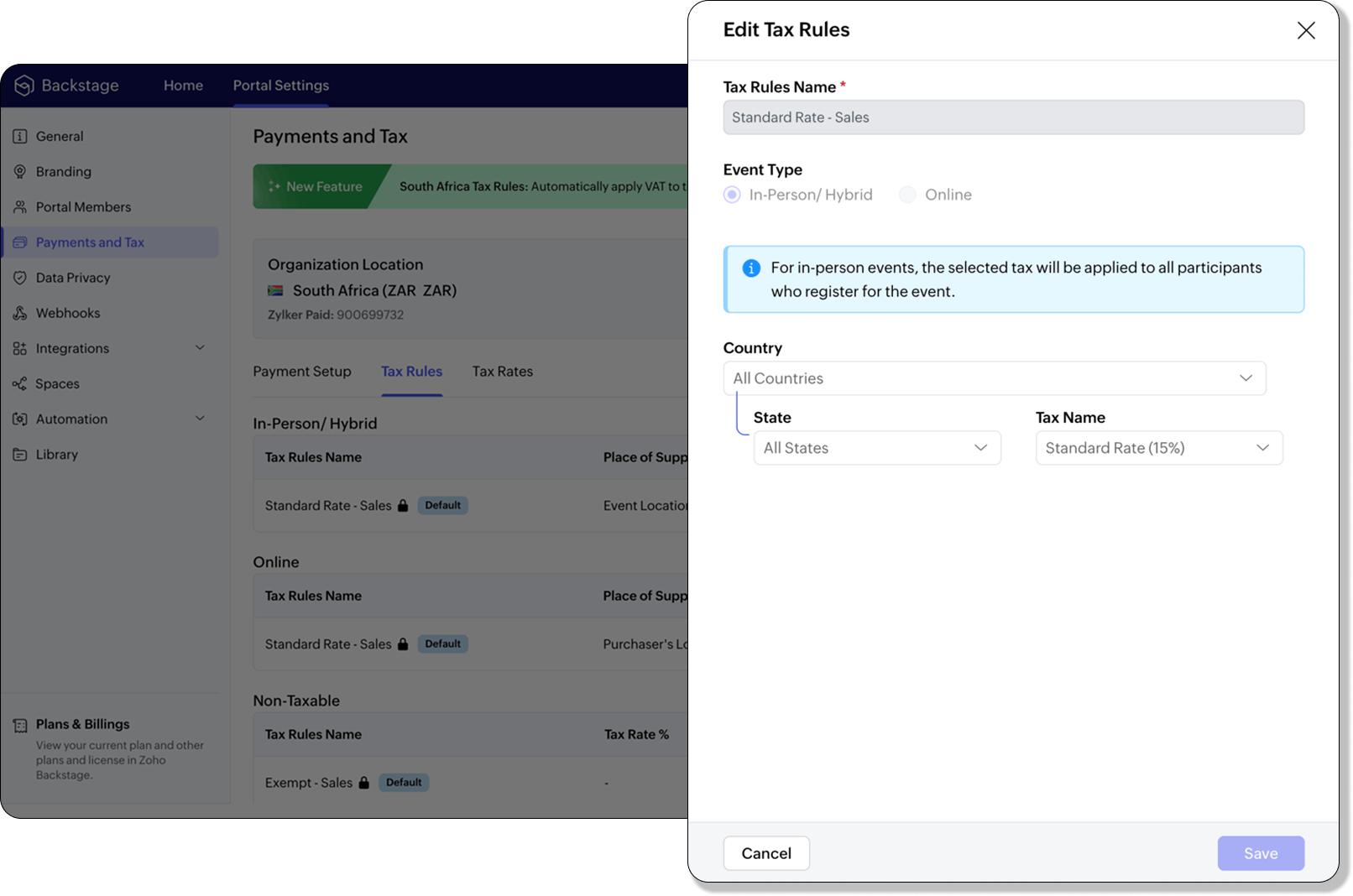
If an event is held in South Africa, the place of supply is considered within South Africa, and 15% VAT must be charged on ticket sales (unless exempt or zero-rated).
Virtual events
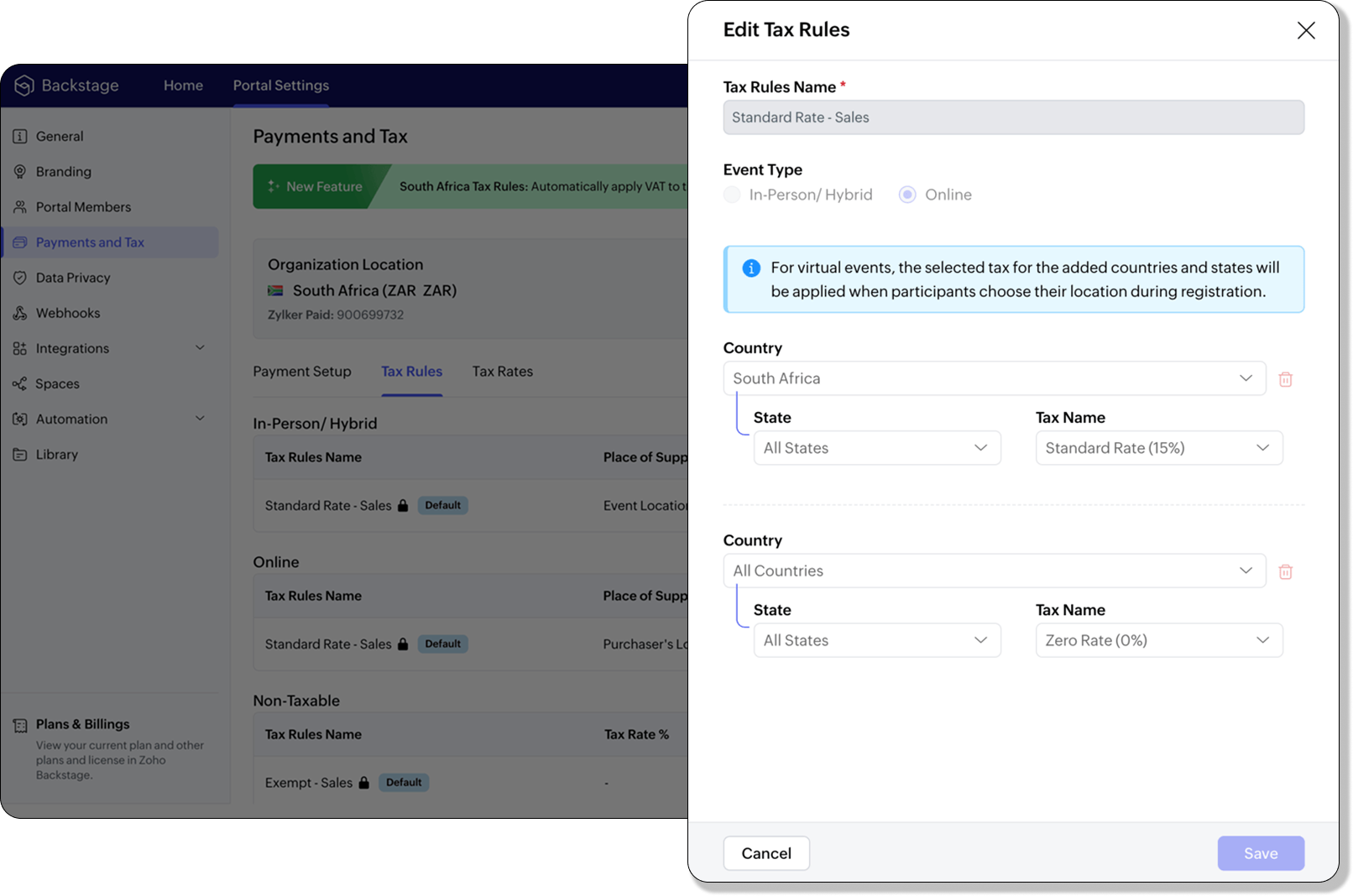
For virtual events, the attendee’s location determines the place of supply. For foreign attendees, the transaction is treated as an export of service and is zero-rated.
How to use
To enable South Africa tax rules, configure your organization’s location:
- Navigate to Portal Settings > Payments and Tax.
- Select South Africa as the organization location.
- The system automatically populates:
- 2 default tax rates (15% and 0%).
- 4 tax rules (in-person/hybrid, virtual, and two non-taxable rules).
Unlike other countries, South Africa Tax Rules are predefined. You can't edit existing rules or add new ones.
Applying Tax Rules to in-person and hybrid events
When South Africa is selected as the organization location, Zoho Backstage automatically applies the correct VAT (15%) to in-person and hybrid events. This ensures compliance with SARS requirements. A preview of the tax to be applied is shown during event publishing, so organizers know exactly what their attendees will be charged.
Applying Tax Rules to virtual events
For virtual events, Zoho Backstage automatically applies the zero-rated VAT rule for foreign attendees. South African attendees are charged the standard 15% VAT. This setup ensures accurate handling of local and international transactions without manual intervention.

- Tax rules in Zoho Backstage are fixed for South Africa. They can't be edited or expanded.
- Organizers can change the applied rule during event setup, but updates only affect new transactions. Existing transactions retain their original tax rule.
- If the event location is set to any country other than South Africa, South African VAT won't be applied.
Plan availability: Included in the Essentials, Premium, and Ultimate plans
Full page floor plan
We’ve taken the exhibitor experience to a whole new level with the introduction of the full page floor plan. This enhanced layout gives everyone including organizers, exhibitors, and attendees a more immersive and detailed view of the event venue.

For organizers, the full-page view provides better visibility and control when managing booth layouts and exhibitor placements. Whether you’re reviewing space allocation or showcasing your setup, the new Fit to Screen option lets you adjust the view instantly, making it ideal for large displays and on-site monitors.

Visitors can explore the floor plan in full-screen mode, view the exhibitor list, and discover details about each exhibitor. Signed-in attendees can further filter exhibitors by category and mark their favorites to plan their visit efficiently. Exhibitors can browse the directory or register directly from the same page, making navigation and engagement effortless.
Plan Availability: All plans that include the Exhibitor management module
Date & Time form field
We’ve enhanced the existing Date field to support time preferences, giving you more flexibility when collecting scheduling details. By enabling the Include Time toggle, you can now capture both date and time within a single field.
Similar to the standalone Time field, organizers can configure properties to accept entries in either 12-hour or 24-hour format and even set restrictions within a specific time range. A default date and time value can also be defined to simplify form submissions.
The default time format for this field automatically aligns with your event’s configuration under Manage > Event Info, ensuring consistent formatting across your forms.
Plan availability: Included in the Ultimate plans
With the event season in full swing, we’re focused on making your experience with Zoho Backstage faster, more reliable, and ready for every challenge. We look forward to bringing you more updates next month.
All the features and enhancements mentioned in this article are available across all Zoho Backstage-supported data centers.
If you need further assistance with our features, please contact support@zohobackstage.com.
Topic Participants
Jithan Raghuraj
Recent Topics
Zoho Inventory Custom Field Update
Hello All, In this post I am describing how can we Update the Custom Field Value in Zoho Inventory. // Get Org ID orgid = organization.get("organization_id"); // Field Value resvp = ifnull(item.get("purchase_rate"),null); // Record ID iid = item.get("item_id");Alphabetically
How can i arrange alphabetically - (Manage Manufacturer) Field in Item MasterCan i set a default value for country and state in address field in zoho creator?
Can i set a default value for country and state in address field in zoho creator?Convert HTML to PDF & Send as Email Attachments in Zoho Creator (Deluge)
This approach is useful for sending welcome letters, instructions, or promotional offers after order creation. // 1. Define the variables using the submitted input customerName = input.Customer_Name1; orderID = input.ID; customerEmail = input.Email_Address; //Redirect after submission is not working after a few submission
I have setup redirect url correctly and everything works as expected. However, it seems that there's a limit to the number of submissions before the redirect stops working. After the "limit" is reached, the page redirects to a seemingly zoho hosted page,Enhancement Request for Multi-Asset Work Order Feature
Hello Latha, Thank you for your continued support. The multi-asset Work Order feature is extremely helpful. I did some testing based on our requirements, and during the process, I noticed a few areas where we need your team’s support to improve the featureMarketing Tip #8: Run limited-time offers
Exclusive offers that don't last long make shoppers purchase right away instead of waiting. Run a flash sale or limited-time discount to convert interest into sales. Try this today: Set up a "Buy X Get Y" coupon in Zoho Commerce valid for a limited timeAdd Option to Mass Dispatch by User
Hello! We are using the dispatch console to dispatch service appointments to our service ressources. Right now, the process is our dispatcher verifies each ressource's route for the day and dispatches it after validation. Sadly, there doesn't seem toZoho Projects - Email notification relabelling of modules not present on default templates
Hi Projects Team, I noticed that in the default email template notification, the word "bug" was not renamed to the lable I am using in my system. As many users may used the Bugs modules for various purposes including Changes, Revisions, Issues, etc...Include the "Added Email ID" to the Filters of a Report
Hi, With a Report and lots of entries, a normal thing is to filter entries by the submitter, but that is not included in the Auto Filter of Reports and you can't add a custom filter to a Report without specifying the actual value. I would like to be ableLoops in Deluge
Hi, Can someone tell me how I do a simple loop in deluge? For example, if i have a variable "X" containing a number of loops to perform, i would like to perform an action X amount of times. X = 10; do while (Y < X){ // ... do something } to further explain, the equivalent in PHP of what i am trying to acheive would be: $X = 20; for($Y = 1; $Y < $X; $Y++ ){ // ... do something } ThanksI am facing a problem with an if-else condition
If I use if, else if, and else conditions in Deluge with the same variable name, sometimes the variable causes an error because the same variable name is present in every blockZoho Projects - Reply by email to @ mentions posted on the Feed.
When mentioning someone on the Feed (Status), it would be great if that mentioned person could reply to the email notification to update the Feed thread.Product Updates in Zoho Workplace applications | October 2025
Hello Workplace Community, Let’s take a look at the new features and enhancements that went live across all Workplace applications this October. Zoho Mail Create Signature from Compose window You can now effortlessly create a Signature using the CreateSubform data to Sheets
I have been trying to setup a Zoho Flow automation to bring any Subform input to a Zoho Sheets but it seems impossible to post the subform entries to a Zoho Sheet. Is there any way to do it via Zoho Sheet API? https://www.zoho.com/sheet/help/api/v2/#CONTENT-Insert-row-with-JSON-dataEdit Contact Roles in the Potentials Mod
New to ZOHO so I need some help. I work the same people on different projects concurrency. Their contact info remains the same but their role changes from project to project. In the Potential Mod you can pick contacts and assign a Role to them. I knowIs there a way to disable the Activity Reminders Pop-Up Window every time I log in?
Just wondering if there is a setting to disable the window from opening every time I open my CRM? Thanks ChrisRich-text fields in Zoho CRM
Hello everyone, We're thrilled to announce an important enhancement that will significantly enhance the readability and formatting capabilities of your information: rich text options for multi-line fields. With this update, you can now enjoy a more versatileFont Size 11 - Zoho CRM Email Templates
Our company communicates with our vendors exclusively using Calibri Font Size 11, as this is the standard formatting for professional emails. Since the CRM only allows for the selection of font sizes 10 & 12, we have been unable to utilize the CRM emailError 400 Booking
Added a custom domain to Booking. Am Getting a SSL Error that has some other domain on the SSL and giving a 400 error. Followed instructions and it stated it verified our domain.. However it is not working. Please Help!Zoho Projects - Email Notifications for Feed Updates
Hi Projects Team, I'm working with a client who wants a simple way to communicate with their customers on projects. Getting the customer to add comments to Tasks or Bug records is not ideal, as we need a way which is easy with minimal training, and hasZoho Analytics Export API
Hi Team, I’m working on some integration tasks and wanted to confirm if it’s possible to retrieve a Zoho Analytics table as JSON data using a Deluge script. I’ve already stored my custom data from multiple sources and combined it into a single source.Request to Remove LinkedIn Verification from My Emai
I would like to submit a complaint regarding my Zoho Mail account. I previously used this email address to verify a LinkedIn account, but that LinkedIn account has now been closed. I need to remove or cancel the verification associated with the closedIntroducing the all-new email parser!
Greetings, We are pleased to introduce to you, a brand-new, upgraded version of the Zoho CRM Email Parser, which is packed with fresh features and has been completely redesigned to meet latest customers needs and their business requirements. On that note,Extracting Images from a Zoho Creator Report into a Pages
If you’ve uploaded images in a form and can see them in your report, you might also want to display those same images inside a Page (custom HTML page). This is useful for dashboards, profile pages, or any place where images should be visible dynamicallyZoho is blocking emails I subscribe to from one sender
About 4 months ago I stopped receiving newsletters that I subscribe to from @thedispatch.com. They tell me that zoho's server is blocking them. I've added them to my contacts list, but they're not even reaching my inbox. I don't know how to troubleshootInactive Items - Make Less Prominent by Default
Currently, when one marks an Item as "Inactive", it really doesn't do much of anything to hide it or get it out of the way. Search and reporting within Finance should, by default, hide inactive Items from standard reports, searches, etc. If one specificallyHow to calculate GST based on "Ship To Address"
We into the interior designing work, providing "Works Contract Services" to our clients across India. We are registered under GST in Maharashtra state. For works contract services as per the GST rule, we need to decide place of supply based on "Ship toI NEED TO NUMBER TO TEXT NO HERE
=NUMBERTEXT NEEEDAuto-fill New Row with Previous Row Values
rowsize = input.Order_Items.count(); for each row1 in input.Order_Items { rowsize = rowsize - 1; if(rowsize == 1) { row.Door_Model = row1.Door_Model; row.Door_Color = row1.Door_Color; row.Materials = row1.Materials;API question - adding a thread to an existing ticket
Hi Is there an API function for the customer to add to an existing ticket thread? example, customer puts in new support ticket. support replies and ask for more details. customer replies with more details -what api function is used for this (will add record append to same ticket number?) ThanksCalendar week view: Today + 6
Is there anyway to have the calendar change dynamically based on the date? Due to the amount of events, we only display a week at a time, but towards the end of the week, we can no longer see ahead to next week (without changing it manually every time).How to restrict user/portal user change canvas view
Hi , I would like to restrict user / portal user change their canvas view because I hide some sensitive field for them. I dont want my user switch the canvas view that do not belong to them But seems Zoho do not provide this setting?How to add to Subforms via Zapier with Zoho Writer?
I have the following layout for a Zoho Writer Document. As you can see there is a repeating subform taking in "Items". I am trying to make a Zapier integration with it, and I can see there is 1 field saying: "Items", but it does not specify how I'm supposedContrôles administratifs granulaires : un atout pour la sécurité des e-mails
La moindre erreur dans votre système de messagerie peut coûter très cher à votre entreprise, tant en argent qu’en conformité et en image de marque. Pour beaucoup d’organisations, ce risque est bien réel. Les e-mails véhiculent quotidiennement des informationsCollections Management: #6 Realign Customers who gets back In-Term
Arun stared at the subscription list on his dashboard. Another account had just been moved to Cancelled status after completing the whole dunning process. Nothing unusual, just that payment failures happen, retries fail, and cancellation is the expectedZoho Mail IP Blacklist
I need problems with send mails: Error: junk mail rejected - sender4-op-o10.zoho.com 136.143.188.10, is in RBL. Spamcop. Please remove FQDN for blacklist. Regards.I can receive but not send emails
Hello, I've been not able to send emails for almost a year now. I been using alternate email to do this. I want to know how to fix this so I can use my zoho account normally again.The challenge of 24/7 connectivity: Being present and meeting customer expectations
Before television entered our homes, radio was our window to the world. We had to tune carefully to catch voices from distant places. When television arrived, the world began to grow smaller. We can watch rocket launches, see the goal that wins our favoriteHow to download all attachments from inbox, send, other folders in one go
Hi All, Appreciate if anyone could help me with steps for below requirement. How to download all attachments from inbox, send, other folders in one go. Even mapping to new folder will help me. Thanks in advance.Next Page