Zoho One Tips & Tricks 02: Single Sign-On (SSO) in Zoho One

Sinds de uitbreiding van MarketPlace heb je nu de mogelijkheid om nóg meer apps toe te voegen aan Zoho One. Meer apps betekent echter ook meer inloggegevens die je moet opslaan en bijhouden. Zou het niet makkelijker zijn om vanuit één inlog-account toegang te krijgen tot je favoriete apps? Maar als je één credential gebruikt dan wordt je toch blootgesteld aan meerdere gevaren? Dat klopt, en hiervoor is er een oplossing. SSO, ofwel Single Sign On.
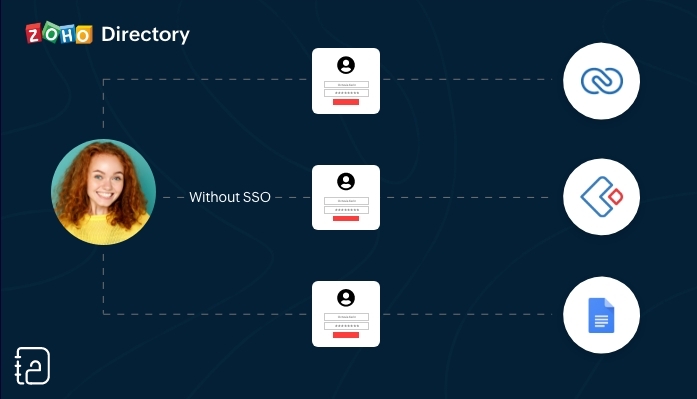 Zonder SSO
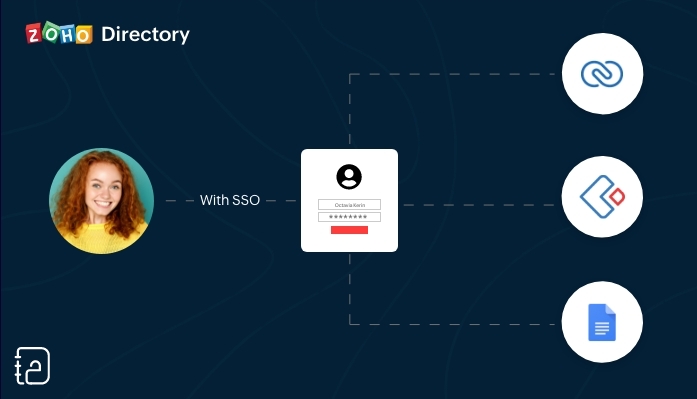 Met SSO
SSO (Single Sign On) is een authenticatiedienst die een gebruiker in staat stelt om op een veilige manier met één enkele aanmelding toegang te krijgen tot meerdere webapplicaties in verschillende domeinen en services. SSO gebruikt Security Assertion Markup Language (SAML)* voor de uitwisseling van authenticatie tussen de applicaties.
*SAML is een op XML gebaseerd framework voor het uitwisselen van informatie over gebruikersverificatie, -rechten en -kenmerken.
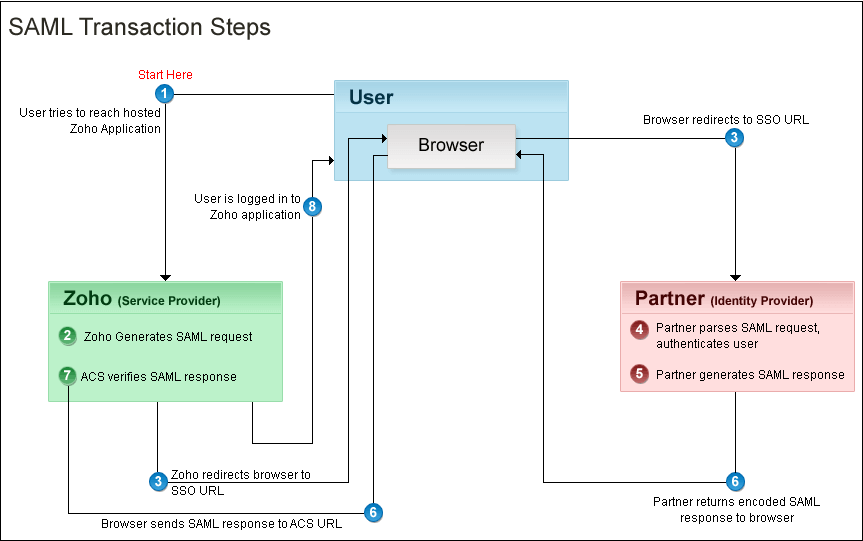
Kort samengevat. Vanuit je Zoho One Admin-paneel stel je een SAML-gebaseerde SSO-authenticatie in waardoor gebruikers de mogelijkheid hebben om vanuit Zoho One toegang te krijgen tot meerdere applicaties zonder dat je telkens opnieuw je wachtwoord moet zoeken en opnieuw moet inloggen. Hiermee automatiseer en verbeter je het beheer van je inloggevens.
Hoe werkt het?
Je gebruikers hoeven alleen hun e-mailadres in te voeren op de aanmeldingspagina van Zoho One en worden automatisch doorgestuurd naar jouw Identity Provider (IdP) voor verificatie. Als alternatief kunnen zij zich ook eerst aanmelden bij jouw IdP en van daaruit Zoho One benaderen. Aangepaste verificatie kan worden gebruikt met elke IdP die SAML ondersteunt.
Wij raden je aan om de volgende stappen te ondernemen:
Log in op Zoho One, klik op "instellingen".
1. Ga naar "beveiliging"
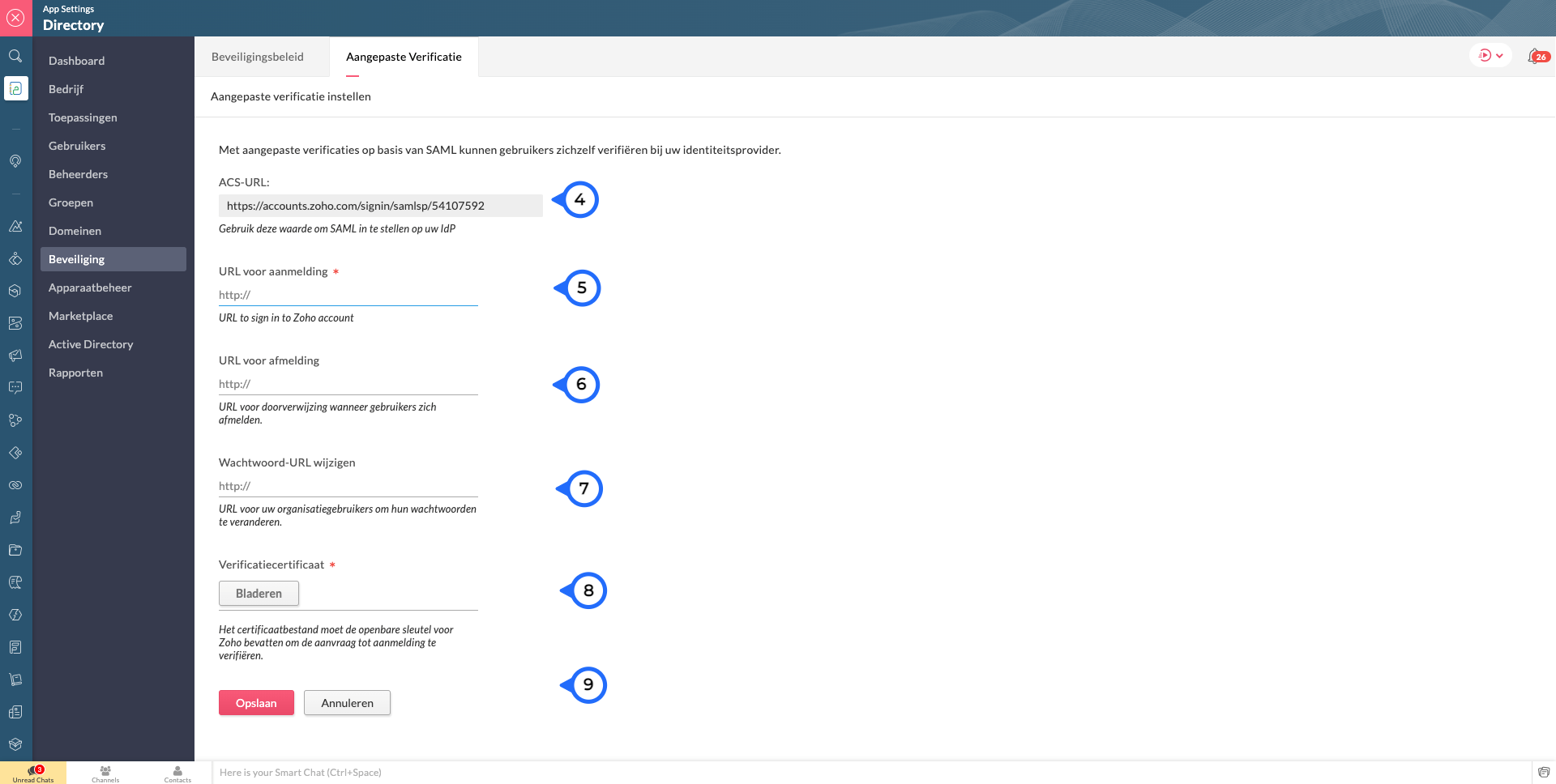
2. Klik vervolgens op de Aangepaste Verificatie-tab.
3. Klik op "Aan de slag".
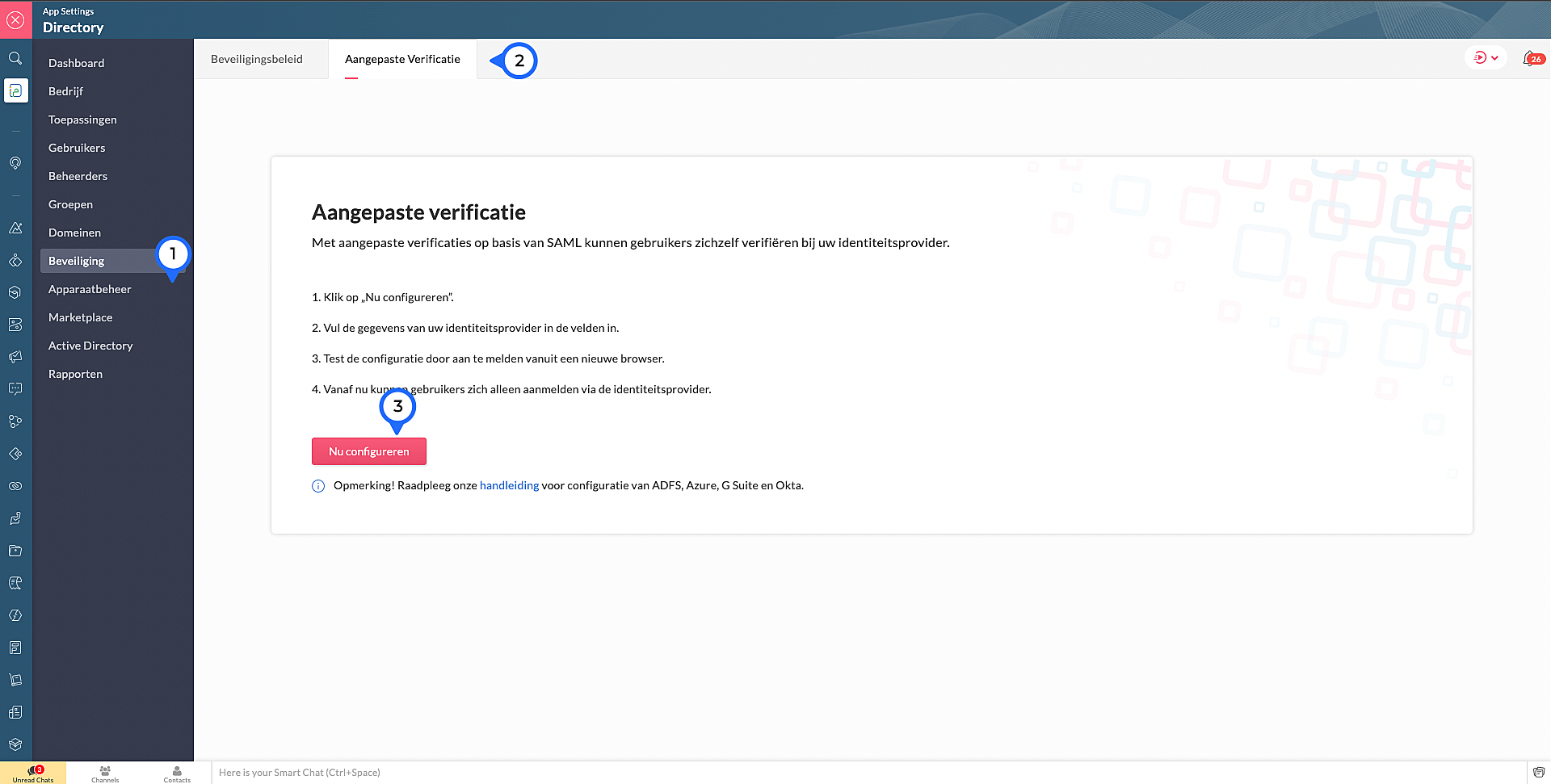
4. Kopieer de ACS Url.Waarschijnlijk heb je dit nodig om jouw IdP in te stellen.
Voer de volgende details in die je verzameld van je IdP:
5. Sign-in URL: De URL de gebruiker wordt doorgestuurd wanneer ze inloggen in Zoho
6. Sign-out URL. De URL de gebruiker wordt doorgestuurd wanneer ze uitloggen in Zoho
7. Wachtwoord URL wijzigen: De URL van de gebruiker wordt doorgestuurd wanneer ze hun wachtwoorden willen veranderen in hun Zoho accounts.
(Nb: Admins worden niet doorverwezen naar de IdP's Wachtoord URL wijzigen en kunnen hun wachtwoord in Zoho wijzigen)
8. Verificatiecertificaat: De certificaat met welke Zoho de digitale handtekening kan checken op de IdP's authenticatie.
(Alleen base-64 gecodeerd .CER, .CRT, .CERT of .PEM-bestanden worden geaccepteerd)
9. Klik op "Opslaan" en vervolgens bevestig je het.
Marketplace:
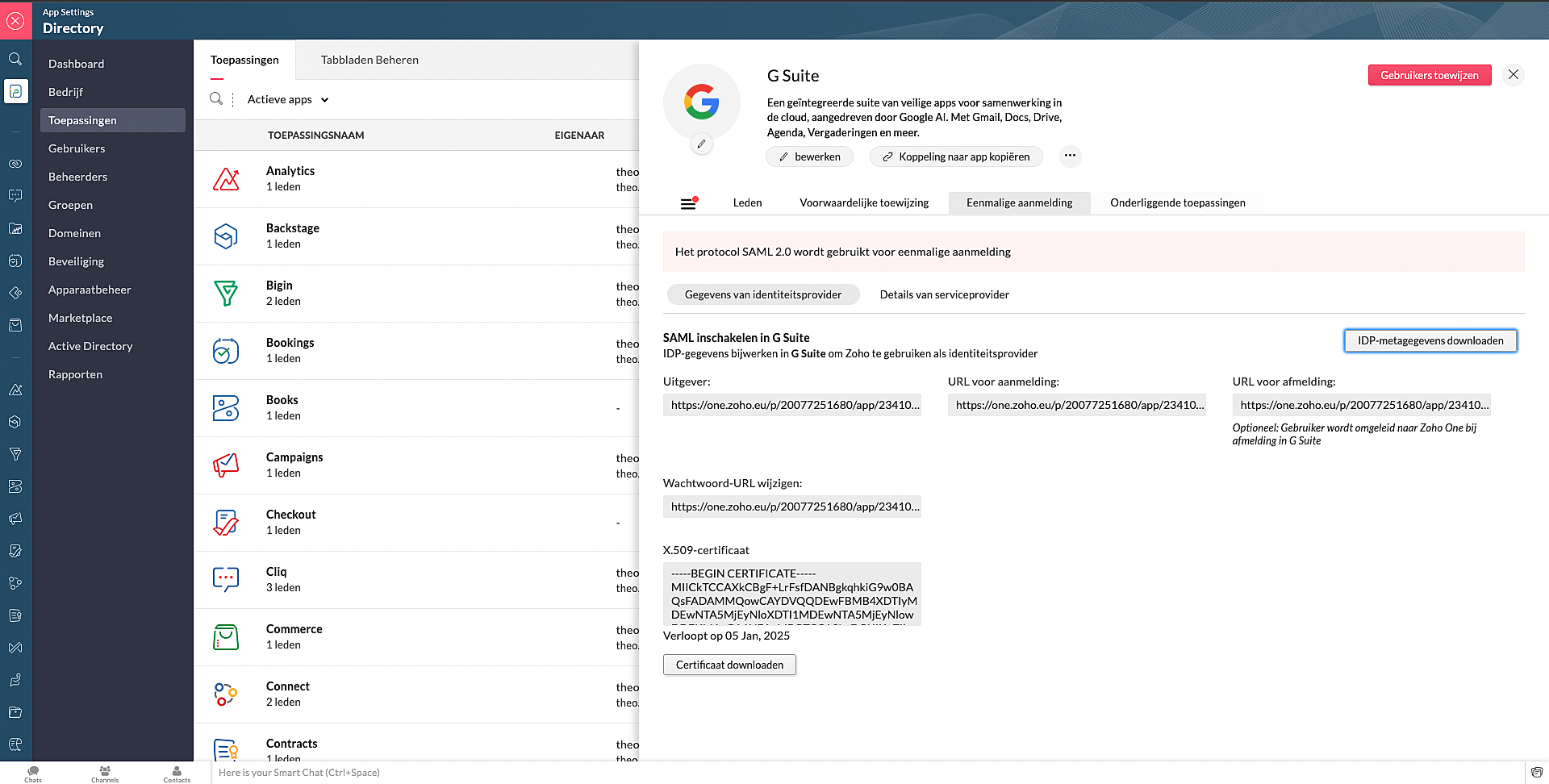
Via Zoho Marketplace kan je ook makkelijk en snel de SSO instellen. Na installatie van de app via MarketPlace ga naar Eenmalige aanmelding en vul daar de nodige gegevens in.
Wil je lezen hoe je andere apps kan toevoegen aan Zoho One? Klik op deze link voor meer informatie.
SSO in OneAuth:
OneAuth is onze gratis multi-factor authenticatie (MFA) app ontwikkeld voor het beveiligen van uw Zoho-accounts en sociale accounts zoals Google, Facebook, en Twitter. Door MFA voor jouw online accounts te configureren, verhoog je de veiligheid en verminder je het risico op een inbreuk of ongeautoriseerde toegang tot jouw accounts. OneAuth is beschikbaar voor iOS-, Android- en Windows-platforms.
OneAuth biedt een echte single sign-on (SSO) ervaring. Zodra OneAuth voor jouw account is geconfigureerd, hoef je niet telkens je inloggegevens niet meer in te voeren wanneer je een nieuwe Zoho-app installeert. Meer informatie vind je hier. Om dit in te stellen dien je OneAuth te installeren en vervolgens te koppelen aan je Zoho One-account.
Wil je meer weten over SSO, lees dan dit artikel over waarom Single Sign-On belangrijk is voor jouw bedrijf. Heb je meer vragen laat een reactie achter.
Topic Participants
Theo Su
Sticky Posts
De nieuwe Zoho One is hier! Deel 1
Beste Community-leden, Zoho One, hét besturingssysteem voor bedrijven introduceert vandaag haar nieuwste update met maar liefst 5 nieuwe apps, 3 nieuwe services en 7 grote platform verbeteringen. Wij hebben gekeken naar hoe wij jullie verder kunnen helpen.Tips &Tricks: Jouw online boekingssysteem in 5 stappen!
1 Creëer een afsprakenkalender die past bij jouw branding Met Zoho Bookings behoud je de kleuren van jouw merk in alle applicaties. Je kan kiezen uit vier voorgedefinieerde thema's (Modern Web, Nieuwe Opmaak, Klassiek en Nieuw) met daarnaast opties omStart met Zoho One
Welkom op de community-pagina van Zoho One, hét besturingssysteem voor bedrijven. Op deze pagina geven wij een korte introductie over Zoho One. Daarnaast geven wij een aantal tips om te starten met deze besturingssysteem. Tegenwoordig zijn Cloud-oplossingen
Recent Topics
CRM x WorkDrive: We're rolling out the WorkDrive-powered file storage experience for existing users
Release plan: Gradual rollout to customers without file storage add-ons, in this order: 1. Standalone CRM 2. CRM Plus and Zoho One DCs: All | Editions: All Available now for: - Standalone CRM accounts in Free and Standard editions without file storageWindows Desktop App - request to add minimization/startup options
Support Team, Can you submit the following request to your development team? Here is what would be optimal in my opinion from UX perspective: 1) In the "Application Menu", add a menu item to Exit the app, as well as an alt-key shortcut for these menusAbility for admin to access or make changes in zoho form without asking for ownership
Currently in zoho form only form owner can make the changes in the form and if someone else has to make changes then we have to transfer the ownership to them and even admin also cant access it . So i think admin must have the ability or option to accessIssue with WhatsApp Template Approval and Marketing Message Limit in Zoho Bigin
We are facing issues while creating and using WhatsApp message templates through Zoho Bigin, and we request your clarification and support regarding the same. 1. Utility Template Approval Issue Until December, we were able to create WhatsApp templatesZoho CRM Calendar View
Hello Zoho team, We need desperately a calendar view next to list, kandan and other views. I think it should be easy to implement as you already have the logic from Projects and also from Kanban View in CRM. In calendar view when we set it up - we chooseCamera
I can sign on to a meeting and see the other participants, but my screen is dark. The instructions for Zoho "Camera Settings" say "click on lock icon in address bar," but I don't see that icon! Suggestions?What is Workqueue and how to hide it?
Hi, My CRM suddenly have this "Workqueue", may I ask how to set the permission of this tab?Batch/lot # and Storage bin location
Hi I want to ask for a feature on Zoho inventory I own a warehouse and I've gone through different management software solutions with no luck until I found Zoho, it has been a game changer for my business with up to the minute information, I'm extremely happy with it. It's almost perfect. And I say Almost because the only thing missing for me (and I'm sure I'm not alone) is the need of being able to identify the lot number of my inventory and where it is located in the warehouse. Due to the natureAdding Sender Address with Basic Plan
According to the knowledge base, I should be able to add Sender addresses with the Basic Plan. But whenever I try to add an email, it takes me to a search window and I cannot find any emails in the list. Even mine, which is the admin. email.Conditional Field Visibility in Bigin CRM
I would like to request support for conditional field visibility within Bigin CRM. This feature should allow administrators to configure show/hide rules for fields based on predefined criteria (e.g., field values, picklist selections, stage changes,Bill automation in Zoho Books
Hi I am looking for 3rd-party options for bill automation in zoho which are economical and preferably have accurate scanning. What options do I have? Zoho's native scanning is a bit priceyReporting Tags
We've been using reporting tags for years (before itemizing was available) and now we are finding reporting these tags are impossible to track. Reports have changed in the customization and our columns of reporting tags no longer show up. We do not useConsumption based inventory
I am currently using Zoho Books for my hospitality business, which includes lodging and restaurant services. We purchase many items in bulk for storage and consumption as needed. I'd like these items to be recorded as inventory when purchased and categorizedSmarter Access Control: Role-Based Access vs. Responsibility-Based Profiles
Every business has roles, responsibilities, and workflows. While roles help define structure, responsibilities within those roles are rarely the same. As your team grows, some members need access to only a specific set of features. Others require visibilityPartner with HDFC And Sbi Bank.
Hdfc and sbi both are very popular bank if zoho books become partner with this banks then many of the zoho books users will benefit premium features of partnered banks.API in E-Invoice/GST portal
Hi, Do I have to change the api in gst/e-invoice portal as I use zoho e books for my e-invoicing. If yes, please confirm the process.Member role in zoho meeting
does a user with member role can see other users in the organizationHow to post more than 4 Images on Instagram?
Hi I read several articles to the topic od how to post more than 4 images on instagram, but i can't figure out how it works. I can't find the content editor and i installesd the z share extension for google chrome. Could someone please help me? ThanClone Recurring Expenses
Our bookkeeping practices make extensive use of the "clone" feature for bills, expenses, invoices, etc. This cuts down significantly on both the amount of typing that needs to be done manually and, more importantly, the mental overhead of choosing theZoho Books - How to Invoke a Custom Function in Schedulers
We have multiple schedulers that send emails to customers in batches. Currently, we are maintaining the same code across several schedulers. Is it possible to use a custom function inside a scheduler script? If yes, how can we invoke the custom functionSpecial characters (like â, â, æ) breaking when input in a field (encoding issue)
Hey everyone, We are currently dealing with a probably encoding issue when we populate a field (mostly but not exclusively, 'Last Name' for Leads and Contracts). If the user manually inputs special characters (like ä, â, á etc.) from Scandinavian languages,Set Custom Icon for Custom Modules in new Zoho CRM UI
All new Address Field in Zoho CRM: maintain structured and accurate address inputs
The address field will be available exclusively for IN DC users. We'll keep you updated on the DC-specific rollout soon. It's currently available for all new sign-ups and for existing Zoho CRM orgs which are in the Professional edition. Latest updateis there any way to change the "chat with us now" to custom message?
is there any way to change the "chat with us now" to custom message? I want to change this textNotes badge as a quick action in the list view
Hello all, We are introducing the Notes badge in the list view of all modules as a quick action you can perform for each record, in addition to the existing Activity badge. With this enhancement, users will have quick visibility into the notes associatedIs Zoho Live Chat compatible with WordPress CMS?
Hello, I have a website called www.jjrlab.com and I'm interested in using Zoho Chat on it. Does it support WordPress CMS? Thanks.Introducing spam detection for webforms: An additional layer of protection to keep your Zoho CRM clean and secure
Greetings all, One of the most highly anticipated feature launches—Spam Detection in webforms—has finally arrived! Webforms are a vital tool for record generation, but they're also vulnerable to submissions from unauthenticated or malicious sources, whichBring your CRM and Desk app inside SalesIQ with widgets
Have you ever been confused and frustrated with multiple open tabs and switching back and forth from SalesIQ to other apps to perform your business-specific operations? How effective would it be to have all the required tools and data of the apps youSpeak Your Customers' Language: SalesIQ's chatbots now support 30 languages 🤖
We're unveiling some major upgrades to our chatbot that are set to revolutionize your experience! Now SalesIQ support 30 languages for both Zobot and Answer bot. By speaking your customers' language, you can enhance engagement, improve customer satisfaction,Repeat Column merge in ZOHO writer columns doesn't allow to set max columns per row
I'm using ZOHO writer to merge data from a ZOHO CRM subform and I want it to make a table. We're using Insert Table for Column Repeat, because this is what we need. (Name of column (Teamname) and underneath that a list of names of teammembers). It worksPersisting email signals to contact timeline?
Hello there. Regarding the email signals that are logged when a contact opens an email, am I correct that these signals are not logged to a contact's timeline? Ideally, I would like to have this context available for future follow-ups, if the contactTrouble with using Apostrophe in Name of Customers and Vendors
We have had an ongoing issue with how the system recognizes an apostrophe in the name of customers and vendors. The search will not return any results for a name that includes the mark; ie one of our vendors names is "L'Heritage" and when entering theReally want the field "Company" in the activities module!
Hi team! Something we are really missing is able to see the field Company when working in the activities module. We have a lot of tasks and need to see what company it's related to. It's really annoying to not be able to see it.🙈 Thx!Upcoming update to Google Drive integration in Zoho Creator
Hello everyone, We're writing to inform you about an upcoming update to how Zoho Creator integrates with Google Drive. In Zoho Creator, during actions like importing files to create an app or attaching files to fields, you can choose files directly fromChanging Account Type in Chart of Accounts
Does anyone know how to change/edit the account type for an Account name in Chart of Accounts. Zoho will not let me do this for some reasonManaging Scheduled Replies
Communication is most effective when the intended message reaches the right person at the right time. However, this can be challenging when communication occurs across different time zones. By scheduling replies, businesses can ensure that responses reachShow price book list price
When using price books, once you add products to the price book in the Products related list you can display the Unit price which is the default list price; however, there is no option to show the price book list price. To see the price book list priceAllow Attaching Quartz Recordings to Existing Zoho Support Tickets
Hi Zoho Team, We would like to request an enhancement to how Zoho Quartz recordings integrate with Zoho Support tickets. Current Behavior: At the moment, each Quartz recording automatically creates a new support ticket. However, in many real-world scenarios:Issue with open-rate reporting in Zoho Campaigns
Hello, Since yesterday I’ve been experiencing an issue with the open-rate reports in Zoho Campaigns. The campaigns I send appear in the reports as if none of the emails have been opened, even though I know they have. To verify this, I replicated the campaignCan I hide empty Contact fields from view?
Some contacts have a lot of empty fields, others are mostly filled. Is there a way I can hide/show empty fields without changing the actual Layout? I would like to de-clutter my view, and also be able to add information later as I am able. I would beNext Page